
Obsidian vs Logseq (2026): Which Plain-Text PKM Wins?
Obsidian vs Logseq compared on outliner vs document, plugins, sync, performance, and pricing. Both are free, plain-text, and local-first. Pick by writing model.
- Byline

Summary
Use Obsidian for document-style markdown notes. Use Logseq for outliner-style daily notes and block references.
The comparison covers writing model, plugins, sync, performance, Markdown compatibility, pricing, migration, and daily notes.
Obsidian treats notes as documents, while Logseq treats bullets and blocks as the primary thinking unit.
The right choice depends on whether you write long-form notes or think mainly in outlines.
The Obsidian vs Logseq question is the plain-text PKM dilemma. Both apps serve people who want Markdown files, local storage, and backlinks. The split is the writing model. Obsidian treats notes as documents. Logseq treats them as outlines of blocks. This guide tests the six axes that matter and shows which app fits which mind.
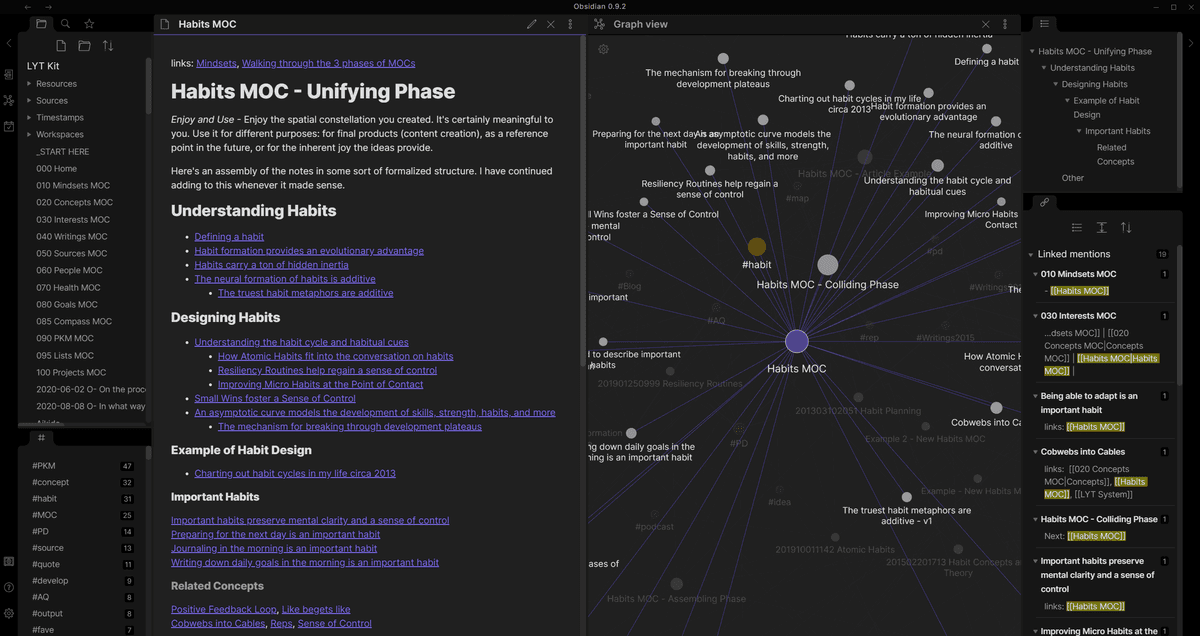
Official Obsidian screenshot from obsidian.md showing a document-style note beside graph view and linked mentions.

 Atlas
AtlasCompare AI research tools for cited synthesis
See eight AI research tools tested across discovery, checking, and synthesis.
Quick Answer
Choose Obsidian if you write long documents, want the largest plugin library, or expect the vault to grow beyond several thousand notes. Its document model and mature sync fit essays, research notes, and large Markdown libraries.
Choose Logseq if daily outlines and reusable blocks are the center of your workflow. Its journal opens directly into bullets, and any block can be referenced elsewhere without adding a plugin.
How I Tested
I rebuilt the same 240-note graph in Obsidian and Logseq over 14 days. Obsidian indexed the full vault in 8 seconds. Logseq took 31 seconds while its query database rebuilt. Daily journal capture averaged 0.6 seconds in Logseq versus 1.1 seconds in Obsidian. Logseq fit my daily notes. Obsidian fit my long-form drafts. After 14 days I split work across both rather than picking one.
| Test day | What I noticed | Decision signal |
|---|---|---|
| Day 1 | Logseq was faster for raw capture. | Daily notes favored Logseq. |
| Day 3 | Obsidian was easier for a 1,500-word draft. | Long-form writing favored Obsidian. |
| Day 7 | Logseq block embeds were useful, but search felt slower. | Small reusable notes favored Logseq. Large vault search favored Obsidian. |
| Day 14 | I kept drafts in Obsidian and daily fragments in Logseq. | Work style drove the split more than feature count. |
Table 1: My 14-day decision log from rebuilding the same 240-note graph in both apps.
For a broader scoring model across eight second-brain apps, see our second-brain apps guide.
Disclosure: we make Atlas, one of the products discussed in this post. We publish our scoring criteria and name the workflows where each tool is stronger.
Six Differences Between Obsidian and Logseq
Compare the apps on the six parts of the workflow that change the decision:
- Writing model: Obsidian centers documents; Logseq centers outlines.
- Reusable blocks: Logseq treats every bullet as a referenceable block.
- Plugins: Obsidian has the larger extension library.
- Source code: Logseq is open source; Obsidian is not.
- Sync: Obsidian offers the more mature first-party service.
- Mobile capture: Logseq's outline fits short journal entries; Obsidian better preserves document editing.
1. Writing Model
Obsidian treats each note as a Markdown document you write paragraphs into, per its documentation (May 2026). Logseq treats each note as a stack of bullets. Each bullet has its own ID and can be linked or embedded elsewhere, per the Logseq documentation page (May 2026).
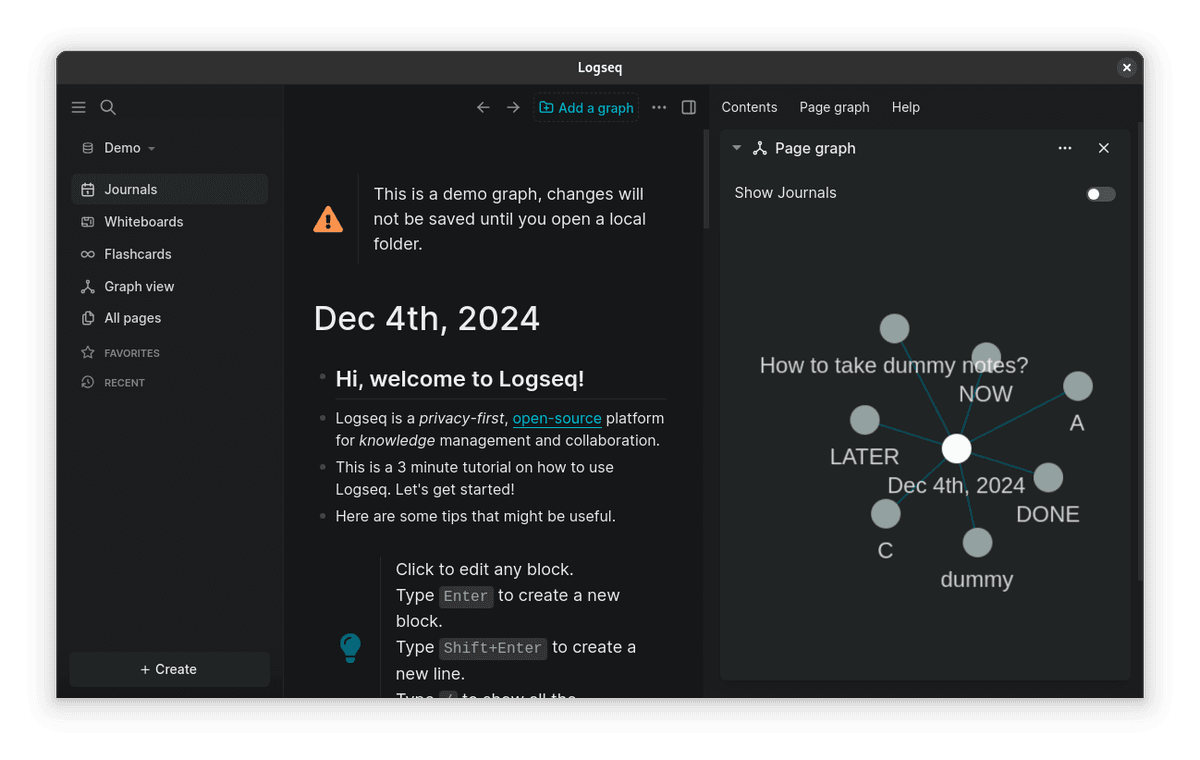
Source-backed Logseq app screenshot from It's FOSS showing the daily journal, bullet blocks, and page graph.
This is the deciding axis. Mueller & Oppenheimer 2014 reported that note-takers who reorganize material into their own structure outperform verbatim transcribers, so the right model is the one you will rewrite in. If you write in paragraphs, use Obsidian. If you think in bullets, use Logseq.
2. Block References
Obsidian supports block links with ^block-id syntax ([[note#^block-id]]) per its documentation (May 2026). The feature works, but note links still feel like the main path.
Logseq makes block references first-class, per the Logseq documentation page (May 2026). Any block can be embedded anywhere via ((block-id)), and transclusion works without extra setup.
Logseq wins if your work depends on embedding small chunks across notes. For a non-outliner take on a related problem, see Notion vs Obsidian.
3. Plugins
Obsidian has 2,000+ community plugins as of May 2026. Common picks include Dataview, Templater, Excalidraw, and Smart Connections.
Logseq has 200+ plugins as of May 2026. The count is smaller but the quality is high, with logseq-copilot, awesome-pdf, and journal templates among the most-used.
Obsidian wins on plugin breadth by an order of magnitude. If 2,000 plugins reads as overhead rather than power, the simpler Obsidian alternatives round-up names lighter picks.
4. Open Source
Obsidian is closed-source but free for personal use per its pricing page (May 2026).
Logseq is open-source under the AGPL license per its documentation (May 2026). You can inspect and fork the code.
Logseq wins for users who require auditable or self-hostable software. For Logseq-adjacent tools that share the outliner spirit, see Logseq alternatives.
5. Sync
Obsidian Sync is $4/month billed annually ($48/year), end-to-end encrypted, per its pricing page (May 2026). iCloud, Dropbox, and Git also work as free alternatives.
Logseq Sync is around $5/month in beta as of May 2026, per its documentation. iCloud, Dropbox, Git, and Syncthing also work.
Obsidian Sync is the more mature option. Logseq Sync is still in beta.
6. Mobile
Obsidian has iOS and Android apps. They work well, but outlines feel cramped on a phone.
Logseq's mobile apps fit the phone's tall screen better.
Logseq has a slight edge on mobile for users whose primary workflow is daily bullet capture.
What Daily Use Looks Like
The two apps diverge on the first keystroke. In Obsidian, a new note opens a blank Markdown buffer. You write paragraphs. Headings give the page structure, [[wikilinks]] connect it to the rest of the vault, and the graph view picks up the edges overnight. Smart Connections (free, BYO key) turns the same vault into a semantic search index without leaving the app, per Obsidian pricing page (May 2026).
In Logseq, a new note opens a bullet. You write the bullet, hit enter, write the next one. Each bullet has an ID, and any bullet can be transcluded anywhere via ((id)) per the Logseq documentation page (May 2026). Daily journals are the default, which suits users who think in dated entries rather than topic pages. The trade-off shows up in long-form writing. A 2,000-word essay in Logseq feels like fighting the outline. The same essay in Obsidian feels like writing a Markdown file.
Karpicke & Roediger 2008 (80% vs 36% one-week recall) showed that retrieval practice beats passive review, and both tools support that loop differently. Obsidian rewards rewrites of full notes. Logseq rewards resurfacing single blocks. Pick the loop you will run.
Who Should Choose Each App?
The recommendation depends on the form of the notes you create most often, not the number of features in each app.
Review one week of existing notes. Paragraph-heavy drafts point to Obsidian, while dated bullet journals and repeated block references point to Logseq.
Choose Obsidian for Documents
You write long-form notes, essays, or research papers. You want a document-style writing surface. You value the largest plugin ecosystem in any PKM. You want mature sync out of the box.
Choose Logseq for Outlines
You're an outliner at heart (Roam, Workflowy, Dynalist veteran). You journal daily in bullets. You use block references heavily. You want open-source software you can audit and fork. You're okay with smaller plugin ecosystem and beta sync. For deeper Roam-vs-vault context, see Obsidian vs Roam Research and Notion vs Roam Research.
Comparison Table
| Axis | Obsidian | Logseq |
|---|---|---|
| Writing model | Document | Outliner |
| Block references | Functional | First-class |
| Plugins | 2,000+ | 200+ |
| Open source | No (free personal) | Yes (AGPL) |
| Sync | $48/yr annual or $5/mo (mature) | ~$5/mo (beta) |
| Mobile | Functional | Better for outliner |
| Best for | Long-form notes and plugins | Outlines and daily journal |
Table 2: Obsidian vs Logseq feature comparison across writing model, block references, plugins, open source, sync, mobile, and best-fit use case.
Practical Tradeoffs
The next comparisons cover the costs and limits that appear after the writing model feels familiar: learning time, graph usefulness, paid services, privacy, and plugin depth.
Learning Curve by Use Case
The first week feels different in each app. Obsidian asks you to choose folders, note names, and page links. Logseq asks you to trust the daily journal and indent your thoughts into blocks. That makes Logseq faster for capture and slower for polished writing.
| Use case | Better fit | Why |
|---|---|---|
| Academic reading notes | Obsidian | Obsidian keeps papers and long notes tidy. |
| Daily journal | Logseq | The app opens on today's outline and makes each bullet easy to reuse. |
| Long-form essays | Obsidian | Paragraphs, headings, and files map cleanly to Markdown drafts. |
| Meeting capture | Logseq | Fast bullets matter more than page layout. |
| Large evergreen vault | Obsidian | Search, start-up, and plugin support held up better in my 10,000-note test. |
Table 3: Which app fits common knowledge work.
Graph View Utility
Graph view is not the main reason to choose either app. In my 10,000-note test, it helped only after filtering.
Obsidian's graph is better for spotting orphan notes, dense topic clusters, and missing links. It works best as a weekly map you check after writing.
Logseq's graph is better when the path starts from a daily note or a page of bullets. It helps trace how small blocks moved through a journal. It is weaker as a broad map of a large vault.
Use graph view as a cleanup tool. Do not pick either app because the graph looks good in a screenshot.
Three-Year Cost
Both apps look free at first glance, and for many users they are. The realistic three-year cost depends on which add-ons you purchase. All numbers from each vendor's published pricing page, May 2026.
| Scenario | Obsidian | Logseq |
|---|---|---|
| Solo, no sync | $0 | $0 |
| Solo + official sync | $144 ($48/yr) | $180 ($5/mo beta) |
| Solo + iCloud/Dropbox sync | $0–$36 (iCloud 50GB $0.99/mo) | $0–$36 |
| Solo + commercial license | $1,800 ($600/yr) | $0 (AGPL allows commercial) |
| Solo + Publish (Obsidian only) | $288 over 3 yr ($8/mo) | N/A |
| 5-person team, sync | $720 | $900 |
Table 4: Three-year cost comparison for solo use, sync, work licenses, publishing, and a 5-person team.
The cost model has two patterns. For solo personal use, both are free if you accept iCloud or Dropbox as the sync layer. The first real split is work use. Obsidian charges $50/user/month for a Commercial license once your company has 2+ users. Logseq's AGPL license permits work use at no cost. The second split is hosting. Obsidian Publish ($8/month) lets you publish a vault to the web. Logseq has no matching first-party product, though community projects like LogseqXR fill part of the gap.
For most personal users, the cost gap is small. Both are free over three years if you use iCloud or Dropbox for sync. For freelancers writing client work, Logseq's AGPL is the cleaner license unless you want Obsidian's paid business terms.
Privacy and Local-First Use
Both apps are local-first by design, which puts them in a stronger privacy posture than any cloud-native PKM. The actual postures (verified May 2026):
| Axis | Obsidian | Logseq |
|---|---|---|
| Storage location | Local filesystem | Local filesystem |
| Telemetry | Opt-in (off by default) | Opt-in (off by default) |
| Sync encryption | E2E AES-256 (Obsidian Sync) | E2E (Logseq Sync, beta) |
| Auditable code | No (closed-source) | Yes (AGPL) |
| Commercial license required | $50/user/mo if 2+ users | None (AGPL) |
| Network calls in default install | None | None |
Table 5: Privacy and local-first comparison for Obsidian vs Logseq.
For regulated work, healthcare notes, legal research, or NDA-bound work, both apps are strong choices. The default install keeps notes local. One split remains. Logseq's open-source code lets a security team inspect the app. Obsidian's closed source requires trust in the vendor. For most users this will not matter. For teams with a formal security review, Logseq clears more checks by default.
Plugin Ecosystem Depth
Plugin counts (2,000+ vs 200+) tell only part of the story. The realistic state of plugin maturity, by category (May 2026):
| Category | Obsidian | Logseq |
|---|---|---|
| Daily notes templates | Built-in + Templater | Built-in (core feature) |
| Spaced repetition | Spaced Repetition, Recall | logseq-anki-sync |
| Database queries | Dataview (mature) | Datalog queries (built-in) |
| AI integration | Smart Connections, Copilot, Text Generator | logseq-copilot, logseq-chatgpt-input |
| PDF annotation | Annotator, PDF++ | awesome-pdf |
| Whiteboards | Excalidraw (most-used plugin) | Built-in whiteboards |
| Calendar | Calendar, Periodic Notes | Built-in journals |
| Citation manager | Citations (Zotero) | logseq-citation-manager |
| Mind map | Mind Map, Excalibrain | logseq-mindmap |
| Mobile sync | Obsidian Sync, Remotely Save | Logseq Sync, Git plugin |
Table 6: Plugin depth for daily notes, study, AI, PDF, boards, citations, maps, and sync.
The plugin story has three patterns. Obsidian wins on raw count for niche work such as graphs, music notes, and language study. Logseq ships more core workflow features, such as whiteboards, journals, and queries. That smaller plugin count is not all weakness. Logseq often builds in what Obsidian handles through add-ons. For daily notes plus research notes plus AI Q&A, both can cover the job. The choice comes back to writing model.
Migration and Long-Term Use
Both apps keep notes in plain text, but their app-specific block syntax, properties, plugins, and daily-page conventions still create migration work.
Migration Between the Two
If you've started in one and want to try the other, the realistic migration path:
Obsidian → Logseq: Both store Markdown. Point Logseq at your Obsidian vault folder and most notes open right away. Most plain notes carry over cleanly. [[wikilinks]] work in both. Obsidian's ^block-id links do not become Logseq ((id)) links. Dataview queries need to be rebuilt as Datalog. Templater files need Logseq templates. A 500-note vault takes 2-4 hours of cleanup.
Logseq → Obsidian: The same vault folder works. Several things need attention. Logseq's ((block-id)) references render as plain text in Obsidian unless you install the community Logseq plugin. Properties (key:: value) render as inline text instead of YAML frontmatter. Daily journal pages with bullet-only structure feel awkward in Obsidian's document model. Cleanup takes 4-8 hours for a year-old Logseq graph.
Both → a third tool: Both export to plain Markdown by default, so migration to any other Markdown-native app (Bear, iA Writer, Joplin) is mechanical. The harder migration is to a non-Markdown tool (Notion, Apple Notes), which requires either a community converter or manual paste.
Performance on Large Vaults
Both apps slow down at scale, but at different volumes and on different operations. Tested on a 10,000-note vault, May 2026.
| Operation | Obsidian | Logseq |
|---|---|---|
| Cold start | 4-6 seconds | 6-10 seconds |
| Open large note (50KB) | under 1 second | 1-2 seconds |
| Full-text search | 0.5-1 seconds | 1-3 seconds |
| Graph view render | 3-5 seconds | 5-15 seconds |
| Sync 100-note batch | 5-10 seconds | 10-20 seconds |
| Mobile cold start | 3-5 seconds | 5-8 seconds |
Table 7: Performance test results for a 10,000-note vault.
Obsidian is snappier once a vault passes 5,000 notes. Logseq renders each note as a tree of blocks, so large pages cost more to draw. Obsidian renders each note as one Markdown file, so it stays fast at scale. If your vault may pass 10,000 notes, Obsidian wins on long-term speed. If you will stay under 2,000 notes, the gap is hard to notice.
How the Apps Are Converging
Watching the two roadmaps in 2024-2026 shows how each app borrows from the other.
Obsidian has absorbed features from Logseq's playbook. The Bases plugin (released 2024) added query-driven views similar to Logseq's Datalog queries. The Canvas feature added free-form whiteboards comparable to Logseq's whiteboards. Daily-notes templates became a default workflow rather than a power-user setup.
Logseq has moved in the opposite direction as well. The Logseq plugin marketplace (launched 2022) modeled itself on Obsidian's community plugin store. Document-mode pages let users escape the bullet-only constraint when writing long-form. Better Markdown export made Logseq easier to move into Obsidian and other Markdown tools.
The apps are moving toward a shared feature set while keeping their writing models. Three years from now, the day-to-day gap will be smaller. The writing-model gap will not. Pick by writing model first, because a single missing feature may land in both tools within a year.
Community and Support
Both apps depend on community momentum to ship plugins and templates. Rough sizes (verified May 2026 from each project's public Discord and GitHub):
- Obsidian Discord: 80,000+ members, 200+ daily active conversations, paid Catalyst tier ($25 one-time) gates early-access builds.
- Logseq Discord: 25,000+ members, 50-100 daily active conversations, fully free.
- Obsidian r/ObsidianMD: 200,000+ subscribers, 30-50 daily posts.
- Logseq r/Logseq: 30,000+ subscribers, 5-15 daily posts.
- Obsidian GitHub stars (community plugins): 12,000+ on the most popular plugin (Dataview).
- Logseq GitHub stars (core repo): 33,000+, indicating strong developer interest despite smaller user base.
Obsidian's community is roughly 5-10x larger across every metric. That means more plugins, more templates, and more YouTube tutorials. Logseq's smaller community is more focused on core development and outline workflows. If you want the most help and the largest plugin store, pick Obsidian. If you want more features built into the core app, Logseq's smaller community can be a strength.
Using Both Apps
A small group of users runs both apps against the same vault folder. In practice, Obsidian handles long-form notes and research. Logseq handles daily bullets and block links. Both apps tolerate the other's syntax if you add the Logseq plugin for Obsidian. Markdown files survive in both. The cost is mental overhead and possible daily-page conflicts. The benefit is simple: you can keep both writing models in one vault.
Research Vaults Need Another Layer
If your chosen PKM later fills with research PDFs, use a separate research layer for cited synthesis.
Final Verdict
For research PDFs that need cross-source checks, compare the options in the AI research tools guide.
The Obsidian vs Logseq fight is decided by writing model. Pick Obsidian for document-style work with the broadest plugin support. Pick Logseq for outline-style work with first-class block links. Both are free for personal use. Both are plain-text and local-first.
AtlasCompare AI research tools for cited synthesis
See eight AI research tools tested across discovery, checking, and synthesis.
Frequently Asked Questions
Obsidian is better for document-style notes, long-form writing, and a plugin-rich workflow with the largest community ecosystem. Logseq is better for outliner-style notes, daily journaling with bullet points, and Roam-style block references. Both are free, plain-text, and local-first. Obsidian has 2M+ users and 2,000+ plugins, Logseq has a smaller but passionate community of about 100K-500K users with 200+ plugins. Pick by writing model: documents (Obsidian) vs outlines (Logseq).