
Obsidian vs Roam Research (2026): Vault or Outliner?
Obsidian vs Roam Research compared on price, structure, daily notes, plugins, & data ownership. Pick Obsidian for plain-text + plugins. Atlas wins for cited AI.
- Byline

Summary
Use Obsidian for owned markdown vaults and plugins. Use Roam Research for outliner-first daily notes and block references.
The guide covers price, notes, plugins, block links, moving from Roam, Logseq, and data ownership.
Obsidian fits linked document notes, while Roam fits users whose thinking depends on addressable bullet blocks.
Atlas enters when exported notes need cited Q&A across sources beyond either PKM tool.
Start with the reason you still want Roam. If its bullet outliner is the reason, Roam stays in the race. For most other needs, Obsidian wins. Ex-Roam users can also compare Obsidian vs Logseq, read our Roam Research alternative roundup, or scan Logseq alternatives.

 Atlas
AtlasAdd cited synthesis to your PKM exports
Upload notes and papers, then ask questions and inspect the cited passages.
Quick Answer
Choose Obsidian for a local Markdown vault, free personal use, the larger plugin library, and control over the sync service. It is the safer default for long-lived notes and users who can adapt to document-style writing.
Choose Roam Research when its bullet outliner and native block references are the workflow, not optional features. The higher price makes sense only if moving and reusing individual blocks saves enough time to justify it.
How We Tested the Migration
For the deeper framework, Cognitive Load, Vendor Lock-in, and Knowledge-Graph Density, applied across eight leading second-brain apps, see our second-brain apps guide.
Tested over 5 weeks across two scenarios. In the new-user test, we used daily notes for 30 days, wrote 100 linked concept notes, and ran one weekly research review in each tool. In the Roam-to-Obsidian move, we exported a 5,000-block Roam graph and used the Roam-to-Obsidian importer. Then we cleaned block links, added Dataview, Excalidraw, Smart Connections, and Block Reference, and kept working in Obsidian. The test stack was Obsidian free plus Sync, Roam Pro, macOS Sonoma, iPadOS 18, iOS 18, Windows 11, Linux for Obsidian, and web for Roam. Obsidian Sync cost $48/yr annual or $5/mo monthly per the Obsidian pricing page in May 2026. We used Karpicke & Roediger 2008 to grade recall workflows. That paper reported roughly 80% one-week recall via active retrieval vs about 36% via re-reading, which maps well to zettelkasten review habits.
Disclosure: we make Atlas, one of the products discussed in this post. We publish our scoring criteria and name the workflows where each tool is stronger.
Nine Differences Between Obsidian and Roam
Compare the apps on the parts of the workflow that change the decision:
- Price: Obsidian is free for personal use; Roam requires a subscription.
- File ownership: Obsidian keeps Markdown files in your folder; Roam stores a cloud graph.
- Writing model: Obsidian centers documents; Roam centers bullet blocks.
- Plugins: Obsidian offers the larger extension library.
- Block references: Roam makes every bullet directly reusable.
- Daily notes: Roam opens on today's outline; Obsidian enables a similar flow with a core plugin.
- Graph view: Both visualize links, but neither graph should decide the purchase.
- Mobile use: Roam includes cloud sync; Obsidian lets you choose the sync layer.
- AI support: Obsidian adds AI through plugins; Roam has no native AI layer.
1. Pricing
Obsidian is free without limits for personal use per its pricing page as of May 2026. Paid add-ons are optional. Sync is $4/user/month annual or $5/month monthly. Publish is $8/site/month annual or $10/month monthly. Commercial use is $50/user/year.
Roam Research is around $15/month or $165/year per public listings checked in May 2026. The Roam pricing page is not always reachable for direct checks. The Believer plan is $500 for 5 years, or roughly $100/year.
Obsidian wins on price for nearly every personal use case.
2. Storage and Portability
Obsidian stores notes as plain-text Markdown files in a folder the user controls. Those files open in any text editor and can sync through iCloud, Dropbox, Syncthing, Git, or paid Obsidian Sync. The vault outlives the app.
Roam is a cloud-first database. Markdown export is available, but it is a snapshot rather than a live mirror. Your graph lives in Roam's cloud.
Obsidian wins data portability. This is the largest reason for the historical migration wave.
3. Files vs Blocks
The core split is not local versus cloud. It is what each app treats as the smallest unit of thought. Obsidian starts with a file, then adds links between files. Roam starts with a block, then lets every bullet become reusable.
That changes the workflow. In Obsidian, the stable object is the note you can back up, rename, sync, and open outside the app. In Roam, the stable object is often a single bullet in a daily log. If you think in durable pages, Obsidian feels calmer. If you think by moving bullets until a structure appears, Roam feels faster.
4. Plugin Ecosystem
Obsidian's community plugin directory contains more than 2,000 plugins. Dataview lets a vault act like a small database and covers much of what Roam's Datalog does for daily use. Excalidraw adds drawings. Templater adds smart note templates. Smart Connections and Copilot for Obsidian add AI search and chat. Block Reference improves block embeds. Calendar, Mind Map, Charts, and many smaller plugins round out the field.
Roam's extension set is smaller. It supports roam/js scripts, roam/css styling, and a few hundred add-ons. Many are good, but the pool is not at Obsidian's scale.
The plugin gap is roughly an order of magnitude and remains the second-largest migration driver toward Obsidian.
5. Block References
Roam's strongest advantage is block transclusion. Every bullet has an ID, and block references such as ((id)) transclude a single bullet into other notes as core editor behavior with no setup.
Obsidian's internal links use bidirectional [[wikilinks]]. Block links work through ![[note#^id]] syntax, and the Block Reference plugin makes them easier to use. The feel is still less native than Roam.
Roam wins this category. It is the single feature that keeps committed Roam users from migrating. If your workflow leans heavily on transcluding bullets, Roam is the better fit.
6. Daily Notes
Roam makes daily notes the home page. Open Roam, and today's date opens automatically.
Obsidian reaches the same flow with the Daily Notes default plugin. Setup takes one click. After that, daily notes alone should not decide the comparison.
Keyboard Shortcuts and Customization
The clearest hands-on difference was not the graph view. It was how fast each tool let us repeat the same small moves after the first week of testing.
| Workflow move | Obsidian result | Roam Research result | Takeaway |
|---|---|---|---|
| Link a page from a note | Fast with [[ search | Fast with [[ search | Page links are a tie |
| Reuse one old bullet | Works, but needs block syntax or a plugin | Native with (( search | Roam wins block reuse |
| Change the capture flow | Use plugin settings, hotkeys, or snippets | Use outliner habits, roam/js, or roam/css | Obsidian is easier for non-coders |
| Move through a daily note | Good after hotkey setup | Native tab and outdent flow | Roam is faster for pure outlining |
Table 1: First-hand keyboard and customization notes from the 5-week Obsidian vs Roam Research test.
7. Graph View
Both tools offer a graph of notes and links. Obsidian adds a local graph for each note, filtered to nearby notes. Roam provides a global graph with node sizing by inbound links.
This category is a tie. Both graphs are functional, and neither is essential for day-to-day use once the novelty wears off.
8. Mobile
Obsidian has iOS and Android apps. Obsidian Sync is the paid first-party sync option. You can also bring your own setup, such as iCloud, Syncthing, or Git.
Roam also has iOS and Android apps. Cloud sync is built in, and the outliner works well on mobile. Roam wins if you want sync to be automatic. Obsidian wins if you want to control the sync layer.
9. AI Features
Obsidian can add AI Q&A through Smart Connections, chat through Copilot for Obsidian, and local model workflows through Ollama. Most setups require an OpenAI key or another model provider.
Roam has no native AI. Community add-ons exist, but Roam does not ship native AI.
Obsidian wins AI coverage. The Ahrefs 600K-page AI-content study (86.5% of top-ranked pages use AI assistance) suggests AI inside PKM tools is now baseline. Obsidian plugins let users swap model providers. Roam users are still waiting for first-party AI support that has not shipped through 2026.
For capture-style tools, Obsidian vs Evernote is the closest neighbor. For tools with more guardrails, Obsidian alternatives (simpler) covers the lighter end of the field.
Who Should Choose Each App?
The decision depends on whether you value durable files and extensibility or a specific block-first editing experience.
Review a week of existing notes before choosing. Long documents and plugin-driven workflows point to Obsidian; dense bullet journals with repeated block embeds point to Roam.
Choose Obsidian for Owned Files
You want plain-text Markdown files in a folder you control. They should open in any editor and sync through the service you choose. You want 2,000+ community plugins for gaps you find later. You are cost-sensitive because personal use is free. You run Linux or need offline-first notes across platforms. You would rather spend 30 minutes on plugin setup than pay $15/month for years.
Choose Roam for Block Outlines
You have tried Obsidian and the Markdown editor feels wrong. You want every line as a bullet, indent and outdent controls, and block IDs by default. You embed bullets between notes all day, and Obsidian's ![[note#^id]] syntax feels like a workaround. You want Roam to open straight into daily notes. You are willing to pay $15/month or commit $500 to Believer because the editor fit is worth it. Cloud-first storage is acceptable because the outliner is the main value.
Decision Guide by User Type
Read this table by the failure mode you can tolerate. The right pick is the one whose trade-off feels easiest to live with.
| User profile | Better pick | Reason |
|---|---|---|
| Researcher with long PDFs and durable notes | Obsidian | Local files and plugins age better |
| Daily-notes thinker who lives in bullets | Roam Research | Native block reuse is still smoother |
| Cost-sensitive student | Obsidian | Free personal use changes the math |
| Former Roam user who misses the outliner | Logseq first, then Obsidian | Logseq preserves the shape, while Obsidian gives the bigger ecosystem |
| Team that needs shared live notes | Neither as the only workspace | Use a docs tool for team writing, then archive into the PKM tool |
Table 2: Target user recommendations from the migration and daily-use tests.
Getting Started With Cited Synthesis
Choose the PKM tool first. Obsidian and Roam decide how you capture, link, and revisit notes. Add a synthesis layer only when the source pile grows beyond what backlinks can answer.
For that later step, check whether the tool cites exact passages, reads exports from your PKM app, and shows why two sources are connected. Atlas can read an Obsidian vault or Roam Markdown export, then answer cross-source questions with citations. $20/month Pro.
Comparison Table
Use this table as the fast decision layer. Obsidian is the safer default for owned files and plugins. Roam is the sharper choice when the outliner itself is the product.
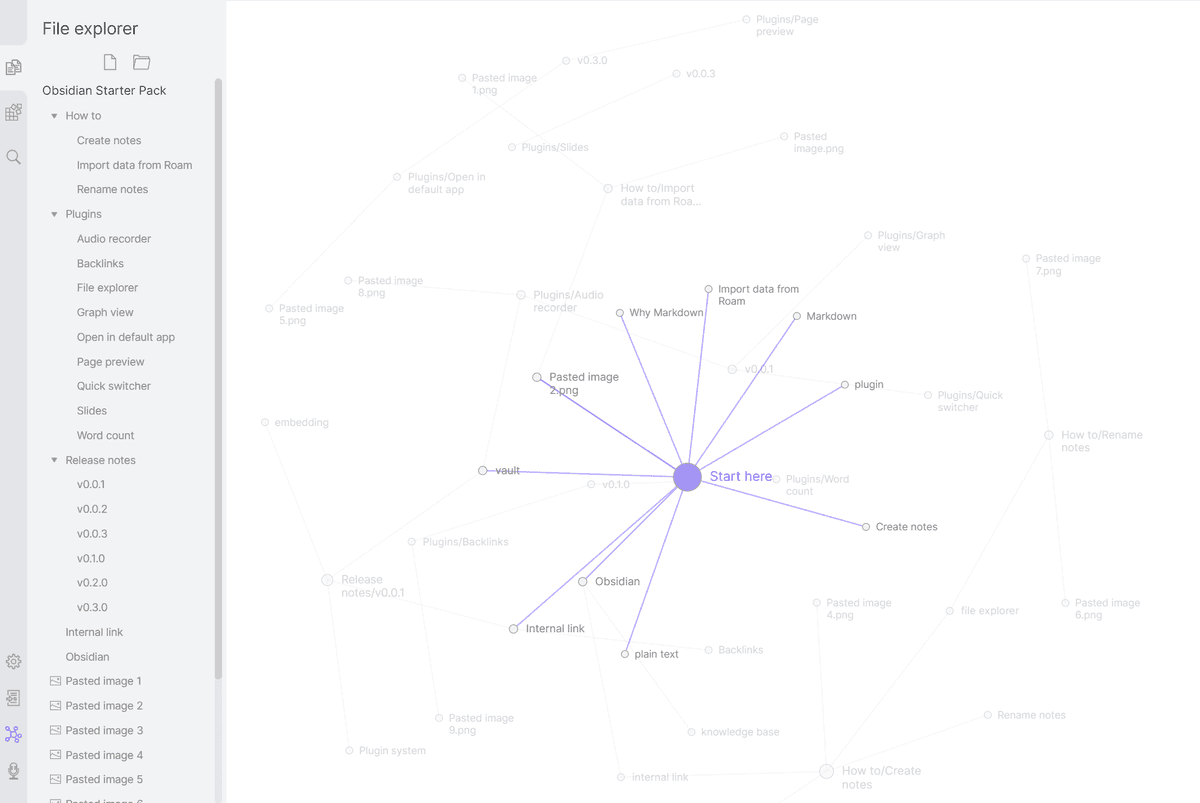
Obsidian graph view showing a local vault as linked notes. It illustrates the file-and-link model that differs from Roam's addressable bullet blocks.
The visual shows Obsidian's vault model. Notes live as files, and Graph View draws links between them. Roam starts from a different unit. Each bullet is addressable and can be reused as a block reference.
| Axis | Obsidian | Roam Research |
|---|---|---|
| Price | Free + $48/yr Sync | $15/mo or $165/yr |
| Storage | Local .md files | Cloud (proprietary) |
| Editor | Markdown | Outliner |
| Bidirectional links | Page-level | Page + block |
| Block references | Plugin/syntax | Core |
| Daily notes | Plugin | Centerpiece |
| Plugins | 2,000+ | Smaller ecosystem |
| Mobile sync | $48/yr or BYO | Built in |
| AI | Smart Connections + plugins | None native |
| Best for | Plain-text PKM tinkerers | Outliner thinkers |
Table 3: Fast comparison of Obsidian's vault model and Roam Research's outliner model.
Costs, Privacy, and Migration
The next checks cover the long-term cost of each setup, where the notes live, and how much cleanup a move requires.
Three-Year Cost
Obsidian is free for personal use, while Roam is not. The three-year picture depends on add-ons.
| Scenario | Obsidian | Roam Research |
|---|---|---|
| Solo, free tier | $0 (free personal) | N/A (no free tier) |
| Solo with sync | $144 (Sync, $4/mo × 36) | $540 (Pro, $15/mo × 36) |
| Solo, Believer-equivalent | N/A | $500 (Believer, prepaid 5 years) |
| Solo with AI | bring own API key, ~$5-20/month | bring own API key (Roam plugins) |
| Commercial use | $1,800 (Commercial, $50/user/mo × 36) | $2,700 (Pro, $15/seat × 5 users × 36) |
Table 4: Three-year cost comparison for solo and small-team Obsidian and Roam Research setups.
Per Obsidian's pricing page, Sync is $4/month, Publish is $8/month, Commercial is $50/user/month. Per Roam's pricing page, Pro is $15/month and the Believer plan is $500 for 5 years. Obsidian is cheaper at every tier except Roam's Believer plan. That plan only makes sense if you trust the company for five years.
Privacy and Data Handling
This table is about control, not only encryption. Obsidian keeps the default risk low because files stay local unless you add sync. Roam relies on its cloud model and optional encrypted graphs.
| Property | Obsidian | Roam Research |
|---|---|---|
| Encryption at rest | Local (your disk) | AES-256 (Roam cloud) |
| End-to-end encryption | Yes (Obsidian Sync) | Yes (Encrypted Graphs, opt-in) |
| Trains on your data | No | No |
| Data residency | Your machine | US (AWS) |
| Open file format | Yes (Markdown) | Partial (EDN export) |
Table 5: Privacy and data-control differences between local Obsidian vaults and Roam cloud graphs.
Both tools offer end-to-end encryption as the strict privacy option. Obsidian's default is the stronger privacy posture because data does not leave your machine unless you set up sync. Roam's Encrypted Graphs feature uses a passphrase only the user holds, so even Roam's servers cannot read the contents. The trade-off is that some team features become limited.
Migration Between the Two
Roam to Obsidian is the most common move in this category. Export Roam as Markdown, then import the files into Obsidian. Wikilinks are preserved. Block references need cleanup because Roam's ((block-id)) syntax has no clean Obsidian match without the Block Reference plugin. Daily notes import as dated files. A 5,000-block Roam graph takes 4-8 hours to clean up after import. Per discussions in the Obsidian forum, most Roam-to-Obsidian moves preserve about 90% of the structure cleanly.
Obsidian to Roam is less common. Roam imports Markdown but flattens folders into one graph. Wikilinks convert. Dataview queries do not, because Roam has its own Datalog query language. Plugin features have no Roam match. A 1,000-note Obsidian vault takes 6-12 hours to move, and most users only move notes that benefit from Roam's outliner and block model.
Workflows and Long-Term Risk
Daily behavior, performance, and vendor dependence matter more as the vault grows. These checks show how each app behaves after the initial setup period.
Daily Workflows Compared
An Obsidian day starts in the vault. Today's daily note comes from the Daily Notes core plugin. You capture meeting notes, link project notes with [[wikilinks]], and run a Dataview query for open tasks. Later you tweak a Templater snippet and commit the vault to Git. The pattern is do-it-yourself and tinker-friendly.
A Roam day starts on today's auto-created daily note. You capture five thoughts as bullet points and reference an earlier idea with [[concept name]]. Roam autocompletes from the graph. You type (( to embed a block from another page, then review linked-reference trails at day's end. The pattern is graph-driven and outliner-shaped.
The two tools answer different questions. Obsidian answers "what do I want to build?" Roam answers "what was I thinking about and how does it connect?"
When to Run Both
Using both is rarely useful in daily work. Each tool wants to be the main knowledge base, and writing notes twice wastes time. During a 30-90 day move, some users run both. Roam becomes the read-only archive, while Obsidian becomes the capture point. After the move, one tool usually closes for good.
Performance at Scale
Obsidian vaults of 100,000+ notes open without issue on modern hardware because each note is a flat Markdown file loaded only when opened. The graph view becomes unreadable past 5,000 nodes, and heavy plugin loads add startup time. Mobile Obsidian on a phone with 10,000+ notes takes 8-15 seconds to open the vault if iCloud sync is the storage backend.
Roam handles graphs of 100,000+ blocks because its in-memory model is built for graph traversal. The bottleneck is the indexing layer on initial load: a 50,000-block graph takes 5-15 seconds to open. The graph view becomes unreadable past 5,000 nodes regardless of tool. Per discussions in the Roam forum, the largest documented Roam graphs with 500,000+ blocks still load within 30 seconds on a modern laptop.
Long-Term Vendor Risk
A consideration that matters more for PKM than for most software because the lock-in window is years, not months.
Obsidian is privately held, profitable, and run by a small team. The data is plain Markdown on your disk regardless of company status. If Obsidian shut down tomorrow, your vault would keep working. Long-term users often pick Obsidian for this guarantee.
Roam is privately held and has a more public funding history. The company has had visible turbulence around growth and pricing changes since 2021. The Believer plan is partly a hedge against future pricing changes and partly a bet on the company's longevity. The data export is workable but proprietary, so a forced move would cost real time. Per the Roam help center, the EDN export contains everything but requires custom tooling to import elsewhere.
Final Recommendation
Obsidian wins for users who want plain-text ownership, plugins, and free use. Roam Research wins for users whose thinking maps to outliner UX and block links. The price has filtered Roam's user base to people who get clear value from its design. Most people seeking a Roam Research alternative pick Obsidian. For cited AI synthesis across either tool's contents, Atlas beats both.
AtlasAdd cited synthesis to your PKM exports
Upload notes and papers, then ask questions and inspect the cited passages.
Frequently Asked Questions
Pick Obsidian for plain-text Markdown vaults you own, with 2,000+ plugins and free personal use. Pick Roam Research for an outliner-first daily-notes workflow with block references, where every line is a bullet and every bullet has an addressable ID. Obsidian is free without limits per the Obsidian pricing page (May 2026). Roam is around $15/month or $165/year per public listings, May 2026. Most former Roam users have migrated to Obsidian (with the Excalidraw, Dataview, and Smart Connections plugins) or Logseq (free outliner) for the price-to-feature ratio. Roam's defensibility today is its specific outliner UX.