
Best Knowledge Management Software (2026): 8 Tools Compared
Best knowledge management software in 2026: Atlas, Notion, Confluence, SharePoint, Guru, Slab, Document360, and Bloomfire compared for teams and workflows.
- Byline

Summary
Use KM software when teams need one trusted place for docs, answers, and source links.
The updated guide compares Atlas, Notion, Confluence, Guru, Slab, Document360, and related workplace knowledge tools.
Clear search, cited AI answers, access control, team fit, and upkeep decide long-term fit.
Atlas fits teams that need answers from saved docs and notes with source links for checking.
Knowledge management software stores and finds a team's docs, process notes, past choices, and reference material. The 2024-2026 shift was cited AI search. Tools stopped showing only search results. They now answer questions and point back to the source doc. Atlas, Notion, Guru, and Confluence all ship this in 2026. The gaps are answer quality, team fit, and price.
This guide ranks 8 KM tools tested across 4 buyer types.

 Atlas
AtlasAsk cited questions across your knowledge base
Upload documents and notes, then trace each answer back to its source.
What Counts as Knowledge Management Software?
For nearby team tool choices, see our document AI tools guide and the Atlas vs Notion comparison.
Modern KM software has to handle four jobs. First, it must capture the material a team relies on, including notes, documents, files, decisions, and conversations. Notion and Atlas accept a broad mix of material, while Confluence organizes knowledge mainly as pages.
It also needs a structure that people can maintain. Confluence groups pages into spaces; Notion uses databases as well as pages; other tools rely on folders, tags, links, and access rules. The right structure is the one your team will keep current.
Good retrieval goes beyond matching a page title. When someone asks, "What is our policy on X?", the answer should identify the source document so they can check it. Atlas, Guru, and Notion AI provide that kind of source-backed retrieval, while Atlassian continues to expand AI search inside Confluence.
Finally, the software should connect to the places where work already happens. Guru brings knowledge into Slack, and Confluence connects documentation with Jira. Connections to Teams, email, calendars, and development tools can be equally important for other teams.
How to Choose KM Software
For team KM, the key question is not whether a tool can store pages. It is whether the tool keeps knowledge fresh, findable, and safe after launch.
Use six criteria:
- Retrieval quality: can people find the right answer without the exact page title or tag?
- AI synthesis depth: can the tool combine saved docs into one answer?
- Citation grounding: does each AI answer point back to the source passage, doc, card, or page?
- Permissions and governance: can admins control access, audit changes, and protect sensitive knowledge?
- Collaboration fit: does the tool match where the team works, such as Jira, Slack, Teams, or a help center?
- Maintenance burden: how much cleanup, ownership, and migration work is needed to keep the knowledge base useful?
Retrieval, Synthesis, and Governance Compared
The comparison below weighs each tool against six proof points: search, AI depth, cited answers, access control, team fit, and upkeep.
| Tool | Retrieval Quality | AI Synthesis Depth | Citation Grounding | Permissions and Governance | Collaboration Fit | Maintenance Burden |
|---|---|---|---|---|---|---|
| Atlas | Strong across uploaded sources | Strong cross-document synthesis | Strong passage citations | Medium | Research analysis | Low-medium |
| Notion | Strong with tidy pages | Medium | Medium page references | Good | Docs, projects, databases | Medium |
| Confluence | Strong in organized spaces | Medium | Medium page grounding | Strong | Jira engineering docs | Medium-high |
| SharePoint | Strong in M365 estates | Medium-strong | Medium M365 grounding | Very strong | Teams and intranet | High |
| Guru | Strong verified-card retrieval | Medium | Strong card-backed answers | Strong | Sales and support in Slack | Medium |
| Slab | Good wiki search | Limited-medium | Limited-medium | Basic | Lightweight internal wiki | Low-medium |
| Document360 | Strong help-center retrieval | Medium | Medium article references | Strong | Customer-facing docs | Medium |
| Bloomfire | Strong video search | Medium | Medium transcript grounding | Strong | Enablement and L&D | High |
Table 1: KM tools compared by search quality, cited AI answers, access rules, team fit, and upkeep.
Atlas wins the source-synthesis use case. Upload a policy memo, meeting notes, customer research, and a source PDF. Ask what evidence supports a choice, then check the answer by opening each cited passage. The guide to AI answers with citations explains that verification workflow, while the knowledge graph tools guide compares ways to map links among sources. Confluence and SharePoint are better when large-scale admin is the main problem. Guru is better when each answer needs a named owner.
If that is the workflow, build a knowledge base that answers from your own sources. Test it with a real document set before you pick another static wiki.
8 Best Knowledge Management Tools
Each tool below fits a different job. The list covers research synthesis, general workspaces, engineering docs, Microsoft 365, sales support, lightweight wikis, public help centers, and video training.
1. Atlas: Best for AI-Grounded Synthesis
Atlas is strongest when the job is comparing source material rather than maintaining a company wiki. Upload notes, PDFs, articles, and research documents. Then ask questions across the set, inspect a map of related ideas, and open the source behind each answer. This helps operators, consultants, analysts, and small teams avoid comparing the same documents by hand.
Atlas Pro is $20 per month.
2. Notion: Best General Workspace KM
Notion combines blocks, databases, wiki pages, and Notion AI Q&A. Its breadth is the attraction: one workspace can hold project plans, team documents, structured records, and a wiki. A team already working in Notion can add knowledge management without introducing another tool, though the experience is less focused than a dedicated KM product.
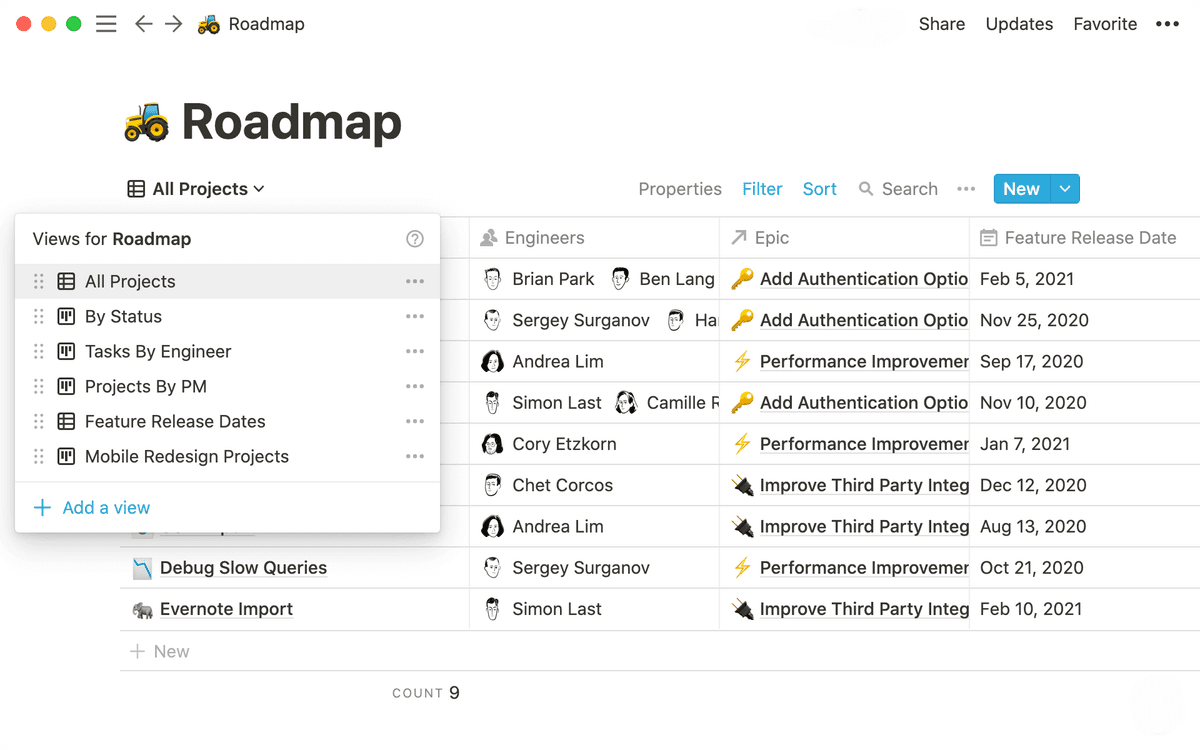
Notion has a free tier. Plus is $10 per month, and Notion AI is a separate $10 per month add-on.
3. Confluence: Best for Engineering Enterprises
Confluence is Atlassian's team wiki with a close Jira link. Teams can connect plans, decisions, and docs to work tracked in Jira. Spaces and access rules help control large page sets. Atlassian Intelligence adds AI questions and answers based on Confluence content. The Jira link matters most when the team already manages its work there.
Confluence pricing includes a free plan for up to 10 users, with paid plans adding storage, permissions, analytics, and support.
4. SharePoint: Best for Microsoft 365 Enterprises
SharePoint is Microsoft's intranet and file hub for large organizations. Its value comes from Microsoft 365. Files can flow through Teams and Outlook. Admins can use the same access and compliance rules, while Copilot answers from SharePoint and OneDrive. For teams already using Microsoft 365, those links can outweigh SharePoint's heavier setup.
SharePoint Online Plan 1 costs $5 per user per month. Microsoft 365 Business Standard bundles SharePoint at $12.50 per user per month.
5. Guru: Best for Sales and Support
Guru brings a card-based knowledge base into Slack and a browser extension. That helps sales and support teams. Staff can find an approved answer without leaving the customer conversation. Guru also lets teams verify content, so an answer can have a visible owner instead of becoming an anonymous wiki page.
Guru publishes current plan features and prices for teams comparing its verification and AI search tools.
6. Slab: Best Lightweight Team KM
Slab is narrower than an all-purpose workspace. Small and midsize teams get a clean editor, simple wiki structure, and search. There are no project databases or heavy admin layers. That focus makes Slab easier to adopt when the goal is to write, read, and find internal documentation.
Slab has a free tier, and Startup costs $6.67 per user per month.
7. Document360: Best for Customer Help Centers
Document360 is for product teams that publish customer documentation. It supports public help centers, saved article versions, and AI writing help. Documentation teams get controls that a general internal wiki may lack.
Document360 pricing is organized around help-center projects and plan limits rather than a simple per-seat wiki price.
8. Bloomfire: Best for Video-Heavy Enterprise
Bloomfire handles knowledge stored in recordings, which page-based wikis often miss. It turns meetings and training videos into searchable text. That suits sales and training teams with large video libraries.
Bloomfire uses custom enterprise pricing.
Best KM Software by Team Scenario
- Source-heavy small teams: Atlas. It answers from saved docs and cites the source.
- Cross-functional teams: Notion. Docs, projects, and databases live in one place.
- Engineering teams: Confluence. Jira context, spaces, and access rules matter most.
- Microsoft 365 teams: SharePoint. Identity, compliance, and Teams links drive the rollout.
- Sales and support teams: Guru. Verified cards work well in Slack.
- Lightweight wiki teams: Slab. The narrow scope keeps reading and search simple.
- Public help-doc teams: Document360. Versioned public docs are the core workflow.
- Video-heavy training teams: Bloomfire. Transcript search is the main draw.
When You Need KM Software
Three signals.
Search is failing when people ask the same question in Slack repeatedly because the doc is impossible to find. Modern AI Q&A solves this directly.
Onboarding is painful when new hires lose the first week reconstructing tribal knowledge. KM software cuts ramp-up time by making the org's accumulated knowledge findable.
Old choices get reopened when the reason is hard to find. A KM tool with strong links and tags makes that context easy to find, so the team stops re-deciding the same questions.
If none of these apply, a shared Google Drive plus Slack search is fine.
Buying and Implementing KM Software
Build the final shortlist around four facts: how the tool finds answers, total team cost, data rules, and rollout time. Also ask how much old content must move into the new system.
Why KM Software Matters in 2026
The knowledge-management software market reached an inflection point in 2025-2026. Fortune Business Insights values the global KMS market at $23.2 billion in 2025 and projects $74.22 billion by 2034 at a 13.8% CAGR. Grand View Research's estimate is $20.15 billion in 2024 growing to $62.15 billion by 2033 at 13.6% CAGR. Mordor Intelligence projects faster growth at 18.34% CAGR through 2031.
The estimates vary because each firm defines the market in a different way. Some count only narrow KMS vendors. Others include AI search, intranets, and enterprise wikis. The clear read is double-digit growth, driven by AI adoption.
Document management is the dominant functionality at 38.61% of 2025 spend, but intelligent chatbots and virtual agents are the fastest-growing slice at 21.88% CAGR through 2031 per Mordor Intelligence. AI-grounded synthesis, the Atlas pattern, is downstream of this trend.
Healthcare is the fastest-growing buyer industry. Estimates range from 14.3% to 20.74% CAGR. Clinical support, patient records, and compliance needs drive that growth. IT and telecom remains the largest single industry vertical at 23.87% of 2025 revenue.
The geographic split favors North America, which holds 38.08% of 2025 KM software spend. Asia-Pacific is the fastest-growing region at 22.98% CAGR through 2031.
Buyers should now expect AI answers that point back to saved sources.
Pricing Across Tiers
Annual cost for a 25-seat team using the published Business or equivalent tier:
| Tool | Per-Seat/mo | 25 Seats/Year | Free/Trial |
|---|---|---|---|
| Atlas | $20 (Pro) | $6,000 | Free preview |
| Notion | $15 (Plus) | $4,500 | Free tier |
| Confluence | $6.05 (Standard) | $1,815 | Free up to 10 users |
| SharePoint | $5 (Plan 1) | $1,500 | M365 trial |
| Guru | $15 (All-in-One) | $4,500 | 30-day trial |
| Slab | $8 (Business) | $2,400 | Free up to 10 users |
| Document360 | $149/project/mo | $1,788 | 14-day trial |
| Bloomfire | Quote-based | $25k+ | Quote-based |
Table 2: Published prices for a 25-person team billed yearly.
For under 50 seats, Confluence Standard ($6.05/seat/month) is the cheapest enterprise-credible option. Notion's free tier is the most generous starting point. Document360 charges by project, so seat count is not the main cost driver.
Privacy, Compliance, and Data Residency
SOC 2 Type II and HIPAA support matter for larger buyers. Confluence, Notion, Guru, Document360, and Bloomfire all publish SOC 2 Type II reports. Confluence and Notion offer HIPAA terms on enterprise tiers. Bloomfire ships HIPAA-ready setups out of the box.
EU data residency is available from Confluence in EU and Frankfurt regions. Notion added an EU region in 2024. Atlas offers EU deployment on request while vendor SOC 2 Type II is in progress.
Self-hosted control means SharePoint Server on-prem or Confluence Data Center on-prem.
AI-training opt-out is now common in serious KM tools. Notion, Confluence, Guru, Document360, and Atlas all say customer content is not used to train third-party models.
For health, finance, and public-sector teams, Confluence Data Center on-premises and Bloomfire HIPAA are safer picks.
Implementation and Time-to-Value
Light rollout takes 1-2 weeks for Notion, Slab, and Atlas. Most teams can set up a working KB within five work days.
Medium rollout takes 4-8 weeks for Confluence, Guru, Document360, and SharePoint. Moving old wiki pages, setting up structure, and adding SSO can take a quarter to feel finished.
Heavy rollout takes 3-6 months for Bloomfire, on-prem Confluence, and custom graph tools. Services work, video ingest, and system moves drive the timeline.
For teams under 50 people, lightweight rollout is the right default. Over-engineering the KM stack early predicts abandonment within 18 months.
Final Take
KM software is buyer-specific. Atlas fits cited AI answers, Notion fits broad workspace needs, Confluence fits engineering documentation, and SharePoint fits Microsoft 365 teams.
Guru fits sales and support, Slab fits lightweight wikis, Document360 fits help centers, and Bloomfire fits video-heavy knowledge. Choose for the people who must keep the system accurate after rollout.
If your knowledge base consists mainly of papers and reports, compare AI research assistants and document organizers. If it consists mainly of linked notes, start with personal knowledge management and second brain apps.
AtlasAsk cited questions across your knowledge base
Upload documents and notes, then trace each answer back to its source.
Frequently Asked Questions
Atlas (Pro $20/month) leads for AI-grounded individual and small-team KM, mind-map synthesis with source-cited Q&A across notes, PDFs, and research. Notion ($10/month) is the most-recommended general workspace KM. Confluence ($6.05/user/month) is the enterprise standard for engineering teams. SharePoint ($5/user/month) is the Microsoft 365 enterprise pick. Guru ($10/user/month) wins for sales/support knowledge. Slab ($6.67/user/month) is the lightweight team KM choice.