


Knowledge graph tools can mean four kinds of products. A graph database stores links for an app. A visual tool helps people explore an existing graph.
A research map connects papers or uploaded sources. An AI-memory system retrieves changing facts for an agent. Choose the job before the brand.
Atlas can map and question sources you control. It is not our pick for a graph database, a fraud console, or a general AI-memory backend. We checked product and plan pages on August 10, 2026. Official sources underpin this guide. We did not run a private test.

Map connections across your sources
Upload documents, generate a map, and open the cited passages.
Choose by Graph Job
- Build an app data layer: start with Neo4j, Amazon Neptune, or GraphDB.
- Investigate a graph visually: start with Linkurious, Kineviz, or Cytoscape.
- Map a research corpus: start with Atlas, ResearchRabbit, or Connected Papers.
- Give an AI system graph memory: start with Graphiti, Zep, or FalkorDB.
The categories overlap. Neo4j has Bloom, Neptune has graph notebooks, and FalkorDB has a browser.
Those interfaces do not make every database a full analyst workspace. Research maps also show nodes and links, but they do not replace a production graph database.
Knowledge Graph Tools Compared
Use this table to pick a lane before you compare features. Ask what must still work when the graph is done. Is it an app query, a human review, a sourced claim, or an agent lookup?
| Tool | Best-fit job | Data or source boundary | Verification or export path |
|---|---|---|---|
| Atlas | Owned-source research mapping | Uploaded project sources and notes | Map, cited answer, and inspectable source passage |
| Neo4j | Property-graph applications | Modeled nodes, relationships, and properties | Cypher queries, database export, Bloom scene export |
| Amazon Neptune | Managed AWS graph workloads | Property-graph or RDF data inside AWS | openCypher, Gremlin, SPARQL, notebooks, AWS operations |
| GraphDB | RDF and semantic repositories | RDF statements, ontologies, and linked data | SPARQL, repository export, semantic search |
| Linkurious | Governed graph investigation | A connected supported graph database | Visual exploration, case workflows, image and data exports |
| Kineviz | Flexible visual exploration | Imported files, internal data, or connected graphs | CSV, Excel, project, PNG, and SVG export |
| Cytoscape | Open network analysis | Imported network and attribute files | Graph formats, images, web output, and automation API |
| ResearchRabbit | Citation-network discovery | Academic articles saved in collections | Citation map, shared collection, BibTeX import and export |
| Connected Papers | Paper-similarity exploration | One or more seed papers | Similarity graph, prior work, derivative work, saved papers |
| Graphiti | Open-source temporal AI memory | Conversations, records, and documents sent by the developer | Graph search plus the backing database and application code |
| Zep | Managed temporal context | Episodes sent through Zep APIs | Managed retrieval APIs and plan-level controls |
| FalkorDB | Graph storage and GraphRAG | Property graphs or ingested documents | Cypher, browser export, RDB snapshots, cited GraphRAG output |
Table 1: Knowledge graph tools compared by job, data boundary, and the path used to inspect or export their results.
How This Comparison Works
We do not give the tools scores. Instead, ask six questions with a fair sample of your own data:
- Model: Does the job need a property graph, RDF, a citation network, a document-derived map, or a temporal context graph?
- Input: Can the tool take the data, files, papers, events, or APIs you have?
- Exploration: Can the user search, filter, expand, compare, and return to an earlier view?
- Source trail: Can you trace a key link to a record, paper, file, or event?
- Handoff: Can the result leave as queries, files, citations, images, APIs, or database snapshots?
- Care: Who owns hosting, access, storage, cost, updates, and recovery?
Vendor docs tell us what a tool offers now. They do not prove how well it will work with your data, rules, or query load. Use the same sample and the same required output for each trial.
Research Mapping
1. Atlas
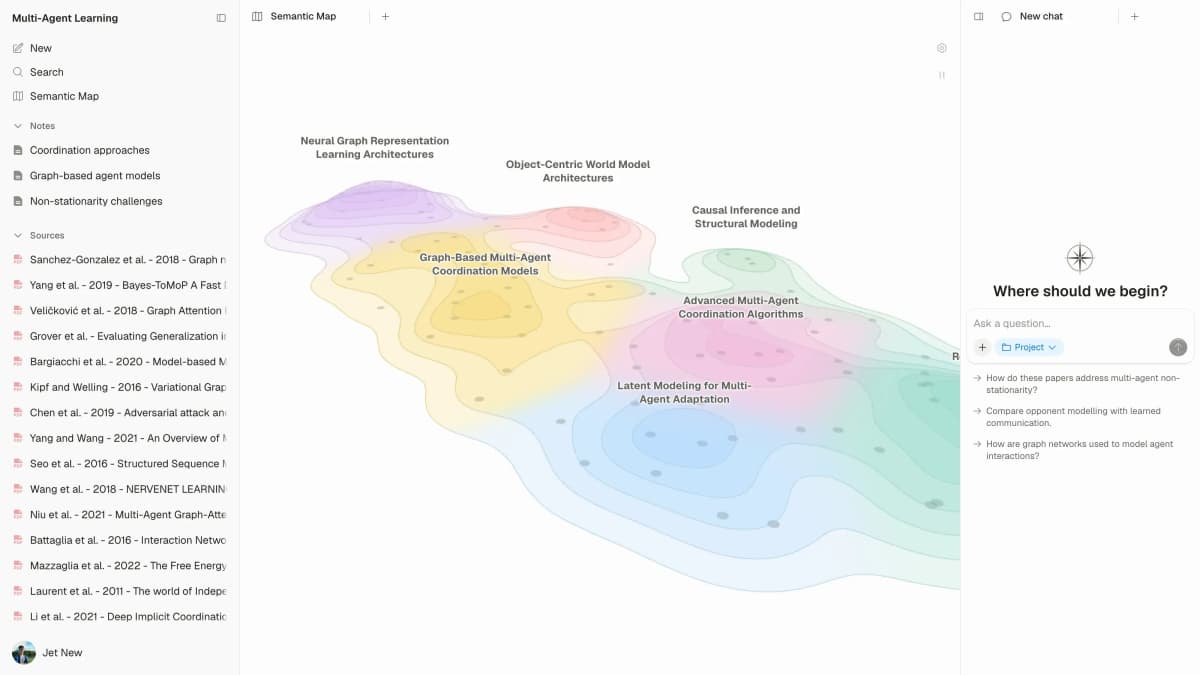
Atlas fits teams that have papers, reports, web pages, notes, or transcripts. It helps them see and question links across those sources. Atlas finds project sources, builds a map, and adds citations to key claims.
A citation opens the associated source passage for review. The knowledge graph generator guide explains the source-to-map workflow.
The boundary matters. Atlas is not a graph store for an app. It also does not replace a paper search tool. Use it when you need to compare claims, inspect links, and keep the map tied to your sources.
Atlas offers free and Pro access with source and chat limits that can change by plan.
To check the workflow, upload sources and make a project map. Ask which files support or oppose a link, then open the citation.
The passage may support the claim fully, partly, or not at all. The verifiable AI research guide shows the human check that follows.
2. ResearchRabbit
ResearchRabbit helps scholars find papers around a saved set. Its free tier has paper search, citation links, related papers, visual maps, Zotero import, shared lists, and BibTeX import and export. ResearchRabbit+ adds more search and sorting tools.
Choose it to follow citations or grow a reading list. It maps links between papers. It does not map claims inside files you upload.
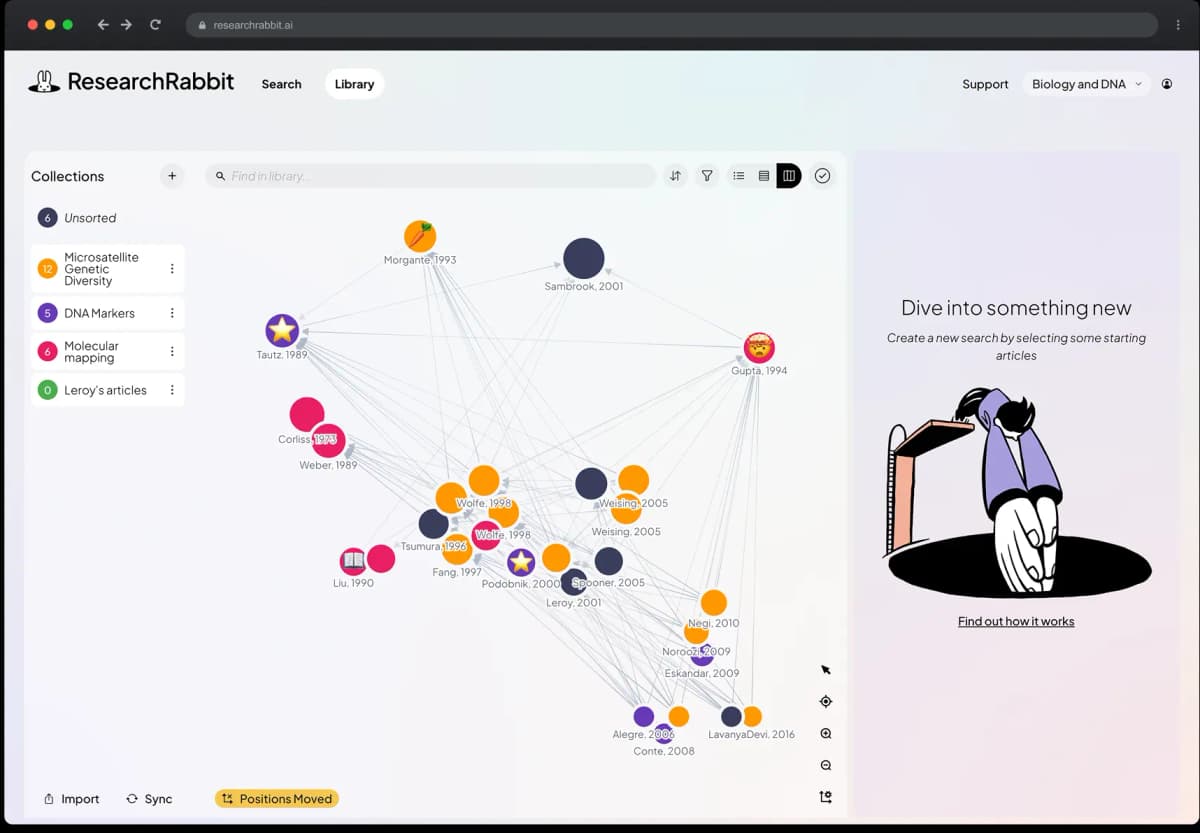
ResearchRabbit is strongest for exploring relationships between papers. This view shows a citation network, not evidence that one paper supports a claim.
Read each paper before you use a network link to support a claim. If your next step uses Zotero, compare the current Zotero alternatives and their export paths.
3. Connected Papers
Connected Papers makes a similarity graph from seed papers. It also marks prior and later work. The free tier gives five graphs per month. Paid plans remove that limit.
Choose it when one useful paper should lead to a wider set. Similarity does not prove that a paper backs a claim. The graph may also miss useful work. Read the papers, then move good sources into the tool that holds your notes and claims.
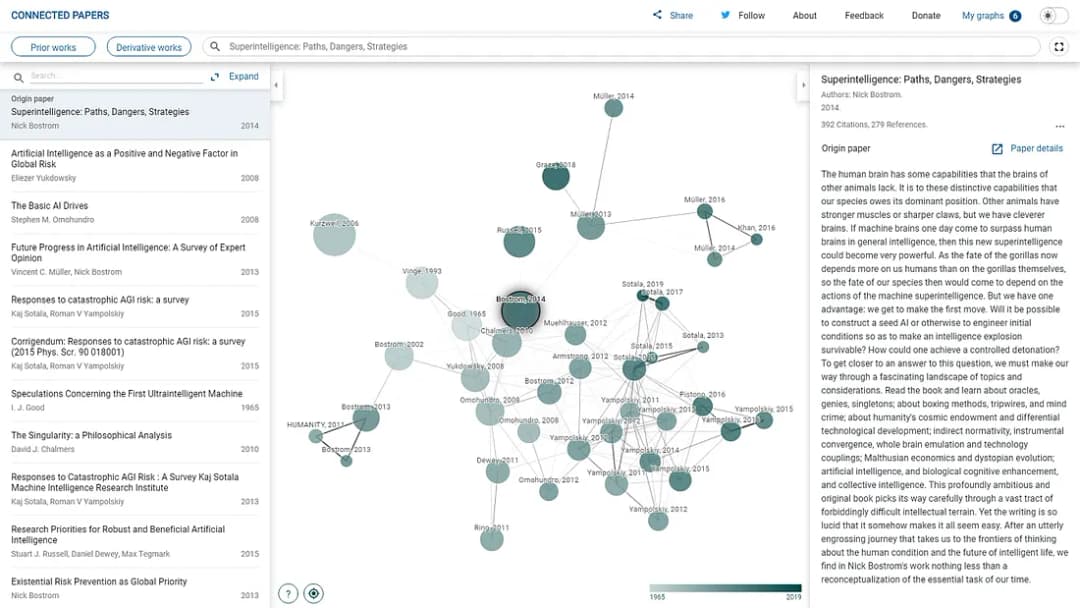
This screenshot was published by Connected Papers in 2020. It shows the graph layout, not current plan limits or interface details.
Graph Databases
4. Neo4j
Neo4j is a broad choice for teams that build property-graph apps with Cypher. It has self-hosted and Aura plans, import tools, drivers, and Bloom for visual work.
Bloom can export a scene, while the database remains the source of truth.
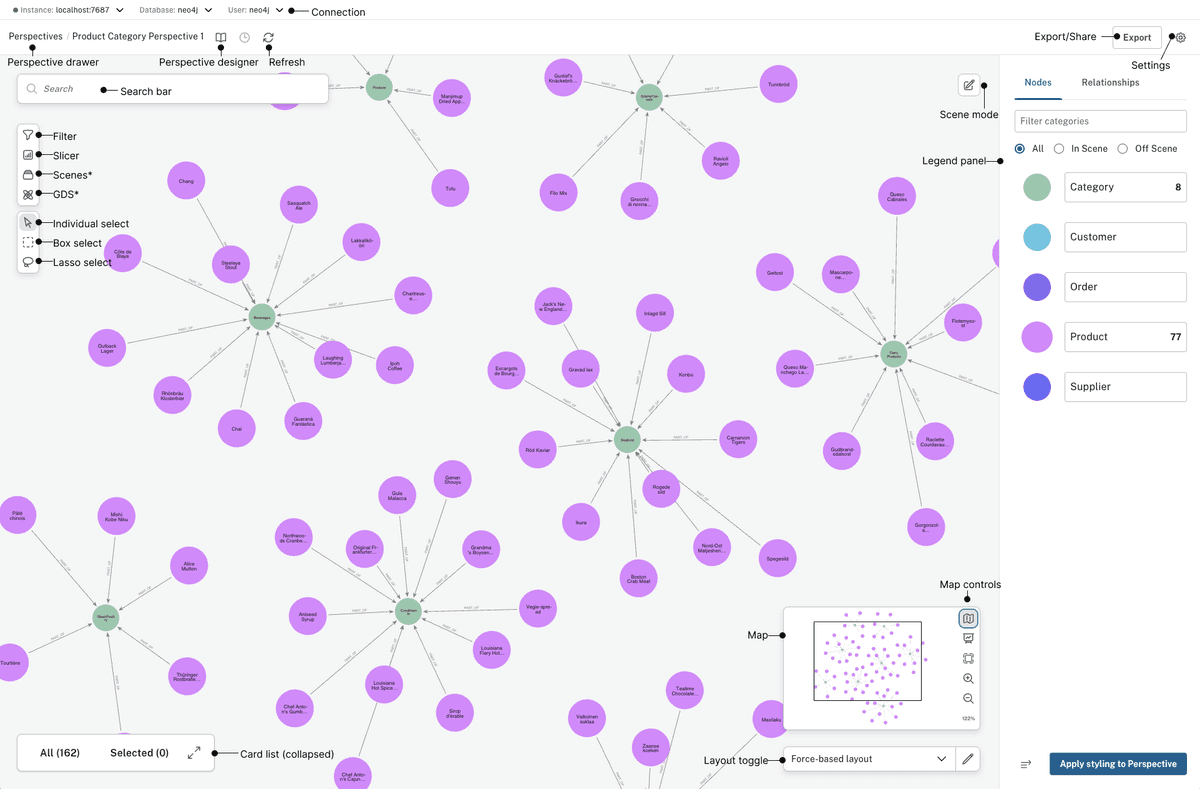
Neo4j’s Bloom 2.37 guide uses demo data in this interface overview. It illustrates the workspace and controls, not a customer graph or a measured result.
Choose Neo4j when your team needs to model a field, query paths, and build an app on graph data. The wide product range adds choices about hosting and tools. Check Neo4j pricing and export needs for the plan you want.
5. Amazon Neptune
Amazon Neptune is an AWS graph service. It supports Gremlin and openCypher for property graphs, plus SPARQL for RDF data.
It fits teams that already need IAM, VPC rules, backups, and other AWS controls.
Neptune's graph notebooks help teams run queries and view results. They do not replace a full case-work tool. Price is based on use, and notebook costs are separate. Test your openCypher queries because Neptune and Neo4j do not support the exact same set.
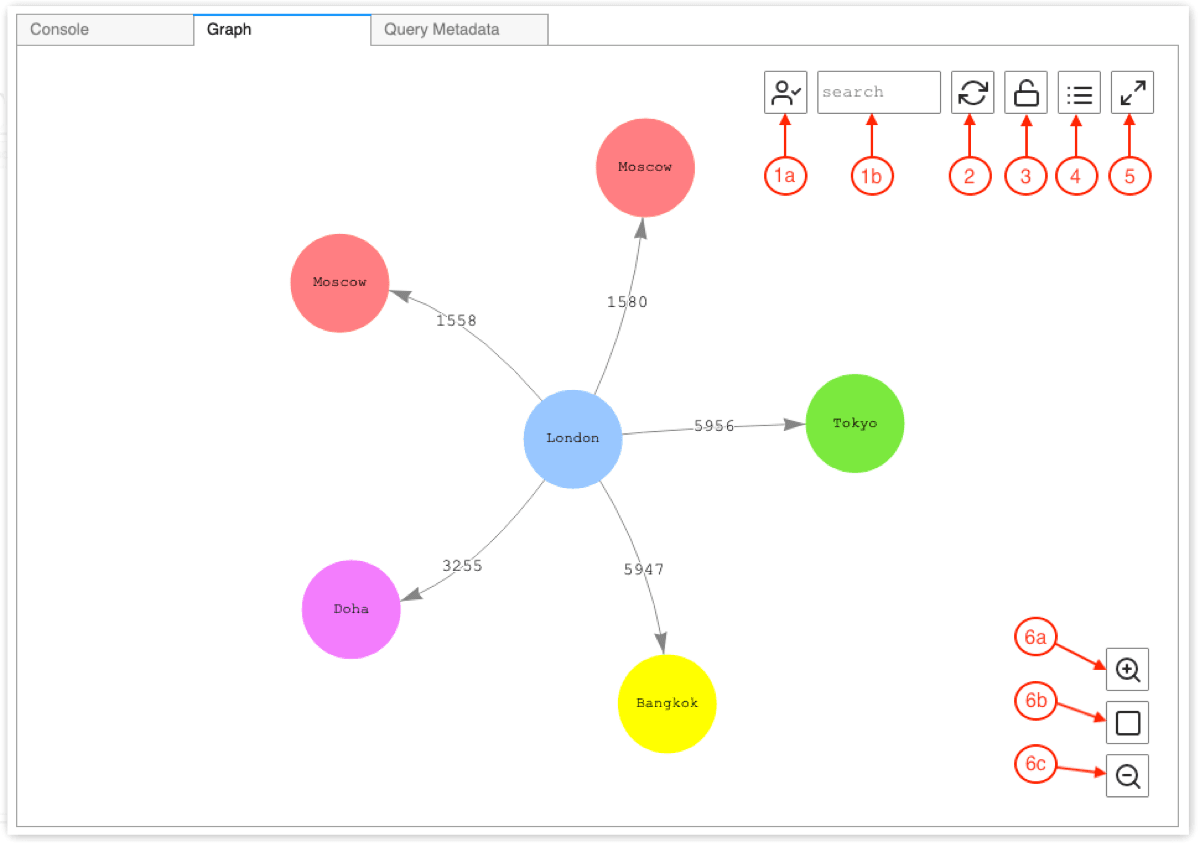
This Neptune Workbench image comes from Amazon's docs. It shows how to inspect query results. Your team still owns the database setup, network rules, and app.
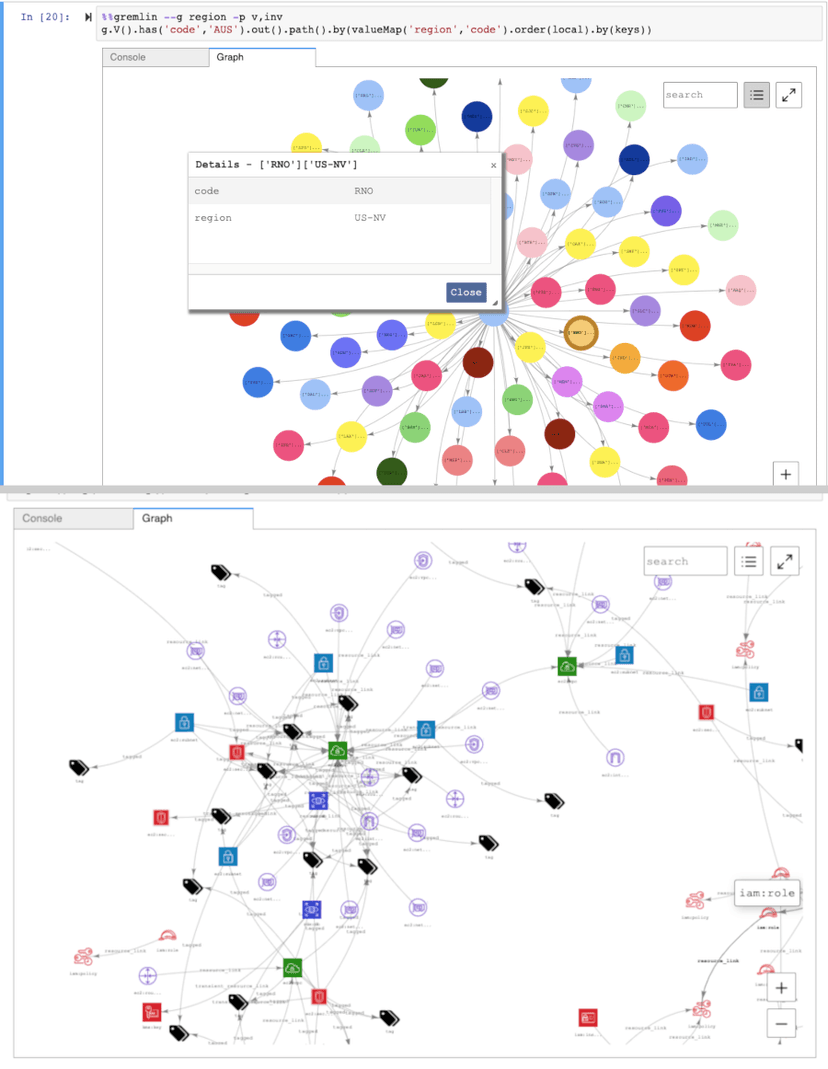
These are documentation examples of Neptune’s graph results. They illustrate the Workbench visualizer, not a customer deployment or measured outcome.
6. GraphDB
GraphDB from Ontotext works with RDF, SPARQL, rules, linked data, and semantic search.
Choose it when shared terms, linked data, and open standards matter more than a property-graph app.
GraphDB has free and paid editions. You still need to design the data terms, match IDs, and track sources. Export a test store and rerun key queries before you assume the work can move to another system.
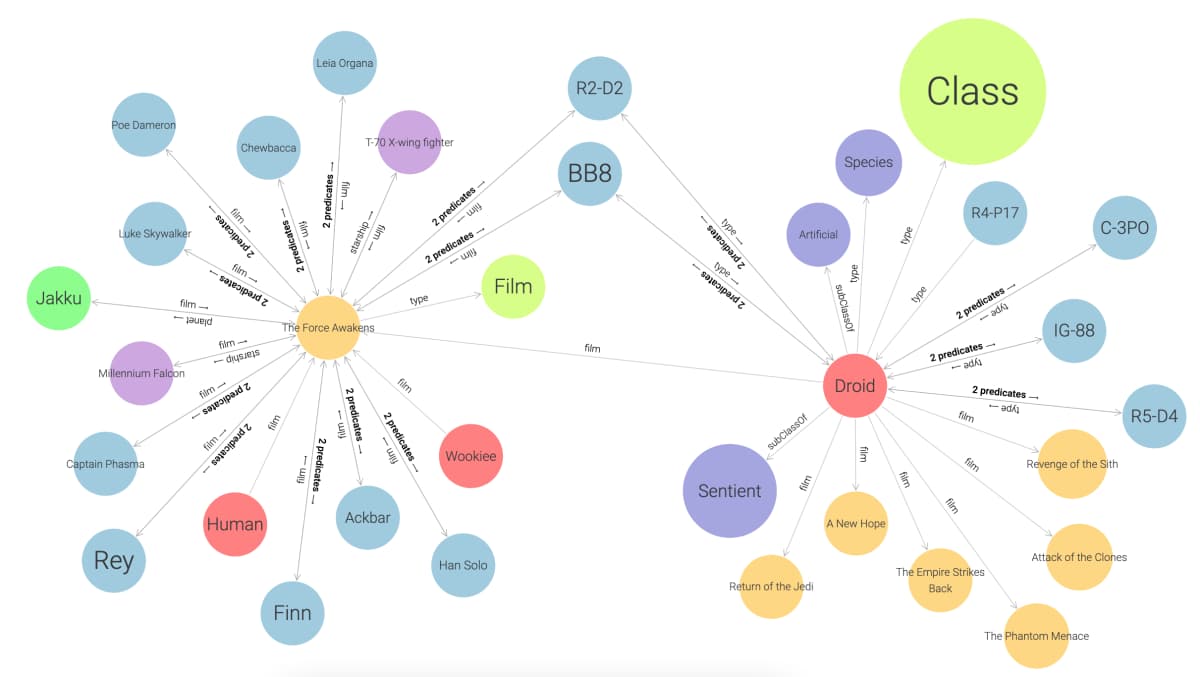
GraphDB’s guide uses Star Wars sample data in this visual graph. It shows the RDF exploration interface, not a production repository or benchmark.
Graph Visualization
7. Linkurious
Linkurious is a visual layer for supported graph stores. It offers search, link expansion, layouts, filters, maps, time views, team work, and exports.
The cloud plan lists a monthly price per user. The self-hosted plan needs a quote.
Choose Linkurious when people need a controlled view over Neo4j, Neptune, or another supported store. It is not the store itself. Include the base graph, data load, and access rules in your cost and privacy check.
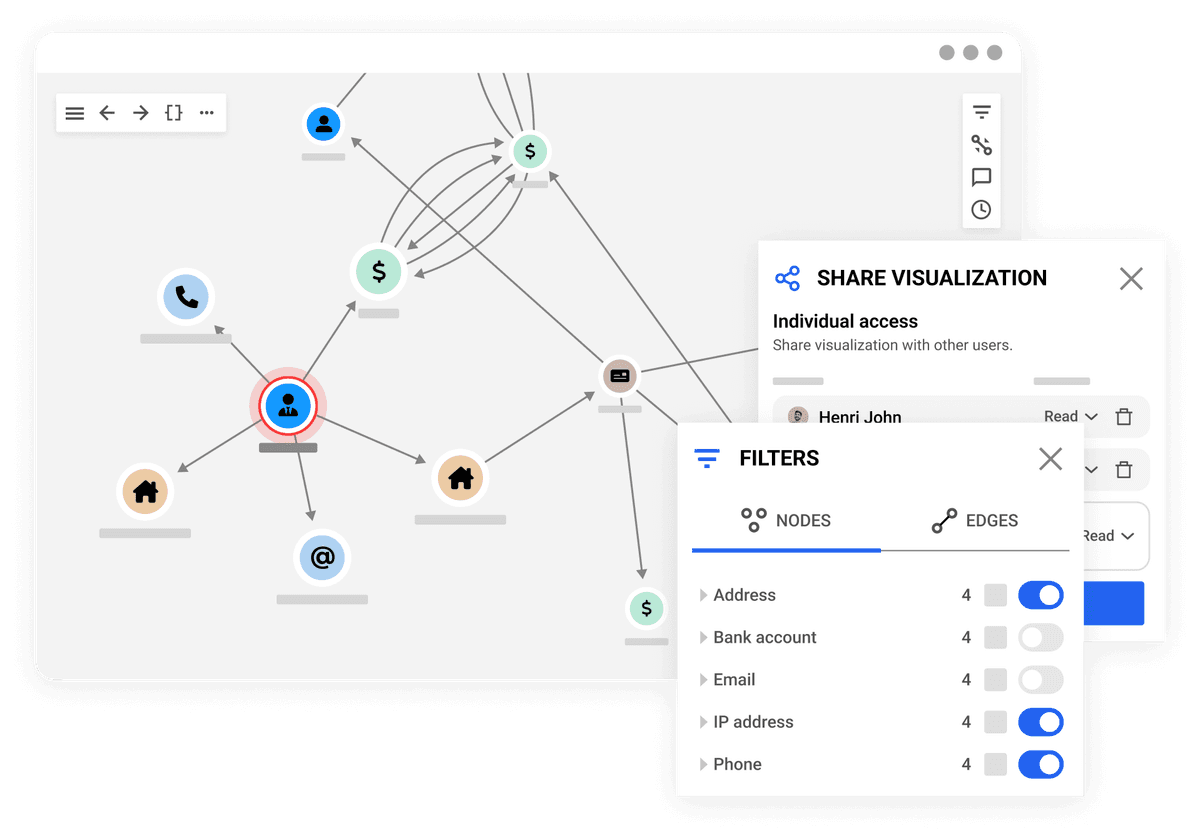
This official product-page image illustrates the exploration interface. The example graph and values are demonstration content, not a verified customer investigation.
8. Kineviz
Kineviz, formerly GraphXR, focuses on hands-on 2D and 3D graph work. Users can load data, change nodes and links, trace paths, filter fields, and save views.
Its workspace documentation lists CSV, Excel, project, PNG, and SVG exports.
Choose Kineviz when visual study and clear output matter more than owning a graph store. It has cloud and desktop apps. Check where each app keeps data, what it can connect to, and which plan lets you share and export.
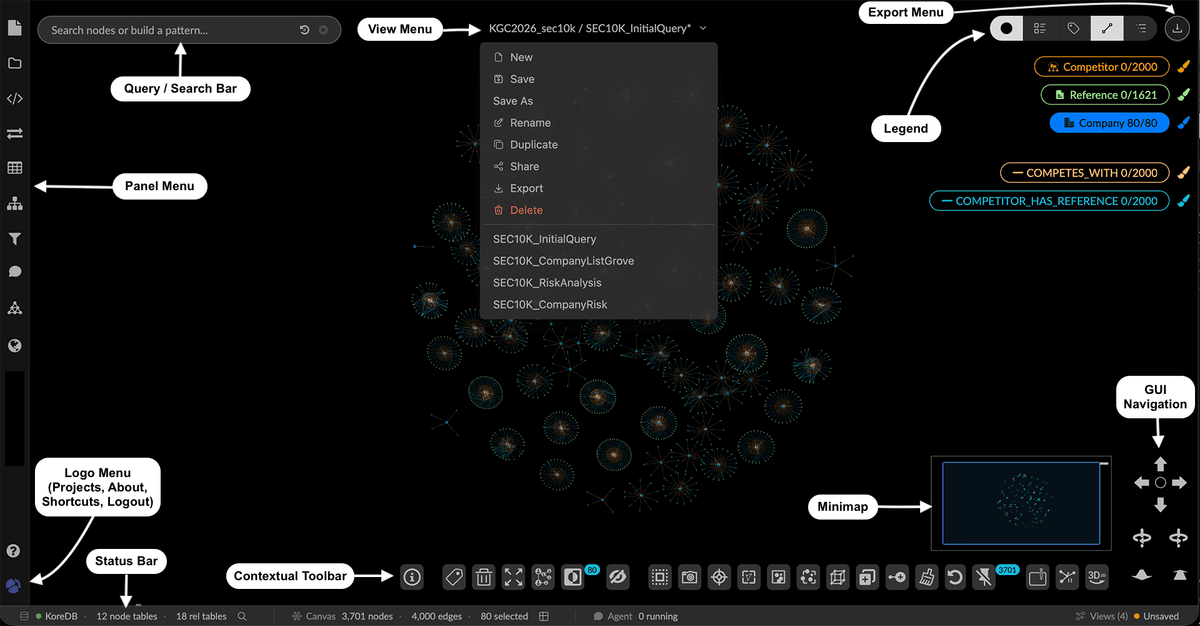
This labeled User Guide v3 screenshot uses example data and counts. It illustrates the workspace controls, not an analyst result or product benchmark.
9. Cytoscape
Cytoscape is an open-source set of network tools. The desktop app has layouts, styles, filters, add-ons, scripts, and high-quality image export.
Cytoscape Web supports browser sharing. Cytoscape.js is a library for developers rather than a complete app.
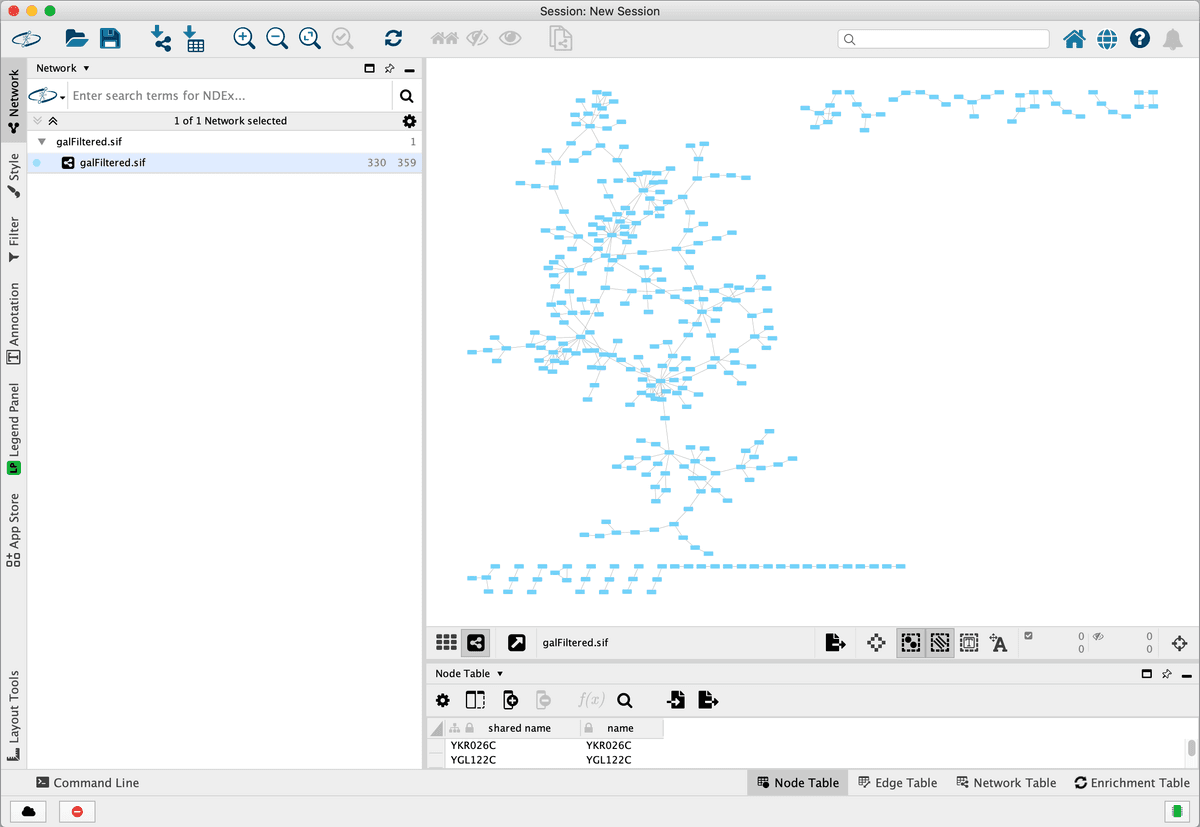
This manual screenshot shows a sample network in the application. It illustrates the analysis workspace, not an independent study result.
Choose Cytoscape for research networks, repeatable work, add-ons, and local control. It began in life science, and many add-ons still serve that field. Other teams should test file formats and needed add-ons before they commit.
AI Memory and GraphRAG
10. Graphiti
Graphiti is Zep's Apache-2.0 kit for graphs that track change over time. It turns chats, records, and files into things, facts, links, and dated state.
Search blends graph, text, and meaning over a supported graph store.
Choose Graphiti when your team wants to own the memory code. You must supply model keys, a graph store, data rules, prompts, and live service care. It handles changing context well. Readers will still need a separate user-facing tool.
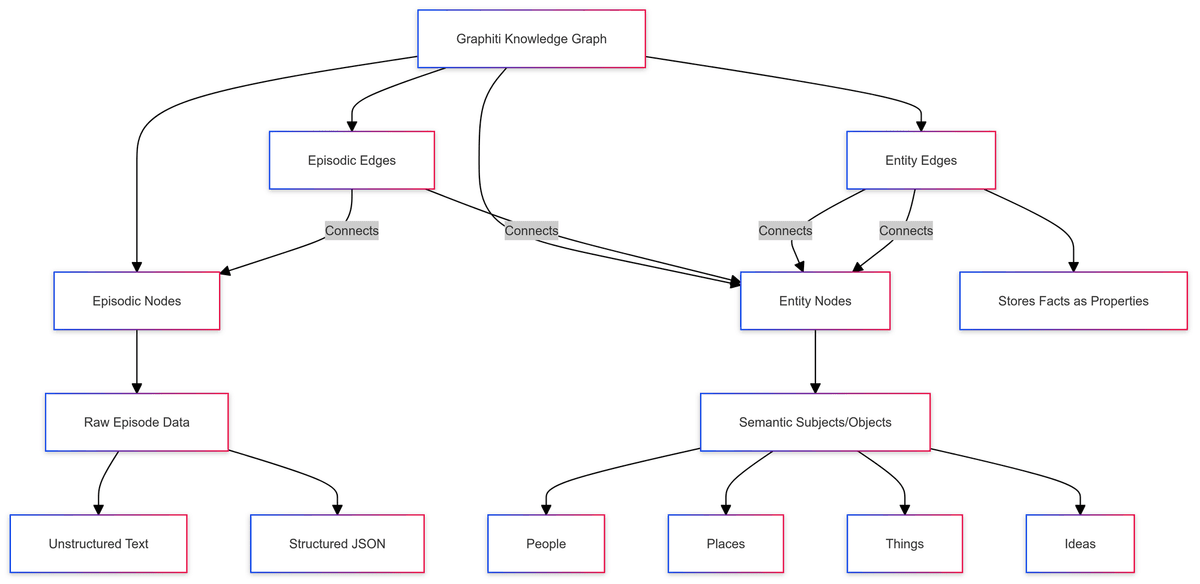
The Graphiti schema diagram separates raw episode data from semantic entities: episodic edges connect source records to entities, while entity edges store facts as properties.
11. Zep
Zep is the hosted product built on time-aware graphs. It fits teams that want search APIs without running all the graph services.
Its price uses credits tied to events sent to the service. See the current Zep pricing page.
Choose Zep when a hosted service and app link matter more than code control. Before you send live data, check storage, access, deletion, and contract terms. Vendor test results cannot replace a trial with your own memory tasks.

Zep presents this as a conceptual example of temporal graph updates. It is not a screenshot of the hosted product or evidence of extraction accuracy.
12. FalkorDB
FalkorDB is a property-graph store with openCypher, a browser, text and vector indexes, and GraphRAG tools. Teams can run its container or use FalkorDB Cloud, which has a free start.
Choose FalkorDB when one tech team owns both Cypher data and GraphRAG code. Its GraphRAG SDK can load files and return cited answers with mixed search. Its code uses the SSPL. This license has tighter terms than permissive open-source licenses, so review it before you host or share the code. Browser and cloud exports serve different needs.
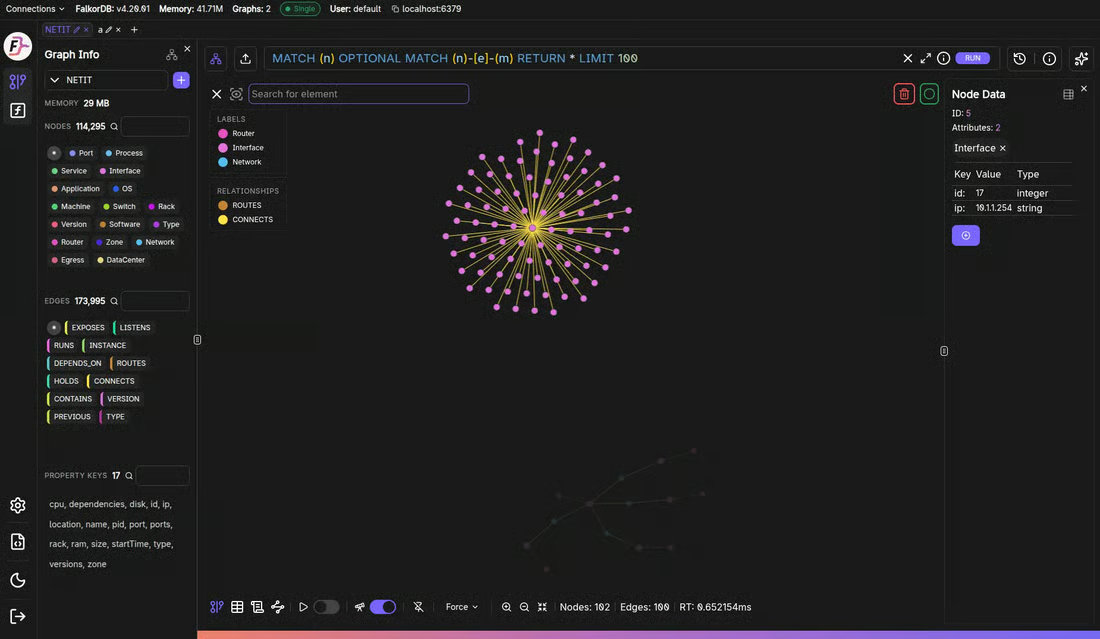
The official documentation identifies this as a realistic demo graph. Its displayed values are not independent performance or customer results.
Run a Decision-Ready Pilot
Check Pricing, Privacy, and Export
There is no single price or privacy winner. A self-hosted store, a managed case tool, a web research service, and an AI API send data to different places.
| Boundary | Questions to answer before purchase |
|---|---|
| Access and price | Is the needed feature in free, individual, team, enterprise, usage-based, or separately billed infrastructure? |
| Data location | Is the graph local, in your cloud, in the vendor cloud, or split between a database and visualization layer? |
| Model use | Does AI processing call a third-party model, and can the organization control retention and training terms? |
| Permissions | Do application roles, source permissions, and graph edges enforce the same access policy? |
| Export | Can the team export nodes, edges, properties, sources, views, citations, and history in reusable formats? |
| Deletion and recovery | Can data be deleted, backed up, restored, and audited under the selected plan? |
Table 2: Read the current privacy, safety, license, and plan terms for the setup you want. Open code or a free account does not prove that a paid plan has the controls you need.
Use Representative Inputs
Use a fair sample of your own data. A made-up node count will not reflect the real job. Include its file types, links, access rules, gaps, repeats, and source clashes.
- Write the choices, queries, or review steps the graph must support.
- Load the same sample into each tool on your short list.
- Trace key edges back to their records, papers, files, or events.
- Test search, filters, path exploration, layout, and return-to-view behavior.
- Export the graph and the evidence needed by the next system or reviewer.
- Record setup work, upkeep, plan limits, and how you recover from a fault.
A trial passes when another person can reach the same choice and check its source trail after export. A polished graph image alone is not enough.
Final Recommendation
Choose by the output you need to keep. Neo4j, Neptune, and GraphDB store app data. Linkurious, Kineviz, and Cytoscape support visual review. Atlas, ResearchRabbit, and Connected Papers cover three forms of research maps. Graphiti, Zep, and FalkorDB cover AI memory and GraphRAG.
For Atlas's lane, use the knowledge graph generator guide to make a map from your sources. If the real job is to sort ideas, compare mind maps and knowledge graphs first.
Map connections across your sources
Upload documents, generate a map, and open the cited passages.