


Mind maps and knowledge graphs both show links. They answer different questions. A mind map asks, "What belongs under this central topic?" A knowledge graph asks, "What connects across the whole source set?"

Build a source-grounded Knowledge Map
Upload papers and inspect the source passage behind each graph connection.
Choose between the two formats
I use the three-test rule when reviewing whether a visual-thinking article needs a simple map or a source-backed graph:
- Center test: if the work has one clear topic, use a mind map.
- Link test: if ideas need to connect across branches, use a knowledge graph.
- Proof test: if every link must trace back to a source, use a source-built graph rather than a hand-drawn map.
Core definitions
What Is a Mind Map?
A mind map is a visual diagram that starts with one central idea and branches outward. Each branch is a child of the main topic or of another branch. Most mind maps are made by hand, so they show how one person breaks down a topic.
A mind map starts with one central idea and grows outward like a tree. Branches can have smaller branches, but everything still flows from the center.
Defining characteristics:
- Single center: one main topic at the core.
- Tree structure: parent-child links between ideas.
- Outward branches: ideas move away from the center.
- Few cross-links: traditional branches usually do not link to each other.
- Manual creation: the map reflects the creator's view.
They work well when you start broad and then add detail.
Example: a mind map for "Machine Learning" might split into "Supervised Learning," "Unsupervised Learning," and "Reinforcement Learning." Each branch can then hold methods, use cases, and examples.
What Is a Knowledge Graph?
A knowledge graph is a network of entities linked by named relationships. The entities can be concepts, people, papers, events, or sources. There is no single center. Any node can link to any other node, and the link itself explains the relationship.
Defining characteristics:
- No fixed center: many entry points into the network.
- Network structure: any node can connect to any other node.
- Typed links: each connection can say "uses," "contradicts," "cites," or "causes."
- Cross-links: value comes from seeing paths across topics.
- Often machine-built: AI or algorithms can build and expand the graph.
Knowledge graphs power Google's information panels, Wikipedia's structured data, and large systems that track relationships across millions of entities.
Example: a knowledge graph for "Machine Learning" could link an algorithm to its paper, dataset, author, field, and use case. Each link says what the relationship is.
Compare mind maps and knowledge graphs
Use the table to decide what the format must preserve. The practical question is whether your work needs one clear hierarchy or many cross-topic links.
| Aspect | Mind Map | Knowledge Graph |
|---|---|---|
| Structure | Hierarchical (tree) | Network (web) |
| Center | Single central node | No fixed center |
| Connections | Parent-child only | Any node to any node |
| Relationship types | Implied (proximity) | Explicit (labeled) |
| Creation | Usually manual | Often automated or AI-assisted |
| Scale | Dozens to hundreds of nodes | Hundreds to millions of nodes |
| Best for | Brainstorming, overview | Research, discovery, synthesis |
| Cognitive model | How we explain | How things relate |
| Tools | MindMeister, XMind, Coggle | Atlas, Neo4j, Obsidian graph |
Table 1: Mind maps fit centered hierarchies; knowledge graphs fit labeled relationships without a fixed center.
Mind maps preserve one hierarchy; knowledge graphs preserve explicit links among entities across a larger network.
Build an Atlas map from sources
Atlas is relevant when you want graph-like links without drawing every node by hand. A typical research workflow looks like this:
- Upload a small source set, such as three papers on the same research question.
- Open the Knowledge Map that Atlas builds from the uploaded material.
- Inspect the concept cards and follow links between methods, claims, and source passages.
- Ask a cited question, such as "Which papers connect model trust to clinical adoption?"
The boundary is important. Use a blank mind map for a brainstorm. Atlas is the relevant workflow when the links need to stay tied to the underlying documents.
Concept Maps Are the Missing Middle
Concept maps sit between mind maps and knowledge graphs. They still help a person explain a topic, but the links are more explicit than a normal mind map. The IHMC concept-map theory guide defines concept maps as concepts joined by linking words, so the line itself says how two ideas relate.
Use this distinction:
| Format | Best question | Link style |
|---|---|---|
| Mind map | What belongs under this topic? | Branch position implies the link |
| Concept map | How do these ideas explain each other? | Linking words name the link |
| Knowledge graph | What connects across sources? | Typed links can be queried and reused |
Table 2: That middle case matters in education. Concept maps are good when the reader needs to explain relationships in a lesson. Knowledge graphs are better when the same idea must connect across many lessons, papers, or projects.
The cognitive reason is not just taste. A review on cognitive maps and cognitive graphs argues that people use both map-like and graph-like mental structures. The practical split follows from that: a mind map helps with a local explanation. A knowledge graph helps when the route across ideas matters.
What AI Automates
AI does not make the format choice disappear. It changes the cost of building the map.
For a mind map, AI mainly turns text into a draft hierarchy. You still decide whether the branches make sense.
For a knowledge graph, the pipeline is different. An NLP system has to extract entities, resolve duplicate names, infer relationships, and keep links tied to source passages. The ACM survey on automatic knowledge graph construction frames the job as building structured knowledge from diverse data. Neo4j's guide to building a graph from unstructured text makes the same practical point. Extraction is only the first step. Relationship modeling is the value.
That is why a source-built graph should be judged first on where each link came from. Layout still matters, but a beautiful graph with no source trail is weaker for research than a plain graph with source-backed edges.
If that is the job, prepare a small source set before building the graph so every important link can be checked against the underlying material.
When each format works best
When Mind Maps Work Better
Mind maps work best when you need a quick overview and one clear center.
Brainstorming Sessions
During a brainstorm, you usually do not know every link yet. A mind map lets you add ideas quickly, group them, and keep moving.
Studying and Exam Prep
For a single course topic, a mind map is easy to make and review. It matches the way many courses are taught: topic, subtopic, detail. For study tactics, see our guide to mind mapping for exam prep.
Planning and Outlining
For a paper, project, or presentation, a mind map shows the outline at a glance. The branches can become sections and supporting points.
Quick Topic Overviews
When you need to explain a topic fast, a mind map gives people one place to start. The center tells them what the map is about.
When Knowledge Graphs Work Better
Knowledge graphs work best when the links are as important as the topics.
Research Synthesis
In a literature review, one paper can connect to many others. A graph can link a method in Paper A to a finding in Paper B and a dispute in Paper C. A tree forces those links into one branch.
Multi-Source Analysis
If you work across articles, reports, and books, a graph can show how ideas travel across sources. A mind map asks you to pick one center first.
Building a Knowledge Base Over Time
A knowledge graph becomes more useful as you add material. Older nodes gain new links, so the same idea can reappear in new contexts. Mind maps do not scale this way because new branches rarely connect back to old branches.
Discovering Non-Obvious Relationships
Graphs can reveal paths you would miss in a linear read. If A links to B and B links to C, the graph can show a route from A to C. A strict hierarchy hides that route.
Strengths and Limitations
Mind Map Strengths
- Easy to read: most people understand the center-and-branch layout.
- Fast: you can create a useful map in minutes.
- Focused: the single center keeps attention on the main topic.
- Good for sharing: it is easy to present and explain.
Mind Map Limitations
- Forced hierarchy: not every idea fits under one parent.
- Single perspective: the center controls the whole map.
- Limited scale: beyond 50-100 nodes, maps get hard to scan.
- Weak cross-links: related ideas on different branches can stay apart.
Knowledge Graph Strengths
- Flexible structure: links can follow the material.
- Scales: graphs can handle hundreds or thousands of concepts.
- Multiple viewpoints: no single center controls the map.
- Discovery: paths can reveal patterns you did not expect.
Knowledge Graph Limitations
- More complex: graphs take more work to build and read.
- Can feel crowded: a large graph can become visually noisy.
- Needs software: you need a tool to explore it well.
- Slower start: the payoff often comes after more sources are added.
Examples and source-trace test
Real-World Examples
To make the difference concrete, compare the same source set in both formats. A mind map sorts material under one topic. A knowledge graph keeps the source links visible across topics.
Example: Studying Climate Change
As a mind map: "Climate Change" sits at the center. Main branches might be "Causes," "Effects," "Solutions," and "Key Data." It is clean and easy to review.
As a knowledge graph: "Fossil fuels" links to "CO2 emissions" and "economic policy." "Deforestation" links to "biodiversity loss," "carbon cycle," and "agriculture." The graph shows loops that the hierarchy hides.
Example: Machine learning in healthcare
As a mind map: "ML in Healthcare" sits at the center. Branches might cover imaging, diagnosis, and treatment. Each paper gets placed into one branch.
As a knowledge graph: a radiology AI paper can link to a model-interpretability paper because both discuss clinical trust. A drug-discovery paper can link to a genomics paper through a shared dataset. Those cross-paper links are where new research questions often appear.
Source-Trace Test: Where the Graph Starts Winning
I use a source-trace test before recommending a graph. Take the same material and count how many useful links would be hidden if every item had to live under one branch.
| Test packet | Mind map output | Knowledge graph output | Decision |
|---|---|---|---|
| Climate notes | 4 clean branches: causes, effects, solutions, data | 5 cross-links, including deforestation to agriculture and weather to food systems | Mind map for review, graph for feedback loops |
| Healthcare papers | 3 branches: imaging, diagnosis, treatment | 3 cross-paper links across trust, datasets, and methods | Mind map for overview, graph for synthesis |
Table 3: My threshold is simple: if the useful cross-links outnumber the top-level branches, the work has moved beyond a mind map. If the branches still explain the topic cleanly, keep the mind map.
Tools for Each Approach
Best Mind Map Tools
| Tool | Standout Feature | Free? |
|---|---|---|
| MindMeister | Real-time collaboration | 3 free maps |
| XMind | Professional styling | Basic free |
| MindNode | Apple-native experience | Basic free |
| Coggle | Simple and shareable | 3 free diagrams |
| GitMind | AI generation from text | Yes |
Table 4: For a complete comparison, see best mind mapping software.
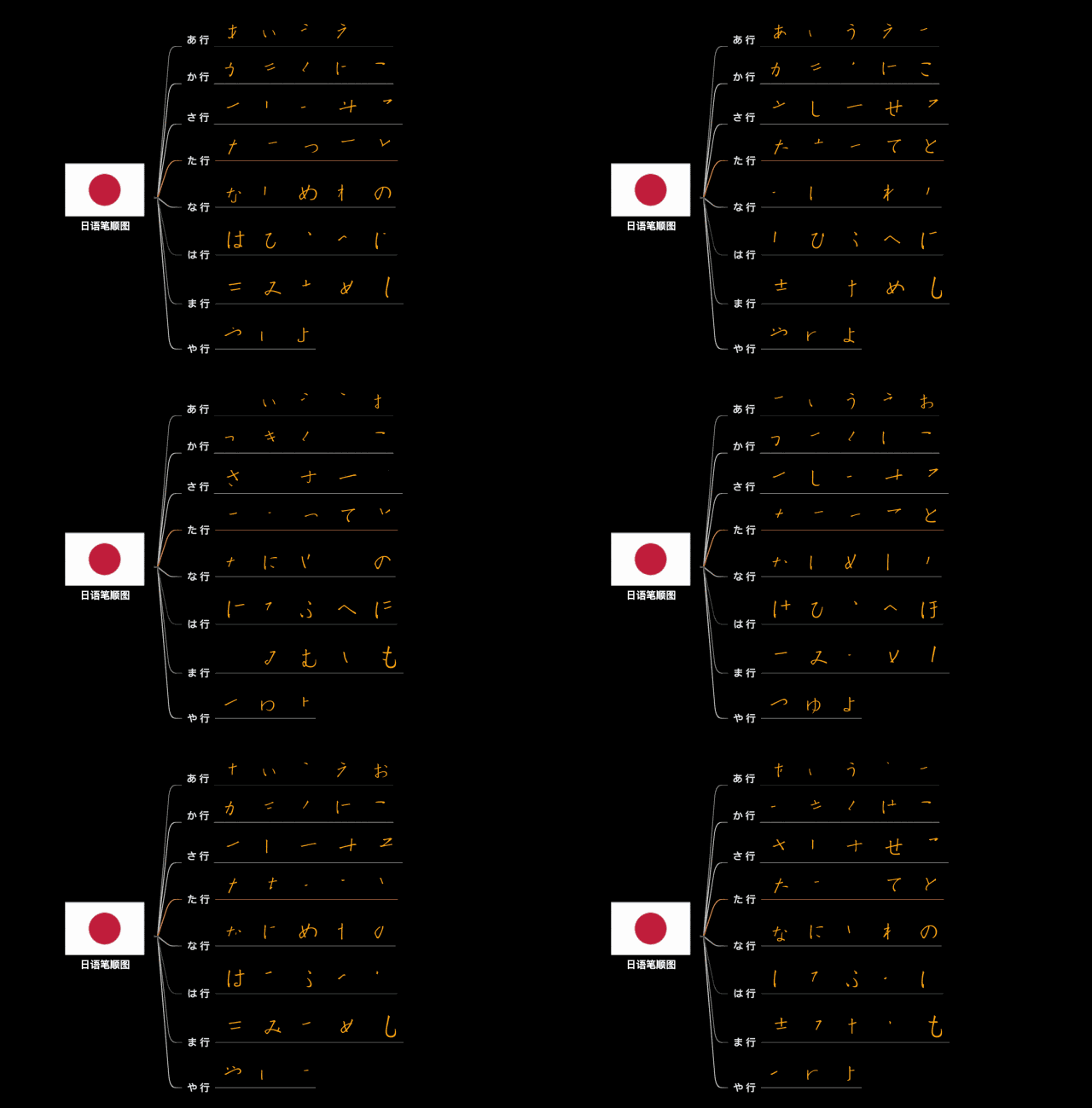
Note: XMind user @Mr Wong’s map puts “Japanese stroke order” at the centre with a flag, branches to each hiragana row (あ行, か行, さ行 down to や行), and lists that row’s characters on each branch. Every branch hangs from one centre with no links between branches, which is what makes it a mind map rather than a knowledge graph. The original gallery image is reproduced unchanged from XMind's mind-map article.
Best Knowledge Graph Tools
| Tool | Standout Feature | Free? |
|---|---|---|
| Atlas | AI-built graphs from sources | Paid Pro |
| Obsidian | Manual links, local files | Yes |
| Roam Research | Block-level connections | No |
| TheBrain | Decades of graph building | Basic free |
| Neo4j | Full graph database | Community edition |
Table 5: For detailed reviews, see knowledge graph tools compared.
Obsidian: Local Files and Manual Links
Obsidian is strongest when you want a local Markdown vault and you are willing to create links yourself. Its graph view is useful after you have many linked notes, but the graph depends on the links you add.
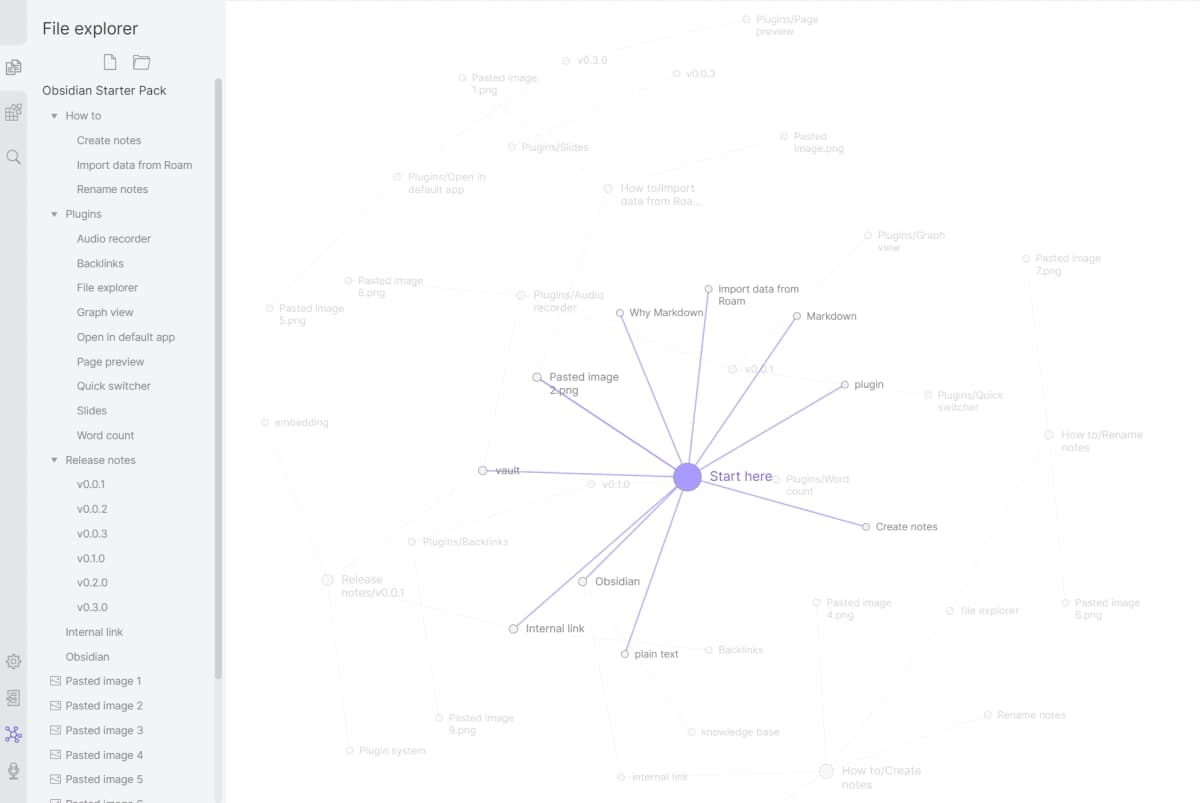
The Obsidian graph makes manually linked notes visible; the layout reflects the links in that vault. Source: Obsidian Graph View help.
Roam Research: Block-Level Thinking
Roam Research is strongest when you think in daily notes and blocks. It is less about a polished visual map and more about linked fragments that build up over time.
Logseq: Open-Source Outliner Graph
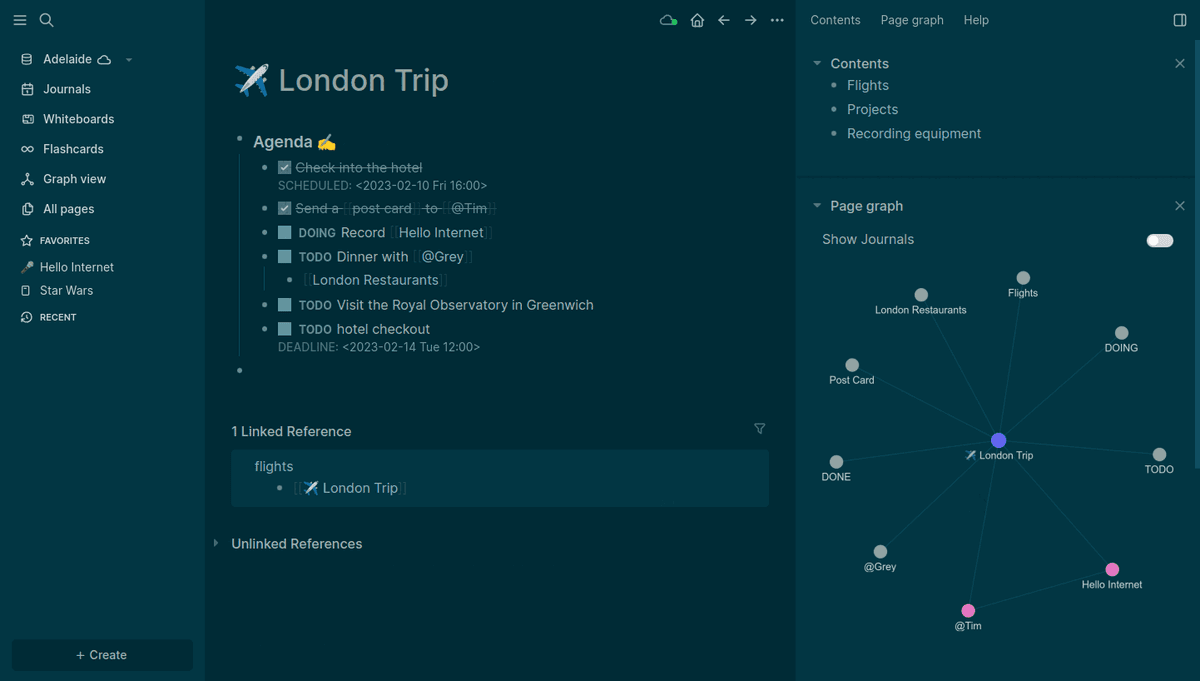
Logseq is a good fit if you want an open-source outliner with backlinks and graph views. Like Roam, it rewards users who already like bullet-based notes.
TheBrain: Mature Visual Graph
TheBrain is built around visual linking and has a long history in graph-style personal knowledge work. It is a better fit for people who want to browse a visual network directly than for people who want AI to build the graph from sources.
Choose a mind map or knowledge graph
For students studying course material: Start with mind maps. They match how most courses are taught and are quick to review. Use mind mapping tools like XMind, MindNode, or Coggle. For exam-specific strategies, see our guide to mind mapping for exam prep.
For researchers reviewing literature: Use knowledge graphs. Papers, claims, methods, and datasets rarely fit one clean tree. Atlas or other knowledge graph tools handle those links better.
For writers organizing ideas: Start with a mind map for the first outline. Move to a graph if the draft depends on many sources.
For professionals managing complex projects: Knowledge graphs are better for people, risks, and project links. Mind maps still work for task breakdowns.
For anyone building a long-term knowledge base: Use a knowledge graph. New information can connect to older notes, so the graph becomes more useful over time. Check out connected notes apps for tools that support this.
The Convergence
The line between mind maps and knowledge graphs is getting blurrier. Mind-mapping tools like Miro and Coggle now suggest links with AI. Graph tools are also getting easier to use. Atlas sits between the two because it creates a visual map from source material.
What matters isn't the label. What matters is whether the tool helps you see relationships in your information that you wouldn't see otherwise. If a mind map does that for your use case, use a mind map. If you need something more connected, a knowledge graph will serve you better.
Match the tool to your time horizon
Tool Choice in Practice
The tool category you pick depends partly on what you are trying to remember and partly on how you think.
Mind-map tools include MindMeister, Coggle, Miro, and XMind. They use trees rooted at one topic. They fit brainstorms, lecture notes, and project outlines.
Graph tools include Obsidian, Logseq, Roam Research, and Capacities. They fit long-term notes where the same idea appears in many places. The graph view is the visual layer, and note links are the structure.
Hybrid tools include Atlas, Heptabase, and Scrintal. They offer a canvas while you think and a graph for later lookup.
When Each Format Pays Off
Mind maps pay off for a 90-minute brainstorm, a one-page topic summary, or a presentation outline. The map is usually read once or twice and then archived.
Knowledge graphs pay off for long projects. Examples include an 18-month research project, a growing reference library, or a team wiki. The graph matters when the same concept appears in many places.
The common mistake is a time-horizon mismatch. A knowledge graph is too much setup for a one-session brainstorm. A mind map becomes cluttered when it has to carry years of reference material.
Build a source-grounded Knowledge Map
Upload papers and inspect the source passage behind each graph connection.