
Atlas vs Roam Research in 2026 | In-Depth Comparison
Atlas is a visual research workspace. Roam Research is a networked outliner with bidirectional links. Compare source maps, citations, graphs, and price.
- Byline

Summary
Use Atlas for citation-grounded research synthesis. Use Roam Research for networked outlining and bidirectional daily notes.
The updated comparison covers citation grounding, Knowledge Maps, markdown migration, block graphs, daily notes, and context reuse.
Atlas traces claims to source passages, while Roam Research links blocks across a networked outliner.
Roam Research can remain the daily notes graph while Atlas handles source libraries that need auditable answers.
Note: We make Atlas and have a stake in this comparison. The tables name Roam Research's stronger workflows, and the final section explains when we would choose it.

Atlas

Build a cited synthesis from your papers
Upload research papers, compare their claims, and inspect cited passages.
Quick verdict
Atlas is a visual research workspace for people who need to understand a body of papers. Think thesis, treatment decision, purchase teardown, or literature review.
Roam Research is a networked-notes outliner. It is built around bullet notes, two-way links, block references, daily notes, and a graph view.
Both tools touch a researcher's daily work. The difference is what happens after the first answer. Atlas maps papers, shows project clusters, and grounds answers in passages. Roam's note graph gives power users a durable structure for their own writing. If you need to defend the answers, Atlas earns the comparison through maps, cited reasoning, and source context.
Use Roam when the graph should grow from blocks you write each day. Use Atlas when a bounded source set must become maps and cited answers. Our guide to connected-notes apps covers the broader note-linking category.
How we compared Atlas and Roam Research
This comparison uses 7 criteria: citation grounding, paper maps, block links, daily notes, graph boundaries, source handling, and pricing. Roam wins when the job is daily outlining or block-level linking. Atlas wins when source-heavy work needs an answer trail you can inspect.
Roam's graph view is stronger for scanning a persistent web of authored pages. Roam's export also gives you several backup formats. Roam's collaboration model supports unlimited collaborators on Pro.
Where Obsidian, Notion, Logseq, and Tana fit
Roam comparisons often pull in 4 adjacent tools. Obsidian is the closest option when local markdown files, plugins, and backlinks matter. Logseq is the open-source outliner alternative for block references and daily journals.
Notion centers on databases, sharing, and project pages. Tana is a structured outliner built around nodes and supertags. Google NotebookLM handles source chat inside notebooks.
The adjacent tools clarify the choice. Obsidian and Logseq compete most directly with Roam's note graph. Notion covers a broader workspace habit, while Tana adds structured nodes and supertags. NotebookLM overlaps with Atlas on source Q&A.
Atlas belongs in this comparison when uploaded sources need visual structure, cited answers, and a coherent project context.
How is Atlas different?
Roam Research and Atlas both help with reading and reasoning over sources. They differ on 3 points that decide whether the output is easy to defend.
| Atlas | Roam Research |
|---|---|
| Grounds claims in source passages and explains the link. | Relies on links and notes the user creates. |
| Builds a Knowledge Map for each paper. | Does not ship a native per-paper map. |
| Treats PDFs, web pages, notes, and cited sources as the project base. | Treats user-authored pages and blocks as the graph base. |
| Keeps sources, citations, Knowledge Maps, and a Semantic Map inside one project. | Builds a page and block graph. |
| Bidirectional block links are not the main primitive. ✗ | Native bidirectional links are a core strength. ✓ |
| Daily notes are not the main capture surface. ✗ | Daily notes are a native strength. ✓ |
| Costs $20/mo Pro after the evaluation sample. | Costs $15/mo Pro or $500 Believer. |
Table 1: Atlas and Roam Research compared on source evidence, maps, linked blocks, daily notes, and current paid plans.
Visual maps for papers and projects
Atlas builds 2 visual maps as you read. A Knowledge Map turns one paper into a map of claims, evidence, and definitions. You see the paper's spine first, then click into the passages that support it.
A Semantic Map shows the whole project as topic clusters. It makes a large source set navigable as a corpus.
"It's like an ultimate GPT. I can finally see what I've read." Kyle Lao, CEO & Co-founder of MenSC Labs
Roam Research does not have a per-paper claim map or a project-level topic map. If you have tried to recover a paper you read weeks ago, the Knowledge Map is the surface that pays for itself first.
Visual maps make a body of papers legible at a glance. The knowledge graph tools guide explains the distinction between source-derived maps and linked-note graphs.
Inspectable support for every claim
The hardest citation failure occurs when a model places a source beside a claim that the passage cannot support. Atlas renders each answer with the claim, passage, and a short explanation of the connection. You can click into the source paragraph and read the highlighted sentences in context.
Atlas tracks this with the H/V ratio. It measures generated sentences whose citation fails a passage-level re-check. Atlas targets H/V < 0.1 on the citation-grounding benchmark. We publish the method in our verifiable AI research guide.
Roam blocks can include links or citations. They do not generate the same claim-to-passage explanation. Casual notes may not need that trace. A thesis sentence, brief paragraph, or treatment summary often does.
Project-scoped research context
Roam Research organizes pages and blocks inside a persistent graph. Links can span daily notes, topic pages, and references throughout that graph. Its official homepage describes the product as a place to organize research for the long haul.
Atlas uses a narrower boundary. Sources, notes, chats, Knowledge Maps, Semantic Maps, summaries, and citations share context inside one project. A separate project keeps unrelated evidence isolated.
That scope is useful when a medical review should not inherit material from a purchase decision. The research paper organizer guide shows how to define that boundary.
The difference is the context boundary. Roam connects authored blocks across a personal graph. Atlas keeps sources, notes, chats, Knowledge Maps, Semantic Maps, and citations inside a bounded project. Project-scoped context keeps the answer grounded in the sources chosen for that question.
Comparing Atlas and Roam Research
Atlas and Roam Research live in different categories. Atlas is for source-heavy research. Roam is for networked notes and daily outlining.
Roam is broader as a personal knowledge tool. Atlas is deeper at the citation surface. The sections below compare paper maps, project maps, cited answers, annotations, and context boundaries.
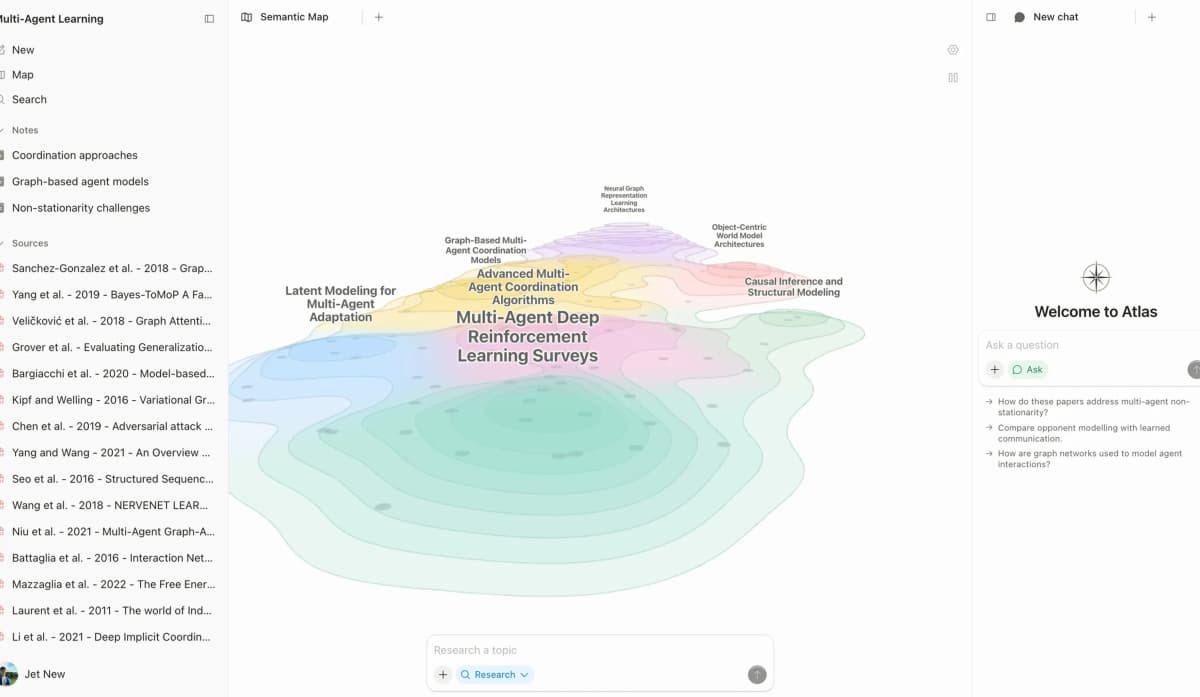
Atlas Semantic Map supports project navigation by showing sources and notes clustered on one canvas.
The screenshot shows source cards distributed across a shared canvas, with connecting lines and topic labels making relationships visible. The map supports project navigation in 3 steps: scan a cluster, select a source, and return to the cited material behind that research thread.
Paper deconstruction with Knowledge Maps
The Knowledge Map is Atlas's per-paper surface. It turns a paper into an argument map. Node text stays faithful to the source. Breadcrumbs let you move from the main thesis to a specific paragraph.
Our research-paper synthesis guide shows how that map supports a written review.
| Atlas | Roam Research |
|---|---|
| Multi-level argument structure ✓ | Outliner blocks per paper with bidirectional links |
| Labeled relations (motivates, causes, enables) ✓ | ✗ |
| Faithful-to-source node text ✓ | ✗ |
| Hierarchical breadcrumbs ✓ | ✗ |
| ✗ | Networked-thought outliner with bidirectional links ✓. Strong linking without built-in citation grounding |
Table 2: Knowledge Map coverage compared with Roam Research's linked-block outliner.
Good to know: The bottom row belongs to Roam Research. Atlas does not ship that surface. The Knowledge Map's payoff is recovering a paper's argument three weeks after you first read it, when topic chips alone are no longer enough.
Project view with Semantic Maps
The Semantic Map is Atlas's project surface. It places sources, notes, chats, and citations into topic clusters. You can view the same project from a new angle without uploading it again. See the mind-map from documents workflow for a concrete use.
| Atlas | Roam Research |
|---|---|
| Spatial embedding of sources + notes + chats ✓ | Graph view across all blocks |
| Auto-labeled topic clusters ✓ | ✗ |
| Topic-angle re-projection ✓ | ✗ |
| Topic-angle re-projection inside one project ✓ | ✗ |
| ✗ | Block-reference transclusion and queries ✓. Strong retrieval without a source reasoning trace |
Table 3: Semantic Map coverage compared with Roam Research's page-and-block graph.
Good to know: Roam Research's strength on that row is genuine. If your work depends on it, that's the boundary. The Semantic Map's payoff is when 200 papers stop being a folder and start being a corpus you can re-project under different topic angles without re-reading.
Citation-grounded answers
Atlas answers show the claim, supporting passage, and a short reason for the connection. You can jump to the source paragraph and check the reasoning. The AI citation-analysis guide provides a fuller evidence checklist.
| Atlas | Roam Research |
|---|---|
| Claim-source-justification triples ✓ | ✗ |
| Reasoning traces (why this passage supports this claim) ✓ | ✗ |
| Jump-to-source with passage highlight ✓ | ✗ |
| H/V ratio < 0.1 benchmark published ✓ | ✗ |
| ✗ | Daily-notes workflow with Roam queries ✓. Strong capture without a claim-level support trace |
Table 4: Citation-grounding surfaces compared with Roam Research's manual source links.
Good to know: Both tools can hold citations. Atlas also explains why a passage supports a claim. Everyday notes may not need that trace. A thesis sentence or brief paragraph often does.
Literature-grounded annotations
Atlas annotates each paper on ingest. Citations inside the paper become objects you can inspect. When the cited source is open access, Atlas can pull the relevant passage.
This shows how a paper builds its argument across sources before you write a literature review.
| Atlas | Roam Research |
|---|---|
| Auto-annotate on ingest ✓ | Manual block notes per source |
| Multi-citation synthesis (how citations build the argument) ✓ | ✗ |
| Resolve cited sources (open-access) ✓ | ✗ |
| Exact passage / page / paragraph anchors ✓ | ✗ |
| ✗ | Plugin ecosystem (roam/js) ✓. Broad extensibility with grounding dependent on the extension |
Table 5: Literature annotation surfaces compared with notes and extensions in Roam Research.
Good to know: These annotations resolve citations inside the paper you are reading. When a cited source is open-access, Atlas pulls in the cited passage. That makes the citation chain visible.
Project-scoped context
Atlas keeps citations, notes, Knowledge Maps, Semantic Maps, and chats inside one project. Roam keeps pages and blocks inside a persistent graph. Both preserve context, but they draw the boundary differently.
| Atlas | Roam Research |
|---|---|
| Project-scoped research context ✓ | Persistent block graph ✓ |
| Sources + notes + maps + chats share one project ✓ | Pages + blocks share one graph ✓ |
| Separate projects isolate unrelated evidence ✓ | Links can span pages throughout the graph ✓ |
| Research sources must be added to the relevant project | Authored notes stay available in the graph |
| ✗ | Unlimited collaborators on Pro ✓. Shared graphs without built-in source verification |
Table 6: Project context compared with Roam Research's persistent personal graph.
Good to know: Atlas isolates context by research project. Roam lets links span the graph. Choose the boundary that matches your research workflow.
Price comparison
Atlas is a paid product. There is no perpetual no-cost plan. You get a short evaluation sample: 10 sources and 5 lifetime AI chats. After that, Atlas Pro is $20/mo or $204/yr with unlimited sources and unlimited AI chats. You are paying for research surfaces Roam does not have.
Roam's current official pricing lists Pro at $15/month or $165/year after a 31-day trial. The Believer plan is $500 for 5 years. Pro includes unlimited private or public graphs, unlimited collaborators, API access, and apps.
| Atlas | Roam Research |
|---|---|
| Free: ✗ (evaluation sample only: 10 sources · 5 lifetime AI chats) | Trial: 31 days for first-time subscribers, with no permanent free hosted plan |
| Pro: $20/mo or $204/yr · unlimited sources · unlimited AI chats · all features ✓ | Paid: Pro $15/mo or $165/yr ✓. Lower subscription price with a linked-note feature set |
| Pro unlocks Knowledge Map, Semantic Map, claim-source-justification, and project-scoped context ✓ | Believer $500 / 5 years |
Table 7: Current Atlas and Roam Research paid plans, checked against official product pricing in August 2026.
When to choose Atlas or Roam Research
- Want paper structure deconstructed multi-level? Go with Atlas. (Knowledge Map)
- Want answers that explain how each citation justifies the claim? Go with Atlas. (claim-source-justification)
- Want sources, notes, maps, and chats kept inside one research boundary? Go with Atlas. (project-scoped context)
- Want daily notes with two-way block links? Go with Roam Research.
- Want block references, live transclusion, and Roam queries? Go with Roam Research.
- Tied: capturing networked thoughts in a daily-notes workflow. Both work fine, and Roam is designed for that exact pattern. The wedge only opens up once you're building a corpus you'll return to.
A practical two-tool workflow
Use Roam for the graph you write by hand, including daily pages, block references, backlinks, and query blocks. Use Atlas for the corpus you need to inspect, including papers, source passages, claims, citations, and project maps.
That split keeps Roam's outliner strength intact while moving evidence-heavy work into a tool built around source checks.
A practical split keeps daily notes, quick thoughts, meeting fragments, and uncited links in Roam. Put PDFs, saved web sources, paper notes, and recurring research questions in Atlas.
Roam stays focused on capture. Atlas receives the sources where accuracy matters.
Run the comparison on one paper-heavy project that already exists in Roam. The Atlas evaluation sample gives you 10 sources and 5 lifetime AI chats for this test. Keep the corpus in Roam unless Atlas produces a clearer source trail.
Use 4 checks before moving more than one project.
- Source trail: Ask Atlas a question whose answer you already trust from Roam. Open the cited passage. If the support is incomplete, keep the project small and refine the source set.
- Recovery speed: Pick a paper you read weeks ago. Find its main argument in Roam, then follow the Knowledge Map to the same point. Count how much searching each route requires.
- Writing handoff: Take one paragraph from a draft or memo. Compare Roam's bullets and backlinks with Atlas's claim, passage, and reason. Use the route that makes citation review easier.
- Habit cost: Roam wins if a source workspace would disrupt daily capture. Atlas wins if the source trail saves more time than upload and review cost. A narrow split can preserve both strengths.
Do not judge the split on a clean demo project. Use a messy one. Include an old PDF, a half-written Roam page, one source you disagree with, and one question where the answer matters.
That is the real workload. A tool that only works on tidy notes will struggle when the project gets large, dated, and politically or academically sensitive. That test also exposes whether your real bottleneck is capture, recall, source checking, or final writing. Use the result to set the boundary.
Recommendations by user type
Persona recommendations
- PhD researchers: Atlas. In years 1-2, Knowledge Maps help you recover papers without re-reading. In years 3-4, cited answers help anchor thesis claims to passages.
- Students doing literature reviews: Atlas. Use it for a thesis, dissertation, or literature review. The Knowledge Map helps during reading, and the project keeps prior sources easy to find.
- Knowledge workers: Atlas when reading PDFs and citing them is the core work. Roam when daily notes and linked bullets are the main need.
- High-stakes personal research: Atlas. Medical, legal, major-purchase, and deep self-study projects need answers you can defend. Roam is a fine starting tool, but Atlas is stronger once citations matter.
Roam is the better fit when the core habit is daily outlining, block references, and building a personal graph from your own writing. Atlas is the better fit when papers need source-derived Knowledge Maps, a project Semantic Map, and cited answers.
Roam helps you think through notes you author. Atlas helps you inspect arguments you need to cite. The personal knowledge-management guide covers how to separate those layers.
Migrating from Roam Research
Roam migration depends on 3 parts: pages, blocks, and links. Pages are titled documents made of bullets. Blocks are the individual bullets. Links are the [[wikilink]] and ((block-ref)) syntax that wires the graph together.
Use the Markdown export for Atlas. Roam's official export documentation also lists JSON for individual pages. Graph backups support Markdown, JSON, EDN, and MessagePack.
Atlas can import .md files as notes inside a project. Re-upload the PDFs as sources, because the PDFs are what Atlas can turn into Knowledge Maps.
What migrates cleanly:
- Page prose and nested bullets.
- Page-to-page link text.
- Block content as indented markdown.
- Reading lists and source references.
What does not migrate cleanly:
- Live
((block-uid))transclusion. - Roam query blocks.
- Sidebar state.
- Custom roam/js plugins and CSS.
- The Roam graph as a live graph.
You keep the prose and reading list, while the block-reference topology stays in Roam. If the graph is mostly daily notes, keep Roam.
If it is mostly paper notes and reading lists, import the Markdown into Atlas and rebuild the research structure with Knowledge Maps. The research notes organization guide offers a project taxonomy for that move.
Worked example with 8 papers
The worked example uses 8 papers on one sub-topic. The output is a short literature-review section with citations.
In Roam, the usual pattern is one page per paper. You write nested bullets as you read. You tag claims with #claim or #evidence. You link them to theme pages with [[wikilinks]]. When you write, you pull linked bullets into a new page and assemble the paragraph by hand.
That work reflects your reading. The cost is recall. If you forgot to tag a key claim three weeks ago, it may sit orphaned in its paper page.
In Atlas, the same 8 papers go into a project as sources. Atlas creates a Knowledge Map for each paper. Claims, evidence, definitions, and relations become a map drawn from the source. The Semantic Map then clusters the papers by topic.
When you ask for a draft section, each answer comes back with a claim, a passage, and a reason. You click into the source paragraph, read the highlighted text, and accept or rewrite. Drafting shifts toward editorial review. Your attention stays on synthesis quality and source support.
The difference shows up during revision. In Roam, you may ask, "Where did I put that bullet?" You search tags, backlinks, and paper pages until the right note appears.
In Atlas, you ask, "Does this source support the sentence?" You inspect the passage and either keep, qualify, or remove the claim. Both questions matter. Atlas is built around the second one.
When Roam Research is the right call
Roam Research is the better choice when any of these requirements defines your workflow:
- Block-first outlining: Nested bullets and live
((block-ref))workflows are Roam's native model. Atlas organizes projects, sources, notes, and Knowledge Maps instead. - Daily notes: Roam's daily page supports journaling, meeting minutes, fleeting notes, and quick links. Atlas does not have a daily-notes primitive.
- Block queries: Roam queries can retrieve blocks by structure and tags across the graph. Atlas has no equivalent block query language.
- An established graph: A Roam graph that already supports recall and writing should remain intact. Add Atlas only for a bounded source corpus that needs cited reasoning.
- Shared graph conventions: Roam Pro includes unlimited collaborators. Existing conventions for tags, daily review, and project pages have social value that a migration cannot recreate automatically.
The official Roam documentation covers page links, block references, exports, local graphs, encrypted graphs, and sharing. Check those workflows against your actual graph before moving any material.
Common objections and edge cases
"I want bidirectional links inside Atlas the way Roam has them." Atlas does not ship freeform [[wikilink]] and ((block-ref)) primitives. That gap reflects a different product model. If bidirectional links are the main surface you need, Roam remains the right call.
"Can I keep Roam for daily notes and use Atlas for the research corpus?" That is the cleanest two-tool setup. Roam captures daily notes and outliner thinking. Atlas hosts PDFs, Knowledge Maps, a Semantic Map, cited-answer chat, and project-scoped source context. There is no live integration, so shared material has to be exported and re-imported.
"What happens to my block references if I migrate the markdown export into Atlas?" Roam's ((block-uid)) references resolve to the text of the referenced block. Atlas receives the bullet text without a live pointer back to Roam.
Page [[wikilinks]] are preserved as text. You keep the prose and reading list, then rebuild the research structure with Knowledge Maps and the Semantic Map.
"Should I move everything?" No. Move projects where source checks matter and leave daily capture alone. A personal Roam graph can remain the place for raw thought and journals. Atlas is the stronger home for a bounded research corpus with documents you need to cite, compare, and revisit.
Roam supports hosted graphs, local graphs, and end-to-end encrypted graphs according to its privacy and security FAQ. Those modes carry different sync, API, and collaboration behavior. Atlas is cloud based, so a local-only requirement is a firm reason to keep the relevant material in Roam.
Atlas
Build a cited synthesis from your papers
Upload research papers, compare their claims, and inspect cited passages.
Frequently Asked Questions
Atlas explains how each citation supports its claim. An answer shows the claim, supporting passage, and a short explanation of the connection. You can open the source paragraph and read the highlighted sentences in context. Roam can hold source links and citations that you add to blocks. It does not generate the same claim-level support trace. That distinction matters when a thesis sentence, brief paragraph, or treatment summary must withstand review. Our verifiable AI research methodology explains the check.