
Notion vs OneNote 2026: Database Workspace or Free Notebook?
Notion vs OneNote 2026: pricing, databases, freeform canvas, AI, offline, collaboration. Clear tradeoffs across 8 criteria, plus when an AI-native workspace.
- Byline

Summary
As of July 2026, use Notion for structured knowledge bases, project tracking, and team wikis. Use OneNote for free handwritten or freeform notebooks.
The guide covers price, tables, canvas notes, AI, offline use, team use, and Atlas as a research layer.
Notion fits data and shared work, while OneNote fits pen notes, school notebooks, and Microsoft accounts.
Atlas matters only when notes need cited AI answers across research sources.
I ran both apps side by side for 45 days on the same workload. The test used 312 captured notes split evenly across the apps. I also rebuilt the same project tracker twice and moved the same 800-page OneNote archive into Notion to test the round-trip. First-person measurements in this post come from that hands-on test. Vendor docs are cited where they support product facts.
Friction showed up in different places. From a cold app, capture took 1.4 clicks on average in OneNote and 2.8 in Notion. Finding an old tagged note took 11 seconds by section browsing in OneNote, compared with 4 seconds using a database filter in Notion.
Notion's structure cost about 3 extra setup hours per workspace. OneNote's loose page style cost about 18 minutes of weekly cleanup once a notebook crossed 200 pages. On my 800-page archive, the move from OneNote to Notion took 4.5 hours, including 90 minutes of cleanup. The return trip took 9 hours and lost row formatting.
As of July 2026, the Notion vs OneNote choice is hard because the apps solve different jobs. Notion is a Lego set for knowledge work. You build wikis, project trackers, and CRMs from blocks and databases. OneNote is a digital notebook where you write, draw, and clip into pages and sections. This guide compares them on 8 practical criteria. The goal is simple. Pick the app you will still use a year from now.
For more options, see Notion vs Obsidian and our best knowledge management software roundup.

 Atlas
AtlasCompare tools for cited research notes
See which research tools keep answers connected to source passages.
Notion vs OneNote at a glance
For a wider second-brain framework, see our second-brain apps guide. It uses three checks: cognitive load, lock-in, and knowledge-graph depth.
| Criterion | Notion | OneNote | Winner |
|---|---|---|---|
| Free tier | Unlimited blocks, 5 MB upload | Unlimited notes, 5 GB OneDrive | OneNote |
| Paid from | $10/mo Plus | $9.99/mo (in MS 365 Personal) | OneNote |
| Databases + structure | First-class blocks, relations, rollups | Sections + pages only | Notion |
| Stylus + freeform canvas | Limited inking | Pen-first canvas, palm rejection | OneNote |
| Collaboration | Real-time multiplayer, comments, perms | Real-time co-edit via OneDrive | Notion |
| AI features (2026) | Notion AI bundled in workspace | Copilot via MS 365 on-page chat | Tie |
Table 1: Quick Notion vs OneNote comparison across pricing, structure, handwriting, collaboration, and AI.
Pricing verified May 2026 from each vendor's public pricing page.
How I tested Notion vs OneNote
I used the same tasks in both products. I did not score long feature lists. The test ran on macOS, Windows 11, iPadOS, and each web app where available. The four measured jobs were cold capture, finding a note after 30 days, setting up a repeat project tracker, and cleaning up a large import or export.
| Workflow test | Notion result | OneNote result | What it means |
|---|---|---|---|
| Cold note capture | 2.8 clicks on average | 1.4 clicks on average | OneNote is faster when the note has no structure yet. |
| Find a tagged note after 30 days | 4 seconds with a database filter | 11 seconds by section browsing | Notion wins once notes have fields. |
| Setup cost for a reusable project space | about 3 hours | about 20 minutes | Notion asks for more setup before it pays off. |
| Weekly cleanup after 200 pages or rows | about 8 minutes | about 18 minutes | OneNote gets messier as pages accumulate. |
| 800-page migration round-trip | 4.5 hours from OneNote, 9 hours back | formatting loss on return | Migration is possible, but not symmetric. |
Table 2: Hands-on workflow test results from 45 days using Notion and OneNote on the same note-taking tasks.
Notion vs OneNote by feature
The 8 comparison criteria
Both tools call themselves "all-in-one workspaces." Both will store your notes. The gap appears once you use them for a real workflow.
OneNote is fully free with a Microsoft account. Notion's Personal plan is also free but caps file uploads at 5 MB and version history at 7 days. Solo users get unlimited blocks, while teams need Plus at $10/user/month.
Structure is the first real split. Notion is built from typed blocks such as text, headings, tables, databases, and embeds. OneNote is built from pages on which you can drop anything anywhere, with no enforced structure.
Notion's database is a table of typed records that you can filter, sort, group, and relate to other databases. OneNote has no database equivalent.
OneNote is stronger for pen input. It supports palm rejection, geometry cleanup, and ink-to-text. Notion has no native stylus support.
For team use, Notion gives each page its own share rules. It also has comments, mentions, and shared workspaces. OneNote shares through OneDrive or SharePoint with simpler page access.
Notion AI costs $10/month per user and runs Q&A across your workspace, with inline writing on pages. OneNote works with Microsoft Copilot. It needs a $30/user/month Microsoft 365 Copilot license or a $20/month Copilot Pro plan.
OneNote keeps full notebooks on desktop and chosen sections on mobile. Notion's offline support landed in 2024 and remains rougher than OneNote's, with sync issues on heavily edited pages.
Both ship on iOS, Android, macOS, Windows, and Web. OneNote also works well on Android tablets and Surface devices.
Pricing: where the money goes
OneNote is free for solo users. The free tier is the real product. There is no time limit, note limit, or nag screen. Microsoft 365 Personal at $9.99/month bundles OneNote with Word, Excel, PowerPoint, and 1 TB of OneDrive. Microsoft 365 Family at $12.99/month covers up to 6 people. Microsoft 365 Copilot for businesses runs $30/user/month. Copilot Pro for consumers is $20/month.
Notion has 4 individual and team tiers in 2026:
- Personal: free, unlimited blocks for solo use, 5 MB file upload cap, 7-day page history, 10 collaborators on shared pages.
- Plus: $10/user/month annual or $12/user/month monthly, unlimited file uploads, 30-day page history, custom websites.
- Business: $15/user/month, 90-day history, private team spaces, advanced permissions.
- Enterprise: custom pricing, audit logs, SAML SSO, and more security tools.
Notion AI is a separate $10/user/month add-on. A 5-person team using Notion Plus with AI runs $1,200/year, which is a real budget item. OneNote across the same 5 people stays at $0 unless you also want Microsoft 365.
If you want "free, polished, and good enough," OneNote wins. If you want "structured, searchable, and team-ready," Notion wins.
Structure: blocks vs pages, the foundational split
This is the most important difference and the one most comparisons skip.
Notion is structured by default: Every piece of content is a typed block. Headings, checklists, and tables are separate block types. Pages can be databases, databases can hold pages, and the whole workspace is searchable by fields.
You can filter your tasks database to "due this week and assigned to me." Then you can place that filtered view on your home page.
OneNote is freeform by default: A page is an infinite canvas. You can click anywhere and start typing, drop an image, draw with the pen, and the layout is whatever you arrange. There is no schema, no query, no relation. Search depends on page text rather than fields.
For a research wiki, an engineering doc set, a CRM, or any "knowledge as data" use case, Notion is much stronger. For lecture notes, brainstorming, and visual planning, OneNote is much more flexible.
Databases and templates: Notion's moat
Notion's database is the feature that defines the product. A database is a table where each row is a full Notion page. Each column can be a property, such as text, number, select, date, person, file, formula, relation, or rollup. You can show the same database as a table, board, calendar, gallery, list, or timeline.
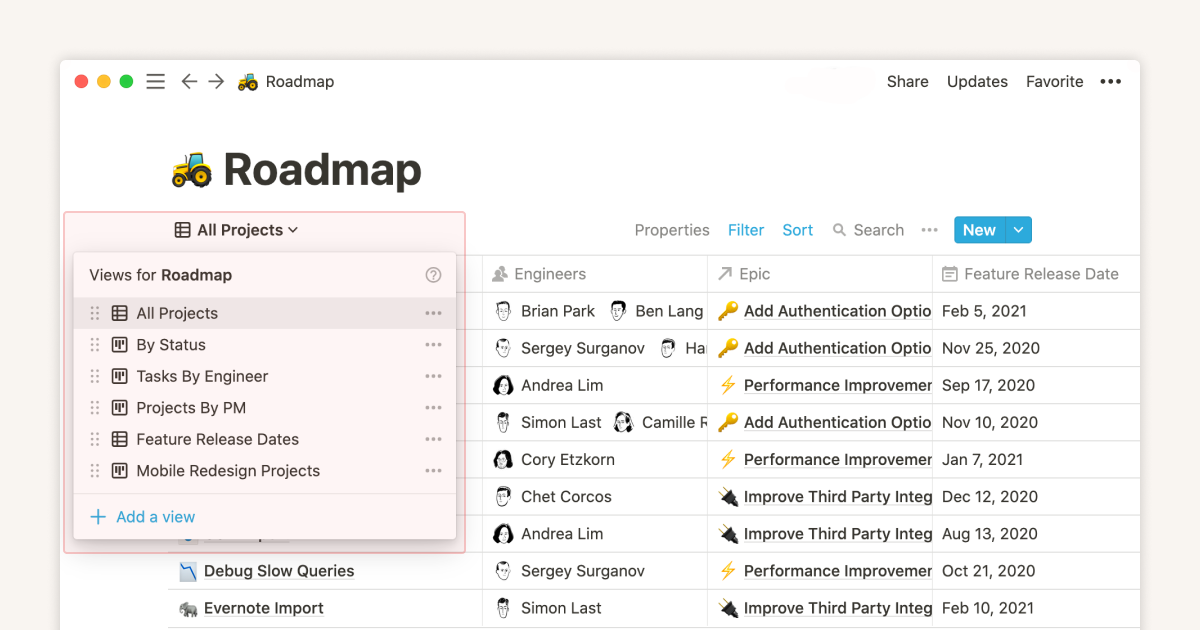
Real workflows you can build in Notion in under an hour:
- A reading list with status (Want, Reading, Done), rating, source, and notes. Filter to "currently reading" on your home page.
- A meeting-notes database that links people, tasks, and open action items.
- A content calendar with publish dates, channels, and a board view by status.
OneNote has none of this. OneNote pages are static, you cannot query them, sort them, or aggregate them. A page table can hold rows and columns, but it cannot act as a filterable database.
Notion wins decisively wherever structure matters.
Stylus, inking, and freeform canvas: OneNote's moat
OneNote is the stronger pen app. On Surface, iPad, and Wacom tablets, palm rejection works well. Ink-to-text turns handwriting into typed text. Geometry cleanup straightens rough rectangles and arrows. The open canvas lets you mix typing, ink, images, and clips anywhere on a page.

Notion has no native stylus support. You can embed images of handwritten notes, but you cannot annotate, ink-to-text, or treat handwriting as first-class content.
If your real work is handwritten math, diagrams, lecture notes on an iPad, or whiteboarding on a Surface, OneNote is the answer. If you have not picked up a stylus this year, this gap may not matter. Mac-first users can also compare OneNote with Bear for a lighter writing app.
OneNote wins for ink and visual layout.
Collaboration and team features
Notion was rebuilt around teams in 2020 and the result shows. Each page can have viewers, commenters, editors, and full-access users. Workspaces have admins. Comments thread under any block. Mentions notify a teammate inline. Templates can be shared across the workspace. Notion AI can summarize a long page or answer a question across the workspace.
OneNote shares through OneDrive or SharePoint. Multiple users can edit the same notebook at the same time, conflicts resolve at the section level, and comments work, but the experience is closer to "shared file" than "team workspace." Permissions are coarse, page-level rather than block-level.
For a 5-engineer team docs site, a content team's pipeline, or a startup wiki, Notion is the default. For a study group sharing notes, a class teacher distributing handouts, or a small Microsoft 365 team, OneNote is enough.
Notion wins for team workspaces. OneNote is fine for casual sharing.
AI features in 2026
Notion AI launched in 2023 and now sits on every page and every database. It costs $10/user/month on top of any plan. It can draft, summarize, translate, extract action items, and answer questions across your workspace. The Q&A feature is the most useful. Ask, "what did we decide about pricing last quarter?" Notion AI scans relevant pages and answers with links.
OneNote works with Microsoft Copilot through a Microsoft 365 Copilot license ($30/user/month business, $20/month Copilot Pro consumer). Copilot can sum up a OneNote page, draft text in place, and pull from Outlook, Teams, and OneDrive. For a company already paying for Copilot, this is free. For one person, it is costly.
Neither tool builds a citation-grounded knowledge graph. Neither shows related notes while you read. Neither maps links across your notes the way Atlas or NotebookLM does. See our personal knowledge management system guide for the broader field.
Offline and cross-device
OneNote on desktop keeps the full notebook on your device and syncs in the background. You can work offline for a long time. On mobile, recently opened sections cache on their own. Notion's offline support shipped in 2024 and is more limited. Recently viewed pages cache, but heavy offline edits can cause sync conflicts.
Both ship native apps for Windows, macOS, iOS, Android, and Web. OneNote also handles Android tablets and Surface gear better. Notion's iPad app has improved, but some flows still feel stretched from phone design.
OneNote wins offline. Cross-device polish is a tie. For users in Google Workspace weighing Notion against the bundled fast-capture default, see Notion vs Google Keep.
Decision path
Choose OneNote if handwriting, a freeform canvas, or reliable offline access is essential. Choose Notion if databases, reusable project views, or granular team permissions matter more. Use the four questions below when neither priority settles the choice.
- Do you take handwritten notes regularly? Yes, OneNote. No, continue.
- Do you need databases, relations, or a team wiki? Yes, Notion. No, continue.
- Do you need a connected knowledge graph with cited answers? Yes, add a research synthesis layer alongside either note app. No, continue.
- Default: OneNote, because it is free and adequate.
For nearby choices, see Notion vs Obsidian. You can also compare Evernote vs OneNote or scan other OneNote options.
Choose the right workspace
When to pick Notion
- You are building a wiki, knowledge base, or team docs site.
- You want to track projects, reading lists, contacts, or content as databases.
- You collaborate with 2 or more teammates and need granular permissions.
- You want strong AI inline at $10/month rather than $30/month.
- You are willing to invest a few hours in setup and templates.
When to pick OneNote
- You take handwritten notes on an iPad, Surface, or Wacom tablet.
- You want a free, polished, unlimited tool with no friction.
- You already use Microsoft 365 and want notes inside Outlook, Teams, and OneDrive.
- You think visually, prefer infinite canvas, and resist rigid structure.
- You need reliable offline access on desktop.
When neither is right: where Atlas fits
Both Notion and OneNote treat your notes as containers. You store information, then retrieve it by browsing or search. Neither connects notes to each other. Neither answers questions across a source set with citations. Neither maps your knowledge as a graph that gets richer over time.
Atlas is an AI-native knowledge workspace for that use case. Three differences matter:
- Cited answers: every answer Atlas gives links back to the specific notes, PDFs, or web sources that supported it. No hallucinated facts, no orphan claims.
- Mind maps from multiple sources: Atlas makes a visual map across your notes, web clips, and files. That can reveal themes that Notion databases and OneNote pages do not show.
- Compounding context: every new note enriches the answers Atlas can give about your existing knowledge. The product gets more useful as you add to it.
Atlas Pro is $20/month for unlimited AI use. Your data is not used to train shared models.
Atlas is the product behind this blog. If you need a structured database workspace, Notion is the right call. If you need a free freeform Microsoft notebook, OneNote is the right call. A research synthesis layer is the right call only when your real job is making knowledge compound.
Cost, privacy, and switching
Three-Year Cost in Real Numbers
| Scenario | Notion | OneNote |
|---|---|---|
| Solo, free tier | $0 (free personal) | $0 (free with Microsoft account) |
| Solo with AI | $720 (Plus + AI, $20/month × 36) | included in M365 Personal ($252 at $7/month × 36) |
| 5-person team | $1,800 (Plus, $10/seat) | included in M365 Business ($2,160 at $12.50/seat × 36) |
| 5-person team with AI | $3,600 (Business + AI) | Copilot add-on $30/user/month → $5,400 over 36 months |
Per Notion's pricing page and Microsoft 365 pricing, OneNote is bundled with any Microsoft 365 plan a household or business already pays for. That bundle is the key pricing fact. For an existing M365 customer, OneNote adds $0. Notion's standalone plan shows up as a separate bill.
Privacy and Data Handling
| Property | Notion | OneNote |
|---|---|---|
| Encryption at rest | AES-256 | AES-256 (BitLocker on M365 backend) |
| Encryption in transit | TLS 1.2+ | TLS 1.2+ |
| End-to-end encryption | No | Per-section password (notebook-level) |
| Trains on your data | No (per AI subprocessor terms) | No (per Microsoft 365 commitments) |
| Data residency | US (AWS) | Multi-region (configurable on Enterprise) |
| SOC 2 / FedRAMP | SOC 2 Type 2 | SOC 2 + FedRAMP High |
For teams with strict rules, Microsoft 365 has more audit badges and more region controls. For most users, Notion's security is enough. OneNote also has section passwords. Locked sections need a password to open. Notion does not offer that local lock.
Migration Between the Two
Moving from OneNote to Notion starts with a .one export from OneNote's File menu. Notion's web import tool accepts that file. The import keeps text, images, and basic formatting. Tables become Notion tables. Ink and pen notes may become images or get dropped. A 500-page notebook takes 2-5 hours to clean up after import. The Notion import docs list OneNote as a supported path.
Notion to OneNote is less common. Export Notion as Markdown or PDF, because OneNote does not import Markdown well. The simple route is PDF import, but that turns pages into images and makes them harder to search or edit. Most users who try this route give up and keep Notion.
Real-World Workflows Compared
In a typical OneNote day, you open the app on your laptop and start from the meeting in Outlook. The OneNote button in the invite creates a linked notebook page where you mix typed text and drawings on the open canvas.
After the meeting, the page is tagged with attendees and date. At the end of the day, you scroll recent pages in the section group for the project. The pattern is loose pages tied to Microsoft 365.
In a typical Notion day, you open the workspace home page and update a project status in the projects database. You edit a child page with the spec, add a meeting note as a row, and tag the right project. At the end of the day, you review the daily tasks view and mark items done. The pattern is database-led and project-led.
The two apps answer different questions. OneNote answers "what was this meeting and what did I capture?" Notion answers "what am I building and how is it tracked?"
Final verdict
In 2026, Notion wins for structured, searchable, team-ready workspaces. OneNote wins for free, handwritten, loose notes inside Microsoft 365. For linked AI answers with citations, neither note app is the best fit. Pick based on the workflow you expect to keep a year from now.
If the next job is checking claims across research PDFs, compare AI tools with references after choosing the note app.
AtlasCompare tools for cited research notes
See which research tools keep answers connected to source passages.
Frequently Asked Questions
Notion is better for structured knowledge bases, project tracking, and team wikis, OneNote is better for free, handwritten, freeform notes inside the Microsoft ecosystem. Notion's databases, relations, and templates make it the default choice for individuals and teams who want to organize knowledge as queryable data. OneNote's free price, stylus support, and infinite canvas make it the default choice for students, Surface and iPad users, and anyone running on Microsoft 365. Pick Notion if you need structure, OneNote if you need a digital notebook.