
Evernote vs OneNote (2026): Which Note App Wins for You?
Evernote vs OneNote 2026: pricing, search, OCR, web clipper, offline, cross-device sync. Clear tradeoffs across 8 criteria, plus when an AI-native workspace.
- Byline

Summary
Use OneNote for free free-form capture inside Microsoft workflows. Use Evernote for web clipping, OCR search, and research archiving.
The updated comparison covers pricing, search, OCR, web clipping, offline access, migration, cross-device sync, and AI features.
OneNote fits school notes and Microsoft accounts, while Evernote fits large archives with PDFs, images, tags, and clipped pages.
Atlas enters when notes need automatic connections, knowledge graphs, and cited AI answers across source material.
The Evernote vs OneNote debate has run for over a decade. In 2026, the answer is more subtle than the old "Evernote for power users, OneNote for free users" line. Evernote has stabilized under Bending Spoons. OneNote has absorbed Copilot AI. Both now compete with newer AI-native workspaces.
By Jet New.
My rule is simple. Choose the app by the note you create most often. Web clips and old receipts point to Evernote. Class notes, meeting pages, and handwriting point to OneNote. Research synthesis points outside both tools. I also treat Evernote Home as a real workflow advantage because OneNote has no matching daily dashboard. The comparison below stress-tests that rule across price, free limits, search, clipping, offline access, migration, AI, and daily use.
Four findings from this review stand out.
- Input surface predicts fit better than feature count. Clips, ink, and cited source work each point to a different tool.
- The hidden OneNote gap is not storage. It is the lack of a daily dashboard for review.
- The hidden Evernote gap is not capture. It is that the free plan ends before most real archives start.
- Neither app owns synthesis. Both store knowledge as pages. Neither links claims back to the source passage or lets you query across documents with cited answers.
For more options, see our best note-taking apps roundup. For team knowledge bases, use the best knowledge management software guide.

 Atlas
AtlasBuild a personal knowledge management system
Choose a PKM method, tool, and review habit for reusable connected notes.
Quick verdict
For a deeper framework across second-brain apps, see our second-brain apps guide. It looks at ease of use, lock-in, and link depth.
| Criterion | Evernote | OneNote | Winner |
|---|---|---|---|
| Free tier | 50 notes, 1 notebook, 250 MB upload | Unlimited notes, 5 GB OneDrive | OneNote |
| Paid from | $14.99/mo Personal | $9.99/mo (in MS 365 Personal) | OneNote |
| Web clipper | Industry-leading, full-page + simplified | Basic, saves URL + selection | Evernote |
| OCR + search | OCR on images and PDFs (paid) | OCR on images only | Evernote |
| Freeform canvas + stylus | Limited inking, structured pages | Pen-first canvas, palm rejection | OneNote |
| AI features (2026) | Evernote AI for cleanup/summarize | Copilot via MS 365 on-page chat | OneNote |
Table 1: Evernote vs OneNote across six everyday note-taking criteria.
Pricing verified May 2026 from each vendor's public pricing page.
Evernote and OneNote compared
The two apps look similar at first. Both organize notes into notebooks. Both sync across devices. Both let you attach files. The differences show up only when you stress them with a real workflow.
Evernote's free plan now caps you at 50 notes and 1 notebook. Treat it as a trial. OneNote is fully free, with no note count limit and unlimited notebooks. If your budget is zero, this single fact decides the comparison.
Evernote searches typed text, attached PDFs, image OCR, and handwriting in one query. OneNote searches the same surfaces, but it can slow down once notebooks get large. It can also miss some ink that Evernote catches.
Evernote's Web Clipper is the better capture tool. It saves simplified articles, full pages, screenshots, and bookmarks with cleaner formatting. OneNote's clipper works, but output is messier on script-heavy pages.
OneNote treats each page as a freeform canvas. You can drop text anywhere, ink over it, draw a diagram, and arrange the page visually. Evernote is a structured note editor. Pages flow from top to bottom.
OneNote is stronger for pen work. It supports palm rejection, drawing cleanup, and ink-to-text. Evernote supports handwriting, but it treats ink more like an image with OCR on top.
Both sync across iOS, Android, Windows, macOS, and Web. Evernote sync is faster on the paid plan. OneNote sync can lag on large, image-heavy notebooks.
Evernote Personal lets you mark mobile notebooks for offline use. The free tier does not. OneNote caches full notebooks on desktop and recently opened sections on mobile.
Evernote AI summarizes and drafts on paid plans. OneNote works with Microsoft Copilot if you carry a Copilot license. Neither app builds a connected knowledge graph the way Atlas, Notion AI, or NotebookLM do.
Core feature differences
Price and free plans
OneNote costs nothing for an individual. Sign up for a free Microsoft account and install OneNote on your devices. You get unlimited notebooks, unlimited pages, OCR on images, ink-to-text, and 5 GB of OneDrive storage. Microsoft 365 Personal at $9.99/month raises OneDrive storage to 1 TB and adds Office. Microsoft 365 Family at $12.99/month covers up to 6 people. Microsoft 365 Copilot, the AI add-on, is $30/user/month for businesses and $20/month for consumers as Copilot Pro.
Evernote has 3 main tiers. Free gives you 50 notes, 1 notebook, and 60 MB of monthly uploads. Personal is about $14.99/month and adds 250 notebooks, 10 GB of monthly uploads, offline mobile, and AI features. Professional is about $17.99/month and adds 500 notebooks, 20 GB of monthly uploads, geographic search, and advanced export. Annual billing lowers the monthly rate. The Free tier is now too limited for most active users. It functions as a trial rather than a sustainable working tier.
If you are choosing on price alone, OneNote wins by $179.88/year.
Search and OCR
Search is what separates a note app from a filing cabinet. Evernote has spent 17 years tuning it. A query for "tax 2023 receipt" can return a photo receipt, a PDF tax return, and a typed note with "tax" in the title. OCR runs server-side, so search works the same on every device.
OneNote's search covers the same surfaces: typed text, ink, and image OCR. Past 5,000 to 10,000 pages, search can start to lag. OCR on mobile is also less complete than desktop OCR. For most users this never matters. For archives with years of clips and receipts, it does.
For search depth and consistency, Evernote has the edge. OneNote is still good enough for typical school, meeting, and project notes.
Web clipping
Evernote Web Clipper is available for Chrome, Safari, Firefox, and Edge. The 5 capture modes are Article, Simplified Article, Full Page, Bookmark, and Screenshot. It tags and files the clip on save. It also attaches the source URL, so the saved page still has context months later.
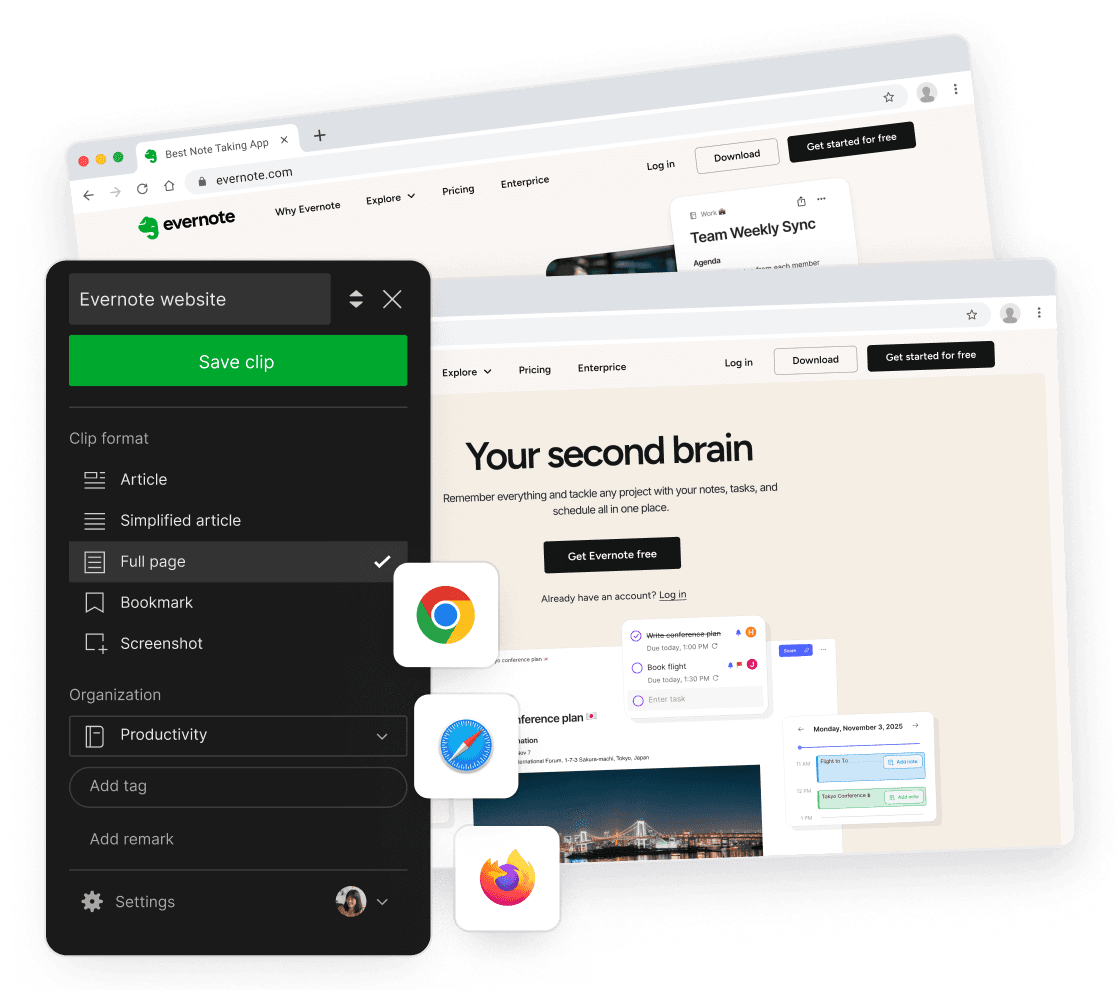
Evernote's official Web Clipper image shows why its capture flow is still the reference point. Clip format, notebook, tags, and save action sit in one browser panel. Image source is Evernote Web Clipper.
OneNote's Web Clipper, Send to OneNote, has improved. It still produces uneven results on modern pages with heavy scripts. Full-page captures can arrive as one image instead of selectable text. If you research from the web more than a few times a week, the Evernote clipper is worth real money.
For web clipping, Evernote is the clear pick.
Canvas and stylus
OneNote treats every page like a sheet of paper. You can click anywhere and start typing, the text becomes a draggable block. You can drop an image, draw an arrow with the pen, and write a label next to it. There is no "right" structure, which suits diagram-heavy lecture notes, brainstorming, and visual planning.
Stylus support is the reason many people choose OneNote. Palm rejection works on Surface, iPad, and Wacom tablets. Ink-to-text converts handwritten English, Japanese, and dozens of other languages to typed text in 1 click. Drawing cleanup turns rough boxes and circles into clean forms.
Evernote allows pen input but stores it as an image. You can search inside it with OCR. You cannot reflow it, turn it into text in place, or treat it as structured content.
For inking and visual layout, OneNote is stronger.
Sync and offline access
Both apps sync across Windows, macOS, iOS, Android, and Web. Evernote's sync is one of its most mature systems. On the Personal plan, it usually pushes changes within seconds. OneNote sync runs through OneDrive. It is usually fast, but huge notebooks with many images can stall.
Offline behavior favors OneNote on desktop, where the full notebook caches by default. On mobile, OneNote keeps recent sections. Evernote Personal lets you choose which notebooks stay offline on mobile.
Offline access is close. OneNote has the cleaner desktop story. Evernote has the cleaner mobile control if you pay.
AI features
Evernote AI launched in 2024. It now offers note summaries, draft generation, and formatting help on the Personal and Professional plans. It is useful for "summarize this 2,000-word meeting note." It does not link your notes together or show what relates to what you are reading.
OneNote integrates with Microsoft Copilot if you have a Microsoft 365 Copilot license. That is $30/user/month for business or $20/month for Copilot Pro consumer. Copilot can summarize a page, draft text inline, and pull from your wider Microsoft Graph. It fits company workflows better than solo note budgets.
Neither builds a knowledge graph, neither cites sources back to the original note, neither maps connections across notebooks. If those capabilities matter, use the Atlas section below as a separate fit check.
Who should choose each app?
Choose Evernote when
- You clip articles, receipts, and PDFs constantly and need them findable years later.
- You search across thousands of notes and need OCR on images and handwriting.
- You work on Linux or ChromeOS, where OneNote feels weaker.
- You are willing to pay roughly $120-$180/year for a polished, focused capture-and-search workflow.
Choose OneNote when
- You already use Microsoft 365, Teams, or Outlook and want notes inside that ecosystem.
- You want a free, unlimited tool for class notes, meeting notes, or freeform brainstorming.
- You take handwritten notes on a Surface, iPad, or Wacom tablet.
- You think visually and want to drop content anywhere on the page.
Pros and cons
Evernote pros are capture, search, and archive depth. It handles clipped pages, scanned files, images, and tags with less setup. Its cons are price, a tight free tier, and weaker handwriting.
OneNote pros are cost, handwriting, canvas freedom, and Microsoft 365 fit. Its cons are weaker web clipping, messier export, and search that slows noticeably in large notebooks.
The shared strength is broad platform support. The shared weakness is that both still act like notebooks. They store notes better than they connect them.
Student recommendation
Most students should start with OneNote. It is free, works well with a stylus, and fits lecture notes, lab sketches, and meeting pages. It also keeps class notebooks close to Outlook, Teams, and Word.
Evernote makes sense for students who collect many web sources. It can be worth paying for after the free tier runs out if you clip articles, save PDFs, and find old sources later.
Workflow fit and alternatives
Five-workflow stress test
Here is the practical test I use for note apps. It asks what breaks first when the notebook becomes part of daily work.
| Workflow | Better pick | Why |
|---|---|---|
| Capture a web source in under 10 seconds | Evernote | The clipper keeps format, tags, and source URL together. |
| Find a receipt from two years ago | Evernote | OCR search is more reliable across images and PDFs. |
| Take lecture notes with a pen | OneNote | The canvas, ink, and page layout are built for handwriting. |
| Share meeting notes inside a Microsoft team | OneNote | Outlook, Teams, and OneDrive keep the page in the same work stack. |
| Ask questions across many saved sources | Neither | This is where a cited AI workspace is a better fit. |
Table 2: Five workflow scenarios showing which tool handles each task better and why.
Alternatives to both apps
Google Keep is better for quick lists and reminders. It is not a deep notebook.
Notion is better when notes need databases, project pages, and shared team spaces. It is heavier than either Evernote or OneNote.
Obsidian is better when you want local Markdown files and links between notes. It takes more setup.
Home screen and daily review
Evernote and OneNote also differ in what you see first. Evernote Home is a dashboard with widgets for notes, tasks, calendar items, pinned notes, scratch pads, and shortcuts. That makes Evernote better when you want a single morning launch screen for capture and review.
OneNote opens into the notebook, section, or page structure. There is no equivalent all-up dashboard. That is good if you already know where today's note lives. It is weaker if you want the app to tell you what to resume next.
Use this as a tie-breaker. Evernote is better for inbox-style review. OneNote is better for project pages.
Four-step decision path
Use this 4-step tree:
- Do you need OCR search across images and handwriting at scale? Yes, Evernote. No, continue.
- Do you live in Microsoft 365? Yes, OneNote. No, continue.
- Do you need a connected graph with cited answers? Yes, compare a separate research workspace after choosing the capture app. No, continue.
- Default: OneNote, because it is free and adequate for typical note workflows.
For nearby choices, see Notion vs Obsidian, Evernote alternatives, and OneNote alternatives.
Costs, privacy, and migration
Three-year cost
| Scenario | Evernote | OneNote |
|---|---|---|
| Solo, free tier | $0 (50-note cap) | $0 (free with Microsoft account) |
| Solo paid | $599 (Personal, $14.99/mo × 36) | included in M365 Personal ($252 at $7/month × 36) |
| 5-person team | $4,500 (Teams, $24.99/seat × 36) | included in M365 Business Standard ($2,160 at $12.50/seat × 36) |
| With AI | Professional $959/3yr | Copilot $30/user/month → $1,080 over 36 months |
Table 3: Three-year cost comparison for solo and team scenarios based on May 2026 published pricing.
Per Evernote's pricing page and Microsoft 365 pricing, OneNote is cheaper at every tier. It is effectively free for any household or business already paying for Microsoft 365. Evernote's free tier has a 50-note cap and 250 MB monthly upload limit, so most active users outgrow it quickly.
Privacy and data handling
| Property | Evernote | OneNote |
|---|---|---|
| Encryption at rest | AES-256 | AES-256 (BitLocker on M365) |
| End-to-end encryption | Per-note encryption (selected text) | Per-section password |
| Trains on your data | No (per Evernote privacy) | No (per Microsoft 365 commitments) |
| Data residency | EU + US | Multi-region (configurable on Enterprise) |
| SOC 2 / FedRAMP | SOC 2 | SOC 2 + FedRAMP High |
Table 4: Privacy and data handling summary based on each vendor's published policies as of May 2026.
For regulated teams, Microsoft 365 has the broader trust story. It includes FedRAMP High and can offer HIPAA BAA cover for OneNote. Evernote lets you lock selected text inside a note. OneNote lets you password-protect a section. Both help with sensitive fields. Neither app gives full end-to-end encryption for all notes by default.
Migration between the apps
Evernote to OneNote is the easier direction. Microsoft offered a free Importer for Evernote until 2020. That tool is now retired, but third-party importers like Evernote2OneNote still work. Notes keep format and tags, and PDFs become attachments. Expect a 5,000-note archive to need 4-8 hours of cleanup after import.
OneNote to Evernote is less common and more painful. OneNote exports as proprietary .one files, which Evernote does not import. The realistic path is to copy pages one at a time or export to PDF and import the PDFs as attachments. The PDF route keeps a record but loses editability.
Real-world workflows
An Evernote workday
A typical Evernote day starts in the desktop app or web clipper. You save a research article from a browser tab via the Evernote Web Clipper extension, then tag it with the relevant project. The page is OCR-indexed within minutes. A search for "renewable" returns hits inside typed notes and text recognized in clipped images. At the end of the day, you scan recent notes for follow-up. The pattern is clip-heavy, OCR-driven, and archive-style.
A OneNote workday
A typical OneNote day starts in the app on your laptop. Today's meeting starts in Outlook, and the OneNote button creates a linked notebook page. You capture notes on the freeform canvas, with text and drawings placed wherever they make sense. After the meeting, the page carries the attendees and date. At the end of the day, you scroll recent pages in the project section group. The pattern is freeform and Microsoft 365-centered.
The two apps answer different questions. Evernote answers "what did I save and what does it say?" OneNote answers "what was this meeting and what did I capture?"
Final verdict
In 2026, OneNote is the default winner on price and breadth. Evernote wins on search and clipping depth. Neither is the best fit if your real need is connected, AI-grounded knowledge.
Choose the app for the workflow you expect to keep a year from now. Clip-heavy research goes to Evernote. Freeform Microsoft notes go to OneNote. If your notes need cited answers across sources, use a separate knowledge workflow comparison.
AtlasBuild a personal knowledge management system
Choose a PKM method, tool, and review habit for reusable connected notes.
Frequently Asked Questions
OneNote is better for free, freeform note capture inside the Microsoft ecosystem, Evernote is better for fast cross-platform search and web clipping if you accept its Personal plan at around $14.99/month. OneNote ships free with any Microsoft account and supports unlimited pages organized into notebooks, sections, and pages, with stylus and typing on equal footing. Evernote's strength is OCR-indexed search across PDFs, images, and handwritten notes, plus the strongest web clipper in the category. Pick OneNote for school and Microsoft 365 workflows, Evernote for research-heavy archiving.