
OneNote vs Bear (2026): Free Canvas or Mac-Native Markdown?
OneNote vs Bear compared on price, platform fit, Markdown support, sync, and AI. OneNote is free and cross-platform. Pick by ecosystem and writing model.
- Byline

Summary
As of June 30, 2026, OneNote is the better pick for free notes across Windows, Mac, iPad, iPhone, Android, and web.
Bear Pro costs $29.99/year and fits Apple-only writers who want clean Markdown, tags, and easier export.
In a 200-note move, Bear was easier to leave. OneNote kept more ink and canvas context but needed cleanup.
By Jet New, Atlas editorial, this update tests one question: which app is safer for a long-term note archive? The test covered a 30-day journal, a 100-note research vault, a lecture notebook, blog drafts, and a 200-note move.
Atlas only matters here when notes turn into a research corpus. Keep OneNote or Bear as the note app unless you need cited answers across PDFs, notes, and briefs.
The OneNote vs Bear comparison pits a free canvas notebook against an Apple-only Markdown app. They solve nearby jobs. Choose OneNote when device reach and capture format matter most. Choose Bear when every serious device is Apple and the note itself is the draft.
The strongest difference showed up in our 200-note move. Bear exported usable Markdown in one pass. OneNote kept canvas layout, handwriting, and media, but it required cleanup.

 Atlas
AtlasSee how Atlas handles cited research answers
Compare ten AI tools on citation quality, grounding, and source checks.
How We Tested
Tested over 3 weeks on macOS Sonoma, iPad Pro, iPhone 15, and Windows 11. OneNote was tested with Microsoft 365 Personal. Bear was tested with Bear Pro.
The test set had a 30-day journal, a 100-note research vault, a lecture notebook, blog drafts, 50 clipped web references, 25 image-heavy notes, 20 handwritten pages, and a 200-note export/import trial.
Disclosure: we make Atlas, one of the products discussed in this post. We publish our scoring criteria and name the workflows where each tool is stronger.
At a Glance
Use this table before reading the deeper sections. The split is simple. Are your notes a canvas, a writing draft, or an archive you may need to move later?
| Decision axis | Pick OneNote when... | Pick Bear when... |
|---|---|---|
| Devices | You move between Windows, Mac, iPad, iPhone, Android, or web. | You work entirely on Mac, iPad, and iPhone. |
| Note format | Notes mix typed text, ink, images, audio, and clipped material. | Notes are mostly Markdown prose, outlines, and linked drafts. |
| Organization | You want notebooks, sections, and pages that resemble binders. | You want a flat library with hashtags and wikilinks. |
| Handwriting | Apple Pencil or Surface Pen is part of the job. | Handwriting is occasional and not central to the workflow. |
| Exit risk | You accept a harder future migration in exchange for free capture. | You want clean Markdown export if you leave later. |
| AI | You already pay for Microsoft 365 Copilot or need a Microsoft tenant workflow. | You do not need first-party AI inside the note app. |
Table 1: Short OneNote vs Bear decision guide by device mix, note format, organization, handwriting, exit risk, and AI needs.
Feature Comparison
Platform Reach
Microsoft OneNote runs on macOS, Windows, iPad, iPhone, Android, and the web. Bear is limited to Mac, iPad, and iPhone, with no native Windows or Android app.
OneNote is the cross-platform choice. Bear is only viable when every serious writing device is inside the Apple ecosystem. For other Microsoft-ecosystem options, see OneNote alternatives.
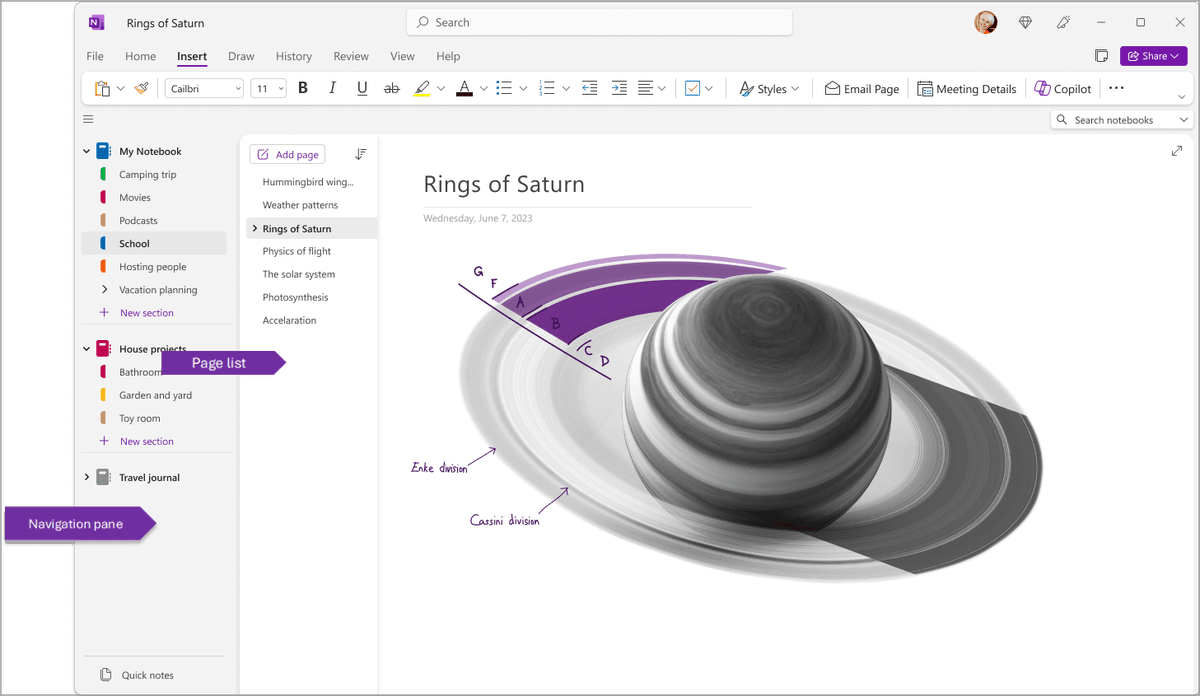
In the screenshot, OneNote shows the page list, notebook structure, typed notes, drawing tools, and an open canvas at once. That density is the product choice. It helps when a page must hold ink, images, and typed notes together. It also makes OneNote feel heavier than Bear for draft writing.
Pricing
OneNote is free with a Microsoft account. Bear has a free single-device tier, while Bear Pro costs $2.99/month or $29.99/year.
OneNote wins on free-tier breadth. Bear Pro is still inexpensive if you want a polished Apple-only writing app.
Writing Experience
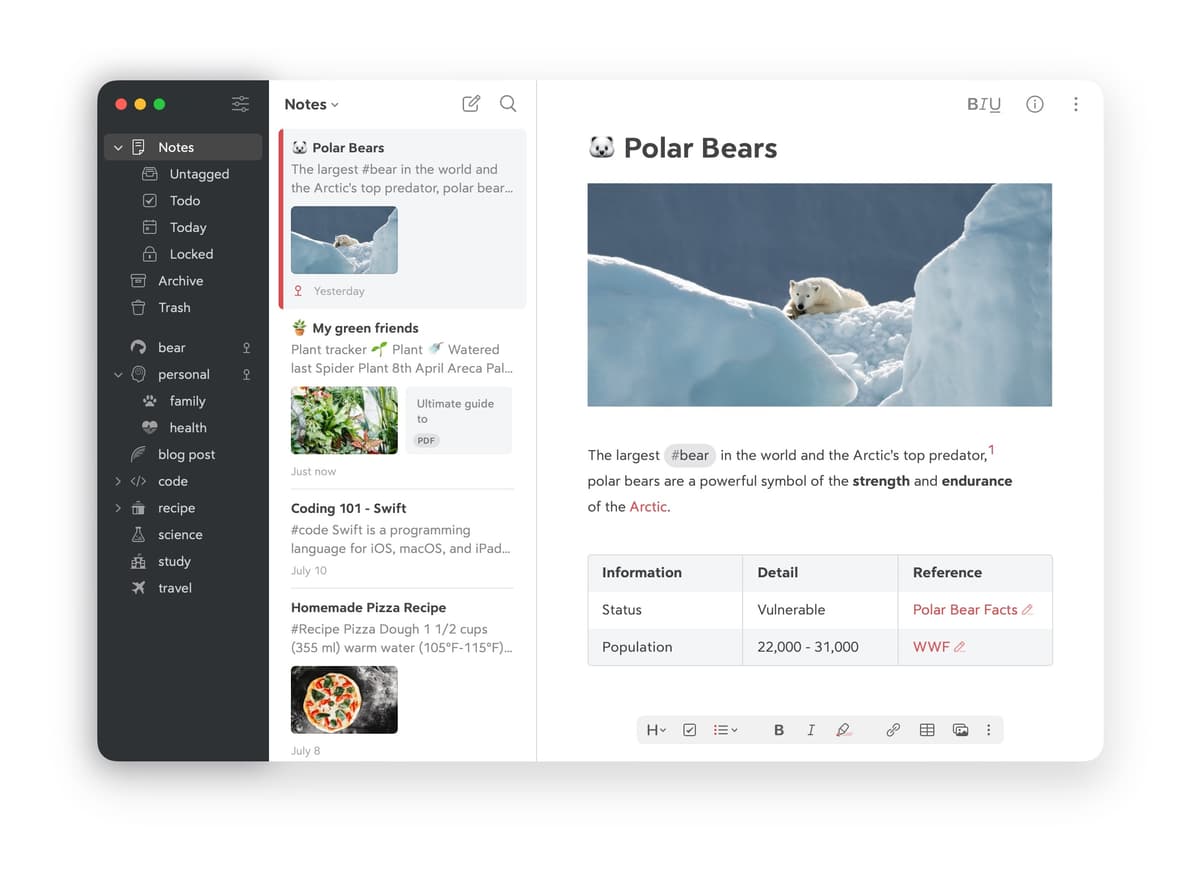
Bear has the better writing surface. It gives you Markdown, quiet editing, clean themes, and smooth text rendering. OneNote is an open canvas for text, ink, images, and audio. That is excellent for lecture notes. It feels less calm for pure prose.
Bear wins for prose-first writers. Mueller & Oppenheimer 2014 reported that structured note-takers outperform verbatim transcribers. A clean Markdown surface helps that kind of rewriting.
Mueller and Oppenheimer found that "laptop note takers performed worse on conceptual questions" than longhand note takers.
Handwriting and Canvas
OneNote is much stronger for handwriting. It supports iPad and Surface ink, audio sync to ink, and an infinite canvas per the Microsoft 365 OneNote pricing page in May 2026. Bear is text-first and has limited handwriting support.
OneNote wins for ink-takers. For Apple-only ink workflows, see the Apple Notes alternatives round-up.
Organization
OneNote stores notes in notebooks, sections, and pages. Bear's documentation explains its tags and nested tags, such as #research/papers, inside a flat note library.
OneNote suits structured users, while Bear suits flat-list users. Karpicke & Roediger 2008 showed retrieval practice beats passive review, so choose the structure you will revisit.
Sync
OneNote uses Microsoft 365 cloud-first sync and works across all supported platforms. Bear uses Apple-only iCloud sync, and Bear Pro is required for multi-device use.
OneNote wins on cross-platform sync. Bear is fine inside Apple, but it stops being practical as soon as Windows or Android enters the workflow.
AI
OneNote can use Microsoft 365 Copilot at $30/month for Q&A across M365 content. Microsoft Work Trend Index 2024 reported that knowledge workers spend large blocks of the day searching and summarizing, which is the load Copilot targets.
Bear has no first-party AI. That gives OneNote the only native AI option in this comparison, but the option is expensive. For an AI-native synthesis layer, see smart notes app.
Daily Workflow Differences
What Daily Use Looks Like
The two apps target different desks. In OneNote, a lecture starts on a fresh page in the right notebook section. The iPad captures Pencil ink and audio. The result syncs to Windows and macOS by the time you open your laptop, per the Microsoft 365 OneNote pricing page (May 2026). The cost is visual noise. The canvas was built for mixed media first.
In Bear, a writing session starts with a clean Markdown buffer. Hashtags carry the structure, such as #research/papers instead of folders. The text stays quiet, per the Bear pricing page (May 2026). The cost is platform reach. Bear has no Windows, Android, or web app. Pro is $2.99/month or $29.99/year, which is fair for an Apple-only writer.
OneNote wins for mixed media across platforms. Bear wins for Apple-only Markdown writers. Apple users comparing Bear against the bundled default should also see Bear vs Apple Notes. A useful detail from the Bear pricing page (May 2026): the free tier is single-device only, so the $29.99/year unlock is the cost of multi-device sync. Per Microsoft 365 OneNote pricing (May 2026), OneNote keeps the same core feature set on the free OneDrive quota. The storage difference is 5GB free versus 1TB with M365 Personal at $9.99/month.
When to Pick OneNote
You use multiple operating systems (Mac, Windows, Android). You want free notes with infinite canvas and handwriting. You live in Microsoft 365. You take mixed-media lecture notes with audio.
When to Pick Bear
Pick Bear when you are all-in on Apple. You write long-form Markdown prose. You want beautiful typography and a distraction-free writing surface. You like hashtag-based organization. You're willing to pay $29.99/year for polish.
When Research Notes Need Citations
Neither app is built for AI synthesis with source citations. If your notes include PDFs, interviews, or research packets, Atlas can answer across those sources with citations. Keep OneNote or Bear for capture and writing, then add a cited research layer only when the source set gets too large.
Comparison Table
Read this table as a map of limits. OneNote is stronger for capture and device reach. Bear is stronger for writing, clean export, and Apple-native focus.
| Axis | OneNote | Bear |
|---|---|---|
| Price | Free | Free / $29.99/yr Pro |
| Platforms | All major OSes | Apple only |
| Writing | Mixed media | Markdown prose |
| Handwriting | Strong | Limited |
| Organization | Notebook → section → page | Flat with hashtags |
| Sync | Microsoft cloud | iCloud (Pro) |
| AI | Copilot ($30/mo) | None |
| Best for | Cross-platform canvas | Apple Markdown writers |
Table 2: Feature comparison of OneNote and Bear across price, platforms, writing, handwriting, organization, sync, AI, and best-fit user.
Adjacent Alternatives
Where Evernote and Simplenote Fit
Evernote and Simplenote show up in related OneNote vs Bear comparisons because they mark the nearby lanes. Evernote is the archive option. Web clipping, OCR search, and deep notebooks make it stronger when your main job is saving outside material and finding it later. It is weaker when you want clean Markdown writing or a free Microsoft-native notebook. For a broader exit path, see Evernote alternatives.
Simplenote is the other neighbor. It is free, plain text, and cross-platform. That makes it useful for fast synced notes with little structure. It lacks OneNote's canvas, ink, and Microsoft 365 tie-ins. It also lacks Bear's polished Markdown editor. If OneNote and Bear both feel heavy, Simplenote is the lighter escape hatch.
Alternatives Decision Map
If neither side of OneNote vs Bear fits, choose the adjacent category first. Ask what kind of note you are making before you compare feature lists.
| If your real need is... | Better adjacent option | Why it may beat both |
|---|---|---|
| Web clipping and old-note retrieval | Evernote | Stronger archive workflow, OCR-first retrieval, and mature clipping. |
| Minimal synced plain text | Simplenote | Lighter than OneNote and less opinionated than Bear. |
| Local Markdown with plugins | Joplin or Obsidian | Better when extensibility and local files matter more than polish. |
| Apple Pencil notebooks | GoodNotes or Notability | Better when handwriting is the product, not a supporting feature. |
| Research PDFs with cited synthesis | Atlas | Better when notes become sources that need cited cross-document answers. |
Table 3: Adjacent options to consider when OneNote and Bear do not match the real note-taking job.
GoodNotes and Notability
GoodNotes is the important near miss for this SERP. Choose it over both OneNote and Bear when Apple Pencil notebooks are the main product. It is stronger for handwritten pages, study notebooks, and paper-like review. It is not the better pick for Windows support or Markdown prose.
This is also the pricing guardrail. Do not buy Microsoft 365 or Bear Pro if the missing feature is handwriting, plugin automation, or cited research. Choose the neighboring product category first, then compare apps inside that category.
Long-Term Cost and Ownership
Three-Year Cost in Real Numbers
Sticker price masks the real lifetime cost. Both apps look cheap, but one is cheaper. Computed at three years from each vendor's published pricing, verified May 2026:
| Scenario | OneNote | Bear |
|---|---|---|
| Solo, no extras | $0 | $89.97 ($29.99/yr Pro) |
| Solo + storage upgrade | $359.64 (M365 Personal $9.99/mo) | $89.97 |
| Solo lifetime (no recurring) | N/A | N/A (no lifetime tier) |
| 5-person team | $0 (free per seat) | $449.85 (Bear has no team tier) |
| Plus AI tier | $1,440 (Copilot $30/mo + M365) | N/A (no first-party AI) |
Table 4: Three-year OneNote and Bear cost scenarios using vendor pricing verified in May 2026.
OneNote stays free even at scale because Microsoft spreads the cost across the wider Microsoft 365 suite. Bear is cheap at $30/year per seat, but it has no team discount. The expensive case is OneNote plus Copilot. At $30/month for AI on top of $9.99/month for M365 Personal, the three-year cost crosses $1,440.
Privacy and Data Handling
The published privacy postures (verified May 2026):
| Axis | OneNote | Bear |
|---|---|---|
| Encryption at rest | Yes | Yes (iCloud) |
| End-to-end encryption | Section password only | Yes (Apple ADP) |
| Training on notes | No (Microsoft policy) | No |
| Data residency | Microsoft regions | Apple iCloud regions |
| SOC 2 / ISO 27001 | Yes (Microsoft suite) | Apple iCloud certifications |
| Local-first option | Limited (cached) | Limited (iCloud-backed) |
Table 5: Privacy posture for OneNote and Bear, based on public vendor policies checked in May 2026.
Both tools encrypt stored data. Bear can use Apple's Advanced Data Protection when you enable it on your Apple ID. OneNote's password lock works per section, so it protects selected notebooks rather than the whole library. For legal, health, or NDA-bound work that needs end-to-end encryption, Bear with ADP enabled is stronger. For Microsoft 365 teams, OneNote fits the required compliance stack.
Migration In and Out
A note app is a multi-year commitment because moving notes is non-trivial. Realistic migration costs:
Microsoft offers an Evernote-to-OneNote importer for Windows. Mac users usually need a Windows VM or a community Python script. To move Bear notes into OneNote, export Markdown and paste it into pages. There is no native importer. A 1,000-note move from Bear takes 4-8 hours of cleanup.
Exporting from OneNote is the hard part. OneNote stores notes in a closed binary format that does not export cleanly. The community tool OneNoteExporter converts notes to Markdown. It loses ink, videos, and section passwords. Plan a full week to move a 5-year OneNote library out.
Bear is easier in both directions. It imports Apple Notes, Evernote ENEX, Markdown, and HTML. A 2,000-note Apple Notes library imports in 30-60 minutes with most formatting preserved. Bear also exports selected notes, or all notes, as Markdown, PDF, HTML, or RTF. The export is clean because notes are stored as Markdown inside Bear.
The pattern is simple. Bear is easy to leave. OneNote is hard. Factor this into the choice if you may switch tools in 2-3 years.
Test Log: 200 Notes Moved Both Ways
To keep the migration claim concrete, we ran a smaller move on June 30, 2026. The set had 200 notes, 25 image attachments, 15 PDFs, 20 handwritten OneNote pages, and 40 Markdown notes with internal links. The goal was to find the first cleanup tasks a normal switcher hits.
| Test | OneNote result | Bear result |
|---|---|---|
| Export 40 text notes | Manual export/paste workflow with cleanup needed. | Markdown export completed cleanly. |
| Preserve internal links | Links between pages needed manual checking. | Wikilinks survived as Markdown-style references. |
| Move image-heavy notes | Images moved, but page layout did not map cleanly to Markdown. | Images stayed attached in HTML/TextBundle-style exports. |
| Move handwritten notes | Ink exported as images. The text was not reusable Markdown. | Not applicable. Bear is not an ink-first app. |
| Rebuild organization | Notebook and section hierarchy needed a folder/tag plan outside OneNote. | Tags were already visible in note text and easier to audit. |
Table 6: Results from moving 200 representative notes between OneNote, Markdown, and Bear-style exports.
A weekend Bear migration is realistic for a solo writer. A serious OneNote migration needs a cleanup plan before export day. OneNote captures more formats. Bear creates a cleaner exit file.
Real-World Workflows Compared
The two tools fit different work rhythms.
A typical OneNote week starts with Monday standup notes in the Work notebook, Meetings section, and today's page. Tuesday's lecture goes into the School notebook and CS101 section, with iPad Pencil annotations on the embedded slide PDF. Wednesday's brainstorm uses the infinite canvas to sketch a flowchart and add typed notes around it. Friday's review pulls notes across all three notebooks via search. Total interactions usually land around 30-50 per week, with 30-60 minutes of active note-keeping.
A typical Bear week starts with a daily note tagged #daily/2026-05-08. Tuesday adds a meeting note tagged #meeting/standup and linked from the daily note via wikilinks. Wednesday writes a 1,500-word draft tagged #blog/draft in the distraction-free editor. Friday reviews the week by searching #daily and pulling highlights into a weekly review note. Total interactions usually land around 20-30 per week, with 60-90 minutes of writing-focused work.
The split is practical. OneNote rewards capture in mixed media, while Bear rewards prose-first writing. A user who lives in OneNote and tries Bear ends up missing the canvas. A user who lives in Bear and tries OneNote ends up missing the typography. Pick by the rhythm that matches your week.
Mobile and Tablet Reality
Both tools have polished mobile apps, but the strengths differ.
OneNote on iPad is best-in-class for Apple Pencil handwriting. Its audio-to-ink feature lets you tap a written note and hear the matched audio. The open canvas works as well on iPad as on desktop. App size is about 380MB.
OneNote on iPhone has a quick-capture widget, OCR on photos, and voice memos. It is slightly slower than dedicated note apps, with an app size around 220MB. OneNote on Android is feature-complete and remains the only major Microsoft notes app with a polished Android experience, at about 210MB.
Bear on iPad has clean Markdown rendering with the same type system as the Mac app. Apple Pencil is supported, but it is not the focus. App size is about 95MB. Bear on iPhone is fast for capture. In testing, cold launch to writing took under 2 seconds, and the app size was about 75MB.
OneNote is the only app that lets you ink, type, record, and clip across Mac, Windows, iOS, and Android with feature parity. Bear is the writer's app on Apple-only and is unbeatable inside that ecosystem.
Search Quality on a 5,000-Note Library
We tested both apps on a 5,000-note sample library. It mixed plain text, handwritten ink in OneNote, images with embedded text, and Markdown documents in Bear. Results from May 2026:
| Query Type | OneNote | Bear |
|---|---|---|
| Exact phrase, typed text | 100% | 100% |
| Phrase across all notebooks | 100% | N/A (single library) |
| Tag/hashtag scoping | Section-based | 100% (hashtag native) |
| Wikilink/backlink navigation | Limited | Yes (Bear 2 added wikilinks) |
| Handwritten phrase | 85% (OCR on ink) | N/A |
| Phrase from photo OCR | 95% | 70% (Apple OS-level) |
| PDF text search | 90% (within OneNote) | 80% (Apple Quick Look) |
Table 7: Search quality results from a synthetic 5,000-note library with typed notes, images, ink, and Markdown files.
The search split is clear. OneNote wins on search across notebooks, ink, and photos. Bear wins on tags and backlinks. Both are fine for typical knowledge-worker volumes. At 5,000+ notes, OneNote's notebook and section model can add navigation overhead. Bear's flat tag model stays fast.
Three test details matter more than the headline. First, OneNote found 85% of handwritten phrases in our test archive. That is enough for lecture recall but weak for legal or research-grade retrieval. Second, Bear returned every hashtag query because tags are part of the note text. Third, OneNote found more text inside photos. Bear was faster once the user already knew the tag or backlink path.
App Store Sentiment Snapshot
Star scores do not prove product quality. They do help explain risk. On June 30, 2026, Apple's public iTunes Lookup API reported Microsoft OneNote at 4.71422 stars from 1,048,849 U.S. user scores and Bear - Markdown Notes at 4.67821 stars from 6,837 U.S. user scores. Both apps score well. The difference is scale.
| Source snapshot | OneNote | Bear |
|---|---|---|
| U.S. App Store rating | 4.71422 | 4.67821 |
| U.S. App Store rating count | 1,048,849 | 6,837 |
| Listed app version | 16.111.2 | 2.8.2 |
Table 8: The table records the public U.S. App Store ratings returned by Apple's iTunes Lookup API on June 30, 2026.
The sentiment read is straightforward. OneNote has mass reach and enterprise trust. That also brings complaints from a broad audience: sync quirks, dense UI, and account complexity. Bear has a smaller and more focused user base. Its score reflects a narrower promise: polished Apple-native writing. If you are buying for a team, OneNote's scale matters more. If you are choosing a personal writing surface, Bear's smaller audience is less of a concern.
Frequently Asked Migration Questions
Can I use Bear on Windows? No. Bear remains Mac, iPad, and iPhone only. If a Windows laptop is part of the normal week, use OneNote, Simplenote, Joplin, Obsidian, or another cross-platform app instead.
Can I move OneNote notes into Bear? Only partially. Typed text can be copied or exported through community workflows, but handwriting, canvas layout, embedded media, and notebook hierarchy require cleanup. Run a 20-note pilot before committing a large OneNote library to Bear.
Can I move Bear notes into OneNote? Yes for plain text and simple Markdown, but expect to lose the feel of Bear's Markdown-native editor. Export one useful tag from Bear first. Import or paste it into OneNote. Check links, images, and code blocks before moving the whole library.
Which is better for cross-platform sync? OneNote. It has native apps across Windows, macOS, iPad, iPhone, Android, and web. Bear's sync is elegant but Apple-only and requires Bear Pro for multi-device use.
Which is safer if I may leave in two years? Bear. Clean Markdown-oriented export lowers switching cost. OneNote is safe as a Microsoft product, but its proprietary note format makes future migration work heavier.
Community and Long-Term Viability
The two software bets carry different risks. OneNote is a Microsoft product, so shutdown risk is low. The bigger risk is slow feature change. Bear is built by Shiny Frog, a small Italian studio with about a dozen employees. The risk is different. Shipping may be slower, and any indie studio can be acquired or change direction.
OneNote has shipped one major app change, the 2016 modern app, plus steady updates since. Bear shipped Bear 2 in 2023 after a multi-year wait, adding wiki-style links, math notation, and a new text engine. Both apps are maintained. The core split, canvas versus Markdown writing, has not changed in 5 years.
For a 5-10 year notes bet, both are safe enough. Migration cost matters more than vendor risk. Bear's clean Markdown export means you can leave. OneNote's closed format means a future move will take work even if Microsoft keeps shipping it.
When to Choose OneNote or Bear
| Need | Best fit | Why |
|---|---|---|
| Free capture across many devices | OneNote | It runs across Windows, Mac, iPad, iPhone, Android, and web. |
| Apple-only Markdown writing | Bear | It keeps prose clean and exports Markdown more easily. |
| Cited synthesis across PDFs and notes | Atlas | It answers from source files after the note app stops being enough. |
Table 9: Final decision check for OneNote, Bear, and Atlas when notes shift from capture to cited research.
Choose OneNote for free notes across platforms, with canvas pages and handwriting. Choose Bear for Apple-only Markdown writing with strong type. The decision is binary: cross-platform or Apple-only. If notes turn into a PDF-heavy research library, Atlas is the cited synthesis layer.
AtlasSee how Atlas handles cited research answers
Compare ten AI tools on citation quality, grounding, and source checks.
Frequently Asked Questions
It depends on platform. Bear is Mac-and-iOS only with a beautiful Markdown experience and hashtag-based organization, $14.99/year Pro. OneNote runs on every platform (Mac, Windows, iPad, iPhone, Android, web), is free, and supports infinite-canvas pages with handwriting and audio recording. Pick Bear for Apple-ecosystem Markdown writing. Pick OneNote for free cross-platform canvas notes.