
Bear vs Apple Notes (2026): Markdown Polish or Free Default?
Bear vs Apple Notes compared on price, Markdown, search, OCR, sync, and Apple-ecosystem fit. Pick Bear for Markdown polish. Atlas wins for cited AI workflows.
- Byline

Summary
Use Bear for polished Apple-only Markdown writing. Use Apple Notes for free mixed-media capture and Apple Pencil notes.
The updated comparison covers price, Markdown, OCR, handwriting, sync, privacy, migration, and Apple ecosystem fit.
Bear focuses on type, tags, themes, and export, while Apple Notes handles sketches, scans, and default iCloud capture.
Atlas enters only when notes become source-grounded research that needs cited AI answers.
Bear vs Apple Notes is a narrow choice with a clear split. Bear is better if you write in Markdown and care about clean export. Apple Notes is better if you capture scans, sketches, handwriting, shared lists, and quick notes for free. After testing both, the costly choice was the one that slowed my main note type. The wrong app made notes harder to create, search, automate, or export with files intact.
By Jet New.
Neither tool is a research AI app, so this guide keeps Atlas in the background except where source-cited research notes change the workflow.

 Atlas
AtlasCompare cited research workflows
Compare AI tools by citation quality, source grounding, and verification.
How We Tested
For the deeper framework, Cognitive Load, Vendor Lock-in, and Knowledge-Graph Density, applied across eight leading second-brain apps, see our second-brain apps guide.
Tested over 4 weeks on macOS Sonoma, iPadOS 18, and iOS 18. I used a Bear Pro subscription and the default Apple Notes app. The test set included a 100-note research vault, 30 handwritten lecture notes, 50 web clips, and a daily journal.
I scored each app against the job it claims to handle. Bear was judged on writing speed, Markdown round-trip quality, tags, export, and large-text search. Apple Notes was judged on capture speed, Pencil notes, OCR search, sharing, and whether mixed media stayed usable after sync. My strongest first-hand finding was about export. It matters long before a full move because it changes how freely you can reuse notes in other tools.
Disclosure: we make Atlas, one of the products discussed in this post. We publish our scoring criteria and name the workflows where other tools are stronger.
Who Should Use Each App
These profiles are more useful than a generic winner. Pick the closest match, then use the detailed sections below to check the tradeoffs that matter for your archive.
| User profile | Better app | Why |
|---|---|---|
| Markdown writer | Bear | Fast editor, tags, clean Markdown export |
| Student with iPad lectures | Apple Notes | Pencil ink, OCR, scans, and Math Notes |
| Family or household note sharer | Apple Notes | Native sharing and activity history |
| Long-term archive owner | Bear | Easier bulk export and plain-text backups |
| Casual Apple user | Apple Notes | Free, preinstalled, and good enough |
| Research-heavy reader | Neither alone | Use Bear or Apple Notes for capture, then use a cited research layer when sources pile up |
Table 1: Bear favors Markdown writing; Apple Notes favors handwriting and mixed-media capture.
Detailed Test Results
The tests below cover both everyday note-taking and two concerns that matter after an archive grows: whether another app can automate a note and whether attachments remain usable after export.
Edge-Case Test: Automation and Portable Attachments
Most Bear vs Apple Notes comparisons stop at Markdown versus free capture. I also tested two edge cases for heavy users. First, can another app open or edit a note in a predictable way? Second, can an image-rich note leave the app as usable files?
| Edge case | Bear result | Apple Notes result | Practical consequence |
|---|---|---|---|
| Create a templated note from another app | Bear exposes documented x-callback-url actions for creating, opening, searching, tagging, and adding files to notes, including callbacks for success and error states. | Apple Shortcuts can automate common app actions, but Apple Notes does not expose the same public URL API surface. | Bear is easier to wire into Raycast, Alfred, Shortcuts, or a custom script when note IDs, tags, and return values matter. |
| Export a note with images | Bear's official export docs list Markdown, TextBundle, TextPack, HTML, DOCX, PDF, JPG, ePub, TaskPaper, and Bearnote. TextBundle keeps Markdown and attachments together. | Apple Notes native export remains PDF-first. | Bear is safer for image-rich Markdown archives. Apple Notes is safer when capture stays inside Apple's app. |
| Move a mixed-media lecture note | Text survives well, but handwritten ink and scan workflows are not Bear's strength. | Ink, scans, OCR, and Pencil notes stay in the native note. | Apple Notes remains the better live notebook for students and scan-heavy users. |
Table 2: That edge-case test is why the answer is not "Bear for writers, Apple Notes for everyone else." Bear also wins when a note needs automation and portable files. Apple Notes wins when a scan, sketch, or handwritten note needs to stay searchable inside Apple's apps.
Test Results Snapshot
Use this scorecard as the short version of the 4-week test. A feature earns credit only when it made a real task easier. A listing on the product page earns no points by itself.
| Test job | Bear result | Apple Notes result | Winner |
|---|---|---|---|
| Draft 20 linked text notes | Fast writing, clean Markdown links, easy tags | Usable, but rich-text formatting slowed structure | Bear |
| Capture 30 Pencil lecture notes | Scribble converts text, but ink is not stored as ink | Ink, OCR search, sketches, and Math Notes stayed together | Apple Notes |
| Save 50 web clips and scans | Good for text clips, weak for scans | Strong scan, photo, and attachment capture | Apple Notes |
| Export 100 research notes | Markdown files plus attachments stayed readable | PDF export worked one note at a time | Bear |
| Share a live note | No native collaboration | Shared notes, mentions, and activity history worked | Apple Notes |
Table 3: The tests split between Bear's writing strengths and Apple Notes' capture strengths.
Why Lightweight Notes Apps Still Matter
Lightweight note apps matter because capture friction compounds. Jakob Nielsen's usability heuristic says interfaces should reduce memory load by making options visible rather than forcing recall. That is a useful lens for this choice. Apple Notes follows the rule because scan, sketch, share, and search are visible system actions. Bear follows it because Markdown shortcuts, tags, links, and export stay close to the text.
"Recognition rather than recall." Jakob Nielsen, usability researcher and co-founder of Nielsen Norman Group.
This comparison focuses on which app keeps your next action obvious. Bear has less friction when you need to write. Apple Notes has less friction when you need to capture something. Neither is the final workspace for combining findings across sources.
Feature-by-Feature Comparison
The eight comparisons below cover the price, writing format, capture tools, organization, portability, search, collaboration, and built-in AI that separate Bear from Apple Notes.
1. Pricing
Bear has a free tier, but sync and full export require Pro. Bear lists Pro at $2.99/month or $29.99/year, and the annual plan saves about 16% over monthly billing. That matters because note apps become painful only after you build a large archive.
Apple Notes is free. iCloud storage costs apply, with 5GB free, $0.99/month for 50GB, $2.99/month for 200GB, and $9.99/month for 2TB per Apple's iCloud pricing page (May 2026). Most text-only users stay under the free tier. Receipts, scans, and Pencil sketches can push a notes archive past 5GB.
Apple Notes wins on cost. Bear's $29.99/year is a small premium for Markdown-first writers, and the same outlay covers about 10 months of iCloud's 50GB tier.
2. Markdown Support
Bear's Markdown editor renders headings, lists, code blocks, tables, footnotes, and LaTeX-style math inline as you type. Bear keeps raw syntax close to the styled output, so writers can move fast without giving up plain-text structure.
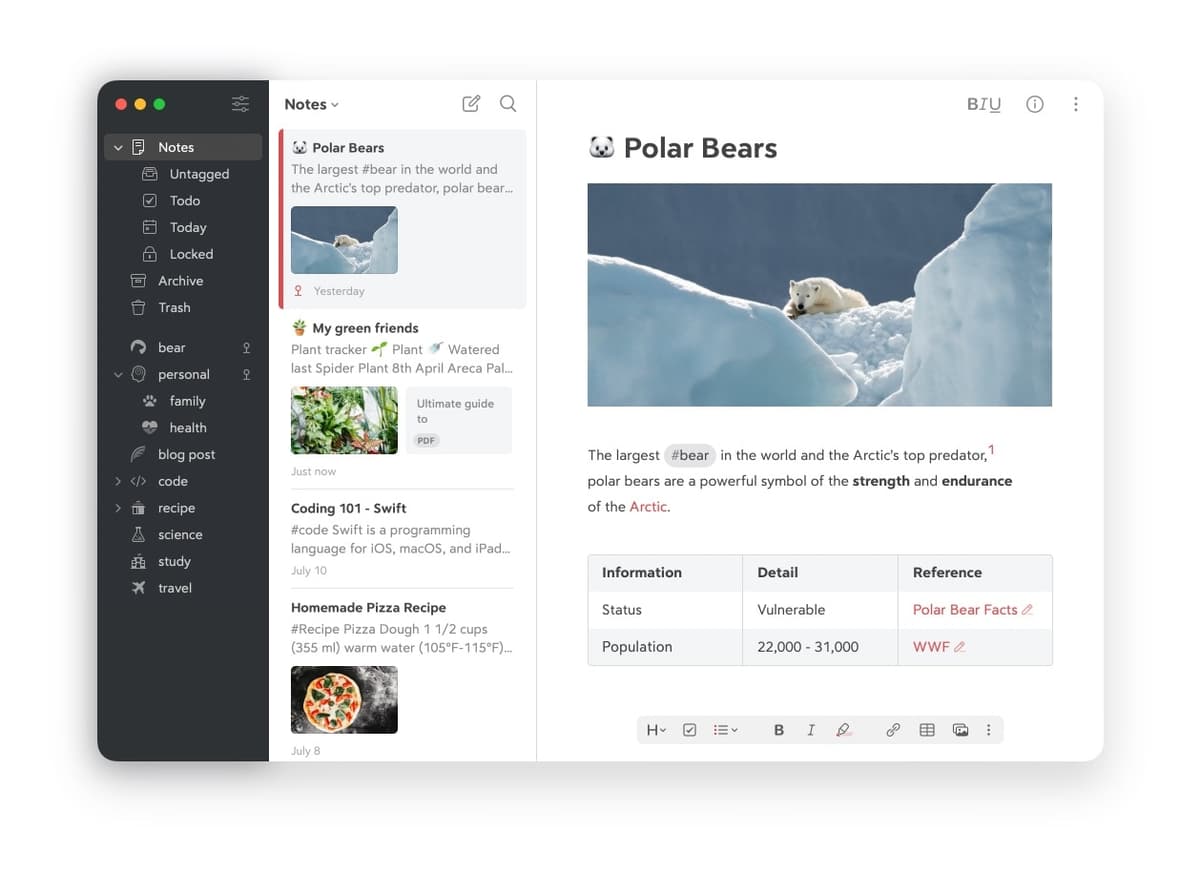
Apple Notes is rich-text only. You can paste Markdown syntax, but Apple Notes does not render it as Markdown.

Bear wins for Markdown writers. A Bear note exported today opens cleanly in Obsidian or iA Writer next year. For a deeper compare on Markdown vault tools, see Bear vs Obsidian.
3. OCR and Handwriting
Apple Notes has the stronger capture layer. On-device OCR runs over scanned documents, photos, and handwritten ink per Apple's Vision framework documentation page (May 2026). Apple Pencil scribble converts handwriting to text. Math Notes shipped in 2024 with iOS 18 and iPadOS 18. It recognizes handwritten equations and computes them in place. Mueller & Oppenheimer 2014 found longhand notes can improve conceptual recall. Apple's ink and OCR layer lets you keep handwriting and still search it.
Bear has no OCR and no native handwriting layer. Pencil scribble works because iPadOS handles it system-wide, but Bear does not store ink layers. The visual note-taking guide compares workflows that preserve handwriting and diagrams.
Apple Notes wins. If OCR is the reason you are leaving Apple Notes, see Apple Notes alternatives.
4. Organization
Bear uses inline hashtags such as #research and #research/papers to create a tag tree. Notes can have multiple tags, but there are no folders or notebooks. Tags are the structure.
Apple Notes uses folders, Smart Folders, pinned notes, and inline tags. Smart Folders can organize by tag, date, attachment type, and mentions. Tags were added in 2022, but they are less central than Bear's hashtag model.
Bear wins for tag-driven workflows. Apple Notes wins for folders and Smart Folders.
5. Export and Data Portability
Bear can export individual notes or the whole library to Markdown, PDF, HTML, DOCX, RTF, and JPG. The lossless Markdown round-trip is the real advantage. Bear's export docs list TextBundle and TextPack support so embedded images can travel with Markdown (checked June 2026). A 1,000-note library exports in under a minute on a 2024 MacBook Air per user reports.
Apple Notes exports to PDF only, one note at a time. There is no native bulk export. Leaving Apple Notes is painful. Most Bear and Obsidian importers work around this by reading the local Notes database.
Bear wins. Apple Notes is harder to leave. The OneNote-to-Bear migration path covered in OneNote vs Bear shows what a clean Markdown migration looks like in practice.
6. Search
Apple Notes searches typed text, OCR'd text in images, handwritten ink, and document attachments. Its search depth is excellent for mixed-media notebooks.
Bear searches typed text, Markdown headers, and tags. It is fast, scoped, and regex-aware in Bear 2.
Apple Notes wins for mixed-media search. Bear wins for text-vault search precision.
7. Collaboration
Apple Notes supports live sharing, mentions, and an activity view per note. It works well for couples, families, and study groups.
Bear is a single-user app with no collaboration.
Apple Notes wins if you need to share notes.
8. AI Features
Apple Intelligence shipped in 2024 with iOS 18 and iPadOS 18 per Apple's documentation page (May 2026). Apple Notes gets summaries, suggested replies, and Math Notes. Most work runs on device. Private Cloud Compute handles heavier requests. That makes built-in summaries useful when you do not want to send notes to another app.
Bear has no native AI in Bear 2 as of early 2026. Markdown export means you can send notes to your own AI tool. That is a strength if you want control, but a weakness if you expect summaries inside the note app.
Apple Notes wins on built-in AI. Bear works better for users who prefer an external AI layer. For broader smart-notes coverage, see smart notes app.
Which App Should You Choose?
When to Choose Bear
Choose Bear if your notes are mostly typed prose. It is the better fit when you write in Markdown and want rendered headings, code blocks, and polished type. It is also stronger if you expect to export to Obsidian, iA Writer, or another Markdown app later. Bear is the safer choice if vendor lock-in bothers you.
When to Choose Apple Notes
Choose Apple Notes if your notes are mostly capture. It is the better fit when you scan documents, write with Pencil, sketch, save photos, or share lists. The iPad note-taking guide explains how those capture methods fit into a class or reading workflow. Apple Notes is also better if you want a free app on every Apple device, with Apple Intelligence summaries built in.
When Atlas Fits
Neither Bear nor Apple Notes is built for cited research synthesis. If your notes become PDFs, interviews, or source libraries, use the note app for capture and a research layer for answers. In that workflow, export Bear notes to Markdown or Apple Notes to PDF, then ask source-grounded questions across the set. Compare citation tools for that second step.
Step-by-Step Selection Process
Use this order if you are still stuck. First, choose Apple Notes if more than half your notes start as scans, photos, Pencil ink, shared lists, or quick system captures. Second, choose Bear if more than half your notes start as typed text that you may later export. Third, check your exit plan before you migrate anything. Bear should export to Markdown cleanly. Apple Notes should have an Exporter or PDF backup path. Last, keep your current app if the switch saves less than 10 minutes per week. Moving a notes archive is rarely worth it for a small preference.
If Neither App Fits
Bear and Apple Notes are intentionally light. Choose Ulysses if you want publishing goals, manuscript sheets, and a stronger long-form writing flow. Choose Craft if you want polished document design and easier sharing outside Apple Notes. Choose ClickUp only when notes are part of a task system. It is not the right pick for a quiet personal notebook. Choose a cited research app when the real job is asking questions across PDFs, sources, and notes.
Comparison Table
Use the table to match the app to the job you do most often. Bear wins the rows tied to writing and portability. Apple Notes wins the rows tied to capture, sharing, and built-in Apple features.
| Axis | Bear | Apple Notes |
|---|---|---|
| Price | $2.99/mo or $29.99/yr Pro | Free |
| Platforms | Mac, iPad, iOS | Mac, iPad, iOS, watchOS, visionOS |
| Markdown | First-class | None |
| OCR | None | Industry-leading |
| Handwriting | Scribble only | Ink layers + search |
| Apple Pencil | Scribble | Full ink + Math Notes |
| Organization | Hashtags | Folders + Smart Folders |
| Export | Markdown, PDF, HTML, DOCX, RTF, JPG | PDF only |
| Collaboration | None | Real-time + mentions |
| AI | None native | Apple Intelligence |
| Best for | Markdown writers | Mixed-media capturers |
Table 4: Bear offers a focused Markdown editor; Apple Notes offers broader native capture tools.
Practical Ownership Considerations
Before moving an archive, compare migration effort, encryption, recurring cost, writing performance, offline access, support, automation, backups, and the long-term risk of depending on each vendor.
Migration Between Bear and Apple Notes
The two formats are structurally different: Bear is Markdown plus hashtags, Apple Notes is rich text plus folders.
For Bear to Apple Notes, start with Bear's Markdown export. It writes one .md file per note plus a folder for attachments. Apple Notes does not import Markdown directly. The cleanest path is to convert each Markdown file to RTF or HTML with a Mac script. Then drag the converted set into a target Apple Notes folder. Hashtags become flat folder names. Bear's note-to-note wikilinks need a manual fix-up pass.
For Apple Notes to Bear, export to PDF or HTML first. Bear ingests Markdown best, so the Exporter app or Pandoc (pandoc input.html -o output.md) is the practical conversion step. Inline images survive, but handwritten ink layers do not.
For either tool to Atlas, upload Markdown, HTML, or PDF. Folder structure becomes folder-tag pairs, and Bear's hashtags survive as Atlas tags after export.
In my test set, a 100-note Bear export finished in seconds and kept the attachment folder intact. Choosing and preparing the import target took most of the work. For a writer with under 1,000 Bear notes, plan a couple of hours. For a heavy Apple Notes user with thousands of scans and sketches, plan a half-day plus a pass to fix broken links.
Privacy and Encryption
Bear uses TLS in transit and AES-256 at rest. Bear Pro adds end-to-end encrypted note bodies on a per-note basis, where the user sets a passphrase that Bear cannot decrypt. Bear publishes its security and privacy policies on the bear-app.com site.
Apple Notes uses Apple-managed keys under standard iCloud sync. Turn on Advanced Data Protection and notes get end-to-end encryption that Apple cannot decrypt. Locked Notes use AES-256 with a per-note password. Apple states user content is not used to train Apple Intelligence.
Atlas uses TLS in transit and AES-256 at rest, with vendor SOC 2 Type II in progress at the time of writing.
For per-note locks with a passphrase, Bear is the strongest choice. For whole-account encryption with one toggle, Apple Notes plus Advanced Data Protection wins.
Pricing in Practice
Bear Pro at $2.99/month or $29.99/year unlocks sync across iPhone, iPad, and Mac plus the full export set. The free tier is single-device only.
Apple Notes costs $0 for the app. iCloud+ 200 GB at $35.88/year covers heavy attachment use, and the storage is shared with Photos and device backup, so the marginal Notes share is small.
Atlas Pro covers most individual workloads at $20/month or $200/year.
Year-one cost for a single user is Bear Pro at $29.99, Apple Notes effectively $0 to $35.88, and Atlas at $0 to $200. Workflow differences drive this decision more than price. The spread is under $35 between Bear Pro and a fully kitted Apple-stack notes setup.
The cost model below separates app price from the real productivity cost. A free app is expensive if it forces manual export later. A paid app is cheap if it prevents cleanup work every month.
| Scenario | Year-one cash cost | Hidden cost to watch |
|---|---|---|
| Bear free, one device | $0 | No sync, limited export |
| Bear Pro | $29.99 | Worth it only if Markdown export matters |
| Apple Notes with free iCloud | $0 | Storage can fill if notes include scans and photos |
| Apple Notes with 200GB iCloud+ | $35.88 | Export remains PDF-first |
| Either app plus periodic Markdown backup | App cost plus backup time | Lowest lock-in risk |
Table 5: Bear charges for sync and export; Apple Notes bundles its core features.
Writing Workflow and Performance
Bear is built for writers. The editor is fast. The type is polished, and focus mode hides everything except the current paragraph. Markdown shortcuts such as #, **, and [[link]] feel native. Bear performs well on archives in the tens of thousands of notes. Search stayed fast at corpus sizes that slowed Apple Notes.
Apple Notes is built for capture. The editor handles ink, scans, photos, sketches, and audio better than any plain-text editor. Large libraries above 20,000 notes can lag on iPad and iPhone, especially when notes are photo-heavy. The Quick Note shortcut from any iPad screen with the Pencil is the fastest capture path on either platform.
For writers who type, Bear wins on editor experience. For mixed-media capturers working with scans, ink, and photos, Apple Notes is the only practical choice between the two.
Offline Capability
Bear works fully offline on Mac, iPhone, and iPad clients. iCloud sync resumes when the device comes back online. Bear stores the corpus locally, with sync layered on top.
Apple Notes works fully offline by default on every Apple device. The sync layer is invisible.
Atlas can render cached PDFs offline, while AI Q&A requires a server connection.
Offline use is a tie inside the Apple ecosystem. Both Bear and Apple Notes work offline first.
Customer Support and Documentation
Bear offers email support and has an active community on the Bear forums and X. Shiny Frog is a small studio, so response times vary. Users usually report replies within a few business days.
Apple Notes uses standard Apple Support routes such as chat, phone, and in-store Genius appointments. Documentation is thin and assumes a current OS.
If you value direct developer access, Bear's smaller team is a feature. If you value uptime and formal support routes, Apple Notes wins by scale.
Programmability and Automation
Bear's x-callback-url scheme is well documented and is the strongest automation surface here. Bear documents actions such as create, open note, search, add text, add file, tag, rename tag, and trash. It also documents callback parameters for success and error states. Shortcuts on iOS and macOS, Alfred and Raycast workflows, and Hazel rules can all create, search, and tag Bear notes. The CLI ecosystem around Bear is small but usable.
Apple Notes Shortcuts coverage in iOS 18 and macOS Sequoia is much better than before. Apple describes Shortcuts as a way to build multi-step automations across apps, and Notes can take part in those workflows. AppleScript on macOS is more limited than Bear's because Apple Notes exposes fewer object types. There is no public x-callback API.
Bear is the more automation-friendly tool for power users. Apple Notes is improving but still trails on programmable depth.
Backup, Export, and Vendor Lock-in
Bear Pro export covers Markdown, HTML, PDF, DOCX, RTF, and JPG. Markdown is the canonical safe format and round-trips into any Markdown-aware tool with high fidelity.
Apple Notes native export is PDF only. Third-party utilities such as Exporter on Mac can write Apple Notes to Markdown. They require manual launch and do not run on a schedule.
Atlas has built-in Markdown export that round-trips with most knowledge-management tools.
If lock-in risk is a top concern, Bear's Markdown storage plus broad export is the strongest posture here. Apple Notes ranks last on this axis.
Long-Term Reliability and Vendor Risk
Bear is built by Shiny Frog, an independent developer. The team has kept the app stable since 2016 and shipped Bear 2.0 in 2023. Markdown storage means user data stays portable regardless of Bear's future. Exporting to Markdown takes seconds.
Apple Notes is Apple-backed and has stayed stable through five major macOS releases. Its CoreData format is opaque, but data can still move through Markdown, HTML, or PDF export. Apple Notes has the lowest vendor risk in this comparison.
Atlas is the younger product here, so quarterly Markdown export remains the safe hedge.
The practical rule is to keep a Markdown export of important notes outside the vendor's system. Bear makes this easy. Apple Notes needs an Exporter-style utility.
Final Take
Bear wins for Markdown writers who value polished type and clean export. Apple Notes wins for scans, Pencil notes, shared family lists, and users who want no app bill. The two tools barely compete because they serve different jobs. Use Bear to write, Apple Notes to capture, and a cited research tool only when your notes become source material you need to question.
AtlasCompare cited research workflows
Compare AI tools by citation quality, source grounding, and verification.
Frequently Asked Questions
Depends on what you write. Bear is built by Shiny Frog (shinyfrog.net), an independent Italian studio, founded 2016, Markdown-first, with polished typography. Apple awarded Bear App of the Year 2016, an Apple Design Award in 2017, and Editor's Choice in 2020 per Apple's awards listings. Bear Pro costs $2.99/month or $29.99/year per Bear pricing page (May 2026), Mac, iPhone, iPad only. Apple Notes is free, ships with iCloud, has industry-leading on-device OCR for handwriting and printed text, and integrates with Apple Pencil scribble. Bear wins for Markdown writers. Apple Notes wins for mixed-media capture and free use.