


SciSpace and Elicit solve different parts of a research project. Start with SciSpace when you need paper search, PDF reading, source help, and draft support. Start with Elicit when your review needs screening rules, data columns, and repeatable choices.
I checked current product pages in July 2026 before making feature claims.
The choice gets easier when you stop asking which tool is better overall. A review usually moves through paper search, PDF reading, source screening, data pulls, notes, writing, and source checks.
SciSpace is broader across the reading and writing side of that path. Elicit is more focused on reviews where every paper needs the same screen or data treatment.
Use Atlas after either tool when you have finalist papers. Add them to a source-grounded project, compare claims, inspect citations, and save only the synthesis you have checked.

Compare selected papers in Atlas
Add finalist papers, compare their claims, and inspect the cited passages.
Quick verdict
Choose SciSpace when the job is broad reading or draft support. The SciSpace page lists paper search, PDF chat, cited answers, PDF data pulls, paper tables, exports, source tools, and writing surfaces. That makes it a strong fit when you want to read papers and move toward a cited draft in the same place.
Choose Elicit when the job looks like an evidence review. The Elicit page lists paper search, reports, review flows, screening, data pulls, source links, tables, alerts, and multi-step work. Its review page goes deeper on protocols, source gathering, screen choices, data pulls, reports, and PRISMA-style artifacts.
Do not treat either product's own comparison page as neutral proof. SciSpace's own comparison page shows how SciSpace frames itself, but the page is still vendor-owned.
Paperguide, AnswerThis, and DataStudios can help with market language. Product claims need current product pages first.
Compare the workflow stages
The fastest way to decide is to map the tool to the stage where your project is most likely to fail.
| Research stage | Better default | Why it matters |
|---|---|---|
| Broad paper discovery | SciSpace for breadth, Elicit for scientific semantic search | SciSpace presents itself as a broad literature-search and research workspace. Elicit also has a large academic search surface, but its strongest differentiation is what happens after search. |
| PDF reading and comprehension | SciSpace | SciSpace has a visible PDF chat and paper-reading surface, which helps when the bottleneck is understanding individual papers. |
| Screening against criteria | Elicit | Elicit is built around systematic-review screening, suggested criteria, reviewer decisions, exclusion reasons, and supporting quotes. |
| Data pulls into fields | Elicit | Elicit is usually the better fit when the review depends on repeated fields such as population, intervention, sample size, outcome, limit, or study design. |
| Literature-review writing handoff | SciSpace | SciSpace advertises writing and citation-adjacent tools. Elicit is stronger when the output is a report or evidence table rather than a manuscript workflow. |
| Citation verification | Tie, with manual checking | Both products make cited answers part of the workflow. A citation still needs inspection before the claim supports a literature review or deliverable. |
| After you pick papers | Atlas as a follow-up workspace | Once papers are selected, Atlas is useful for asking source-grounded questions across imported papers and checking cited passages before saving a note. |
Table 1: This split is not a rule about quality. It is a rule about failure modes.
If your project fails because you cannot find enough papers, SciSpace may be the better first stop. If it fails because data differs across papers, Elicit is usually closer to the job.
SciSpace vs Elicit compared
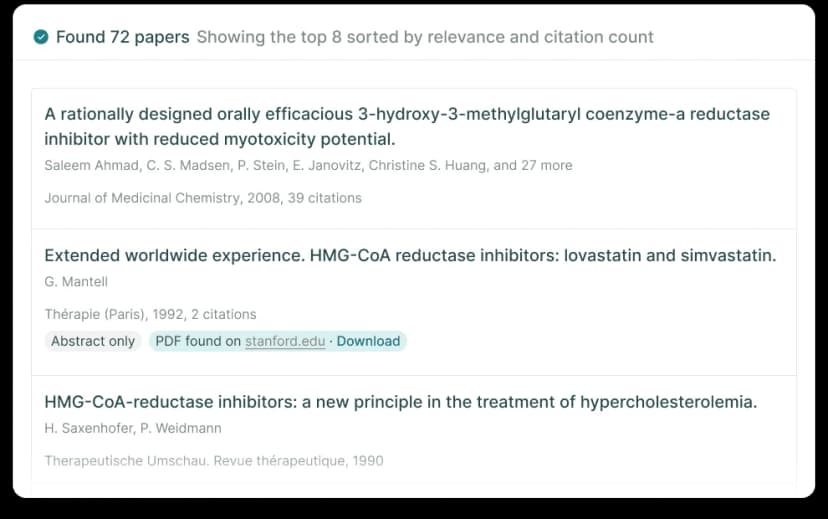
Elicit's official literature-review page publishes this example search view. It shows discovery results, not screening or extraction quality; Elicit retains rights to the screenshot.
Product shape
Elicit speaks most directly to formal reviews. Its review page describes protocol work and searches across PubMed, ClinicalTrials.gov, Elicit's corpus, and imported databases. It also describes live screening, data pulls with quotes or figures, and reports with source links.
SciSpace speaks more directly to the broader research workspace. Its public pages show literature review, chat with PDF, AI Writer, source tools, data pulls, paraphrasing, and paper comparison. That breadth matters if you do not want separate tools for reading, writing, and source checks.
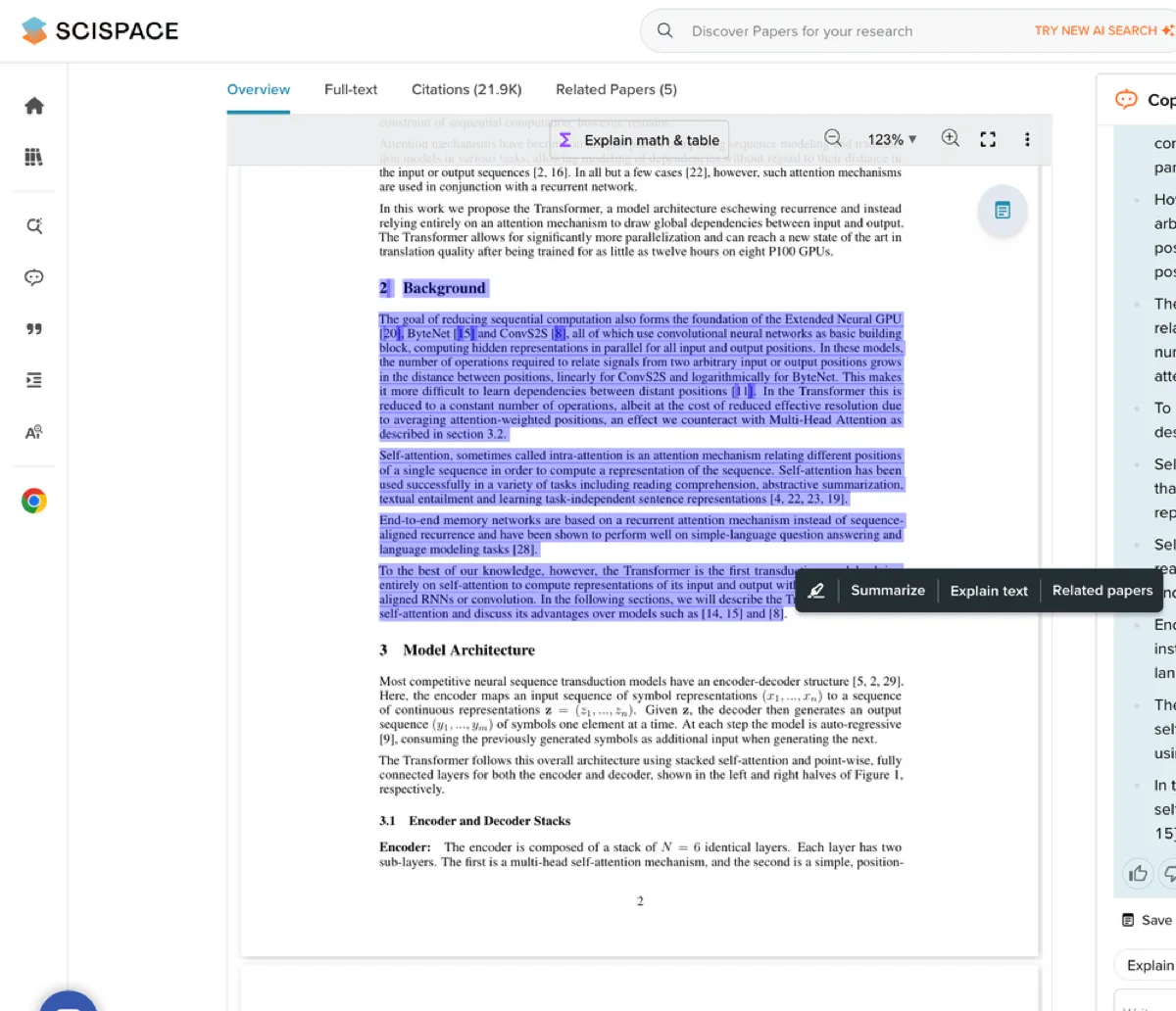
The screenshot shows why SciSpace often fits the reading stage: the paper, highlighted passage, explanation controls, and assistant panel sit in the same workspace.
Search, reading, and extraction
The practical split is this: SciSpace fits when the next step is to read, compare, and draft from papers. Elicit fits when the next step is to apply rules and pull the same fields from each paper.
Both can support cited answers. Neither turns a source link into proof without a reader checking it.
Verification posture
For both tools, the test is not whether an answer includes a citation. The test is whether the reader can open the source and inspect the passage. The evidence also has to stay attached when the claim moves into a review, thesis, report, or manuscript.
The verification gap after discovery
The hard part of AI-assisted research is not getting a plausible summary. The hard part is keeping the paper, claim, caveat, source link, and final note connected after the first useful answer.
Many product comparisons overstate what cited answers and data tables can prove. A source link is a pointer. Check it against the passage, nearby text, and any source that disagrees. A table helps only if the reviewer can see where each cell came from. The passage still has to support the cell.
That caution matters for formal reviews. A methods study on Elicit data extraction treated the tool as promising. It still found that prompt wording, repeat runs, account settings, product changes, accuracy, and human review matter. The useful stance is not "avoid AI research tools." Use them where they reduce search and data work. Keep human checking in the loop.
The handoff risk appears in three places:
- A paper found in one tool may become a PDF, source link, or note in another tool with weaker context.
- An extracted claim may lose its quote, page, figure, or exclusion rationale when it moves into a draft.
- A generated summary may blend sources unless the reviewer asks for source separation and checks the source links.
If you choose SciSpace, watch the move from reading and writing support into final source checks. If you choose Elicit, watch the move from data pulls into the review or manuscript draft. In both cases, the final claim should still be checked against the source.
Verify SciSpace or Elicit outputs
The comparison does not end when SciSpace or Elicit returns a cited answer.
Check the same four objects before the claim reaches a review or draft: the paper, the passage, the caveat, and the note you plan to save.
For SciSpace, focus on the handoff from broad reading or draft support into source checks. For Elicit, focus on whether each screen choice or data field still points to the right quote, figure, or passage. If the claim loses that support, keep it out of the final synthesis.
Atlas can help after either tool when you have selected the papers and want a separate source-grounded project for comparison. Here is the handoff I would use:
- Add the finalist papers to Atlas by PDF, DOI, arXiv ID, exact title, author, or topic.
- Wait for processing. Confirm the papers are readable before asking synthesis questions.
- Ask a focused comparison question, such as:
Compare these three papers in a table with columns for claim, supporting evidence, limitation, and citation. - Ask for source separation if the answer blends papers together.
- Open citation badges for the claims that matter.
- Read the cited passage and nearby text. Revise any claim that is stronger than the source.
- Save only the checked synthesis as a note. Include the question, points of agreement, gaps, source links, and next reading.
That verification step changes the task. You are no longer asking, "Which answer sounds right?" You are asking, "Which claim can I trace back to a passage in my selected sources?"
A source document should stay open beside any grounded answer, citation markers should identify the passages behind each claim, and the surrounding text should remain available before the claim becomes a saved note or evidence-table row.
Which should you choose?
Use this decision rule:
If the SciSpace-versus-Elicit choice still feels ambiguous, choose by the next artifact you need to produce rather than by the larger feature list.
-
Choose SciSpace if you want a broad research workspace for open-ended paper search, close PDF reading, citation tools, and writing support.
-
Choose Elicit if your review depends on screening rules, include or exclude choices, repeated data fields, evidence tables, and review reports.
-
Use both when the project has two distinct phases. A reasonable path is SciSpace for broad search and close reading, then Elicit for formal data pulls or screening. That mix creates a handoff, so assign someone to check whether the same paper, claim, quote, and source link survived the move.
-
Add Atlas after paper selection when the chosen papers need source-grounded synthesis. Add the papers you trust, ask cited comparison questions, inspect the source passages, and save the synthesis only after the evidence checks out.
For a wider category view, read AI tools for academic research. For more on Elicit, see Atlas vs Elicit or Elicit alternatives. If the main question is repeated fields and evidence tables rather than a full SciSpace-versus-Elicit workflow choice, use the document extraction AI guide.
Choose by research stage
SciSpace is usually the better choice for broad paper search, PDF reading, and writing support. Elicit is often better for screen rules, data pulls, and source tables.
The research job does not end when either tool returns an answer. Before a claim reaches a review, thesis chapter, report, or manuscript, check the source passage.
Atlas supports that check by keeping selected papers in a single project. You can ask cited questions, open source passages, and save notes that stay tied to the evidence.
Compare selected papers in Atlas
Add finalist papers, compare their claims, and inspect the cited passages.