


Elicit and SciSpace help with different parts of research. Elicit helps you find papers, screen them, and pull the same study details into a table. SciSpace helps you find and read papers, ask questions about PDFs, and work on a draft.
Use Elicit to build a review table. Use SciSpace to read and work through papers.
After you choose the papers to keep, compare them in a workspace where you can check each citation.

Compare selected papers in Atlas
Compare the papers you keep and inspect citations behind every finding.
Quick verdict
Choose Elicit when you need to find papers, apply the same screening rules, and build a table of study details. Choose SciSpace when you need help finding papers, reading PDFs, asking questions, or drafting text.
Neither tool completes the review for you. You still need to set the rules, read the key papers, judge their quality, compare the findings, and check the citations.
Compare the research workflow stages
Start with the step that takes the most work. Elicit fits when you have a review question and need a clear process for finding, screening, and comparing papers.
Its systematic review page covers the full path from a review plan to paper search, screening, study fields, and a final comparison.
SciSpace fits when the hard part is reading papers. Its literature review tool pairs search with help planning a review. Chat with PDF answers questions about one paper, while Extract Data pulls details from files.
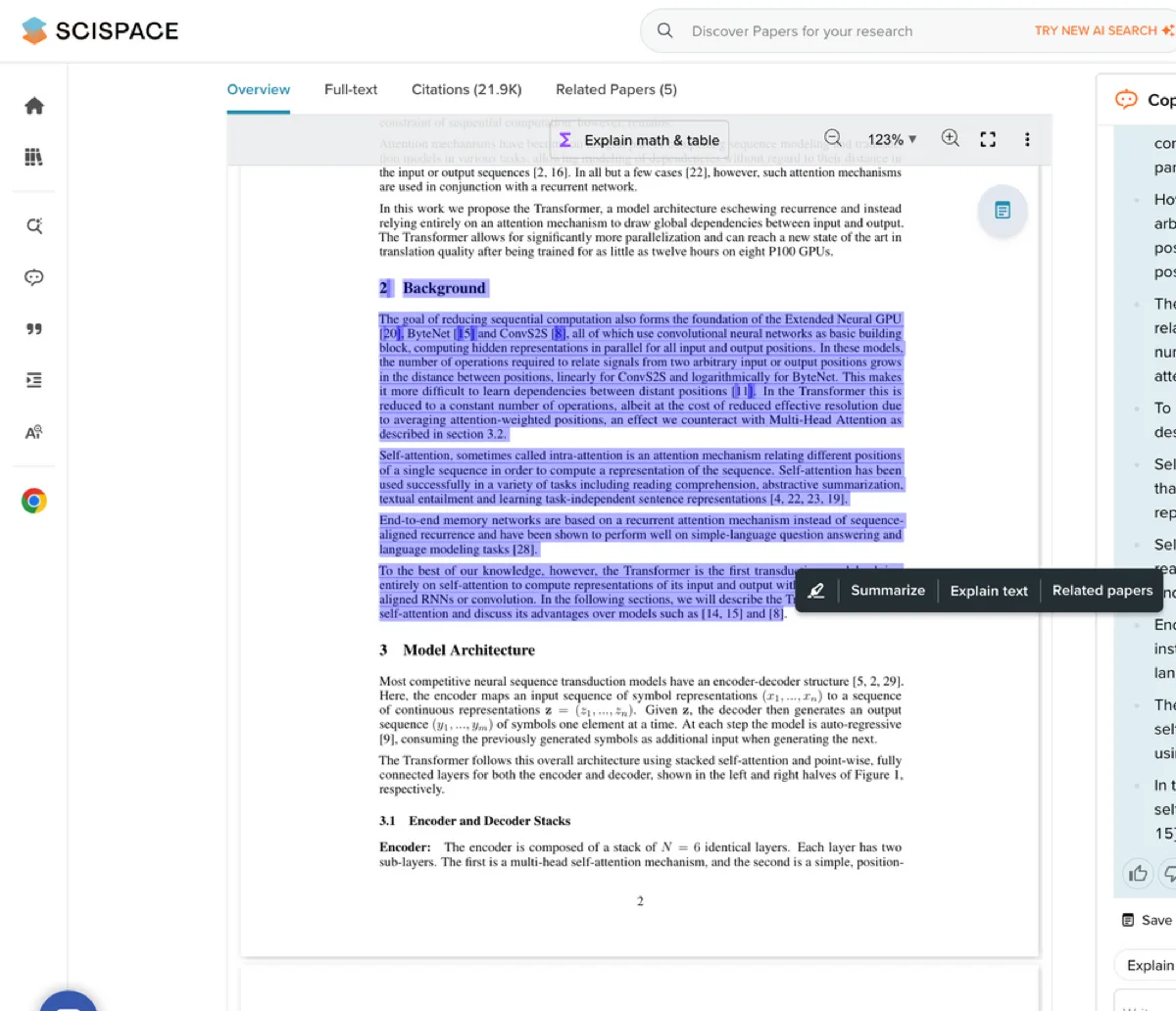
Official SciSpace resource-page screenshot of its PDF highlight and explanation view. It illustrates a product feature; inspect the paper passage before relying on an answer.
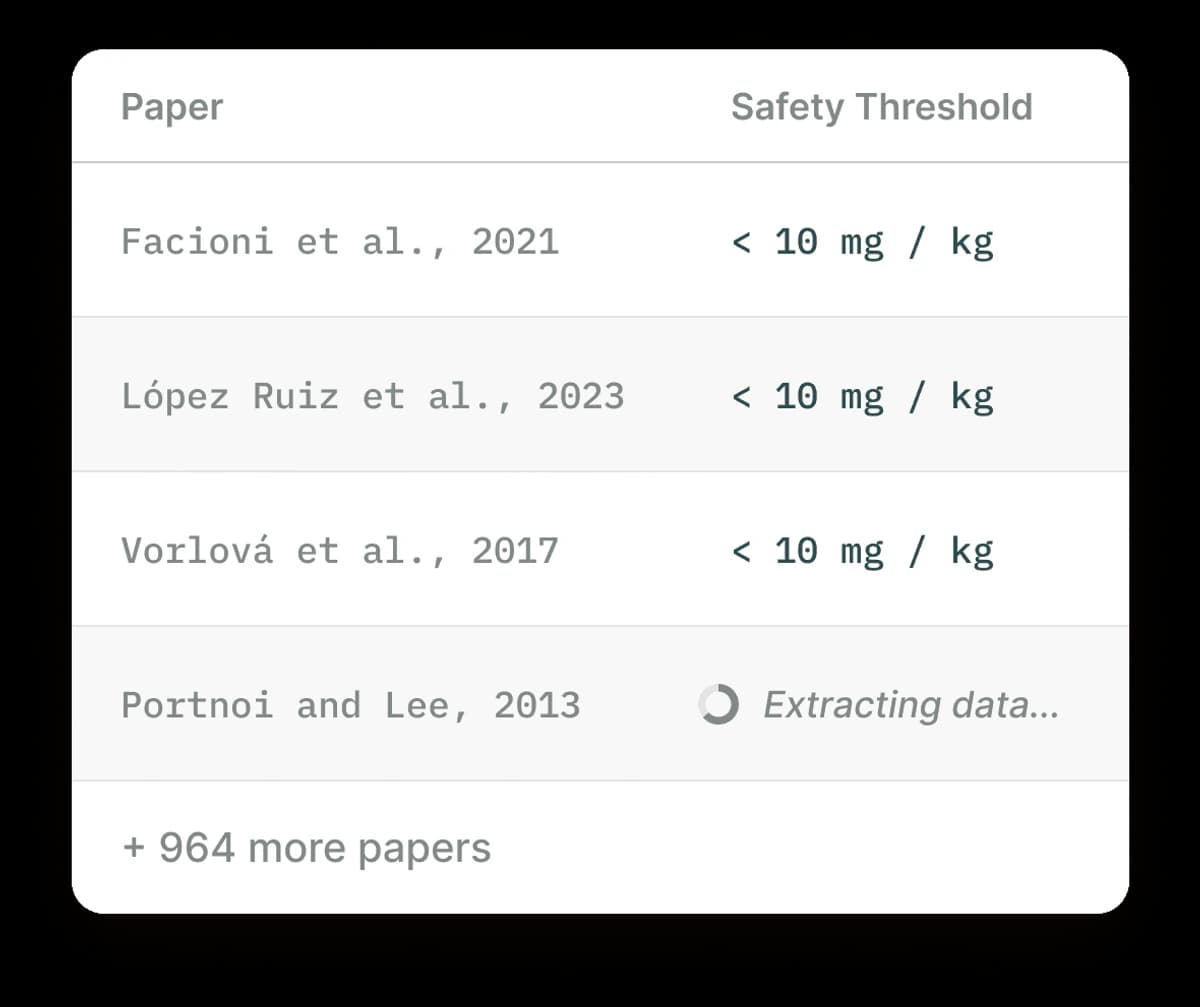
The screenshot shows how Elicit builds a study table. Each row is a paper, and one column holds the same type of value for every study. The page also shows that more rows are still being filled.
This row-by-row view lets you check how each paper fills the same study field. A chat summary does not show that work as clearly.
Use Elicit to turn a review question into a screened paper set and study table. Use SciSpace to read each paper and work on notes or a draft. In both cases, open the cited source before you reuse a claim.
Formal reviews may require searches in PubMed or ClinicalTrials.gov. You can use Elicit or SciSpace to save time, but keep a record of each search, screening rule, rejection reason, and data check outside the AI answer.
Elicit vs SciSpace compared
| Research stage | Elicit | SciSpace | Best follow-up |
|---|---|---|---|
| Define research question | Helps turn a question into a review workflow | Helps explore a topic and frame literature review prompts | Write the inclusion criteria before trusting results |
| Find papers | Strong fit for structured scientific search | Strong fit for broad literature search and paper discovery | Save only papers that match the question |
| Screen candidates | Better fit when screening criteria and exclusions matter | Useful for discovery, but less tied to a review protocol | Track why each paper is kept or rejected |
| Extract study details | Better fit for methods, populations, measures, outcomes, and quote-backed extraction | Useful when extraction is part of a broader reading workflow | Check extracted facts against the PDF |
| Understand one paper | Useful, especially inside a review workflow | Better fit for reading, explaining, and asking questions about a paper | Read the source around key claims |
| Synthesize selected papers | Can produce cited synthesis inside its workflow | Can help with literature review drafting and source navigation | Use a cited synthesis workflow over the final source set |
| Final literature review | Still needs researcher judgment | Still needs researcher judgment | Audit citations and claim strength |
Table 1: Elicit tracks the steps in a review more closely. Start with it when you need clear screening rules and the same study fields for every paper.
Start with SciSpace when you need to read papers, ask questions about them, and use the findings in a draft.
Use the comparison after discovery
After either tool helps you choose papers, focus on the final source set. The next task is to compare what those papers say and check the text behind each claim.
Suppose Elicit built a table for 8 studies, or SciSpace helped you read those papers one by one. Add the same 8 PDFs to an Atlas project and ask: "Compare these papers on study group, method, result, limits, and whether the authors agree." First request one row per paper. Then ask which findings agree, conflict, or lack enough support.
- Save the papers that passed your screening rules.
- Add those papers to one Atlas project.
- Ask for themes, conflicts, method differences, weak spots, or one row per source.
- Open the citation on each claim you plan to use and read the source passage.
- Save only the notes that the cited text supports.
Atlas turns the papers you kept into a cited comparison that you can check. It does not replace Elicit's study tables or SciSpace's paper-reading tools.
Go back to Elicit or SciSpace if you still need more papers. Move to Atlas once you have the paper set and need to compare its claims, methods, and gaps.
Which should you choose?
Choose Elicit when you need to find papers, screen them with set rules, and pull the same study details from each one. It is the better first step when your review needs a table that shows how every paper was handled.
Choose SciSpace when you need help finding and reading papers. It is the better first step for broad topic search, PDF questions, citation tasks, or help with a draft.
Use both when you need Elicit to build the paper table and SciSpace to explain the hardest papers.
After you choose the final papers, compare them in a tool that lets you open the source text behind each claim. See also SciSpace vs Elicit, Elicit vs Consensus, and AI tools for academic research.
Compare selected papers in Atlas
Compare the papers you keep and inspect citations behind every finding.