

Elicit and Consensus serve different parts of a literature review. Elicit helps you search for papers, screen them, and pull the same details from each study. Consensus gives a quick answer to a clear research question and links to the papers behind it.
You can also use them in sequence. Ask Consensus about a claim, use Elicit to build the paper set, then compare the papers in Atlas. Atlas lets you open the citation behind each key claim.
Consensus starts with a question, such as "Does retrieval practice improve long-term memory?" Elicit starts with a review topic and helps you move through search, screening, and study details.

Compare your selected papers in Atlas
Bring your chosen papers together, compare claims, and inspect every citation.
Compare the research jobs
Match the tool to your next task. Checking one claim is different from finding a broad set of papers. Both differ from pulling the same fields from every study in a review.
- For a first check of a claim, Consensus search guidance shows how to ask a clear research question.
- For yes-or-no questions, the Consensus Meter gives a quick view of how the papers lean.
- For paper discovery, Elicit search fits review topics where the next step is collecting papers around a question.
- For screening, Elicit systematic review workflows help you apply the same include-or-reject check to each paper.
- For study tables, Elicit reports and its library workspace help sort papers and pull the same fields before writing.
- The HKUST review of Elicit and Consensus also shows why you should check an AI summary against the cited paper.
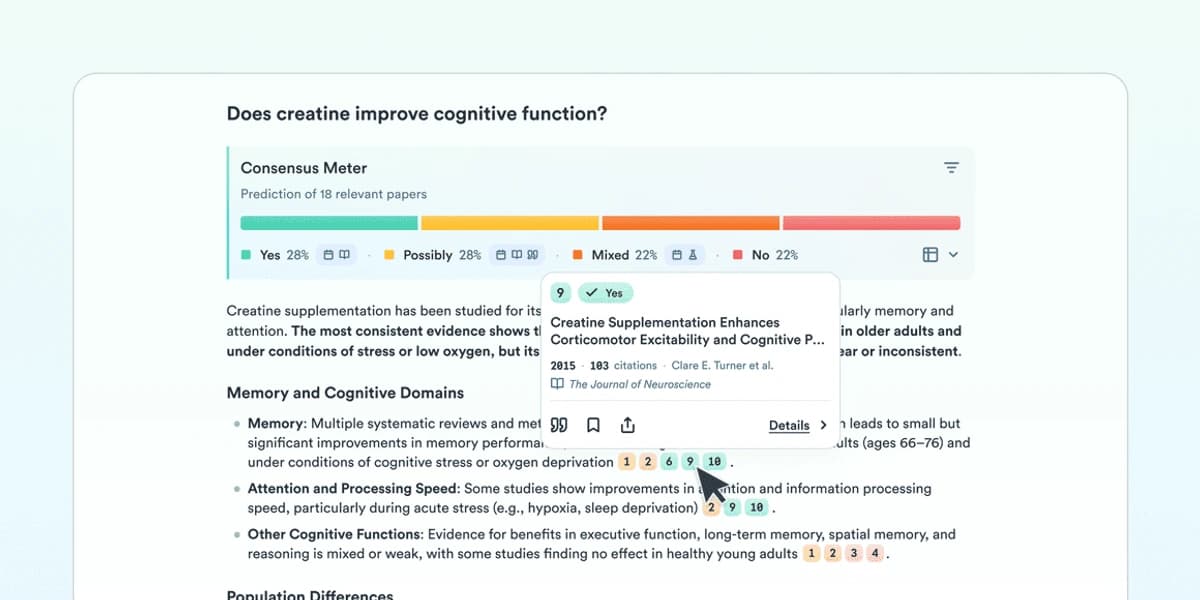
This screenshot comes from the Consensus Meter guide. It groups cited papers into yes, possibly, mixed, and no answers. Use the groups as a reading map, then open the papers and check whether they studied the same question you asked.
Elicit is a better fit when you need to compare many papers by study group, method, result, or limit. Its study fields can feed a review table or the evidence section of a draft. Both tools can find papers and explain abstracts, but the next task decides the choice. Consensus feels lighter for another question, while Elicit fits a review table. If you are also considering a web answer tool, read Elicit vs Perplexity.
Elicit vs Consensus compared
Use this table as a decision rubric for the main research jobs behind the query. It avoids pricing and limit claims because those can change quickly. Check each official product page before making a procurement decision.
| Research job | Elicit fit | Consensus fit |
|---|---|---|
| Fast claim check | Useful when the claim leads into a review topic, but heavier than necessary for a quick directional answer. | Strong fit for asking a focused academic question and scanning evidence-backed answers. |
| Broad literature scan | Stronger when you need to collect and organize papers around a review question. | Useful for finding relevant papers from a question, but less review-table oriented. |
| Systematic screening | Better fit when you need repeatable screening and extraction-style workflows. | Works best as an early signal before the main screening workspace. |
| Extraction table | Stronger fit for turning papers into structured fields you can compare. | Use it to identify papers or evidence direction before extraction. |
| Citation inspection | Useful, but still requires opening papers and checking extracted claims manually. | Useful for tracing answer claims back to papers, with the same need for manual verification. |
| Writing handoff | Best when you need organized evidence fields before drafting. | Best when you need a concise evidence direction before deeper reading. |
Table 1: The table points to a workflow difference rather than a universal winner. Consensus starts with the question and evidence direction. Elicit starts with the review process and evidence structure. For the same comparison from a Consensus-first angle, see Consensus vs Elicit.
For a student writing a short evidence memo, Consensus may be enough to find the first papers and read the direction of the literature.
For a scoping review, Elicit is usually the better first workspace. The task depends on screening, extraction, and comparing details across many papers.
For clinical, policy, or thesis work, do not stop at either AI answer. Open the papers, check who was studied and what was tested, and confirm that the cited result supports the claim.
A fast answer is only useful if the underlying evidence survives that check.
After Elicit or Consensus
Elicit and Consensus help you find and sort papers. Atlas fits the later step of comparing the papers you kept. Add the PDFs or notes to a project, ask a question across that set, and open the citations behind the answer.
Use this workflow when the final report needs claims that a reader can check:
- Ask Consensus a focused claim question to see whether the literature direction is promising.
- Use Elicit to search, screen, and extract details from papers that belong in the review.
- Add the papers or notes you keep to an Atlas project.
- Ask Atlas a comparison question such as "Compare these papers on study group, method, outcome, and limits."
- Open the citations behind each key claim before saving the synthesis into notes or a draft.
After step 5, add the PDFs you kept from Elicit and any Consensus notes worth checking to one Atlas project. Ask: "Compare these papers on study group, method, result, and limits." Open the citations behind each row before you copy the comparison into a draft. If the source does not support a row, revise or remove that claim.
Keep Elicit or Consensus as the starting point while you still need more papers. Once you have the key papers, Atlas gives you one place to compare them and check which source supports each claim.
Which should you choose?
Choose Consensus when you have one clear research question. Its quick answer can show how the papers lean and help you decide whether to read more.
Choose Elicit when you need to build a paper set for a review. It helps you find papers, screen them, and pull the same fields from each one. For a closer look at study fields versus PDF reading, see Elicit vs SciSpace.
Use both when the project has two phases. Start with Consensus to test the claim, then use Elicit to build the review. Add the final paper set to Atlas when you need a cited comparison that reflects only the sources you chose.
Use Consensus for quick research answers, Elicit for a step-by-step literature review, and Atlas for cited comparison across the papers you keep.
Compare your selected papers in Atlas
Bring your chosen papers together, compare claims, and inspect every citation.