


If you are choosing between Elicit and Perplexity, start with the source type. Are you working from scientific papers, or are you still exploring the web?
Use Elicit for papers. It helps with finding studies, screening abstracts, extracting fields, building evidence tables, and preparing a review report.
Use Perplexity for the open web. It helps with fresh context, cited answers, company, or market research, Projects, and web-grounded APIs.
For many serious research workflows, the answer is both. Perplexity can help you map the question and current context. Elicit can help you work through the paper layer.
After those tools help you choose sources, move the kept material into a separate source-checking step so the final write-up stays tied to evidence.

Compare selected sources in Atlas
Bring chosen papers and web sources together for cited comparison.
Quick verdict
Choose Elicit if your next output depends on academic papers. Its official product surface is scientific research. It covers paper search and research reports. It also supports review work, data pulls, tables, alerts, source lists, and cited claim checks. That makes it the stronger first stop when you need a review matrix.
Choose Perplexity if your next output depends on fresh context across the open web. Perplexity describes itself as an answer engine that researches the web in real time and returns cited answers. Projects can group threads, files, source choices, and team work. Its APIs also split raw ranked search results from Sonar's cited prose answers.
Treat citations from either product as a path back to the source. Elicit can point claims back to papers. Perplexity can point answers back to web sources. Open the source and read the nearby passage before you reuse an important claim.
Compare by research workflow
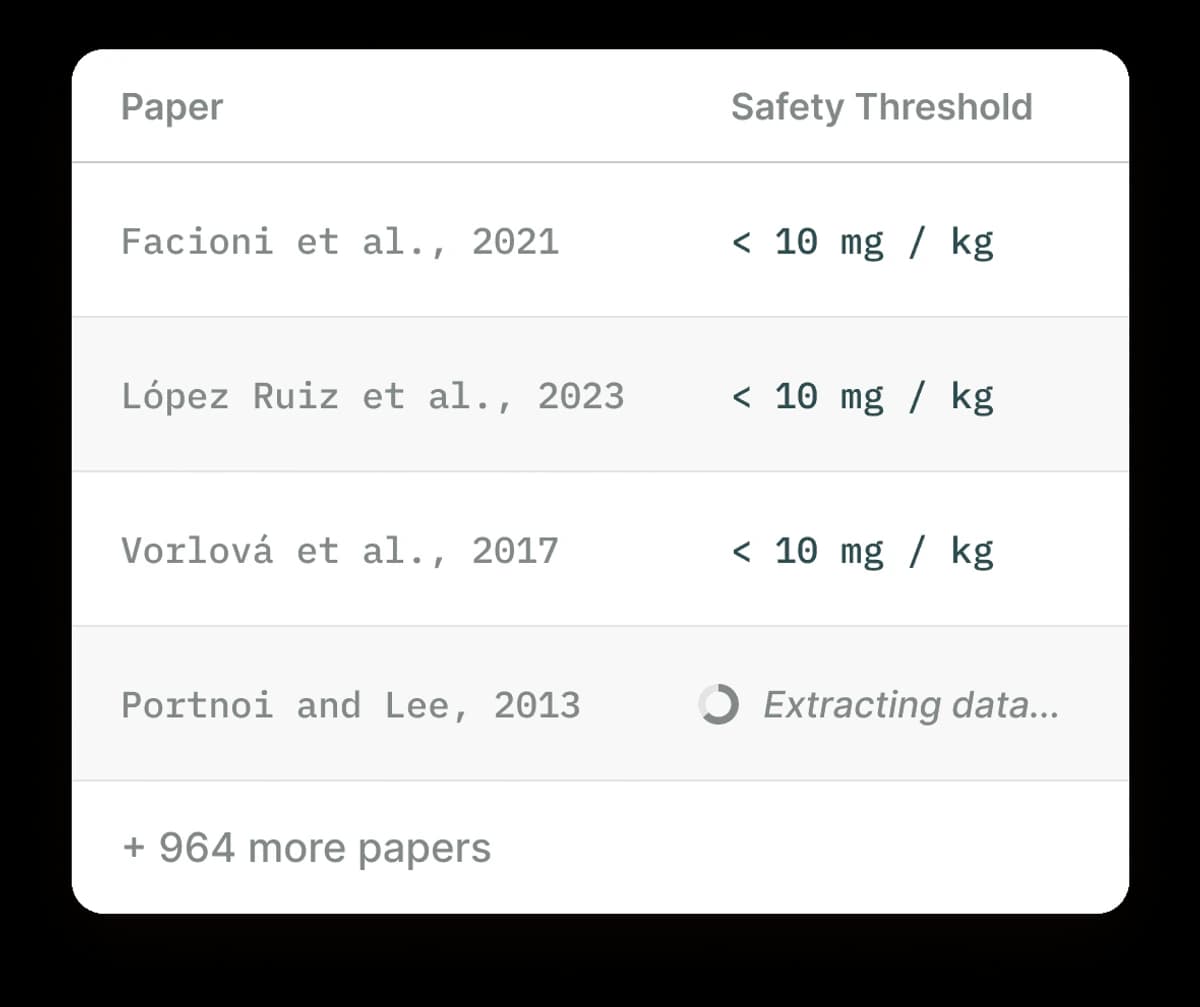 Source scope is the cleanest separator. Use Elicit when most of the evidence lives in papers, trials, abstracts, methods, groups, treatments, or outcomes. Use Perplexity when you start with current pages, firms, docs, news, forums, or broad questions.
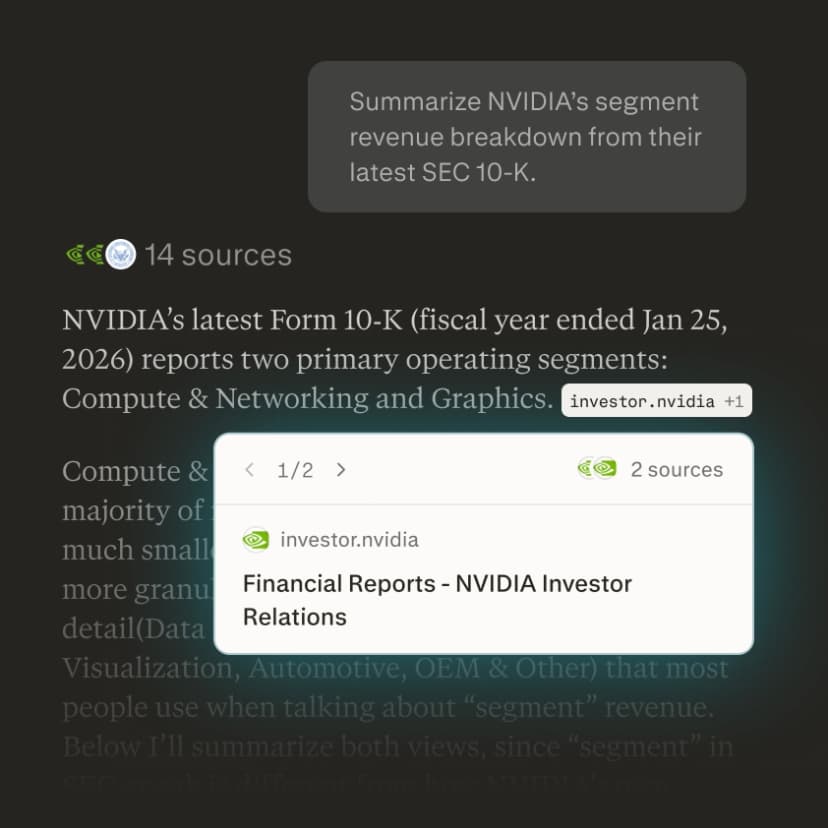
Perplexity’s product page pairs a web answer with a source card. Open the linked source and read its surrounding context before reusing a claim. If you are still sorting the broader category, compare the wider set of AI tools for academic research before narrowing to this head-to-head choice.
After you choose papers, reports, notes, PDFs, or web sources, the job moves from discovery to verification. Keep the selected sources available for comparison, open the citations behind important claims, and use a dedicated AI citation checker step when citation trust matters more than finding more sources.
Here is the practical workflow I would use:
- Start in Perplexity when you need current context, terms, related entities, or a fast map of the topic.
- Move to Elicit when you need to search papers, screen candidates, pull data, or build a review report.
- Move keeper sources into a source-checking workspace when you need to compare them, ask cited questions, and save a write-up.
- Check key claims by opening the cited passages before using them in a draft, review, memo, or recommendation.
Elicit vs Perplexity compared
This table uses official product pages for product claims. It keeps the verdict tied to workflow fit.
It avoids exact prices, plan limits, corpus-size claims, and benchmark claims because those change quickly.
| Criterion | Elicit | Perplexity | Better fit |
|---|---|---|---|
| Primary research surface | Scientific papers, clinical trials, review workflows, reports, data pulls, and evidence tables. | Web research, cited answers, Projects, files, connectors, and developer APIs. | Elicit for paper reviews. Perplexity for broad discovery. |
| Search style | Semantic paper search, useful when you do not know every keyword in the field. | Web-first answer engine and Search API for real-time ranked web results. | Elicit for scholarly sources. Perplexity for current web context. |
| Literature review work | Built for screening, data pulls, reports, and review-style workflows. | Can support academic exploration, but it is not a dedicated review matrix or extraction-table product. | Elicit. |
| Current information | Better when the current question still lives inside the scientific-paper layer or Elicit's supported sources. | Stronger for fast context across web pages, organizations, documentation, social threads, and recent public material. | Perplexity. |
| Citation behavior | Sentence-level citations are part of Elicit's research workflow claims. | Cited answers are core to the answer engine, and Sonar API responses can include citations. | Tie. Verify the cited passage in either tool. |
| Files and projects | Elicit organizes found sources through library and research workflows. | Projects can group threads, files, instructions, source choices, collaboration, connected sources, and file uploads depending on setup. | Perplexity for broader workspace context. Elicit for paper workflow structure. |
| Developer surface | Elicit has API-oriented research workflows, but the main user story is scientific research. | Perplexity's Search API returns ranked web results. Sonar returns prose answers with citations. | Perplexity for web-search API use cases. |
| After source selection | Useful for the paper analysis stage, especially when the output is an evidence table or research report. | Useful for continued web exploration and follow-up answers. | Atlas when the next job is durable synthesis across the sources you selected. |
Table 1: The table is job-based. A long checklist can make the wrong product look stronger. Web freshness, paper data pulls, APIs, project files, and citation checks solve different problems.
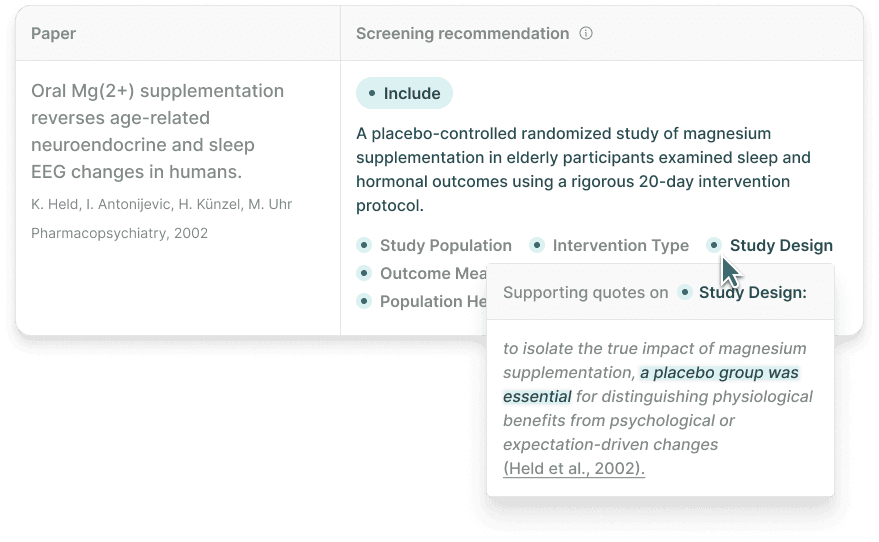
Elicit’s published interface example shows a screening recommendation with criteria and a supporting quotation. The magnesium study is an interface example, not independent evidence of product accuracy.
Source-checking step
After choosing between Elicit and Perplexity, verify the sources you kept. If you have not found the right sources yet, return to the tool that matches the source type. This step belongs after the choice is made, when the source set is ready for checking.
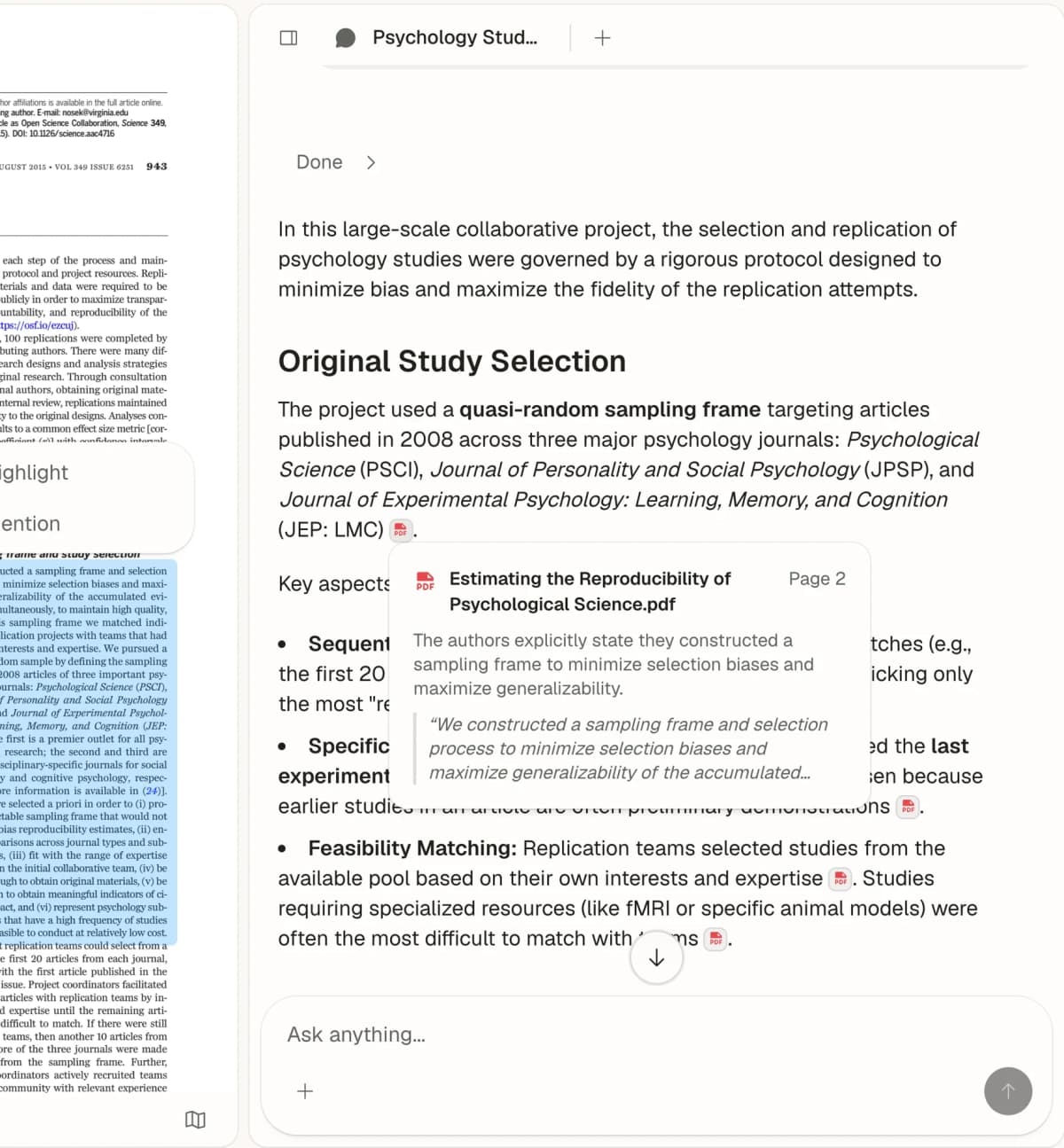
Atlas’s first-party capture shows citation and passage review. The visible paper is an unrelated psychology example, not one of the clinical QA papers in this workflow.
If you already have keeper sources, the next job is comparison: separate what each source supports, check citations, and save the result.
A useful post-discovery handoff looks like this:
| Source state | Best first tool | Verification handoff |
|---|---|---|
| You need candidate papers, abstracts, methods, outcomes, or extraction fields. | Elicit | Import the kept papers into one source-checking project after screening. |
| You need current pages, docs, firms, policies, or broad context. | Perplexity | Add the selected web pages, reports, PDFs, or notes as sources. |
| You already know which sources matter and need a cited answer. | Source workspace | Ask one grounded comparison question and inspect citation badges before saving. |
Table 2: Here is a concrete Atlas example. Suppose Perplexity gives you the current policy context and Elicit helps you keep 6 papers about retrieval-augmented generation in clinical QA. Add the 6 papers, the policy page, and your notes to one Atlas project.
Ask: "Compare these sources on method, sample size, outcome, and stated limits. Use a table and cite every source-specific claim." If the answer says one study showed lower hallucination, open the citation badge, read the highlighted sentence and nearby paragraph, and check whether the passage supports that exact claim.
Save the synthesis only after the important claims have a citation trail you have inspected.
Atlas is one option for that step when the answer depends on your chosen source set. It can add academic papers by topic, DOI, arXiv ID, or title. It also works with PDFs, web pages, YouTube transcripts, notes, and attachments. For the narrower PDF version of this workflow, see chat with PDF.
Once Atlas has read the files, ask grounded questions and compare claims across sources. Keep the citations open for claims you plan to use, especially when you are doing AI citation analysis across a mixed source set.
This does not make Atlas a replacement for Elicit or Perplexity. Elicit remains the better fit when the core job is paper screening or data extraction. Perplexity remains the better fit when the core job is current web discovery.
Atlas fits when the job has moved from finding sources to writing from sources you chose.
Which should you choose?
Use Elicit when your question depends on scientific papers. It is the better start for lit reviews, review prep, evidence tables, and paper-centered work.
Use Perplexity when your question depends on the open web, current context, or a fast cited answer. It is the better start for market scans, company research, policy context, dev research, and broad questions where freshness matters.
Use both when the project has two phases. Perplexity can help you understand the live context and the terms people use. Elicit can help you move through the paper layer.
Make the handoff clear. Collect candidate sources, decide which ones matter, then check the claims against the source.
Use Atlas when you have the sources and need to compare them. A broad answer or paper-search table has done its job by then. Put the selected evidence in one place.
Ask one sharp compare question. Open the citations. Save the final write-up with the source trail intact.
Next, read Atlas vs Elicit and Atlas vs Perplexity.
Compare selected sources in Atlas
Bring chosen papers and web sources together for cited comparison.