
Atlas Workspace vs Perplexity for Research (2026)
Compare Atlas Workspace and Perplexity for research. See how the visual research workspace handles citation grounding versus live web search and Projects.
- Byline

Summary
For 2026 comparisons, use Atlas for owned-corpus research. Use Perplexity for live web search and fresh questions.
Atlas gives citation-grounded answers, Knowledge Maps, and source passage checks for uploaded papers.
Atlas keeps sources, maps, notes, and chats together inside one project. Perplexity is stronger for live web discovery and Projects.
Atlas traces claims to uploaded source passages, while Perplexity searches the web and links answers to sources.
Researchers can use Perplexity to find material and Atlas to synthesize sources that need defensible answers.
Note: This article compares Atlas Workspace, the research product at atlasworkspace.ai, with Perplexity. It does not compare OpenAI's Atlas browser with Perplexity Comet.

Atlas

Synthesize your uploaded research corpus
Upload private documents, compare their claims, and inspect each cited passage.
Quick answer
Atlas is a visual research workspace for projects that depend on a body of papers, such as a thesis, treatment choice, major-purchase review, or literature review. Perplexity is an AI search engine that searches the web in real time, returns an answer with sources, and saves threads and files in Projects.
The choice depends on what happens after discovery. Atlas turns each paper into a Knowledge Map and shows a whole project in a Semantic Map.
Atlas checks each cited claim against a source passage and explains why the passage supports the claim. It also keeps sources, maps, notes, and chats together inside the current project. Atlas is built for research that needs visual source structure and a claim-level passage explanation, as our citation-analysis guide explains.
Perplexity is better when the answer is on the live web and you need it fast. Its official product explanation describes real-time search, source citations, Pro Search, Research, and contextual follow-ups.
Criteria and methodology
This page compares Atlas Workspace with Perplexity's search and Comet surfaces. Search results also mention OpenAI's browser that uses the Atlas name. That is a different product category.
If you mean browser-to-browser, compare browser agents and web privacy. If you mean Atlas Workspace versus Perplexity, compare source ownership, paper maps, and citation checks.
ChatGPT's Atlas browser and Perplexity Comet
OpenAI's Atlas-named browser is separate from Atlas Workspace. Perplexity Comet is Perplexity's browser surface.
This article compares Atlas Workspace and Perplexity for research workflows. Choose a browser comparison if you mean ChatGPT's Atlas browser versus Perplexity Comet. Keep reading if you mean Atlas Workspace versus Perplexity.
The comparison table below is the proof surface. It compares Atlas and Perplexity on the rows required by the brief.
| Atlas Workspace | Perplexity / Comet |
|---|---|
| Citation grounding: claim, source passage, and support reason | Citation grounding: numbered citations and links |
| Knowledge Maps: per-paper argument map | Knowledge Maps: no per-paper map |
| Live web search: No | Live web search: a core Perplexity strength ✓ |
| Uploaded corpus synthesis: built for owned PDFs and notes | Uploaded corpus synthesis: Projects search uploaded files and optional web sources |
| Source traceability: jump to highlighted source passage | Source traceability: jump to cited page or file |
| Project context: sources, notes, maps, and chats stay inside one project | Projects: grouped threads, files, search, and scoped memories |
| Pricing: paid after a small sample | Pricing: free tier plus paid Pro |
Table 1: Atlas and Perplexity differ on research grounding, web search, project context, and pricing.
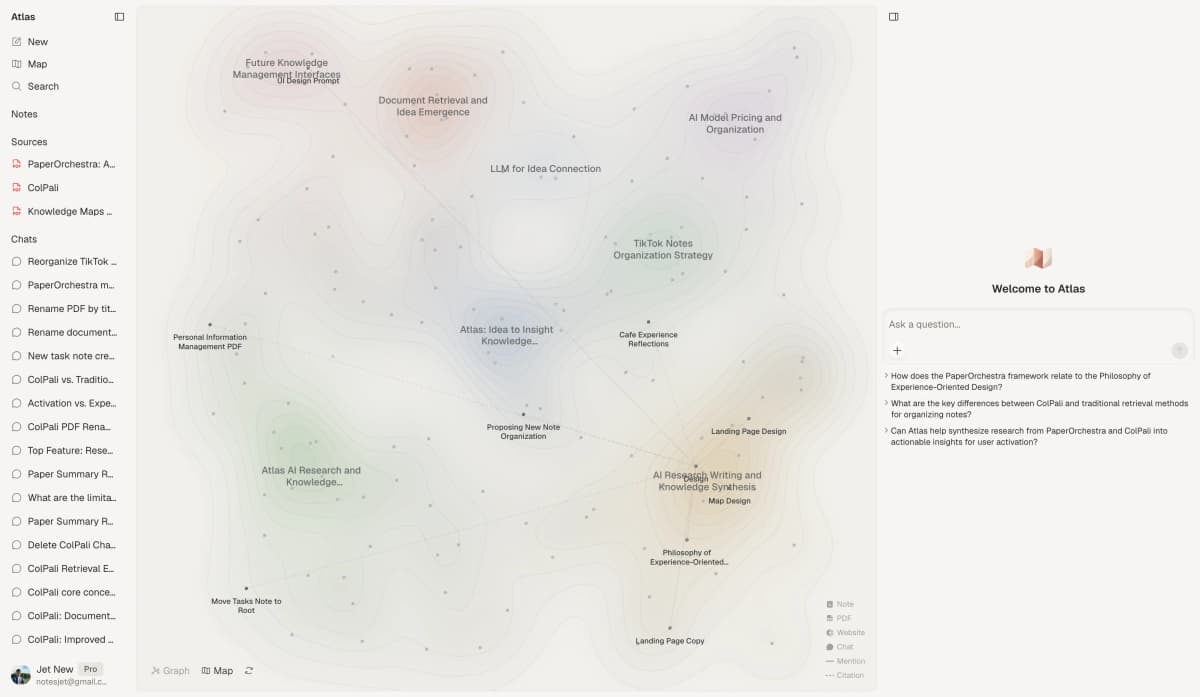
This product view shows how Atlas keeps a project map, source list, and research questions visible in one workspace.
How is Atlas different?
Perplexity and Atlas both support reading and reasoning over sources. They diverge on three capabilities that decide whether the output is shareable and defensible. This section walks through the three differences, in order.
Visual maps for papers and projects
Atlas builds two kinds of visual map as you read. A Knowledge Map turns one paper into its argument structure, including claims, evidence, definitions, and labeled links. You see the paper's spine at the top level.
You can drop into the supporting passages with a click. This differs from the hierarchy described in our mind map and knowledge graph comparison.
A paper's argument remains connected to its supporting text.
A Semantic Map shows the sources, notes, chats, and citations within a project. Related items cluster by topic. You can view the same project from a new topic angle without re-reading every source. The broader relationship-mapping approach is covered in knowledge graph AI.
"It's like an ultimate GPT. I can finally see what I've read." Kyle Lao, CEO & Co-founder of MenSC Labs
Perplexity does not make a claim-evidence map for each paper or re-map a whole project by topic angle. If you've spent an afternoon trying to recover a paper you read three weeks ago, the Knowledge Map is the surface that pays for itself first.
Visual maps make a body of papers legible at a glance, and the multi-level zoom of the Knowledge Map is the surface Atlas is built around.
Source traces for every claim
The hallucination problem in AI research tools isn't "the model made something up." It's "the model put a citation next to a claim that the cited passage doesn't justify."
Atlas renders every answer as a claim-source-justification triple: the claim, the passage, and a one-sentence explanation of why the passage supports the claim. You can click into the source paragraph and read the highlighted sentences in context.
That trace makes each cited sentence independently checkable.
Atlas tracks this with the H/V ratio. In plain terms, it asks how often a cited sentence fails a passage check. Atlas targets H/V < 0.1 on the citation benchmark.
We publish the method in Verifiable AI Research (2026): What It Actually Means, while the AI citation checker guide covers the reader's verification step.
Perplexity may include citations or source links. That is useful. But it does not show the same claim-level reason trail. Casual Q&A rarely needs the extra explanation. A thesis sentence, legal brief, or treatment note does. The wedge is simple: every Atlas claim traces to a source, and Atlas explains why the source supports it.
Project-scoped research context
Perplexity Projects keep threads, files, custom instructions, and memories in a dedicated workspace. Perplexity states that memories created inside a Project stay scoped to that Project and do not flow into global memory.
Atlas keeps citations, mentions, Knowledge Maps, Semantic Maps, notes, and chats together inside one research project. A separate project creates a separate context boundary.
The distinction is the boundary around reusable context.
That boundary lets a sustained project use the sources and prior work already added to it without mixing in unrelated material. To reuse a source elsewhere, add it to the other project explicitly.
Comparing Atlas and Perplexity: features
Both tools help with research, but they live in different categories. Perplexity is broader on the open web. Atlas is deeper once the sources are in your library. The table above is the quick read. The sections below explain the main rows.
Paper deconstruction with Knowledge Maps
The Knowledge Map is Atlas's per-paper surface. It turns one paper into a map of claims, evidence, and links between ideas. The node text is drawn directly from the paper. You can move from the main thesis down to a source paragraph, then keep the file organized with a research paper organizer.
| Atlas | Perplexity |
|---|---|
| Multi-level argument structure ✓ | ✗ |
| Labeled relations (motivates, causes, enables) ✓ | ✗ |
| Faithful-to-source node text ✓ | Generated text summary on page |
| Hierarchical breadcrumbs ✓ | ✗ |
| ✗ | Web search across the open internet ✓. returns fresh web answers. Owned-library argument deconstruction is outside its scope |
Table 2: Atlas maps each paper's argument while Perplexity keeps this job in search and summary mode.
Good to know: The bottom row belongs to Perplexity. Atlas does not ship that surface. The Knowledge Map's payoff is recovering a paper's argument three weeks after you first read it, when topic chips alone are no longer enough.
Project and corpus view with Semantic Maps
The Semantic Map is Atlas's per-project surface. It places sources, notes, chats, and citations on a project map. Related items cluster by topic. You can view the same canvas from a new angle without re-ingesting anything.
| Atlas | Perplexity |
|---|---|
| Semantic Map of project sources + notes + chats ✓ | Projects with threads, files, and scoped memory |
| Auto-labeled topic clusters ✓ | ✗ |
| Topic-angle re-projection ✓ | ✗ |
| Mixed-item project canvas ✓ | ✗ |
| ✗ | Wider web index, latest news, blogs, papers ✓. a broad live answer feed. Annotated corpus building is outside its scope |
Table 3: Atlas organizes an owned research corpus as a visual map inside one project, while Perplexity Projects organize search threads, files, tasks, and sources.
Good to know: Perplexity's strength on that row is genuine. If your work depends on it, that's the boundary. The Semantic Map's payoff is when 200 papers stop being a folder and start being a corpus you can re-project under different topic angles without re-reading.
Citation-grounded answers
Atlas shows the claim, its source passage, and the reason the passage supports it. You can jump to the source paragraph, read the highlighted lines, and check the reasoning yourself. The citation tracking guide explains why a link alone is a weaker audit surface.
| Atlas | Perplexity |
|---|---|
| Claim-source-justification triples ✓ | Numbered citations to web sources (no per-claim reasoning) |
| Reasoning traces (why this passage supports this claim) ✓ | ✗ |
| Jump-to-source with passage highlight ✓ | Jump to web source ✓ |
| H/V ratio < 0.1 benchmark published ✓ | Web-source synthesis |
| ✗ | Fresh web results and source-linked answers ✓. Perplexity specializes in current discovery. |
Table 4: Atlas emphasizes passage-level citation checks while Perplexity emphasizes linked web-source answers.
Good to know: Both tools cite sources. The difference is whether the tool explains why a passage supports the claim. Everyday Q&A rarely needs that explanation. A thesis sentence or brief paragraph does.
Literature-grounded annotations
Atlas annotates each paper on ingest. Citations inside the paper become first-class objects. When the cited source is open-access, Atlas pulls the relevant passage. You can synthesize research papers while keeping the paper's citation chain visible.
| Atlas | Perplexity |
|---|---|
| Auto-annotate on ingest ✓ | ✗ |
| Multi-source citation chain ✓ | ✗ |
| Resolve cited sources (open-access) ✓ | ✗ |
| Exact passage / page / paragraph anchors ✓ | ✗ |
| ✗ | Pro Search and Project file search ✓. Perplexity can combine uploaded documents with web sources. |
Table 5: Atlas exposes citation chains inside papers while Perplexity searches beyond the uploaded library.
Good to know: Atlas resolves citations inside the paper you're reading. When a paper cites an open-access source, Atlas pulls in the cited passage. That makes the citation chain visible as part of the paper.
Project-scoped context
Atlas keeps citations, mentions, Knowledge Maps, Semantic Maps, chats, and notes inside one project. Separate projects isolate unrelated evidence.
| Atlas | Perplexity |
|---|---|
| Project-scoped research context ✓ | Memories remain scoped to each Project |
| Sources + notes + maps + chats share one project ✓ | Threads, files, and memories share one Project |
| Separate projects isolate unrelated context ✓ | Separate Projects isolate memories ✓ |
| Sources must be added to each relevant project | Files must be added to each relevant Project |
| ✗ | Fast iteration on open-web questions ✓. Memories remain in each Project |
Table 6: Both products scope reusable context to a project, but Atlas adds source-derived maps and passage-level evidence traces inside that boundary.
Good to know: Project boundaries prevent unrelated evidence from entering an answer. Add the same source to both projects when it genuinely supports both lines of work.
Price comparison
Atlas is a paid product. There is no forever-free plan. The evaluation sample gives you 10 sources and 5 lifetime AI chats. After that, Atlas Pro is $20/mo or $204/yr with unlimited sources and unlimited AI chats. The paid tier includes Knowledge Map, Semantic Map, cited answer checks, and project-scoped context.
Perplexity Pro is $20 per month according to its official Pro membership page. Perplexity documents high-volume Pro Search, model choice, increased uploads, and file analysis in its Pro guide.
| Atlas | Perplexity |
|---|---|
| Free: ✗ (evaluation sample only: 10 sources · 5 lifetime AI chats) | Free: No-cost plan: standard search, limited Pro searches per day ✓ |
| Pro: $20/mo or $204/yr · unlimited sources · unlimited AI chats · all features | Paid: Pro $20/mo with high-volume Pro Search, model choice, file uploads, and Projects |
| Pro unlocks Knowledge Map, Semantic Map, claim-source-justification, and project-scoped context ✓ | ✗ |
Table 7: Atlas charges for owned-corpus research surfaces while Perplexity offers web search from a free tier.
Generate a Knowledge Map from one paper before moving a larger corpus into Atlas.
When to choose Atlas vs Perplexity
Choose based on whether discovery or sustained source analysis is the primary job. Perplexity searches current web and project sources, while Atlas organizes a project-scoped corpus around maps and passage-level claim checks.
Use these prompts as a practical decision check.
- Want paper structure deconstructed multi-level? Go with Atlas. (Knowledge Map)
- Want answers that explain how each citation justifies the claim? Go with Atlas. (claim-source-justification)
- Want sources, notes, maps, and chats kept inside one research boundary? Go with Atlas. (project-scoped context)
- Want fast, current answers from the open web with numbered citations? Go with Perplexity.
- Tied: quick factual lookup that needs a citation**: both work fine. The wedge only opens up once you're building a corpus you'll return to.
Recommendations by user type
- PhD researchers: Atlas. Years 1-2 usually mean heavy literature review work. The Knowledge Map helps you recover each paper without re-reading. Years 3-4 usually mean thesis writing. Atlas helps anchor each thesis claim to a passage. Perplexity still works for one-off tasks.
- Students doing literature reviews and thesis research: Atlas. The Knowledge Map is the largest time-saver in the lit-review phase. Sources, maps, notes, and chats remain available when you return to the same project.
- Knowledge workers (consultants, analysts, PMs, journalists): Atlas when you own the library and need a sustained project corpus, Perplexity when the answer is a fresh web query.
- Personal high-stakes research (medical, legal, major purchase): Atlas. Citation-grounded reasoning matters when you must defend the answer. Perplexity remains useful for initial discovery.
Perplexity is the better tool for web-first questions where freshness, search breadth, and fast cited answers matter most. Atlas is the better tool when the source set is yours and the question will come back repeatedly. Use Perplexity to scan the open web and find starting points. Use Atlas to work through the papers and documents that become your durable research base.
Using Atlas and Perplexity together
The strongest workflow is often a handoff rather than a switch. Many research projects start as a web question and become a source library later.
Perplexity is useful at the start because it can scan the live web, show source links, and help you find the first set of papers or reports. Atlas becomes useful when those sources need the deeper paper-analysis workflow.
Each tool therefore owns a different stage of the same project.
For a literature review, use Perplexity to map the search space. Start with broad questions about which terms the field uses, which authors appear often, and which papers seem central. Follow the source links. Download the PDFs that are worth reading. At this stage, Perplexity's speed matters more than deep source memory.
Then move the fixed source set into Atlas. Upload the papers for the project. Let Atlas build a Knowledge Map for each source and a Semantic Map for the full project. The question changes from "what is out there?" to "what do these sources support?" The latter needs passage-level checks.
For market research or policy research, the split is similar. Perplexity handles the live layer well. That includes new rules, recent announcements, company pages, and news coverage.
Atlas handles the durable layer: PDFs, filings, reports, interview notes, and source packs you expect to cite later. If the source may change tomorrow, Perplexity is a good first stop. If the source needs to stay stable in your notes, bring it into Atlas.
The handoff point is simple. When you catch yourself opening the same source a second or third time, it belongs in Atlas. When you need the latest page on the web, keep using Perplexity. That division keeps the comparison grounded in the job each tool does best.
What to test in 30 minutes
Do not test Atlas and Perplexity with a trivia question. Both tools can answer easy questions. Test them with a source-checking job you actually have.
Start with 5 to 8 PDFs you already trust. Upload them to both tools if your Perplexity plan supports file work. Perplexity Pro currently allows up to 50 files per Project, while higher tiers allow more, according to the official Projects guide.
In Atlas, wait for the maps to build. Then ask both tools which 3 claims the sources agree on and which source supports each claim.
Use the resulting answers to compare auditability. In Perplexity, check whether the citations point to the right files or web pages. Open each cited source and confirm the claim.
In Atlas, click the claim's source passage and read the highlighted support. Judge which answer is easier to audit instead of which one sounds smoother.
Test recall after closing the project for a day. Come back and ask where the strongest evidence lives. In Atlas, use the Knowledge Map and Semantic Map to recover the structure. In Perplexity, use the Project search and thread history. This test shows the difference between a mapped research corpus and an organized search project.
Test the boundary case with a live-web question about a new paper, a new product release, or a current event. Perplexity should win that round. Atlas is not designed to run a fresh web search for every question. If Atlas wins every test in your notes, the test is probably too narrow. A fair comparison should reveal where each tool is the wrong choice.
Migrating project sources to Atlas
If you have been running research in Perplexity, migration is mostly about which inputs carry over. Your original PDFs, notes, and prompts are the reliable inputs. Product-specific instructions, memories, and search settings need to be recreated because Atlas uses a different project model.
Any PDF, DOCX, or text file you uploaded to a Perplexity Project can be re-uploaded to an Atlas project. On ingest, Atlas builds a Knowledge Map, resolves cited sources where it can, and places the source on the Semantic Map. You can also carry over prompts. Paste the chat transcripts you want to keep into a text file and upload it as a source.
Perplexity's web-grounded answers depend on a live index Atlas does not share, so the results may differ when recreated. Project instructions, scoped memories, source choices, and model settings are also Perplexity-side controls.
Perplexity's internal knowledge search guide confirms that users can combine file and web sources. Re-upload the stable sources in Atlas when passage-level checks and visual maps justify the move.
Worked example with 8 papers
The clearest place to feel the split is a literature-review section you have to write. Say you have 8 papers on biomedical question-answering. You need a 600-word section with source-level claims your advisor can check.
Perplexity uses Project file search and optional web search for this example. You upload the 8 PDFs to a Project, then ask Perplexity to summarize the main findings across the papers. Perplexity returns an answer with source citations and may also use the web if that source is selected.
You can ask follow-ups and copy the draft into your document. For passage-level defense, open each cited file and check the exact supporting text.
Atlas starts by mapping source structure. On upload, each paper becomes a Knowledge Map. Before writing, you can scan the 8 maps side by side. The view reveals shared claims, disagreements, and nodes you may want to cite.
When you ask a source question, Atlas returns a claim, the exact passage, and the reason the passage supports it. The source paragraph opens with the support highlighted. The verification step lives inside the tool. The Semantic Map also shows the 8 papers as topic clusters. You can shift from one topic angle to another without re-reading the whole set.
Limits and edge cases
When Perplexity is the right call
Perplexity is the right call in roughly 5 situations. Use it where live search matters more than a mapped research library. For a broader view of this category, see Perplexity versus ChatGPT and Perplexity versus Consensus.
-
A question like "What's the consensus on a 2026 macro indicator?" belongs in the open web. Perplexity's real-time search, model choice, and Pro Search are built for that job. Atlas's library-grounded design serves a different one.
-
Before you can deconstruct papers, you have to find them. Perplexity is a good discovery tool for the early phase of asking "what's the relevant literature?" Type a sub-topic, follow the citations, and download the PDFs that look promising. Atlas takes over once those PDFs are in your library.
-
Anything tied to "what happened this week" lives in the web index. That includes rule changes, new model releases, and breaking research. Perplexity's freshness wins here. Atlas does not run a new web search for each question by design.
-
When you don't yet know how a field is structured, Perplexity's open-web synthesis gives you an overview faster than uploading 30 papers and waiting for ingest. Use Perplexity to scope the field, then move the papers that matter into Atlas for the deep-reading phase.
Cited search answers for sources you do not own: Quick fact checks are Perplexity's home turf. Use it when you need a source link and do not already have the source. If the answer will go to a thesis committee or a regulator, re-check it in Atlas later. Perplexity is still the right first stop.
Common objections
"Can Atlas work with my Zotero library?"
You don't need to leave Zotero to use Atlas. Export the PDFs from Zotero and upload the files for the current project into Atlas. Keep Zotero as your citation manager for the final bibliography. Use Atlas for reading, reasoning, and source checks. The PDFs you upload to Atlas don't change anything in Zotero.
"What if a paper I want to cite isn't open-access and Atlas can't resolve the citation?"
Atlas only pulls cited passages when the cited source is open-access. Atlas still lists a closed-access citation inside the paper, though it cannot pull the passage. If you have legal access, upload the closed-access paper yourself. Atlas will map it and link it to the original paper.
"I'm worried about lock-in. Can I export my Knowledge Maps and notes if I leave Atlas?"
Atlas lets you export Knowledge Maps, Semantic Maps, source annotations, and chat transcripts. The data-portability surface lives under project settings. Graphs export as JSON. Notes export as markdown. Chats export as plain text. Your papers stay yours, and the derived maps and notes can move into other tools.
Atlas
Synthesize your uploaded research corpus
Upload private documents, compare their claims, and inspect each cited passage.
Frequently Asked Questions
Atlas explains how each citation justifies the claim. Every answer is rendered as a claim-source-justification triple: the claim, the passage it draws from, and a one-sentence explanation of why the passage supports the claim. You can click into the source paragraph and read the highlighted sentences in context. Perplexity may cite at the sentence level or link to sources, but it does not render the reasoning trace that connects the claim to the passage. That trace is the move when you need to defend a thesis sentence, a brief paragraph, or a treatment-plan summary. Read more about how Atlas grounds claims in Verifiable AI Research (2026): What It Actually Means.