


Choose Perplexity when you need current web sources first. Choose ChatGPT when you need to draft, code, analyze files, revise text, or plan through a longer chat.
That is not a universal ranking. It is a workflow split.
Perplexity says it searches the internet in real time, sums up results, and adds numbered source links. That makes it a strong first stop when you need current pages and links worth reading. ChatGPT can also search the web and cite sources when search is used. Its larger edge comes after the first answer: it can transform files, draft text, reason through a plan, write code, and revise with you over several turns.
The source-risk rule is the same for both tools. A citation gives you a path to inspect. Open the cited page, file, or passage before you trust a claim that matters. A strong workflow can split the job. Use Perplexity to find sources. Use ChatGPT to make or check drafts. Use Atlas to keep selected sources with cited follow-up questions.

Compare your selected sources in Atlas
Add sources from either tool, compare their claims, and inspect cited passages.
Compare workflow jobs
Feature lists can blur this choice. A better test is the source lifecycle:
Source lifecycle rubric
- Discover: find sources, current pages, papers, terms, news, or starting points.
- Decide: choose which sources deserve attention and which claims need a check.
- Draft: turn sources into an outline, memo, code snippet, or first version.
- Verify: inspect whether each important claim is supported by the source it cites.
- Preserve: keep the sources, notes, and verified findings in a workspace you can return to later.
Perplexity owns the first two stages when the web is the starting point. It is built around live search, source links, follow-up questions, and cited answers. ChatGPT owns more of the draft stage.
ChatGPT is a general assistant for search, files, data work, code help, and long chats. For source-preserving follow-up, Atlas supports grounded questions, source-passage checks, and citation inspection.
Verification and preservation are different jobs. Neither tool removes source checks. Perplexity's numbered citations help you jump to the web pages it used. ChatGPT's search and file tools can provide cited answers or source panels in the right contexts. The reader still has to ask whether the linked source supports the sentence in the answer.
Atlas fits after discovery or drafting. Use it when a source set should not stay trapped in a search session or chat thread. Add the papers, PDFs, notes, or reports to Atlas. Ask a grounded comparison question. Then inspect the citation badges that point back to source passages.
Perplexity vs ChatGPT compared
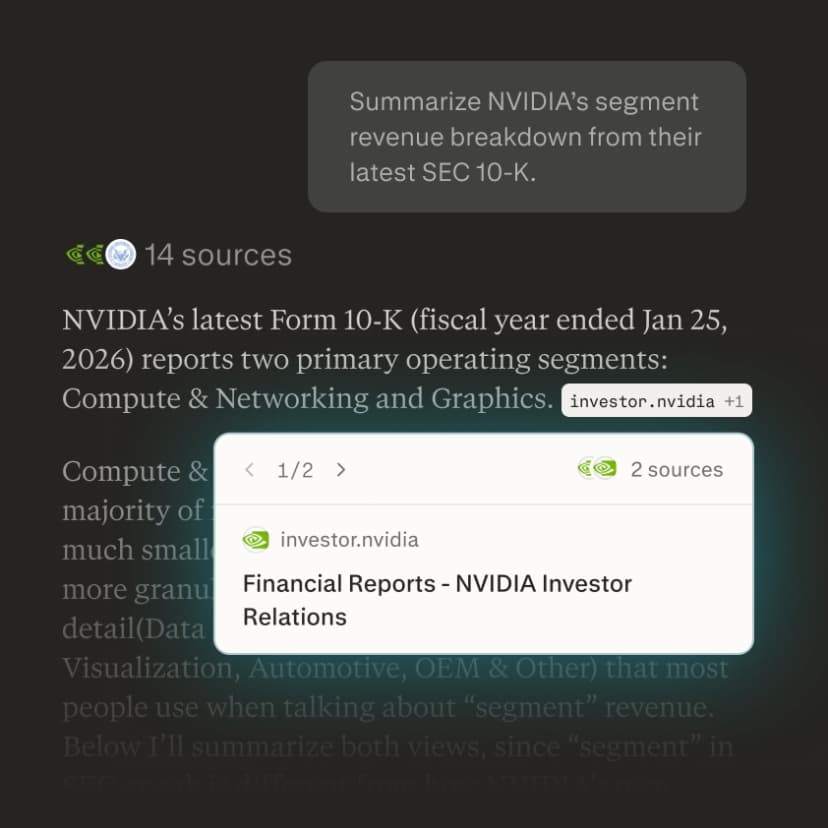
Evidence basis
This table uses official Perplexity and OpenAI docs for feature claims. It maps each feature to the job it serves.
Exact plan limits, model names, and quotas change often. Use this table to choose the right workflow stage before you compare paid plans.
Check volatile details against the current Perplexity file upload docs, Perplexity Projects docs, Perplexity Pro Search docs, ChatGPT file upload docs, and OpenAI's note on when ChatGPT can be wrong.
| Job | Perplexity | ChatGPT | Best fit |
|---|---|---|---|
| Current web discovery | Search-first answers with source links and follow-up context. | Can search the web when search is selected or automatically useful. | Perplexity when the first job is finding current sources quickly. |
| Citations and source visibility | Numbered citations are central to the answer surface. | Search and deep-research workflows can provide cited web answers or source panels. | Perplexity for fast source-visible lookup. Both still need human source checks. |
| File uploads | Supports uploaded files for session context, including text, docs, images, audio, and video transcription within documented limits. | Supports document synthesis, transformation, extraction, spreadsheets, slides, and common docs within documented limits. | ChatGPT for heavier transformation and analysis. Perplexity for file-informed Q&A alongside search. |
| Projects or workspaces | Projects organize threads, files, instructions, sharing, and selected sources. | Projects keep chats and files together for a scoped assistant workspace. | Tie, with the choice depending on whether the workspace is search-first or assistant-first. |
| Long-form drafting | Can summarize and answer from sources, but drafting is not the main product frame. | Stronger for outlines, memos, rewrites, explanations, and iterative writing. | ChatGPT. |
| Coding and data work | Can help with technical questions and some generated artifacts. | Better fit for code generation, debugging, data analysis, and structured transformations. | ChatGPT. |
| Deep research | Perplexity offers more involved research modes that run multiple searches and produce reports. | ChatGPT can use search or deep research tools for multi-source answers, depending on availability. | Choose by workflow: Perplexity for web-search-centered reports, ChatGPT for broader assistant work around the report. |
| Source audit | Citation links make sources easier to open, but the citation still needs checking. | OpenAI advises users to verify key outputs, quotes, data, and references. | Neither is enough by itself for high-stakes claims. Inspect sources directly. |
| Preserving a source set | Projects can keep threads and uploaded materials organized. | Projects can keep files and chats in one assistant workspace. | Atlas when the durable job is cited comparison over selected sources. |
Table 1: Perplexity is the search-first fit, ChatGPT is the assistant-first fit, and Atlas becomes relevant when selected sources need a durable citation-checking step.
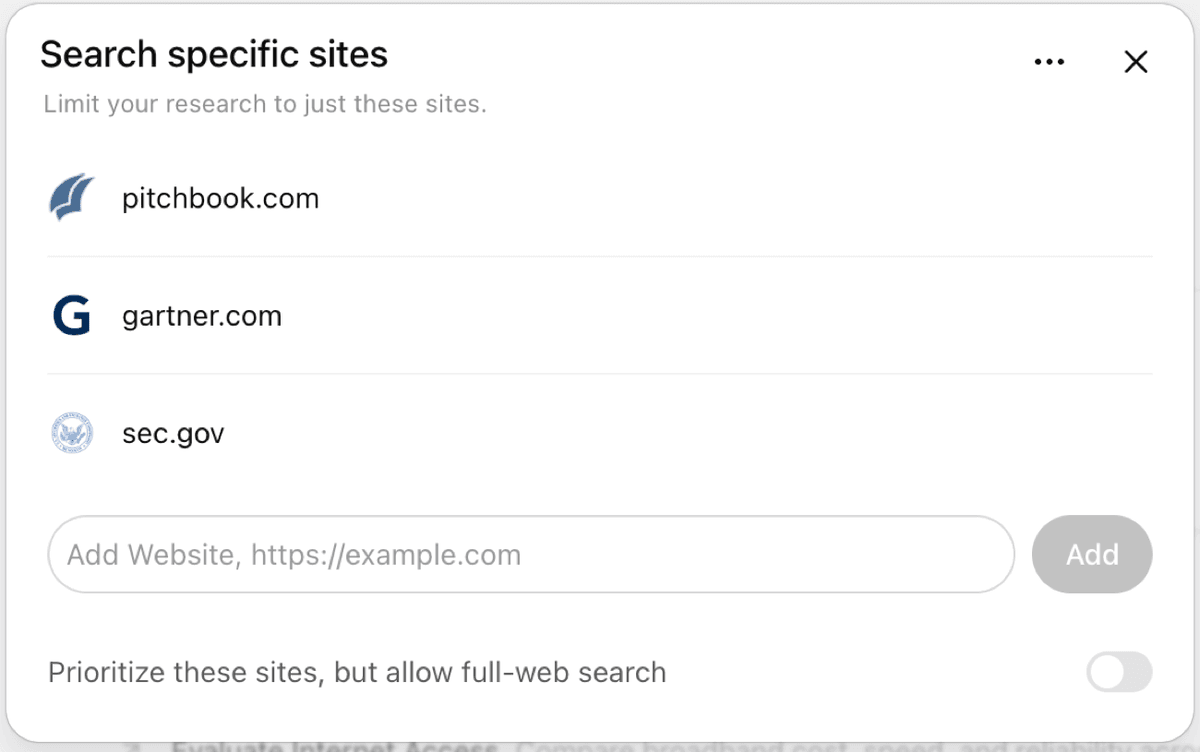
OpenAI's Deep Research interface lets the user restrict or prioritize websites before research begins. This is useful source control, but the resulting claims still require inspection against the cited pages.
Use both with source traceability
A strong workflow separates search from proof.
Search and draft handoff
Use Perplexity to map the open web. Ask for main sources, recent coverage, official docs, opposing views, or papers worth reading. Open the citations as you go. Save the sources that matter instead of copying only the answer. If the same page appears across several searches, inspect the original page directly.
Source check checklist
Use this source check before reusing a cited AI answer:
- Open the cited page, file, or passage.
- Check that the passage supports the exact claim.
- Read nearby context for limits or disagreement.
- Revise the claim if the source is narrower.
- Save the source trail with the final note.
- Name the source in the saved note.
Then use ChatGPT for general assistant tasks. Upload selected files. Ask it to compare two docs, extract spreadsheet rows, rewrite a memo, generate code, or turn notes into a draft.
When the output contains a claim that matters, ask for the source behind that claim and check it yourself. OpenAI tells users to check key facts, quotes, data, technical details, and references. If the main job is a dedicated source-grounded workspace, compare this article with Atlas vs ChatGPT and Atlas vs Perplexity.
The handoff breaks when you let a search answer become the final source. A Perplexity answer can be useful and still be a summary of sources you have not read. A ChatGPT draft can be fluent and still contain a claim that is too strong for the underlying file. The safer pattern is:
- Use Perplexity to find and triage sources.
- Use ChatGPT to transform, analyze, or draft from selected materials.
- Open the cited or uploaded source behind important claims.
- Save the verified source, passage, and note somewhere durable.
- Revisit the source set when the project becomes more than a one-off answer.
Many AI workflows lose context at the save-and-return stage. A useful answer in a chat can disappear into thread history. A source link can be hard to recover when the project returns two weeks later.
If the source set will support a paper, report, memo, policy choice, or client deliverable, do not leave it in chat history. Move those sources into a grounded workspace before you rely on them.
Source follow-up after AI search or chat
Atlas is not a live web answer engine like Perplexity and it is not a general assistant like ChatGPT. It fits the stage after you have sources you want to keep, compare, and verify.
In Atlas, the relevant source or note must be in the current project before it can support a grounded answer. The public docs explain how Atlas grounds answers in sources and how to troubleshoot weak citations. Once the source is processed, you can ask a focused question such as:
- "Compare Source A and Source B on their explanation of this claim."
- "Which source supports this sentence, and what caveat does it include?"
- "Using only these reports, where do the authors agree and disagree?"
- "Cite each bullet so I can inspect the passage before I reuse it."
Atlas answers grounded questions from project sources and returns citation badges for key claims. Each badge opens the source passage Atlas used. The real check is not the citation number. It is reading the passage, checking nearby context, and deciding whether the answer stayed faithful to the source.
For example, a researcher might use Perplexity to find company pages and analyst reports. ChatGPT can turn notes into a first memo. Atlas can keep the selected PDFs and pages together. In Atlas, the researcher can ask which sources support a market-size claim. Then they can inspect each citation passage and save the finding with source context attached.
The same pattern works for students and researchers. Perplexity helps find papers and recent commentary. ChatGPT helps summarize a file, draft an outline, or rewrite a paragraph. Atlas helps answer questions across the chosen papers. It also keeps source passages close before a claim enters the review.
For adjacent workflow comparisons, see Perplexity alternatives, NotebookLM alternatives, ChatGPT alternatives, best document AI tools, and AI tools for academic research. For outside comparison language, the approved brief used hands-on pages from G2, Zapier, Coursiv, and a Reddit Perplexity discussion as secondary or language-only inputs.
For volatile Perplexity details, check the current docs for what Perplexity is, Pro Search, sessions, internal knowledge search, Pro, and advanced deep research before quoting limits or availability.
Atlas handoff proof
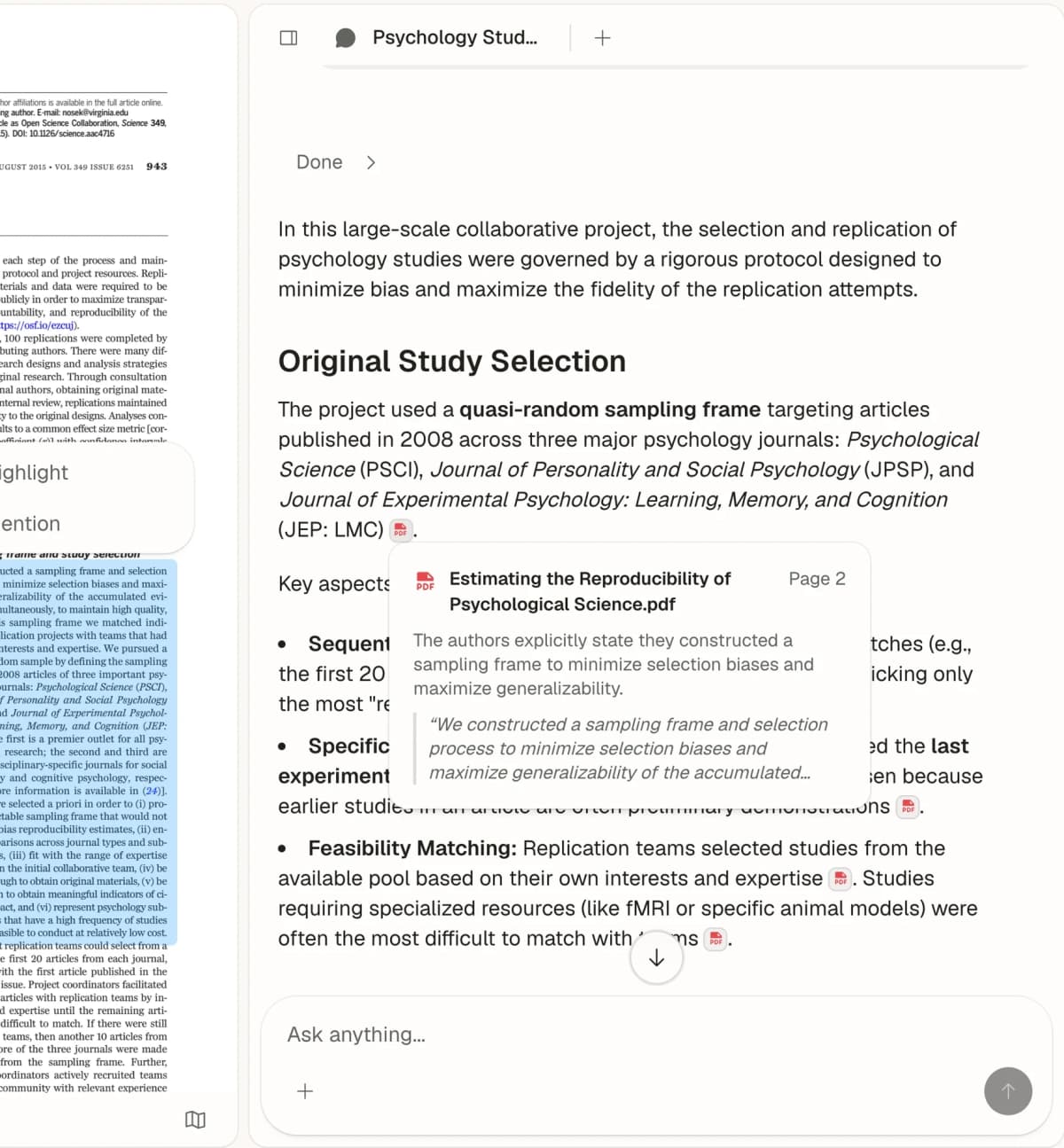
A concrete Atlas follow-up looks like this:
- Add the 2 reports, papers, or PDFs you plan to rely on.
- Ask: "Compare these sources on the claim that X is increasing. Cite each bullet."
- Open the citation badge beside each claim.
- Read the cited passage and nearby context.
- Save only the claims that survive the passage check.
That workflow makes the source set do the proving. Perplexity may have helped find the sources. ChatGPT may have helped draft the first memo. Atlas is useful when the next question is whether the saved sources support the claim you are about to reuse.
Atlas has limits worth naming. It cannot cite evidence that was never imported or processed. Broad questions can retrieve weak passages. A citation can be present but incomplete. For high-stakes work, use Atlas to navigate evidence. Ask narrow questions. Open citation badges. Read the passage. Revise the claim when the source is weaker than the answer.
Which should you choose?
Choose Perplexity if your main question is "what is current, and which web sources should I open?" It is the better default for live discovery and fast cited lookup.
Choose ChatGPT if your main question is "help me make, analyze, write, code, or revise something." It is the better default for drafts, file tasks, data work, code help, planning, and broad assistant work.
Use both when the project starts with discovery and turns into production. Perplexity can help you find the source set. ChatGPT can help you work with the material. The important discipline is to keep the sources separate from the generated answer until you have inspected the support.
Use Atlas when the project moves from "answer this now" to "I need to keep and check these sources." At that stage, source checks and grounded follow-up questions matter more than another fluent answer.
Use Perplexity to find sources. Use ChatGPT to create from selected material. Use Atlas to preserve and check the source set.
Conclusion
Perplexity and ChatGPT overlap more than they used to. Perplexity has files, projects, and deeper search modes. ChatGPT has search, citations in search workflows, file uploads, projects, and deep research features. The right choice is less about which product has the longest feature list and more about where your work starts.
If your task starts on the open web, begin with Perplexity. If your task starts with a blank page, file, spreadsheet, code problem, or plan, begin with ChatGPT. If the answer will depend on sources you need to defend later, move those sources into Atlas. Inspect the source passages before the claim leaves your workspace.
Compare your selected sources in Atlas
Add sources from either tool, compare their claims, and inspect cited passages.