


Perplexity is a strong choice for fast web search with linked sources. Another tool may fit better when you need to write a draft, search research papers, work from private files, or check a claim against a set of sources.
Use ChatGPT or Gemini for broad tasks. Claude is useful for long files and careful writing. Consensus, Elicit, and SciSpace focus on research papers. NotebookLM answers from sources you add. Atlas compares selected sources and links each cited answer to its source passage.
There is no single best replacement. Choose the tool that fixes the step Perplexity does not handle well enough for your work.

Continue in Atlas with your selected sources
Add trusted sources, ask a grounded question, and inspect each cited passage.
Start with the research job
First, name the task you need to finish. A search tool fits when you need web sources. A research tool fits when you need to find or compare papers. A broad assistant fits when you need a memo, plan, or code. Atlas fits when you must check a claim against files you chose.
Use these criteria:
- Does the tool search the web, research papers, or your own files?
- Do you need a quick answer, a draft, or a table of findings?
- Can you open the source passage behind the answer?
- Will you reuse the answer in a report, review, or public claim?
Comparison matrix or decision table
Start with the sources each tool can use. A tool that searches the live web may not be the best tool for reading your own files or comparing facts from research papers.
| Alternative | Best fit | Source boundary | Verification note |
|---|---|---|---|
| Atlas | Comparing a set of sources you choose. | Sources you add to a project. | Open the passage behind each citation. |
| ChatGPT | Drafts, files, data, and broad project work. | The web and files you upload; access depends on the mode. | Check key sources and references. |
| Gemini | Google search, Workspace, images, video, and long files. | Google services and supported files. | Check account settings and source access. |
| Claude | Long files, careful prose, and document questions. | Files you upload and the current chat. | Check quotes and source claims. |
| Consensus | Quick answers backed by studies. | Its collection of research papers. | Open the studies before citing them. |
| Elicit | Finding papers and pulling the same facts from each one. | Research papers and review projects. | Check extracted facts in the paper. |
| NotebookLM | Questions and summaries from a set of sources. | Sources you add to a notebook. | Open citations before saving a finding. |
Table 1: The main difference is not the chat box. It is what the tool can search and whether you can inspect the source after you get an answer.
Best Perplexity alternatives by workflow
ChatGPT or Gemini for broad assistant work
Choose a broad assistant when the task goes beyond search. ChatGPT Deep Research can make a report with linked sources. Gemini Deep Research can do multi-step research within Google's services.
ChatGPT is a good fit for drafts, code, data, and project work. Gemini may fit better when the work starts in Google Search, Gmail, Docs, Drive, images, or video.
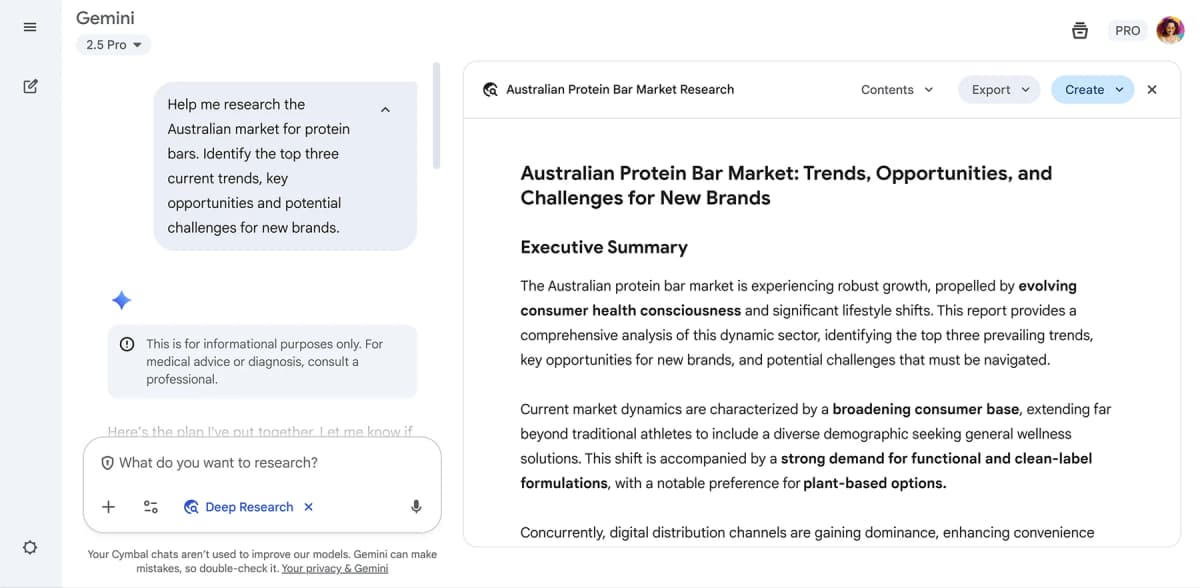
Google’s sample shows Deep Research creating a research plan before the final report. It illustrates a multi-step workflow, not source coverage or report quality.
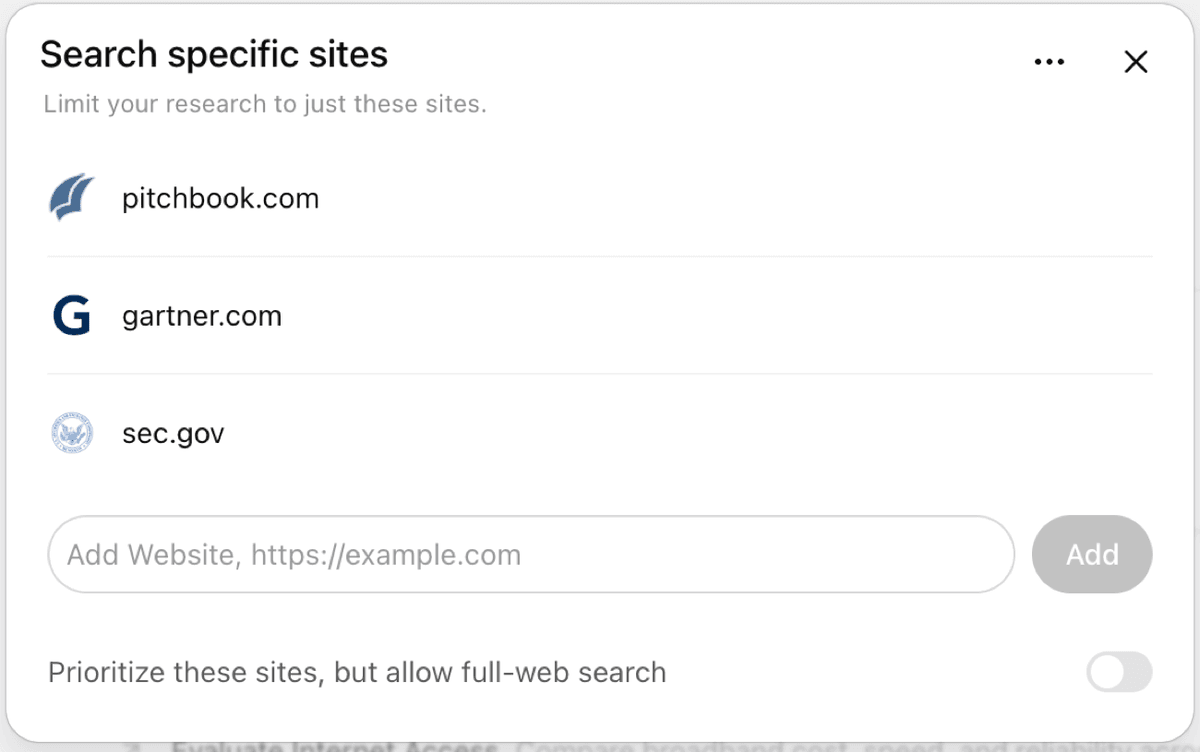
The site-control panel shows how ChatGPT Deep Research can scope a run to selected websites. It does not show the resulting research report.
Consensus, Elicit, or SciSpace for academic evidence
Choose a research tool when you need answers based on studies rather than the whole web.
Consensus gives quick answers linked to papers. Elicit finds papers and pulls set facts from them. SciSpace helps users read papers and work on a literature review.
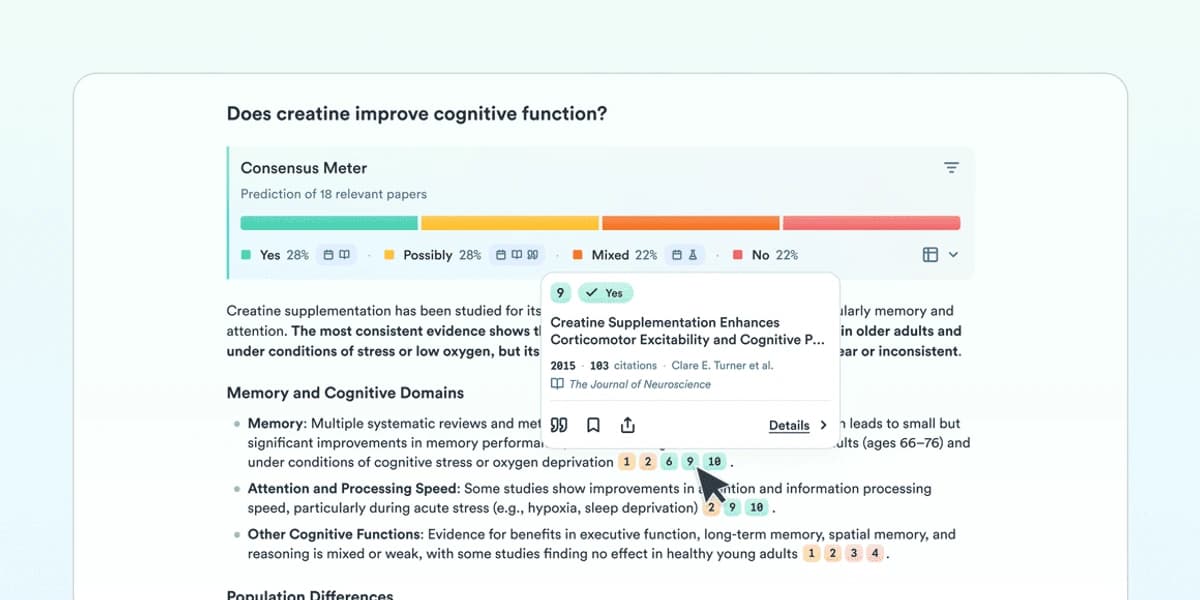
Consensus groups the returned papers by answer direction. Open the underlying studies and check the question and paper count before using the summary.
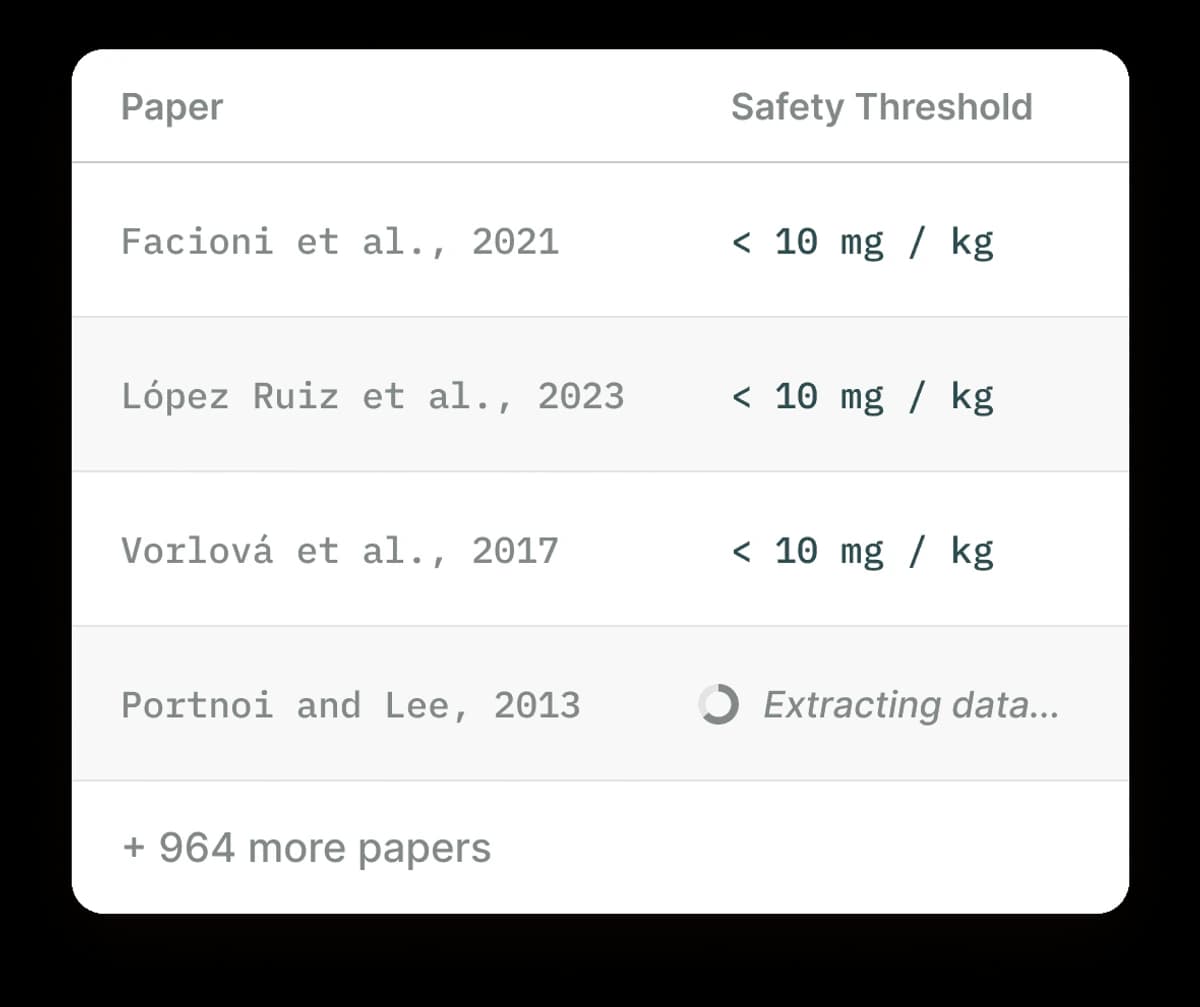
Elicit’s table applies a structured field across paper rows. Verify extracted values against the source papers before relying on them.
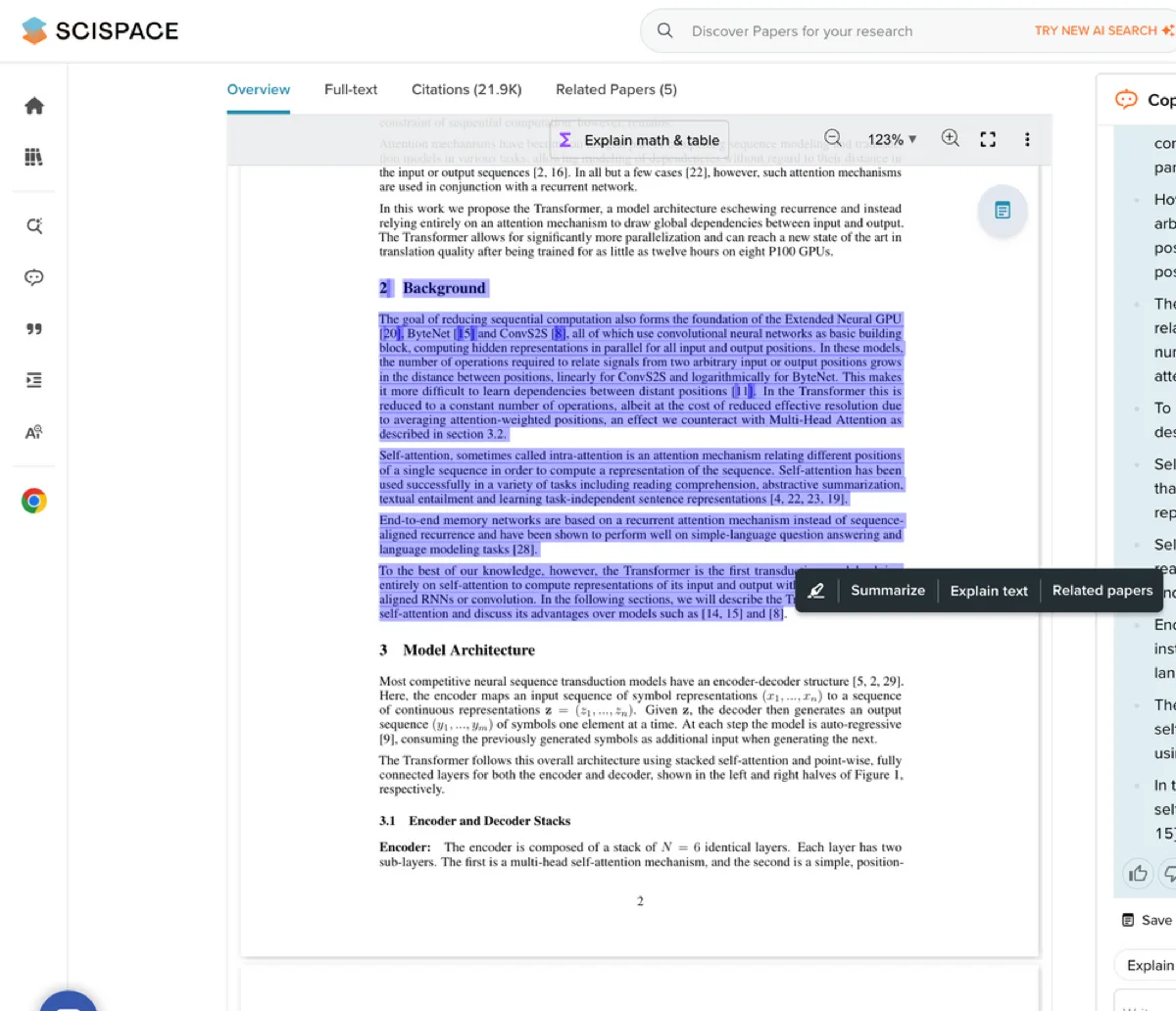
The screenshot shows a highlighted passage and explanation panel in SciSpace. Check the cited source passage before carrying an explanation into a review.
Atlas for source-grounded synthesis
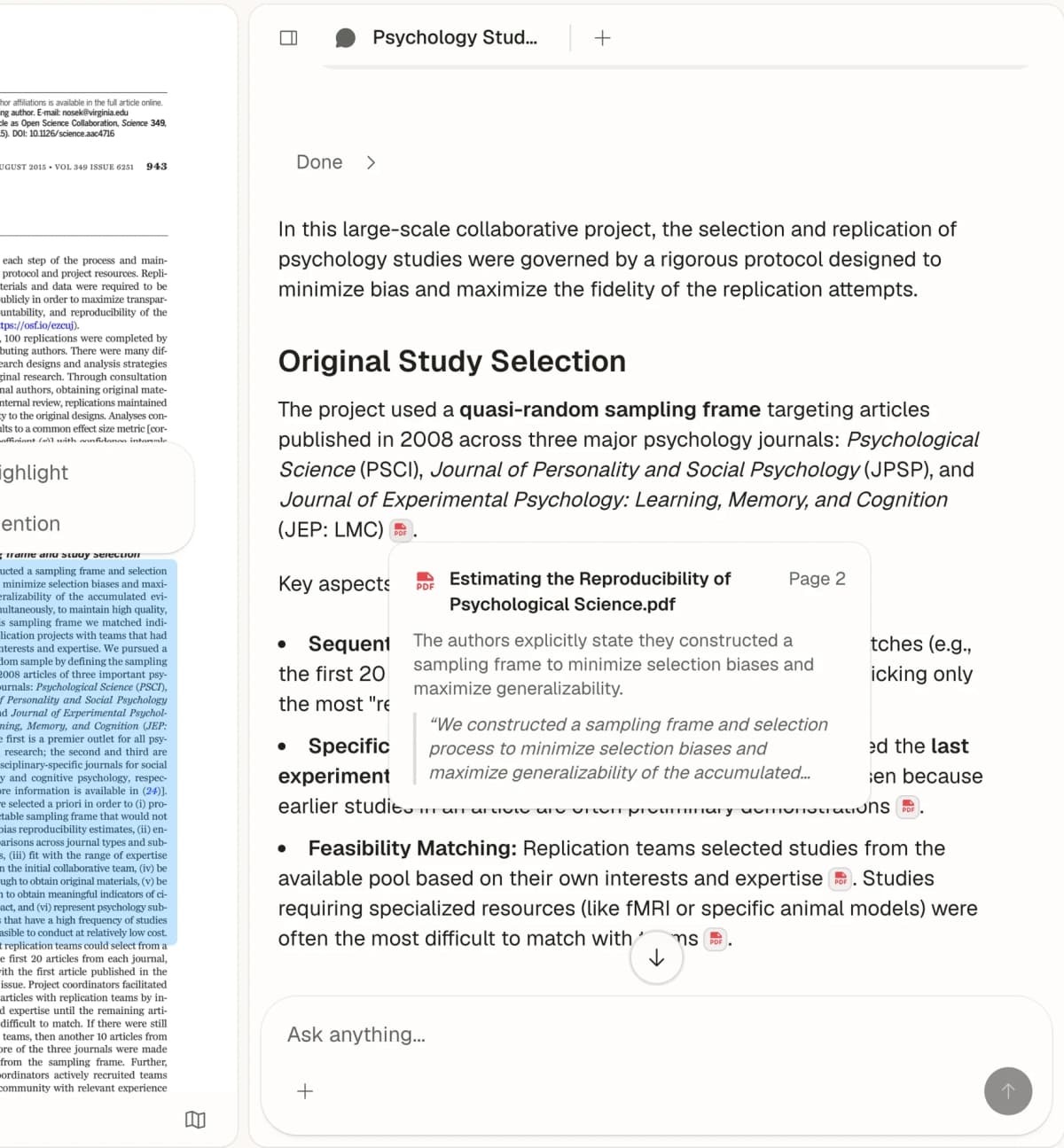
Choose Atlas when you have selected PDFs, pages, notes, or papers and need to compare them. Ask, "Which source supports this claim, and what limit does it give?" Each answer includes citations that open the source text.
NotebookLM for bounded source sets
Choose NotebookLM when you know which sources you want to use. It can answer questions and make study aids from those items. It is a better fit than web search when the answer must stay within one notebook.
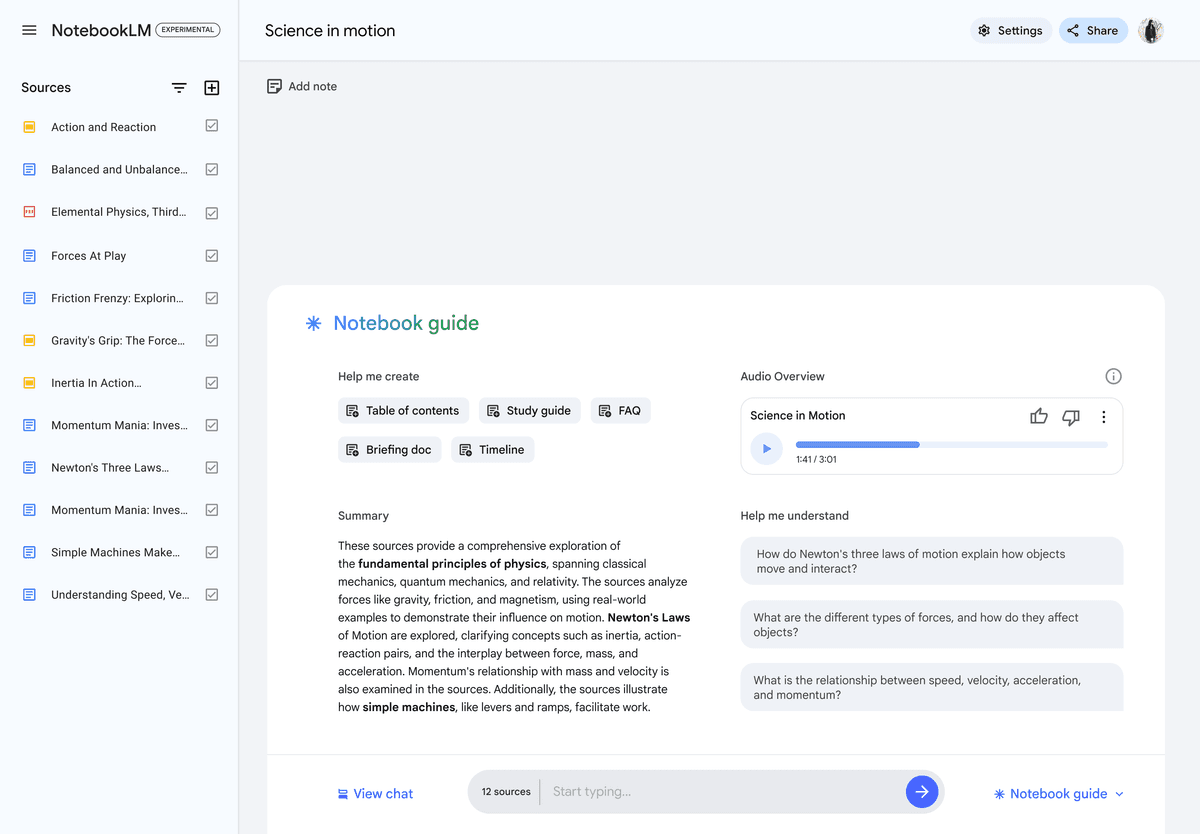
The visible source list shows the materials included in this NotebookLM workspace. Check answers against those source documents.
Where Atlas fits after discovery
Perplexity can help you find sources. Atlas fits after you decide which sources you want to trust and compare.
Add the key documents, web pages, PDFs, or notes to one Atlas project. Ask a clear question about them. Then open each citation in the answer and read the source passage.
This check matters because a search answer can sound final even when its source does not support the wording. Atlas keeps the answer tied to the sources you selected, so you can decide whether the claim is fair.
The Atlas screen shows the source, the text around the cited passage, and the answer with citation badges. Use all 3 views to check a claim found through Perplexity.
This step is useful for a literature review, client report, strategy note, or any work that will reuse a source-backed claim. Perplexity can find the sources. Atlas can help you compare the ones you select before the answer becomes final.
How to choose
Perplexity remains the best fit in this guide for fast AI web search. ChatGPT, Gemini, and Claude fit broader writing and thinking tasks. Elicit, Consensus, and SciSpace help users find and read research papers.
NotebookLM works from sources placed in one notebook. Atlas works from sources added to a project, then lets you compare them and open the passage behind each cited answer.
If 2 tools seem close, look at what they can search. The live web, a collection of research papers, files you upload, and a set of sources you chose are not the same.
Continue in Atlas with your selected sources
Add trusted sources, ask a grounded question, and inspect each cited passage.