

An AI citation checker can help you find fake sources, broken DOI details, and citation-format problems. It cannot prove that a cited source supports the sentence around the citation.
Use citation checking as a 3-step review. First, confirm that the source exists. Second, confirm that the citation details match the source record. Third, read the source passage and decide whether it supports the claim. Many citation tools stop before that third step.

Check claims against your uploaded sources
Upload a source, check a claim, and inspect the cited passage before reuse.
What AI citation checkers verify
Most people searching for a citation checker ai are trying to answer one of 3 questions:
- Did the AI invent this reference?
- Does the DOI, title, author list, journal, year, or page range match a real record?
- Does the cited source support the claim in the draft?
Those questions look similar, but they need different proof. A database-backed checker can compare a citation against source records. Common places to check include Crossref, OpenAlex, PubMed through NCBI E-utilities, Semantic Scholar, Google Books, and publisher pages. That helps when ChatGPT, Claude, Gemini, or another writing tool gives you a source that sounds real.
Source lookup is not the same as checking the claim. A real paper can be cited for the wrong finding. A correct DOI can sit next to a sentence the paper never supports. A source-finder can suggest better papers without proving that your current sentence is fair.
Citation checking workflow
Use the exists, matches, supports rubric. Run the checks in that order because each layer catches a different error.
1. Check whether the source exists
Start with stable source IDs such as DOI, PMID, ISBN, arXiv ID, exact title, and first author. If the source is biomedical, PubMed or PubMed Central may be the right first stop. If the source has a DOI, Crossref can confirm whether a record exists. If you only have title and author fragments, try OpenAlex, Semantic Scholar, Google Scholar, a library catalog, or a publisher page.
An existence check catches fake-source signs. The journal may not exist. No database may find the title. The DOI may resolve nowhere. The author-year pair may point to the wrong paper.
Treat an unmatched result as unresolved before you call it fake. New, niche, local, non-English, book, legal, archival, and non-indexed sources can be real without appearing in the first database you try.
2. Check whether the metadata matches
If the source exists, compare the citation details against the record:
- title and subtitle
- author order
- year and publication venue
- DOI, PMID, ISBN, URL, or accession number
- volume, issue, page range, article number, or chapter
- publisher or journal name
This step catches stitched-together citations. You may find a real author with the wrong title. You may find a real DOI attached to the wrong paper, or a journal name swapped into a plausible-looking source.
Tools such as CiteMe, Citely, CiteTrue, and Sourcely focus on this kind of source check. Evernote's AI Citation Checker shows another side of the market. Some tools focus on citation parts, style guides, and format rules rather than deep source support.
3. Check source support
The final check is semantic. Open the source and find the passage that should support the draft sentence. Then ask:
- Does the passage make the claim, or is it only related?
- Is the draft stronger than the source?
- Is the claim based on a result, a limitation, a method note, or a citation inside the source?
- Does nearby text add a caveat, population limit, time limit, or contradiction?
- Is another source needed before the claim is fair?
This is the layer that matters most for publication, grading, peer review, and serious research notes. The arXiv paper on full-text citation verification makes the same point. A source can exist and have a clean format while still failing to support the claim.
AI citation checker tool types compared
Use this matrix before you paste a bibliography into the first checker you find. The right tool depends on whether you are checking a reference, a draft claim, a citation format, or a source passage.
| Tool type | Best for | What it can verify | What still needs human review |
|---|---|---|---|
| Database lookup and DOI tools | Confirming that a reference exists | DOI, title, author, year, journal, publisher, PMID, ISBN, or record match | Whether the source supports the sentence where it is cited |
| AI citation checkers and bibliography auditors | Finding fake, partial, or suspicious references in a reference list | Missing records, mismatched metadata, invalid DOI patterns, potentially hallucinated references | False negatives, niche sources, and claim-source alignment |
| AI source finders | Finding sources for unsupported claims in pasted text | Possible supporting or contradicting sources for a sentence or paragraph | Whether the suggested source is the right source to cite in your draft |
| Citation-format checkers | Cleaning up APA, MLA, Chicago, Harvard, or other style details | Citation elements, punctuation, order, capitalization, and style consistency | Whether the reference is real or the claim is supported |
| Source-grounded workspaces | Checking a claim against documents you already have | Passage-level support inside uploaded or imported sources, citation badges, and nearby context | Whether you accept the evidence strength after reading the source yourself |
Table 1: GPTZero's citation checker and similar source-finder pages show why this market can be confusing. Some tools analyze text and look for source support. Some inspect a bibliography. Some produce replacement sources. Some mainly format references. A bibliography audit may need database lookup first and passage inspection after the source is found.
If you only need to clean APA format, use a formatter. If you need to catch fake sources, use database lookup. If you need to decide whether a source supports a draft claim, move from source records into passage checks.
Where Atlas fits for claim support
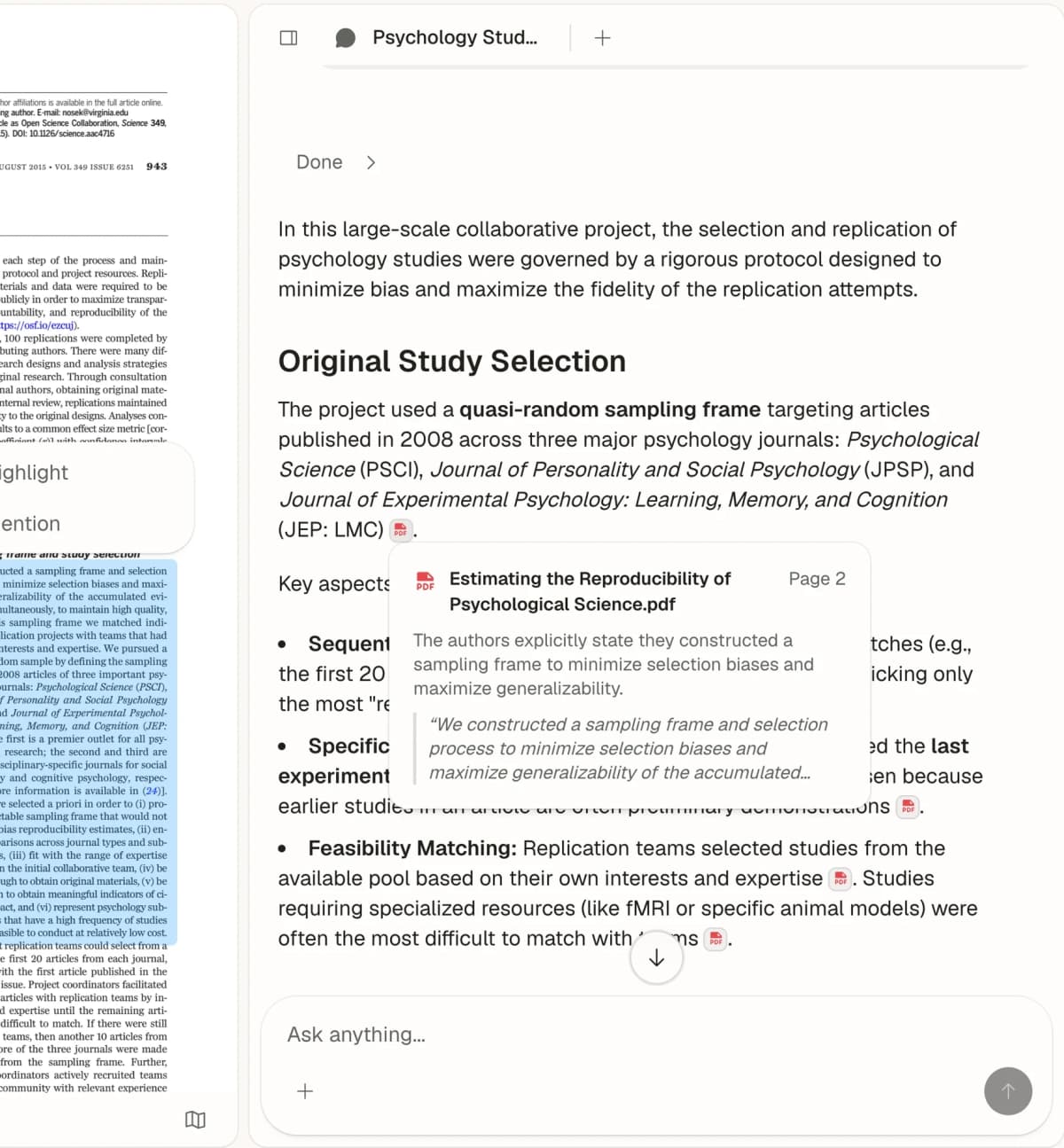
Atlas fits after you have the source document. It does not replace DOI lookup, style cleanup, or fake-source checks. Use it when the paper, PDF, article, note, or source page is already in your project. Then inspect whether the source supports the claim.
For a suspicious citation, I would use this Atlas sequence:
- Import the source. Add the PDF, website, note, or academic paper record to the project. Wait for source processing to finish.
- Ask a narrow grounded question. Use a prompt such as:
Does this source support the claim that retrieval reduces hallucination in long-form research answers? Cite the exact passage. - Open the citation badge. Atlas answers can include numbered citation badges that open the source passage used for the answer.
- Read the passage and nearby context. Check the highlighted sentence, surrounding paragraph, caveats, figures, tables, and footnotes when they affect the claim.
- Decide what to do with the draft. Keep the claim, narrow it, add another source, or mark it as unsupported.
Example prompts for claim-support checks
Using only this uploaded paper, what passage supports the claim that the intervention improved retention?Does the source say the model reduced hallucinations, or does it only describe retrieval?Cite the limitation the authors give for this result.Which source in this project disagrees with this claim?
If you are comparing citation tools more broadly, read the guide to citation tools for research. It covers reference managers and source-list setups. If your main concern is AI answers that cite sources, read how to choose AI that cites sources, then compare the verifiable citation workflow for writing-tool answers that need source checks.
Educator and reviewer guidance
For teachers, editors, and reviewers, source checks are often stronger than style-based AI claims. A fake citation, broken DOI, or mismatched source is a concrete problem in the submitted draft. You can document that problem without making a broader claim than the evidence supports.
Use this review path:
- Record the exact citation and the sentence it is meant to support.
- Search stable IDs first: DOI, PMID, title, author, year, and venue.
- Save screenshots or notes when records are missing, mixed, or wrong.
- If the source exists, read the relevant passage before deciding the citation is wrong.
- Apply the school, journal, class, or editor policy for bad citations.
Avoid shortcuts that create a new evidence problem. Do not assume a citation error proves a student or author used AI. Do not rely on a detector score as the only proof. Do not swap in a similar source unless the new source supports the claim.
The strongest feedback is specific. You can write, "This cited paper exists, but it does not support the sentence about X." You can also write, "I could not verify this DOI, title, and author match." That gives the writer a repair path and keeps the review focused on source quality.
Recommendation for citation verification
Choose the verification path based on the failure you are trying to catch.
- You have a suspicious source list: start with database lookup. Use an AI citation checker that compares sources against scholarly records.
- You have a broken DOI or partial title: search DOI, title, author, venue, and year. Check Crossref, OpenAlex, PubMed, Google Scholar, publisher pages, and library catalogs.
- You need citation style cleanup: use a formatter or citation manager. Then check important sources against source records.
- You have a claim with no citation: use a source finder or academic search tool to find possible sources. Then read the source before citing it.
- You have the source but need to verify the sentence: use Atlas or another source-grounded tool. Ask a narrow question, open the citation passage, and inspect context.
For high-stakes work, stop treating "real citation" as the finish line. A real citation is only the beginning of the check. The safer standard has 3 parts. The source exists, the details match, and the passage supports the claim.
Conclusion
An AI citation checker is useful when it cuts search time and flags sources that need review. It is risky when it makes a source list look checked without showing whether the cited source supports the claim.
Use the three-layer check every time. Confirm existence, metadata, and support. Database tools can help with the first two layers. Atlas fits the third layer when the source is already in your workspace and the decision depends on the passage.
Check claims against your uploaded sources
Upload a source, check a claim, and inspect the cited passage before reuse.