


For most researchers, Zotero is the default free reference manager; Zotero's official overview confirms that it is free, open source, and built to collect, organize, cite, and share research. Choose Paperpile when Google Docs is central, EndNote when an institution supports a Word-based workflow, and Scite when you need citation context. Use Atlas after selecting sources when you need cited synthesis across them; Atlas does not store or format your bibliography.
This guide compares eight tools across those separate jobs. Reference managers collect papers and format citations. Citation-context tools show how later papers discuss a source. Research workspaces help compare and synthesize a selected source set.

Ask cited questions across your paper library
Keep Zotero for references, then use Atlas to compare evidence across papers.
Feature Matrix
Use this table before the ranked list. Some tools format sources, some explain how papers cite each other, and some help after you have selected a set of papers. The comparison covers imports, bibliography support, research analysis, review workflows, and writing-app integrations.
Read the proof this way. Zotero, Mendeley, Paperpile, and EndNote are strongest for import and bibliography work. Scite is strongest for citation context. Atlas is strongest for the ask-cited-question step, after the source set is already built. Atlas can import PDFs and web sources for analysis, but it is not the tool to format a bibliography. That is why the best workflow pairs Atlas with Zotero, Paperpile, or EndNote.
| Tool | Import | Bibliography | AI citation context | Review fit | Writing links |
|---|---|---|---|---|---|
| Atlas | PDFs and web sources | Not a formatter | Cited answers across uploaded papers | Good synthesis after screening | Pair with Zotero, Paperpile, or EndNote |
| Zotero | PDFs, DOI, BibTeX, RIS | Strong | No | Good source home | Word, Google Docs, LibreOffice |
| Mendeley | PDFs, RIS, BibTeX | Good | Basic discovery | Fair for groups | Word, LibreOffice |
| Paperpile | Chrome, PDFs, BibTeX, RIS | Strong in Docs | No | Fair for Docs-first work | Google Docs, Word |
| EndNote | Large libraries, RIS, Web of Science | Strong | Limited | Good for labs | Word, Web of Science |
| Scite | Paper lookup and citation graph | Not a formatter | Strong support/contrast labels | Good claim check | Browser, Assistant |
Table 1: Worked Atlas prompt set: Collect papers in Zotero or Paperpile first. Then upload key PDFs to Atlas and ask: "Which papers support my main claim?", "Which papers disagree?", and "What method gap appears across these studies?" The value is not a formatted bibliography. It is a cited answer you can trace to exact source passages.
For a real paper workflow, keep the steps small. Save sources. Tag them. Read the best ones. Upload the core set. Ask one question. Check each cited passage. Move only checked claims into the draft. This keeps the source trail clear.
How to Evaluate Citation Tools
The core checklist is simple. A good tool should pull paper details from PDFs and DOIs. It should support common styles like APA, MLA, Chicago, Vancouver, and IEEE. It should save sources from the browser, work with your writing app, and sync cleanly if you work with a team. AI features are useful when you need help reading patterns across papers.
Before comparing specific tools, here are the features that matter most when choosing a citation tool for research.
Automatic Metadata Extraction
A good tool should pull authors, title, journal, year, and DOI from a PDF, ISBN, URL, or DOI. Manual entry breaks down fast. Crossref contains metadata for more than 150 million scholarly records. DOI lookup is safer than typing records by hand.
Citation Style Support
Journals and schools require formats such as APA, MLA, Chicago, Vancouver, and IEEE. Your tool should support the styles you need and update them as rules change.
Browser Extension and PDF Import
You find papers on the web. Your tool should meet you there. A browser extension should save papers in one click. PDF import also matters for files you already downloaded.
Collaboration Features
If you work on a team, shared libraries and sync matter. Solo researchers can skip this. Team projects need a clean way for many people to add sources.
AI Capabilities
This is where newer tools differ. AI features can include:
- Smart citations: See whether a paper was cited as support, contrast, or background.
- Cross-paper Q&A: Ask a question across your library and get cited answers.
- Connection discovery: Find links between papers that are easy to miss.
- Summaries: Short notes on one paper or a group
Traditional managers do not do this work. If you use only those tools, you still have to spot the patterns yourself. That gets hard once a project has dozens of papers. For tools with source links, see our guide to AI tools with references.
Integration with Writing Tools
Your citations need to flow into your writing. Look for plugins or integrations with Microsoft Word, Google Docs, LaTeX (BibTeX export), and Overleaf. A citation tool that doesn't connect to where you write creates an extra manual step every time you cite something.
Storage and Organization
Look for folders, tags, saved searches, full-text search, and notes. Some tools search only titles and abstracts. Better tools search the full text of each PDF.
Top 8 Citation Tools for Researchers
The entries below list the best fit, main pros, and main cons for each tool.
- Atlas: Best after you have a set of papers. Pros: cited answers and maps. Cons: not a bibliography formatter.
- Zotero: Best free source home. Pros: open, stable, easy export. Cons: no AI synthesis.
- Mendeley: Best if you want a paper library plus a social layer. Pros: PDF notes and groups. Cons: no native Google Docs plug-in.
- Scite: Best for citation context. Pros: shows support and contrast. Cons: not a full source manager.
- Sourcely: Best for draft-to-source help. Pros: fast source ideas. Cons: not a formal review tool.
- Paperpile: Best for Google Docs. Pros: smooth Docs flow. Cons: paid only.
- Citavi: Best for structured notes. Pros: quotes, tasks, and outlines. Cons: Windows-first.
- EndNote: Best for large labs with a site license. Pros: strong for old team workflows. Cons: costly for solo users.
If you already have a source library, compare the options first. Then try Atlas to ask cited questions across your papers.
1. Atlas: Best for Cited Synthesis
Use if: You already have papers and need to understand links across them.
Atlas is not a replacement for Zotero or Paperpile. It is the layer you add after your sources are collected. Upload your papers, then use Atlas to map concepts, methods, and findings across them. Ask a question in chat and Atlas links each answer back to source passages.
This matters when your library stops being a filing cabinet and starts becoming evidence for an argument. Zotero can tell you where a paper is. Atlas helps you ask what your set of papers says.
Key points:
- Upload PDFs and web articles
- Mind maps show links across sources
- Chat answers include source links
- Web clipper for saving articles and web pages
Pricing: Free tier available, Pro from $20/month
Limitations: Atlas organizes and analyzes a selected set of sources. It does not create Word or Google Docs bibliographies. Pair it with Zotero, Paperpile, or EndNote for that job.
The clearest way to place Atlas in this workflow is to compare its job with the main reference managers:
| Job | Atlas | Zotero | Mendeley | Paperpile |
|---|---|---|---|---|
| Import papers | Upload PDFs and web sources | Strong | Strong | Strong in Chrome |
| Format bibliography | Not the job | Strong | Good | Strong in Google Docs |
| Explain citation context | Cited answers across your files | No | Basic discovery only | No |
| Support review synthesis | Maps claims, methods, and gaps | Stores and tags sources | Stores and shares sources | Good for Docs-first writing |
| Best next question | "What do my papers say?" | "Where is this source?" | "What are peers reading?" | "How do I cite in Docs?" |
Table 2: Atlas prompt example: Upload five papers from the same topic and ask, "Which studies support this claim, which ones disagree, and what method gap should I mention?" Atlas should answer with links back to source passages, so you can check the claim before you cite it.
Why it stands out: Most citation tools help you store research. Atlas helps you think with it. The mind map view and cited chat help you see patterns across 50 papers that are hard to track by hand. As one researcher put it: "Atlas has been a real time-saver for me. I just needed a tool to help me wade through the sea of articles I come across daily." - Walter Tay, Co-founder at Knoyo Health
Pros: Strong for comparing findings across a selected set of papers.
Cons: You still need Zotero, Paperpile, or EndNote for formal bibliographies.
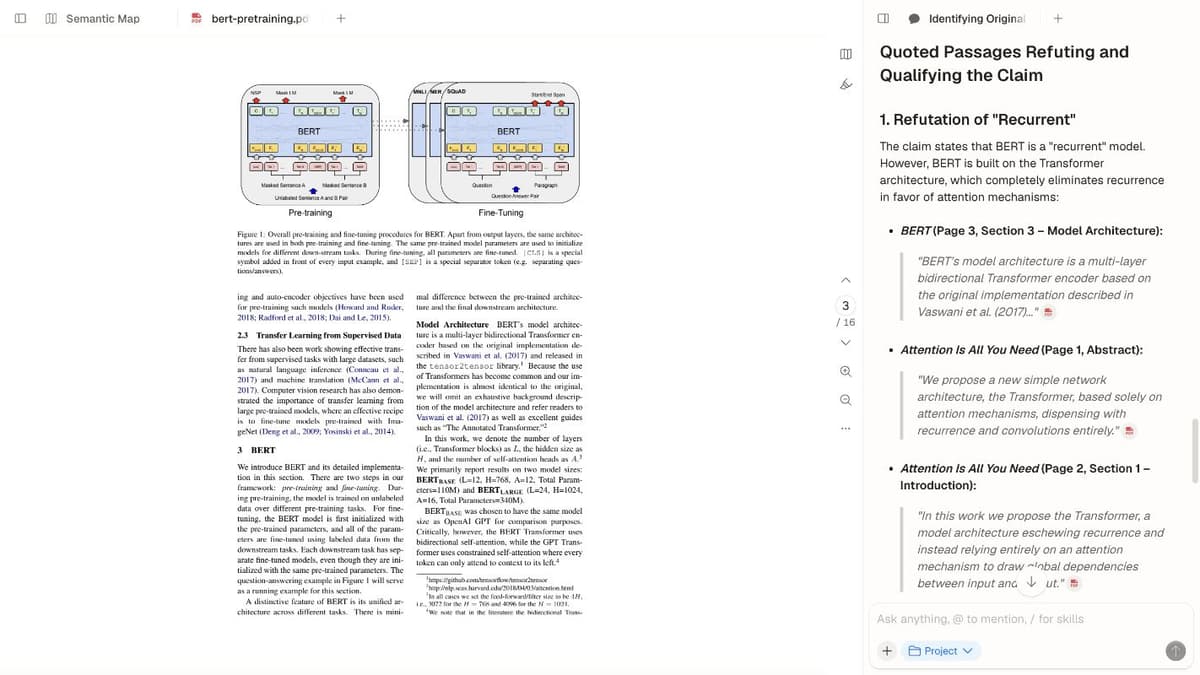
Atlas tests a claim against two papers in the library: the answer quotes BERT (Page 3, Section 3) and Attention Is All You Need (Page 1 and Page 2), each followed by a PDF citation badge, while page 3 of the BERT paper stays open on the left. That is the step after Zotero or Paperpile: asking what the collected papers say, with every quote traceable to a page.
2. Zotero: Best Free, Open-Source Citation Manager
Use if: You want a free, reliable home for papers.
Zotero is the default pick for most people. It is free, open-source, and strong at the core job: save, organize, cite, and format. The Zotero Connector saves papers from most academic sites in one click. The Word and Google Docs plugins insert citations and build bibliographies.
Key points:
- Save papers from the browser in one click
- Cite inside Word, Google Docs, and LibreOffice
- 10,000+ citation styles through the Citation Style Language (CSL) standard
- Syncs across devices (300 MB free storage, additional storage from $20/year)
Zotero's core software is free, while 2 GB of file storage costs $20 per year. Its open format and reliable exports make it easy to move your library later. The tradeoffs are an older interface, no AI synthesis, and extra setup for some LaTeX workflows. Zotero formats sources well, but you need another tool to compare what the papers say.
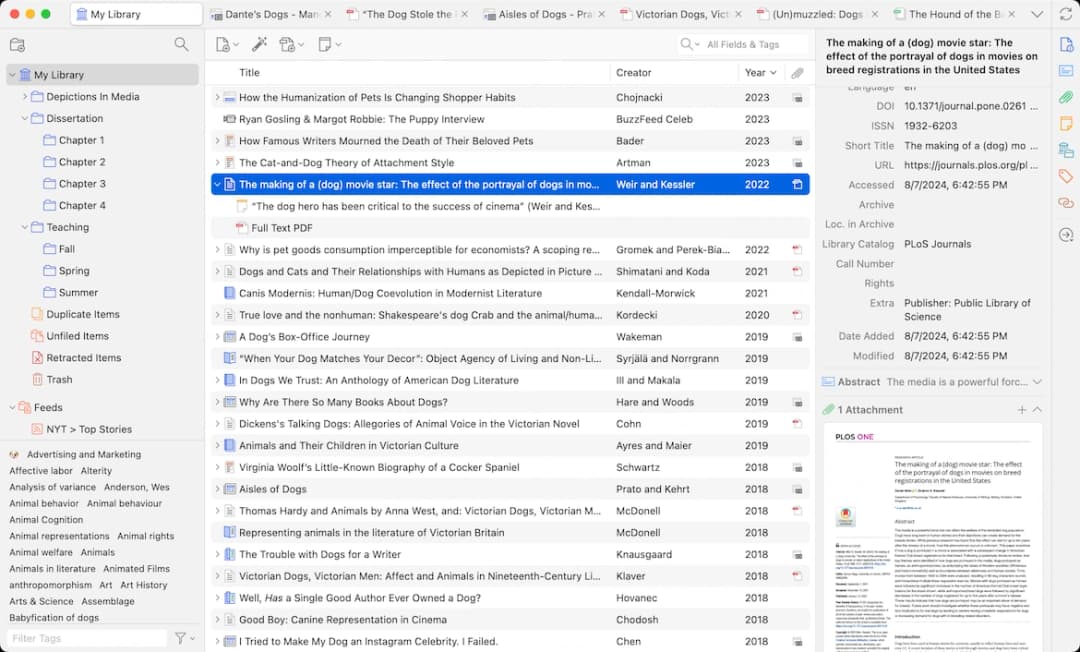
Official Zotero homepage screenshot showing the main job: sort papers, check details, tag items, and keep each PDF near its record.
3. Mendeley: Best for Social Academic Networking
Use if: You want a paper library plus academic network features.
Mendeley, owned by Elsevier, combines a reference library with academic social features. You can follow researchers, join groups, and find papers through what peers read. The core manager handles PDF import, metadata lookup, Word citations, and notes.
Key points:
- Import PDFs and pull source details
- Cite in Word and LibreOffice
- Follow researchers, join groups, and see trending papers
- 2 GB free cloud storage for PDFs
Pricing: Free (2 GB storage), institutional plans available
Limitations: Owned by Elsevier, which concerns some researchers on open-access grounds. No Google Docs plugin (a gap for many users). The desktop app has had stability issues. Less flexible than Zotero for advanced customization. Limited AI capabilities beyond basic paper suggestions.
Mendeley works well for PDF notes, research groups, and finding papers. Its drawbacks are a less open system than Zotero and weaker support for Google Docs.
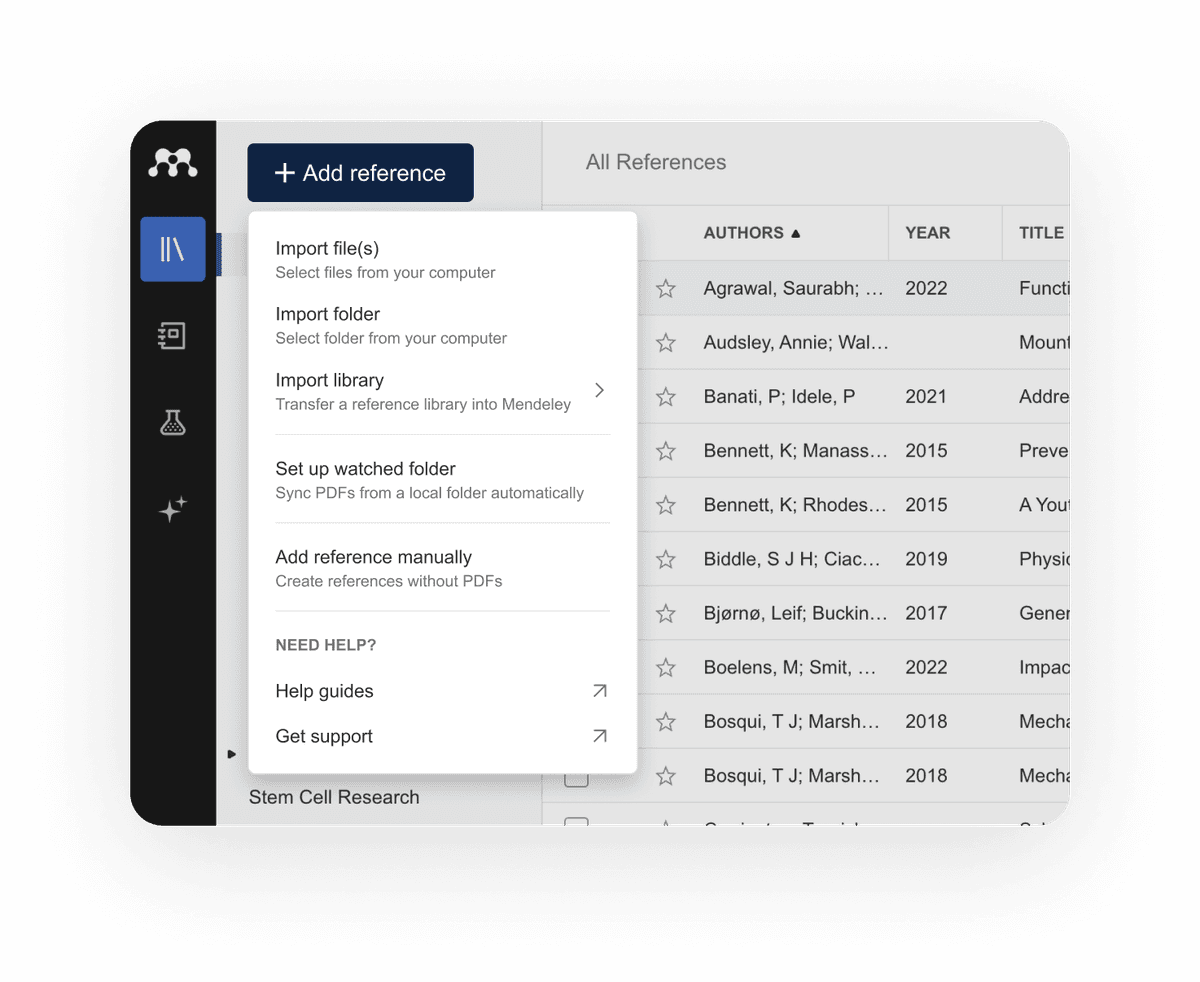
Mendeley's official Reference Manager image shows the import menu beside its library. Source: Mendeley features.
4. Scite: Best for AI-Powered Smart Citations
Use if: You need to see whether later papers support or challenge a source.
Scite shows you how a paper has been cited. Its Smart Citations label each citation as supporting, contrasting, or mentioning. That changes how you judge impact. A paper with 500 citations looks strong. If many of those citations challenge its findings, you need to know that.
Key points:
- Smart Citations show support, contrast, or mention
- Citation statements show the sentence where a paper is cited
- Scite Assistant answers questions from published papers
- Reference Check tests whether your sources support your claims
Pricing: Free trial, Individual from $12/month, Institutional pricing available
Limitations: Not a full citation manager. You'll still need Zotero or another tool for bibliography formatting and in-document citation. Coverage is strong in biomedical and social sciences but thinner in humanities and engineering. The pricing adds up if you're already paying for other tools.
Pros: Strong for checking whether later papers support or dispute a claim.
Cons: It does not replace a reference library or writing plugin.

Figure: the Scite plug-in adds Supporting, Contrasting and Mentioning columns to a Zotero library. A 2016 paper on anthocyanins in young red wines has 2 supporting, 0 contrasting and 17 mentioning citations out of 19 Smart Citations. Sort by Contrasting to find saved papers that later work disputes. Source: Stacy Brody, “Scite,” Figure 1, Journal of the Medical Library Association (2021), CC BY 4.0.
5. Sourcely: Best for AI-Assisted Source Finding
Use if: You have draft text and need source ideas.
Sourcely starts from your draft. Paste an essay section, thesis paragraph, or proposal. It suggests academic sources that may support the claim. This helps when you know what you want to say but still need sources.
Key points:
- Paste text and get source ideas
- Relevance score for each source
- Bibliography output in common styles
Pricing: Free tier available, Pro from $9/month
Limitations: Finding sources after writing is the reverse of how research usually works (read first, then write). The quality of suggestions depends on how well your text matches available literature. Not a replacement for systematic literature searching. Limited to papers in its index.
Pros: Fast when a paragraph needs source leads.
Cons: Weak for formal search plans and review methods.
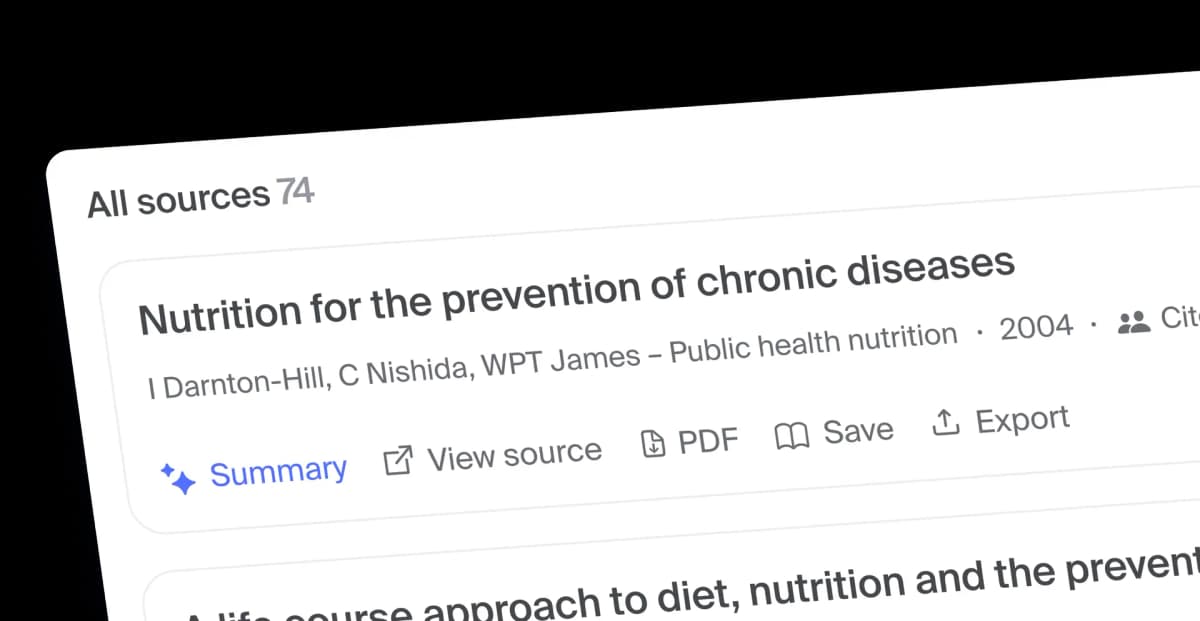
The example shows Sourcely’s source suggestions after text input; it is a product demo, not an independent check of source quality. Source: Sourcely.
6. Paperpile: Best for Google Docs
Use if: You write mainly in Google Docs and Chrome.
If you write in Google Docs, Paperpile has the cleanest fit. The Chrome extension saves papers. The Google Docs add-on inserts citations and formats the bibliography. Most of the workflow stays in Google.
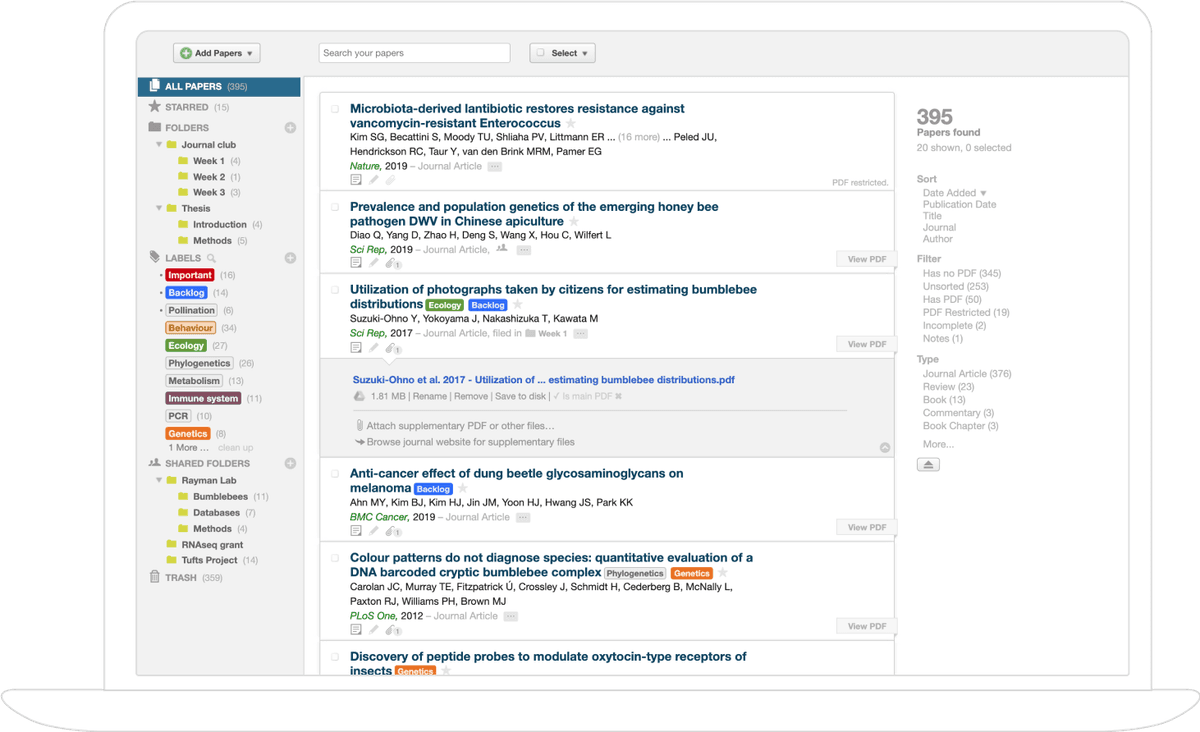
Note: Paperpile’s library lists research papers in rows with their folders and labels, the reference library that feeds its Google Docs citation workflow. Source: Paperpile.
Key points:
- Chrome extension for saving papers
- Google Docs add-on for citations and bibliography
- Word plugin also available
- Mobile app for iOS and Android
Pricing: $2.99/month (academic), $9.99/month (professional)
Limitations: No free tier (though the price is modest). No AI features beyond basic metadata extraction. Less flexible than Zotero for users who work across multiple platforms. Smaller community and plugin ecosystem than Zotero.
Pros: The smoothest Google Docs flow.
Cons: Paid only, with less room to customize than Zotero.
7. Citavi: Best for Structured Research
Use if: You want source storage plus structured notes.
Citavi is popular in German-speaking academia. It goes beyond a basic reference list. Its knowledge tools let you sort quotes, ideas, and comments by topic. You can also build an outline inside the app.
Key points:
- Citation management with 10,000+ styles
- Sort quotes, ideas, and comments by topic
- Plan research and writing tasks
Pricing: Free (Citavi Free, limited to 100 references), licenses from ~$120 for students
Limitations: Windows-only desktop app (web version in development). The interface is complex and has a steep learning curve. Less well-known outside German-speaking countries. No Mac or Linux desktop app. Limited AI features.
Pros: Good for outlines, quotes, and long writing plans.
Cons: Windows-first and harder to learn.
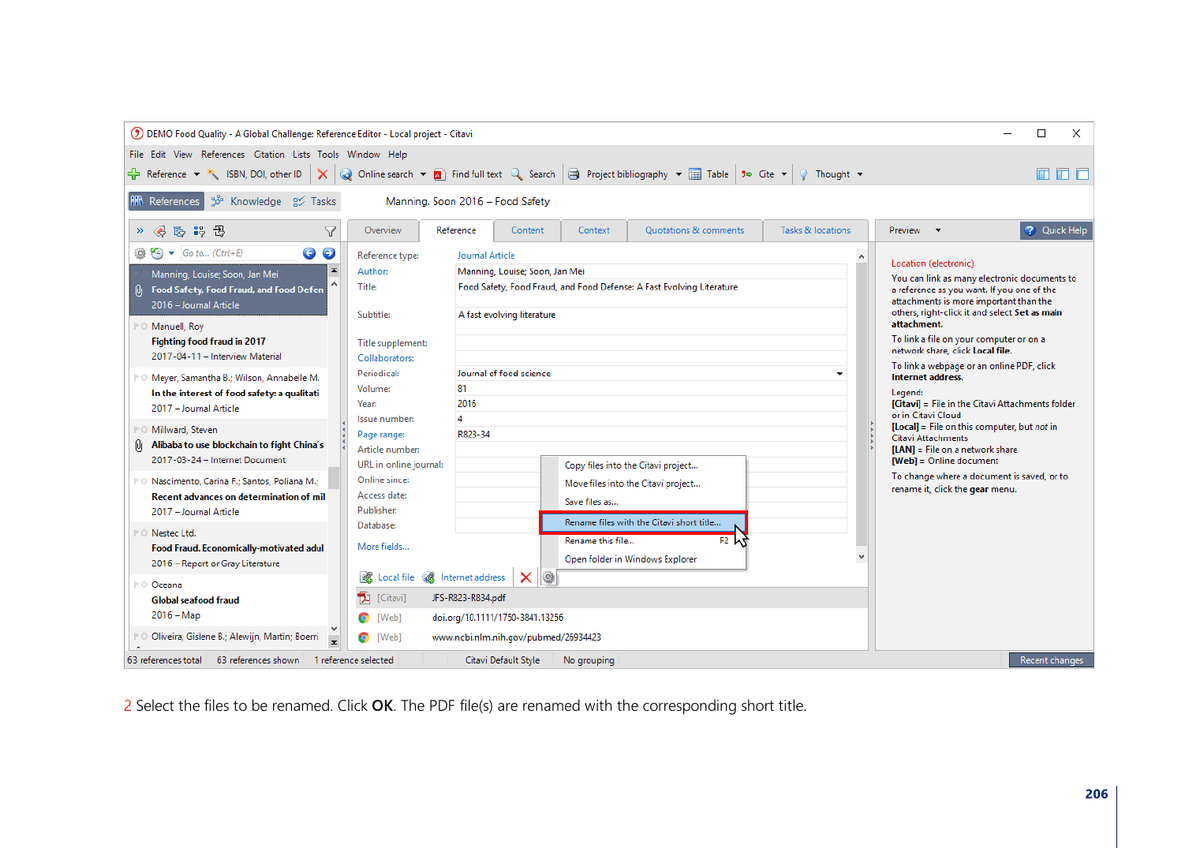
The Citavi 6 manual shows the reference editor and attached files. Source: Citavi 6 manual, page 206.
8. EndNote: Best for Research Teams
Use if: Your school or lab already pays for EndNote.
EndNote has been an institutional standard for decades. If your university pays for it, it is still a capable choice. It works well with Web of Science and large libraries, so it fits long research programs.
Key points:
- Deep integration with Web of Science for paper discovery and import
- Word plugin for citation and bibliography
- Handles large libraries (researchers with 10,000+ references)
- Available on Mac and Windows
Pricing: From $274.95 (one-time purchase), often available through institutional licenses
Limitations: Expensive for individuals. The interface has not aged well. No free tier (though many universities provide licenses). Limited AI features. Cloud sync has had reliability complaints. Feels like legacy software compared to modern alternatives.
Pros: Strong for large labs and old shared workflows.
Cons: Costly for solo users and less modern than newer tools.
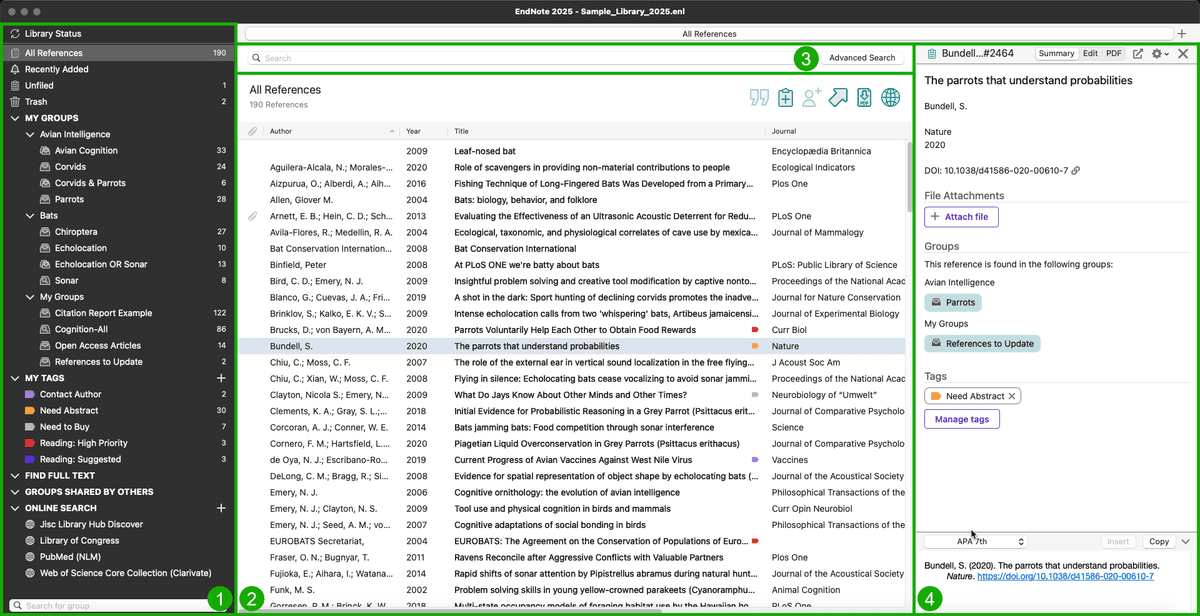
EndNote documentation shows its groups, searchable references, and selected-record panel. Source: EndNote documentation.
Best Citation Manager: Head-to-Head Picks
Most searches for the best source manager lead to the same three picks: Zotero, Mendeley, or EndNote. Quick picks below cover the common matchups.
Zotero vs Mendeley
Pick Zotero if you want free, open-source, and broadest-style support (9,000+ CSL styles). Zotero is community-owned and never sells data. Pick Mendeley if you want PDF annotation plus an academic social network (owned by Elsevier). Free up to 2 GB, with paid storage from $4.99/month.
For most researchers in 2026, Zotero is the default because it's open-source and has the larger plugin ecosystem.
Zotero vs EndNote
Pick Zotero if you're a solo researcher, grad student, or in a department without an EndNote site license. Free, faster, and modern.
Pick EndNote ($249.95/year) if your institution mandates it for legacy workflows or your collaborators all use EndNote. EndNote 21 added AI-assisted reference matching but remains the heavyweight option.
For most students and independent researchers, Zotero replaces EndNote without functional loss. If those are your final two options, use the focused EndNote vs Zotero comparison to check writing plugins, school support, library migration, and the post-citation synthesis handoff.
Mendeley vs Zotero (Reverse Search)
Searching for Mendeley vs Zotero leads to the same choice. Zotero wins for openness and breadth. Mendeley wins for PDF annotation polish. Mendeley pricing for storage upgrades: 2 GB free, 5 GB $4.99/month, 10 GB $9.99/month, unlimited $14.99/month.
Best Reference Manager (Cluster Summary)
The best reference manager in 2026 is Zotero for most researchers. It is free, open-source, broad in style support, and has a strong browser extension. Pair Zotero with Atlas when you need AI-grounded synthesis. Zotero stores the papers. Atlas maps how they connect and answers questions with source links.
How to Choose a Citation Tool
Use this plain-English decision guide first:
- Choose Atlas if you already have papers and need cited answers across them.
- Choose Zotero if you want the best free home for papers.
- Choose Paperpile if your draft lives in Google Docs.
- Choose EndNote if your school or lab already pays for it.
- Choose Scite if you need to check whether a paper is being supported or challenged.
- Choose Sourcely if you have a draft and need source ideas.
A Simple Study Workflow
Use one tool as your source home. Do not split your core paper list across many apps. Pick Zotero, Paperpile, or EndNote for that job.
Save each paper as soon as you find it. Add one tag for the class, lab, grant, or chapter. Add one tag for the task. Use short tags such as read, skim, cite, reject, or ask.
Write one plain note for each source. Keep it short. What did the paper test? What did it find? What claim can you use? What doubt did it raise?
Put quotes in their own notes. Add the page. Add the claim the quote might support. Do not trust a quote if you cannot find the page again.
Use your main tool for clean records. Use Scite when a claim looks risky. It can show if later papers support the work or push back on it.
Use Atlas when the pile gets too large to hold in your head. Upload the core set. Ask one clear question. Good prompts are short. Ask what agrees. Ask what conflicts. Ask what gap keeps coming up.
Keep the draft and the source list linked. When you write a claim, add the source at once. Do not leave a blank note that says "cite later." That is how weak claims slip in.
Before you submit, run a last pass. Check each claim. Check each page. Check each style rule. Then export the bibliography from your main manager.
This flow keeps the jobs clean. One app stores sources. One app checks citation context. One app helps you think across the set. You can swap tools later, but the workflow stays the same.
Solo Researcher on a Budget
Start with Zotero. It is free and handles the basic loop: save, sort, cite, format. Add Atlas when you need synthesis and connection discovery. That setup covers the mechanical work and the thinking work.
Graduate Student
Use Zotero for citation management and Atlas for synthesis. Save every paper in Zotero. Upload your key papers to Atlas when you need to find themes, tensions, and gaps. Zotero formats the bibliography. Atlas helps you shape the argument.
Research Team
If your institution provides EndNote, use it for shared citation work. If not, Zotero group libraries are a good team option. Add Scite when you need citation context. Add Atlas when the team needs a shared source-backed knowledge base.
Traditional Manager + AI Tool Combo
For most researchers, the best setup is one manager plus one analysis tool:
- Zotero + Atlas: Free citation management plus cited synthesis
- Zotero + Scite: Free citation management plus citation context
- Paperpile + Atlas: Google Docs writing plus AI synthesis
Deadline, Trust, and Study Workflow Checks
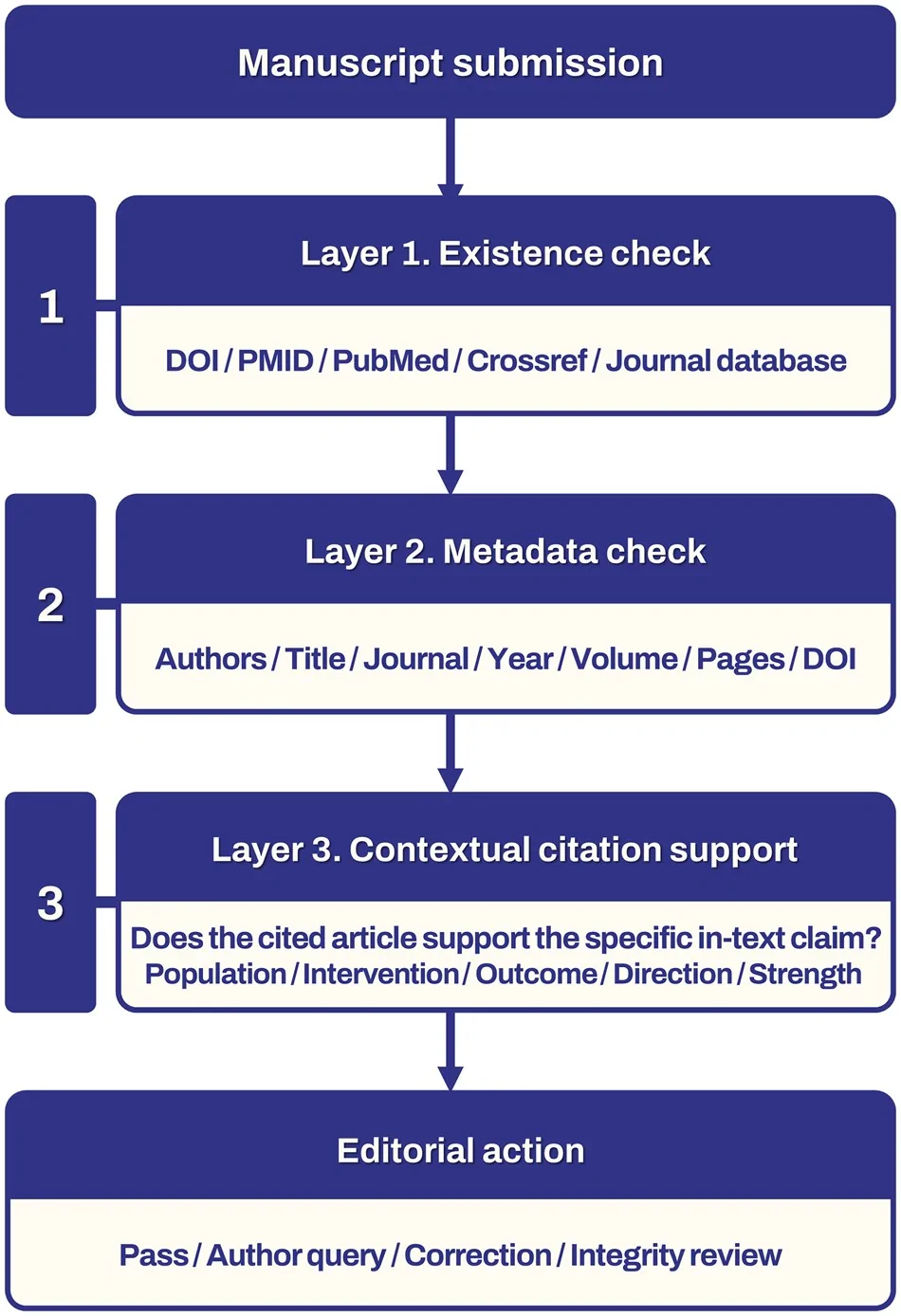
Citation tools rarely manage submission dates by themselves. Use your main manager for source records, then track deadlines in a calendar or task app. A simple review workflow works well:
- Save each paper with a tag for the assignment, chapter, or review question.
- Add a second tag for status: unread, skimmed, coded, cited, or rejected.
- Keep the submission deadline outside the citation tool, but link back to the source folder.
- Before writing, use Scite to check risky claims and Atlas to ask what your sources agree or disagree on.
Trust signals matter too. Prefer tools with clear ownership, export formats, support docs, and real user proof. Zotero is strongest on openness and data control. EndNote is strongest where the institution pays and trains the team. Atlas is strongest when you need cited answers from your own uploaded sources.
Platform Considerations
- Mac users: Atlas, Zotero, and Paperpile all work well. Avoid Citavi (Windows-only) and check EndNote Mac compatibility.
- Linux users: Zotero is the strongest option. Most web-based tools (Atlas, Paperpile, Scite) work on any platform.
- Mobile: Zotero has iOS and Android apps. Paperpile has mobile apps. Atlas works in mobile browsers. Most others are desktop/web-only.
Conclusion
Traditional citation managers remain the backbone of research reference work. According to a 2024 survey by Technavio, the global reference management software market is projected to grow by $1.18 billion between 2024 and 2028. The reason is simple: researchers have more papers to store, cite, and share. For these tasks, Zotero is the strongest free option. Paperpile is best for Google Docs.
AI citation tools add a layer that managers do not cover: understanding. Scite shows citation context. Atlas maps links across your own papers and answers with cited passages. Sourcely helps find sources for draft text. If source accuracy is a top priority, see our comparison of AI research tools that don't hallucinate.
For most researchers, the best setup is both: a manager for the mechanical work and an AI tool for the analysis. The mechanical work is mostly solved. The open question is whether you still want to do the synthesis by hand. A research paper organizer keeps the library usable, while literature review software supports the wider review workflow.
Atlas goes beyond citation management by turning your paper library into a knowledge workspace. Upload your sources. See how they connect through mind maps. Ask questions and get cited answers that link back to exact passages.
Ask cited questions across your paper library
Keep Zotero for references, then use Atlas to compare evidence across papers.