
Atlas vs Zotero (2026): An In-Depth Research Comparison
Atlas is a visual research workspace, Zotero is a reference manager. Compare paper deconstruction, citation grounding, project-scoped context, and workflow fit.
- Byline

Summary
Use Atlas for project-scoped deep reading and citation-grounded answers. Use Zotero for reference management, PDF storage, and citation formatting.
The updated comparison covers citation grounding, Knowledge Maps, BibTeX migration, PDF handoff, and citation-manager fit.
Atlas explains source support for claims, while Zotero manages references, metadata, files, and bibliography workflows.
Researchers can keep Zotero as the citation manager and use Atlas to understand the paper corpus.
Note: We make Atlas. This comparison comes from the team that built it, so treat it as first-party guidance. Where Zotero has the better answer for a research job, the article says so plainly. See the rows where Zotero wins and the "When Zotero is the right call" section below.

Atlas

Ask cited questions across Zotero papers
Upload a Zotero PDF and trace each answer back to supporting passages.
Quick verdict
Atlas is a visual research workspace for people who need to understand a body of papers. Common examples include a thesis, treatment choice, purchase review, and literature review. Zotero is a free, open-source reference manager. It saves source data from web pages and PDFs, stores files, formats citations, and works inside Word, LibreOffice, and Google Docs.
The split is simple. Use Zotero when the job is capture, storage, BibTeX, and citation style. Use Atlas when the job is reading and synthesis. Visual maps make a body of papers legible at a glance. Every Atlas claim traces to its source, and Atlas explains why the source justifies it. A Knowledge Map covers each paper, while a Semantic Map covers one project's corpus.
Choose Zotero if your main job is to collect sources, store PDFs, export BibTeX, and format citations in a manuscript. Choose Atlas if your main job is to understand a paper, compare claims, and ask questions that return cited answers. Atlas does not replace Zotero as the citation manager. It is the deep-reading layer for the papers that matter most.
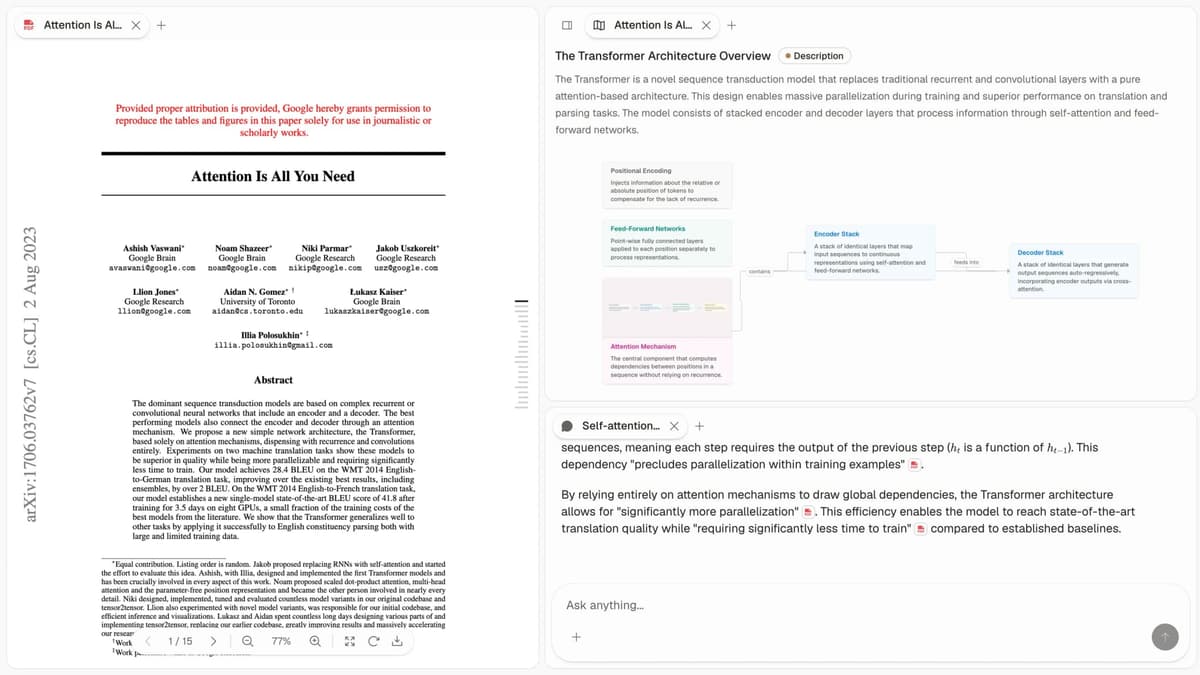
The first-party Atlas screenshot shows the three surfaces compared below: a project source list, a visual research map, and cited answers that support passage-level checking.
How we compared Atlas and Zotero
This comparison uses the daily research jobs that decide tool fit:
- Capture and records: Can the tool save sources, PDFs, notes, tags, and citation records cleanly?
- Writing and export: Can it format citations, export BibTeX or RIS, and work inside a draft?
- Reading and synthesis: Can it show what a paper argues and explain how a passage supports a claim?
- Project context: Do sources, maps, notes, and chats share a bounded evidence base?
- Price and ownership: Is the workflow free, open-source, local-first, paid, or cloud-based?
Read this table by research job. Zotero wins for capture, storage, export, and writing inside a draft. Atlas wins for close reading, map-based review, and cited synthesis across the papers you choose to upload. The table also shows why many researchers keep both tools instead of forcing one tool to do both jobs.
| Atlas | Zotero |
|---|---|
| Citation grounding: Each answer shows the claim, source passage, and why the passage supports it | Citation grounding: Citations, links, notes, and PDF highlights, but no claim-to-passage reasoning trace |
| Knowledge Maps: Deconstructs each paper into claims, evidence, definitions, and relations | Knowledge Maps: No equivalent per-paper argument map |
| Semantic Maps: Projects a whole corpus into topic clusters you can revisit | Project view: Library collections, saved searches, and tags |
| Source records: Reads uploaded PDFs, but Zotero records do not sync directly into Atlas | Source records: Core strength for authors, titles, journals, DOI, tags, collections, notes, and files |
| BibTeX / RIS / citation export: Not the citation manager of record | BibTeX / RIS / citation export: Core strength, including EndNote export and Better BibTeX workflows |
| PDF annotation: Useful when paired with Atlas maps and cited chat | PDF annotation: Strong PDF reader with highlights, notes, and file storage |
| Browser capture plugin: No Zotero Connector equivalent | Browser capture plugin: Core strength for one-click capture from supported sites |
| Word / Google Docs citation plugin: No in-document citation plugin | Word / Google Docs citation plugin: Core strength for inserting and formatting citations in drafts |
| Pricing: Evaluation sample, then Atlas Pro at $20/mo or $204/yr | Pricing: Free open-source app, with paid cloud storage upgrades |
Table 1: What Atlas and Zotero do for cited answers, visual maps, reference records, export, PDF annotation, browser capture, writing plugins, and price.
How is Atlas different?
Zotero and Atlas both support source reading. They diverge once the job shifts from storing papers to defending what the papers mean.
Visual maps for papers and projects
Atlas builds two visual maps as you read. A Knowledge Map turns one paper into claims, evidence, terms, and links. You see the paper's spine first, then click down into the support. A Semantic Map groups the current project's sources, notes, and chats by topic. It is how 200 papers stop being a folder and start becoming a navigable corpus.
The research-paper analysis guide follows the same sequence. Recover the argument first, then inspect the evidence behind it.
"It's like an ultimate GPT. I can finally see what I've read." Kyle Lao, CEO & Co-founder of MenSC Labs
Zotero does not have a claim-evidence map for each paper. It also lacks a topic map for the whole project. If you need to recover a paper weeks later, the Knowledge Map is the first Atlas surface that pays off.
Inspectable claim support
The AI risk is not only "the model made something up." The harder risk is a weak citation. Atlas shows each answer as a claim-source-justification triple. You see the claim, the passage, and a short note on why the passage supports it. You can click into the source paragraph and read the highlighted lines.
Atlas tracks this with the H/V ratio. It asks how often a cited sentence fails a passage check. Atlas targets H/V < 0.1, and we publish the method in the Verifiable AI Research guide. Zotero can hold citations and links, but it does not explain why a passage supports a claim.
Project-scoped research context
Atlas keeps sources, notes, chats, Knowledge Maps, and Semantic Maps inside the project where they were created. That project boundary gives every answer and map one focused evidence base.
A separate project has its own sources, so unrelated research does not leak into the answer. Zotero takes a different approach. Its persistent library, collections, tags, and saved searches organize references across many writing projects. Choose Atlas for bounded cited synthesis and Zotero for durable reference management.
The knowledge-graph AI guide explains the graph concepts behind maps and linked research objects without changing this project boundary.
Comparing Atlas and Zotero
Both tools touch daily research work, but they live in different lanes. Zotero is broader for citation styles, export, and Word workflows. Atlas goes deeper at the reading surface. The sections below compare maps, cited answers, notes, memory, and price.
Paper deconstruction with Knowledge Maps
The Knowledge Map is Atlas's per-paper surface. It breaks one paper into claims, evidence, definitions, and links between them. Its nodes preserve source language. Breadcrumbs let you move from the thesis to a paragraph.
| Atlas | Zotero |
|---|---|
| Multi-level argument structure ✓ | PDF storage with manual highlights |
| Labeled relations (motivates, causes, enables) ✓ | ✗ |
| Faithful-to-source node text ✓ | ✗ |
| Hierarchical breadcrumbs ✓ | ✗ |
| ✗ | Reference manager with citation-style formatting ✓. This is a manuscript-writing surface |
Table 2: How Atlas maps one paper and how Zotero manages its citation record.
Good to know: The bottom row belongs to Zotero. Atlas does not ship that surface. The Knowledge Map pays off when you need to recover a paper's argument weeks after you first read it.
Project view with Semantic Maps
The Semantic Map is Atlas's project view. It puts sources, notes, chats, and citations on a map where related items sit near each other. You can view the same project from a new topic angle without uploading it again.
| Atlas | Zotero |
|---|---|
| Spatial embedding of sources + notes + chats ✓ | Library + collections + tags |
| Auto-labeled topic clusters ✓ | ✗ |
| Topic-angle re-projection ✓ | ✗ |
| One project-scoped evidence view ✓ | ✗ |
| ✗ | Word / Google Docs in-document citation plugin ✓. This inserts references into a manuscript |
Table 3: How Atlas maps one project and how Zotero supports in-document citations.
Good to know: Zotero's in-document citation plugin is the better surface when a manuscript needs dynamic citations and bibliography updates. The Semantic Map pays off when 200 papers stop being a folder and start becoming a navigable corpus.
Citation-grounded answers
Atlas shows the claim, the passage, and a short note on why the passage supports the claim. You can jump to the source paragraph, read the highlighted lines, and check the answer yourself.
| Atlas | Zotero |
|---|---|
| Claim-source-justification triples ✓ | ✗ |
| Reasoning traces (why this passage supports this claim) ✓ | ✗ |
| Jump-to-source with passage highlight ✓ | ✗ |
| H/V ratio < 0.1 benchmark published ✓ | ✗ |
| ✗ | Export to BibTeX, RIS, EndNote, etc: ✓. This carries reference metadata |
Table 4: How Atlas explains cited answers and how Zotero exports reference metadata.
Good to know: Both tools have a citation surface. Atlas also explains why a passage justifies a claim.
Literature-grounded annotations
Atlas adds notes to each paper on upload. Citations inside the paper become objects you can inspect. When a cited source is open-access, Atlas can pull in the relevant passage. That helps you see how one paper builds its case across sources.
| Atlas | Zotero |
|---|---|
| Auto-annotate on ingest ✓ | Manual highlights and notes on PDFs |
| Multi-citation synthesis (how citations build the argument) ✓ | ✗ |
| Resolve cited sources (open-access) ✓ | ✗ |
| Exact passage / page / paragraph anchors ✓ | ✗ |
| ✗ | Web Connector, one-click citation capture ✓. This creates a reference record from a page |
Table 5: How Atlas resolves cited sources and how Zotero captures source records.
Good to know: Atlas resolves citations inside the paper you are reading. When a paper cites an open-access source, Atlas can pull in the cited passage. This is built for one paper at a time.
Project-scoped context
Atlas keeps citations, notes, maps, and chats inside one project. Those surfaces share the same uploaded evidence. A separate project has a separate evidence base.
| Atlas | Zotero |
|---|---|
| Project-scoped research context ✓ | Persistent local library + optional cloud sync ✓ |
| Sources, notes, maps, and chats share one evidence base ✓ | Collections, tags, and saved searches organize references ✓ |
| Separate projects isolate unrelated context ✓ | Group libraries support shared reference collections ✓ |
| Sources must be added to each relevant Atlas project | One Zotero item can appear in several collections without duplication ✓ |
| ✗ | Free, open-source app with 300 MB of Zotero Storage ✓. The allowance covers synced attachments |
Table 6: How Atlas bounds project evidence and how Zotero organizes a persistent library.
Good to know: Atlas's project boundary is deliberate. Put sources that answer the same question together, and create another project when the evidence should stay isolated.
Price comparison
Atlas is a paid product, and there is no forever-free plan. The evaluation sample includes 10 sources and 5 lifetime AI chats. After that, Atlas Pro costs $20/mo or $204/yr and includes Knowledge Map, Semantic Map, and cited answers.
| Atlas | Zotero |
|---|---|
| Free: ✗ (evaluation sample only: 10 sources · 5 lifetime AI chats) | Free: Free, open-source app with 300MB free storage ✓ |
| Pro: $20/mo or $204/yr (unlimited sources · unlimited AI chats · all features) | Paid: Storage upgrade: 2GB $20/yr · 6GB $60/yr · unlimited $120/yr |
| Pro unlocks Knowledge Map, Semantic Map, and claim-source-justification ✓ | ✗ |
Table 7: What Atlas Pro and current Zotero Storage plans include.
Zotero's official storage page lists 300 MB free, 2 GB for $20/year, 6 GB for $60/year, and unlimited storage for $120/year. The desktop app remains free and open source. The paid plans cover synced attachment storage.
Use a real paper before deciding. Atlas's evaluation sample includes 10 sources and 5 lifetime AI chats, enough to test one Knowledge Map and one cited-answer workflow.
When to choose Atlas vs Zotero
- Choose Atlas when you need a map of a paper's structure. The Knowledge Map shows the main claim and the support behind it.
- Choose Atlas when you need answers that explain why a source backs a claim.
- Choose Atlas when sources, maps, notes, and cited chat should share one project-scoped evidence base.
- Want a mature reference manager with a Word or Google Docs plugin? Go with Zotero.
- Want free, open-source, local source storage? Go with Zotero.
- Tied: both work fine when you are managing the citation list for a thesis in Word, but also building a corpus you will return to.
The choice turns on the job. Zotero owns the reference record and bibliography. Atlas owns close reading and source-traced synthesis inside one project.
Test the handoff with one paper you already know well. Zotero should capture and format its record correctly. Atlas should make the argument and supporting passages easier to inspect.
Recommendations by user type
- PhD researchers: Use Atlas + Zotero. Keep Zotero for capture and in-document formatting. Use Atlas for reading and reasoning.
- Students doing thesis or literature review work: Use Atlas for the papers that need close reading. The Knowledge Map saves the most time in the review phase.
- Consultants, analysts, PMs, and journalists: Use Atlas when a claim has to survive a meeting. Use Zotero for source storage if you need it.
- Personal researchers with high stakes: Use Atlas when the answer must be defensible. Use Zotero when the job is only to store and cite sources.
Zotero should remain the tool of record for capture, BibTeX, Word, Google Docs, and group libraries. Its word processor plugins create dynamic citations and bibliographies. Atlas should handle the subset of papers that need close reading, maps, and cited answers. The tools pair well. Zotero manages references, while Atlas helps turn selected papers into claims you can defend.
The AI research assistant guide places deep-reading tools, discovery systems, and citation managers in their separate lanes.
Using Atlas and Zotero together
The cleanest setup is not a cold-turkey migration. Keep Zotero as the source library. Use its Connector workflow for capture, then keep tags, groups, citation metadata, and manuscript links there. Move only the PDFs that need close reading into Atlas.
Migrating research sources to Atlas
If you already have a Zotero library, the handoff to Atlas is narrow. Select the papers that require close reading and leave the record graph in Zotero. Zotero stores source records, PDFs, notes, and tags inside collections. Atlas stores sources inside projects and builds maps on upload. The two models meet at the PDF.
In the first handoff step, use the screenshot below to confirm the Zotero item record and attached PDF before moving the file into Atlas.
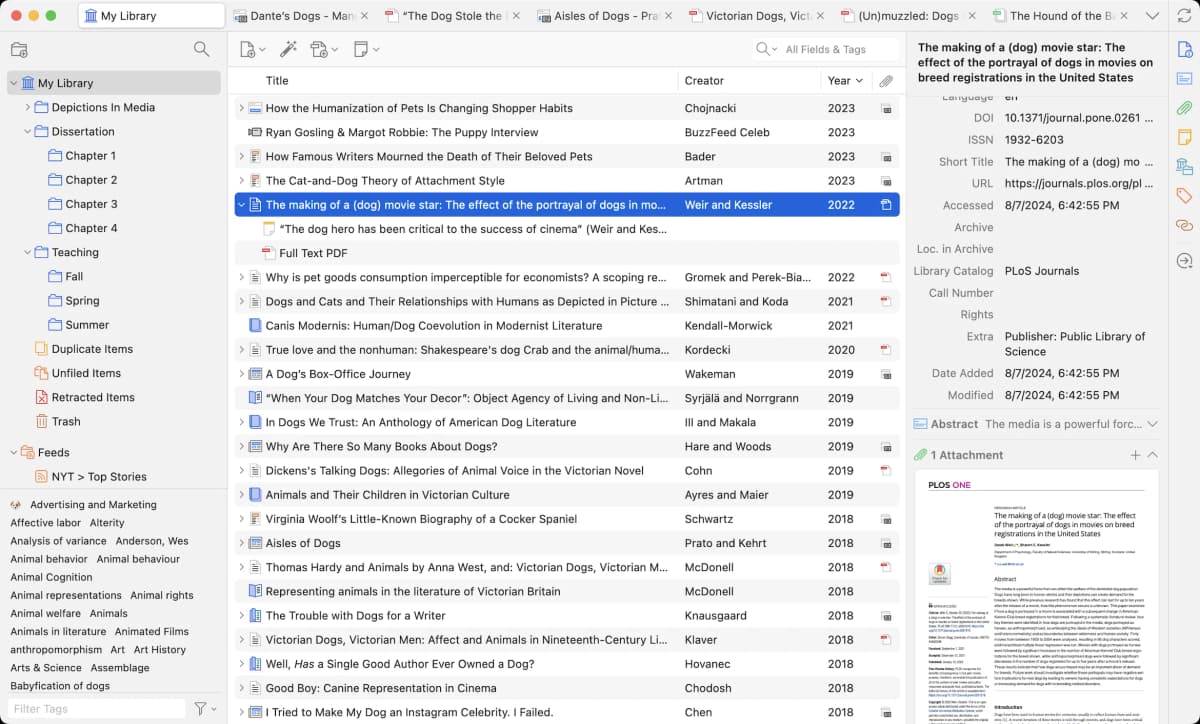
Zotero's official homepage screenshot shows the library, item record, and PDF reader that support its citation-manager workflow.
The handoff moves PDFs as ordinary files. Zotero's official export guide says Zotero RDF with files and notes is the most complete export for sharing with another Zotero user. For Atlas, select or locate the PDFs you need and upload them to one project. Atlas does not import the Zotero database. The Zotero data-directory guide explains where stored attachments live. Atlas builds a Knowledge Map for each uploaded paper. BibTeX data still belongs in Zotero or a .bib file.
Nested collections, tags, and group libraries do not carry over. Atlas projects use a source list, while Zotero uses a collection hierarchy. Zotero tags map only loosely to Semantic Map clusters. Atlas creates clusters from the paper text.
The practical advice is simple. Do not migrate cold turkey. Keep Zotero as the citation manager of record. Stand up Atlas only on the papers you actively read. PDFs flow into Atlas. Source records stay in Zotero.
Worked example with 8 papers
Imagine you are drafting a 1,500-word literature review section from 8 papers. The section has to cite each paper, defend the reasoning, and fit into a thesis chapter you will revisit next semester.
In Zotero, you open each PDF, highlight key passages, and write a child-note summary on the citation record. When you draft in Word or LaTeX, Better BibTeX gives you a citation key. Zotero formats the in-text citation and bibliography. That part is best-in-class. What Zotero does not give you is a structural read of each paper. The 8 sets of highlights still live in 8 separate PDFs. The synthesis stays in your head until you write it down.
In Atlas, you upload the 8 papers into one project. Each paper becomes a Knowledge Map, with claims and evidence linked back to passages. The papers also appear in a Semantic Map. You can see which papers share a method, which ones agree, and which one is the outlier. When you draft, ask Atlas a question. You get a claim, a source passage, and a short note on why the passage supports the claim. Then you decide whether that reasoning belongs in the draft.
Later in the same project, the maps and chat history remain attached to that evidence base. Zotero gives you citation style and file storage. Atlas gives you the structural read, cross-paper synthesis, and a reasoning trace per sentence.
When Zotero is the right call
There are real research jobs where Zotero is the better recommendation and Atlas is overkill or actively the wrong tool.
If your main job is citation management with Word, Google Docs, or LaTeX, Zotero is the better tool. Its citation plugin, CSL styles, and BibTeX pipeline are best-in-class. Atlas does not ship that surface and is not trying to.
If you collaborate through a shared library, Zotero's group libraries are designed for that job. Atlas projects instead provide a bounded evidence base for maps, notes, and cited chat.
If you rely on one-click citation capture from journal pages, news articles, or Google Scholar, use the Zotero Connector. Zotero documents how the Connector can capture metadata and download a full-text PDF when available. Atlas does not have an equivalent.
If you need free local storage, Zotero wins on price. Atlas is a paid product after the evaluation sample.
Mendeley, EndNote, and Paperpile
Mendeley sits closest to Zotero when the decision is a paper library and PDF workflow. EndNote is relevant when a lab, school, or publisher already standardizes on it. Paperpile is a natural comparison when writing lives in Google Workspace.
Qualitative-analysis software with a similar name is a different category: it codes interviews, field notes, and other qualitative data. It is not the Atlas visual research workspace discussed here. For this decision, Zotero is the reference-library baseline and Atlas is the close-reading layer.
Common objections and edge cases
Can I use both Zotero and Atlas at the same time? The tools are complementary. Use Zotero for capture, metadata, citations, and group libraries. Use Atlas for reading, Knowledge Maps, and cited answers inside one project. There is no live integration, but the workflows do not conflict.
What if I only do one-off literature reviews and never return to the corpus? If you have one self-contained set of 20 PDFs to store, cite, and annotate once, Zotero is the lower-friction starting point. Atlas becomes useful when those PDFs need Knowledge Maps or cited synthesis whose source trail another person can inspect.
Is the visual map a gimmick or does it save time? A Knowledge Map saves time most when you are recovering a paper weeks later or synthesizing several papers at once. A short opinion piece may not need one. A literature review benefits when its argument must stay connected to several source passages.
Setup checklist
Use this checklist if you want both tools without a messy setup that creates duplicate work.
- Save the paper and PDF in Zotero. Correct the title, author, year, and DOI before citing it.
- Keep Zotero as the source list for records, citation keys, group libraries, and manuscript links.
- Move only the hard papers into one Atlas project, then run the Knowledge Map first.
- Ask a narrow question such as "Which passage supports the methods claim?" and inspect the cited passage.
- Use Zotero for the citation key or bibliography and Atlas to check whether a sentence is faithful to the source.
- Keep storage-only papers in Zotero. Add a paper to Atlas when it needs maps or cited synthesis.
Zotero's bibliography guide documents BibTeX and RIS output. For broader workflow comparisons, see the research paper organizer, AI citation checker, and research synthesis guide.
Atlas
Ask cited questions across Zotero papers
Upload a Zotero PDF and trace each answer back to supporting passages.
Frequently Asked Questions
Atlas is built around this citation surface. Every answer is rendered as a claim-source-justification triple: the claim, the passage it draws from, and a one-sentence explanation of why the passage supports the claim. You can click into the source paragraph and read the highlighted sentences in context. Zotero may cite at the sentence level or link to sources, but it does not render the reasoning trace that connects the claim to the passage. That trace is the move when you need to defend a thesis sentence, a brief paragraph, or a treatment-plan summary. Read more about how Atlas grounds claims in the Verifiable AI Research guide.