
Atlas Workspace vs Mendeley for Research (2026)
Compare Atlas Workspace and Mendeley for research: cited paper synthesis, visual maps, reference management, PDF organization, and bibliography tools.
- Byline

Summary
Use Atlas for visual maps, citation-grounded answers, and project-scoped context. Use Mendeley for reference management and bibliography workflows.
The updated comparison covers Knowledge Maps, Semantic Maps, BibTeX migration, PDF handoff, and citation-manager fit.
Atlas explains source support for claims, while Mendeley stores references, PDFs, metadata, highlights, and citation records.
Researchers can keep Mendeley as the citation manager and use Atlas to understand the paper corpus.
Note: This article compares Atlas Workspace, the research product at atlasworkspace.ai, with Mendeley. It does not cover similarly named qualitative-analysis software.
Atlas is a visual research workspace for people whose work depends on understanding a body of papers: a thesis, a treatment decision, a major purchase, or a lit review. Mendeley is Elsevier's reference manager for PDF storage, notes, metadata, Word/LaTeX cite tools, and groups. Atlas gives you visual maps, citation-grounded answers, and one project-scoped evidence base. Mendeley gives you a clean reference library and bibliography workflow. If you need to defend the answer, Atlas earns the comparison. If you need to format the bibliography, Mendeley is still the tool to keep.

Atlas

Read and synthesize your paper corpus in Atlas
Upload a Mendeley PDF, map its argument, and inspect cited answers.
Quick verdict: Atlas vs Mendeley
Choose Atlas when your bottleneck is understanding a paper corpus, checking the evidence behind an answer, or keeping one project's maps, notes, and cited chats together. Its Knowledge Maps, Semantic Maps, and claim-source-justification traces turn uploaded papers into an inspectable synthesis workspace.
Choose Mendeley when your bottleneck is maintaining reference metadata, annotating PDFs, collaborating through groups, or inserting formatted citations into a manuscript. Many researchers use both. Mendeley remains the bibliography system while Atlas handles the papers that require deeper analysis.
How is Atlas different?
Mendeley and Atlas both sit near your papers, but they solve different jobs. Three gaps matter most when a research conclusion must be checked and shared. The broader second-brain apps guide explains where persistent research context fits among note and knowledge tools.
Maps for papers and projects
Atlas builds two maps as you read. A Knowledge Map lays out one paper's argument, pulling out claims, proof, terms, and links between ideas. You can start with the main point, then click down to the passage.
A Semantic Map shows the whole project. Papers, notes, chats, and sources share a canvas, with related items clustered by topic. You can change the angle and map the same set again, which is how 200 papers stop being a folder and start becoming a corpus.
The research-note organization guide covers the underlying source-to-note workflow.
"It's like an ultimate GPT. I can finally see what I've read." Kyle Lao, CEO & Co-founder of MenSC Labs
Mendeley does not have a per-paper claim map. It also does not remap a full project by topic angle. If you spend hours trying to recall a paper from three weeks ago, the Knowledge Map is the first Atlas surface that pays off. Visual maps make a body of papers legible at a glance.
Atlas explains every cited claim
The hard AI problem is not only that a model can make things up, because it can also put a source next to a claim that the source does not prove. Atlas answers with a claim-source-justification triple, so you see the claim, the source passage, and a short reason. You can click the paragraph and check it yourself.
Atlas tracks this with the H/V ratio, which checks whether a source passage backs a generated sentence. Atlas targets H/V < 0.1 on that benchmark, and we explain the method in Verifiable AI Research. The AI citation checker guide shows how to inspect the relationship between an answer and its evidence.
Mendeley's Reading Assistant can answer questions with citations to its sources. Atlas adds an explicit claim-level justification that explains why a cited passage supports the sentence. For casual Q&A, that gap may not matter. For a thesis, brief, or care decision, it does. The wedge is simple: every claim traces to its source, and Atlas explains why the source justifies it.
Project-scoped research context
Atlas keeps sources, notes, chats, Knowledge Maps, and the Semantic Map inside the project where they were created. Those surfaces share one evidence base for the research question.
A separate Atlas project has separate sources and context. That isolation prevents unrelated evidence from entering a cited answer. Mendeley takes a different approach through a persistent reference library, folders, and groups.
Choose Atlas when maps, notes, and cited chat should share one bounded source set. Choose Mendeley when reference records and manuscript citations should span a broader library.
How we compared Atlas and Mendeley
This comparison uses one rule. Judge each tool by the job it was built to do. Atlas is judged on deep reading, source checks, maps, and reuse. Mendeley is judged on saved refs, PDF notes, metadata, Word/LaTeX cite tools, Elsevier fit, and price.
We checked Mendeley's current Reference Manager guides, feature overview, desktop workflow, and pricing. We also checked nearby tools in search results. Many readers are weighing Zotero, EndNote, Citavi, and ATLAS ti.
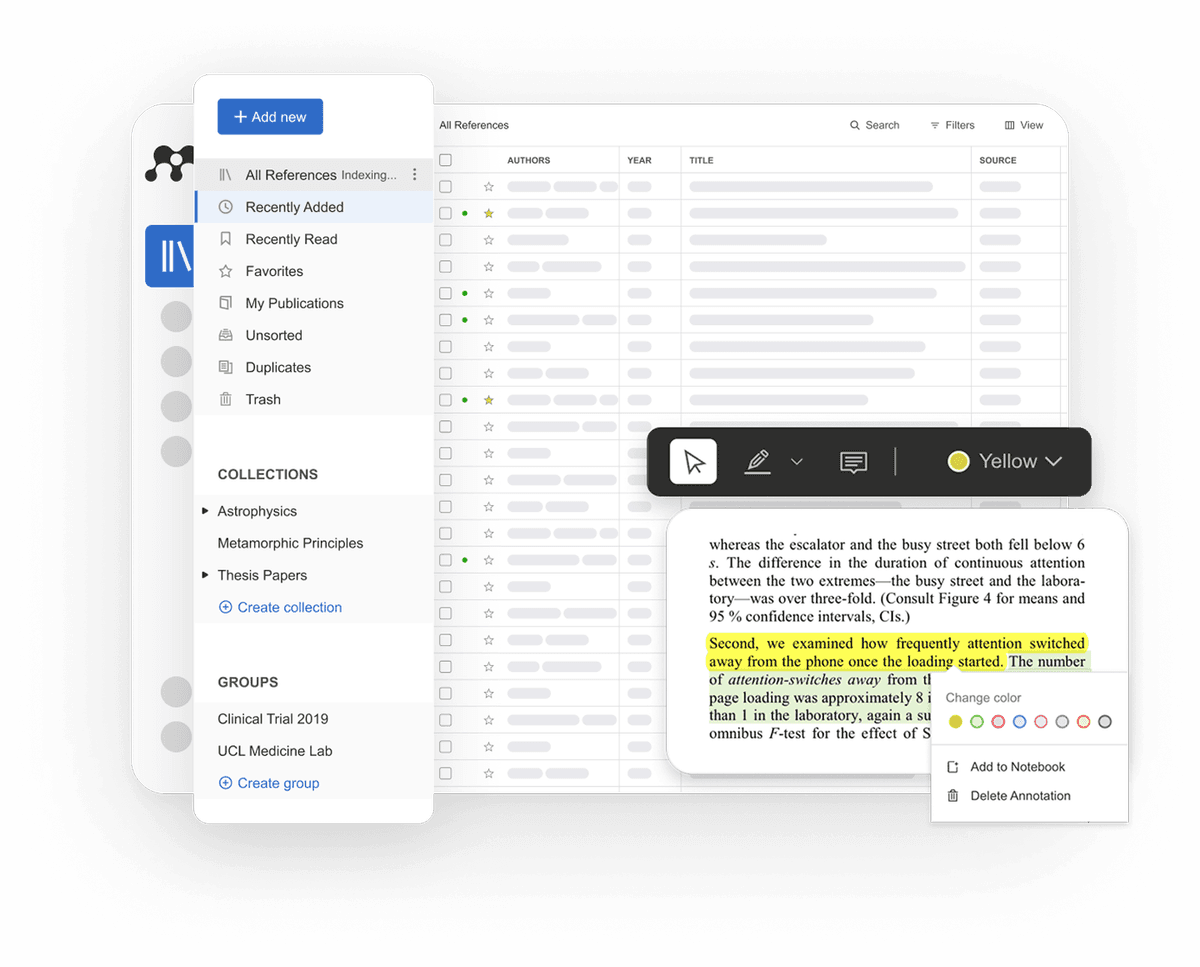
The visual above comes from the official Mendeley.com home page. It shows the library, notebook, and cite workflow that Mendeley promotes for its free manager.
Comparing Atlas and Mendeley
Both tools touch daily research, though they live in different classes. Atlas is for reading, maps, cited answers, and reuse across a corpus. Mendeley is for saved refs, PDF notes, and citation formatting. Mendeley is stronger for Word and Elsevier workflows. Atlas goes deeper at the reading surface.
| Atlas | Mendeley |
|---|---|
| Citation grounding: claim-source-justification links each claim to a passage and a reason. | Citation records: source links and PDF notes, but not the same claim-level reason. |
| Knowledge Maps: paper-level maps show claims, evidence, and relations. | ✗ |
| PDF annotation: source passages and project notes become part of Atlas context. | PDF annotation: highlights, sticky notes, notebook, and groups ✓ |
| ✗ | BibTeX export: BibTeX, RIS, and EndNote XML workflows ✓ |
| Reads the uploaded PDF for synthesis. | Reference metadata: stronger title, author, DOI, journal, and year cleanup ✓ |
| No special Elsevier library workflow. | Elsevier integration: stronger fit for Elsevier journals and institutional workflows ✓ |
| Evaluation sample, then Atlas Pro at $20/mo or $204/yr. | Pricing: free manager with 2GB storage and paid storage upgrades ✓ |
Table 1: This matrix separates research synthesis from reference management before the detailed workflow comparisons below.
Paper deconstruction with a Knowledge Map
The Knowledge Map is Atlas's per-paper view. It shows the argument in levels, with node text drawn from the source. You can move from the main claim to a paragraph in a few clicks.
| Atlas | Mendeley |
|---|---|
| Multi-level argument structure ✓ | PDF reader with manual highlights and notes |
| Labeled relations (motivates, causes, enables) ✓ | ✗ |
| Faithful-to-source node text ✓ | ✗ |
| Hierarchical breadcrumbs ✓ | ✗ |
| ✗ | Reference manager with citation-style export ✓. This surface formats references. |
Table 2: Atlas maps the paper's argument, while Mendeley provides the stronger reference-formatting workflow.
Good to know: The bottom row belongs to Mendeley. Atlas does not ship that surface. The Knowledge Map's payoff is recovering a paper's argument three weeks after you first read it, when topic chips alone are no longer enough.
Project view with a Semantic Map
The Semantic Map is Atlas's project view. Sources, notes, chats, and cited passages share a canvas. Related items cluster by topic. You can map the same set again under a new angle.
| Atlas | Mendeley |
|---|---|
| Spatial embedding of sources + notes + chats ✓ | Library + folders + groups |
| Auto-labeled topic clusters ✓ | ✗ |
| Topic-angle re-projection ✓ | ✗ |
| One project-scoped evidence view ✓ | ✗ |
| ✗ | Word / LaTeX in-document citation plugin ✓. This surface inserts formatted citations. |
Table 3: Atlas organizes a corpus spatially, while Mendeley organizes a reference library for citation work.
Good to know: Mendeley's strength on that row is genuine. If your work depends on it, that's the boundary. The Semantic Map's payoff is when 200 papers stop being a folder and start being a corpus you can re-project under different topic angles without re-reading.
Citation-grounded answers
Atlas shows the claim, the source passage, and the reason the passage backs it. You can jump to the paragraph. Then you can read the highlighted lines and check the logic.
| Atlas | Mendeley |
|---|---|
| Claim-source-justification triples ✓ | Reading Assistant answers can include citations |
| Reasoning traces (why this passage supports this claim) ✓ | No equivalent explicit claim-to-passage justification |
| Jump-to-source with passage highlight ✓ | ✗ |
| H/V ratio < 0.1 benchmark published ✓ | ✗ |
| ✗ | Citation metadata pulled from Elsevier index ✓. Metadata supports the reference record, while cited AI answers are a separate feature. |
Table 4: Both products surface citations, but Atlas adds an explicit explanation between each answer claim and its supporting passage.
Good to know: Both tools help with citations. Atlas adds the why. That matters when a thesis line or brief paragraph must stand up to review.
Literature-grounded annotations
Atlas adds notes when a paper is uploaded. A cited paper can become a source you can inspect. When that cited source is open, Atlas can pull the relevant passage. You can see how one paper builds its case without leaving the doc. The AI citation analysis guide explains how this differs from merely formatting a reference.
Atlas wins when you need notes that connect back to source passages. It can resolve open cited sources, show exact anchors, and help explain how cited papers support the current paper.
Mendeley wins when the job is manual PDF highlighting or shared group reading. Its collaboration surface is built for that workflow. Atlas focuses on citation grounding.
Good to know: Literature-Grounded Annotations resolve citations inside the paper you're reading. When a paper cites a source that's open-access, Atlas pulls in the cited passage. The feature is built for citation resolution inside one paper, showing how that paper builds its argument across the sources it cites.
Project-scoped context
Atlas keeps sources, notes, maps, and chats inside one project. A separate project has a separate evidence base.
| Atlas | Mendeley |
|---|---|
| Project-scoped research context ✓ | Persistent library with cloud sync ✓ |
| Sources, notes, maps, and chats share one evidence base ✓ | Folders and groups organize references ✓ |
| Separate projects isolate unrelated context ✓ | One library supports several writing projects ✓ |
| Sources must be added to each relevant Atlas project | Reference records remain reusable across folders ✓ |
| ✗ | No-cost plan with 2GB cloud storage ✓. The limit applies to storage. |
Table 5: Atlas scopes research context to one project, while Mendeley maintains a persistent synced reference library.
Good to know: Atlas's project boundary is deliberate. Put sources that answer the same question together, and start a separate project when the evidence should remain isolated.
Price comparison
Atlas is a paid product with no perpetual free plan. Its evaluation includes exactly 10 sources and 5 lifetime AI chats. Atlas Pro costs $20 per month or $204 per year and includes unlimited sources, unlimited AI chats, Knowledge Maps, Semantic Maps, and claim-source-justification.
Mendeley's free plan includes 2GB of storage and 5 Reading Assistant questions. Its current paid plans are Plus at $4.99 per month or $55 per year, Pro at $9.99 per month or $110 per year, and Max at $14.99 per month or $165 per year.
Higher tiers add more storage and expanded AI features. Check Mendeley's pricing page before purchase.
| Atlas | Mendeley |
|---|---|
| Free: ✗ (evaluation sample only: 10 sources · 5 lifetime AI chats) | Free: 2GB free storage, free reference manager ✓ |
| Pro: $20/mo or $204/yr (unlimited sources · unlimited AI chats · all features) | Paid: Plus $4.99/mo or $55/yr · Pro $9.99/mo or $110/yr · Max $14.99/mo or $165/yr |
| Pro unlocks Knowledge Map, Semantic Map, and claim-source-justification ✓ | ✗ |
Table 6: Atlas pricing buys synthesis surfaces, while Mendeley pricing primarily expands storage and AI access around its reference-management workflow.
Practical two-tool workflow
The clean setup starts with one rule. Mendeley owns the library record, and Atlas owns the reading work. Do not try to keep every field in sync, because that creates busywork and does not improve the draft.
Start in Mendeley when a new paper arrives, then save the title, authors, DOI, journal, year, and PDF. Its official adding references guide covers file import, drag-and-drop PDFs, and watched folders.
Put the paper in the right folder. If it will only be cited once, Mendeley has done the job.
Move the paper into Atlas when you need to understand it. Good triggers are simple: the paper is central to your thesis, makes a claim you may quote, disagrees with another source, defines a method, or will matter again next month.
In Atlas, run the Knowledge Map first and use it to find the paper's main claim and key proof. Then ask one narrow question, such as "What claim does this paper make about model grounding, and which passage supports it?" Check the cited passage, and if it holds, save the answer as a note. The chat-with-PDF guide offers more test prompts.
Use Mendeley again when the writing starts by inserting the citation in Word or LibreOffice. Treat the Mendeley record as the source of truth for the bibliography, and treat the Atlas note as the source of truth for what the paper says.
This split keeps each tool in its lane. Mendeley stays fast and tidy, while Atlas stays focused on reading and synthesis. You avoid a messy migration, and you still get the benefit of maps and source-checked answers.
Zotero, EndNote, Citavi, and ATLAS ti fit
This query often sits near several other tools. Zotero is the closest free alternative to Mendeley. The Zotero alternatives guide covers open libraries, browser capture, and citation tools. EndNote is the paid choice for labs with long manuscript workflows.
Citavi joins references with task planning and fits teams using its project model. ATLAS ti is for qualitative coding across interviews, documents, and field data rather than BibTeX export or Word citation insertion.
Atlas is different from all four. It is not trying to become the canonical reference library. It is the workspace for the subset of papers where you need maps, cited answers, and reusable project context.
When to choose Atlas vs Mendeley
The choice starts with the output you must produce. Atlas is strongest when the output depends on explaining what a set of papers says and showing the supporting passages. Mendeley is strongest when the output is a correctly formatted manuscript and bibliography.
The tools are also complementary. Keep Mendeley as the reference system of record, then move only the analytically important PDFs into Atlas for mapping, questioning, and synthesis.
- Want paper structure deconstructed multi-level? Go with Atlas. (Knowledge Map)
- Want answers that explain how each citation justifies the claim? Go with Atlas. (claim-source-justification)
- Want one project-scoped evidence base for maps, notes, and cited chat? Go with Atlas.
- Want a reference manager with a Word plugin and Elsevier integration? Go with Mendeley.
- Tied: maintaining a citation library for a Word manuscript**: both work fine (and many researchers use both). The wedge only opens up once you're building a corpus you'll return to.
Recommendations by user type
- PhD researchers: use Atlas + Mendeley, or Atlas + Zotero. Keep one tool for citations. Use Atlas for deep reading.
- Students doing thesis work: use Atlas for the papers you must explain later. The Knowledge Map supports the process in the literature-review guide.
- Knowledge workers: use Atlas when reports and papers feed client work. A cited answer is easier to defend in a meeting.
- Personal research with stakes: use Atlas when a medical, legal, or large buying decision needs source checks. Use Mendeley if you only need a file library.
Mendeley is the choice when the job is refs, PDFs, and Word citations. Atlas is the choice when the job is understanding papers and defending claims with source passages. A clean stack is simple: Mendeley for the bibliography, Atlas for the papers that need deep reading.
Migration and worked example
Migrating from Mendeley to Atlas
A live Mendeley library may hold hundreds of PDFs. It also holds titles, authors, DOI fields, folders, groups, highlights, and Word citation fields. Moving "to Atlas" is not a one-for-one move. Split the job instead. PDFs move into Atlas. Citation records stay in the manager.
The path is plain. Export BibTeX, RIS, or EndNote XML from Mendeley, following its official export guide. The export records reference information rather than PDF files. Collect the PDFs separately, upload them to Atlas, and keep the Mendeley export for citation work in your draft.
Some things do not move. Mendeley groups stay in Mendeley. Native highlights and sticky notes also stay there. Atlas does not replace CSL styles or the Word/LibreOffice cite plugin. For most users, the end state uses both tools. Mendeley or Zotero handles citations. Atlas handles reading, maps, and cited Q&A.
What to test in the first hour
Use one paper you know well, upload it to Atlas, and open the Knowledge Map. Check whether the main claim matches your own read, then ask a question whose answer you already know. Judge the answer by whether Atlas cites the passage you would cite yourself. The citation-checker guide provides a second verification pass.
Next, upload 2 papers that disagree and ask Atlas where they conflict. Check both passages. If the answer points to the right claims, Atlas is helping with synthesis. If the passages are weak, keep the tool out of that part of the draft.
Finally, keep Mendeley open and insert the same 2 sources into a test document. This reminds you of the split. Mendeley formats the manuscript, while Atlas checks what the papers say.
Worked example with 8 papers
Imagine 8 papers for a literature review. Use the same PDFs in both tools. The research process feels different in each tool.
In Mendeley, you import the PDFs and clean up metadata from the DOI or your own edits. You open each PDF, mark key passages, add notes, and build a project folder. When you write in Word, you insert citations with Mendeley Cite. The citation-tool guide explains the difference between this manuscript workflow and evidence synthesis.
In Atlas, the 8 papers become sources in a project, and each paper gets a Knowledge Map. Claims, proof, and links are visible, while the Semantic Map shows clusters across the set. You can remap by a new angle, such as "evaluation method," and ask what the papers agree on. Atlas returns a claim, a source passage, and the reason the passage supports the claim. A week later, those maps and chats still help the next section.
The end product may be the same paragraph. The path is not. Mendeley gives you the library and bibliography. Atlas gives you the synthesis, with sources close by. Many users keep both. Mendeley formats the draft. Atlas helps them think through the sources.
When Mendeley is the right call
There are jobs Mendeley does and Atlas does not. The four most common:
Choose Mendeley for citation and bibliography work when you need Word, LibreOffice, or Google Docs cite fields. It also formats CSL bibliographies. Atlas does not do that job.
Choose Mendeley when your lab or school already uses it as the institutional library. Atlas projects provide bounded evidence for research maps and cited chat. Mendeley remains the shared institutional reference library.
Choose Mendeley when co-authors need a shared PDF library and shared notes. Atlas does not have the same group note surface today.
Choose Mendeley when its catalog helps you find nearby work. Atlas is narrower. It follows citations inside papers you upload.
Choose Mendeley when a supervisor or journal workflow expects the reference file, shared folder, and manuscript plugin to stay in one system.
Common objections and edge cases
"Won't I keep two libraries forever?" In practice, yes. That is fine. Mendeley is the citation record. Atlas is the reading surface. The duplicate part is the PDFs.
"What about my Mendeley highlights and notes?" They stay in Mendeley. Atlas does not import Mendeley-native notes today. For key notes, add them near the right Knowledge Map node in Atlas. They can then help future chats.
"Can I use Atlas without paying for Mendeley?" Yes. If you do not need Mendeley, use Atlas with Zotero or a manual cite flow. The best AI tools for students guide compares other ways to assemble that stack.
Final side-by-side comparison table
Use this table as the final decision check before you move a live research library.
| Atlas | Mendeley |
|---|---|
| Use Atlas when each answer must show the claim, source passage, and reason. | Use Mendeley when a source record or PDF note is enough. |
| Use Atlas when a Knowledge Map or Semantic Map helps you recover how papers relate. | Use Mendeley when folders and PDF notes are enough. |
| Use Atlas when notes should become reusable project context. | Use Mendeley when shared PDF highlights are the main job ✓ |
| ✗ | Use Mendeley when BibTeX, RIS, EndNote XML, and cite-while-you-write are the main job ✓ |
| Use Atlas when reading the PDF matters more than curating fields. | Use Mendeley when title, author, DOI, and journal fields are the source of truth ✓ |
| Use Atlas when Elsevier integration is not the deciding factor. | Use Mendeley when Elsevier catalog, journal, and school workflows matter ✓ |
| Use Atlas when paid synthesis is worth it for papers you revisit. | Use Mendeley when a free manager with 2GB storage is enough ✓ |
Table 7: If the right-hand column is your daily work, stay with Mendeley. If the left-hand column describes the papers you need to understand and defend, test Atlas with a small evaluation set first.
Atlas
Read and synthesize your paper corpus in Atlas
Upload a Mendeley PDF, map its argument, and inspect cited answers.
Frequently Asked Questions
Atlas makes that explanation the core of its citation surface. Every answer is rendered as a claim-source-justification triple: the claim, the passage it draws from, and a one-sentence explanation of why the passage supports the claim. You can click into the source paragraph and read the highlighted sentences in context. Mendeley may cite at the sentence level or link to sources, but it does not render the reasoning trace that connects the claim to the passage. That trace is the move when you need to defend a thesis sentence, a brief paragraph, or a treatment-plan summary. Read more about how Atlas grounds claims in Verifiable AI Research (2026): What It Actually Means.