


For most students and researchers, Zotero is the better default. It is free, open source, strong in the browser, and works with Word, LibreOffice, and Google Docs. If you are starting a thesis or seminar paper without a school requirement, Zotero gives you less lock-in.
EndNote is the better choice when the surrounding workflow already depends on it. That can mean a campus license, a supervisor's source set, or a lab setup. It can also mean a press workflow or a support desk that trains everyone on Cite While You Write. It is worth keeping when you have a large corrected EndNote set with custom fields, notes, tags, and linked documents.
The key split is the job each tool owns. EndNote and Zotero store sources and format cites. Atlas fits after the paper set is chosen. Use it to ask cited questions, compare limits, inspect passages, and turn checked findings into notes or draft material.
If you are still choosing across more than 2 tools, start with the broader citation tool for research guide. Use this page once the choice narrows to EndNote and Zotero. If your shortlist also includes Elsevier's tool, compare Mendeley vs Zotero next. If the core problem is keeping papers and PDFs orderly, the research paper organizer guide covers that adjacent job.

Synthesize selected papers in Atlas
Import selected papers, compare findings, and inspect the cited source passages.
EndNote vs Zotero decision criteria
Use this matrix as a routing tool. It separates reference jobs from later source work. First choose where to collect and cite. Then decide where to read, compare, and check the sources.
| Decision point | Choose Zotero when... | Choose EndNote when... |
|---|---|---|
| Cost and access | You want a free, open-source tool you can keep after graduation or a job change. Zotero's hosted file sync is optional, so the core library is not tied to a paid license. | Your school, hospital, publisher, or company already pays for EndNote and gives you training or support. That support may matter more than the sticker price. |
| Word and Google Docs writing | You need Word, LibreOffice, or Google Docs support without a paid cite-tool license. Zotero bundles word processor plugins and its Google Docs support runs through the Zotero Connector and desktop app. | Your manuscript workflow is already built around EndNote Cite While You Write, especially in Word or Apple Pages, or your school has validated the EndNote Google Docs add-on path. |
| Browser capture and collecting sources | You save papers, books, webpages, preprints, and library records from many sites and want quick capture with tags and folders. Zotero is especially strong when the browser is where your research starts. | You collect through school databases, Web of Science-adjacent workflows, or EndNote tools your library already teaches. EndNote can fit when the library has standardized its training around it. |
| Library cleanup and upkeep | You want a flexible library you can inspect, tag, export, and extend with plugins. This helps students and researchers who expect their workflow to change. | You need advanced reference upkeep inside an established EndNote library, such as reference updates, full-text retrieval, shared notes, or features in EndNote 2025 that your school supports. |
| Team work | You want free shared libraries and co-writing options, and your coauthors can install the Zotero Connector when working in Google Docs. | Your team needs access to an entire shared EndNote library with references, files, notes, marks, rights, and activity history, and everyone can keep sync configured. |
| LaTeX and technical writing | You use LaTeX, Overleaf, Markdown, BibTeX, Better BibTeX-style workflows, or scripts around exported cite data. Zotero's open setup usually fits technical writing better. | You are in a lab or department where EndNote export formats and school templates already define the technical-writing workflow. |
| Switching risk | You can test a small export and confirm that the fields, notes, files, and cite keys you use survive the move. | Keep EndNote when active drafts, corrected records, custom fields, shared rights, or linked files make migration riskier than the expected benefit. |
| After sources are selected | Use Zotero for the library, then move selected PDFs or papers into Atlas when you need cited synthesis, source comparison, and passage-level checking. | Use EndNote for the library, then move selected PDFs or papers into Atlas when the next job is source-grounded analysis rather than citation formatting. |
Table 1: The table is not a feature checklist. A feature matters when it changes the writing job, the team job, the support burden, or the need to check source claims.
Source notes for the comparison
- Zotero facts: Zotero, Google Docs, word processor plugins, and plugins.
- EndNote facts: EndNote, product details, shared libraries, and Google Docs Cite While You Write.
- Selection framing: Northwestern, Pitt Health Sciences Library System, Paperpile, and Effortless Academic.
- Switching concerns: Zotero forum and Reddit academia thread. Product facts above come from official pages.
Writing workflow comparison
Word, LibreOffice, and Google Docs
Zotero is usually safer if the writing setup is still open. Its word processor plugins support Microsoft Word, LibreOffice, and Google Docs. The docs describe live cites and reference lists that update when library data changes. Zotero's Google Docs workflow also supports cite insert, style changes, refresh, and shared use.
That flexibility has limits. Zotero's Google Docs docs say coauthors should install the Connector. Cutting or dragging cites can unlink them. Cite inserts and edits can also slow down in long documents with many cites. For a short paper, those caveats may not matter. For a dissertation chapter with 250 references, check them before the draft is full of active fields.
EndNote-first writing environments
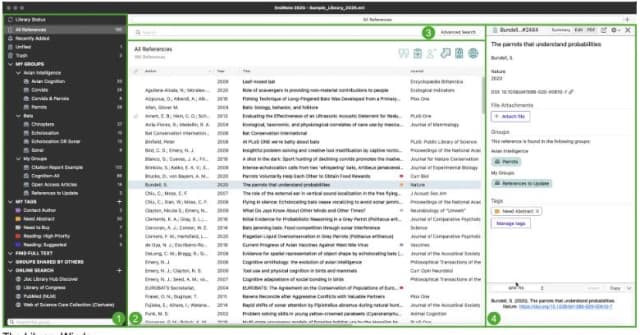
EndNote is strongest when the document workflow is already set. Cite While You Write is a major reason schools keep paying for it.
Clarivate's current EndNote 2025 pages also highlight writing help, reference updates, PDF-based cite insert, and desktop-web use. If a supervisor says "use this shared EndNote set and this Word template," do that first. Arguing for Zotero may create more team cost than it saves.
For Google Docs, do not reduce the choice to "Zotero supports it and EndNote does not." Zotero's Google Docs support is mature and well documented. EndNote has a Google Docs Cite While You Write path. Before moving a large shared draft into it, verify the current add-on, license, and campus setup.
If Zotero is the baseline but you want other paths, read the Zotero alternatives guide. It covers the broader replacement job.
LaTeX and technical writing
For LaTeX, Markdown, Overleaf, and technical writing, Zotero tends to be easier to adapt. Its open plugin culture helps here. EndNote can still export cite data. Many technical writers prefer a workflow where cite keys, BibTeX export, and plain-file handoff are easy to inspect and automate.
Library, PDFs, capture, and cleanup
Capture and organization
Zotero is built around fast capture. Its homepage centers on collecting, sorting, marking up, citing, syncing, and sharing research. The browser connector is the part many users feel first. If you collect from databases, library catalogs, arXiv, journals, news sites, and PDFs in the same week, Zotero's capture loop helps. It keeps source intake fast.
Zotero also gives you a lot of control. You can use folders, tags, saved searches, notes, duplicate cleanup, plugins, local files, and export paths. That control helps when your research plan changes.
Before handing a selected PDF to Atlas, check the Zotero record and its attachment. In the official Zotero view below, collections and tags are on the left, library records are in the center, and the selected item's metadata and attached PDF are on the right. That is the information worth checking before copying the PDF into a project for close reading.
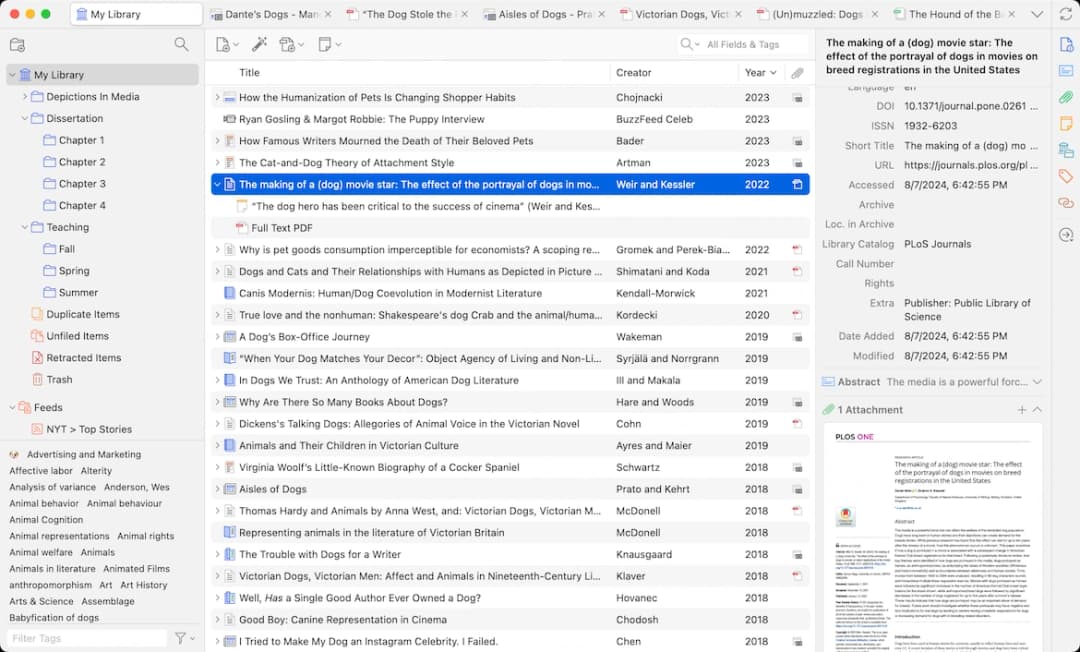
Zotero’s official library view shows the record and attached PDF used at the citation-manager side of a handoff.
The tradeoff is that community plugins are not the same as official product features. Zotero warns that plugins have broad access to Zotero and the computer. Install them only when you trust the developer and have checked current support.
Cleanup and migration risk
EndNote is better when a source set has been corrected and kept there for years. Large source sets are not loose piles of RIS records.
They may include fixed data, custom fields, groups, notes, PDF marks, shared rights, and drafts with active cite fields. A switch then becomes a data move that can affect active writing.
If you are considering a switch, test the smallest useful slice first:
- Back up the original source set and any active drafts.
- Export a small collection with the fields, notes, tags, PDFs, and attachments you actually use.
- Import it into the new tool and inspect the records by hand.
- Test one file with active cites before touching a thesis, grant, or lab paper.
- Keep the old source set available until the new workflow has survived a real writing cycle.
Lock-in risk is highest when the source set is large and corrected. It also rises when the draft has active cite fields or the team depends on shared files. If you are early in a project, Zotero's lower cost and cleaner exit paths often matter more.
When to leave the library alone
Keep the current tool when the cost of disruption is higher than the likely gain. A finished EndNote set may feed a lab paper, a grant, or a thesis chapter. Preserve it until that writing cycle ends. You can still use Atlas or Zotero on a new project without disturbing the old set.
Where Atlas fits after citing
EndNote and Zotero should own the bibliography. Atlas should not replace cite styles, Word fields, Google Docs cite plugins, CSL formatting, or final reference-list cleanup.
The handoff after source selection
After you have selected the sources worth reading closely, the handoff is:
- Use EndNote or Zotero to collect sources, keep data clean, attach PDFs, and format cites in the writing tool.
- Move the selected PDFs, papers, websites, or notes into an Atlas project when the question shifts from cite work to analysis.
- Ask a focused comparison question. For example: "Which papers name the same limit in the intervention design?" or "Compare the methods and sample sizes across these studies."
- Inspect the citation badges for important claims and read the source passage before reusing the answer.
- Save checked findings as notes. Return to EndNote or Zotero when the final paper needs formatted cites and a works cited list.
That split avoids a common failure mode. The cite tool may hold every source. The writer may still have to rebuild the argument, limits, and evidence table by hand. Atlas is useful in the middle layer, where selected sources need to become cited synthesis.
The Atlas source-check workflow starts after the EndNote or Zotero library has narrowed the paper set. Open a selected paper in the project, ask a focused question, and inspect the citation badge and source passage before deciding whether the answer is strong enough to reuse in the draft.
The boundary to keep
The boundary matters. If you need to insert a formatted cite into Word, use EndNote or Zotero. If you need to compare what several papers say about a method, limit, theory, or result, add those sources to Atlas. Verify the cited answer before writing.
For the direct product comparison, read Atlas vs Zotero. This article keeps the narrower EndNote-Zotero decision separate.
The useful test
Use Atlas when the next question needs evidence across sources. Use EndNote or Zotero when the next task is the works cited list. A good test is whether the answer should name the paper and show the passage. It should also keep caveats before it enters your draft.
Team, support, and school fit
Team libraries
The best tool is often the one your coauthors will use correctly. Zotero supports free shared work and group libraries.
Its Google Docs workflow can work well when coauthors install the Connector and avoid citation edits at the same time. That makes it useful for student groups, cross-school projects, and teams without a shared license.
EndNote's shared-work advantage comes from schools. EndNote shared libraries can give a team access to a full synced source set. That can include references, files, notes, marks, access rights, and an activity feed.
The same docs note that changes depend on sync and may not appear for everyone right away. Treat EndNote sharing as a managed source workflow rather than a shared-drive folder.
Library and supervisor support
Schools and libraries also change the decision. If your campus has librarians who teach EndNote, fix license issues, and support journal workflows, EndNote may be lower risk.
That can be true even if Zotero looks better in a solo test. If your institution supports both, start with the writing setup and team pattern:
- Use Zotero when people need free access, Google Docs, browser capture, open-source control, or a workflow they can keep after leaving school.
- Use EndNote when the lab, supervisor, publisher, or library has standardized on it and support is part of the value.
- Avoid switching near the end of a paper unless the current tool blocks submission work.
When support beats preference
If your advisor, library, or publisher has a required workflow, treat that rule as part of the tool. A reference manager that looks better in a solo test can still be the wrong choice.
The real test is whether someone on the project can fix it when citations break near submission.
Which should you choose?
Choose Zotero if you are a student, PhD candidate, solo researcher, or early-career scholar who wants a free tool you can keep.
It is also better if you write in Google Docs. Pick it if you collect from the browser or expect to use plugins and exports later.
Choose EndNote if your school or organization provides the license and support. Choose it when your supervisor or lab already works in EndNote.
It is also safer for a large shared set. Use it when access, files, notes, and history matter. EndNote is the safer choice when a publisher, department, or long-running project already depends on Cite While You Write.
For PhD students, the key question is not "Which tool has more features?" Ask which tool will still serve you when the project grows, coauthors join, or the campus license ends. Zotero is often better for portability. EndNote is often better for institutional continuity.
For librarians and research teams, the right answer may be to support both. Zotero covers low-cost personal work and team use. EndNote covers licensed school workflows, set training, and teams with shared source needs.
If you already have a large EndNote set, do not migrate because a comparison article says Zotero is a better default. Back up the set, test export/import with a small group, inspect the fields that matter, and try one real document.
Use this final rule:
- Start with Zotero unless a real school, team, or legacy-set constraint points to EndNote.
- Keep EndNote if the test move breaks fields, notes, PDFs, or active drafts.
- Keep source analysis in its own step. Collect and cite in the reference manager. Synthesize and verify selected sources in Atlas.
For a low-risk trial, keep the test small:
- Add 10 sources.
- Cite them in one short draft.
- Share the draft with one coauthor.
- Export the source data.
- Check one PDF.
- Fix one bad record.
- Ask one source question in Atlas.
- Follow one cited passage.
- Save one useful note.
- Check one quote.
- Check one page.
- Ask one coauthor to try it.
- Keep what works.
- Keep the old setup until the test works.
Synthesize selected papers in Atlas
Import selected papers, compare findings, and inspect the cited source passages.