


The best AI for references depends on what you need to do. You may need to find papers, check a claim, make a source list, or ask questions of files you own. These are four different jobs.
This guide compares ten tools by job. It does not publish an Atlas test or one score for all tasks. We checked each product site on August 10, 2026.

Query the sources you already trust
Upload one source, ask a question, and inspect the cited passage before reuse.
Four Jobs for AI References
Discover sources
Find papers or web pages tied to a question, claim, or draft.
Verify support
Check that a source exists, is the right work, and backs the exact claim.
Format references
Make or export a full source record in the style and file type you need.
Query your library
Ask across papers and notes you chose, with a path back to the key passage.
No tool leads every job. A real paper can still be the wrong paper. A close match may not back your sentence. A neat source note can still point to weak proof.
Best AI for References by Research Job
| Research job | Start with | Why | Main boundary |
|---|---|---|---|
| Check how later papers cite a study | Scite | Shows citation statements and support, contrast, or mention labels | Automated labels do not settle whether a claim is true |
| Find papers for a question or draft | Paperpal, Sourcely, Elicit, Consensus | Searches scholarly material from different writing and review surfaces | Search relevance is not claim-level support |
| Find and format missing citations in a draft | Grammarly Citation Finder, Logically, Anara | Keeps source work close to writing and reference management | Suggested or formatted citations still need inspection |
| Ask across sources you already selected | Atlas | Links cited answers to passages in the current project | It does not make an incomplete source library complete |
Table 1: Use Perplexity when you need the live web. Paper indexes and chosen file sets serve narrower source pools.
The 10 Best AI Tools for References
1. Scite: Verify Citation Context
Scite is the best fit here for seeing how later papers cite a work. Its Smart Citations show the citing text and label it as support, contrast, or mention. Reference Check adds that view to a draft's source list.
Use Scite when a paper is well known, in dispute, or key to a claim. Read the citing text, then open the paper. The label helps you navigate; read the paper before reaching a verdict.
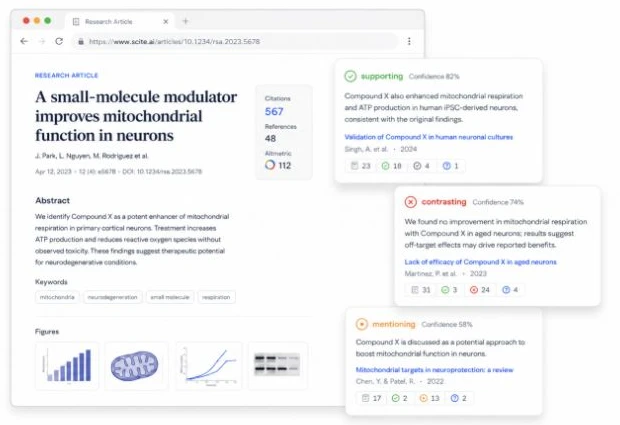
Scite example citation cards show supporting, contrasting, and mentioning labels beside a sample research article. The demo references are not evidence for this article. Source: Scite Smart Citations.
Access and data: Scite offers trial and paid plans. Check its terms before you upload an unpublished draft.
2. Paperpal: Find References Near the Draft
Paperpal’s AI Reference Finder finds papers from a question or draft. It sums up each result and lets writers save it. The tool works on the web and in Paperpal's writing apps.
Use it when a paragraph needs source leads. Do not rely on the vendor's claims about how well it works. Read the abstract or full text. Then ask if the paper backs the full scope of your sentence.
Access and data: The search has a free tier with limits. Paperpal says it does not train models on customer text. Your school or firm may still set its own rules.

Note: Paperpal’s Research panel takes a question in its Search box (“What are the long-term mental health effects of COVID-19?”) and returns a Citations List: result [1] is an open-access article, “Covid-19 disease and vaccines: the balance of risks and benefits”, with its DOI, authors and journal, and a Preview link to read it before saving. Source: Paperpal’s Reference Finder update.
3. Sourcely: Match Draft Passages to Sources
Sourcely starts with a topic, claim, or draft and finds papers that may fit. Its June 2026 export update added more source styles, bulk export, file export, and BibTeX.
Use it to find leads for text you have written. Matches and short summaries can help you shortlist papers. They do not prove the claim. Open the paper and read the key part before you cite it.
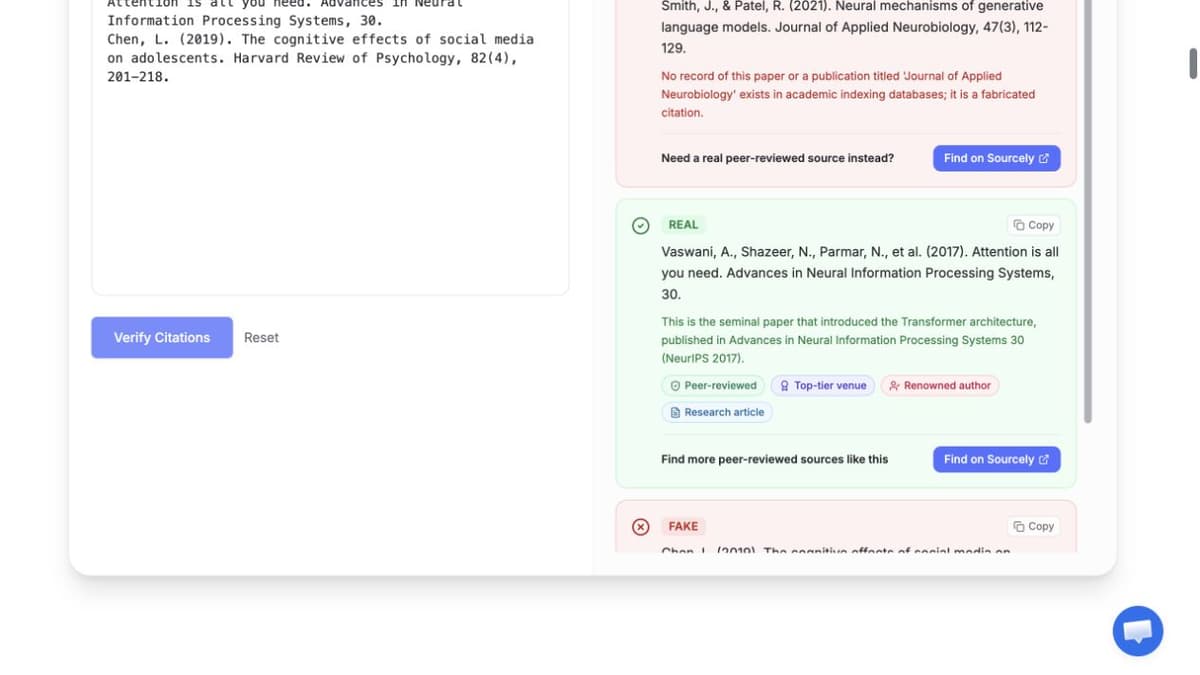
Sourcely’s verifier demo displays sample real/fake citation labels and explanations. Demo results are not independently audited. Source: Sourcely Citation Verifier.
Access and data: Sourcely has free and paid plans. Read its terms before you send private or unpublished text.
4. Elicit: Review Tables
Elicit pairs paper search with review tables and set fields. It works well when you need to compare many papers in the same way. Our Elicit alternatives guide covers close use cases.
Elicit's August 2026 plan page lists free search and paid export tools. Its export guide lists CSV or Excel for some tables and RIS or BIB for some source lists.
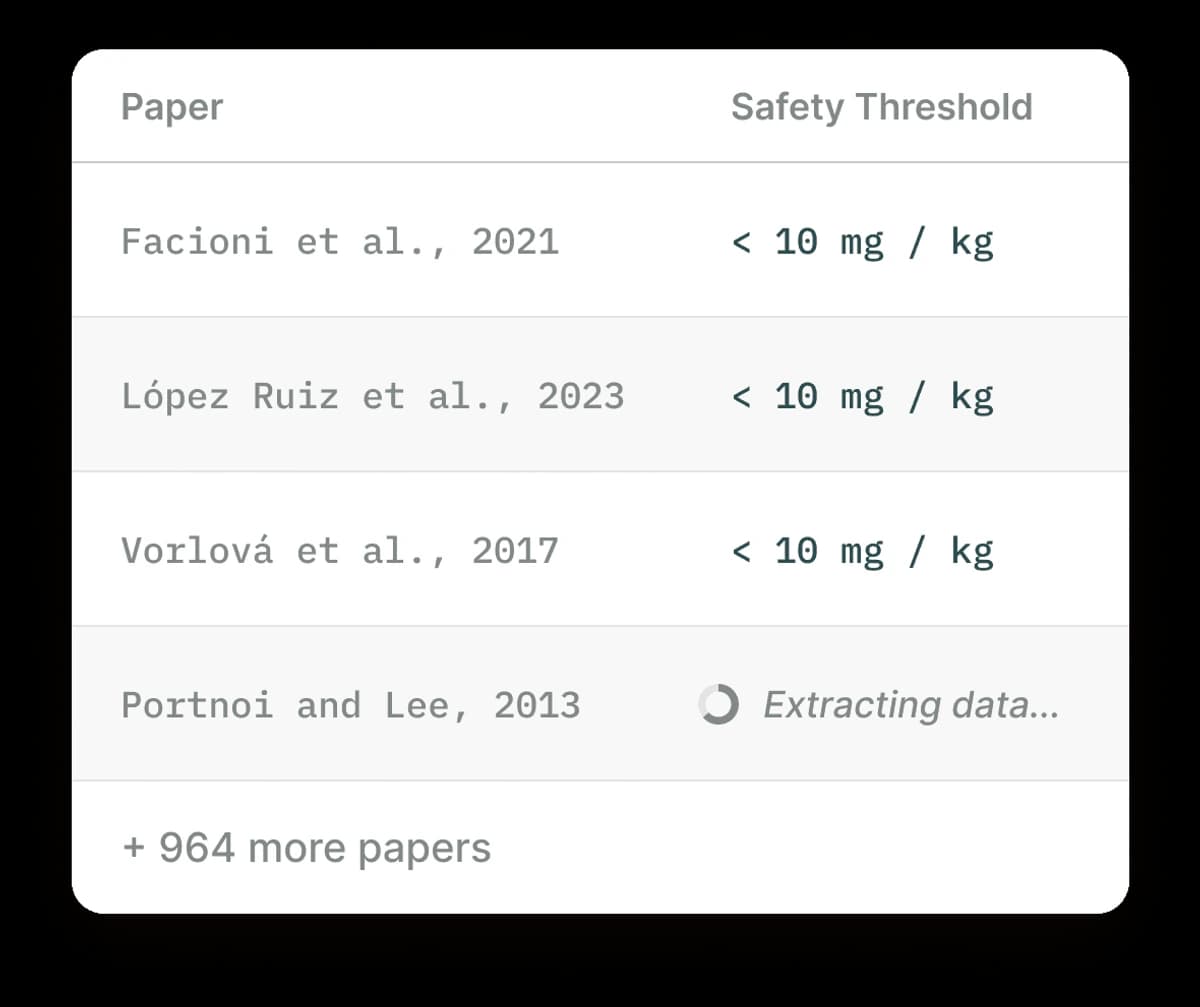 This Elicit example shows the core flow. One question becomes a column, and each paper becomes a row. Open the paper behind each key cell before you cite the value.
5. Consensus: Evidence Questions
Consensus is a paper search tool that links short answers to research papers. It works well for a clear question when you want a fast path to studies. Study Snapshots and the Consensus Meter add context, but you still need to read the work.
Access and data: Consensus has free and paid plans. Its help site says it does not train its AI models on user data. Results still depend on the papers and full text it can reach.
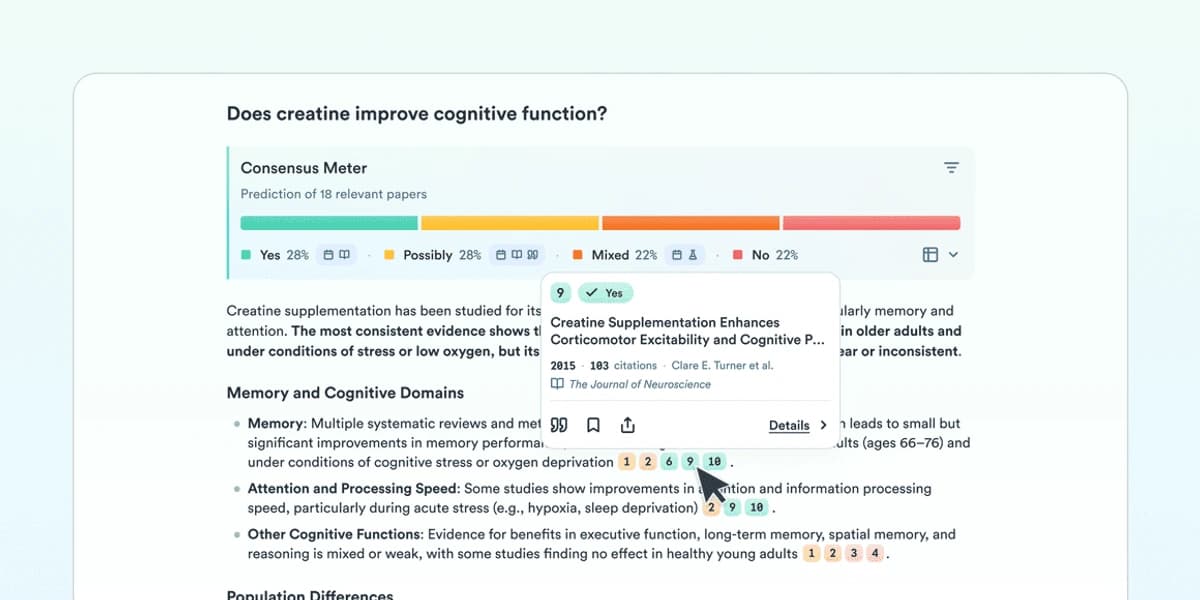 This Consensus Meter guide shows how the tool groups views across cited studies.
6. Atlas: Query Your Source Library
Atlas fits the step after search. You have picked the PDFs, notes, or saved pages and want a cited answer across them. Atlas finds text in the project, writes an answer, and adds links back to the source. Those links help you trace a claim, but they do not prove it is right.
Use Atlas to compare sources, trace a claim, or sum up a reading set. Use a search tool first when you still need to find the source.
You can jump back to the text and judge whether it backs the answer.
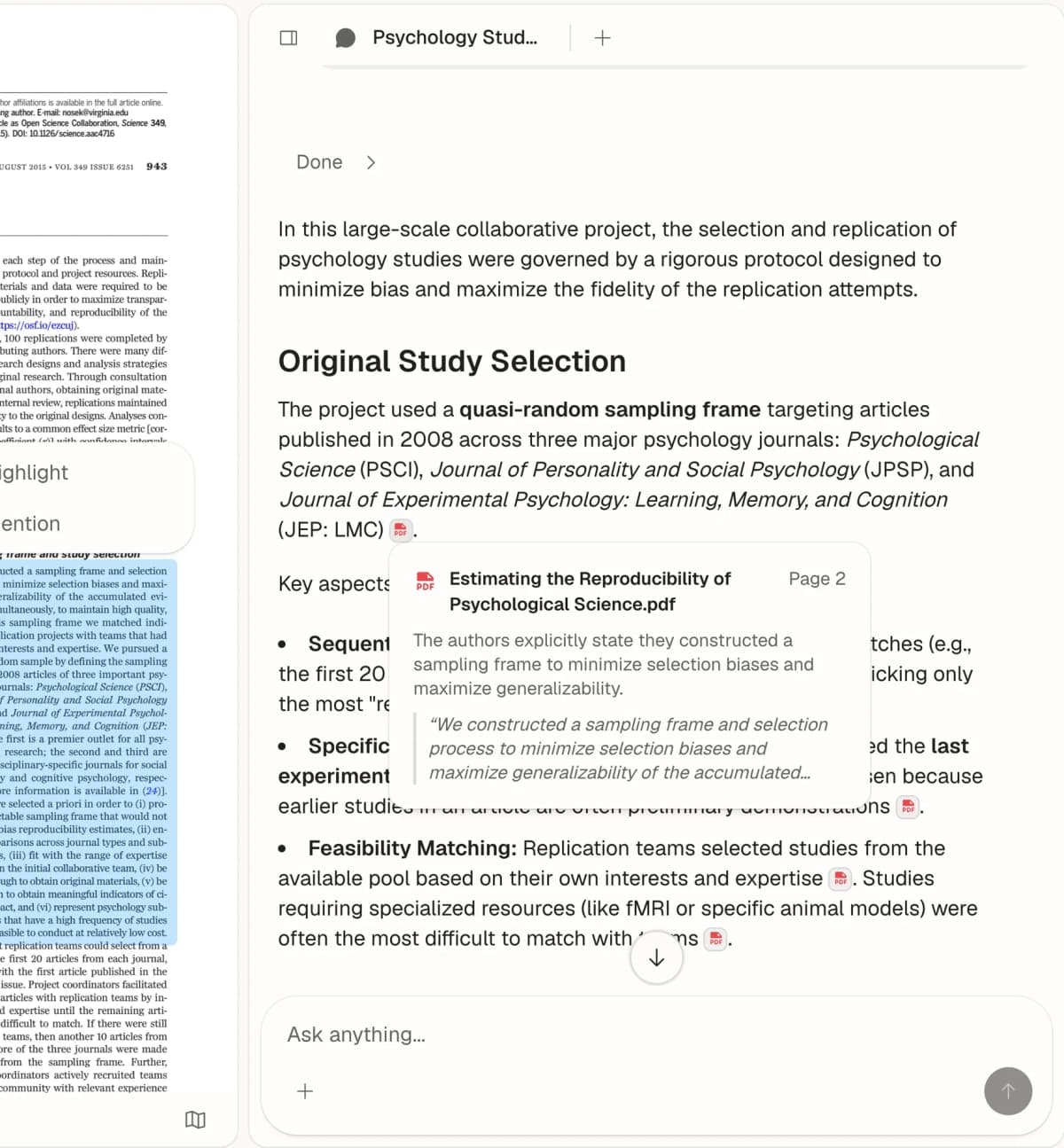
Atlas displays an answer beside the source passage it cites in a PDF. Read that passage to judge whether it backs the answer. Source: Atlas Chat with Paper.
Access and data: Atlas plans have different use and source limits. Check the plan before signup. Upload only files you have the right to use.
7. Perplexity: Current Web Sources
Perplexity searches the live web and puts links by its answers. Use it for new web pages, reports, and news that may not be in a paper index.
Open each cited page. Check who wrote it, when it was made, and whether it backs the claim. A real link can still be weak or off point.

Perplexity shows a web answer with a source detail card for an investor-relations page. It illustrates link inspection, not independent answer verification. Source: Perplexity Search.
Access and data: Basic search is free, with paid plans as well. Perplexity says it may use user searches to improve its systems unless the user turns off AI Data Usage. Business and API plans have other rules.
8. Grammarly Citation Finder: Draft Coverage
Grammarly’s Citation Finder scans a draft for fact claims. It finds web sources and can add APA, MLA, or Chicago citations. Use it near the end to spot claims that lack a source.
The tool does not prove that a source backs a complex sentence. Read the page, check the author and date, and find the quoted text before you use it.

Grammarly’s help-center example shows the Citation Finder panel with one of four claims cited and an APA reference entry. The sample source is Wikipedia; it does not establish that a suggested citation is accurate or supports a claim. Source: Citation Finder user guide.
Access and data: Citation Finder is part of some paid and team plans.
9. Logically: One Research-and-Writing Workspace
Logically puts source lists, files, AI help, and writing tools in one place. It can import common source-list files and keeps citations near the draft. This cuts down on tool changes while you write.
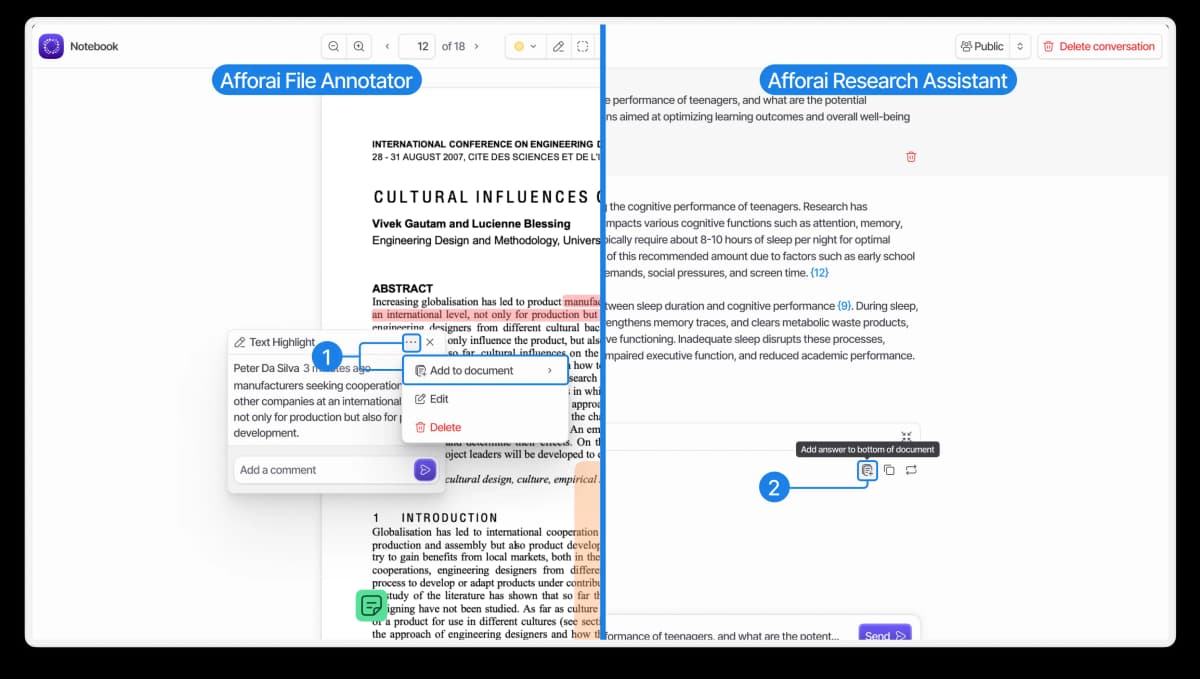
Logically’s help guide shows a PDF reader and Research Assistant side by side. The guide uses the former Afforai name and sample papers and answers; it illustrates the combined workflow, not verified source accuracy.
Test a small set from your field first. Check the source facts, full text, citation output, and export file before you move all your work.
Access and data: Logically has free and paid plans. Its terms say user text is processed to run the service and excluded from AI model training.
10. Anara: Source-Linked Drafting
Anara puts a source set, cited chat, source search, and a writing tool in one place. It can search your files and the web for citations near a draft. Its site lists DOCX, PDF, LaTeX, BibTeX, and CSV export.
Anara is a fit when you want to write and check sources in one place. Its citations link back to source text. You must still check all AI text and source ideas.
Access and data: Anara has free and paid plans with different links and use limits. Teams that need formal controls should read its business terms.
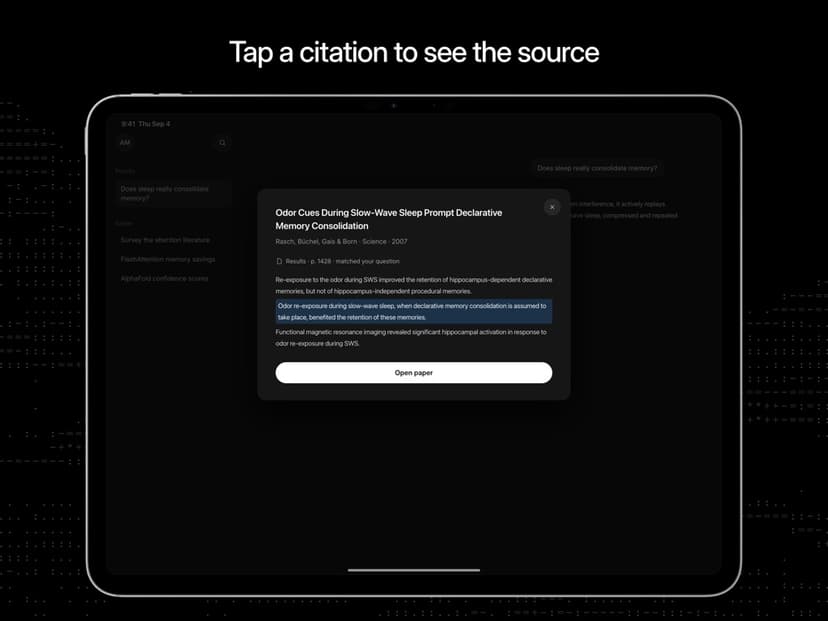
Anara’s App Store iPad screenshot shows a citation opening a highlighted source passage. It supports the source-checking part of Anara’s workflow; it is not the web note editor, and the sample citation is not independently verified research evidence. Source: Anara on the App Store.
Comparison Table
The table lists product features checked on August 10, 2026. It does not report Atlas test results.
| Tool | Best job | Source path | Output or export | What to verify |
|---|---|---|---|---|
| Scite | Citation context | Citation statements in scholarly literature | Context labels and reference checks | Read the citing passage and paper |
| Paperpal | References near writing | Scholarly search from questions or draft context | Saved citation-library items | Confirm the paper supports the sentence |
| Sourcely | Passage-to-source discovery | Academic source matching | Citation and document exports | Use matches only to shortlist papers |
| Elicit | Literature-review tables | Semantic scholarly search and uploaded papers | Eligible CSV, Excel, RIS, and BIB exports | Compare extracted cells with the paper |
| Consensus | Evidence questions | Scholarly-paper search | Cited summaries and study views | Check study design, scope, and access |
| Atlas | Your selected source library | Current project sources | Cited answers and source passages | Check retrieval, passage, and source completeness |
| Perplexity | Current web research | Live web and selected files | Linked answer sources | Check publisher quality and entailment |
| Grammarly Citation Finder | Unsupported draft claims | Draft scan and suggested web sources | APA, MLA, and Chicago citations | Inspect every recommendation |
| Logically | Integrated research and writing | Managed reference library and files | Citation and reference-manager workflow | Test metadata and export compatibility |
| Anara | Source-linked drafting | Library, scholarly connectors, and web | Document and reference exports | Review each generated sentence and citation |
Table 2: How ten AI reference tools differ by source set, citation output, and check path.
If you work from private PDFs you trust, upload one paper to Atlas. Ask a fact question, then check the cited text before you write.
6 Checks for AI Reference Tools
Use the same 6 checks for each tool instead of hiding the trade-offs in one score:
| Check | Pass condition |
|---|---|
| Existence | The cited work resolves to a real source record |
| Identity | Authors, title, venue, year, and identifier point to the intended work |
| Support | The accessible passage supports the exact claim and scope |
| Metadata | DOI or URL, authors, date, volume, issue, and pages match the source |
| Access | A reviewer can open enough of the source to check the claim |
| Format | The citation style or export record is complete and valid |
Table 3: These checks draw on source studies such as ALCE. Such work splits fake sources from errors in source facts or claim support. A real link may still fail the support check.
Pricing, Source Coverage, Privacy, and Export
Compare the full cost of the work, including the plan price. A free search may cost hours of source checks. A paid tool is still a poor fit if it cannot export to your source app or read your file type.
Before you choose, check the plan and source set. Check full-text access, file types, limits, data use, team rules, and how to delete your work. Personal and business terms often differ.
You can mix tools. Find papers in Elicit or Consensus. Check a disputed paper in Scite. Save sources in a source app, then ask across a reading set in Atlas. Use Perplexity for the live web. Use a writing tool when your draft lacks citations.
How to Verify an AI-Suggested Reference
Run this sequence before a source enters the draft:
- Resolve the DOI or URL and confirm the work exists.
- Match the title, authors, date, venue, and identifier.
- Open the source and locate the relevant passage.
- Decide whether the passage supports the claim, population, and degree of certainty.
- Check corrections, retractions, disputes, and access limitations.
- Verify the metadata and format only after the evidence checks pass.
Which AI Reference Tool Should You Choose?
Choose by the next action:
- Choose Scite to inspect citation context around a paper.
- Choose Paperpal or Sourcely to find source leads near a question or draft.
- Choose Elicit for structured literature-review search and extraction.
- Choose Consensus for answer-shaped exploration of scholarly literature.
- Choose Atlas to ask across a source library you selected and inspect cited passages.
- Choose Perplexity for current web research with linked sources.
- Choose Grammarly Citation Finder to flag and format missing draft citations.
- Choose Logically when reference management and writing should share one workspace.
- Choose Anara for drafting beside a connected research library.
For a broader view, read our guides to the best AI research assistants and research paper organizers.
The best AI for references is the one that makes your next verification step obvious. Do not stop at a citation marker. Open the source, read the passage, and decide whether it supports the sentence. If fabricated sources are the main concern, our guide to AI research tools that don't hallucinate covers the system designs that reduce that risk.
Query the sources you already trust
Upload one source, ask a question, and inspect the cited passage before reuse.