
Microsoft Copilot Alternatives (2026): 8 Best AI Assistants
Best Microsoft Copilot alternatives in 2026. Atlas, ChatGPT, Claude, Gemini, Perplexity, NotebookLM, Mistral, Notion AI for productivity and research workflows.
- Byline

Summary
The best Microsoft Copilot alternative depends on your main job: chat, writing, documents, research, or Google Workspace.
The updated guide compares Atlas, ChatGPT, Claude, Gemini, Perplexity, NotebookLM, Mistral, and Notion AI.
Atlas fits cited research work, NotebookLM fits free document Q&A, Claude and ChatGPT fit writing, and Gemini fits Google teams.
The guide covers Office fit, price, web search, citations, privacy, and the jobs Copilot is still hard to replace for.
Jet New, founder of Atlas, reviewed this guide with one test in mind. Which assistant should you use when Copilot's Microsoft 365 tie-in is not the job?
Microsoft Copilot now means more than one product. The free Copilot chat is tied to a Microsoft account. Microsoft 365 Copilot is the paid Office layer for Word, Excel, PowerPoint, Outlook, and Teams. This guide covers those work and chat use cases. Coding teams should use the separate GitHub Copilot alternatives guide because IDE assistance has a different buyer, workflow, and evidence base.
The useful way to choose is to split Copilot into four jobs. Office work means editing files inside Microsoft 365. Research means answering from trusted reports or PDFs. Company search means finding answers across Slack, Drive, or CRM records. Coding belongs in its own IDE-assistant comparison, where repository context, pull-request review, and editor support matter more than Office integration.
Atlas belongs in the research layer, not the Office layer. Glean and Slack AI belong in the enterprise-search layer. Claude and ChatGPT belong in the general writing layer. This split prevents the common mistake of comparing one broad Microsoft bundle against tools that solve one job much better.
My practical rule is simple. Do not replace Copilot just because another model writes better prose. Replace it when the work happens outside Microsoft, when answers need file citations, when meetings happen beyond Teams, or when company knowledge lives in many tools.

 Atlas
AtlasCompare evidence across your research documents
Upload reports and ask a synthesis question with citations you can inspect.
Why Look for Microsoft Copilot Alternatives?
Most teams look outside Copilot for three plain reasons: cost, fit, and the limits of a broad assistant.
Microsoft 365 Copilot Enterprise is $30/user/month on top of the base plan. A 10-person team pays $3,600/year before base licenses.
Copilot is broad. Focused tools often win on narrow jobs. Use Claude for writing, Perplexity for web search, NotebookLM for free document Q&A, and Atlas for cited research across files.
Stack fit matters too. Google Workspace teams, Mac-heavy teams, and EU teams often get a better result from tools built around their own apps and data rules.
What to look for
Start with the job you do most often. If you need Office files edited in place, Copilot is still hard to beat. If you need writing, search, or cited answers from your own files, a focused tool can be better.
Use five checks before you switch:
- Does it work with the files you already use?
- Does it cite sources when answers matter?
- Does it fit your privacy rules?
- Does the team plan cost less than Copilot plus Microsoft 365?
- Does it remove work, or does it just add another chat box?
How I evaluated the alternatives
Microsoft Copilot is strongest when the work is already inside Microsoft 365. It can sit beside Word, Excel, PowerPoint, Outlook, Teams, SharePoint, and tenant data. You do not have to export files first. That is the baseline every alternative has to beat.
Its limits show up when the job is outside that boundary:
- Document research: Copilot can summarize Microsoft-hosted files. A source workspace is easier to audit when every claim must point to uploaded PDFs, notes, or reports.
- Live web research: Copilot can search the web. Perplexity and similar tools are built around source-led answer pages.
- Meeting notes: Copilot is tied to the Microsoft meeting stack. Fireflies, Otter, Read AI, and Granola focus on capture, notes, tasks, and summaries across more meeting flows.
- Company search: Copilot is strong inside Microsoft 365. Glean, Dust, and Slack AI are built for company knowledge that spans many systems.
- Custom agents: Microsoft Copilot Studio lets teams design, test, and publish agents. Those agents can appear in Microsoft 365 Copilot. That makes Copilot harder to replace for companies already tied to Microsoft governance, connectors, and agent workflows.
Evaluation method
For this update, I did not rank every tool against one generic AI score. I treated Microsoft Copilot as four jobs. The jobs are Office work, document Q&A, web research, and company search. That matters because a Teams transcript and an Excel formula need different tools.
I scored each option on six checks. Does it work where the source lives? Does it cite evidence? Can it handle private files? Does the team plan make sense? Is there a low-friction trial? Does its strongest use case differ enough from Copilot to justify adding another tool?
That is why this guide includes Fireflies and Otter in the use-case matrix. The ranked list stays focused on broader Copilot replacements. A meeting bot can replace note-taking. It cannot replace Word, Excel, research, or company search by itself.
Comparison table
Read each row against the job you need to replace. The scores run from 1 to 5, with 5 as the strongest fit. A high Office score means the tool can replace more of Microsoft 365 Copilot. A high citation score means it is safer for research or document work.
| Tool | Best fit | Job category | Document Q&A score | Citation score | M365 score | Research workflow score | Free tier | Paid from |
|---|---|---|---|---|---|---|---|---|
| Atlas | Cited synthesis across files | Research synthesis | 5 | 5 | 1 | 5 | Yes | $20/mo |
| ChatGPT | General chat and drafting | General assistant | 3 | 3 | 1 | 3 | Yes | $20/mo |
| Claude | Writing and analysis | General assistant | 4 | 3 | 1 | 3 | Yes | $20/mo |
| Gemini | Google Workspace teams | Office-suite alternative | 3 | 3 | 1 | 3 | Yes | $19.99/mo |
| Perplexity | Live web research | Web research | 1 | 5 | 1 | 3 | Yes | $20/mo |
| NotebookLM | Free document Q&A | Personal document Q&A | 5 | 5 | 1 | 3 | Yes | $19.99/mo Plus |
| Mistral Le Chat | EU-hosted chat | General assistant | 3 | 3 | 1 | 2 | Yes | $14.99/mo |
| Notion AI | Notion workspaces | Workspace assistant | 3 | 2 | 1 | 3 | Trial AI | $10/member/mo Plus |
Table 1: Microsoft Copilot alternatives scored by the job they replace, citation strength, Microsoft 365 fit, research workflow depth, and starting price.
Copilot jobs and specialist alternatives
Use this matrix before you buy another seat. It separates full Copilot alternatives from narrow tools that beat Copilot on one job.
| Copilot job | Best specialist alternatives | When they beat Copilot | When Copilot still wins |
|---|---|---|---|
| Source-backed research across PDFs and reports | Atlas, NotebookLM | You need cited answers from a controlled source set. | The source files already live in Microsoft 365 and the output must stay inside Word or Teams. |
| Long-form writing and reasoning | Claude, ChatGPT | You need a stronger drafting partner outside Office. | You need edits made directly inside Word or Outlook. |
| Live web research | Perplexity, ChatGPT browsing | You need current web citations and follow-up search. | You need the answer joined to internal Microsoft 365 data. |
| Google Workspace productivity | Gemini | Your files, email, and meetings live in Google Workspace. | The team is standardized on Word, Excel, PowerPoint, Outlook, and Teams. |
| Meeting transcription and summaries | Fireflies, Otter, Granola, Read AI | The main job is recording, transcription, summaries, and action items. Fireflies positions itself around recording, transcribing, and summarizing meetings. Otter focuses on real-time transcription, summaries, insights, and action items. | You need meeting context tied directly to Microsoft 365 permissions, Teams, and follow-up documents. |
| Enterprise search across company apps | Glean, Dust, Slack AI | The job is retrieving answers across apps, documents, conversations, and internal tools. Glean frames this as AI-powered enterprise search across company knowledge. Dust frames it as enterprise AI agents connected to company tools and knowledge. | Your company knowledge is mostly Microsoft 365 and the IT team wants one Microsoft governance boundary. |
Table 2: Specialist alternatives mapped to the Copilot job they can replace and the cases where Microsoft 365 Copilot remains stronger.
8 best Microsoft Copilot alternatives
1. Atlas: Best for Grounded Knowledge Work
Atlas fits Copilot users who mainly need to synthesize reports, papers, briefs, and meeting notes. Upload a source set, ask a research question, and Atlas answers with citations back to the files. It also builds a mind map when you need to see how sources connect.
Choose Atlas when the risky part of the work is not drafting a paragraph. It is proving where the answer came from. Atlas Pro is $20/month.
Meeting assistants
Meeting tools deserve a separate category. They often beat Copilot on capture, but not on Office work. Fireflies is best when the output is a transcript, summary, meeting history, or task list. Otter is best when the team wants live notes, speaker labels, and quick summaries. Granola is useful when you want lighter notes without a heavy workspace.
Do not choose a meeting tool as your main Copilot replacement if the hard work starts after the call. If you need to compare ten calls with reports, briefs, or PDFs, move the source set into Atlas or another document workspace. If the answer must stay tied to SharePoint and Teams permissions, Microsoft 365 Copilot is the safer default.
Enterprise search and agent platforms
Glean, Dust, and Slack AI are closer to company search or agent platforms than to personal chat tools. Choose this group when the painful question is "Where is the answer across our systems?" rather than "Can this chatbot draft a paragraph?"
The key decision is connector depth. Glean is strongest when a company wants AI search over workplace knowledge across apps. Dust is stronger when teams want internal AI agents tied to tools and company context. Slack AI is narrow but convenient when the knowledge already lives in Slack. Copilot remains the default when most important context lives in Microsoft 365 and the company wants one permission model.
2. ChatGPT: Best General-Purpose Alternative
ChatGPT and Microsoft Copilot both use OpenAI model technology. ChatGPT is the safer pick when you want a flexible AI assistant outside Microsoft 365. It is better for mixed personal tasks, custom GPTs, image work, and quick drafts.
Pick ChatGPT if you want a general chat tool and do not need Word, Excel, or Outlook edits in place. Plans include a free tier, Plus at $20/month, and Team pricing for shared use.
3. Claude: Best for Writing and Reasoning
Claude is the best Copilot alternative for long drafts, careful edits, and high-context reasoning. It is also easier to steer when tone matters. Anthropic's Team plan starts at $25 per member per month when billed monthly.
Pick Claude if your Copilot use is mostly writing, analysis, policy review, legal review, or long document cleanup.

4. Google Gemini: Best for Workspace
Gemini is the natural Copilot alternative for teams that already live in Google Workspace. It works across Docs, Sheets, Gmail, and Meet, so it avoids the copy-paste tax that standalone chat tools create.
Pick Gemini when the real goal is to bring AI into Google files, not to replace Microsoft Office.
5. Perplexity: Best for Live Web Search
Perplexity is strongest when your Copilot use starts with a web question. It cites live sources in each answer and handles follow-up research better than a plain search result page.
Pick Perplexity for market scans, vendor checks, news research, and source-led web answers. Pro starts at $20/month.
6. NotebookLM: Best for Your Documents
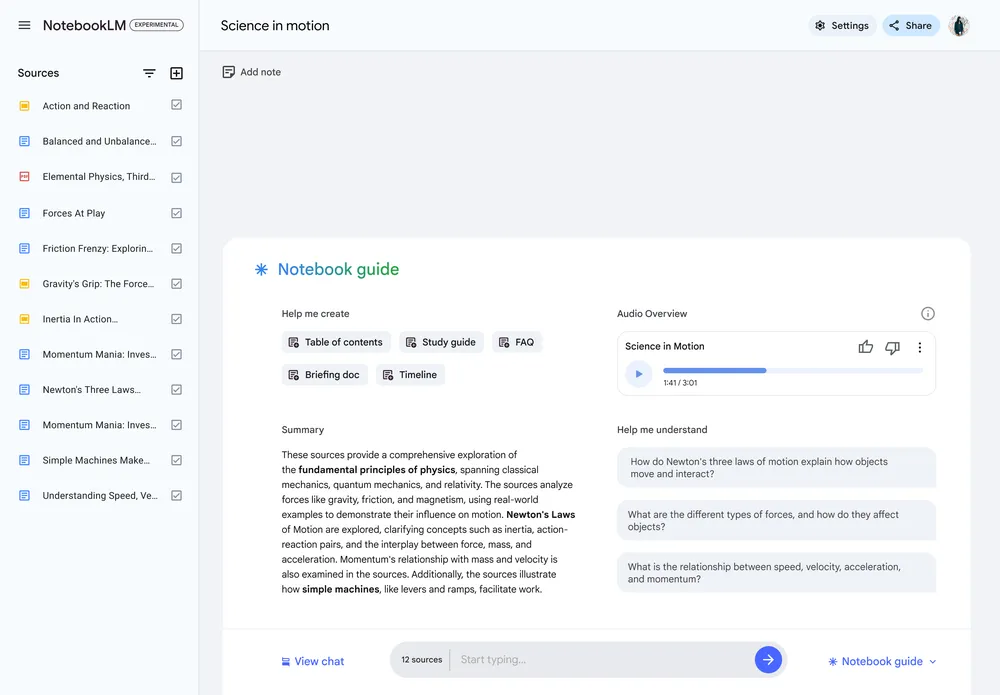
NotebookLM is the easiest free option for chatting with a small library of documents. It answers from uploaded sources and cites them. The audio overview feature is useful when you want a quick verbal summary.
Pick NotebookLM for student papers, personal PDFs, and small research notebooks. It is free with a Google account.
7. Mistral Le Chat: Best European Alternative
Mistral Le Chat is a strong pick for EU teams that care about hosting location and vendor fit. It gives up deep Office control in exchange for speed, EU alignment, and a low-cost paid tier.
Pick Mistral when EU alignment matters more than Microsoft 365 depth. The Pro plan starts at $14.99/month.
8. Notion AI: Best Inside Notion
Notion AI makes sense when your notes, docs, and team wiki already live in Notion. It can draft, summarize, and answer questions without pulling work into Microsoft 365. Notion's Plus plan starts at $10 per member per month.
Pick Notion AI when workspace context matters more than Office file control.
Which alternative fits your job?
Claude is the best first stop for writing. Atlas is the better fit when the answer must come from a set of source files. Perplexity is best for live web research. NotebookLM is the free pick for personal PDFs. Gemini is the obvious choice for Google Workspace. Mistral is the EU-friendly chat option. Notion AI is useful only if Notion is already your work hub.
What Copilot is hard to replace
Microsoft 365 integrations
The deep Microsoft 365 integration is what is genuinely hard to replace.
Word is replaceable with Claude or ChatGPT beside the document. Copy text into chat, revise it, and paste it back. It is less smooth, but it works.
Excel is the hardest part to replace. Copilot can read live spreadsheet data. Most chatbots need an exported CSV before they can help.
PowerPoint is easier. Gamma and Beautiful.AI can draft slides. Claude can write the outline and speaker notes.
Outlook can be replaced for simple drafts. Most chatbots can write email if you paste the thread. Apple Mail also has built-in AI tools for Apple users.
Teams notes are a separate job. Otter.ai and Granola handle meeting capture. Atlas helps when you need to synthesize several past meetings.
For many knowledge workers, the practical setup is Microsoft 365 without Copilot plus one or two focused tools. Claude covers writing. Atlas covers cited research. NotebookLM covers free PDF Q&A.
Annual cost
Microsoft lists Microsoft 365 Copilot Enterprise at $30/user/month. That is the main reason teams compare alternatives. Here is the one-year bill for common paid plans:
| Tool | Solo annual | Team of 10 annual |
|---|---|---|
| Microsoft 365 Copilot | $360 (+ M365 base) | $3,600 (+ M365 base) |
| Microsoft Copilot Pro (consumer) | $239.88 | N/A (no team tier) |
| Atlas Pro | $240 | $2,400 |
| ChatGPT Plus / Team | $240 | $3,000 ($25/user) |
| Claude Pro / Team | $240 | $3,000 ($25/user) |
| Gemini Advanced | $239.88 | $2,400 (Workspace AI add-on) |
| Perplexity Pro | $240 | $4,800 ($40/user Enterprise) |
| NotebookLM | $0 (free) or $239.88 (Pro) | $0 (Workspace bundled) |
| Mistral Le Chat Pro | $179.88 | $899.40 |
| Notion AI add-on | $120 | $1,200 (existing Notion) |
Table 3: One-year solo and 10-seat costs for Microsoft Copilot and the main alternatives in this guide.
The cheapest solo stack is free Copilot chat, Claude free, and NotebookLM free. The cheapest paid source-grounded research stack here is Atlas Pro at $240/year. A 10-seat Microsoft 365 Copilot Enterprise add-on costs $3,600/year before base Microsoft 365 licenses.
The math changes if you already pay for Microsoft 365. In that case, you may only need one specialist. Teams outside Microsoft 365 should compare the whole bundle against Google Workspace plus Gemini.
Privacy and data use
Privacy varies across these tools. Check the plan you will buy, not just the vendor name.
- Microsoft says Microsoft 365 Copilot does not train on your Microsoft 365 data. It also stays inside the Microsoft compliance boundary for that tenant.
- Consumer Copilot has looser controls than the Microsoft 365 business product.
- Atlas stores notes in user-controlled storage and uses local AI for some work when possible.
- ChatGPT Team, Enterprise, and API plans are no-training by default.
- Claude does not train on consumer or API data by default.
- Gemini consumer data rules differ from Gemini for Workspace.
- Perplexity Enterprise has stronger controls than Free or Pro.
- NotebookLM states that uploaded sources are not used to train the model.
- Mistral is the best fit here for teams that need an EU vendor path.
- Notion says it does not train on workspace data.
For healthcare, finance, or public sector work, start with enterprise plans. Do not put regulated content into consumer Copilot, consumer Gemini, or Perplexity Pro unless your legal team has approved the contract.
Word, Excel, and PowerPoint
The Office apps split into easy, medium, and hard replacement jobs.
Word and Outlook are easy to replace for drafts and rewrites. Any strong chatbot can do that work through copy and paste.
PowerPoint is medium. Gamma, Beautiful.AI, and Tome can make first-draft decks. Copilot still has the edge when the deck already lives in Microsoft 365.
Excel is hard. Copilot can work inside the sheet. A chatbot usually needs an export, a separate analysis step, and a manual import.
Final recommendation
Microsoft Copilot is useful, but every AI job does not need the same assistant. Choose Atlas for cited research synthesis, Claude for writing, Perplexity for web search, Gemini for Google Workspace, or Mistral when EU vendor fit matters.
Many teams get a cleaner setup by pairing Microsoft 365 with one specialist for the work Copilot handles poorly.
AtlasCompare evidence across your research documents
Upload reports and ask a synthesis question with citations you can inspect.
Frequently Asked Questions
This guide covers Microsoft Copilot, the general-purpose AI assistant in Microsoft 365 (Word, Excel, PowerPoint, Outlook, Teams) and Windows. For coding-focused GitHub Copilot alternatives, see our separate guide. The two share a name but address different jobs: Microsoft Copilot is for office productivity, GitHub Copilot is for writing code in an IDE.