


NotebookLM is now Gemini Notebook. Google renamed the standalone product on July 16, 2026. A Gemini Notebook vs Claude Projects decision is still about how you want to work with sources: cited reading and study outputs, or project instructions and research drafts.
Start with Gemini Notebook for source checks and audio review. Choose Claude Projects when reusable instructions and drafting are central to the work. Both need human checks before an answer becomes evidence. For broader options, see our roundup of chat-with-PDF AI tools.

Map and question your research corpus in Atlas
Compare selected papers, check citations and save the result as a mapped note.
How to Compare Both Tools
Start with three papers you know well and add the same files to each tool. Include one pair with conflicting findings and one paper with a chart or a dense methods section. Ask each tool to find a claim, explain a hard passage, compare sources and draft a cited paragraph.
Judge the answers on three axes. Source fit asks whether the claim traces back to the file. Depth asks whether caveats and disagreement survive. Workflow fit asks how much checking and cleanup you need before using the draft.
| Trial task | What to ask | What to check |
|---|---|---|
| Find a specific claim | Identify the result and its supporting passage | The passage supports the wording and numbers |
| Explain a dense passage | Explain the method and quote the key sentence | The explanation preserves assumptions and limits |
| Compare across sources | Explain where the papers agree and disagree | Each paper's contribution stays separate |
| Draft literature-review prose | Write a paragraph with source references | Claims remain traceable after wording changes |
Table 1: Four tasks for a source-checking trial of Gemini Notebook and Claude Projects
Keep the prompts and answers from the trial. Note whether a cited claim opens the right passage, whether caveats survive and how much cleanup a draft needs. Repeat a failed question with named sources to see whether the problem was missing context or an unsupported answer.
Choose NotebookLM or Claude Projects
For a broader comparison of research tools, see our AI research assistants guide.
Choose Gemini Notebook if you want selected-source chat, Google source imports and audio summaries. Choose Claude Projects if your work depends on saved instructions, iterative drafting and code artifacts. The choice depends on your deliverable and review process, rather than a universal reasoning score.
- Choose Gemini Notebook for a selected source set, Google files, cited reading and audio summaries.
- Choose Claude Projects for saved instructions, repeated drafts and code artifacts.
- Add Atlas when checked comparisons should become saved notes and editable maps.
Source Limits and File Types
Google's source help lists 50 sources per notebook for Free users. Each source can contain up to 500,000 words, or an uploaded file up to 200 MB. The word limit applies to each source, not the whole notebook.
Claude Projects store a knowledge base and chat history. On paid plans, project retrieval can search a knowledge base larger than the model's active context. A context window is the material a model can use at once; it is not the total number of files a project can store.
NotebookLM
Gemini Notebook is Google's renamed research and learning tool. Create a notebook, add PDFs, Google files, websites or supported media, then select the sources for your question. It can also make audio overviews from your files.
Source-based answers use the material you select, with citations you can inspect. Keep the source set narrow when you need to check one paper. Imported research and added sources expand what the notebook can answer.
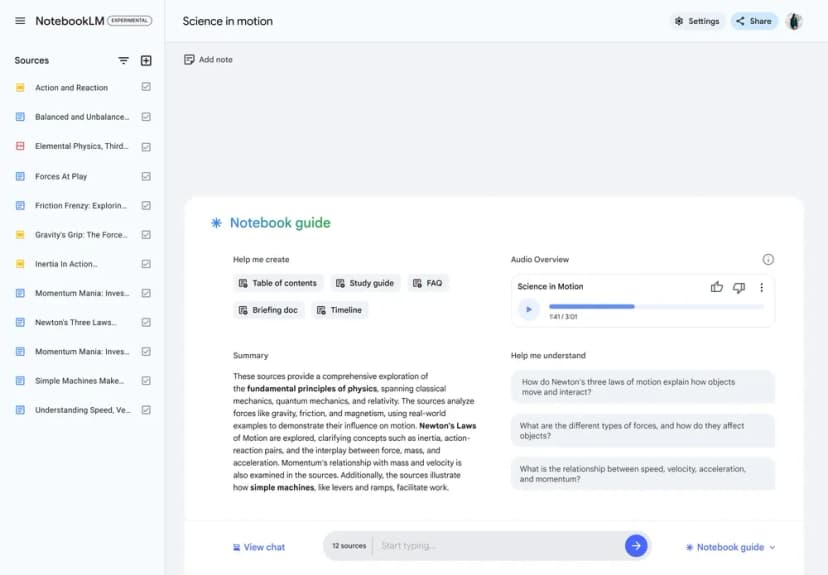
This earlier NotebookLM screen shows sources beside a notebook guide and Audio Overview. It illustrates the source-centered workspace, not current branding or supported file types. Google's Audio Overview announcement identifies the older interface.
Claude
Claude Projects is available on Free and paid accounts. Free users can create up to five projects. Add files to project knowledge and set instructions that apply across chats.
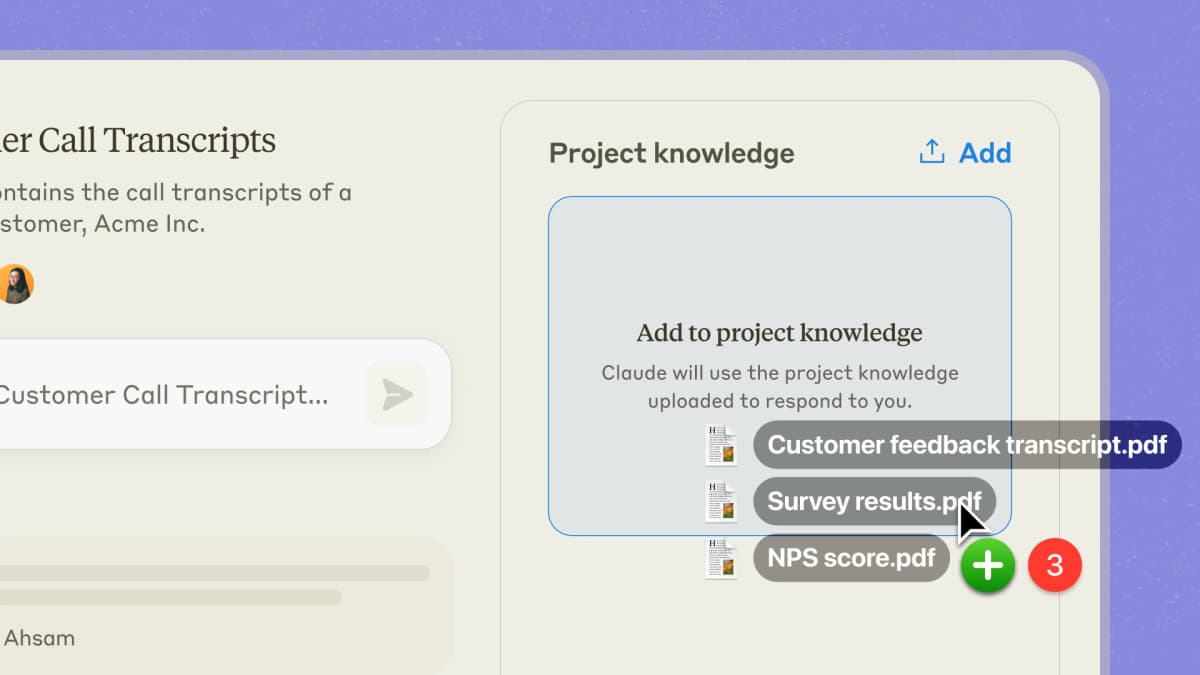
Anthropic's official Projects screenshot shows files being added to project knowledge. Claude stores project context for the chat, while NotebookLM keeps the notebook's sources visible as the main workspace. Image source is the Anthropic Projects announcement.
Claude treats your sources as context. It can still draw on its broader model knowledge when the uploaded files do not cover a topic.
Source Handling
Source handling changes the review process. In Gemini Notebook, selecting sources defines the material for a source-based question. In Claude Projects, uploaded knowledge and instructions provide context for a broader assistant. State which sources the answer should use and whether outside knowledge is allowed.
Source chips can help you reach the evidence without searching the file by hand. In either tool, time the whole checking step: finding the passage, reading its context and deciding whether the claim holds. A polished answer can still be costly to verify.
Document Upload and Types
Choose an intake path that preserves the part of the source you need. A video transcript, screenshot and PDF may support different claims even when they cover the same topic.
| Capability | Gemini Notebook (NotebookLM) | Claude Projects |
|---|---|---|
| PDFs | Yes | Yes |
| Google files | Supported Drive imports | Upload a supported export or use an available connector |
| Websites | URL source import | Web search and available tools; save important evidence in project knowledge |
| YouTube videos | Supported public video sources | Supply the transcript or supported source material |
| Plain Text | Yes | Yes |
| Images | Supported image sources | Supported image uploads |
| Max Sources | 50 per notebook on the standard account | Project knowledge plus chat context |
| File and context limits | 500K words per source; 200 MB uploaded file cap | Model-dependent context; paid project retrieval expands knowledge capacity |
Table 2: Source intake and capacity planning for Gemini Notebook and Claude Projects
Gemini Notebook can import a URL, a public YouTube source or supported Drive content. Check what was imported before asking for a synthesis. A source title alone does not tell you whether the tool read the full paper, its abstract or a transcript.
Claude supports image interpretation, and Gemini Notebook now accepts images too. For a chart, ask the tool to separate what is visible from what it infers. Verify axis labels, units and sample sizes before using the answer.
For a policy report with charts, supply both the report text and the chart you want to interpret. Ask which parts of the answer come from each. If the chart is missing a unit or footnote, provide that context before comparing the output.
Source Grounding
For source-based questions, Gemini Notebook's selected files give you a defined evidence set. Ask which passage supports the answer and open it. If a question needs information outside those files, add an appropriate source rather than treating a plausible answer as proof.
Claude can draw on broader model knowledge and tools as well as project files. A useful instruction is to label claims from uploaded papers separately from suggestions or outside information. That makes a draft's evidence trail easier to audit.
For academic work, compare a supported answer with an unsupported one during your trial. Ask a question the sources cannot answer and see whether the tool admits the gap. A convincing explanation of a missing result is a failure, even if it includes a citation.
Reasoning, Citations, and Features
Response Quality
For two papers that disagree, ask each tool to name the disputed result and quote the relevant text. More detail helps only when the answer explains the difference without inventing a cause.
Ask whether methods, samples or time periods could account for the split. Have the tool mark that explanation as a hypothesis unless the papers support it. Keep the claim separate from the reason proposed for it.
For understanding: Ask for an explanation and a quote from the source. A helpful analogy is not evidence that the paper makes the same claim.
For synthesis: Require a separate contribution from each paper before accepting a joint conclusion. This exposes missing studies and merged claims.
For accuracy: Inspect the cited material rather than trusting a tool's style. Check numbers, qualifiers and which population the result describes.
Citation Quality
Compare citations by what they let you verify. These checks work for both tools and avoid treating a citation's presence as an accuracy score.
| Citation check | Gemini Notebook | Claude Projects |
|---|---|---|
| Source selection | Choose files in the source panel | Name project files in the question |
| Source location | Open the cited source passage | Inspect the reference or request the file and quote |
| Quote check | Read the quote in context | Read the quote in context |
| Missing evidence | Ask whether selected sources answer the question | Ask for gaps and prohibit unsupported claims |
Table 3: How each tool handles source links and quotes
Gemini Notebook's source citations support passage checks. In Claude, name the files and request citations and short source quotes. In either tool, reject a claim when the reference is merely related to the topic. For a literature review, a citation must support the actual wording you intend to use.
If your research workflow needs cited answers plus a map that survives beyond one notebook or chat, Atlas can carry the selected sources into a longer-lived research workspace.
Unique Features
NotebookLM's Standout: Audio Overviews
NotebookLM can make podcast-style audio summaries from your sources. Two AI hosts discuss the material in a chat format. It is useful when you want to review papers while walking or get a first pass on new sources.
Audio review can help you return to a source set when you are away from the screen. Keep factual checks in the original files; a spoken summary can omit caveats. See our guide to NotebookLM audio alternatives for other options.
Claude's Standout: Artifacts and Code
Claude can create artifacts inside the chat: code, charts, diagrams, and draft docs. That matters for researchers who analyze data or write code.
Gemini Notebook now has code execution too: Google's rename announcement introduced a secure cloud computer for Pro rollout. Compare the tools on your actual dataset and available plan. Keep code, assumptions and outputs so another person can reproduce the analysis.
NotebookLM's Standout: Study Guides
Gemini Notebook offers study outputs alongside source chat. Flashcards and quizzes suit recall practice; reports, slides and overviews suit a first pass over a topic. Check generated questions against the selected material. Our NotebookLM for students guide covers that workflow.
Claude's Standout: Custom Instructions
Claude Projects let you save instructions for repeated work. Define the output format, which sources to use and how to label missing evidence. Gemini Notebook also offers response customization, so compare the rules you need rather than assuming it has no controls.
Pricing and Collaboration
Collaboration and Sharing
Choose collaboration based on who can see the files and chats, who can add material, and which account controls your team needs. Sharing a result differs from sharing an editable workspace.
| Feature | Gemini Notebook (NotebookLM) | Claude Projects |
|---|---|---|
| Sharing | Notebook sharing with account-dependent controls | Project collaboration on Team and Enterprise |
| Team work | Shared notebooks; verify viewer/editor permissions | Members can contribute documents and chats in shared projects |
| Export | Copy text, limited | Copy text, artifacts |
| API access | Enterprise notebook management APIs are a separate offering | Claude API is separately billed; Pro is not an API subscription |
| Administration | Depends on Google account and organizational plan | Team and Enterprise controls |
Table 4: How sharing works in each tool
Gemini Notebook sharing and Claude team projects both need permission checks. In Claude, Team and Enterprise projects allow members to contribute documents and chats. That is more than sharing a static transcript.
Claude's separately billed API supports custom applications. Google also offers enterprise notebook APIs, with their own scope and access. Neither option should be confused with buying a consumer research subscription.
Pricing
Both products offer free access. Compare paid plans when you know which allowance, model or team permission your work requires.
| Access | Gemini Notebook (NotebookLM) | Claude Projects |
|---|---|---|
| Free | Standard AI compute allowance and source limits | Up to five projects, with free-plan usage limits |
| Individual paid | Google AI Plus, Pro or Ultra raise AI limits | Pro and Max raise usage and add paid-plan capabilities |
| Team choice | Check qualifying Google Workspace or enterprise access | Team or Enterprise for shared projects and administration |
Table 5: Access choices for individual and shared research work
Gemini Notebook's current compute allowances refresh every five hours until the weekly limit is reached. Prompt complexity, feature choice and chat length affect use. Google AI Plus and Pro offer higher allowances; this does not turn a source count into an AI generation budget.
Claude Free includes Projects. Paid plans add capacity and eligible project retrieval, which matters when your source base exceeds active context. Check Claude's pricing page for monthly versus annual billing, taxes and the plans available to you.
If budget matters, trial both free versions on a small source set. Pay when a specific limit blocks the work, rather than because the older comparison described Projects as paid-only.
Atlas for Long-Term Research Maps
Use Atlas when a checked comparison should become a saved note and a map you can revisit. Gemini Notebook also offers mind maps, so choose based on how you want to save and reuse your work. In an Atlas research paper workspace, keep papers, questions and saved notes in the same project.
For a methods comparison, add three PDFs to a project and wait for source processing to finish. Open chat, type @, and select each paper. Ask: “Compare the methods, main results and limits of these three papers. Give each paper its own row and cite the source for each conclusion.”
Open the numbered citation for each result. Check the population, method and surrounding passage. If an answer blends two studies, ask Atlas to separate their contributions. A PDF citation may open a page or passage when a precise location is available; otherwise find the material in the source.
Save the checked comparison as a note. Open that note's Knowledge Map view to generate an editable map. Use the map to revisit the argument, then return to the PDFs before adding a new claim. This workflow links a synthesis to its sources without treating AI output as verified research.
If you bring a draft from Claude or Gemini Notebook into Atlas, add its source papers too. Saved prose alone cannot support a new claim. Compare the note and map workflows in NotebookLM vs Obsidian vs Atlas, or explore other tools in NotebookLM alternatives.
Head-to-Head Summary
Use the output you need to choose a starting point. Each route still requires a source check before the result supports a research claim.
| Research need | Starting point |
|---|---|
| Selected-source reading | Gemini Notebook |
| Audio review | Gemini Notebook |
| Reusable drafting instructions | Claude Projects |
| Code and data work | Trial both on the available plan |
| Saved cited comparison and note map | Atlas |
Table 6: Starting points by research output, rather than universal tool rankings
See how Atlas turns documents into mind maps. Choose it for the cited-note and map workflow; a larger source collection still needs questions that make the relevant files explicit.
Research Scenarios
Literature Review
NotebookLM: Upload papers, make audio overviews to screen them, then ask narrow questions with citations. It is strong for reading and checking facts.
Claude Projects: Upload papers and ask for competing interpretations. Set rules for quoted evidence and mark suggested arguments as drafts. Check each method critique against the paper before carrying it into your review.
Choice: Start with Gemini Notebook for cited reading, then use Claude when repeated draft instructions matter.
Thesis or Dissertation Research
NotebookLM: Good for one chapter or one topic. The notebook boundary is the limit. It is hard to query your whole research library at once.
Claude Projects: Saved instructions can maintain your chapter structure and evidence rules across chats. Larger paid projects use retrieval, so ask for named papers rather than assuming every file was read for each answer.
Choice: Match the workspace to your chapter workflow and verify coverage as the paper set grows.
Professional Research and Reports
NotebookLM: Quick to set up, easy to share, and useful for audio briefings.
Claude Projects: Reusable project instructions help with repeated report drafts and shared team work. For data analysis, test the code and outputs against the same inputs used in Gemini Notebook.
Choice: Use Gemini Notebook for source briefings and Claude for instruction-driven reports when its project format fits the team.
The Research Workflow Router
Route each task by its output and the source check you will need afterward. Source questions need a passage you can inspect. Drafting tasks need evidence that stays attached when the wording changes.
| Research job | Default tool | Why | Verification step |
|---|---|---|---|
| Save a comparison and map | Atlas | Checked answers can become notes with editable maps | Review the generated map against the original PDFs |
| Find where a source makes a claim | Gemini Notebook | Source anchors support passage checks | Open the cited passage before copying the claim |
| Understand a dense method section | Trial both | Compare explanations against the paper's assumptions | Ask for the source sentence being explained |
| Compare two contradictory papers | Trial both | The key question is whether each paper's evidence stays separate | Re-check every causal or numerical claim manually |
| Prepare a cited research brief | NotebookLM first, Claude second | NotebookLM gathers evidence, then Claude improves structure | Carry NotebookLM source anchors into the Claude draft before using it |
Table 7: Which tool to use for each research job
Compare the tools on the tasks you repeat before choosing a paid plan. A model update can improve either tool without changing how much evidence your final argument needs. Keep a small set of known answers so you can repeat the trial when your workflow changes.
The main pitfall is mixing the two outputs without labels. If a paragraph came from Claude reasoning, mark it as a draft. If a claim came from NotebookLM, keep the source anchor attached. That discipline prevents a polished synthesis from quietly losing its evidence trail.
Privacy, Limits, and Hallucinations
Switching Costs
Switching from NotebookLM to Claude is easy if your work is still a folder of PDFs and notes. Export or re-upload the files, then recreate the prompts you used most. The cost rises once your notebook has many saved answers, audio summaries, and shared Google links.
Switching from Claude Projects to NotebookLM is harder when the project depends on custom instructions. NotebookLM will take the sources, but it will not copy Claude's project rules, tone, or draft history. If your workflow depends on those rules, keep a short setup note. List your citation rules, output format, and review steps.
Atlas belongs in a different part of the decision. Use it when the real asset is the source library itself and when papers, citations, claims, and links need to survive beyond one notebook or chat thread.
Privacy and Data Handling
Both tools process files in the cloud. Privacy matters because research files often include unpublished papers, internal reports, or client work.
For Gemini Notebook, Google's privacy terms treat files and feedback differently. Feedback from a personal account can include prompts, sources and answers for human review and product improvement. Work and school accounts have other data terms. Check your account's rules before sending feedback with private files.
For Claude Free, Pro and Max, Anthropic's privacy help explains how to control use of your chats to improve models. A Pro payment alone does not turn that use off. Check the setting before adding private files. A work account's contract can give it different rules.
For client work or papers that are not yet public, follow your team's rules and the account contract. A higher-priced plan alone does not give you the right to upload those files.
Source-Limit Reality
NotebookLM's published source ceiling makes the limit easier to plan around. Claude Projects is limited by context and retrieval.
Gemini Notebook Free supports up to 50 sources per notebook, with a separate size limit for each source. Its five-hour and weekly compute limits govern AI work. You can have room for another paper while lacking enough AI allowance for a long generation. Inspect the usage panel before a large batch; our NotebookLM limitations guide explains these boundaries.
Claude's active context varies by model and plan. Paid project retrieval can search beyond that context, but retrieving passages is different from reading every paper at once. For either tool, audit coverage with a small question set: name the papers that should contribute and check whether each one appears in the answer.
Hallucination Patterns
Both tools cite sources, but they fail in different ways.
Gemini Notebook's numbered citations help you find supporting material. Broad summaries still need review: a citation may support one sentence while failing to support the conclusion around it. Check that the answer preserves qualifiers such as “may,” “in this sample” or “under these conditions.”
Claude's reference format depends on the source, tools and prompt. Ask for short quotes and named files when the answer is hard to trace. If either tool invents a quote or points to unrelated evidence, revise or reject the claim rather than treating its citation format as a guarantee.
Final Recommendation
Neither tool is always better. NotebookLM is built around source-grounded notebooks. Claude Projects is built around reusable context for reasoning and drafts.
Start with Gemini Notebook if you want selected-source Q&A, audio review and study outputs. Its Free plan lets you trial those jobs within source and compute limits.
Choose Claude Projects if reusable instructions and iterative research drafts fit your workflow. Trial Free Projects before paying for capacity or other paid features.
Add Atlas if you want your research to build into a connected knowledge base.
You can combine the tools when each stage has a defined job. Keep citations attached during a manual handoff, and inspect the draft after another model changes its wording.
Gemini Notebook and NotebookLM are the same product under different names. Keep the comparison focused on source work, output and plan access. Claude Projects offers another way to organize instructions and drafts; neither product removes the need to verify a research claim.
If those chats start to sprawl, add a tool built around the library instead of the conversation.
Map and question your research corpus in Atlas
Compare selected papers, check citations and save the result as a mapped note.