
Miro Alternatives (2026): 8 Whiteboard Apps Tested
Miro alternatives compared for design teams, workshops, diagrams, free sketching, and research. Check guest limits, exports, governance, and team cost.
- Byline

Summary
Use FigJam for Figma teams, Mural for workshops, Lucidspark for formal diagrams, and Excalidraw for quick free sketches.
Shortlist Whimsical for structured product flows, tldraw for an embedded canvas, Canva Whiteboards for visual marketing, and Microsoft Whiteboard for teams that use Microsoft's work suite.
Test one representative board before switching because guest access, export fidelity, governance, and the next handoff matter more than a feature count.
Atlas is not a direct Miro replacement. Consider it only when the visual job starts with source documents and requires cited synthesis.
The best Miro alternative depends on what happens after the team finishes the board. Use FigJam when ideas will become Figma designs. Use Mural to run planned workshops, Lucidspark to turn ideas into a formal diagram, and Excalidraw to sketch without an account. Keep Miro if its broad canvas and workshop tools already work well for your team.
Atlas handles a different job. It turns PDFs, web pages, and notes into a visual map with cited findings. Choose a whiteboard instead when people need to draw together on a blank canvas.
I compared each tool across four common jobs: running a workshop, moving ideas into a design, turning a brainstorm into a diagram, and mapping research. For each job, I checked whether the work could move to its next step without being typed or built again. This comparison covers how the tools fit those jobs, not their speed.

 Atlas
AtlasCompare knowledge maps with blank whiteboards
Compare document-generated mind maps with manual whiteboard tools.
What should you compare in Miro alternatives?
Start with the reason your team is considering a switch. A long feature list will not tell you whether the new tool fixes that specific problem.
- Where the work goes next: Will the board become a Figma design, Jira task, Lucidchart diagram, slide deck, or research note?
- How you run a session: Check voting, timers, private input, host controls, guest access, and whether outside guests need accounts.
- Who needs a paid seat: Count the people who create and edit boards. Viewers may not need the same plan.
- What survives an export: Test comments, links, connectors, frames, and images. A screenshot keeps the look of a board but not its parts or links.
- How large boards perform: Open your biggest board on the oldest laptop and weakest network your team uses. A product demo cannot answer this for you.
- How the tool handles company data: Check where it stores data, how long it keeps deleted work, what guests can see, and whether AI providers receive board content.
Miro's pricing page shows why plan details matter. Its Free plan keeps three recent boards open for editing. Paid plans add private boards, sharper exports, visitor editing, session tools, and more links to other apps. Check the live page because these limits can change.
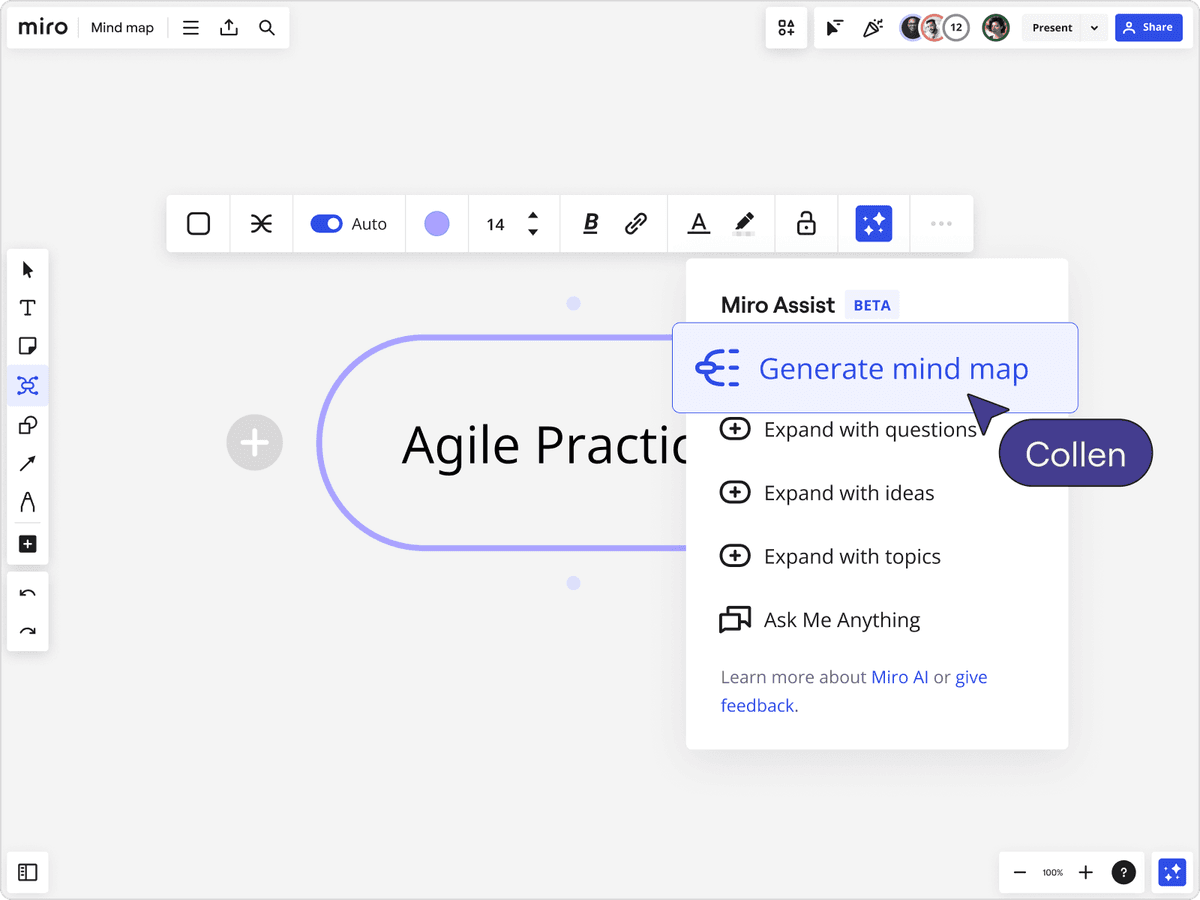
The screenshot shows Miro creating a mind map with AI inside a shared board. This may save time during a session. It does not solve the next step, such as turning the ideas into tasks, a formal diagram, or a finding backed by sources.
What the interfaces reveal
Each screen shows what the product is built around. FigJam keeps team planning next to design work. Whimsical centers on flows and rough page layouts. Atlas starts with source files rather than a blank workshop board.
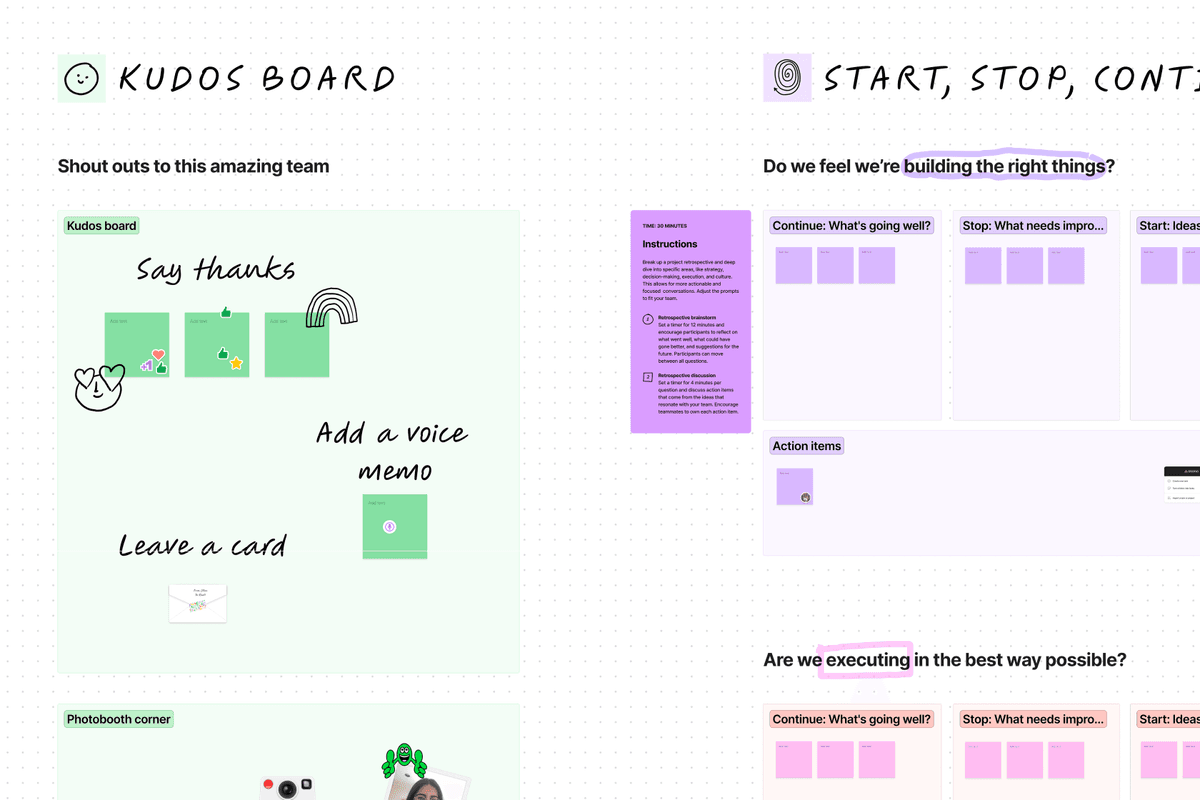
Figma's screenshot shows sticky notes and comments next to the design files that will receive the team's ideas.
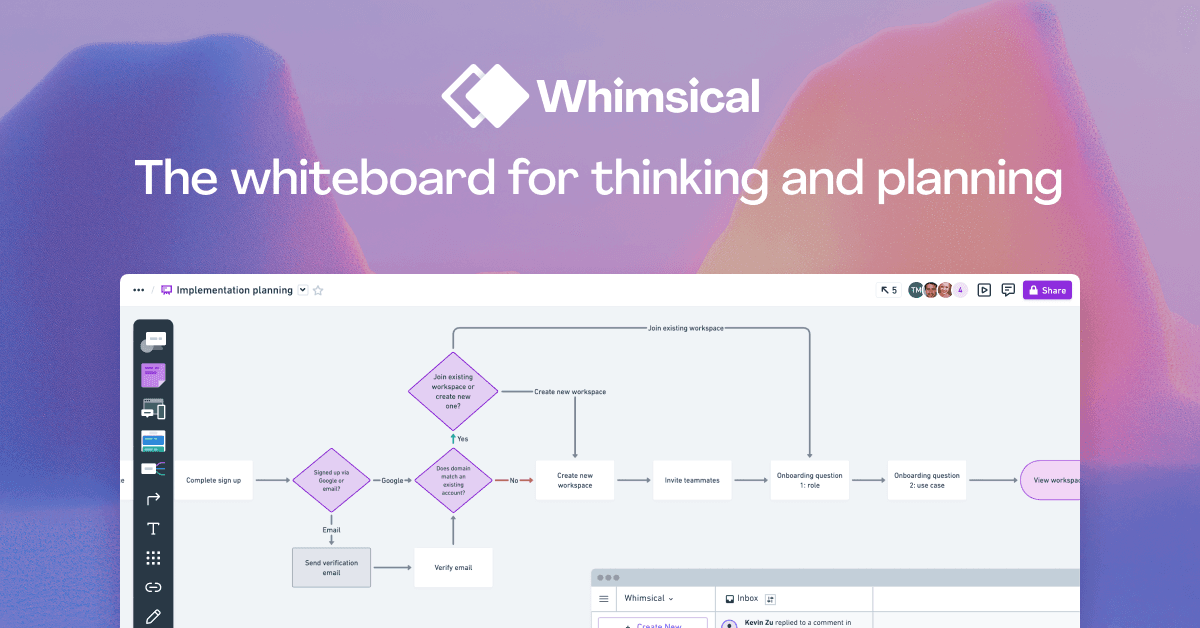
Whimsical's image shows linked shapes in a planned work flow. This structure suits teams that need a diagram more than a free-form workshop.
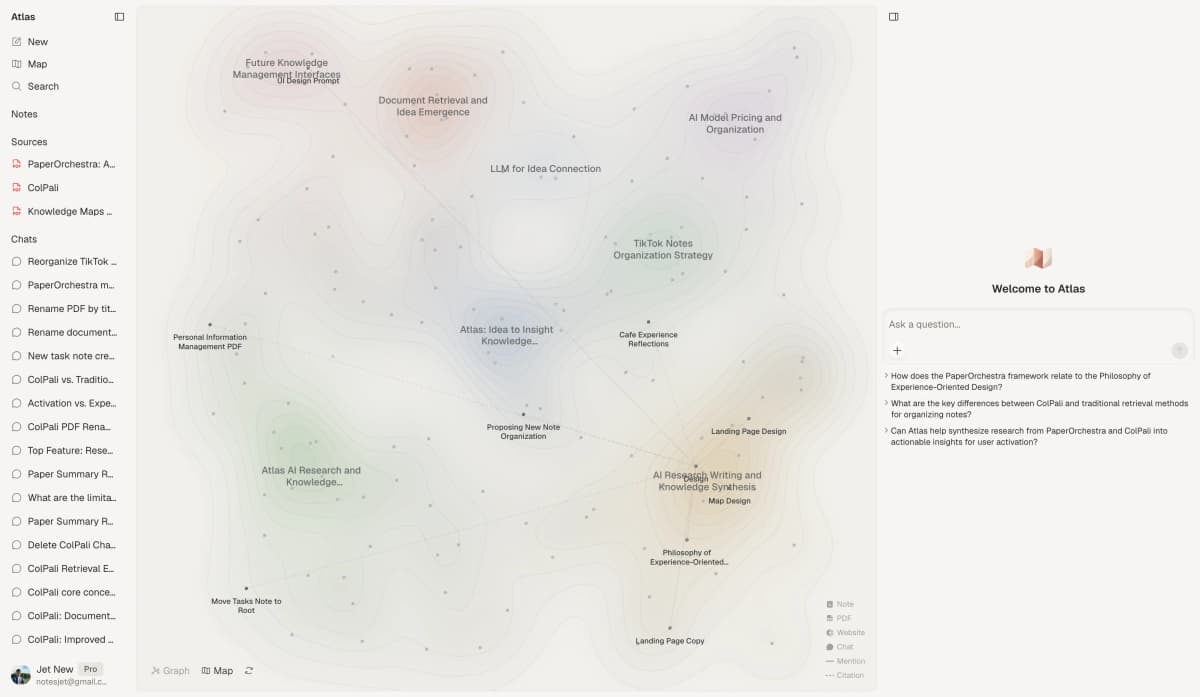
The Atlas screenshot shows a research map. Files and notes remain in view, so a reader can trace a link on the map back to the source behind it.
Board-to-Backlog Fit Matrix
Start with the result your team needs after the board session. This table shows which tools make that next step easier. It does not score speed or ease of use.
| Starting board | Best handoff | Shortlist | Trial question |
|---|---|---|---|
| Guided workshop | Decisions and follow-up | Mural, Miro | Can guests contribute without account or permission delays? |
| Design review | Editable design work | FigJam | Can the team move from stickies into Figma without recreating context? |
| Process brainstorm | Maintained diagram | Lucidspark, Whimsical | Do connectors, labels, and structure survive the handoff? |
| Research synthesis | Verifiable finding | Atlas (adjacent workflow) | Can a reader inspect the source passage behind the conclusion? |
Table 1: Miro alternatives matched to what the board must become.
Excalidraw and tldraw make it quick to start a sketch. Before using either with a team, decide where files will live, who can open them, and where follow-up work will go.
Near-Misses for Embedded Teams
These tools put a whiteboard inside an app your team may already use. Each replaces only part of Miro.
- ClickUp Whiteboards link boards with tasks, docs, chat, projects, and PDF export. Try ClickUp if your main problem is copying ideas from a board into project tasks.
- Confluence whiteboards fit teams that already organize decisions and delivery in Confluence and Jira.
- Stormboard helps teams run planned meetings, make decisions, and produce reports.
- Boardmix combines whiteboards, diagrams, and docs. Check its current plans, exports, and data controls before treating it as a cheaper substitute.
Notion fits when the end result is a page, wiki, or project brief. It is not a substitute for a large, open canvas.
The 8 Direct Miro Alternatives Worth Picking
These eight tools are direct whiteboard alternatives. The list explains when to choose each one and when to leave it off your shortlist.
- FigJam for teams whose board becomes Figma work.
- Mural for planned workshops and session control.
- Lucidspark for turning a brainstorm into a formal diagram.
- Whimsical for flows, wireframes, and structured product thinking.
- Excalidraw for quick hand-drawn sketches without an account.
- tldraw for developers adding a shared canvas to their own app.
- Canva Whiteboards for visual work that continues in Canva.
- Microsoft Whiteboard for groups that work in Teams.
1. FigJam: Figma Design Teams
FigJam is the strongest fit for product and design teams that already use Figma. It supports live brainstorming, diagrams, comments, voting, guest sessions, and AI help. It can also link ideas to tools used later in the work.
Its main benefit is a short path from planning to design. The same people can keep early ideas near the files they will edit and review. Check Figma's current plans before comparing prices because FigJam access depends on the type of seat.
Do not choose FigJam only because your team owns Figma. Test one workshop with an outside guest and one review with real design files. Make sure guests can join and the ideas move into the design without extra work.
2. Mural: Best for Workshops
Mural is built for sessions led by a host. Its plans include timers, voting, private input, ways to bring everyone to one area, guest access, templates, and flexible boards.
Those tools help one person run the room. A host can pace each task, hide content until it is needed, and bring everyone back to the same place. Mural offers less value for a solo sketch or for teams that mainly need a finished diagram.
Mural treats regular members and visitors differently. Count how many of each your sessions need before comparing its yearly cost with Miro.
Teams that need a different balance of workshop controls, integrations, and cost can compare these Mural alternatives.
3. Lucidspark: Best for Diagram Handoff
Lucidspark fits teams that brainstorm first and build a formal Lucidchart diagram next. It offers a large canvas, tools for running a session, breakout boards, templates, mind maps, AI help, and task cards.
The link to Lucidchart is its main advantage. A team can turn rough sticky notes into a diagram that stays in use without buying a separate diagram tool.
Test the exact move your team needs. Check whether key shapes, comments, links, and access rules arrive in Lucidchart and can still be edited.
4. Whimsical: Best for Product Flows
Whimsical combines boards, flowcharts, mind maps, rough page layouts, voting, and timers. Its workflow guide shows how a brainstorm can become a user journey or an early design.
Choose Whimsical when your group wants more order than a loose workshop board provides. Product managers and designers can keep a flow, rough layout, and notes in one place.
That structure is also its limit. A large workshop may need more freedom, more than one host, or a wider choice of templates.
5. Excalidraw: Best Free Sketching
Excalidraw offers a free drawing tool that needs no account. It includes a large canvas, reusable shapes, share links, and live work with other people. Its hand-drawn style makes a sketch look like a draft rather than a finished plan.
Use it for system sketches, quick explanations, and sessions where sign-up would slow people down. The free code and Excalidraw Plus are not the same product. The code alone does not include online file storage, team controls, or a ready-made place for long-term group work.
If you plan to run the software on your own servers, your team must also provide sign-in, file storage, backups, updates, and reliable live editing.
6. tldraw: Best Embeddable Canvas
tldraw is a set of developer tools for adding a large drawing canvas to an app. It supports live editing, shared cursors, user sign-in, file storage, and a server that your team can run.
Choose tldraw when the canvas must live inside your own product or company tool. It gives developers more control than a separate whiteboard app.
Its public live demo is for early tests, not daily work. Your developers must build the file storage and server setup needed for a finished product. Teams without that support should choose a ready-made whiteboard.
7. Canva: Best Visual Continuation
Canva Whiteboards suit marketing, teaching, and brand teams that turn ideas into Canva slides and images. The board includes a large canvas, templates, sticky notes, and live work with a group.
Its main benefit is the set of Canva design tools around the board. A campaign team can turn ideas into a slide deck or image without moving every item to another app.
Before buying, check which plans include the board and the brand controls you need. Use Canva's current plan page for its price and AI limits.
8. Microsoft Whiteboard: Best for Teams
Microsoft Whiteboard belongs on the shortlist for groups that use Microsoft Teams. People can open a board in meetings, chats, and channels and work on it from supported devices.
Its strength comes from fitting tools the company already uses. Existing Microsoft accounts and admin controls can make access and purchasing easier.
Test a board with an outside guest before choosing it. Guest access, data storage, and some features depend on your Microsoft plan and company settings.
Adjacent Research Option
Atlas: Source-Grounded Synthesis
Atlas fits when the source files matter more than a blank board. Add PDFs, web pages, or notes to one project and ask a clear question about them. Each answer cites passages you can open before saving a finding. Atlas can then map the links across those sources.
Test Atlas in four steps:
- Add the files and pages that should support the answer.
- Ask one clear question that compares them.
- Ask Atlas to state which source supports each claim.
- Open the citations behind the conclusion and read the text around them.
Atlas is not counted among the eight Miro alternatives because it is not a general-purpose collaborative whiteboard. Use the direct Atlas vs Miro comparison only when research synthesis and whiteboarding are the two workflows under review.
Choose Miro, FigJam, Mural, or Lucidspark for live workshops, sticky-note sessions, and free-form group drawing. Atlas is not built for those jobs.
Comparison table
Use this table to pick two tools for a hands-on test. Check their current prices, free limits, guest rules, and AI limits before buying.
| Tool | Best fit | Handoff advantage | Boundary to test |
|---|---|---|---|
| FigJam | Figma teams | Planning stays near design | External sessions and seat model |
| Mural | Planned workshops | Strong room controls | Recurring member cost |
| Lucidspark | Teams that need formal diagrams | Direct path into Lucidchart | Shape, comment, and access transfer |
| Whimsical | Product flows | Boards, flows, and rough layouts | Large workshop flexibility |
| Excalidraw | Quick sketches | Free drawing with no account | File storage and team controls |
| tldraw | A canvas inside your app | Control for developers | Developers must build and run it |
| Canva Whiteboards | Visual teams | Continuity into Canva assets | Current plan and brand controls |
| Microsoft Whiteboard | Groups using Teams | Existing meetings and accounts | Company and guest settings |
Table 2: Best use and main limit for eight direct Miro alternatives. Atlas is deliberately excluded because it solves an adjacent research job.
One-Year Editor Cost and Guest Limits
Editor Cost
Do not multiply the advertised price by ten until you know who needs a paid editing seat. Compare yearly costs in four steps:
- Count full editors, occasional contributors, outside guests, and viewers.
- Multiply the monthly price on a yearly plan by 12 and by the number of paid editors.
- Add any extra plans needed for AI, data controls, file storage, or diagrams.
- Add the staff time needed to move boards, templates, access rules, and archives and to train the team.
On August 1, 2026, Miro Starter listed $8 per member each month on a yearly plan. Ten paid members would cost $960 a year before add-ons. Mural Team+ listed $9.99, or about $1,199 a year for ten regular members. Figma Professional listed a $3 monthly Collab seat with full FigJam access, or $360 a year for ten seats.
The cheapest option changes with the types of seats your team needs. Bundles, local prices, and company controls can also change the total. Recheck each pricing page before you buy.
Guest Limits
Run one outside-guest session on the exact plan you may buy. Record whether guests need accounts, can edit, can return later, and consume a paid seat.
Governance and Data-Handling Checks
Data Review
A product page cannot prove that a whiteboard is safe for health, finance, government, or other work with strict data rules. Review the exact plan and the type of data your team will add.
- Storage location: In which country or region are boards and backups kept?
- Sign-in and guests: Can you control company accounts, guest access, and access when someone leaves?
- Deletion: What happens to comments, exports, deleted boards, and backups after a user leaves?
- AI use: Does board content go to another AI company, and how long is it kept?
- Proof: What security reports, contracts, and lists of service providers come with the plan?
- Your own server: If you run the software, who will secure it, back it up, watch for failures, and install updates?
Access to a tool's source code does not make its hosted service private. Excalidraw's free drawing code is separate from its paid team service. A finished tldraw app needs a server and file store. Judge the full setup your team will use.
Citation Boundary
Apply the same test to Atlas. A citation lets you open the source behind an answer. You must still decide whether the passage fully supports the claim.
Run a One-Board Migration Trial
Pick the Board
Use the result you need to narrow the list:
- Design file: Start with FigJam.
- Guided workshop: Start with Mural, then compare Miro.
- A diagram the team will keep: Start with Lucidspark or Whimsical.
- Quick sketch: Start with Excalidraw.
- A canvas inside your own app: Start with tldraw.
- A slide deck or image in Canva: Start with Canva Whiteboards.
- Teams meeting: Start with Microsoft Whiteboard.
- A finding backed by sources: Pair Atlas with the whiteboard when readers must be able to open the source passages.
Then run a one-board migration trial:
Record the Handoff
- Choose a typical active board with real comments, links, and access rules.
- Invite one employee, one outside guest, and the person who owns the next artifact.
- Rebuild or import the board in two finalists.
- Check comments, connectors, links, images, access, presentation mode, and export.
- Move the result into the design, tasks, diagram, archive, or research notes that come next.
- Record what you must rebuild by hand before moving more boards or templates.
Test speed in the same trial. Load your largest board on the weakest laptop and network your team supports. Then add the number of people who join a normal session. Use what your team sees instead of a speed claim from a review site.
When NOT to switch from Miro
Keep Miro when moving would cost more than the problem you want to fix. Its plans include many templates, links to other apps, several board formats, AI help, and tools for running workshops.
Staying is usually the lower-risk choice when:
- teams rely on several Miro formats and links to other apps, not just sticky notes.
- clients already know the guest and presentation flow.
- active boards contain years of links, comments, access rules, and templates.
- the cheaper tool makes the next step harder.
- no one owns the move, training, archive checks, and support.
You can also add a focused tool without replacing Miro. A design team can use FigJam, anyone can sketch in Excalidraw, and researchers can use Atlas to map cited sources. Other groups can keep their shared Miro boards.
Final verdict
Choose FigJam if your ideas become Figma designs and Mural for guided workshops. Choose Lucidspark for a path into Lucidchart and Whimsical for planned product flows.
Choose Excalidraw for quick sketches and tldraw for a canvas inside your own app. Choose Canva Whiteboards for work that becomes Canva designs and Microsoft Whiteboard for groups using Teams.
Choose Atlas when a visual map must stay tied to PDFs, web pages, or notes and readers need to open the sources behind each finding. See how Atlas maps documents for that workflow. Miro and the other whiteboards are better for drawing together on a blank canvas.
AtlasCompare knowledge maps with blank whiteboards
Compare document-generated mind maps with manual whiteboard tools.
Frequently Asked Questions
The best Miro alternative depends on the next step. Choose FigJam when a board leads into Figma, Mural for facilitated workshops, Lucidspark when ideas become formal diagrams, and Excalidraw for quick no-account sketching. Atlas fits the narrower job of comparing and organizing evidence from documents with citations.