


The best way to take notes is to make each note pass the reuse test. Can you answer a question, make a decision, or explain an idea from it later? If not, you captured text but did not create a useful note.
Note-taking is one of those skills almost everyone picks up by trial and error, and almost everyone gets wrong for years. The single biggest mistake is treating note-taking as transcription, getting words down rather than getting ideas understood. Good note-taking means actively processing what you hear or read into your own understanding rather than reproducing the source's exact words.
This guide covers a 5-step system that works in class, meetings, reading, and research. It also shows when to use Cornell notes, outlines, maps, and modern note apps. The focus is on notes you can reuse, not prettier ways to store text.
Ask Atlas about your research notes
Add text notes, ask a question, and inspect cited passages.
The Useful Note Test
Before you pick a method or app, judge each note by what it lets you do later.
| Test | Passing note | Failing note |
|---|---|---|
| Recall | Has cues, questions, or headings that let you retrieve the idea without rereading everything. | Preserves the source wording but gives you no prompt for remembering it. |
| Reuse | Contains a decision, example, claim, quote, or next action you can use in an essay, meeting, project, or exam review. | Records what happened but not why it mattered. |
| Connection | Links the idea to a course, project, prior note, open question, or source. | Sits alone in a dated folder with no relationship to future work. |
| Compression | Gets shorter and clearer after review. | Gets longer every time you revisit it. |
Table 1: Four tests for evaluating whether a note will be useful when you return to it
Use this as the real note-taking rule. Capture enough context to trust the note. Then compress it until the point is easy to find and test.
Add one destination line at the top of important notes. Write exam, essay, decision, meeting follow-up, or research claim. That one word tells you what structure the note needs before you start writing.
General note-taking methods compared
For a phase-by-phase walkthrough drawn from interviews with fourteen students, see the student's guide to AI research.
| Method | Structure | Capture speed | Recall benefit | Best for |
|---|---|---|---|---|
| Cornell | Notes / cues / summary | Medium | High | Lectures, study sessions |
| Outline | Indented hierarchy | Fast | Medium | Structured talks, books |
| Mapping | Radial / branched | Slow | High (visual) | Conceptual material |
| Charting | Tabular comparison | Slow | High for compare/contrast | Comparative content |
| Sentence | Linear bullets | Fastest | Lowest without rework | Brainstorms, fast lectures |
| Zettelkasten | Atomic linked notes | Slowest | Highest long-term | Research, long-form writing |
Table 2: Six note-taking methods with structure, capture speed, recall benefit, and primary use case
The 5-Step Note-Taking System
The same five steps apply whether you're taking lecture notes, meeting notes, research notes, or book notes.
Use them in this order:
- Capture the raw material while the source is live.
- Summarize the point in your own words.
- Link the note to a class, project, source, or older idea.
- Review with questions instead of rereading.
- Synthesize by making something new from the notes.
Each step fixes a common failure. Capture prevents loss. Summary creates meaning. Links preserve context. Review builds memory. Synthesis turns stored notes into useful work.
Step 1: Capture
Get the information down. At this stage, speed matters more than format. Use the tool that gets out of your way, whether that is an iPad, a laptop, or paper. Stick to one capture tool during the live session because switching between apps makes it easier to miss content.
Step 2: Summarize
Within 24 hours, write a 2-4 sentence summary of the note in your own words. This is the step almost everyone skips, and it's the step that creates retention.
Summarizing forces you to process what you wrote. Word-for-word notes are hollow. A summary shows whether you understood the point.
Make this an end-of-day routine. Five minutes per note is enough for most class or meeting notes.
For long articles, books, and research papers, use progressive summarization instead of rewriting the whole note. Tiago Forte describes Progressive Summarization as a way to make notes easier to rediscover over time. In practice, that means making several passes:
- Capture the useful passage or observation with enough source context.
- Bold the sentence or clause that carries the actual idea.
- Highlight only the few words you would need to find the idea again.
- Add one sentence in your own words that explains why it matters.
The goal is not prettier highlighting. The goal is a note that gets faster to scan every time you touch it.
Step 3: Link
Connect the new note to related notes you already have. This is the core Zettelkasten idea. Ideas that live inside folders stay isolated. Ideas that link to each other become discoverable.
Modern tools make linking easy. In Obsidian, Logseq, and Roam, type [[ and pick the related note. In Atlas, type @ in a note to link another note or source in the project. Older tools force folders, which hide links that cross topics.
When you summarize, ask what the idea reminds you of. Link those notes before the context fades.
Step 4: Review
Weekly review consolidates learning. Open the past week's notes, reread the summaries, and refine their links. Repeated review keeps useful ideas accessible; notes that you never reopen become harder to recall.
Set a 30-minute Friday review. Review the week's notes, fix mistakes, and add missing links.
Do not only reread. Memory improves when you try to pull the idea back before checking the answer. Cognitive psychologists Henry L. Roediger III and Andrew C. Butler found that recall practice often beats repeated study for long-term memory (PubMed).
For notes, turn headings into questions. Cover the answer. Answer from memory. Then reopen the note and correct the gap.
Step 5: Synthesize
Once a month or at the end of a project, make something new from your notes: an essay, presentation, or memo. Without this step, the collection remains a write-only archive. Regular synthesis turns stored material into useful work.
Pick one synthesis project each month. It can be a short essay, a team deck, or a journal entry that ties together what you learned.
The 4 Classic Note-Taking Methods
Different contexts need different methods.
Cornell Method
Best for class notes and exam prep.
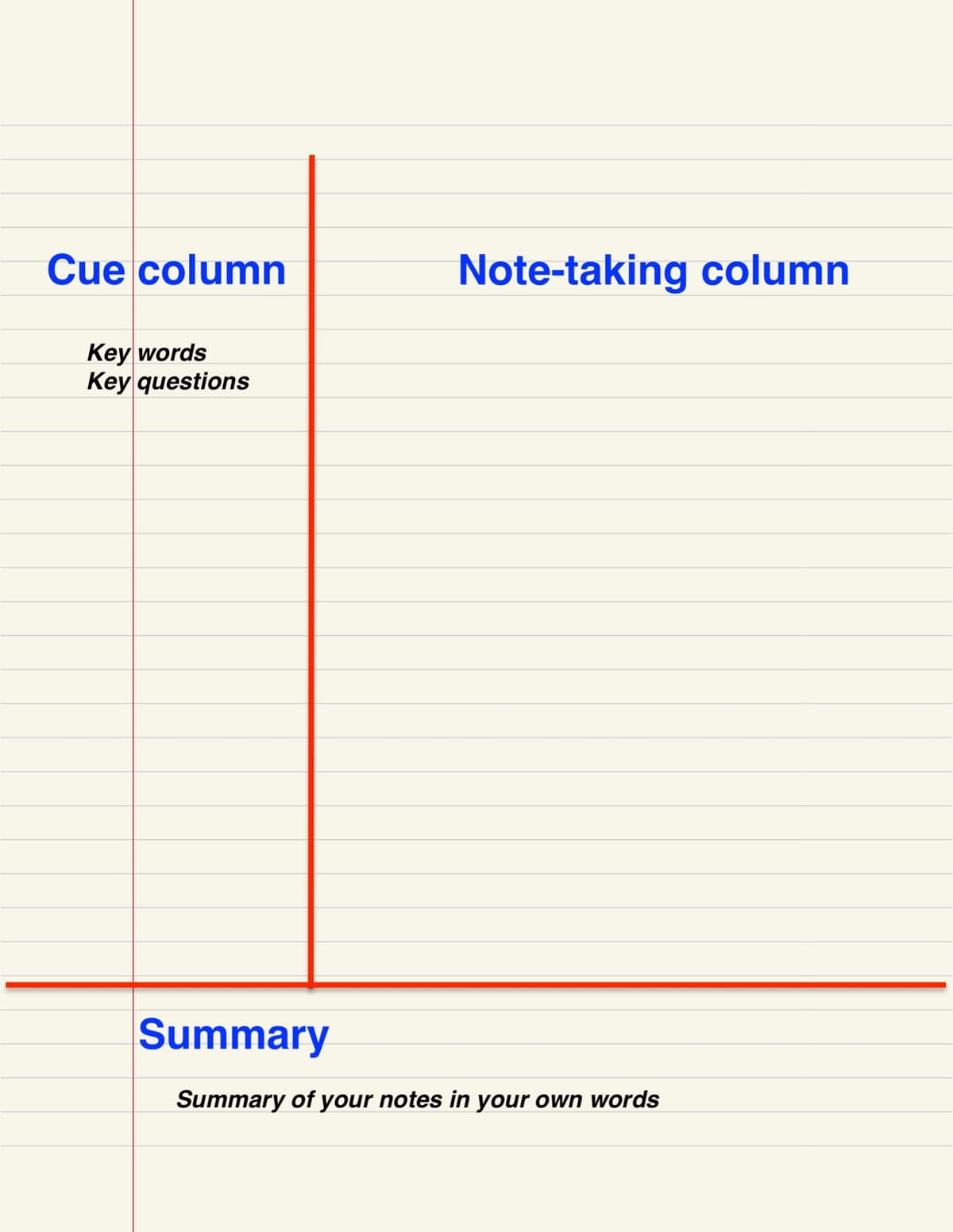
The page is divided into three sections:
- Cue column (left, about 2.5 inches): questions and keywords
- Notes column (right, about 6 inches): the actual notes
- Summary (bottom, about 2 inches): 2-4 sentence summary written within 24 hours
For review, cover the right column, read each cue, and try to recall the content before checking.

Zettelkasten Method
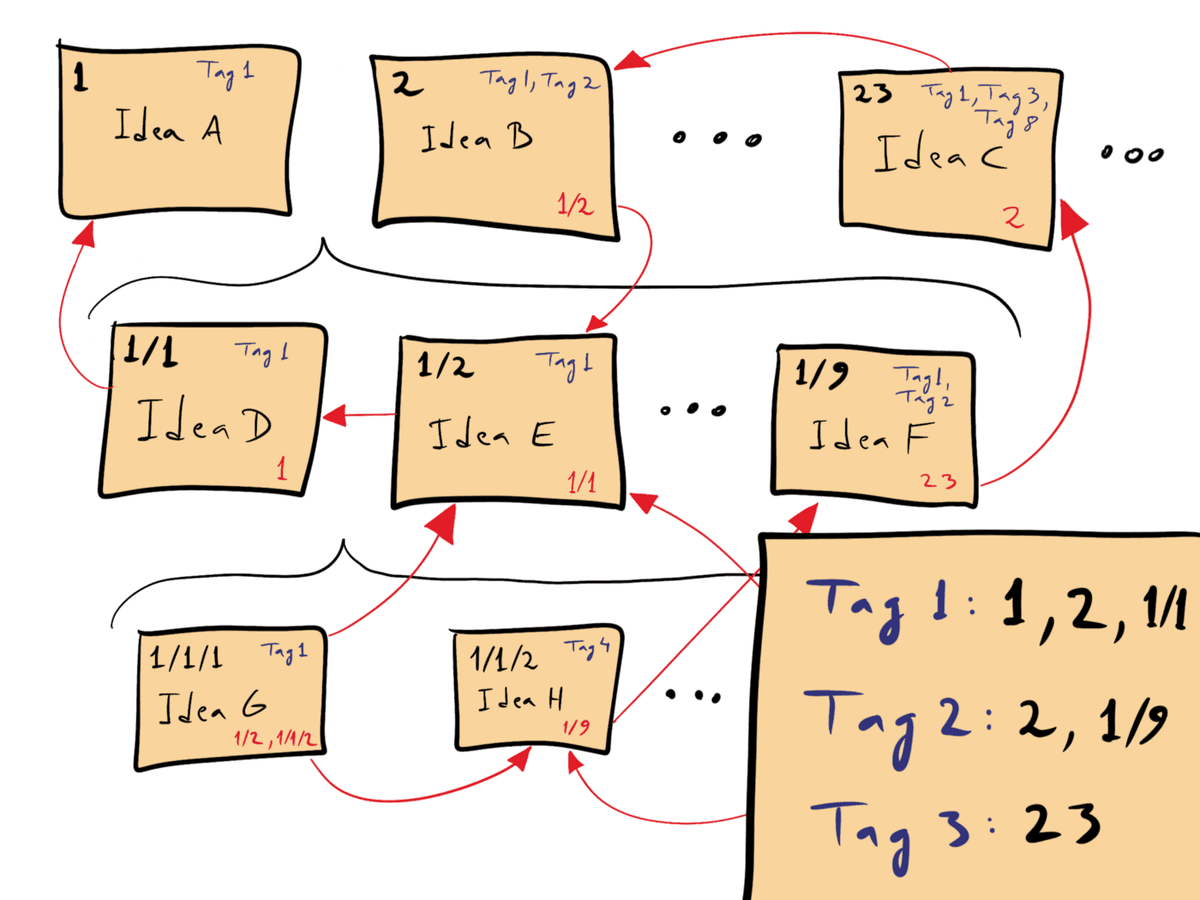
David B. Clear’s schematic shows numbered notes and cross-links. Reproduced under CC BY-SA 4.0 via Wikimedia Commons.

Best for research, writing, and any work where ideas need to compound over years.
Core rules:
- One idea per note, atomic, self-contained
- Link aggressively, connect each note to others
- Original wording, write each note in your own paraphrase rather than copying the source verbatim
Niklas Luhmann used Zettelkasten to write 70 books and 400+ academic papers. The method scales because links can reveal ideas you did not expect.
Common linked-note tools include Obsidian, Logseq, Roam Research, and Atlas when you also need cited AI help.
Outlining Method
Best for meetings, lectures with clear structure, and project planning.
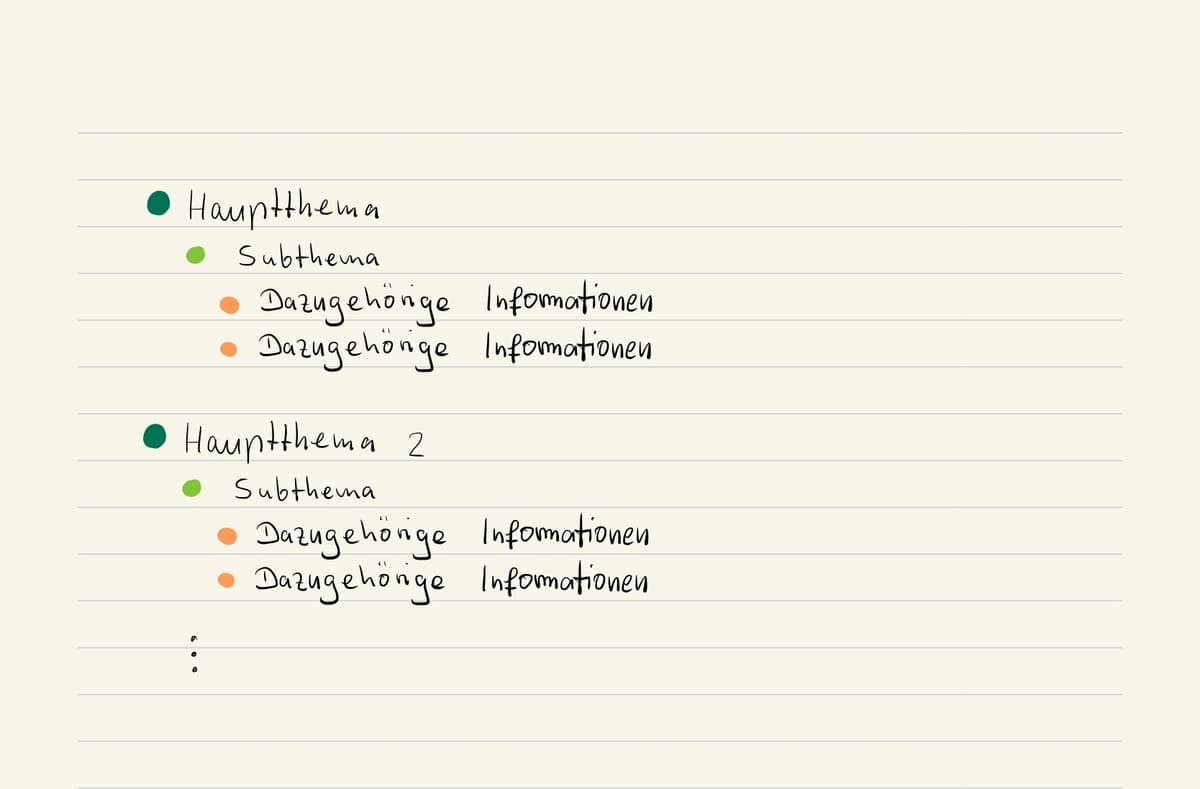
Hierarchical bullets with indentation showing relationships:
- Topic
  - Subtopic
    - Detail
    - Action item: Jane to follow up by Friday
  - Subtopic
- Next topic
Outlining works when content has natural hierarchy. Force-outlining unstructured content makes notes worse.
Charting Method
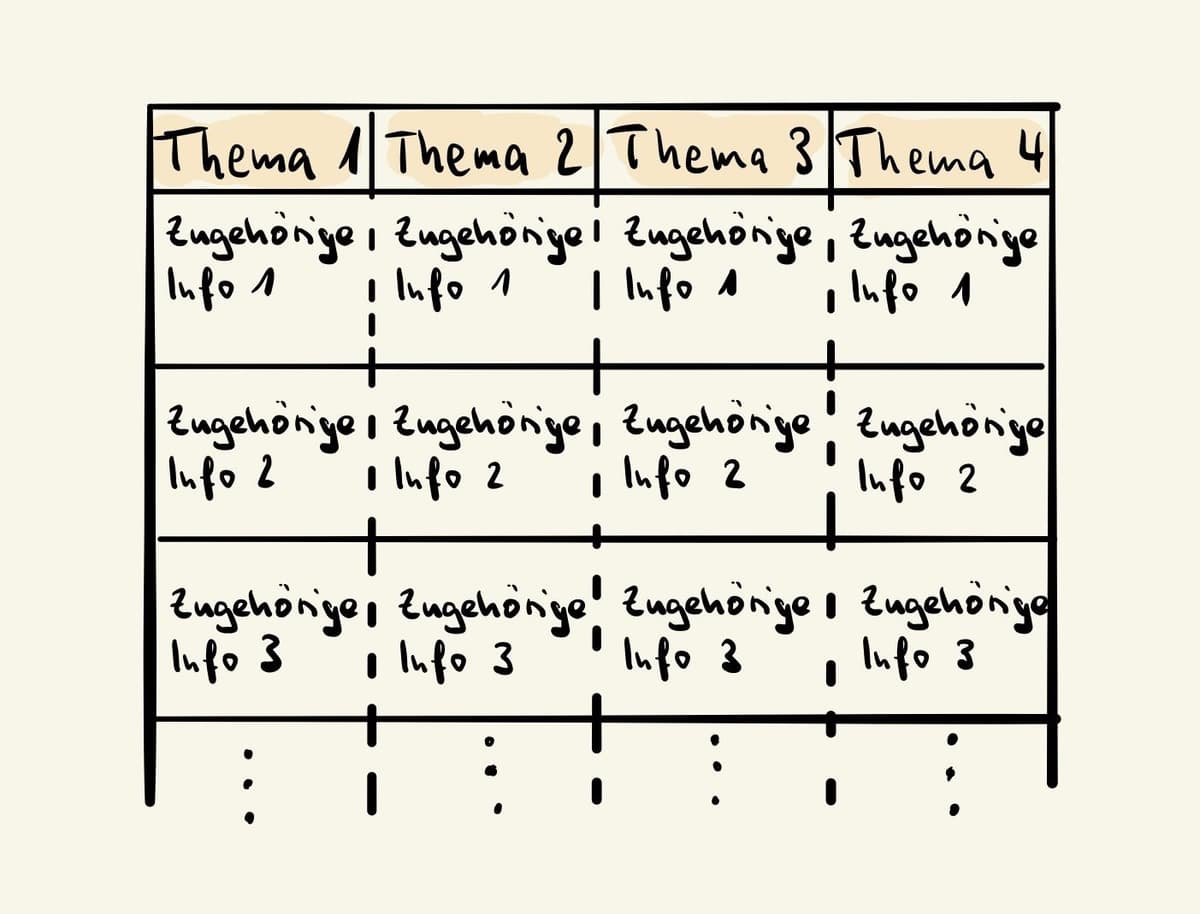
Best for classes, readings, or meetings that compare the same features across several cases.
Use rows and columns when the material repeats. Put the cases down the left side and the traits across the top. A history lecture might compare causes, dates, actors, and outcomes. A biology class might compare organelles, functions, diagrams, and test cues.
Charting is slow at first, but it prevents scattered compare-and-contrast notes. Use it when the exam or project will ask, "How are these different?"
Sentence Method
Best for fast talks where the speaker moves too quickly for a clean outline.
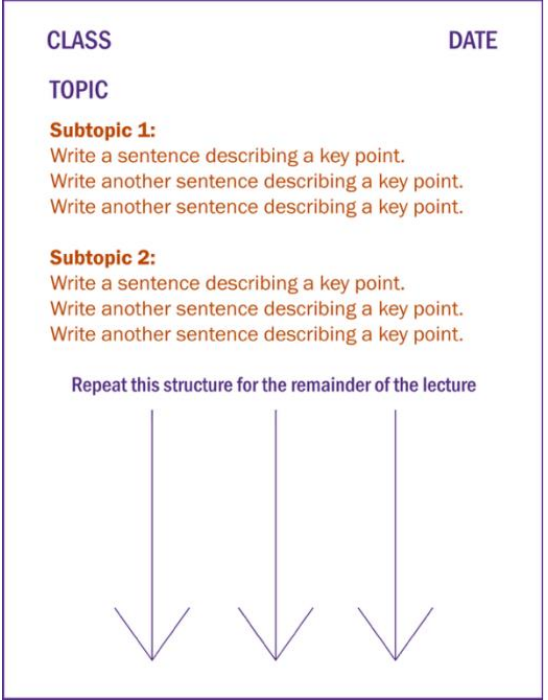
Write one short sentence per point. Number each line. After class, group the numbered lines into themes, then turn the strongest lines into questions. The raw result is too dense for direct exam review, but it captures everything when speed matters more than structure.
Flow-Based Notes
Best when you need to reason with the speaker instead of copying the speaker.
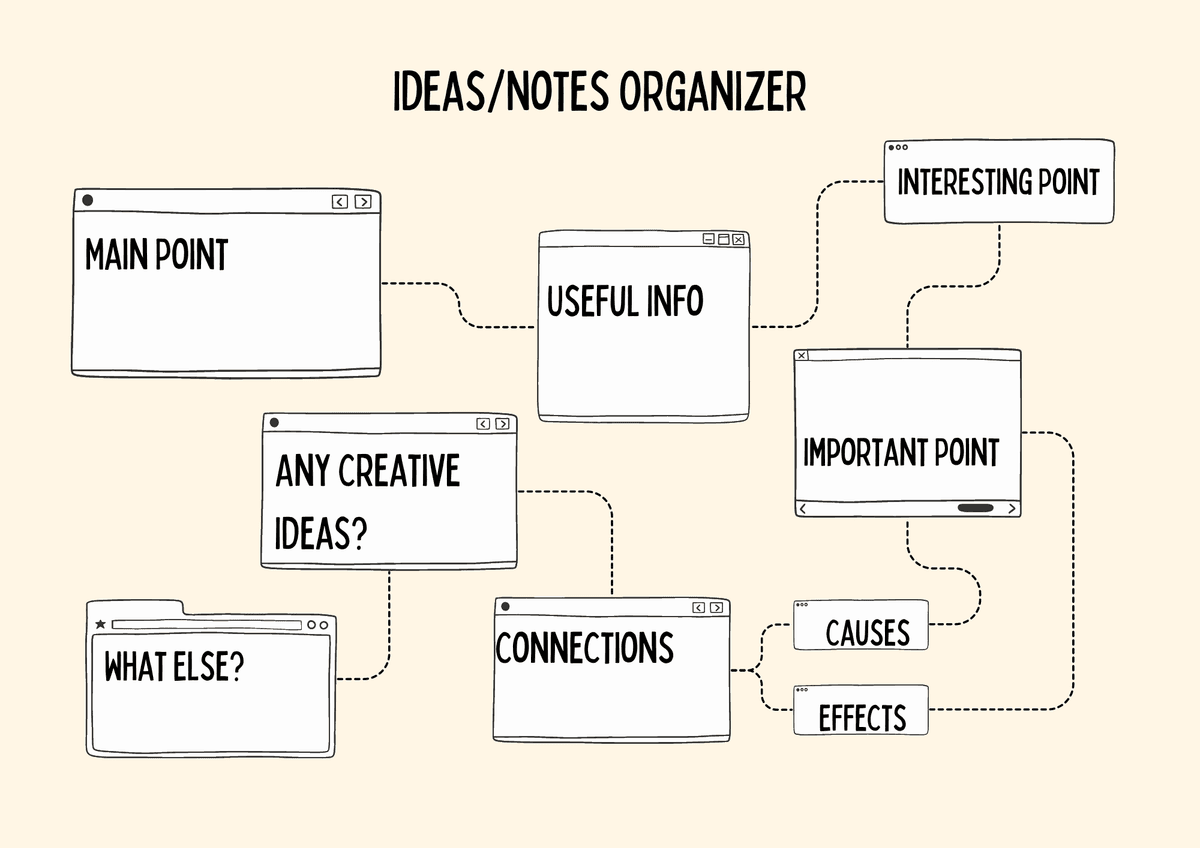
Flow-based notes use arrows, short claims, sketches, and questions. They work well for debates, tutorials, and problem-solving sessions where the argument matters more than the order of slides. Write down how the idea develops rather than trying to capture every word.
Mind Mapping
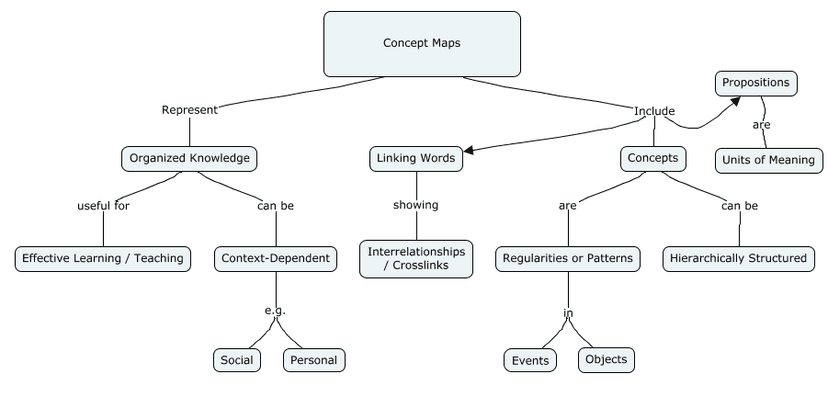
Erich Parker’s 2016 concept map (CC BY-SA 4.0) branches from one central topic like a mind map, and adds linking words that make each relationship readable. Source: Wikimedia Commons.

Best for visual thinkers, brainstorms, and ideas with many branches.
Central topic in the middle, subtopics radiate outward, further subtopics branch from those.
Useful tools include Atlas for maps from uploaded notes, MindMeister, Coggle, Mindly, and Whimsical.
For more on visual methods, see visual note-taking methods.
Common Note-Taking Mistakes
The biggest mistake is transcribing instead of summarizing. If your notes are word-for-word, you are typing more than thinking.
Notes you never review are wasted effort. Build a weekly review habit or your note app becomes storage.
Folders break when one idea belongs in several places. Use tags, links, or both instead of folders alone.
Tool-switching resets the compounding benefit. Notes become more useful when they build up in one system over years.
Skipping the summary is another common failure. Within 24 hours, write 2-4 sentences in your own words.
The illusion of competence is the quieter failure. Clean pages can make you feel fluent because the page looks organized. Test it by closing the note and answering one cue from memory. If you cannot answer, the note is not ready yet.
Notes Are Prompts, Not Archives
Most weak notes fail because they try to preserve the past. Strong notes prepare a future action. A lecture note should become an exam prompt. A meeting note should become a decision log or task list. A book note should become a claim you can reuse in writing. A research note should preserve the source trail well enough that you can defend the claim later.
That shift changes what you write down:
| Situation | Archive-style note | Prompt-style note |
|---|---|---|
| Lecture | "Professor covered operant conditioning and reinforcement schedules." | "How does variable-ratio reinforcement explain habit-forming apps?" |
| Meeting | "Discussed onboarding drop-off." | "Decision: test shorter welcome flow. Owner: Maya. Check activation rate Friday." |
| Book | "Author says habits depend on cues." | "Reusable claim: behavior change starts by changing the cue. Motivation alone rarely holds." |
| Research paper | "Study reviewed retrieval practice." | "Evidence to cite: retrieval practice improves long-term retention more than restudying." |
Table 3: Archive-style versus prompt-style notes across four common note-taking situations
If you only have time for one improvement, rewrite your headings as questions. Questions make review active, expose gaps, and turn a pile of notes into a study system.
Choose an App and Capture Format
Best Apps for Each Method
For Cornell on iPad, use GoodNotes or Notability with a Cornell template.
For Zettelkasten, use Obsidian for local Markdown or Atlas for AI-grounded work. Obsidian links notes with [[, and an Atlas note can mention other notes and sources with @.
For meeting outlines, use Notion, Apple Notes, or OneNote. All three handle nested bullets well.
For mind maps, use Atlas, MindMeister, or Whimsical. Take notes normally first, then map the links that matter.
For app rankings by use case, see best note-taking apps.
Handwritten vs Typed Notes
Research often favors handwriting for concept-heavy material. The Mueller and Oppenheimer 2014 study is the most-cited evidence. Handwriting helps with concepts, formulas, and diagrams, while typing helps with speed, search, and digital work.
Most people should use both. Handwrite for equations and dense lectures. Type quotes, outlines, and anything you need to search later.
For iPad handwriting, see best note-taking apps with stylus.
How AI Changes Note-Taking
AI tools change two specific note-taking workflows.
Tools like Atlas, NotebookLM, and ChatGPT can summarize and connect notes you already took. The key test is citation. Tools that cite the exact note are easier to trust.
AI meeting tools such as Granola, Otter, and Fireflies can replace manual meeting capture. See best meeting notes app.
AI does not replace the 5-step system, capture, summarize, link, review, synthesize. It speeds up specific steps.
Atlas suits one specific part of this workflow. If your notes depend on PDFs, reports, lecture transcripts, or papers, Atlas can answer questions across uploads and shows citations back to the source. Use it for source-grounded synthesis. For day-to-day scratch notes, a faster app will serve better.
Adapting the System to Your Context
The same 5-step system bends to fit different work patterns. Three common contexts and the small adjustments that make the system stick.
For daily meetings, the bottleneck is the gap after the call ends. Use a 90-second post-meeting ritual. Write one sentence on what was decided, one on what you owe, and one on what you need from someone else. Apple Notes works for fast capture. Notion or Obsidian works better for the weekly wrap-up.
For a heavy lecture load, use Cornell on iPad with Apple Pencil for live capture. Move cue-column questions into Anki or RemNote on the weekend. The transfer step is the work. Without it, Cornell pages pile up without review. The Mueller and Oppenheimer 2014 paper supports handwriting for conceptual recall. Spaced review makes the notes more useful.
For a long-term research base, use Zettelkasten in Obsidian or another plain-Markdown tool. Set one strict rule. Every new note must link to at least one old note. The link is the value. Sönke Ahrens' How to Take Smart Notes is the standard English reference. Pair the vault with Atlas when you want cited Q&A across source notes.
When the System Breaks
Three predictable failure modes and the fixes that work.
The most common failure is capture without review. Notes pile up, the weekly review never happens, and the archive turns into storage. Schedule the weekly review as a 30-minute calendar block. Treat review as the real deliverable.
Method shopping is another trap. Switching from Cornell to Zettelkasten to PARA every month becomes a way to avoid the work. Pick one method and run it for 90 days before switching.
App migration loops waste weekends. Moving from Notion to Obsidian to Apple Notes resets your links each time. Pick the tool that matches how you want to store notes: cloud database, plain files, or Apple ecosystem. Commit for at least a year.
Recommendation: Choose the Lightest Tool That Fits
Pick the method first, then pick the tool.
| Main use case | Best method | Lightest tool |
|---|---|---|
| Lecture study | Cornell | Paper, GoodNotes, Notability |
| Meetings | Outline | Apple Notes, OneNote, Notion |
| Research reading | Zettelkasten | Atlas, Obsidian, Logseq for source Q&A |
| Visual planning | Mind map | Atlas, MindMeister, Whimsical |
Table 4: Recommended note-taking method and tool by use case
Compare AI research assistants when notes depend on papers, slides, reports, or transcripts. Check which tools let you open the passage behind each answer. For normal scratch notes, a faster notes app is enough.
Final Take
Good note-taking is a thinking system. The 5-step process works across contexts: capture, summarize, link, review, and synthesize. Pick the classic method that fits your main use case. Then pick one tool and stick with it. The compounding starts in month two.
For recorded talks and YouTube-style sources, use the companion workflow on how to take notes from a video.
Sources and Further Reading
- Progressive Summarization, Forte Labs.
- Retrieval practice and long-term memory, Roediger and Butler, 2011.
- The Pen Is Mightier Than the Keyboard, Mueller and Oppenheimer, 2014.
- Effective Note-Taking in Class, UNC Learning Center.
Ask Atlas about your research notes
Add text notes, ask a question, and inspect cited passages.