

A response to reviewers answers concerns about your paper and states what you did about each one. It links each comment to your decision and any change in the revised manuscript.
A polite response also needs proof. "We have addressed this" gives a reviewer no clear way to check the work. A named section, a checked passage and a reference to the right file give them something they can inspect.
The guide below uses a working revision matrix to keep that trail clear. Its comments and manuscript snippets are made-up teaching examples. They are not real reviews, study results or evidence that a journal accepted a paper.
Start with your own decision letter. For example, PLOS Computational Biology's revision instructions require responses to both editor and reviewer comments. Other journals may ask for a different layout or set of files.

Check the changes behind your response
Compare comments and manuscript versions, then check each cited change.
What the response needs to show
For each point, state what you changed, clarified or declined to change. Give the reason when it matters, then tell the reviewer where to look. A response can be complete even when some requests lead to no edit, provided you answer them with care.
Keep the overview short, as Nature's response guidance advises. It gives the editor a view of the main revisions before the detailed replies. The point-by-point section does the work of answering each request. A cover note alone cannot show that you dealt with every concern.
Follow the journal's rules for how much text to repeat. Noble's response-writing guide recommends quoting changes to make replies self-contained. In contrast, Nature's Scientific Reviews guidance asks authors to point to the revised location instead of reproducing blocks of text.
The working matrix can hold short excerpts for your own checks even if the submitted reply uses only locations. Choose the final layout from the journal's instructions, rather than assuming that every publisher wants the same template.
Fix the versions before mapping comments
Keep the source records intact
Keep a copy of the manuscript that the reviewers saw. Name it clearly alongside the working revision, preserving the old-versus-new distinction. For instance, submitted-v1 and revision-v2 make the files easier to tell apart than two files both called final.
Keep the decision letter and each review as separate records. Preserve the wording and order of the comments, following the full-comment approach in the journal guidance. Assign a stable ID such as R1.3 so you can connect a request to notes, edits and the final reply.
One numbered comment may contain two requests. A reviewer might ask you to explain a measure and reduce a claim in the Discussion. Track both tasks under that comment so the easier edit does not hide the harder one.
Noble's coverage rule makes this point: answer each issue, including separate issues within one bullet. Retain the full comment in the response while making the parts of your answer easy to find.
Assign the work and open checks
Then decide what work each request needs. You may need to add a definition, check a result, narrow a claim, explain an existing choice or seek guidance from the editor. Do the work before writing that it is complete.
If a request needs more reading, use a research paper organization workflow to keep supporting papers and notes together. Record which concern each source helps answer. A citation belongs in a reply only when its content supports your reasoning.
Add an owner and an open check to tasks shared across coauthors. For example, a methods author can confirm the measure's definition while the lead author checks that the wording and the response agree. A draft reply is still open until those checks are done.
Build a comment-by-comment revision matrix
The matrix is an internal work record. Give each row a request, an action, supporting text and a check state. This keeps "planned," "written" and "verified" from becoming the same thing during a busy revision. Editage's point-by-point template links the request, response and location. The working matrix also tracks your internal checks.
Suppose a paper describes a survey of study habits in one course. Its authors received the four comments below. All comments, passages and section references in this example are invented, and the example reports no survey data.
| Comment ID and request | Action or decision | Manuscript support to check | Check state |
|---|---|---|---|
| R1.1: Define the recall period. | Add a definition in Methods. | V2 says: "Participants were asked about study habits during the previous seven days." | V1 lacks this sentence. The new V2 text is checked, but final line numbers remain open. |
| R1.2: State how participants were invited. | Clarify the response without claiming a new edit. | V1 and V2 both say: "An invitation was sent through the course mailing list." | Existing text is checked in both versions. No manuscript change is claimed. |
| R2.1: Explain whether findings apply elsewhere. | Add a limit to the Discussion. | V2 says: "The study concerns one course and does not establish patterns in other courses." | The revised passage is checked. The overview must also reflect this narrower scope. |
| R2.2: Add a comparison with another course. | Decline the new comparison and explain why. | No data from a second course are available. Refer to the stated study scope and the revised limit. | Reason and scope wording need coauthor review. No comparison or result is claimed. |
Table 1: Each row separates the requested action from the text that supports the reply and the checks still needed.
Notice that the second row records no new text. That is still a useful response if it answers the concern. The fourth row stays open until coauthors have checked the reason for declining the request.
Use short excerpts to check meaning, but retain the full comment nearby. A compressed matrix cell can miss a condition in the review. Before drafting the final reply, compare each row with the source comment and ask whether it answers the whole request.
If two reviewers ask about the same issue, connect the rows but answer each reviewer. A shared edit can support both replies. Keep the IDs so neither comment disappears from your coverage check.
Verify changes in the final file
Check each claim about a revision against both manuscript versions. Find the old passage, then the new one. Ask what changed in wording or meaning and whether the response describes that change accurately.
The source excerpt below shows Noble's rule on version changes. It warns that pointing to text in the manuscript can hide whether the text is new or was already there. The original and revised versions need distinct roles in your evidence check.
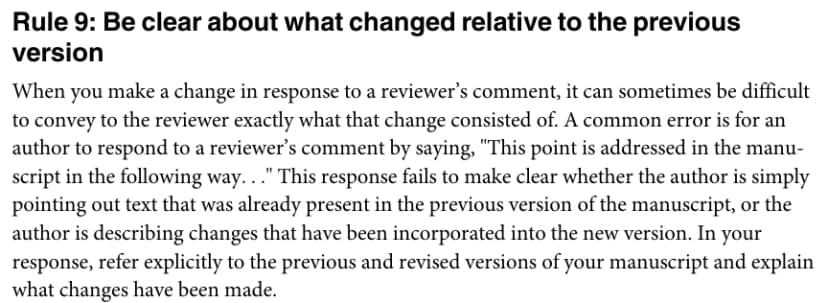
Source excerpt from Noble (2017), PDF page 3, cropped to Rule 9 under CC BY 4.0.
In the worked example, a draft response to R1.2 might say, "We have now added the recruitment route." That claim fails the version check: the same sentence appears in V1. A corrected reply says that the invitation route is described in Methods and identifies its location without claiming an addition.
Check locations after the text and layout settle. A page or line reference from an earlier draft can point to the wrong passage after edits shift the file. State whether your references use the original or revised manuscript, and check them in the exact file you will submit.
An Atlas citation can help you find source text, but it does not certify the journal's line numbers. Open the final manuscript and verify those numbers yourself. If the file has no line numbers, use the journal's permitted section, page or paragraph references.
Write direct answers and supported disagreements
Lead with what you did
Start each reply with the answer to the concern. If you changed the definition, say so. If the text already existed, make that clear. If you declined the request, explain the decision before adding background that the reviewer may not need.
Use this small response skeleton as a drafting aid. It follows the direct-answer principle in Noble's guide:
- Keep the reviewer ID and full comment.
- State the action or decision in one clear sentence.
- Give the reason or evidence needed to understand it.
- Identify the checked location, using the journal's required format.
For R1.1 in the invented matrix, a reply could read: "We have added the recall period to Methods. The revised text states that participants were asked about the previous seven days." Add the final checked location before submitting it.
Editage's templates show ways to pair agreement or disagreement with a change and its location. Use a template to organize a reply, then replace every claim with work you have actually done.
Explain the work you declined
For R2.2, the reason is a data limit: the study has no second-course data. The reply should explain that limit, say that the comparison was not performed, and point to the scope statement. Do not write that the new analysis confirmed the result when no such analysis exists.
Handle partial agreement with the same care. A reviewer may correctly identify an overclaim while suggesting a remedy that the data cannot support. Narrow the claim, explain what the data permit, and address the proposed remedy separately.
When requests conflict, show the conflict to the editor. Nature's guidance advises following the editor's direction where recommendations directly conflict. Describe the two requests and the approach you took, rather than silently choosing one and dropping the other.
Keep the tone focused on the paper. Explain the reasoning without guessing why the reviewer made the comment. If a passage caused confusion, improve its clarity where possible so the next reader has less reason to misread it.
Compare your revision sources in Atlas
Use only review material you are permitted to add to the project. An author-owned manuscript and a confidential review are different records. Check the terms that apply to your review correspondence before including it.
Add the permitted comments and original and revised manuscript sources. Name the versions clearly and wait for processing. The research synthesis workflow explains the broader task of comparing selected sources and checking what each contributes.
Ask a bounded comparison question in chat:
Compare the named reviewer comments, submitted-v1 and revision-v2. Build one row per distinct request, keeping the comment ID. State the response decision, quote supporting manuscript text and cite the source version. Distinguish new edits from existing text. Mark missing support and locations needing a manual check. Do not invent analyses or completed changes.
- Mention the comment source and both manuscript versions by name.
- Open citations for each claimed edit and confirm they lead to the expected version.
- Compare the cited passage with the full request. Correct any answer that covers only part of it.
- Check page and line references in the final submission file, then review the scientific reasoning with coauthors.
- Save the corrected matrix in a note, including open tasks and the exact filenames you checked.
Treat the result as a draft comparison. It is not an exhaustive diff or proof that every comment was found. If you are still choosing tools for this work, the research paper AI guide distinguishes source comparison from search and writing tasks.
Check the package before resubmitting
Read the full response beside the full reviews once more. Count distinct requests rather than only numbered bullets. CASRAI's response guide stresses coverage even for small comments. Every item should have a reply, and every claim of completed work should have support in the submitted files.
Then check the journal's current file requirements. For PLOS Computational Biology, the revision package includes a response, a marked copy and a clean copy. Do not assume that those file names or upload roles apply elsewhere.
Check the exact files being submitted
Before submission, verify that:
- The editor's requests appear alongside the reviewer requests.
- The overview agrees with the detailed replies and revised claims.
- Clean and marked copies represent the same final revision.
- Page and line references point to that revision.
- Coauthors have reviewed the scientific decisions and remaining limits.
- No placeholder or planned task is described as completed work.
Review what will be visible to whom. PLOS's instructions say reviewers can see the cover letter and response, and that a published review history includes the response. Keep confidential concerns in the channel the journal specifies.
A checked response helps the editor assess your work. It cannot promise acceptance or replace a sound manuscript. Keep the matrix as a record of the revision, so a later round can start from what you changed and why.
Check the changes behind your response
Compare comments and manuscript versions, then check each cited change.