

AI tools can help you find papers, read hard methods sections, sum up results, draft from sources, and check claims.
Start with the task you need to do. Then check whether the tool links each answer back to the paper it used.

Ask cited questions across academic papers
Add your papers, ask a focused question, and inspect every cited passage.
Quick answer
Use Elicit or Consensus to find papers and scan what the field says. Use SciSpace to read a hard paper with help beside the text. Use Paperguide to manage sources and draft from them. Use SciSummary or Scholarcy to sort a large reading pile.
Use Atlas once you have picked the papers. Add them as sources, ask a clear question, and open each source link. You can then compare methods or results and save the claims that the text supports.
Apply the same check to every tool. Treat an AI answer as a lead until you read the paper and the exact passage. Check the study method, result, limits, and any paper that disagrees.
Academic paper AI criteria
These tools serve seven common jobs:
- Find papers: search by topic, question, DOI, title, author, or a paper you already know.
- Review a field: search, screen, and record the same facts from each paper.
- Read a paper: explain a section, method, chart, or new term beside the source text.
- Sum up papers: pull out the main claim, method, result, and limits.
- Draft: build an outline or paragraph from papers you chose.
- Trace a claim: show which passage supports an answer.
- Check a claim: read the source text before the claim enters your notes or draft.
For work that rests on sources, check the source before you judge extra features. A tool may be good at search or summaries yet weak at final prose. AI can help start a paragraph. Each claim still needs a paper, a passage, and the right limits before it belongs in your draft.
Academic paper AI tools compared
| Tool | Best job | Source basis | Verification strength | Refresh before relying on |
|---|---|---|---|---|
| Atlas | Ask and compare across papers you chose | Papers and files you add | Opens the source passage for a claim | Full-text access and whether the passage backs the answer |
| Elicit | Find papers and fill review tables | Its paper search and review tools | Links answers and table cells to papers | Search scope, report limits, table output, and price |
| Consensus | Ask what published studies say | Papers found through its search | Shows papers behind its answers | Field coverage, filters, wording, and exports |
| SciSpace | Read and explain a paper | PDFs and paper pages | Keeps the passage near the explanation | Paper limits, writing tools, and source links |
| Paperguide | Manage sources and draft | Sources chosen for a project | Helps you draft around those sources | Draft limits, source tools, links, and formats |
| SciSummary | Sum up and sort papers | Papers you add or choose | Helps with a first scan | Plan limits, batch use, charts, and accuracy claims |
| Scholarcy | Make summary cards | Papers, articles, books, and saved sources | Helps with screening and recall | Imports, exports, Zotero use, and reference lists |
Table 1: Use the table as a starting point. A thesis review, a policy scan, and a class paper each carry different risks.
A broad search may find more papers but give you less help checking the final claim.
For the full paper workflow, see research paper AI. The research paper analyzer guide covers close reading. The scientific paper summarizer guide covers quick summaries. Our AI tools for academic research guide compares the wider tool set.
Verify academic paper answers in Atlas
Atlas helps you ask questions across papers you have picked and check the source behind each answer.
A typical source-checking pass looks like this:
- Add the paper by DOI, arXiv ID, exact title, topic search, or PDF upload.
- Check the title, authors, year, journal, abstract, and full text.
- Ask a clear question such as "How do these 3 papers test their methods?"
- Open the source links for claims that affect your notes, review, or choice.
- Read the cited sentence and nearby text for limits and scope.
- Save the point only when the passage backs it.
The answer stays next to the source. You can compare the answer with the passage and the rest of the paper before you use it.
This view lets you read the paper beside the answer. Use the source link as a check, then read the method and study limits. Move the claim into your review only after those parts agree with the answer.
Choose by research job
Pick the tool based on where your work starts. Search tools help before you have a paper set. Reading and drafting tools help after you have chosen the sources.
-
Choose Atlas to ask across papers you picked, check each source passage, and save the findings that hold up.
-
Choose Elicit to find papers or pull the same facts from each study.
-
Choose Consensus to ask what published studies say and open the papers behind the answer.
-
Choose SciSpace to work through a hard section while the paper stays open.
-
Choose Paperguide when source management and drafting are the main jobs.
-
Choose SciSummary or Scholarcy to sort a reading pile. For one paper, use a research paper summary AI workflow that keeps the method, results, limits, and source text together. If you need more than one job, use a small set of tools. Search first, then read and check the papers that will support your final work.
Best academic paper AI tools
1. Atlas
Atlas is best when you already have a set of papers and need to ask, compare, or check claims. Add the papers to a project and ask a clear question. You can open the source badge and compare what each paper says.
Use Atlas for questions such as "Which source supports this claim?", "What limitations do the authors mention?", or "How do these 2 methods differ?"
The important boundary is that Atlas is not a substitute for reading the original paper. It is useful because it keeps the answer close to the source passage you need to inspect.
2. Elicit
Elicit is best when the research starts with a question and you need to find, screen, or extract evidence from scientific papers. The official Elicit site positions it around scientific research, paper search, research reports, data extraction, chat, and systematic-review-style workflows.
I would start with Elicit when the review depends on structured columns such as population, sample size, intervention, outcome, country, method, or effect. The source-check is still necessary. Read the papers behind the extracted cells before those cells become claims in a draft.
3. Consensus
Consensus is best for academic search and evidence synthesis when the searcher wants research-backed answers rather than a general web result. The Consensus search experience is built around research sources, corpus controls, and filtering.
Use Consensus for questions where you want a fast view of what published research says. Then inspect the cited papers before using the answer as evidence. A synthesis answer can help you decide what to read next. The final citation should still point to the paper you checked.
4. SciSpace
SciSpace is best for reading and explaining academic papers while the paper context stays visible. The SciSpace product surface includes research assistant tools such as literature review, chat with PDF, AI writer, citation generator, and data extraction.
The paper-reading value is strongest when the tool explains a specific paragraph, equation, table, or section you are already looking at. That makes it a good fit for researchers who need help understanding a method before deciding whether the paper belongs in the review.
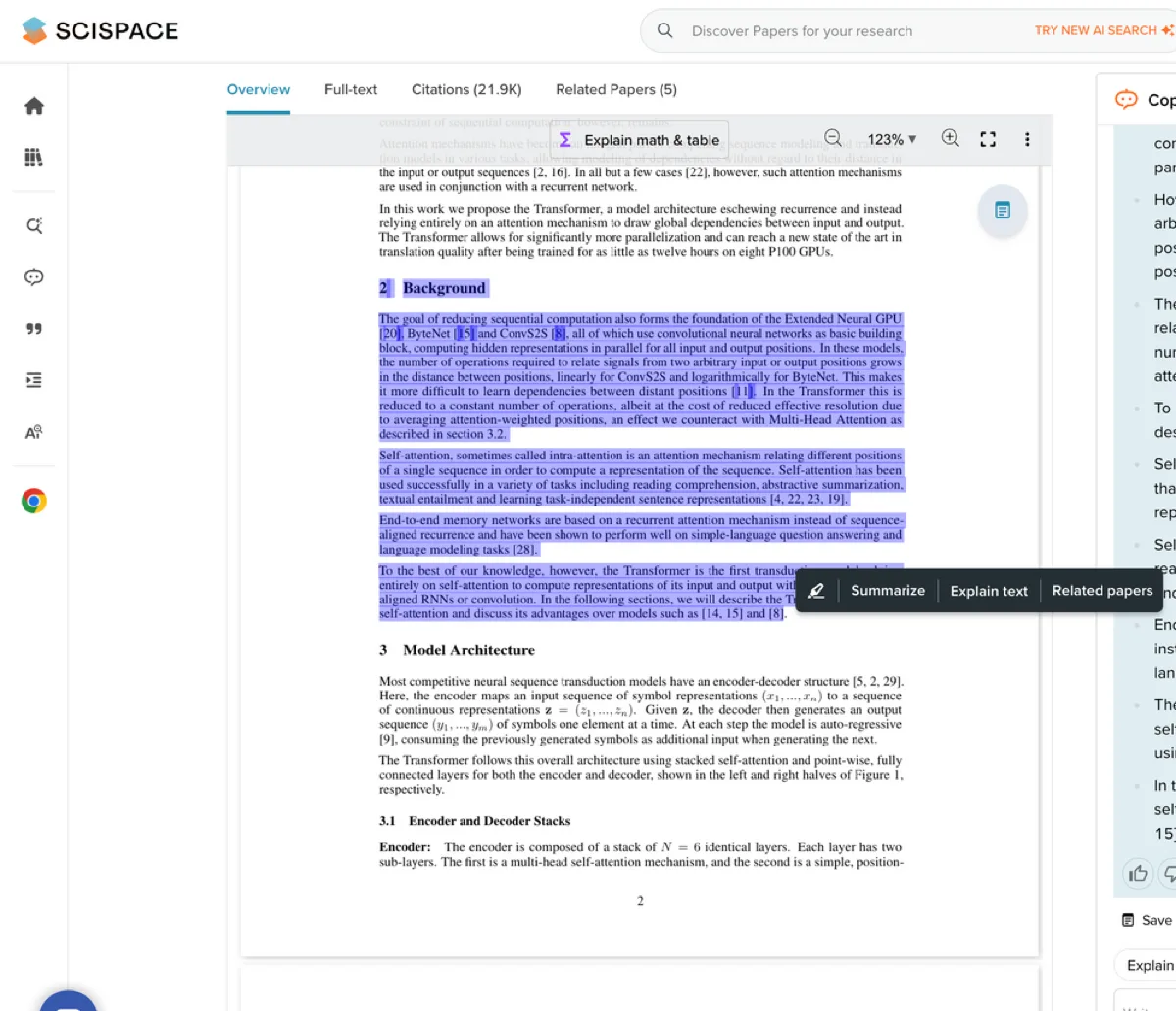
This SciSpace paper-reading view supports the passage-explanation branch of academic paper AI. The highlighted source text stays visible while the assistant explains the selected section.
That makes the reading step easier to audit than a detached summary with no passage nearby.
5. Paperguide
Paperguide is best when you want to find papers, manage sources, and draft in one place. The Paperguide writer page says it can draft, edit, and cite from the sources you choose.
Use Paperguide when the output will become a draft, outline, or cited section. Keep the academic integrity boundary explicit. AI can help draft around sources, but the researcher owns the argument, source accuracy, disclosure, and institution or publisher rules.
6. SciSummary
SciSummary is best for a quick first pass through a paper. The SciSummary product page lists summaries, folders, tags, chat with charts, and ways to compare several papers.
Use SciSummary when you need to triage a reading pile before deciding which papers deserve closer work. The summary is useful for first-pass screening. Important methods, numeric findings, and limitations still need to be checked against the original paper.
7. Scholarcy
Scholarcy is best for readers who want summary cards from papers, books, and other files. The Scholarcy site says it can sum up and sort files from PDFs, Google Drive, YouTube, and Zotero. It also has import and export tools.
Use Scholarcy when the job is to skim, recall, and organize papers before deeper reading. The flashcard format helps when a paper pile is too large to read linearly. You still need to inspect the methods, cited evidence, and limitations.
Academic guardrails for paper AI
Academic paper AI output is an evidence lead that still needs source review. Before using a summary, extracted cell, generated paragraph, or synthesis answer, check the source:
- Original paper: is the tool pointing to the paper you intended?
- Exact passage: does the answer cite the sentence or paragraph that supports the claim?
- Method: does the tool preserve the study design, sample, corpus, or evaluation setup?
- Finding: does the wording match the source, or did the AI strengthen the claim?
- Limitation: did the answer carry over caveats, uncertainty, or scope limits?
- Citation context: does the cited source support the sentence where you plan to use it?
- Conflicting evidence: does another paper in the set disagree or add a boundary?
Writing help needs the same discipline. AI can help outline a paper, draft a section, or organize sources. It cannot decide your argument, meet your institution's disclosure rules, or turn unchecked output into publishable scholarship. If a grade, thesis chapter, manuscript section, policy note, or client decision will rely on the claim, verify the evidence before saving it.
The best academic paper AI workflow often uses more than 1 tool. Discover papers, triage them, read the hard sections, draft carefully, and verify every claim that matters.
If you are choosing today, start with the job that carries the most risk. Broad discovery needs search and filters. Literature-review drafting needs source controls. Claims that will appear in a paper, memo, or report need citation checks before they leave the tool.
Ask cited questions across academic papers
Add your papers, ask a focused question, and inspect every cited passage.