

AMSTAR 2 is a 16-item tool for appraising systematic reviews of healthcare interventions. It covers reviews of randomized and non-randomized studies. You use it to judge how the review was done, rather than to rate each study inside it.
Find the passage that addresses an item, then check it against all the item asks for. An author may name a search or bias tool without showing how it was used. That gap matters to the response you choose.
The official AMSTAR 2 site says the tool should not produce a total numerical score. Its rating gives greater weight to flaws in key parts of the review. A high count of Yes responses can hide a serious flaw.
A working note keeps the item, passage and source location beside any checks you still need to make. You can then explain why you chose a response. Finding a keyword in the paper is only the start of that work.

Find the evidence for your appraisal item
Keep the review passage, source location and remaining checks together.
Check whether AMSTAR 2 fits the review
Use AMSTAR 2 for the kind of review it was built to assess: systematic reviews of healthcare interventions. The LATITUDES tool record confirms that scope and links to the official tool and guidance.
Other review types need tools that fit their questions. Reviews of patient interviews, diagnostic tests and prognostic factors each have different aims. Check the tool's scope before borrowing AMSTAR 2 items for them.
If you need to judge a mixed set of primary studies, a mixed methods appraisal tool guide addresses that task. Decide whether you are judging the included studies or the review's own methods before choosing a tool. The research article versus review article guide helps you distinguish those sources by the work they report.
A well-written review may still have weak methods. Reporting checklists help authors show what they did. In an appraisal, you judge whether those methods meet the tool's requirements, including what the report leaves unclear.
Read the full item before responding
Gather the full review and its extra files, including any linked protocol. The abstract usually gives too little detail to judge the methods. List the files you have so you can see which parts of the packet are missing.
Read the official checklist with the guidance document. The checklist states what each response requires. The guidance helps you judge how those rules apply to the review.
Each item has its own set of responses. Some allow Partial Yes, and some have an option for no meta-analysis. Use the options printed for that item. A general Not Applicable response would change the tool.
Check all the conditions for the response you plan to use. One reported step may meet only part of an item. A registry number alone does not tell you when the team wrote its plan or why it changed the methods.
For the search item, read the methods and search supplement. The phrase "comprehensive search" gives no detail about what was searched or how. Check the reported steps against the tool's conditions.
Keep what the authors say separate from your judgment. If they call their search comprehensive, you can record that claim. To say the search meets the item, you need to show which reported steps support your response.
CoRATES' appraisal guide explains how item responses relate to the overall rating. Use the official sources for the exact conditions. A software summary may omit detail you need to judge a response.
Keep critical weaknesses visible
AMSTAR 2 gives special weight to domains that can undermine confidence in the review's results. The developers' suggested critical items are 2, 4, 7, 9, 11, 13 and 15.
Their topics are the protocol, search, excluded-study reasons, study bias, methods of pooling results, treatment of bias in the final reading and publication bias. These topics help you locate evidence, but each full item contains more detail.
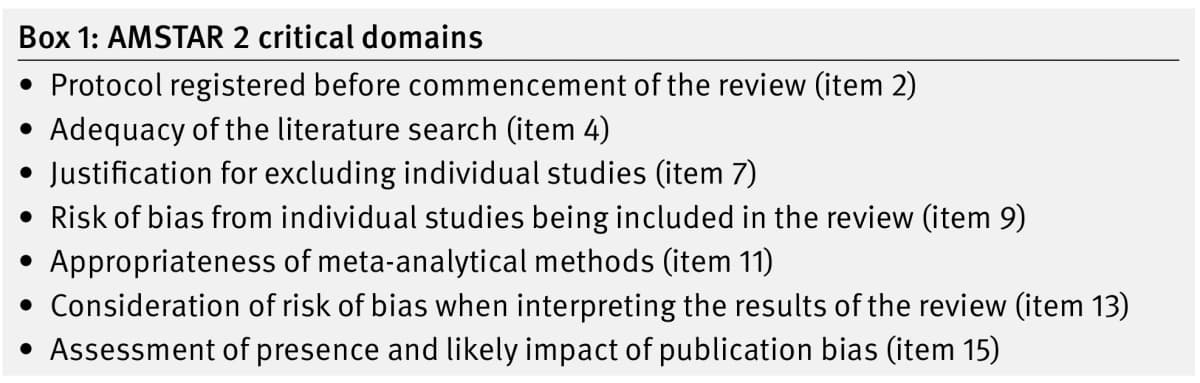
Box 1 from Shea and colleagues, BMJ 2017, © the authors, CC BY 4.0. Cropped from printed page 5 and converted to WebP.
The developers allow appraisers to justify changes to which domains count as critical for a particular review. Agree on those decisions before applying the tool and record the reason. Do not change the rules after seeing an unwelcome rating.
A response to item 9 concerns how the review assessed bias in its included studies. Item 13 asks how that bias affected the reading of the review's results. A list of bias judgments may help with the first question while leaving the second unanswered.
If no meta-analysis was conducted, use the tool's relevant response options for those items. Still examine whether the narrative account takes study bias into consideration. The absence of a pooled estimate does not remove that concern.
Build an item-to-reported-passage evidence note
The following packet is fictional teaching material. It contains Review R, Search Supplement S and an Exclusions Appendix E. Every page, statement and reference label below is invented. No actual healthcare review is rated.
Review R describes a protocol on page 2 but does not give its date. It says on page 3 that two databases were searched. Supplement S contains the search strings and dates on page 1.
Appendix E lists excluded full-text studies on page 2 but gives no study-specific reasons. Review R includes a bias table on page 6 and a broad claim about benefit in its discussion on page 9.
| Item topic | Reported evidence and location | What the evidence establishes | What the appraiser still needs to check |
|---|---|---|---|
| Item 2: protocol | Review R, p. 2 refers to a written protocol | A protocol is mentioned | Retrieve its date, contents and any stated changes before deciding the response |
| Item 4: search | Review R, p. 3 names two databases; Supplement S, p. 1 gives strings and dates | Some search details are available | Compare the full search packet with all conditions for the relevant response |
| Item 7: excluded studies | Appendix E, p. 2 lists excluded full texts without individual reasons | The list is present | Look for reasons elsewhere and assess the item's distinct response conditions |
| Item 13: bias in interpretation | Review R, p. 6 has a bias table; p. 9 makes a broad benefit claim | Bias was recorded and a conclusion was stated | Check whether the discussion actually explains how study bias affects that conclusion |
Table 1: Four fictional item notes separate located passages from the conditions still needing appraisal.
The note separates what you found from what you must judge. Its first row does not convert "protocol mentioned" into "methods fixed in advance." Its last row does not convert "bias assessed" into "bias considered in the conclusion."
Use exact locations so another reviewer can open the same passages. Keep the supplement's file name and page number distinct from the main paper's page number. A vague reference to "the methods" makes disagreements harder to resolve.
These four rows show part of the work. They are not a completed appraisal. Check all the relevant items before assigning an overall rating. Missing rows should remain missing rather than becoming assumed Yes responses.
Record gaps and resolve disagreements
When you cannot find a passage, record where you looked and what is missing. The authors may have done a step without reporting it. You still need enough evidence to support the response you choose.
Look in the extra files, linked plan and corrections before closing the question. A file you cannot access leaves a gap in your packet. It does not show that the team never wrote a plan. Keep that limit beside the item judgment.
In their user commentary, De Santis and colleagues describe problems with unclear item rules. They advise teams to agree on extra rules, try them on reviews and report the choices they made.
The commentary offers user advice. It is not a new official version of the tool. If you adopt an extra rule, explain why you need it and how it relates to the guidance. A reader should be able to follow your choice.
Where your procedure calls for independent review, each person should inspect the evidence before discussing it with others. To resolve a dispute, compare the item requirement and the cited passage. A vote cannot settle what the source supports.
Keep the reason when you change a response. Suppose a later file gives the missing exclusion reasons. Add its location and explain why it changes your judgment. The working history should show both the earlier gap and the new evidence.
Compare review passages and guidance in Atlas
Use Atlas to compare the review, supplements, protocol and official guidance that you have permission to process. Keep restricted information within the project's approved data arrangements. Select the actual files you want to compare.
A research paper organizer helps keep the review packet together. Name each supplement clearly and link it to its main review. You can then check which file a citation refers to.
With the packet in place, use this sequence to build the note:
-
In a chat, type
@to mention the selected processed files. Ask for passages that address one item before asking for a working judgment.For AMSTAR 2 item 7, find passages about excluded full-text studies and reasons for excluding each one. Give file and page locations. Keep a study list separate from individual reasons. State what is absent from the supplied files, and leave the final response to the appraiser.
-
Open the cited passages and read the text around them. For item 7, check that a reason refers to a specific full-text study. A count of records removed during early screening would not supply that reason.
-
Correct claims that go beyond the passage. Keep each response tied to its own item conditions, even when you are comparing several papers. A broad summary of review quality would lose the grounds for each judgment.
-
Save the passage and location beside the open checks and your reason for the response. Create a note with New and Note, then wait for Saved.
You own the final item response and overall judgment. Atlas helps compare passages and write notes. Check its cited evidence before using a suggested response, and keep any gap in what it found visible. Record the appraiser's reasons for each response and the overall confidence rating.
Explain the confidence rating with reasons
Once you have checked the items, explain which weaknesses drive the overall confidence rating. The official scheme distinguishes critical flaws from non-critical weaknesses. These two kinds of weakness have different effects on the rating.
- High: No critical flaw and no more than one non-critical weakness.
- Moderate: More than one non-critical weakness, with no critical flaw.
- Low: One critical flaw, with or without other weaknesses.
- Critically low: More than one critical flaw, with or without other weaknesses.
Several non-critical weaknesses may reduce confidence enough to move a Moderate rating to Low. Keep that caveat in view when you apply the scheme.
Keep the domain judgments beside the rating so readers can see what drives it. A total such as "13 of 16" gives equal weight to conditions that have different roles in the confidence decision.
Before sharing the appraisal, check the file versions and grounds for each judgment. Confirm the item options and the domains you treated as critical. Reopen disputed passages so the final report reflects the full packet you reviewed.
Find the evidence for your appraisal item
Keep the review passage, source location and remaining checks together.