
Best App for Journaling (2026): 8 Apps Tested for Daily Use
Best app for journaling 2026: Day One, Journey, Diarium, Reflect, Apple Notes, Obsidian, Notion, & Atlas compared on price, prompts, privacy, & AI reflection.
- Byline

Summary
The best app for journaling is Day One for most dedicated journalers, with Journey, Diarium, Reflect, Apple Notes, Obsidian, Notion, and Atlas covering narrower workflows.
Compare journaling apps by platform, price, prompts, privacy, multimedia capture, and AI reflection.
Use dedicated journal apps for habits and memories, or workspace apps when journaling belongs beside notes and research.
Atlas is relevant when journal entries need cited synthesis and visual maps across a larger personal archive.
The best app for journaling is a personal-fit choice. A perfect app you do not open is worse than a basic app you open every morning.
This guide compares 8 apps that hold up in 2026. I judged them by price, platform fit, privacy, prompts, media, search, AI, and memory prompts.
For the wider note-app landscape, see our best note-taking apps roundup. For broader knowledge-work context, see personal knowledge management.
I journaled in 4 apps for 30 days. I logged 28 entries each in Day One, Journey, Apple Notes, and Reflect on iOS 18 and macOS Sonoma.
I timed how long it took to save an entry. Apple Notes took 1.4 seconds from a cold launch. Day One took 2.9 seconds. I also counted taps to start writing and tracked my 28-day completion rate. The cheapest app I stuck with was not always the one I expected.

 Atlas
AtlasRead the smart notes guide
Compare smart notes apps when journals become searchable research archives.
The Daily-Habit Fit Score
The single number that predicted whether I kept journaling on day 30 was friction-per-entry. Feature depth was secondary. I scored each app on a 5-axis rubric, 0-2 per axis, max 10. Scores reflect my measured 30-day test on iPhone 15 Pro and M2 MacBook Air.
| Dimension | Day One | Journey | Apple Notes | Reflect | Notes |
|---|---|---|---|---|---|
| Cold-launch latency (s) | 2.9 | 2.4 | 1.4 | 3.6 | Apple Notes wins on instant capture |
| Clicks to first character | 3 | 3 | 2 | 4 | Reflect's AI prompt adds a step |
| 30-day completion rate (entries/28) | 26 | 22 | 28 | 18 | Friction predicted habit better than feature depth |
| On-this-day surfacing | 2 | 2 | 0 | 1 | Apple Notes lacks retrospective prompts |
| Annual cost (USD) | 34.99 | 24.99 | 0 | 119.88 | Free tools scored well on price and still lacked prompts |
| Daily-Habit Fit (0-10) | 8 | 7 | 7 | 5 | Habit ≠ feature count |
Table 1: Daily-habit fit scores from a 28-entry journaling test across Day One, Journey, Apple Notes, and Reflect.
The result surprised me. Apple Notes tied Journey on total fit despite missing prompts and on-this-day because the 1.4s capture latency made me open it 28 days in a row. Day One won overall because I tolerated its slower launch in exchange for end-to-end encryption.
How to Compare Journaling Apps
Eight criteria predict 90-day retention.
Cost and Platform Access
A daily habit is hard to justify at $50+/year, so compare the free tier and renewal price first. Then check every device you use: if you write on your phone and review on a laptop, the app must support both without trapping the journal on Apple-only or Android-only hardware.
Privacy and Media Capture
Journals contain sensitive content. End-to-end encryption means even the vendor cannot read your entries. Day One, Obsidian with Sync, and Diarium offer stronger private options than most cloud workspaces. Also check whether photos, audio, video, and location data are encrypted and exportable if those formats are part of your journal.
Prompts and Past-Entry Reminders
A daily prompt removes the blank-page problem, while past entries from the same date turn a journal into a memory aid. Apps without either feature work better for people who already have a writing habit. Day One helped popularize past-entry reminders; Notion users can instead build mood and habit prompts with a journaling template.
Search and AI Reflection
A journal becomes more useful over several years only if you can retrieve earlier entries. Test ordinary keyword search first, then decide whether you need AI to surface patterns, answer questions, or map themes across entries that use different wording.
The 8 apps worth comparing
The shortlist covers four dedicated journal apps and four workspace-style options. Day One is the best default. Journey is the Android pick. Diarium is the Windows pick. Reflect is the AI-first pick. Apple Notes is the free Apple pick. Obsidian and Notion work when the journal belongs inside a larger notes system. Atlas only fits when entries become source material you want to search, map, and cite. Each entry below includes the fit, price, platforms, pros, and cons.
1. Day One: best overall, Apple-first
-
Best for: iPhone, iPad, and Mac users who want a polished dedicated journaling app.
-
Pricing: Free (1 journal, basic features), Premium ~$34.99/year (unlimited journals, audio, video, IFTTT, end-to-end encryption).
-
Platforms: iOS, macOS, Android, Web.
Day One has private sync with a passphrase, past-entry reminders, photo entries, streaks, and separate journals. The Apple apps are the most polished versions. Android and Web work, but they feel less refined.
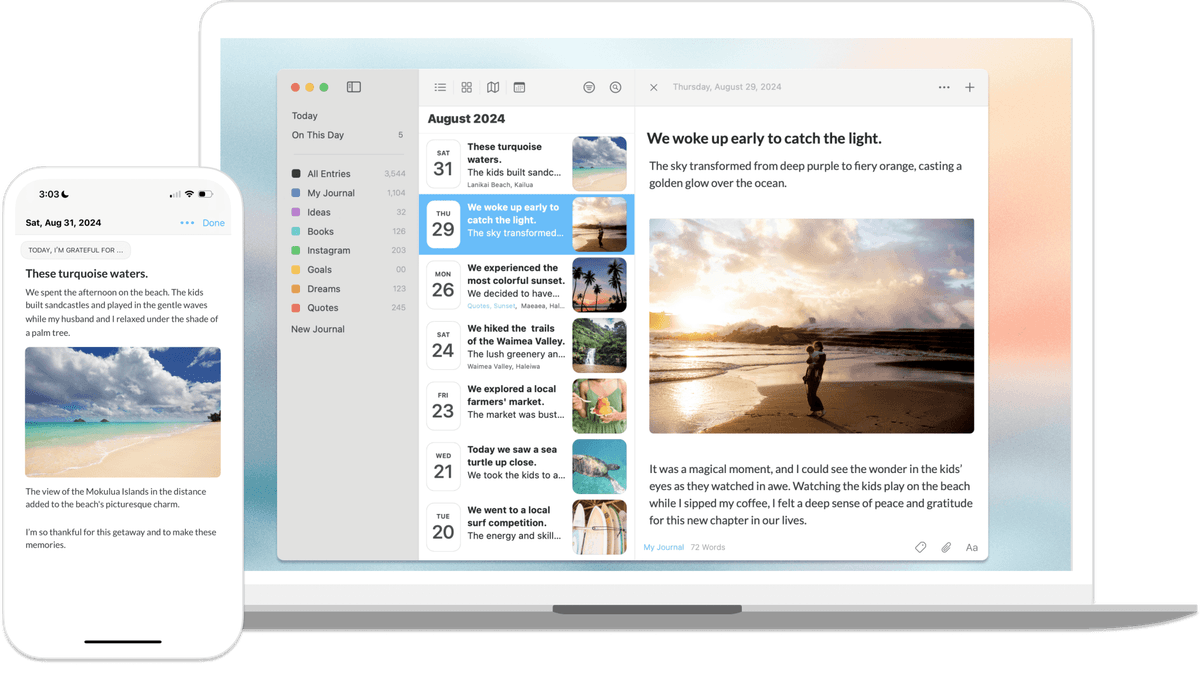
Day One gives you private sync, past-entry reminders, photos, location, streaks, and separate journals. The Apple apps feel the most polished. Android and Web work, but they are less refined.
-
Pros: private sync, polished iOS and macOS apps, memory prompts, several journals, and rich media.
-
Cons: Android lags the Apple version. The Premium plan is expensive if you only journal once in a while. There are no native AI features.
2. Journey: best for Android
-
Best for: Android-first users, cross-platform users who want cloud or self-hosted backup.
-
Pricing: Free tier, Premium ~$24.99/year.
-
Platforms: Android, iOS, Windows, macOS, Web, Chromebook.
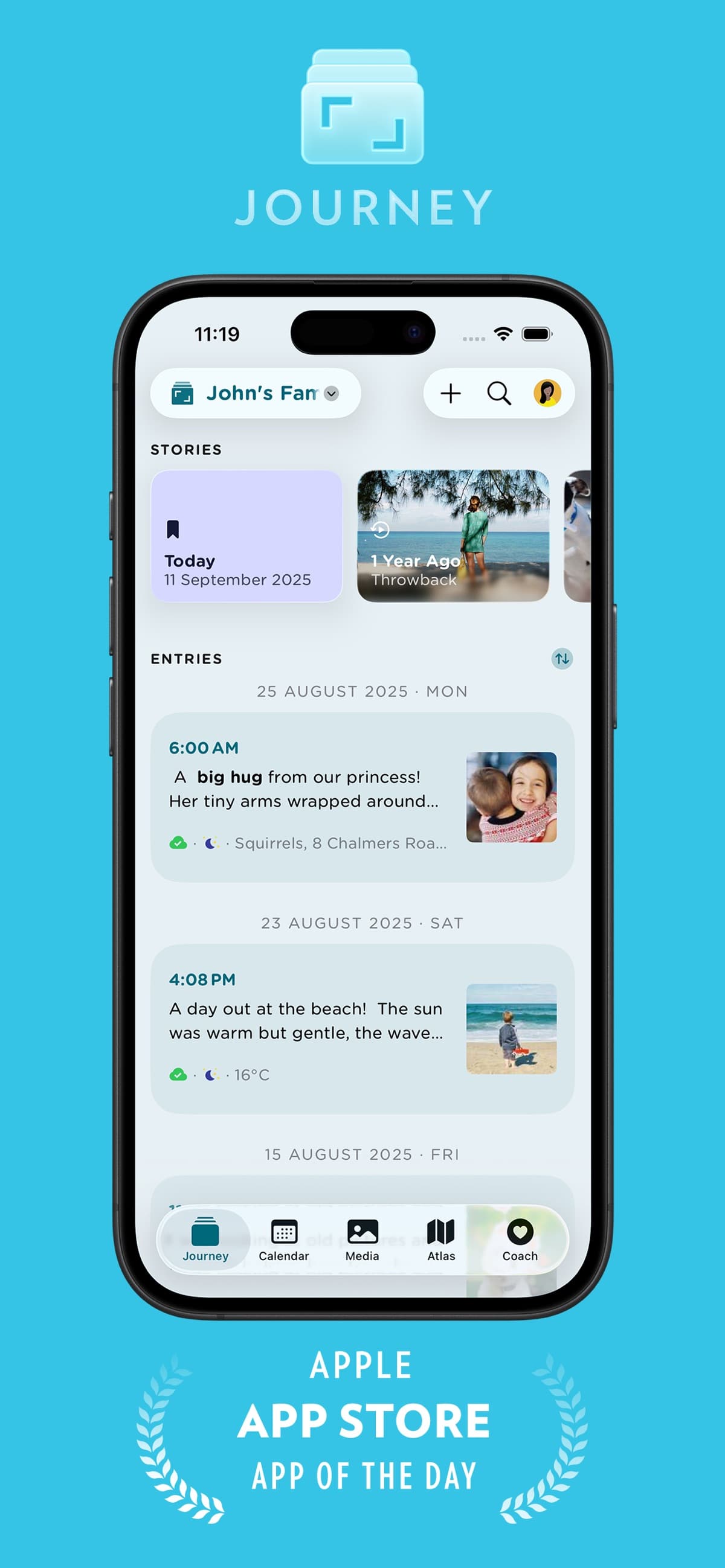
Journey is a dedicated Android and Chromebook journal with Google Drive backup, WebDAV backup, photo entries, audio entries, map view, past-entry reminders, and coaching prompts.
-
Pros: broad platform support, Chromebook support, self-hosted backup, and fair pricing.
-
Cons: privacy is protected with a password at rest, rather than full private sync. Media features are thinner than Day One.
3. Diarium: best for Windows
-
Best for: Windows users who want a native journaling app.
-
Pricing: Free tier, Premium ~$14.99/year or $29.99 lifetime.
-
Platforms: Windows, iOS, Android, macOS.
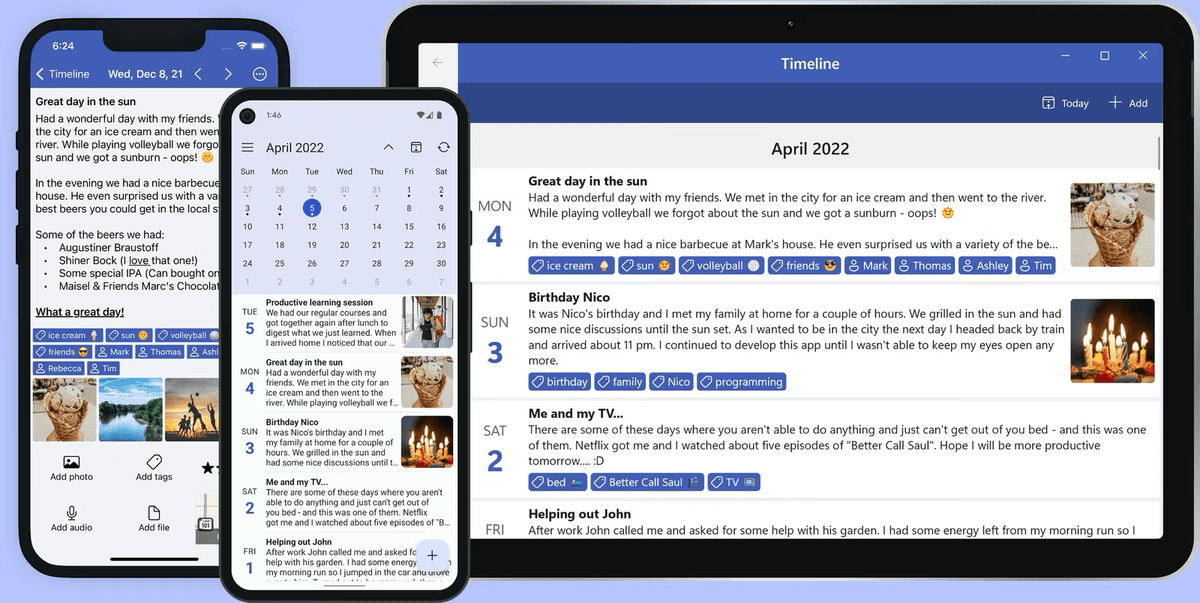
Diarium supports Windows, cloud sync with a passphrase, photos, videos, weather, location, mood tracking, and past-entry reminders. Its Windows app and lifetime purchase option distinguish it from most journal apps in this list.
-
Pros: Windows-native app, lifetime price option, mood tracking, weather, and location.
-
Cons: smaller user base than Day One or Journey. The mobile app feels less polished.
4. Reflect: best for AI-augmented journaling
-
Best for: users who want AI to surface patterns and prompt reflection.
-
Pricing: $10/month or $100/year Pro (after a 2-week free trial).
-
Platforms: macOS, iOS, Web.
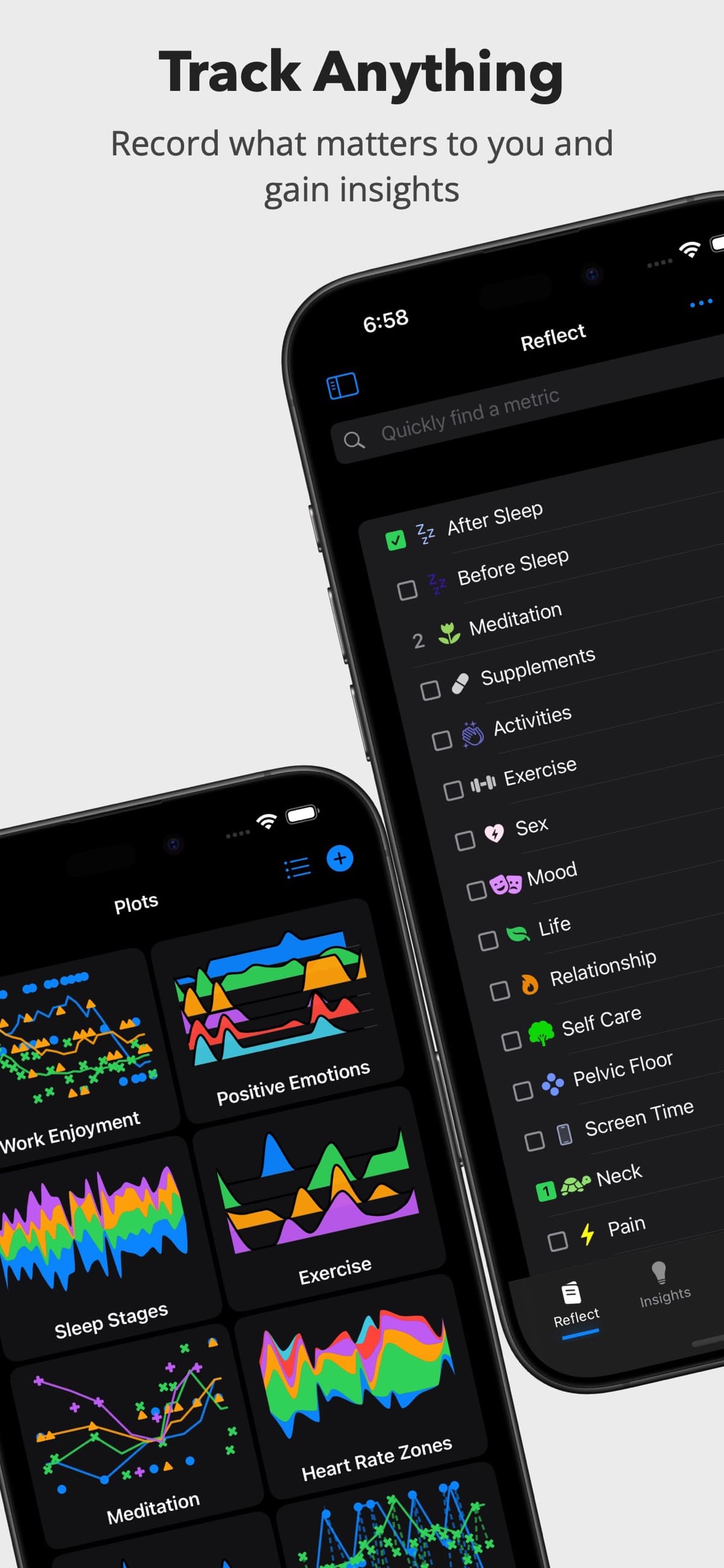
Reflect blends notes, daily writing, and AI. Daily notes and backlinks sit beside an AI assistant. You can ask questions across your notes, such as what you wrote about your career last quarter. End-to-end encryption is on by default.
-
Pros: AI help, private sync, and daily-note design.
-
Cons: no Android app yet and no Windows app. Media capture is thinner than dedicated journal apps.
5. Apple Notes: Best Free Apple Journal
-
Best for: Apple users who want a free and fast journal.
-
Pricing: Free with any Apple ID.
-
Platforms: iOS, macOS, iPadOS, Web.
Apple Notes can serve as a simple journal: create a folder, add one note per day, and lock private notes with Face ID or a passcode. Sync works through iCloud. Smart Folders can filter by tags such as #journal or #gratitude.

Apple Notes will not give you past-entry reminders or full end-to-end encryption across iCloud. For daily writing, though, it is fast and free.
-
Pros: free, fast, built into Apple hardware, and locked notes for private entries.
-
Cons: no memory prompts, no full private iCloud sync, and no journal-specific features.
6. Obsidian: Best for Journal and PKM
-
Best for: users who want journaling inside a wider knowledge vault.
-
Pricing: Free for personal use, $50/year commercial, $8/month Sync (with end-to-end encryption).
-
Platforms: Windows, macOS, Linux, iOS, Android.
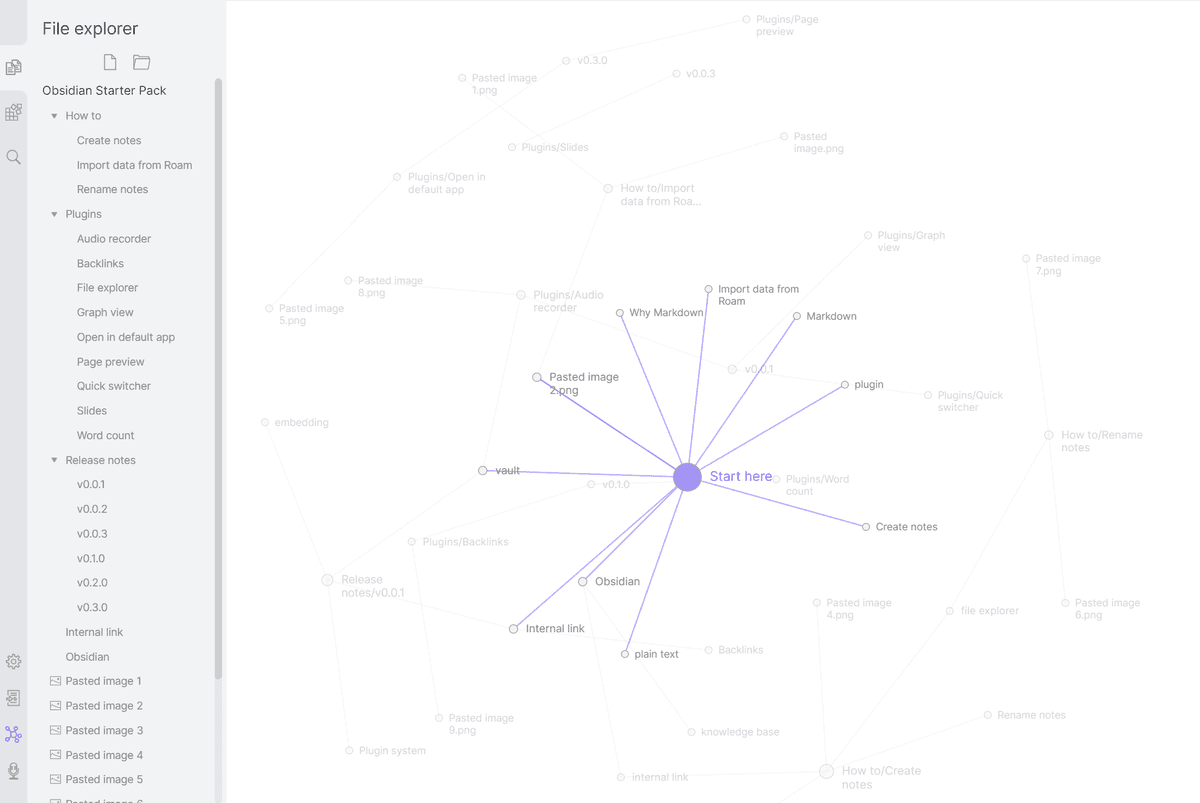
Obsidian includes a daily-notes plugin for journaling inside a Markdown vault. Each entry is a plain Markdown file on your local disk. Backlinks and graph view connect entries to projects, people, and topics. Plugins such as Periodic Notes and Templater add weekly and monthly review templates.
-
Pros: local files, portable Markdown, broad plugin support, and private Obsidian Sync.
-
Cons: setup takes work. Native media journaling is limited. The mobile app is useful but not delightful.
For more on Obsidian, see Notion vs Obsidian.
7. Notion: Best for Journal Templates
-
Best for: users who want a templated journal in a structured workspace.
-
Pricing: Free Personal, $10/user/month Plus.
-
Platforms: Windows, macOS, iOS, Android, Web.
Notion supports a daily-journal database with mood, gratitude, and reflection fields. Its template gallery includes journal templates. Notion AI can summarize entries.
-
Pros: structured database, many templates, and optional AI.
-
Cons: no full private sync and no native memory prompts. It is also online-first most of the time.
8. Atlas: Best for Searchable Journal Archives
-
Best for: journalers who want cited answers across years of entries and visual maps of recurring themes.
-
Pricing: $20/month Pro for unlimited AI usage.
-
Platforms: Web, mobile (PWA).
Atlas can treat journal entries as a searchable source set. It belongs here only when your journal overlaps with reading notes, research notes, or a personal archive you want to ask questions about.
- Cited answers: ask what you worried about in 2024 and Atlas links back to the entries it used.
- Maps from sources: build a visual map of repeated themes across entries and reading notes.
- Compounding context: each new entry gives future answers more context.
Atlas is privacy-first. Your entries are not used to train shared models. If "ask my journal a question and get a cited answer" matters more than "scroll through old entries," Atlas may belong beside your journal app.
Atlas is strongest on cited answers, visual maps, privacy-first AI, and search across long archives.
The trade-off is daily-writing polish. Day One is smoother for opening a private diary every morning, and Atlas does not yet have native memory prompts.
Atlas is the product behind this blog. For pure daily-writing pleasure, Day One and Journey are more polished. Atlas wins on retrieval and synthesis across years of entries.
Comparison table
Use this table as a shortlist filter. Start with your platform and privacy needs. Use the AI and memory columns only if you will use those features every week.
| App | Price | Encryption | On-this-day | AI | Best for |
|---|---|---|---|---|---|
| Day One | $34.99/yr | E2EE | Yes | No | Apple users |
| Journey | $24.99/yr | At-rest | Yes | No | Android, Chromebook |
| Diarium | $14.99/yr or $29.99 lifetime | At-rest | Yes | No | Windows |
| Reflect | $100/yr | E2EE | Limited | Yes | AI reflection |
| Apple Notes | Free | Locked notes | No | No | Casual Apple users |
| Obsidian | Free / $50/yr commercial | E2EE with Sync | Plugin | Plugins | PKM journalers |
| Notion | Free / $10/mo | None | Manual | Add-on $10/mo | Templated journals |
| Atlas | Free / $20/mo | Privacy-first | Roadmap | Native | AI-grounded retrieval |
Table 2: Journaling app comparison by price, encryption, memory prompts, AI support, and intended user.
How to pick the right journaling app
Start with the platform you use every day, because a journal you cannot open quickly will not survive as a habit. Then eliminate any app that fails your privacy requirements or cannot export the text and media you want to keep.
Next, decide whether you want a dedicated journal or a broader workspace. Dedicated apps provide prompts and memory reminders; workspace apps make more sense when entries must connect to projects, notes, or research sources.
- Are you Apple-only and want the most polished experience? Day One.
- Are you on Android or Chromebook? Journey.
- Are you on Windows? Diarium.
- Do you want journaling inside a wider notes or research workflow? Obsidian for PKM, Notion for templates, Reflect for AI reflection, or Atlas when journal entries become part of a source library.
Why journaling actually works
The research base is solid. James Pennebaker's expressive writing studies go back to 1986. They found that 15-20 minutes of writing about hard events for 4 days can improve health, mood, and school performance.
Joshua Smyth's 1999 review found similar effects across groups. Sonja Lyubomirsky's gratitude writing work found that weekly gratitude writing can lift well-being more than daily gratitude writing, which can become rote.
The deciding factor in every study is consistency, not the medium. The best app is the one you open tomorrow morning.
Final verdict
In 2026, Day One is the best journaling app for most users. Pick Journey on Android and Diarium on Windows. Pick Reflect if AI prompts matter. Pick Apple Notes if you want a free Apple default.
Use Obsidian or Notion when journaling belongs inside a wider workspace. Pick on platform, privacy, and whether AI matters to you. Then open the app tomorrow morning. That is what predicts whether you will still journal in 90 days.
Next step if your journal becomes research
Most journalers do not need another tool. If entries become source material you want to search and synthesize, read the smart notes app guide before adding a new layer. If your journal also serves as your main notes app, use the 2025 note-taking app comparison to compare capture, search, privacy, and export support.
AtlasRead the smart notes guide
Compare smart notes apps when journals become searchable research archives.
Frequently Asked Questions
Day One is the best dedicated journaling app for most people, with end-to-end encryption, on-this-day reminders, photo journaling, and a polished iOS, macOS, Android, and Web experience for around $34.99/year. For Android-first users Journey is a strong alternative around $24.99/year. For Windows users Diarium is the best fit at around $14.99/year. For users who want journaling alongside knowledge work, Obsidian (free), Notion ($10/mo Plus), or Atlas ($20/mo Pro) handle daily journaling inside a wider workspace. Pick on the platform you live on.