
How to Take Notes from a Video 2026: The Practitioner Guide
How to take notes from a video 2026: 4 methods, the best AI tools (NotebookLM, Atlas, YouTube transcripts), and a workflow that turns 1-hour videos into.
- Byline

Summary
Use video notes by combining transcripts, timestamps, selective watching, and your own synthesis pass.
Updated for 2026, the guide covers YouTube transcripts, NotebookLM, Atlas, ChatGPT, Claude, lecture workflows, and timestamp-based Cornell notes.
Use transcripts for audio-heavy videos. Watch visual sections when diagrams carry meaning. Verify AI summaries against timestamps.
Video notes work when they preserve key ideas and return points without becoming a full transcript.
Most people make one of two mistakes when taking notes from a video. They either watch without writing anything and forget most of it within a week. Or they try to transcribe verbatim and end up with 3,000-word walls of text no one reads again. This guide covers four methods for lectures, podcasts, and demos. Each method uses AI shortcuts to turn a 60-minute video into 20 minutes of notes you will reuse.
For broader note methodology, see how to take good notes and how to take Cornell notes.

 Atlas
AtlasAsk cited questions across video transcripts
Upload a transcript with related papers or slides, then compare their claims.
Video note-taking methods compared
For most videos, start with the transcript, mark the sections where visuals carry essential meaning, watch those sections, and write a short synthesis with timestamps. Use full watch-first notes only when demonstrations, diagrams, or equations cannot be recovered from text.
For a phase-by-phase walkthrough drawn from interviews with fourteen students, see the student's guide to AI research.
| Method | Time vs video length | Tools | Best for | Recall benefit |
|---|---|---|---|---|
| Pause-and-summarize | ~1.5× video length | Any notes app | Lectures, tutorials | High |
| Timestamp + quote | ~1.2× video length | Notion, Obsidian, paper | Reference content, research | Medium |
| AI transcript + highlight | ~0.3× video length | YouTube transcript, Otter.ai, Atlas | Long videos, podcasts | Medium with review |
| Cornell while watching | ~1.5× video length | Paper or iPad | Structured lectures | Highest |
| Sketch / mind map | ~1.2× video length | iPad, paper | Conceptual / visual content | High |
Table 1: Pause-and-summarize maximizes recall; timestamp methods and transcripts reduce capture time.
Connect transcripts with related sources
Atlas fits a narrower workflow than NotebookLM. It does not process video files directly. Use it after you have a transcript, slide deck, article, or paper that belongs with the video.
- Export the YouTube, LMS, or webinar transcript as text.
- Upload the transcript into Atlas as one source.
- Upload the related paper, slide deck, reading, or meeting brief as a second source.
- Ask a question that needs both sources, such as "Which claims from the lecture are supported by the assigned paper, and where do they disagree?"
- Open the cited answer panel before moving the answer into your final notes.
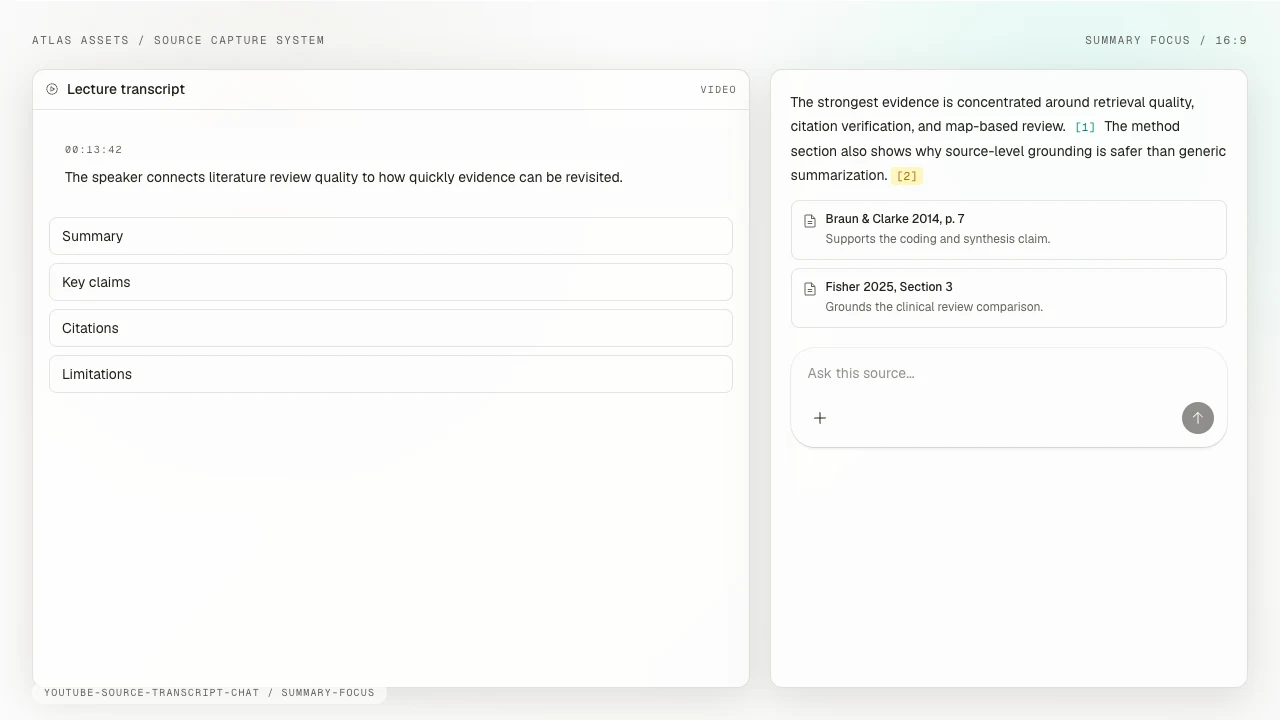
This workflow is useful when a video is part of a larger project. A lecture transcript can answer what the speaker said, while the paired PDF shows whether the assigned reading backs it up. The citation panel keeps the final note tied to the source instead of turning the video into a loose AI summary.
Use Atlas to ask questions across the transcript and related sources, then open each citation before copying the answer into your notes.
Why video notes are hard
Three structural problems make video notes harder than text notes.
Spoken language runs at 125-150 words/minute, while reading runs at 200-300 words/minute. You cannot keep up with verbatim notes, so you must filter in real time.
Diagrams, code snippets, slide transitions, and demos carry meaning that audio alone misses. A transcript-only workflow loses the visual half.
Pausing a lecture every 30 seconds destroys flow and turns a 60-minute video into a 90-minute slog. Good video note-taking filters spoken content, preserves visual context, and limits interruptions.
The 4 methods
These four methods trade speed against visual detail and later recall. The right choice depends on whether the video's meaning lives mainly in speech, mainly on screen, or in both.
Use transcript-first when the audio carries the argument. Use watch-first when diagrams or demonstrations carry it. The hybrid and Cornell methods cover the middle ground.
Transcript-first for audio-led videos
A 60-minute video takes about 15 minutes with this method. Grab the transcript first, then return to the visuals only where they carry information the transcript misses.
- YouTube: click the three-dot menu under the video, choose "Show transcript," and copy the transcript text. Auto-generated transcripts work for English, but quality drops on accented English, technical jargon, and other languages.
- Podcasts: check the show notes for a published transcript. Otherwise use Otter.ai, Whisper (free open-source), or AssemblyAI to transcribe.
- Lectures behind authentication: download the transcript from the LMS if available. Otherwise, screen-record the audio and transcribe it with Whisper.
Once you have the transcript:
- Paste into NotebookLM, Atlas, or ChatGPT.
- Ask for a structured summary: "Summarize this transcript in 5 key takeaways with timestamps."
- Spot-check 2-3 timestamps in the video to verify the AI did not hallucinate.
- Write Cornell-style notes from the verified summary.
Compared with watching at 1x, this saves roughly 75% of the time.
Watch-first for visual lectures
A 60-minute video takes about 75 minutes with this method. Open a Cornell-format template before you press play, then use these rules as the video runs:
- Pause at slide changes or major topic shifts (every 5-10 minutes), not every sentence.
- In the right column, write 1-line summaries of each section.
- In the left column, write cue questions you would use to test yourself later.
- At the end, write a 2-3 sentence summary in the bottom row.
Watch at 1.25-1.5x speed for non-technical content, at 1x for technical content where you cannot afford to miss a step.
This method works for medical lectures, math derivations, code walkthroughs, and any video where the visuals carry essential meaning.
AI-assisted hybrid workflow
A 60-minute video takes about 25 minutes with this method. It combines transcript-first speed with enough selective watching to recover visual meaning.
- Get the transcript and run an AI summary (5 minutes).
- Watch the video at 1.5x with the AI summary open beside it (30-40 minutes for a 60-minute video).
- As you watch, correct AI errors, add visual context, and capture screenshots of key slides.
- Write final Cornell-style notes from the corrected summary (5-10 minutes).
This is the best default for most knowledge workers. AI handles transcription and rough summary. You handle synthesis and visual capture.
Cornell notes for video study
Allow about 75 minutes for a 60-minute video, followed by a weekly review. This method suits students and anyone preparing for a test. Use timestamps and cue questions in the left column, key ideas in the right column, and a summary with action items at the bottom.
After the lecture, run the standard Cornell review cycle:
- Within 24 hours, expand any unclear ideas using the timestamp to rewatch.
- Within a week, cover the right column and self-test from the cue questions.
- Before the exam, review only the bottom-row summaries.
The 24-hour and 1-week cadence comes from Ebbinghaus's spacing curve research. Learners who review within those windows retain about 80% of material. Those who never review retain about 30%.
For a deeper Cornell walkthrough, see how to take Cornell notes.
AI tools for video notes
NotebookLM: best free general-purpose
NotebookLM is free with a Google account and accepts YouTube URLs directly. Paste the URL, and Google's AI reads the transcript. It then creates summaries, study guides, and audio overviews, including a short "podcast" of two AI hosts discussing the video. It cites the source and links back to specific timestamps.
Use NotebookLM when you want free, fast, cited summaries with timestamp links.
Its main limitation is the Google ecosystem. It also does not integrate with your wider notes corpus.
Atlas for connected source notes
Atlas Pro costs $20 per month. Atlas accepts uploaded transcripts and produces cited summaries plus 1-click mind maps. It links the video to your existing notes, web clips, and documents. Three things distinguish this workflow from NotebookLM:
- Cited answers across your corpus: ask "which videos discussed retrieval-augmented generation" and Atlas surfaces them with source links.
- Mind maps from multiple sources: see how a video connects to articles, papers, and notes you already have.
- Compounding context: every video you process enriches the answers Atlas can give about your knowledge.
Atlas is privacy-first, and your data is not used to train shared models. Atlas is the product behind this blog. Use NotebookLM if a video lives in isolation. Use Atlas if it should compound into a wider knowledge graph.
ChatGPT and Claude for transcript summaries
ChatGPT Plus and Claude Pro each cost $20 per month. Both produce strong summaries when you paste raw transcript text. You can use custom prompts like "summarize as Cornell notes" and ask follow-up questions. Neither tool ingests YouTube URLs without extra tools, and citation quality is weaker than NotebookLM or Atlas.
For more, see ChatGPT alternatives.
Meeting tools for live capture
If the "video" is a live meeting or webinar, use an AI meeting tool. Fathom (free), Granola (~$14/month), and Fireflies (~$10/month) all handle live capture and produce a summary in one step. See Otter.ai alternatives.
Sample notes from a 60-minute video
Here is a compact Cornell-style example from a hypothetical product strategy talk:
Video: "Building Defensible Software Companies", Speaker, 60 min
- 02:30 — What are the three moats? Network effects, proprietary data, and switching costs.
- 18:40 — Why is an “AI moat” weak by itself? Competitors can often buy access to the same model.
- 41:20 — How should a team audit a moat? Check who controls it, how long it lasts, and how difficult it is to copy.
- Summary: Durable products combine more than one moat and review those advantages regularly.
- Action: Apply the three-question audit to the current product before the next strategy meeting.
The timestamps make each claim easy to revisit, while the cue questions turn the notes into a short self-test.
Common mistakes
- Verbatim transcription. You end up with 3,000 unreadable words.
- No timestamps. When you want to revisit "that part about retrieval," you cannot find it.
- Skipping visuals. Take screenshots of slides, diagrams, and demos.
- Watching at 1x for everything. Most content works fine at 1.25-1.5x. Technical demos do not.
- Trusting AI summaries without checking. Always verify 2-3 timestamps before you write final notes.
- Notes that go nowhere. A note you never open again is no better than no note. File into a place you can search, like Notion, Obsidian, or Atlas.
Next step: a 1-week practice plan
- On day 1, use the transcript-first method on a 30-minute video.
- On day 2, use the AI-assisted hybrid on a 60-minute lecture.
- On day 3, repeat the transcript-first method with a 20-minute podcast.
- On day 4, review all three note sets and mark missing or overlong sections.
- On day 5, use Cornell notes for a video you would normally summarize in long form.
- On day 6, file every note in one searchable place, such as Atlas, Notion, or Obsidian.
- On day 7, cover the answer column in your first note and test yourself from the cue questions. Adjust the workflow based on what you recall.
After 1 week the workflow becomes habit, after 1 month video-derived knowledge starts compounding.
Final verdict
In 2026, taking notes from a video comes down to one rule: let AI do transcription, you do synthesis. Use the transcript-first method for podcasts and talks, about 15 minutes for a 60-minute video. Use watch-first for visual content, about 75 minutes. Use the AI-augmented hybrid as the default, about 25 minutes. Pair with NotebookLM for free, fast summaries or Atlas for notes that build into a wider knowledge graph. The best video notes are the ones you reread.
Choose transcript-first for podcasts and audio-led talks. Choose watch-first for demonstrations, diagrams, and equations. Choose the hybrid workflow for most other videos, and use Cornell notes when you need cue questions for later study.
AtlasAsk cited questions across video transcripts
Upload a transcript with related papers or slides, then compare their claims.
Frequently Asked Questions
The fastest workflow is to grab the transcript, use AI to summarize it, then verify the summary against the timestamps that matter. For YouTube, click the three-dot menu and "Show transcript" to get a free transcript. Paste into NotebookLM (free), Atlas ($20/mo Pro), or ChatGPT Plus ($20/mo) and ask for a structured summary with key timestamps. Spot-check 2-3 timestamps. Total time for a 60-minute video, around 15 minutes vs roughly 90 minutes watching at 1x.