

“AI notes summarizer” can mean several things. One tool may clean up pasted notes. Another may turn a PDF into a study guide, record a meeting, or draw a mind map. The right choice depends on what you need to sum up.
Start with where the note came from. A simple text tool can clean up pasted notes. A study tool can work with lecture PDFs, while a meeting tool can work with a recording. Atlas fits when you need to ask more questions and check the answer against the source.

Turn notes into a cited summary
Add notes and sources, ask for a summary, then check each cited passage.
Quick verdict
Match the tool to the input first, then to what you do with the result:
- Best for cited follow-up on notes and sources: Atlas. Import notes or add sources, ask a grounded question, and check the cited passage before you rely on the answer.
- Best for messy notes and many file types: Mindgrasp. Add text, files, web pages, YouTube links, video, or audio. The tool returns a summary and tasks.
- Best for student PDFs: Knowt. Upload a PDF and get notes, practice quizzes, and AI questions built around the file.
- Best for several study tasks: NoteGPT. One tool can handle lecture PDFs, meeting notes, short summaries, and visual notes.
- Best if your notes already live in Evernote: Evernote. Summarize notes without leaving the notebook they're already stored in.
- Best for meetings and calls: Summary AI. Turn a recording into a transcript, structured notes, decisions, and action items.
- Best for page references: Sharly. It works with PDFs, web articles, and audio, and can cite page numbers.
- Best for a fast, disposable text summary: QuillBot or Summarizer.org. Paste text and get a paragraph or bullet summary in one click.
- Best for a visual summary instead of paragraphs: MindMap AI. Turn an uploaded note PDF into an editable, exportable mind map.
Speed matters less than whether you can check the result. Keep the note, transcript, PDF, or source text close enough to open before you act.
How to choose the right note tool
Before comparing tools, name the job. The same word "summarize" covers distinct inputs and outputs.
- What will you add? Pasted text and Markdown are easy to read. Scans, handwriting, PDFs, and recordings may need more work and can produce more errors.
- What is the source? Your own note may already have missed part of a paper or talk. A tool that reads only that note cannot recover the missing facts.
- Do you have consent? A meeting tool needs access to the call. Check whether each person must agree to the recording.
- What result do you need? You may want bullets, a short paragraph, a quiz, a task list, a transcript, or a map. Match the result to your next step.
- Can you check it? Look for page numbers, citations, or source text you can open.
- Will you reuse it? A quick skim carries less risk. A research note, shared brief, or decision needs a clear source check.
- Can you upload it safely? Private meetings, school work, and client notes may need stricter data rules than a public web article.
AI notes summarizer comparison table
The claims in this table come from product pages and public Atlas docs. Prices, free limits, file sizes, scan support, and mobile apps can change. Check the vendor page before you choose.
| Tool | Best fit | Inputs | Outputs | Source/citation support | Verification fit |
|---|---|---|---|---|---|
| Atlas | Cited follow-up on notes and sources | Markdown notes, PDFs, and other project sources | Grounded chat answers, notes, knowledge maps | Citation badges link answers to source passages | Best when a summary must be checked and reused |
| Mindgrasp | Messy notes and mixed media | Pasted text, documents, articles, YouTube, video, audio | Clean summaries, action items | Positions itself around clean output rather than cited passages | Verify accuracy claims before high-stakes use |
| Knowt | Student PDFs | Uploaded PDF files | Notes, practice quizzes, AI questions | Built for study review rather than source citation | Good for self-testing, weaker for source audit |
| NoteGPT | Broad learning assistant | Lectures, PDFs, meeting notes | Summaries, visual notes, AI chat | Positions itself as an all-in-one assistant | Confirm citation depth before relying on any single claim |
| Evernote | Existing Evernote notes | Notes already stored in Evernote | AI summaries and highlights | Summarizes in-workspace notes only | Fits users who already keep notes in Evernote |
| Summary AI | Meetings and calls | Recordings, interviews, classes | Transcripts, structured notes, decisions, action items | Chat over meeting notes for follow-up | Check recording consent and platform support first |
| Sharly | Documents with references | PDFs, articles, documents, audio | Summaries with page numbers and citations | Advertises citations and cross-document analysis | Verify security and format limits before sensitive use |
| QuillBot | Fast text summary | Pasted text, articles | Paragraph or bullet summary | Built for speed over cited audit | Use for low-risk, disposable summaries |
| Summarizer.org | One-click text summary | Text, DOCX, images, articles | Short summaries | Built for speed over cited audit | Use for low-risk, disposable summaries |
| MindMap AI | Visual note summaries | Uploaded note PDFs | Editable, exportable mind maps | Positions itself around structure over citations | Best when a map is more useful than paragraphs |
Table 1: The tools serve different jobs: pasted notes, PDF study, meeting notes, quick text, visual maps, or answers that link back to a source.
Check notes against their sources in Atlas
Atlas fits when notes or sources are in a project and you need to ask more than one question. You can ask, “What in the source supports this claim?” and open the answer's citation.
Use this workflow:
- Add your notes and sources. Import Markdown notes, PDFs, web pages, or other files into one project.
- Name what Atlas should read. Use
@mentionsto point chat to the right notes or sources. - Ask a clear question. For example:
List the key decisions in these meeting notes. Flag any point that lacks a source. - Open each citation. Read the marked source text and the lines around it before you trust the claim.
- Save what you checked. Keep the point in a note, or use a Knowledge Map to link it with other checked notes.
Your own notes may leave out facts from the source. Treat them as context, then check key claims against the paper, PDF, or transcript.
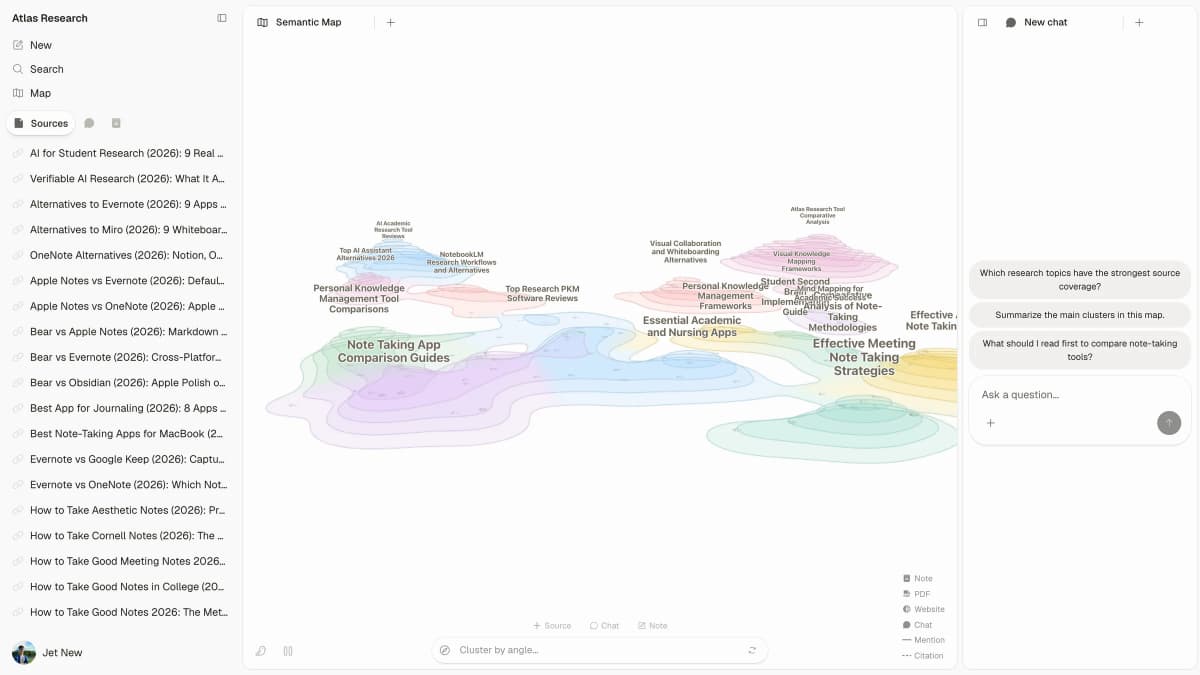
The map view shows notes and sources connected in one project. The chat panel is where you ask the grounded question, open the citation it returns, and check the source before you save the takeaway.
Best AI notes summarizer tools
1. Atlas
Atlas fits when notes or source files are already in a project and you need to ask more questions. Add Markdown notes, PDFs, or other sources. Mention them in chat and ask a clear question.
Citations open the text behind an answer. Check the claim before you add it to a study note, research summary, or brief. Atlas does not record a live meeting or turn audio into text.
Use Atlas when you need to check a summary, reuse it, or add it to a Knowledge Map.
2. Mindgrasp
Mindgrasp works with many kinds of input. Its page lists pasted text, files, web articles, YouTube links, video, and audio. It can turn them into a summary and task list.
Choose it when your notes come in several forms. Check its current free plan and account rules on the product page.
3. Knowt
Knowt turns a student PDF into notes, practice quizzes, and questions about the file.
It fits exam study well. Its page focuses on PDFs, so check the current product page if you need another file type.
4. NoteGPT
NoteGPT brings summaries, lecture PDFs, meeting notes, visual notes, and AI chat into one study tool.
It suits a learner who wants one app for several tasks. Check its current price, use limits, and privacy terms before adding school or client work.
5. Evernote
Evernote fits users whose notes already live inside an Evernote workspace. Its AI Assistant can summarize notes that are already stored there.
Evernote sums up notes stored in its own app. Choose another tool for outside PDFs, meetings, or a separate source library.
6. Summary AI
Summary AI is built for meetings, calls, interviews, and classes. It can record a talk, turn it into text, and pull out notes, choices, and tasks. You can search the result in chat.
Choose it when your notes start as speech. Check call support and recording consent before a live meeting.
7. Sharly
Sharly fits files where page numbers matter. It can sum up PDFs, web articles, other files, and audio. Its page says the result can include citations and page numbers.
Choose it when your notes are marked-up readings or reports that you need to compare.
8. QuillBot
QuillBot is best for a fast, low-stakes text summary. Its page describes paragraph or bullet output with adjustable length and a free word limit.
Use it for quick compression of an article or a rough note where a citation trail back to a source doesn't matter.
9. Summarizer.org
Summarizer.org offers a fast summary for text, DOCX files, images, and web articles. Use it for a low-risk result that you will not keep.
10. MindMap AI
MindMap AI turns a note PDF into a mind map. You can see topics, links, and chapter notes, then edit or save the map.
It fits a dense lecture PDF that is easier to study as a map. Check the product page if you need another file type.
How to verify an AI notes summary
A note summary can look organized and still miss the detail that mattered. Two passes catch most problems. First trace the claim back to where it came from. Then stress-test how the summary worded it.
Trace the claim back to its source
- Find the original. Locate the note, transcript, PDF, or source passage the summary claims to be based on.
- Separate notes from evidence. If the input was your own note about a reading or meeting, remember the note is your interpretation of the source. Trace anything important back further.
- Verify numbers and specifics. Dates, figures, names, and decisions are easy for a summary to compress incorrectly.
Stress-test the summary's wording
- Confirm context survived. Check whether the summary preserved caveats, exceptions, and qualifiers, or flattened them into a cleaner-sounding claim.
- Watch for invented structure. A summary that looks well-organized can still add connections or conclusions the original material didn't support.
- Save only checked takeaways. Once a claim is verified against its source, keep it in a note or map. Keep anything unverified flagged until you check it.
Always use both checks for school, legal, money, or work notes. Dense and high-risk material is where a missed detail can cause the most harm.
Which AI notes summarizer should you choose?
Choose by input and by what has to survive after the summary:
- Messy pasted notes or mixed media: Use Mindgrasp.
- Student PDFs for exam prep: Use Knowt.
- One tool for several learning tasks: Use NoteGPT.
- Notes already stored in Evernote: Use Evernote.
- Meetings, calls, and interviews: Use Summary AI.
- Documents needing page references or cross-document work: Use Sharly.
- A fast, disposable summary: Use QuillBot or Summarizer.org.
- A visual summary instead of paragraphs: Use MindMap AI.
- A summary that must be checked, reused, or turned into a knowledge map: Use Atlas.
If your notes need a broader home before summarizing, compare notes AI tools or best note-taking apps. If the input is a document rather than notes, see AI document summarizer tools. If a PDF's pages need cleanup before summarizing, use a PDF organizer first. If the input is a transcript, see AI transcript summarizer tools instead. For research reading rather than personal notes, see AI tools for academic research.
If your notes and sources are in a project, mention them in Atlas chat and ask a clear question. Open the citation and check the source text before you save the answer.
Keep the source close after the summary
The safer pattern has 2 steps. First, get the summary to decide what deserves attention. Then check anything important against the original note, transcript, PDF, or source passage. Do this before the claim becomes a decision or a shared brief, or before it becomes a study answer you rely on.
- Use the summary to triage what to check next.
- Use citations or the original file to confirm a claim.
- Save only what you've verified into a note or knowledge map.
Turn notes into a cited summary
Add notes and sources, ask for a summary, then check each cited passage.