

"Notes AI" can mean several kinds of software. Some tools record a lecture or meeting. Others turn a file into study notes, rewrite text, or answer questions about notes you saved.
Turbo AI and Mindgrasp make study notes and flashcards from files or recordings. Read AI records meetings and lists the next steps. Revisely rewrites notes you have. Kuse drafts a note from a prompt.
Atlas does a later job. Add the notes and sources you want to use, then ask a question about them. Each answer cites the text it used, so you can open that passage and check the claim.
Choose a tool based on what you need first. For meetings, see the best meeting notes apps. For PDFs, see PDF AI assistants. To shorten notes, compare AI note summarizers. To sort them, compare note organizers.

Ask cited questions across your notes in Atlas
Ask across your notes, then open cited passages before saving the answer.
What to look for in Notes AI
Start with the task, not the product name. The tools in this guide solve six different problems.
Capture, generation, and editing jobs
- Record speech as text. Read AI records meetings. The Notes AI phone app saves voice notes.
- Make study aids from a file. Turbo AI and Mindgrasp turn PDFs, videos, or audio into notes, cards, and quizzes.
- Rewrite a note. Revisely can shorten, expand, or change the style of text you have.
- Draft a note from a prompt. Kuse can make lecture notes, meeting minutes, Cornell notes, or a mind map from a topic.
- Keep notes on a phone. Notes AI puts typed notes, voice notes, and short recaps in one app.
Source chat and cited answers job
The sixth job begins after your notes exist. You may need to ask, "Do these two notes agree?" or "Which source supports this claim?" Atlas answers across the notes and links each claim to the passage it used.
A tool that records a class may be poor at this job. It can recap one lecture but may not compare that lecture with a paper or an email. In the same way, a meeting recorder may not help you rewrite a study outline.
Name the job before you choose the app. Students who need a broader app can also compare the best note-taking apps for students.
Notes AI tools compared
| Tool | Input types | Best fit | Verification surface | Output | Refresh before relying on |
|---|---|---|---|---|---|
| Atlas | Notes and source files | Ask questions across saved work | Links each claim to a source passage | Answers, notes, knowledge maps | Which file types work for you |
| Turbo AI | PDFs, video, audio, lectures | Make study aids from class files | Keeps notes with the same upload | Notes, cards, quizzes, podcasts | Free plan and upload limits |
| NoteGPT | Text, PDFs, video, meetings | Work with many file and language types | Keeps notes tied to the input file | Notes, visual aids, translations | Features in your plan |
| Read AI | Live or saved meetings | Record calls and track next steps | Points back to the part of the call | Transcript, recap, action items | Supported meeting apps |
| Mindgrasp | Files, links, video, audio | Study from mixed class files | Keeps notes with the source file | Notes, cards, quizzes | File and length limits |
| Revisely | Notes, files, prompts | Rewrite text you have | Lets you compare old and new text | Shorter or revised notes | Supported file types |
| Kuse | A topic or pasted text | Draft a set type of note | Follows the prompt, not a source file | Notes, guides, mind maps | Credits and sign-up rules |
| Notes AI (mobile) | Voice and typed notes | Take notes on a phone | Keeps the note with its first entry | Notes and meeting recaps | Current app privacy terms |
Table 1: The "best fit" column matters most. A strong lecture tool is not always good at comparing several sources. A research tool may be poor at recording a live class.
Where Atlas fits: cited answer trails
Most Notes AI tools end by making a note. Atlas starts with notes and source files you have saved. You can ask a question across them and still see where each part of the answer came from.
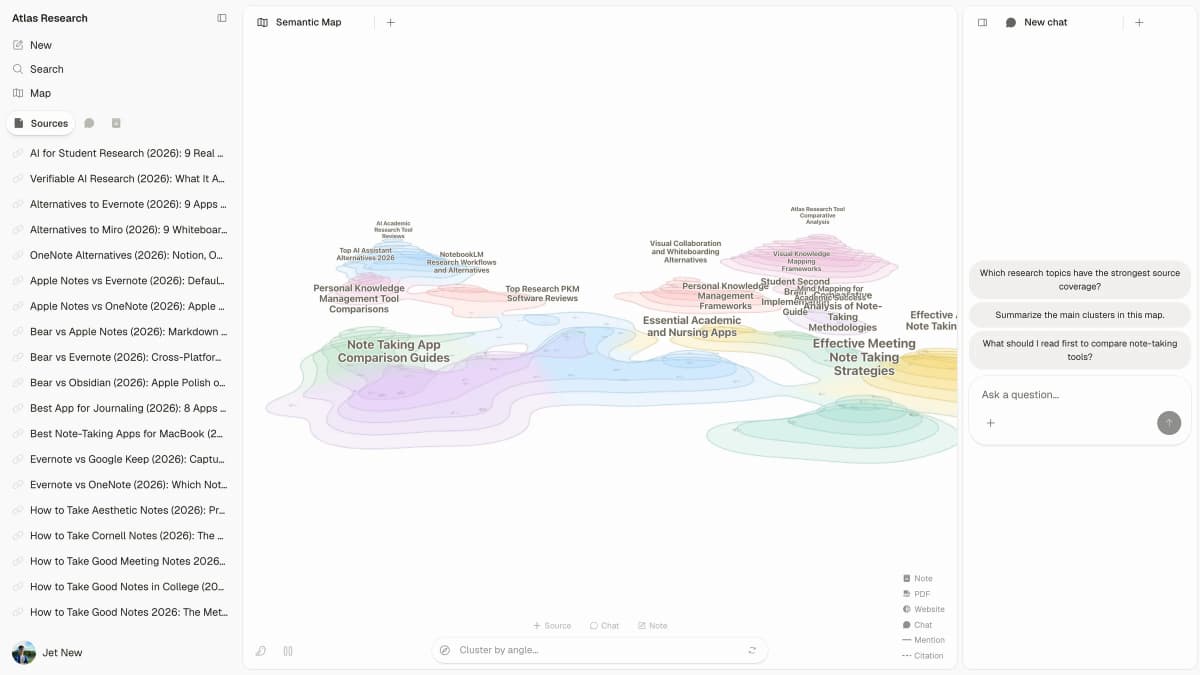
In the screenshot, the project map shows the notes and sources in use. The chat sits beside it. Follow these five steps to check an answer:
- Add your work. Import Markdown notes or add source files to a project.
- Choose what Atlas should read. Use @mentions to point the question at the right notes or sources.
- Ask the exact question. You might ask whether two meeting notes agree or which paper supports a claim.
- Open the citation. Each badge opens the passage behind that part of the answer.
- Save what you checked. Put the result in a note so the claim and its source stay together.
This is the main difference from a note maker. Atlas shows the passage behind an answer. You can check the claim instead of trusting a neat recap.
Best Notes AI tools
Atlas
Atlas is best when you have notes or sources and need to ask questions across them. Import Markdown notes or add files, then use @mentions to choose what Atlas should read.
The answer includes citation badges that open the supporting text. Atlas can also save the result as a note or show links between ideas in a knowledge map.
Turbo AI
Turbo AI turns PDFs, YouTube videos, audio, and class recordings into notes. It can also make cards, quizzes, and podcasts from the same file. It fits exam prep better than research across many files. Check its current free plan, upload limits, and phone apps first.
NoteGPT
NoteGPT works with lectures, PDFs, video, and meetings. It can make notes, visual aids, and PDF translations in one product.
Its feature list is broad. Check which tools and languages come with your plan.
Read AI
Read AI is made for meetings. It records the call, writes a recap, lists action items, and lets you search past talks.
Choose it for work calls. Do not choose it to turn a set of papers into study notes or compare claims across research files.
Mindgrasp
Mindgrasp makes study notes from files, links, YouTube videos, text, and recordings. It also makes cards and quizzes.
It suits students who study from many kinds of files. Check file support and upload limits before adding a full course.
Revisely
Revisely edits notes you have. It can make them shorter or longer, change their style, or write a brief recap.
Use it to clean up rough notes. It is not a meeting recorder or a tool for asking questions across many files.
Kuse
Kuse drafts notes from a topic or pasted text. You can ask for lecture notes, meeting minutes, a study guide, Cornell notes, or a mind map.
Choose Kuse when you need a fast first draft in a set form. Choose another tool when you need to check what a file or recording says.
Notes AI (mobile)
The Notes AI phone app saves voice memos and typed notes. It can write meeting minutes and short recaps, then keep them in one notebook.
Choose it for quick notes while away from a desk. It focuses on each new note, not questions across a large set of sources.
How to verify AI-generated notes
An AI note can look neat and still be wrong or incomplete. Use this five-step evidence check before you rely on it for study, work, or a written claim. It tests each important point against the source:
- Read the source. Open the recording, transcript, PDF, or page and check the note's main points.
- Look for missing limits. A short note may drop an exception, warning, or point of doubt.
- Watch for added claims. If the note sounds more sure than the source, the tool may have added meaning.
- Open source links. Use a citation or time stamp to read the exact part behind a claim.
- Mark unchecked claims. Flag anything you have not checked before you use it in an answer, choice, or report.
This check gets harder as your note set grows. One note is easy to compare with a short recording. Thirty class notes are not. When two tools make equally clear notes, favor the one that links each claim to its source.
Which Notes AI tool should you choose?
- For live meetings: choose Read AI.
- For lectures and class files: choose Turbo AI or Mindgrasp.
- For many file types and languages: choose NoteGPT.
- To rewrite a note: choose Revisely.
- To take voice notes on a phone: choose Notes AI.
- To draft a set note format: choose Kuse.
- To ask across saved notes and check each claim: choose Atlas.
You may need two tools. For example, Mindgrasp can make class notes. Atlas can then answer questions across a term of those notes and show the text behind each answer.
For more options, compare the best note-taking apps and smart notes apps. The guide to using AI for meeting notes goes deeper on calls.
Ask cited questions across your notes in Atlas
Ask across your notes, then open cited passages before saving the answer.