

A notes organizer is the app, structure, or workspace you use to capture notes, group them, find them later, and reuse them without losing context. The best notes organizer depends on what happens after capture: Evernote and Google Keep fit fast saving, Notion fits team pages, OneNote fits notebook-style work, and Obsidian fits linked local notes.
If you are comparing broader note-taking categories, start with the best note-taking apps guide, then come back here to choose the organizer model. Use Atlas when notes are tied to source material such as PDFs, papers, websites, reports, or class material.
Atlas is a better fit when you need grounded answers, citation checks, and a Knowledge Map tied to the source trail. That distinction matters because "notes organizer" is not one job. Some people want quick thoughts, while others need a class notebook, team wiki, linked thinking system, visual board, or AI-assisted research hub.

Organize source-backed notes in Atlas
Ask across notes and sources, then map themes you can trace to evidence.
What to look for
Most notes organizer searches collapse several jobs into one phrase. Separate the job before comparing tools.
- Quick capture. You need a place for short notes, reminders, snippets, links, and ideas before they disappear.
- Notebook structure. You want sections, pages, folders, and a clear place for class notes, meeting notes, or project notes.
- Labels and lightweight retrieval. You want tags, colors, pins, search, and a low-friction way to find notes later.
- Team knowledge base. You need shared pages, databases, permissions, templates, and project context.
- Linked note graph. You want local notes, backlinks, graph views, and a system you can maintain over time.
- Visual note pages. You want layout, design, and shareable visual notes rather than a deep research system.
- Source-grounded organization. You have notes plus source material, and you need answers or maps that can be checked against the original sources.
The last job is where Atlas belongs. Atlas is not trying to replace every quick note app.
It helps when notes are part of a source-backed workflow and the organizing problem is "what do these materials say, how do they connect, and where is the evidence?"
Notes organizer tools compared
The table below compares organization models rather than treating every app as the same kind of product.
| Tool | Best fit | Organization model | Retrieval path | Source traceability |
|---|---|---|---|---|
| Atlas | Source-backed notes, research material, and Knowledge Maps | Notes beside PDFs, websites, reports, and other sources | Grounded questions, @mentions, summaries, and Knowledge Maps | Strong when citations are inspected against the source |
| Evernote | Cross-device capture and personal organization | Notes, notebooks, tags, web clipping, tasks, and search | Search, notebooks, tags, and filters | Good for saved material, but source checks depend on the note content |
| Notion | Team notes and structured workspaces | Pages, databases, templates, embeds, and permissions | Databases, page links, search, and views | Strong for workspace context, but evidence needs manual source handling |
| Microsoft OneNote | Freeform notebooks and class or meeting notes | Notebooks, sections, pages, subpages, ink, and media | Notebook hierarchy plus search | Good for keeping context, but not a citation-first research layer |
| Google Keep | Lightweight notes, reminders, and quick labels | Notes, labels, colors, pins, reminders, and checklists | Search, labels, pinned notes, and Google account access | Low source traceability unless the source is written into the note |
| Obsidian | Local linked notes and personal knowledge systems | Markdown files, links, backlinks, folders, and graph views | Search, backlinks, local graph, and plugins | Strong if you maintain source notes and links yourself |
| Canva Docs | Visual notes and shareable designed pages | Visual docs, templates, layouts, and collaboration | Page structure and visual scanning | Useful for presentation, while source checks need a separate method |
Table 1: The right choice is usually obvious once you name the primary object. A fleeting idea needs capture. A semester needs notebooks. A team needs shared structure. A research packet needs source traceability.
When Atlas fits source-backed notes
Atlas is useful when notes are not isolated text. They are attached to sources: papers, PDFs, web pages, interview notes, reports, or class material.
The goal is not just to store the notes. The goal is to ask questions, preserve the source trail, and see how the material connects.
Use this Atlas workflow for source-backed notes.
- Import the notes and sources. Add Markdown notes, PDFs, websites, or other supported source material to a project.
- Name the relevant context. Use @mentions in chat or notes when you want Atlas to focus on a specific note, source, or source set.
- Ask a grounded question. Instead of "organize my notes," ask something narrower, such as "Which themes repeat across these field notes and which source supports each theme?"
- Inspect the citations. Open cited passages before you trust a claim, theme, or connection.
- Generate a Knowledge Map. Use the map to see clusters, relationships, and paths through dense source material. If the visual layer is the main job, compare this workflow with a dedicated concept map generator.
- Save only checked findings. Keep the answer, map node, or note only after the source still supports it.
That workflow is different from automatic filing. Atlas can help reveal structure, but the map is a reading and navigation layer. It does not prove the source is correct, and it does not replace the judgment needed to check the original text.
Best notes organizer tools
1. Atlas
Atlas is best when notes are connected to source material. Use it for research notes, reading notes, paper notes, report notes, and class material.
It also fits project sources that need to stay checkable.
The strength is source-grounded organization. You can bring notes and sources into the same workspace, ask grounded questions, inspect citations, and create a Knowledge Map for dense material.
That makes Atlas a strong fit when the question is not "where did I put this note?" but "what does this source set say and how do the ideas connect?"
Atlas is not the best choice for a grocery list, a daily scratchpad, or a generic team wiki. It earns its place when notes need evidence.
2. Evernote
Evernote is a strong capture-first app for organized notes. It is built around notebooks, tags, search, web clipping, tasks, and cross-device access.
Choose Evernote when the main job is saving ideas, web pages, receipts, meeting notes, or personal reference material and finding it later. It is less specialized for source-grounded synthesis unless you build that discipline into your own note format.
3. Notion
Notion fits structured notes and shared workspaces. Pages, databases, templates, embeds, and views make it useful for teams that want notes tied to projects, tasks, docs, and planning systems.
Choose Notion when collaboration and flexible structure matter more than a classic notebook model. For research notes, add a source field, evidence field, and review status. Those fields keep unsupported summaries from mixing with checked findings.
4. Microsoft OneNote
OneNote is the safest choice for people who think in notebooks. It gives you notebooks, sections, pages, subpages, freeform layout, ink, images, and search.
Choose OneNote for class notes, meeting notes, personal notebooks, and mixed typed or handwritten material. It keeps that material in familiar notebook form but leaves citation mapping to your own note system.
5. Google Keep
Google Keep is best for lightweight capture. Labels, colors, pins, reminders, checklists, and fast search make it useful for short notes that do not need a deep structure.
Choose Keep when speed matters more than hierarchy. It is a poor fit for a large research library or a long-term knowledge system because the organization model is intentionally simple.
6. Obsidian
Obsidian is best for local Markdown notes and linked-note systems. Backlinks, graph views, folders, and plugins make it powerful for users who want to build their own personal knowledge system.
Choose Obsidian when you are willing to maintain links, note names, and source notes yourself. It can be excellent for long-term thinking, but the quality of the system depends on the structure you create.
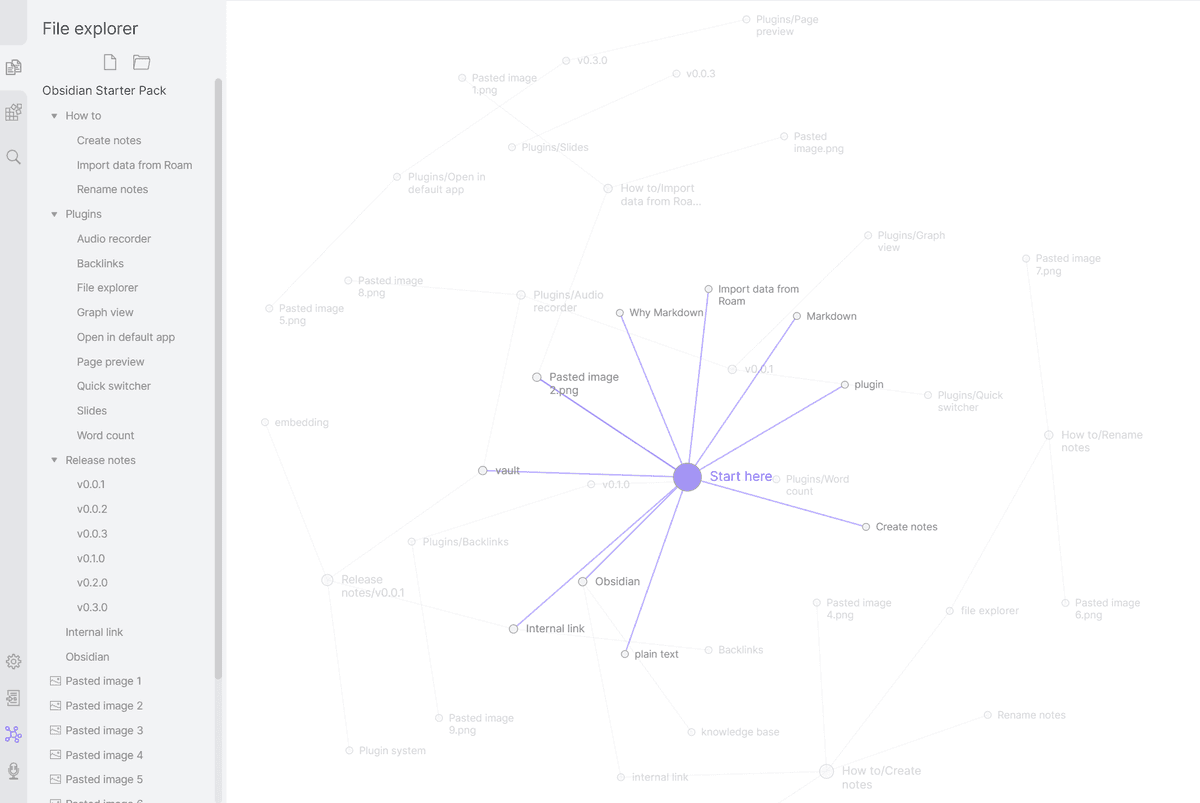
This official Obsidian Help screenshot supports the graph-view comparison. Notes appear as nodes, and internal links become visible paths through the vault.
7. Canva
Canva fits visual notes, simple docs, and designed pages. It is useful when the output needs to be readable, attractive, and easy to share.
Choose Canva when the note is closer to a visual handout, worksheet, template, or presentation page. It is not the right primary tool for source-backed note retrieval or citation checks.
A practical method for organizing notes
The best tool will still fail if every note is a loose summary with no next step, source, or review habit. Use a small method that works across tools.
- Capture. Get the note down quickly, with enough context that it will make sense later.
- Connect. Add the project, source, person, topic, or adjacent note that gives the note meaning.
- Retrieve. Use a title, tag, folder, database property, or link that matches how you will search for it later.
- Verify. For research or decision notes, keep the claim tied to the source passage, dataset, meeting record, or document it came from.
- Reuse. Turn checked notes into an answer, outline, map, brief, or task only after the context still holds.
Keep the method small because most notes systems fail when every note carries too much metadata. Start with the few fields you will use during search, review, or reuse.
For everyday notes, that may be title, folder, and label. For research notes, it should include source, claim, evidence, caveat, and next action.
Which notes organizer should you choose?
Choose by failure mode.
If you lose quick thoughts, choose Google Keep or Evernote. If class notes or meeting notes feel scattered, choose OneNote. If team information lacks a shared home, choose Notion. If your local notes need links and a graph, choose Obsidian as the linked-note option. If notes need to become visual pages, choose Canva for shareable visual notes.
Choose Atlas when the note is only useful if it remains connected to the source behind it. That is common for research, analysis, studying, policy work, customer research, market research, and any workflow where a note becomes a claim someone else may rely on.
Use capture-first tools to save notes quickly. Use structure tools to arrange notes for people or projects.
Use Atlas when notes and sources need to become checkable answers and maps. For a broader system around notes, sources, and reusable knowledge, see the personal knowledge management guide.
Organize source-backed notes in Atlas
Ask across notes and sources, then map themes you can trace to evidence.