

A document organizer can store files or help you read them. Cloud tools such as Box control where files live and who can open them. AI workspaces such as Atlas help you ask questions, compare sources, and map what the files say.
A binder or file box has a different job. It protects paper records, but it cannot search their text or help a team work with them.
This guide covers all 3 jobs. Box manages shared files. Atlas helps you study files you have chosen. A binder keeps paper records in one place.

Map your documents with citations in Atlas
Ask cited questions across your documents, then map the verified findings.
Quick answer
Use Box when a team needs one place for shared files, search, access rules, and long-term storage. It is built to manage company files. It does not focus on answers that cite one passage inside a file.
Use Atlas when you need to read, question, compare, or map what is inside your files. This is the same job covered by an AI document reader or document comparison tool. Atlas does not store paper records or replace a company file system.
Add the files as sources and ask a clear question. Open the citations to check the answer. Then create a knowledge map to see how the ideas and sources link together.
Use a binder, folder, or fireproof box for paper records such as ID cards, deeds, tax forms, or insurance papers.
How to choose a document organizer
Start by naming the job. A binder and an AI workspace do not solve the same problem. These 5 questions will narrow the choice:
- What are you protecting? Paper records such as ID cards, deeds, or wills need a binder, fireproof box, or safe-deposit box. Files on a computer do not.
- How fast do you need to find something? Grab-and-go emergency access favors a labeled binder or folder near the door. Searching across hundreds of files favors a digital system with full-text search.
- Is this a home or team job? Home records may fit in one binder or file box. A team with many shared files needs cloud storage, access rules, and a record of changes.
- Do you need to study what the files say? Storage will not compare PDFs, answer questions, or show how ideas relate. An AI document comparison tool can find changes between files. Atlas can answer broader questions across a set of sources.
- Do you need citations? If an answer must be checked against the source text, choose a system that links each claim to a passage. A folder or legal document organizer for paper cannot do this.
Next, find the step where you need help. Most tools cover only part of this list:
- Add the paper or file to a system by filing, scanning, or uploading it.
- Label it so you can find it later.
- Find the right file when you need it.
- Check a fact or number inside the file.
- Compare facts and ideas across several files.
- Store old files without filling the space used for current work.
Binders help you add, label, and find paper. Box does the same for shared company files and adds access rules. Atlas helps with the later steps: checking claims, comparing sources, and mapping what a set of files says.
Document organizers compared
| Category | Best for | What it does not solve | When to choose it |
|---|---|---|---|
| Source-grounded AI workspace (Atlas) | Reading, questioning, comparing, and mapping the content of imported documents | Physical custody of originals, enterprise file governance, legal storage compliance | You need cited answers and a knowledge map from documents you already have |
| Enterprise cloud document management (Box) | Centralized digital files, permissions, and lifecycle controls at team or company scale | Reading depth, cited answers, mapping relationships inside a document | Your team needs a governed shared drive with search and access controls |
| Physical binder or file box | Grab-and-go access to a small set of critical paper originals | Search, digital backup, multi-user access, understanding content | You need one protected place for insurance, ID, estate, or emergency papers |
Table 1: Atlas and Box both work with computer files, but their jobs differ. Box controls where files live and who can open them. Atlas helps you study what the files say.
The Savor product image below shows its Folio open and closed. It is a paper case that you can grab in an emergency. It does not search files, cite text, or compare ideas.
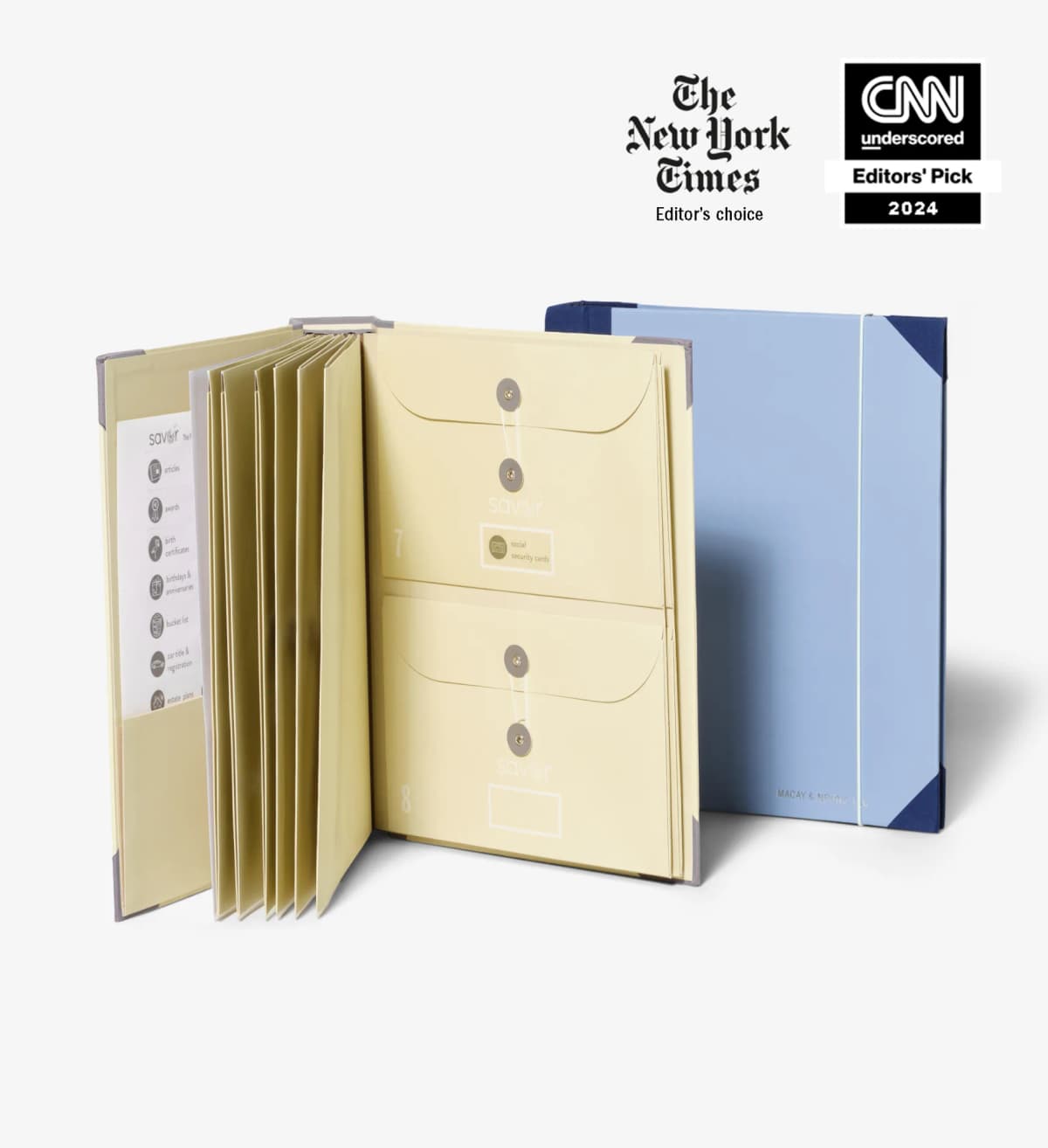
The image shows named sections and pockets for paper records.
Where Atlas fits: source-grounded document maps
Atlas becomes useful after you know which files to study. Add files from your computer or sources you are allowed to use. You can then ask questions and compare what they say instead of filing them again.
The work has 5 steps:
- Add the sources. Atlas accepts PDFs, web pages, YouTube transcripts, papers, and text notes. PDFs work best when you can select their text. See organize PDFs for more help.
- Wait for the source to finish loading. A PDF must be ready before Atlas can search it, cite it, or answer questions about it.
- Ask a clear question. You might ask which policy covers a case or what a set of records says about a date. An AI research assistant uses the same approach in a larger project.
- Open the citation. Read the source passage before you accept the answer. The AI citation checker guide explains this check in more detail.
- Create a knowledge map. Use the map to see how claims, ideas, and sources link across the files.
Atlas needs files that you can add to a project. It does not replace a fireproof box for a passport or the main contract system used by a company.
Atlas answers from the source text you provide. A person should still read the cited passage behind each important claim.
Best document organizers
Atlas
Atlas is the best fit when you need to study files rather than store them. Add sources, ask cited questions, and create a knowledge map to see how the content links together. You can also use it as an AI document reader, to compare file versions, or to study a set of contracts.
Atlas does not hold paper records or replace a company's main file system.
Box
Box gives a team one cloud space for files. It adds search, access rules, storage policies, and tools to manage company content. Choose it when the main question is where files live and who can open them.
It does not focus on cited answers or maps of the claims inside your files.
Physical document organizers
Use a paper organizer when the items you must protect are paper records. The Savor Folio has named sections and pockets for home records. NewlyNamed focuses on forms used after a name change. A basic binder, folder, or file box costs less when you know the size you need.
Paper organizers keep records together and easy to label. They do not offer text search, team access, backups, cited answers, or knowledge maps.
Which document organizer should you choose?
Choose Box when a team needs to store, search, and control access to many files.
Choose Atlas when you have files and need to study what they say. Add them as sources, ask a question, and open the citations. Create a knowledge map when you want to see how the pieces link.
Choose a binder, file box, or fireproof case for paper records such as ID cards, deeds, insurance papers, or estate forms. You do not need software for that job.
You may need more than one option. A binder can hold paper records, Box can manage shared team files, and Atlas can help you study a chosen set of sources.
For more help, see AI document comparison, document comparison tools, how to organize PDFs, and AI research assistants.
Map your documents with citations in Atlas
Ask cited questions across your documents, then map the verified findings.