

A contract organizer keeps signed files, owners, dates, and tasks in one place. Use a contract system when your team must track renewals, approvals, and access to each file.
- Use templates only when the job is creating a service agreement.
- Use physical organizers for jobsite papers and forms.
- Use Atlas when you need to read a set of contracts, ask cited questions, and map the facts you find.

Map contract sources with citations in Atlas
Turn your contracts into cited answers and a Knowledge Map you can inspect.
What to look for
The term "contract organizer" can mean five different things:
- File storage. The team needs one place for signed contracts, attachments, changes, and past versions.
- Date and task tracking. The team needs owners, due dates, renewal dates, sign-offs, and alerts.
- Contract templates. A professional organizer or service business needs a starting agreement for client work.
- Physical paperwork. A contractor needs folders, forms, receipts, or jobsite documents kept together.
- Contract review. A reader needs to ask questions across PDFs and open the clause behind each answer.
Start with the job instead of the longest feature list. Use contract software for renewals and approvals. Use a reading tool when you need to compare what the contracts say.
Contract organizer comparison table
This table separates file and task management from contract reading. A contract system stores the signed files and tracks their status. Atlas can then help you read copies of those files and check cited answers.
| Option | Best fit | Evidence path | Atlas fit |
|---|---|---|---|
| Atlas | Cited questions, cross-contract synthesis, and Knowledge Maps from uploaded sources | Open citations, inspect clauses, and map obligations or entities | Good fit for reading and source-linked synthesis |
| Aptien-style contract organizer | Contract register, attachments, tasks, notes, search, and deadline tracking | Check contract types, fields, reminders, and attachment workflow | Use Atlas only for source Q&A over contract copies |
| ContractWorks or CLM tools | Legal-team repository, reporting, collaboration, e-signature, and AI tagging | Check system-of-record controls, permissions, version history, and exports | Pair with Atlas for cited reading when contracts become research sources |
| Concord, Zoho Contracts, or Contractbook-style tools | Contract lifecycle, approvals, templates, negotiation, and renewals | Check lifecycle stage support and integration needs | Not a replacement for source maps |
| Professional organizer templates | Creating a client service agreement | Check jurisdiction, customization, attorney review, and signature flow | No fit unless the signed contract later needs review |
| Physical contractor organizers | Jobsite forms, receipts, folders, and portable paperwork | Check durability, capacity, labels, and document types | No fit for storage hardware |
Table 1: Use the table to make a short list. Keep the signed record in a contract system. Use Atlas when the next task is reading and comparing the text.
For related jobs, see AI contract readers, contract AI software, document comparison tools, and chat with document.
Where Atlas fits
Atlas fits when you need to read and compare contract copies. Add the PDFs and wait until each file is ready. Then ask a clear question, such as "Which contracts mention renewal and notice periods?"
Open the cited clauses before you make a Knowledge Map of the people, duties, and dates you found.
- Add the signed contracts, changes, and exhibits to one Atlas project.
- Wait until each file is ready.
- Ask one clear question at a time.
- Open the source link for each answer and read the full clause.
- Make a Knowledge Map after you check the key people, duties, dates, and limits against the text.
The Atlas screen keeps the source text open beside the answer. You can check the cited passage before you add a fact to the map. The map keeps its link to that source.
Use the same steps for signed contracts, changes, exhibits, and renewal notices. Ask about one clause, open the source, and read the text around it. Then add the checked fact to the map.
Atlas reads source copies. Use contract software for the signed record, renewals, approvals, drafts, and redlines. Use a lawyer for legal advice.
Best contract organizer options
These options solve different jobs. Test the closest fit with your own files and work rules.
Atlas
Atlas is best for cited questions across PDFs you add. It can compare several contracts and make a Knowledge Map that keeps links to the source. Use it to read and compare contract copies, then open the cited clause behind each answer. Keep signed files, owners, approval steps, and renewal dates in your main contract system.
Aptien Contracts Organizer
Aptien fits teams that need a list of contracts with owners, notes, tasks, files, search, and due dates. Choose this type of tool when the main job is team tracking. Test how it handles your contract types, changes, file links, and alerts before moving the signed record.
ContractWorks, LegalOn, or CLM tools
ContractWorks-style tools help legal and work teams store contracts, control access, make reports, sign files, and track each stage. LegalOn focuses more on clause review. Test these tools when a shared folder is no longer enough. Compare their access rules, file history, exports, and links to the software your team already uses.
When a tool claims to review clauses, check whether it shows the source text beside the finding. The LegalOn image below shows this layout.
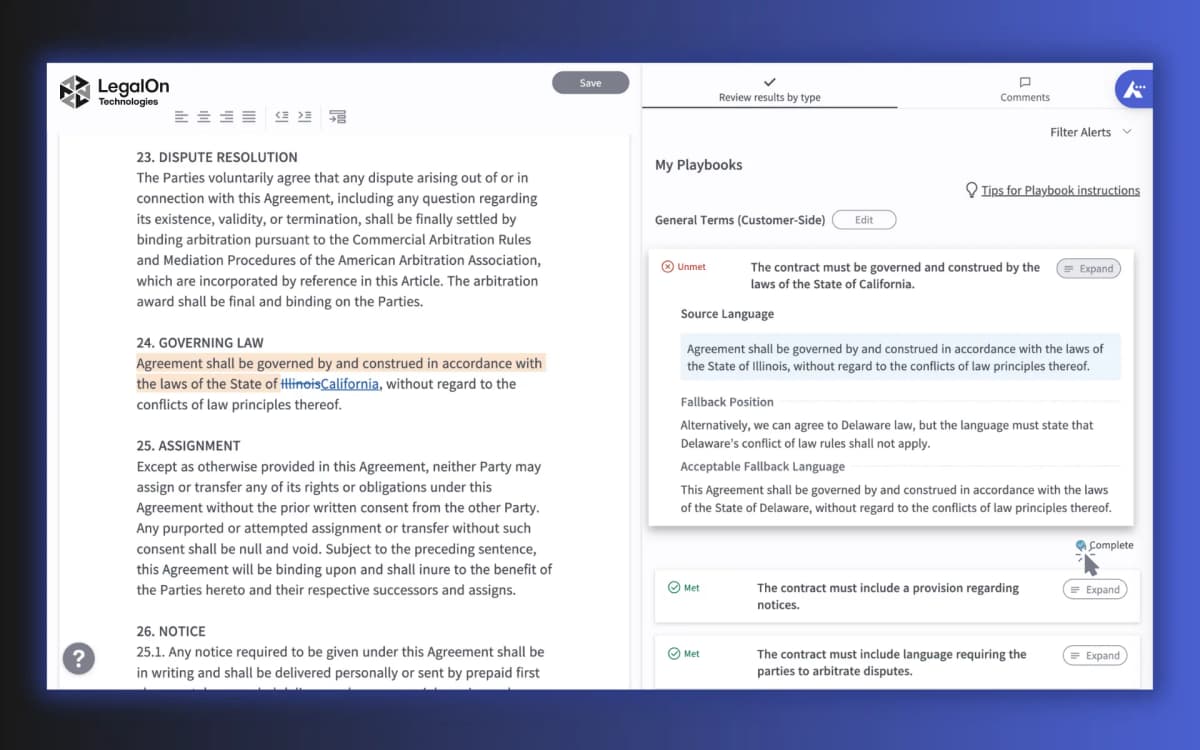
LegalOn shows the contract text beside the review result. Look for this source check when you test any review tool.
ServiceNow Contract Management Pro
ServiceNow fits large teams that manage contracts as part of a wider work process. Its storage guide explains how to link approved file stores and limit access by role. It is built for a company setup rather than one person. Check whether your team needs that setup work before you put it on the short list.
Concord, Zoho Contracts, or Contractbook
These tools help teams draft, approve, sign, store, and renew contracts in one shared space. Check how they link to your other tools and who can view or change each file. Test a full contract from draft through renewal so you can see whether each handoff fits your team.
Jotform Organizing Services Contract
Jotform offers a template for a professional organizer's service contract. Use it as a draft, then ask a lawyer to check the work scope, price, payment dates, end terms, and key risks. A template creates the contract but does not store or track the signed file.
Etsy Professional Organizer Contract Template
Etsy templates give a small service firm text it can edit. They do not store or track signed contracts. Ask a lawyer to check the law, work scope, price, exit terms, and risk terms.
Physical contractor organizers
Folders and clipboards help carry receipts, forms, permits, and other jobsite papers. They do not search files, track due dates, control access, or review clauses.
Legal and system-of-record boundaries
A contract organizer can make files easier to find. It cannot make a legal choice for you.
- Use a contract system for the signed record, renewal dates, approvals, signatures, access, and change history.
- Use templates only as starting points. Counsel should confirm whether the agreement is enforceable and appropriate.
- Use Atlas to read contract copies, ask cited questions, compare files, and make maps.
- Ask a lawyer to explain terms that could create legal or business risk.
Which contract organizer should you choose?
Match the organizer to the task:
- Use a contract system to store signed files and track due dates, approvals, signatures, and access.
- Use a template to draft a new service contract.
- Use a folder or clipboard to carry jobsite papers.
- Use Atlas for cited answers, a comparison across contracts, or a Knowledge Map.
Many teams use both. Their contract system stores and tracks signed files. Atlas helps them read and compare copies of those files.
For related work, see legal document organizers, AI contract analysis, legal documents AI, and AI legal document summarizers.
Map contract sources with citations in Atlas
Turn your contracts into cited answers and a Knowledge Map you can inspect.