

Contract AI software can read, draft, summarize, compare, or flag terms in an agreement. These tools serve different needs. Some review contracts against a legal playbook. Others work inside Word, compare clauses, search a contract library, or link findings to the source text.
For most buyers, I would separate the shortlist this way:
-
Use Atlas when the contracts are already source material. Build a cited checklist, compare issues across documents, and inspect clause language before acting.
-
Use Luminance when a large legal team wants one tool for many kinds of contract work.
-
Use LegalOn when an in-house team wants attorney-built review playbooks and consistent contract review workflows.
-
Use Spellbook when lawyers want AI drafting and review support inside Microsoft Word.
-
Use Lexis+ Agreement Analysis when lawyers need to compare negotiated clauses with other clause language and legal research.
-
Use goHeather when a smaller legal or business user wants accessible contract review and fast issue spotting. Contract AI can save time on review, but its output is not legal advice. A lawyer should still review sensitive or high-value contracts.

Build a cited contract review checklist in Atlas
Compare contract issues and inspect the cited clause behind each finding.
How to choose contract AI software
Start with the contract task your team needs to finish. Tools that look similar in search results may solve very different problems. One may review new contracts against company rules. Another may help a lawyer draft in Word. A third may search contracts your company has already signed.
This guide focuses on contract review and risk checks. A chat PDF tool has a wider role: it answers questions about many types of files.
6 types of contract AI software
Use these groups to tell similar-looking tools apart.
- Contract review playbooks: tools that check an agreement against your preferred terms, backup terms, and review rules.
- Drafting and redlining add-ins: tools that sit close to Microsoft Word and help lawyers draft, revise, explain, or negotiate contract language.
- Company-wide contract analysis: platforms that organize, analyze, and report on contracts for legal and business teams.
- Clause comparisons: legal research tools that compare a negotiated clause with other wording and legal context.
- Self-serve review apps: lighter tools for faster first-pass review by lawyers, founders, operators, or small teams.
- Cited source checks: tools that link each finding to the contract text. A reviewer can read the source before making a decision.
Questions to ask before buying
Ask each vendor the same questions:
- which contract types the tool can read
- whether it follows your rules or gives open-ended answers
- whether it can make redlines
- whether it works with Word or your contract system
- how it protects private files
- how it sends each finding to the right owner
Contract AI software compared
There is no useful single ranking for these tools. The best choice depends on where the work happens and what the reviewer needs to produce.
| Software | Best fit | Workflow surface | Evidence posture | Main caveat |
|---|---|---|---|---|
| Atlas | Cited contract reading and review checklists over uploaded contracts | Import contract PDFs, ask grounded questions, compare issues, and open citations | Findings can stay tied to source passages the reviewer inspects | Use it for evidence checks, with counsel owning legal advice, CLM, and redlines |
| Luminance | Enterprise legal teams that need contract AI across many touchpoints | Drafting, negotiation, analysis, review, compliance, investigation, and collaboration | Enterprise contract platform framing with contract analysis and term extraction | Refresh current implementation, pricing, security, and integration claims before procurement |
| Lexis+ Agreement Analysis | Legal professionals comparing negotiated clauses | Clause analysis inside the Lexis+ legal research environment | Matches negotiated clauses with alternate language and legal-research context | Treat it as clause analysis with research context rather than a self-serve CLM |
| LegalOn | In-house legal teams standardizing contract review | Attorney-built playbooks, risk spotting, non-standard language checks, and review workflows | Review output is structured around playbooks and legal-team consistency | Do not rely on speed, benchmark, or playbook-count claims without current verification |
| Spellbook | Transactional lawyers drafting and reviewing in Word | Microsoft Word-based drafting, review, clause generation, and redline support | Works close to the document where lawyers already draft and negotiate | Evaluate it for drafting and review assistance rather than full CLM ownership |
| goHeather | Smaller legal or business users that need accessible first-pass review | Upload-and-review workflow for issue spotting and contract review support | Useful for fast triage when the buyer accepts a lighter workflow | Vendor-authored rankings should not be treated as independent proof |
Table 1: Use the table to pick two or three tools. Test each one on the same contracts so you can compare its findings.
Cited contract evidence matrix
A cited evidence table is useful when every issue must link back to the contract. Give it columns for the contract name, issue, clause text, business question, next step, and source.
That format works across review tools, Word add-ins, CLM exports, and source-grounded workspaces.
Build a cited checklist
Start by putting the contracts in one workspace. Make sure each file is ready, then ask for a table that keeps the contracts separate. Name the clauses you want to check and the columns you need.
Compare these contracts for termination rights, auto-renewal language, liability caps, indemnity duties, data-use limits, and assignment consent. Return a table with contract name, issue, clause text, risk question, and citation.
In Atlas, import the contract PDFs into one project and ask your question. Open each citation before turning a finding into a review task.
The first pass should expose 3 review checks.
| Atlas step | What the reviewer should see | Why it matters |
|---|---|---|
| Import the contract PDFs | Each agreement appears as its own processed source | The checklist can separate findings by document instead of blending contracts |
| Ask for one cited row per issue | Rows name the contract, clause topic, short clause text, risk question, and citation | The output is reviewable instead of a detached summary |
| Open the citation | Atlas takes the reviewer back to the cited passage or source context | The reviewer can inspect the exact language before acting |
| Revise weak rows | The reviewer asks Atlas to narrow, cite, or separate any unsupported finding | Weak evidence is fixed before the checklist moves forward |
Table 2: Each checklist row stays useful because the reviewer can trace it to the contract.
Verify each cited row
The first answer is a starting point. Check each row:
- Keep findings from each contract separate.
- Require one cited claim per bullet or table row.
- Open the source for any clause that could create legal, money, work, or customer risk.
- Read nearby terms, limits, carve-outs, and linked clauses.
- Compare the finding with your rules and goals.
- Send legal calls, deal plans, and unusual wording to counsel.
A reliable tool should link every row to a contract passage. The reviewer must check that the passage supports the finding. A lawyer should make the legal call.
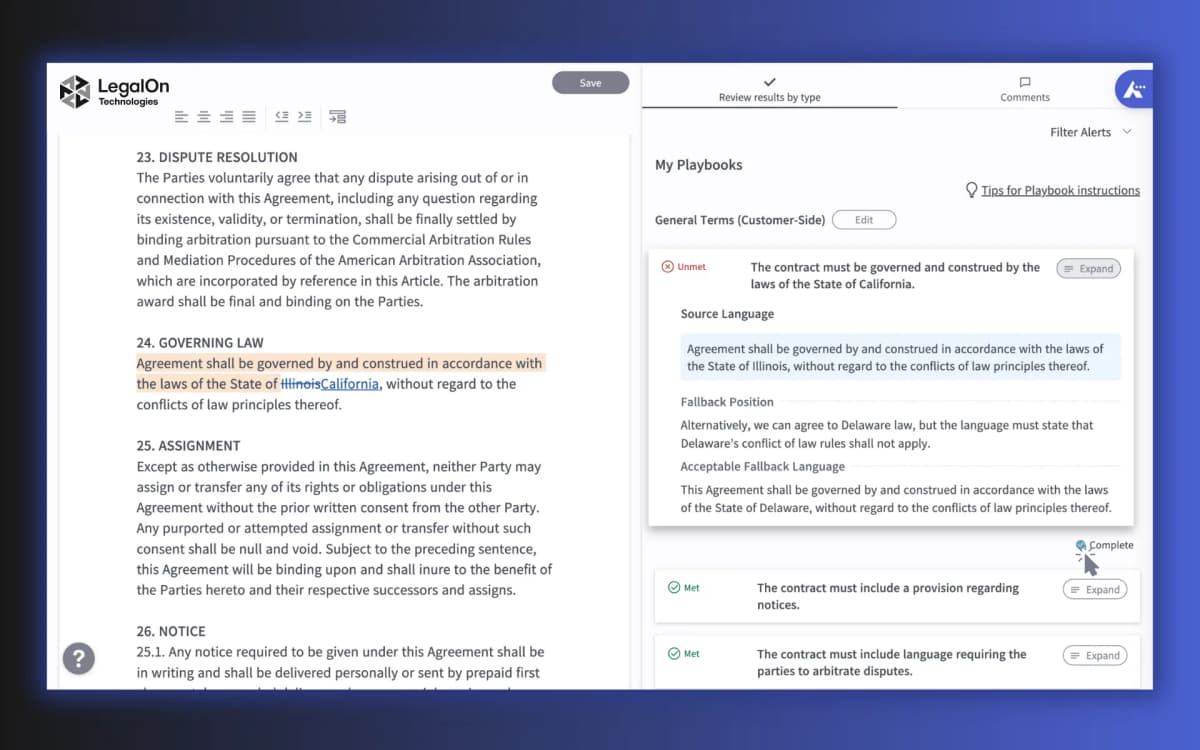
This official LegalOn My Playbooks screenshot shows a contract review surface buyers should inspect during demos. Look for contract text, issue alerts, suggested guidance, and enough context to check the clause before accepting a finding.
Best contract AI software
1. Atlas
Atlas is best when reviewers need to check the evidence behind each finding. Add contracts, amendments, policies, vendor terms, or due-diligence files. Atlas can turn them into a cited issue checklist.
Import the contract PDFs and ask a specific question. Keep the results separate by contract. Then open each citation and check the exact clause.
Save or share the checklist only after that source check. Lawyers and contract owners still handle legal review, redlines, CLM approvals, and deal advice.
Use Atlas to compare language across contracts, keep a record of sources, or prepare questions for counsel. Do not use it to make final decisions about the law or deal strategy.
If your main job is source checking rather than software selection, the chat PDF guide covers adjacent document Q&A workflows. If the file set itself is the bottleneck, the organize PDFs guide covers page order, tags, and OCR before review.
2. Luminance
Luminance fits large legal teams that want one platform for several contract tasks. Its contract review page covers review, term finding, and contract storage.
The Luminance product site also covers drafting, deal talks, rule checks, fact finding, and team work. Review those features if you need more than contract review.
Consider Luminance if your legal team needs a broad platform rather than a simple review tool. Before buying, confirm its features, setup, links to other tools, file safety, rollout plan, and price.
3. Lexis+ Agreement Analysis
Lexis+ Agreement Analysis fits lawyers who need to compare clauses and consult legal research. Its official product page says the tool finds heavily negotiated clauses and matches them with other wording.
This is different from a general contract summary tool. Choose it when a lawyer needs examples of other clause wording or research that explains the legal context.
4. LegalOn
LegalOn fits in-house legal teams that want every review to follow the same rules. Its AI contract review software page covers lawyer-built playbooks, risk flags, unusual language, and standard review steps.
LegalOn also publishes a contract review tools guide. Check any feature claims in that guide against the current product pages.
Playbooks help when a team reviews the same contract types each week. They apply the same rules to every agreement instead of relying on an open-ended chat prompt.
During evaluation, verify the agreement types, playbooks, workflow steps, and integrations supported for your team.
5. Spellbook
Spellbook fits lawyers who draft and review contracts in Microsoft Word. The official Spellbook site covers drafting, review, clause creation, and redlines.
Because Spellbook works in Word, lawyers do not have to move between tools while drafting.
The main caveat is category fit. Check current product materials before treating it as a full CLM, contract repository, or legal adviser.
6. goHeather
goHeather fits buyers who want a quick first review without a large company rollout. Its AI contract review comparison describes uses for lawyers, small firms, founders, and operators.
Use it to flag risks for a first review.
Vendor comparisons can favor the company that published them. Other examples include guides from LegalFly, ContractSafe, Juro, and Ironclad.
Check claims against current product pages, demos, contracts, and safety terms before you use it with private files.
Legal and workflow boundaries to check
Contract AI can prepare a review, but it cannot take responsibility for legal advice. Open the exact clause before trusting a summary. Read the terms it defines, the limits to those terms, its exhibits, and linked clauses. Check how the clause applies to this deal.
Compare the finding with your preferred and backup terms. Send private, high-risk, high-value, or odd issues to counsel. Save the source passage so the next reviewer can check it.
Before buying, test your contract types. Make sure the tool saves its sources and can export its findings. It should also work with Word or your contract system. Check that it meets your file safety rules and sends questions to the legal owner.
For source-heavy reviews, see the AI that cites sources guide for citation checks beyond contracts. If the review archive is broader than contracts, the legal document AI guide covers adjacent legal-document review workflows.
For related file work, use chat PDF to ask questions about sources. Use organize PDFs to prepare files. Use personal knowledge management to keep notes easy to find.
Which contract AI software should you choose?
Pick the tool that fits the work:
- Large legal teams with many contract tasks: Luminance
- In-house teams that use set review rules: LegalOn
- Lawyers who draft and review in Word: Spellbook
- Lawyers who compare clauses with legal research: Lexis+ Agreement Analysis
- Small teams that want a quick first review: goHeather
Choose Atlas when you need to compare a set of contracts and open the source behind each finding. It can build a cited checklist across those files. Use a lawyer or a legal tool for advice, redlines, contract tracking, and e-signing.
The AI contract analysis guide explains how to pull facts from many contracts and compare them.
Test each tool with the same four contracts:
- one routine agreement
- one messy agreement
- one contract with known playbook deviations
- one contract that requires escalation
Compare what each tool found and missed. Make sure reviewers can inspect the source and send the result to the next legal or business step.
Build a cited contract review checklist in Atlas
Compare contract issues and inspect the cited clause behind each finding.