

Legal document AI is not one product category. The same query can mean a guided document generator, a contract reviewer, or a consumer document explainer. It can also mean a legal research assistant or a workspace for checking source evidence. If the source files are PDF-heavy but not legal-specific, start with the broader chat with PDF workflow.
Start with the job. Use a drafting tool for the first version of a form or letter. Use a review tool to find clauses and risks. Use Atlas to ask questions about source files and check the cited passages.
Legal AI can be wrong, incomplete, or too sure. This guide helps you choose software; it is not legal advice. Send major legal decisions to counsel.

Analyze legal documents with cited answers
Ask a narrow question, open each citation, and check the source before relying.
Quick answer
For most legal document AI searches, start by separating drafting from review.
-
Use Atlas when you have the files and need answers linked to passages you can open.
-
Use DocDraft to make a first draft with an option for lawyer review.
-
Use Lawdistrict Lawgenius for plain summaries and Q&A over an uploaded file.
-
Use Justee to find risks and the clauses tied to them.
-
Use Paxton when a lawyer wants drafting, file review, and research in one tool.
-
Use AI Lawyer for broad legal Q&A and mobile access. For any important answer, demand a clear source trail. Open the clause, key term, exception, and nearby text behind the AI claim.
How to choose legal document AI
Legal document AI tools tend to fall into seven jobs. A product can cover more than one job, but the risk changes when the tool moves from summarizing text to giving legal conclusions.
| Legal document AI job | What the tool does | What to verify before relying on it |
|---|---|---|
| Drafting | Generates a first version of a document, letter, clause, or form from intake answers or prompts. | Jurisdiction, factual inputs, defined terms, missing clauses, enforceability, and attorney review path. |
| Summarizing | Turns a legal document into key facts, obligations, parties, dates, and clause explanations. | Whether the summary links back to the source text and preserves exceptions, carveouts, and definitions. |
| Review and risk spotting | Flags issues, compliance risks, unfair terms, or unusual clauses. | Whether the issue has a clause reference, legal basis, severity explanation, and human review workflow. |
| Legal research | Finds or explains legal authorities, rules, cases, or regulatory context. | Source coverage, citation integrity, jurisdiction, currency, and whether the tool is built for lawyers. |
| Document Q&A | Answers questions about an uploaded legal document. | Whether answers stay inside the document and whether citations open the exact passage. |
| Compliance checking | Compares a document against a policy, regulation, statute, or checklist. | Coverage limits, jurisdiction limits, update cadence, and audit trail. |
| Cited evidence analysis | Helps inspect source passages, compare documents, and build a verifiable analysis trail. | Citation quality, source viewer behavior, multi-source separation, and escalation to counsel. |
Table 1: Do not choose by the most impressive demo answer. Choose by the point where a mistake becomes expensive. A lease summary, an NDA red flag, a litigation memo, and a policy compliance review need different evidence standards.
Legal document AI tools compared
For this July 2026 draft, I used current official product pages for tool claims. The comparison leaves out volatile pricing, security, and accuracy claims unless the vendor page states them directly.
If the real task is file prep before review, pair this list with an organize PDFs workflow.
| Tool | Best fit | Main document job | Evidence and review posture |
|---|---|---|---|
| Atlas | Cited analysis over documents you need to verify | Document Q&A, source inspection, multi-source synthesis | Answers can include citation badges that open source passages. The user still verifies whether the passage supports the claim. |
| DocDraft | Guided legal document drafting plus attorney help | Drafting, analysis, revisions, legal questions | Positions AI drafting alongside licensed-attorney review and ongoing support. |
| Lawdistrict Lawgenius | Consumer document summaries and Q&A | Summaries, clauses, key facts, document-specific chat | Uploads PDF or Word documents, answers inside the document, and states it does not replace professional legal advice. |
| Justee | Fast legal document review and risk findings | Review, compliance checks, reports | Supports PDF, Word, and pasted-text uploads and returns organized findings with clause references and recommendations. |
| Paxton | Lawyers and legal teams | Drafting, document analysis, contextual research | Built for legal professionals. Combines drafting, document analysis, and legal research with security positioning. |
| AI Lawyer | Broad legal assistant access | Legal Q&A, document handling, mobile use | Offers web, iOS, and Android access with document automation, research, and conversational legal help. |
Table 2: The table is not a legal reliability ranking. It is a fit map. A tool can be useful for one document job and still be the wrong place to make an unsupported legal judgment.
Where Atlas fits for cited review
Atlas fits the source-checking part of legal document AI. It is strongest when you have source material and need a narrow question answered with citations.
Use it when you need to inspect the cited passage and preserve what you verified.
Here is the Atlas analysis sequence I would use for a legal document review pass:
- Import suitable source documents into the relevant project. PDFs work best when they are not password-protected and contain selectable text.
- Confirm processing quality before asking legal questions. Open the document, check that pages render, search for a known phrase, and make sure the source text is usable.
- Ask a narrow grounded question. For example: "Which duties survive the end of this agreement?" or "Compare the NDA exceptions."
- Open each citation badge attached to the answer. Read the highlighted passage and the surrounding paragraph.
- Check definitions, exceptions, governing law, dates, exhibits, schedules, and linked clauses before accepting the answer.
- If sources conflict, save the verified passages as an analysis note. For high-stakes documents, send the legal conclusion to counsel.
This is why Atlas belongs in the comparison. It is not a legal drafting product, legal research database, redlining engine, or law firm.
Atlas helps when the next step is source checking. Ask a cited question, compare source documents, and decide what still needs human legal judgment.
For a deeper review path focused on extracting obligations, exceptions, and risks from files, use the narrower legal document analysis AI workflow.
Best legal document AI tools
Atlas
Atlas is best for source-grounded legal document analysis when the reader already has the documents and needs answers they can check. It is a good next step after a generator, reviewer, or research assistant produces a claim. Use Atlas when that claim still needs source inspection.
Use Atlas for questions such as:
- Which clause supports this obligation?
- Does the document define this term somewhere else?
- What exception limits this right?
- How do these two agreements treat termination or assignment?
- Where are the confidentiality exceptions?
- Which cited passage should counsel inspect before a decision?
The important boundary is product category. Atlas can import PDFs and other supported source types. It can answer grounded questions from project sources, show citation badges, open source passages, and synthesize across multiple sources. It should not be treated as a lawyer, legal advice provider, redlining tool, or CLM system. It also cannot guarantee that a legal conclusion is correct.
DocDraft
DocDraft is best when the job starts with drafting. Its official page positions the product around drafting a document, analyzing a document, revising a document, and researching a legal question. It also describes guided intake and access to licensed attorneys for review, strategy, and custom edits.
The official DocDraft homepage presents 4 entry points:
- draft a document
- analyze a document
- revise a document
- research a legal question
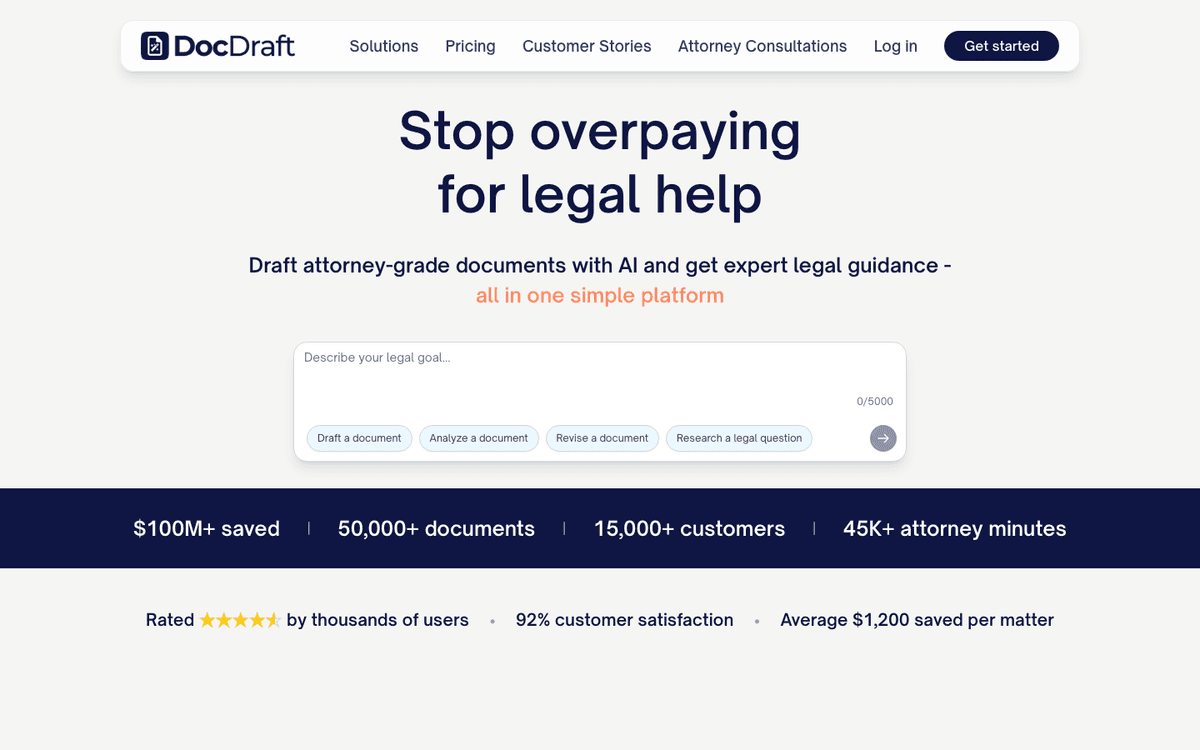
That is why this comparison treats DocDraft as the drafting-first option rather than as a cited source-review workspace.
That makes DocDraft a stronger fit for someone who needs a first version of a legal document. It also gives that person a path from AI drafting to human legal help.
Atlas and DocDraft answer different jobs. DocDraft helps create and refine legal documents. Atlas helps inspect source evidence after documents or claims exist.
Before relying on a DocDraft output, check the same things you would check with any legal draft. Review facts, jurisdiction, defined terms, missing clauses, business assumptions, and the attorney-review terms in your plan.
Lawdistrict Lawgenius
Lawdistrict Lawgenius is best for consumer-facing legal document help. Its AI legal document reviewer page lets users upload PDF or Word files. Users can generate summaries, ask document-specific questions, and review key facts and clauses. The page also says the assistant is focused on the document's content and does not replace professional legal advice.
The Lawgenius page frames the job as an uploaded-document review flow. Step 1 is uploading a legal document. Step 2 is asking the AI reviewer about that file. Step 3 is checking the answer against the document.
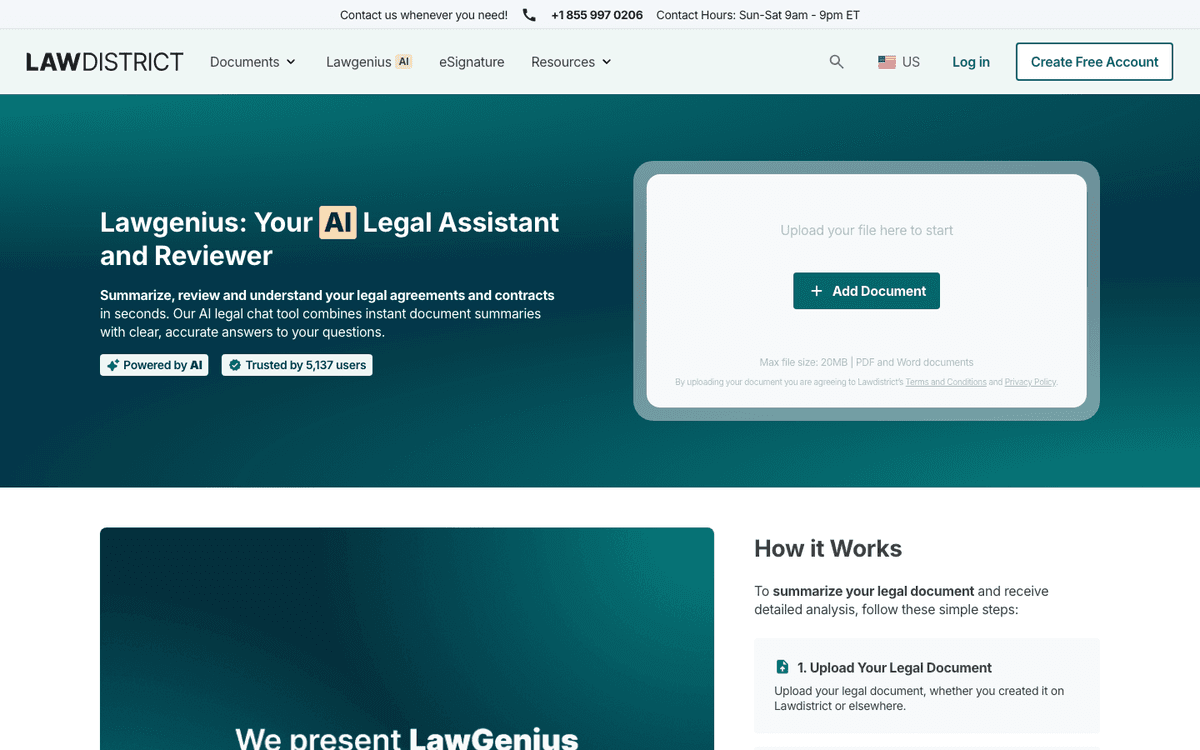
This is useful when the reader's main question is "What does this document say?" rather than "What should I legally do?" The Q&A format can help with leases, employment files, NDAs, and other forms. It gives a non-lawyer enough context to decide whether to ask a professional.
The review standard should still be high. If a Lawgenius answer explains a clause, inspect the actual clause and any definitions or exceptions that affect it. If the issue changes your rights, obligations, money, employment, housing, or litigation risk, get legal advice.
Justee
Justee reviews legal files and flags risks. Its document-review page accepts PDF, Word, or pasted text. The page lists ranked findings, clause links, law citations, and reports you can share.
Use it to find issues in contracts, policies, and agreements before a lawyer reviews them. It is less suited to broad research or open-ended drafting.
Its checks depend on the law, file type, date, and sources it covers. Treat each finding as a lead. Keep the clause, legal basis, and final human decision together.
Paxton
Paxton is for lawyers and legal teams. Its public page lists drafting, file review, legal research, and tools for several fields of law.
Paxton competes with legal research, drafting, and law-firm tools. It is a different product from a plain-language file explainer. The lawyer still owns the judgment.
Before you upload private or regulated files, check Paxton's current security and data terms. Make sure its use fits your professional duties.
AI Lawyer
AI Lawyer offers a legal assistant on the web and mobile. Its public page lists legal chat, file help, document creation, and summaries. It also lists text from images, translation, and apps for iOS and Android.
It may help with general legal questions, student work, and simple file tasks. It is a weaker fit when you need proof at the clause level or a formal record of review.
Read its privacy and data terms before you add a private file. Check the sources behind any answer. A fast answer is not a legal finding.
Legal document AI risks to verify
Legal AI can make up facts, but that is only one risk. It may also cite weak sources, miss context, use old law, expose private data, or assume the wrong law applies.
Several legal sources point to the same controls:
- The American Bar Association explains how AI fits file review and why careful use matters.
- Thomson Reuters keeps human review in the process.
- Spellbook warns about private data, false citations, and a lawyer's duties.
- MyCase and Darrow show the range of tools built for lawyers.
For general chat tools, see ChatGPT alternatives.
If the buyer is comparing contract systems, use contract AI software instead. If the issue is a one-off PDF question, chat with PDF is the narrower workflow.
Source-check protocol
Use this source-check protocol before relying on any legal AI answer:
- Identify the exact claim the AI made.
- Find the clause, law, case, policy, or other source behind the claim.
- Read nearby terms, exceptions, schedules, exhibits, and linked clauses.
- Check which law applies, the date, the version, and whether it is current.
- Compare conflicting documents instead of blending them into one answer.
- Decide whether the answer is legal advice, business advice, a fact summary, or a draft idea.
- Send high-stakes, regulated, unusual, or disputed issues to counsel.
When to escalate
Before you use legal AI, check privacy, your duties, human review, sources, and whether the tool fits the task.
Search results mix tools for drafting, review, research, and file Q&A. Match the tool to the job and its risk.
How this page differs from narrower Atlas legal AI articles
AI contract reader pages are for contract-specific reading tools. Contract AI software is for contract team software procurement. AI legal document summarizer pages are for summary-first triage. This page covers the broader legal document AI choice across drafting, review, Q&A, research, compliance checks, and cited evidence analysis.
Which legal document AI should you choose?
-
Choose Atlas if you need to inspect what the document supports. It fits when the document is already in hand and the question depends on source text. Use it to build a cited analysis trail from the source text.
-
Choose DocDraft if you need a legal document draft and want attorney review attached to drafting and revision.
-
Choose Lawdistrict Lawgenius if you need to understand an uploaded legal document, ask document-specific questions, and get a consumer-friendly summary.
-
Choose Justee if you need document-review triage, including risk flags, compliance issues, clause references, and a report your team can inspect.
-
Choose Paxton if you are a lawyer or legal team comparing AI assistants for drafting, document analysis, legal research, and practice tasks.
-
Choose AI Lawyer if you want broad legal assistant access across devices for general Q&A or document help.
For high-stakes legal decisions, use AI for a first pass: draft, summary, review, or source checking. For a deeper comparison focused on the analysis and Q&A step alone, see AI legal document analyzer.
Use a human professional for legal judgment. Keep a source trail that shows exactly what was checked.
Analyze legal documents with cited answers
Ask a narrow question, open each citation, and check the source before relying.