

People use AI legal document analyzers for different jobs. A lawyer may need legal research. An in-house team may need contract risk flags. A law firm may want short views inside its case files.
A consumer wants plain answers about a lease or NDA. A researcher or analyst wants to ask a document a specific question and check the exact passage behind the answer.
None of these tools should be treated as legal advice. None of them replace a qualified attorney when the stakes are real.
A useful tool lets you trace each finding back to the source text and judge whether it holds up.

Analyze legal documents with cited evidence
Add legal documents, ask a narrow question, and inspect each cited passage.
Quick verdict
Match the tool to the job. Search rank comes second. Check the vendor's current price, security terms, and file support before you buy.
Choose Atlas if you need to compare your own files and open the source passage behind each answer. The other tools below serve legal research, contract review, case files, or quick consumer questions.
- Use Atlas to ask questions across your files and open the source behind each answer.
- Use Lexis+ Document Analysis for legal research inside LexisNexis.
- Use Superwise Legal Document Analyzer for a business demo of clause, duty, and risk checks.
- Use LegalReview.ai or LegalFly Review for contract uploads, red flags, and team reports.
- Use MyCase Legal Document AI when your firm already runs MyCase and wants document summaries tied to matter files.
- Use LawDistrict Lawgenius when a non-lawyer wants a fast, consumer-style summary and Q&A over one uploaded document.
- Use GitHub Legal-AI Project to study an open-source demo. Keep live legal files out of it.
- Use HyperWrite Legal Document Analyzer for a quick pass over text when you do not need case details or deep source links.
One guardrail applies across every option in this list. Treat an AI summary, red flag, or answer as a starting point for review rather than a legal conclusion.
Escalate to a qualified professional whenever the outcome affects rights, money, obligations, or a filing.
What matters in a legal document analyzer
Legal document tools cover five main jobs:
- Understand one document - get a summary, key facts, or a plain answer about what a single file says.
- Pull out clauses - list duties, dates, parties, key terms, and exceptions.
- Compare multiple documents - find agreements, conflicts, or version differences across two or more files.
- Research the law - find laws, cases, or rules that the file depends on.
- Build a cited note - link a finding to the source passage for a coworker or lawyer to check.
A single product rarely covers all five well. Lexis+ leans toward job 4, and contract-review tools lean toward jobs 1 and 2.
Practice platforms lean toward jobs 1 and 3 inside a case file, and a source-grounded workspace like Atlas leans toward jobs 3 and 5.
Before ranking any tool, check it against these criteria:
- Source links - does each answer or flag open the exact passage it came from?
- Clause details - can it list parties, dates, duties, and key terms rather than return a loose summary?
- Multi-document comparison - can it hold more than one file in context and say where they agree or conflict?
- File handling and OCR - does it accept scanned or image-based files, and does it say what happens to citation quality when it does?
- Privacy - does the vendor explain what happens to uploaded files?
- Review record - can you save what was checked as well as the final answer?
- Human review - does the product state when a lawyer must check the result?
Apply the guardrail before you look at a single ranking. None of the tools below should be read as legal advice, legal review, or a substitute for counsel.
Each entry states what its official page supports and what still needs verification.
AI legal document analyzer tools compared
| Tool | Best fit | Source/citation support | Legal-workflow context | Claims to verify |
|---|---|---|---|---|
| Atlas | Cited analysis over your own legal documents | Citation badges open the source passage in the PDF viewer | General-purpose reading tool | Not legal advice, review, drafting, or a counsel substitute |
| Lexis+ Document Analysis | Attorney research on litigation/transactional documents | Tied to Lexis legal-content context | Built for practicing attorneys | Scope and pricing versus your existing Lexis subscription |
| Superwise Legal Document Analyzer | Governed demo of clause and risk extraction | Cites clauses, obligations, missing terms | Positioned around governance and auditability | Whether cited business-impact numbers still hold on a fresh read |
| LegalReview.ai | In-house contract upload and red-flag triage | Summary and red-flag findings tied to the contract | Explicit no-legal-advice disclaimer | Anonymization and bulk-analysis claims on current pricing tiers |
| LegalFly Review | In-house contract review with anonymization | Structured issue reporting | Built for legal teams | Data-protection and confidentiality claims versus your own policy |
| MyCase Legal Document AI | Law firms already on MyCase | Summaries tied to matter documents | Matter-aware, firm-internal workflow | Whether it works usefully outside the MyCase practice suite |
| LawDistrict Lawgenius | Consumer document Q&A | Answers reference the uploaded file | States it is not professional legal advice | File-size limit and supported file types on the current page |
| GitHub Legal-AI Project | Developers studying an open-source demo | Contract Q&A over indexed clauses | Research and education disclaimer only | Maintenance status and security review before any real document |
| HyperWrite Legal Document Analyzer | Quick generic pass over pasted text | Returns key points and issues without passage-level citations | Professional-advice caveat on the tool page | Precedent and law suggestions need independent confirmation |
Table 1: This table matches tools to jobs. It does not rank legal accuracy. A public Q&A tool and a lawyer research system serve different needs.
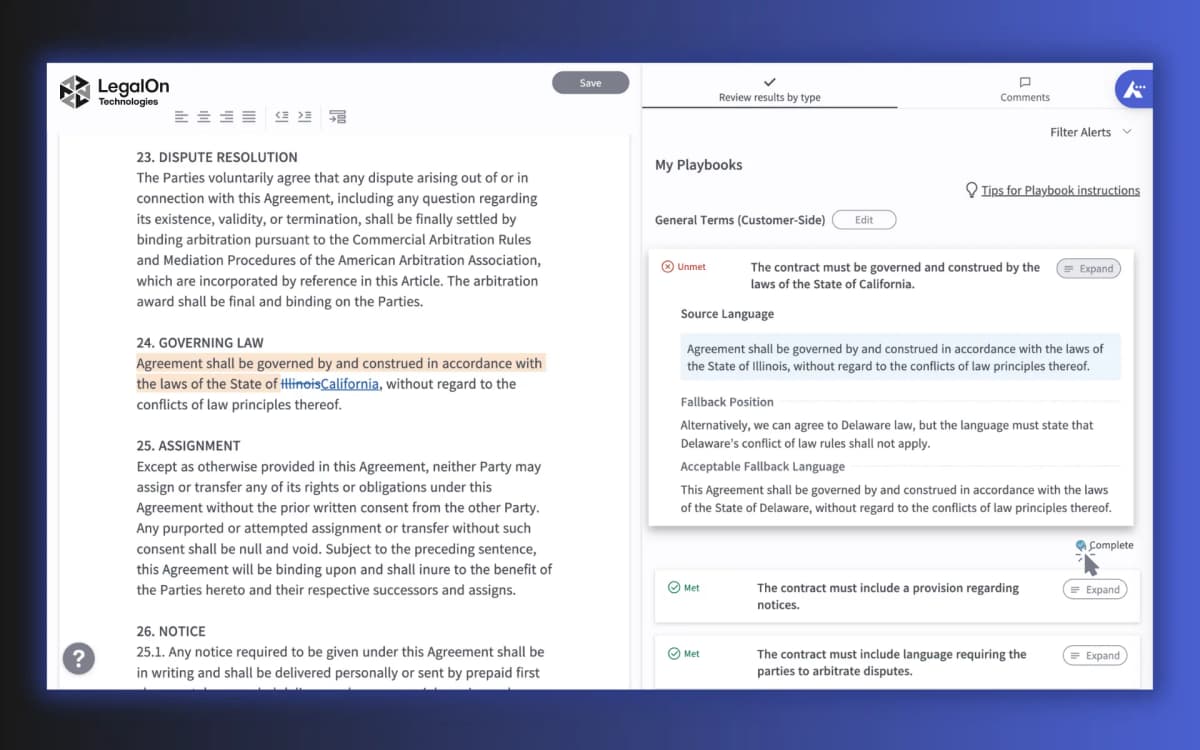
The LegalOn screenshot below shows the kind of legal document analysis surface to look for when a tool promises review rather than a plain summary. It keeps contract text beside review findings, source language, and playbook guidance, which is the evidence layout to compare against any AI legal document analyzer.
Best AI legal document analyzer tools
Atlas
Atlas fits when you have the legal files and need answers you can check. Add a PDF or another supported source to a project and ask a clear question.
The answer comes back with citation badges. Selecting a badge opens the PDF viewer at the cited passage, so you can read the nearby paragraph before you trust the claim.
Atlas can compare several sources in one project. This helps when you need to compare two contracts or check whether a policy conflicts with a filing.
It cannot provide legal advice, legal review, drafting, redlining, or approval, and it is not a replacement for a law firm or qualified counsel. Treat every answer as a lead that still needs verification before you act on it. See how Atlas compares documents when you need to check two files against each other.
Lexis+ Document Analysis
Lexis+ Document Analysis is for lawyers who use LexisNexis research tools. Its product page describes support for court cases and deal work, with Lexis legal content around the AI result.
It is part of a paid legal research system. Lexis also offers legal research, citation checks, and case context that Atlas does not claim to provide.
Superwise Legal Document Analyzer
Superwise's legal analyzer page lists summaries, clause checks, duties, risks, missing terms, rules, and source tracking. It is a demo for business buyers rather than a simple public tool.
Treat any savings or performance number as a vendor claim. Confirm it on the current page and in a test with your own files.
LegalReview.ai
LegalReview.ai gives in-house teams a quick first pass on contracts. Its product page lists uploads, short summaries, red flags, side-by-side views, batch review, and removal of names. It also says the tool does not give legal advice.
That disclaimer is worth taking seriously. LegalReview.ai positions itself as contract-assistant software built to support review. It makes no claim to replace a law firm or a lawyer's advice.
Verify current anonymization and bulk-analysis claims against the live pricing page before assuming a specific tier includes them.
LegalFly Review
LegalFly Review targets in-house teams that review many contracts. Its product page lists unclear-language flags, rule checks, removal of names, and reports.
Do not rank LegalFly above other tools on data safety without testing them side by side. Check its current terms against your own rules before you upload a contract.
MyCase Legal Document AI
MyCase's Legal Document AI page lists short views, file previews, scanned-text support, names, and deadline extraction. It is built for firms that already keep case files in MyCase.
Confirm on the current page whether a firm needs an active MyCase subscription before counting on this feature.
LawDistrict Lawgenius
LawDistrict's AI legal document reviewer is for consumers. Upload a PDF or Word file to get the main facts, a clause list, and a chat for follow-up questions. Its page states a file limit and says the result is not professional advice.
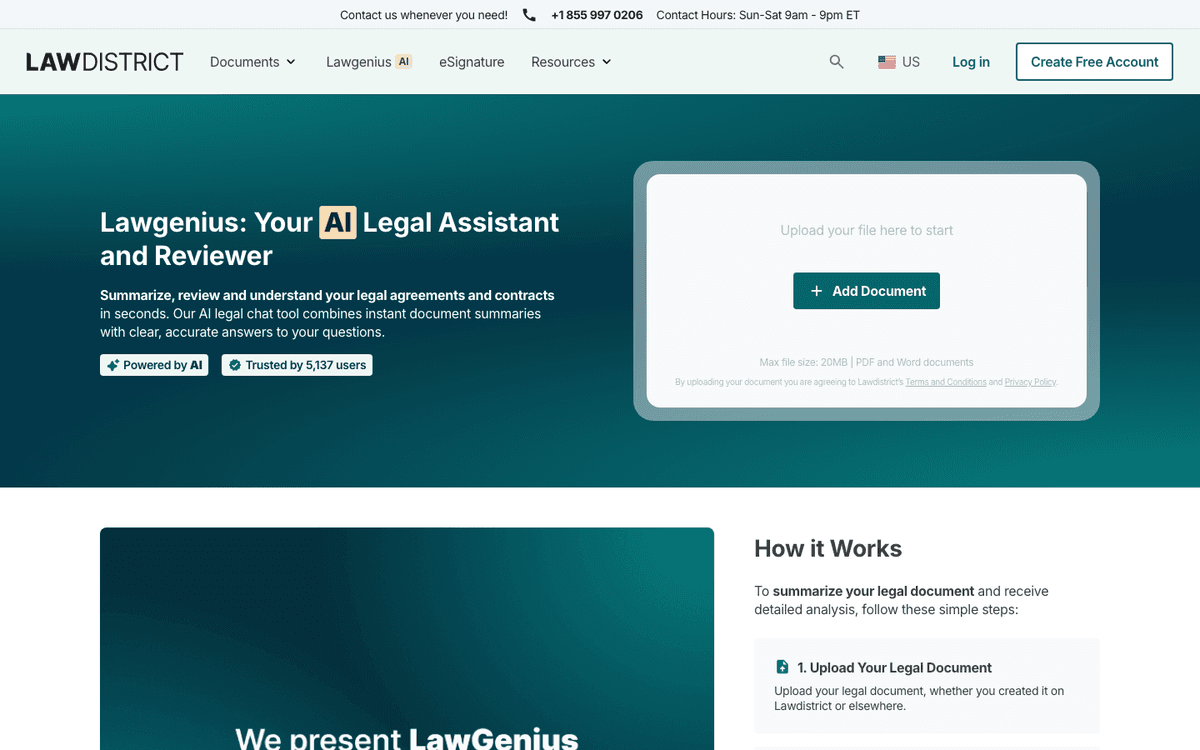
This fits someone who wants a plain read of a lease, NDA, or employment form before deciding whether to involve a lawyer. Language such as "lawyer-powered" or "expert analysis" on a vendor page is not proof of legal-outcome reliability.
Check the disclaimer on the same page before treating any output as a legal conclusion.
GitHub Legal-AI Project
The Legal-AI Project on GitHub is open-source code for contract questions and clause reading. Its author labels it for research and learning.
It is useful for developers who want to study how a legal document Q&A pipeline is built. Treat it as a demo rather than a production tool.
Do not run this untested code on real legal files. A live service needs a full check of its safety, updates, and access controls.
HyperWrite Legal Document Analyzer
HyperWrite's legal document analyzer lets you paste or upload legal text and get key points, issues, and next steps. It also offers to search for past cases and laws, while warning that the result is not legal advice.
Use it for a fast first look at short text. Treat each issue, action, past case, and law as unproven until you check it.
Where Atlas fits for cited legal-document analysis
Use this sequence once you have real documents and a specific question in mind, rather than a general "review this" request:
- Add the files. Put each PDF or other supported source in the project.
- Check the text. Open the file, confirm that the pages appear, and search for a phrase you know is there.
- Ask a narrow question. Instead of "summarize this contract," ask something specific: "Which obligations survive termination?" or "Where do these two agreements define confidential information differently?"
- Keep sources separate. If an answer blends several files, ask for a table with one source and citation per row.
- Open each key citation. Read the marked passage and nearby text for terms, exceptions, or limits that change the meaning.
- Save only checked findings. Record the question, what each source supports, and what still needs a lawyer.
Legal and evidence-safety guardrails
AI analysis of legal documents can miss the details that change an outcome. Watch for these failure patterns:
- An exception buried in a later clause.
- A governing-law assumption that does not match your jurisdiction.
- A conflict between two versions of a contract.
- Context that reverses what a sentence seems to say on its own.
Verification rubric
Use this rubric before treating any AI-generated legal finding as settled:
- Identify the exact document and passage the claim depends on.
- Open and read that passage yourself. Do not rely only on the AI's summary of it.
- Read the terms and exceptions near the passage. They may change what the main clause means.
- Check whether other documents in the same matter conflict with this passage.
- Ask a lawyer when the finding affects rights, money, duties, deadlines, or a filing.
Where Atlas stops
Atlas supports steps 1 through 4. It can cite an answer, open the passage, and compare several files. It cannot decide step 5. Atlas is not a law firm and does not give legal advice, edit contracts, or approve legal work. The guide to checking citations from AI tools applies the same source check to other topics.
How this page differs from nearby Atlas legal-AI articles
This page owns the analyzer tool-choice query: which product to use for source-grounded clause extraction, comparison, and cited evidence checks. If you are choosing across the full legal-document AI category - drafting, review, research, and Q&A together - use the broader legal document AI comparison instead. Summary-first triage and document storage are different jobs with their own tools.
Which analyzer should you choose?
The tools above split by job rather than by a single quality score. Match your job to the list below before you pick a default.
- Choose Atlas to ask questions across your files and open the source behind each answer.
- Choose Lexis+ Document Analysis for lawyer research inside LexisNexis.
- Choose Superwise Legal Document Analyzer for a business demo of clause, duty, and risk checks.
- Choose LegalReview.ai or LegalFly Review for contract uploads, red flags, and in-house reports.
- Choose MyCase Legal Document AI if your firm already runs MyCase and wants document summaries tied to matter files.
- Choose LawDistrict Lawgenius if you are a non-lawyer who wants a fast, plain-language read of one document.
- Choose GitHub Legal-AI Project to study open-source contract Q&A code.
- Choose HyperWrite Legal Document Analyzer for a quick pass over pasted text.
Whichever tool you use, follow the same check. Open the source passage, read the text around it, and ask a lawyer before you act on a high-stakes finding.
Analyze legal documents with cited evidence
Add legal documents, ask a narrow question, and inspect each cited passage.