

The best AI legal document summarizer depends on what you need to do. A simple upload tool can give you a first look at a low-risk document. A legal practice platform is a better fit when the file is part of a law firm's case work.
Choose Atlas when you want to ask questions about your files and check each answer against the source. You can open a citation and read the original passage before you use the answer.
Treat every AI summary as a first look. A tool can help you read faster, find key clauses, and explain legal wording in plain language.
The tool can still miss an exception, deadline, duty, or defined term that changes the meaning. A qualified lawyer should review any legal decision.

Check legal PDFs against cited passages
Ask focused questions, open citations, and verify clauses in the original PDF.
What matters in a legal document summary
- Check the source. Can you open the exact passage behind each important claim in the summary?
- Keep the full clause in view. Definitions, exceptions, dates, and nearby terms can change what a clause means.
- Check the file types. Make sure the tool can read your PDFs, scans, contracts, briefs, policies, or case files.
- Keep a lawyer in the process. AI can help with reading, but it should not replace legal review.
- Consider the rest of the case. Some tools read one upload. Others can work with the case file or other related sources.
- Check saved work. Review any notes or downloads before your team uses them as legal guidance.
Comparison table
This table does not rank legal accuracy. It shows which job each tool fits, how you can check its work, and where a lawyer still needs to review the result.
| Tool | Best fit | Source trail | Legal context |
|---|---|---|---|
| Atlas | Cited follow-up questions after a legal PDF or source set is in a project | Citation badges open the source passage for inspection | Source-grounded reading and synthesis for verification |
| LegalZoom Doc Assist | A lightweight legal-services page for upload-and-summarize intake | Summary-first workflow where source-trail behavior needs verification | Good for simple triage before attorney review |
| LawDistrict Lawgenius | Legal-document Q&A, key facts, clauses, and downloadable summaries | Document-specific assistant positioning | Useful when the reader wants a legal-document assistant around one file |
| Smallpdf AI PDF Summarizer | Quick browser-based PDF summary and chat utility | PDF summary and chat flow with source inspection tied to the workflow | Best kept to first-pass review before licensed legal review |
| SlidesPilot AI Legal Document Summarizer | Simple upload-to-summary workflows for contracts and briefs | Emphasizes clauses, obligations, liabilities, and downloads | Useful for plain-language triage of legalese |
| MyCase Legal Document AI | Law firms already working inside MyCase and 8am IQ | Positioned around traceability, summaries, translation, and insights | Strongest fit is the existing firm matter environment |
| DISCO | eDiscovery-style legal document review context | Focuses on parties, dates, provisions, and themes | Legal-team context for review teams |
| NexLaw NeXa | Litigation-oriented legal AI workflow evaluation | Positions citation traceability around research, memos, motions, and drafting workflows | Better fit for legal teams than one-off document triage |
Table 1: The tools serve three different needs. Quick summarizers can help you understand the main points in one document.
Legal platforms keep summaries with case files, disputes, or document review work. Atlas helps when you already have the sources and want answers that link back to the original passage.
Recommendation
Choose a quick summarizer for a low-risk document when you only need a rough first look. Use a legal practice platform when the file is part of a case or a law firm's work. Choose Atlas when you want to ask about your sources, open the citations, and check each answer against the text.
Best AI legal document summarizer tools
Atlas
Atlas is useful when a summary is only the start of your review. Add a PDF and check that you can search its text. Then ask a focused question, such as, "Which sections define termination rights, and what conditions apply to each one?"
Atlas answers from the sources in your project and adds citations. Open a citation to read the passage and the text around it. You can then see whether the answer goes beyond what the source says.
You can also compare points across related files and save notes after you check them. Atlas does not replace a lawyer. Leave legal advice, contract edits, risk scores, and final review to a qualified legal professional.
LegalZoom Doc Assist
LegalZoom Doc Assist summarizes an uploaded document. It can help when your first question is, "What is this document mainly about?"
Check the source before you rely on the summary. Also check whether any lawyer service is separate from the AI tool.
LawDistrict Lawgenius
LawDistrict Lawgenius lets you upload a legal document and ask questions about it. Its page also lists key facts, clause explanations, and summaries you can download.
It is best suited to help with one file. It is less suited to checking claims across several sources.
The screenshot below shows a panel where users can add a document. The page describes the product as an AI legal assistant and reviewer.
The page presents the result as a starting point for a summary or review. This supports a narrow conclusion: LawDistrict can help you get a first look at one file. You should still check important claims against the source and ask a lawyer to review them.
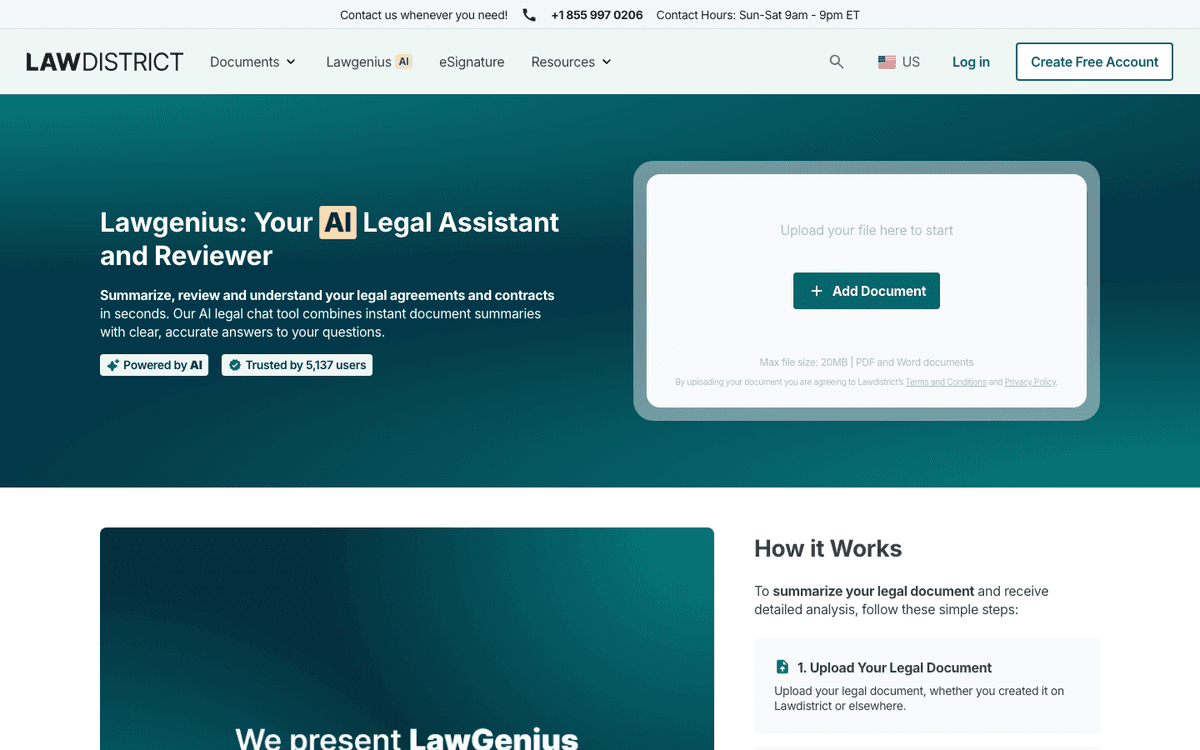
The official page focuses on three things: adding a document, summarizing it, and using AI to review it. That makes the tool a fit for work on one file.
Use this type of tool for a first look. Then check key clauses, terms, and duties in the original document.
Smallpdf AI PDF Summarizer
Smallpdf can give you a quick first look at a legal PDF. Its result still needs review.
Do not treat the summary as a final legal answer. Use it to find where to read next. Check important terms in the PDF, and ask a lawyer when the result may affect a legal decision.
SlidesPilot Legal Summarizer
SlidesPilot turns contracts or briefs into plain-language summaries you can download. Its page says the tool can find clauses, duties, and legal risks.
It is less useful if you need to compare several sources or keep notes that link back to each source.
MyCase Legal Document AI
MyCase Legal Document AI is built for firms that already use MyCase and 8am IQ. Its page highlights summaries, translation, links back to sources, and work with firm data.
If your firm does not use that software, check the wider platform before choosing it only for summaries.
DISCO
DISCO is aimed at legal teams that review large sets of documents. Its guide says summaries can pull out parties, dates, key terms, and themes.
That can help when a legal team reviews many files for a case. A simple upload tool is built for a smaller task.
NexLaw NeXa
NexLaw NeXa is built for law-firm work. Its public page links the tool to court filings, research notes, motions, and citations that users can trace.
Consider it when a legal team needs the summary as part of its wider work. For a plain explanation of one PDF, a simpler tool may be enough.
Verify summaries in Atlas
- Add a legal PDF or a set of sources and wait for Atlas to process them.
- Open the PDF and search for a phrase you know is in it. Make sure the text appears in the viewer.
- Ask a focused question about a clause, term, date, duty, or part of the summary.
- Ask for citations. If the answer is broad, ask for one cited claim in each bullet.
- Open each citation. Read the marked passage and the paragraph around it.
- Save a finding only when the passage supports it. Check that nearby text does not change or limit the claim.
Suppose a first summary says, "Either party can end the contract with notice." Ask Atlas, "Which clauses name notice periods, cure periods, or exceptions? Answer only from this contract and cite each clause."
Open every citation before you save the finding. If the passage points to a defined term, exception, exhibit, or another section, read that part too.
How to choose safely
Start with the risk of getting the summary wrong. A quick tool may be enough for a first look at a low-risk file. Work on a client case, contract duty, or court filing needs more care.
A legal platform can keep the document with the rest of a law firm's case work. Atlas serves a different need: it lets you ask about your own sources and open the passage behind each answer. A qualified lawyer should handle legal advice, contract talks, court filings, and decisions with legal effects.
You may also need to work with other file types or organize your sources. See our guides to video research tools, PDF assistants with answers you can check, and legal document organizers.
If you need more than a summary, compare AI legal document analyzers. They may be a better fit for deeper review.
Check legal PDFs against cited passages
Ask focused questions, open citations, and verify clauses in the original PDF.