

Pick a PDF AI by the job. ChatPDF suits quick chat with one file. Acrobat AI Assistant works inside Acrobat. Smallpdf and iLovePDF pair AI with common PDF tools. NoteGPT turns a PDF into study notes.
SciSpace is built for papers. AskYourPDF works across apps and add-ons. PDF.ai offers tools for developers. Atlas fits when an answer must cite the PDF and let you check the exact passage.

Ask cited questions over uploaded PDFs in Atlas
Analyze a PDF, open its citations, and save only findings the source supports.
Quick answer
Choose by what you need to do with the answer. A quick summary may be enough to decide whether a file is worth reading. If the answer will enter a paper, memo, or choice, use a tool that cites the PDF and opens the text around the citation.
Atlas fits that second job. Upload a text-based PDF, ask one focused question, open the citation badge, read the cited text, and save only what the source supports.
For other jobs, use Acrobat for Acrobat review, SciSpace for papers, ChatPDF for quick chat, AskYourPDF for access across apps, and PDF.ai for data extraction or APIs.
PDF analysis AI criteria
Start with the PDF and the task. A student who needs a study guide, a lawyer who must check a clause, and a developer who must pull fields from invoices need different tools.
The tool should make the next step easier without hiding the source.
Use this checklist before trusting the answer:
- Does the tool cite a passage or page you can open?
- Can you open the PDF beside the answer and read the surrounding context?
- Can you select the text, or does the scan need OCR first?
- Did the tool keep tables, figures, footnotes, and page labels intact?
- Can you ask a follow-up question, or does it make only one summary?
- Do its file and data rules fit the PDF you plan to upload?
- Can you save a checked finding with a link back to its source?
A smooth answer can still be wrong. A checked claim has a clear path back to the PDF text that supports it.
PDF analysis AI tools compared
The table separates the main jobs. Plan limits and prices change often, so check each tool's own page before you upload a file.
Take extra care with private, large, scanned, or regulated files.
| Tool | Best fit | Evidence path | Useful analysis task | Caveat |
|---|---|---|---|---|
| Atlas | Source-grounded PDF analysis | Citation badges and PDF viewer inspection | Ask focused questions, inspect cited passages, and save verified findings | Not a PDF editor, OCR suite, or accuracy guarantee |
| ChatPDF | Fast single-PDF chat | Clickable citations described on its product page | Ask questions and summarize one document quickly | Best for lightweight analysis before deeper source review |
| Adobe Acrobat AI Assistant | Acrobat-centered review | Numbered attributions and source highlighting | Ask questions, compare documents, and extract insights inside Acrobat | Strongest when the team already works in Acrobat |
| Smallpdf | Browser PDF utility work | AI answers inside a utility workflow | Chat, summarize, translate, generate questions, then continue with PDF tools | Not positioned as a research citation workspace |
| SciSpace | Academic paper reading | Citation-linked answers and highlighted text | Explain papers, summarize sections, and follow academic context | Product details and language/security claims should be refreshed |
| iLovePDF | Summary triage | Summary controls in a utility suite | Summarize reports, essays, and study guides | Summary-first tool for quick triage before cited review |
| NoteGPT | Study summaries and transforms | Summary, extraction, chat, translation, and mind maps | Turn PDFs into notes, text, translations, and study aids | Avoid relying on volatile file-size or storage claims |
| AskYourPDF | Broad PDF chat surfaces | Document interaction across app, extension, Zotero, and ChatGPT-adjacent workflows | Manage and question PDFs across devices or integrations | Refresh current integration and pricing details before choosing |
| PDF.ai | API and extraction workflows | Chat plus API parse, extract, split, and ask endpoints | Build parsing, structured extraction, and direct PDF query flows | Better for developer workflows than a simple reader-only job |
Table 1: If the answer will enter a citation, memo, or research note, choose source checks over speed.
Atlas is strongest when you must check the proof. It imports PDFs, answers from the source set, and links each cited answer to the source passage. Read that passage before you save the finding.
Use Atlas for cited PDF analysis
Use Atlas when the answer must stay tied to the PDF:
- Add a text-based PDF to a project.
- Wait for Atlas to finish reading the source.
- Ask a focused question, such as "What evidence does this report give for declining retention after onboarding?"
- Open the citation badges in the answer.
- Read the marked passage and the text around it in the PDF viewer.
- Save only the part that the passage supports.
Citations do not make an answer true. They give you a path to check it. Open the cited text and decide whether it supports the answer before you reuse a key claim.
This check matters most for scans, odd page layouts, tables, figures, and high-stakes files.
Best PDF analysis AI tools
Atlas
Atlas is best when each answer must cite the PDF. Add a text-based file, ask a question, open the citation badge, and read the cited passage in the PDF viewer.
Use it when the answer will enter a research note, report, or choice.
Atlas is not a PDF editor, OCR tool, batch parser, or truth machine. Its value is the path from an answer to a citation, the PDF passage, and the text around it.
ChatPDF
ChatPDF is best for quick chat with one PDF. It shows the file beside the chat and offers summaries, questions, and links from answers. Use it for a first read or a few questions about one file. Before a claim enters a report, test whether its links show enough page text for your review. Paperguide's PDF chat list gives broad context, but vendor pages should support tool claims.
Adobe Acrobat AI Assistant
Adobe Acrobat AI Assistant fits teams that already use Acrobat. It can answer questions, compare files, pull out key points, and show numbered links to marked source text. Use it when the team reviews, marks up, and shares PDFs in Acrobat. Check Adobe's current plan, file, data, and language rules before you use it for private or regulated work.
Smallpdf
Smallpdf AI PDF pairs chat, summaries, translation, and question ideas with common browser PDF tools. Use it when the next step may be to shrink, convert, translate, or edit the file. For research, first test whether its source links meet your needs.
SciSpace
SciSpace Chat PDF is built for papers. It offers cited answers, paper summaries, help with marked text, related papers, and notes. Use it to work through a paper's methods, results, terms, or cited claims. Check its current plan, language, and data rules before a team adopts it.
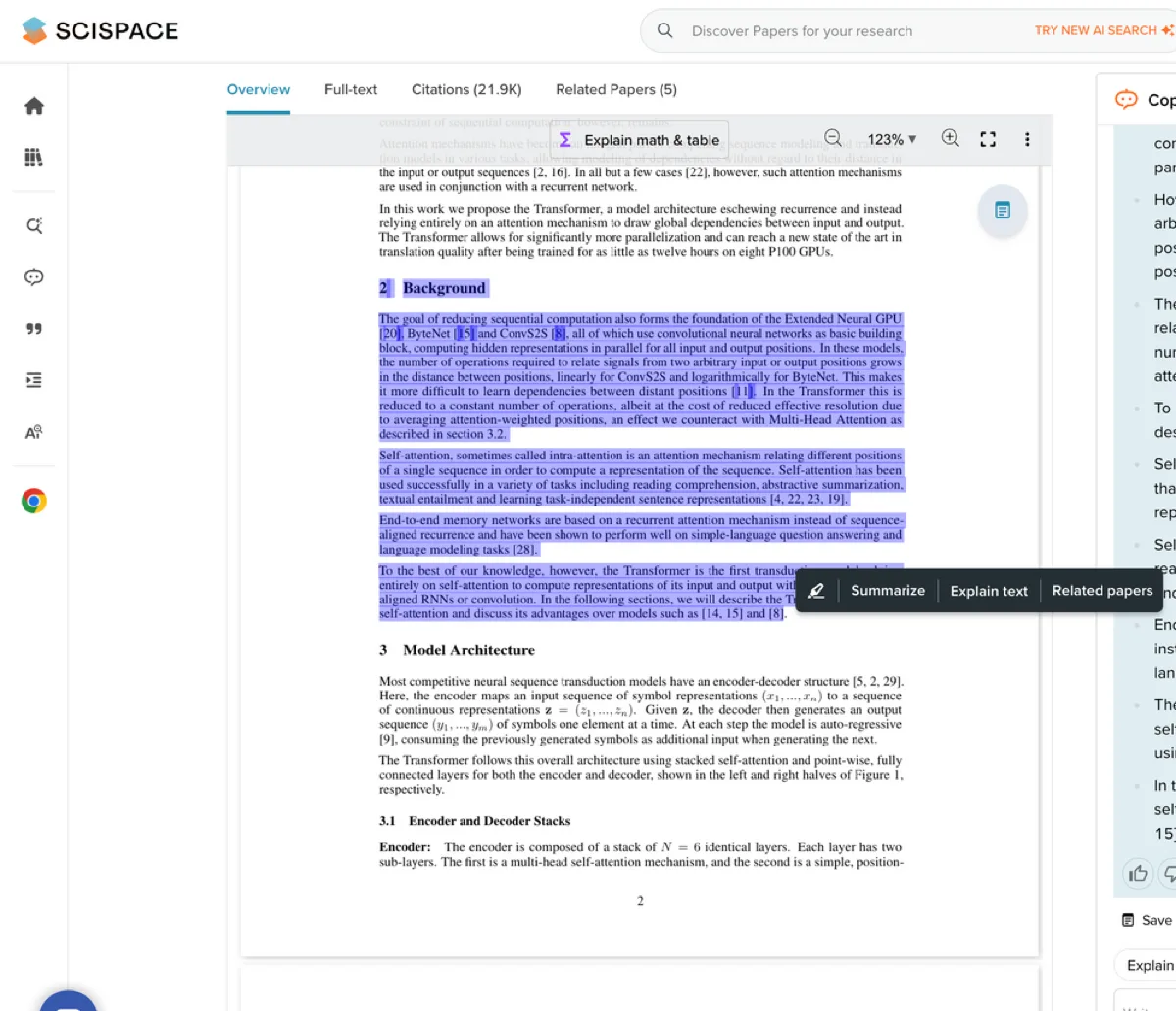
The official SciSpace interface keeps the selected paper passage visible beside the AI explanation panel. That layout helps a reader compare an explanation with the exact text selected in the PDF instead of treating the explanation as standalone evidence.
iLovePDF
iLovePDF's AI summary tool gives a quick view of reports, essays, and study guides. You can choose the summary length and style. Use it to decide what a PDF is about. Choose another tool when you must defend a claim, check a page, or compare several files.
NoteGPT
NoteGPT's PDF summary tool can make notes, pull out text, chat about a PDF, translate it, and build a mind map. Use it when a PDF needs to become study notes, plain text, a translated outline, or a map. Check its current file and data rules before you rely on them.
AskYourPDF
AskYourPDF offers PDF chat across a phone app, browser add-on, Zotero, and ChatGPT-linked flows. Use it when access across apps matters more than one reader view. Check its current add-ons, price, and data rules before a team adopts it. Its PDF analysis list gives context, but it is not proof for claims about other tools.
PDF.ai
PDF.ai fits developers who need to parse, split, query, or pull data from PDFs. Its API docs list parse, extract, split, ask, delete, and credit endpoints. Use it to build a data flow or query PDFs in code. A reader who only needs a cited answer may prefer a tool with a simple PDF view.
PDF analysis limits to test
Text extraction
PDFs are not always clean text. A file may hold scans, columns, tables, figures, forms, footnotes, headers, and odd page labels. The Verge's report on AI PDF failures shows why you should test the actual file instead of trusting a broad product claim.
If the tool cannot read the right passage, a sure-sounding answer may still be wrong or leave out key facts.
Test each tool with a fact you already know from the PDF. Ask for that fact, open the cited text, and read the lines around it. If your work depends on tables, figures, footnotes, or scans, test one of each too.
For legal, medical, money, school, compliance, or security work, treat AI output as a draft. A person must still read the source and make the final call.
Which PDF analysis AI should you choose?
- Quick chat with one file: ChatPDF.
- Work inside Acrobat: Acrobat AI Assistant.
- Common PDF tasks: Smallpdf or iLovePDF.
- Study notes, plain text, translation, or maps: NoteGPT.
- Research papers: SciSpace.
- Access across apps: AskYourPDF.
- Code tools to parse, split, query, or extract: PDF.ai.
Choose Atlas when you must know where each answer came from. Ask one focused question, open its citations, read the PDF text, and keep only what the source supports.
Upload one PDF and test that flow before you trust it with a full source set.
For related tasks, compare AI legal document summary tools, video organizer tools, AI research apps, chat with docs tools, AI paper readers, AI source checkers, and document question answering.
Ask cited questions over uploaded PDFs in Atlas
Analyze a PDF, open its citations, and save only findings the source supports.