
ChatPDF Alternatives (2026): 8 Best AI PDF Tools Compared
Best ChatPDF alternatives in 2026. Atlas, NotebookLM, Claude, ChatGPT, Humata, Anara, PDF.ai, and AskYourPDF for chatting with PDFs and research papers.
- Byline

Summary
The best ChatPDF alternative depends on whether you need free PDF chat, cross-PDF synthesis, or research-paper workflows.
The updated guide compares Atlas, NotebookLM, Claude, ChatGPT, Humata, Anara, PDF.ai, and AskYourPDF.
Use NotebookLM for free source-grounded notebooks, Atlas for cross-PDF synthesis, Claude for long-document reasoning, and Anara for inline paper explanations.
The evaluation covers citations, multi-PDF support, pricing, audio overviews, research use, and where ChatPDF remains enough.
Atlas is built for research that spans more than one PDF. It links each answer back to the source passage and turns a growing PDF library into a mind map, so a literature review can build on prior reading instead of starting over.
ChatPDF popularized the "upload a PDF, chat with it" workflow in 2023. By 2026, several free tools go further. Some can search across many PDFs, cite exact passages, handle longer files, or map ideas across a source set.
This guide compares 8 alternatives by the jobs they handle, the documents they accept, how they cite answers, and what they cost.

 Atlas
AtlasAsk across your research PDFs
Upload several PDFs and trace each cross-document answer to its source passages.
Why Look for ChatPDF Alternatives?
Three reasons stand out.
First, ChatPDF is still mostly a single-PDF tool. For work across many papers or chapters, use a tool that can query the whole set, such as Atlas, NotebookLM, or Claude Projects.
Second, citation detail varies a lot. ChatPDF can cite sources, but NotebookLM and Atlas make the passage trail easier to check. That matters for graded, legal, medical, or client-facing work.
Third, price pressure has changed the category. ChatPDF offers a free plan and a paid Plus tier. NotebookLM is free for many of the same jobs, and Atlas covers cross-PDF work for $20/mo Pro.
What to Look for in ChatPDF Alternatives
A good ChatPDF replacement should do more than answer questions about one uploaded file. Check whether it can search across several PDFs in one workspace, cite the exact passage behind an answer, and keep enough context for long files.
Also check the boring details before you move real work into a tool. Page limits, file caps, privacy terms, and export options matter more once you use the tool for coursework, legal review, client research, or a literature review.
If you are deciding between a basic upload-and-chat tool and a broader research workflow, the PDF AI guide compares those two jobs before you choose a subscription.
8 Best ChatPDF Alternatives
The eight options below cover the main reasons to replace ChatPDF: working across several documents, reading long files, extracting data, checking citations, or collaborating with a team.
1. Atlas: Best for Cross-PDF Synthesis
Atlas fits work that spans multiple PDFs, such as literature reviews, case research, and multi-source analysis. Upload a source set and Atlas builds a mind map that shows how concepts connect across the files. Each answer cites the source passage.
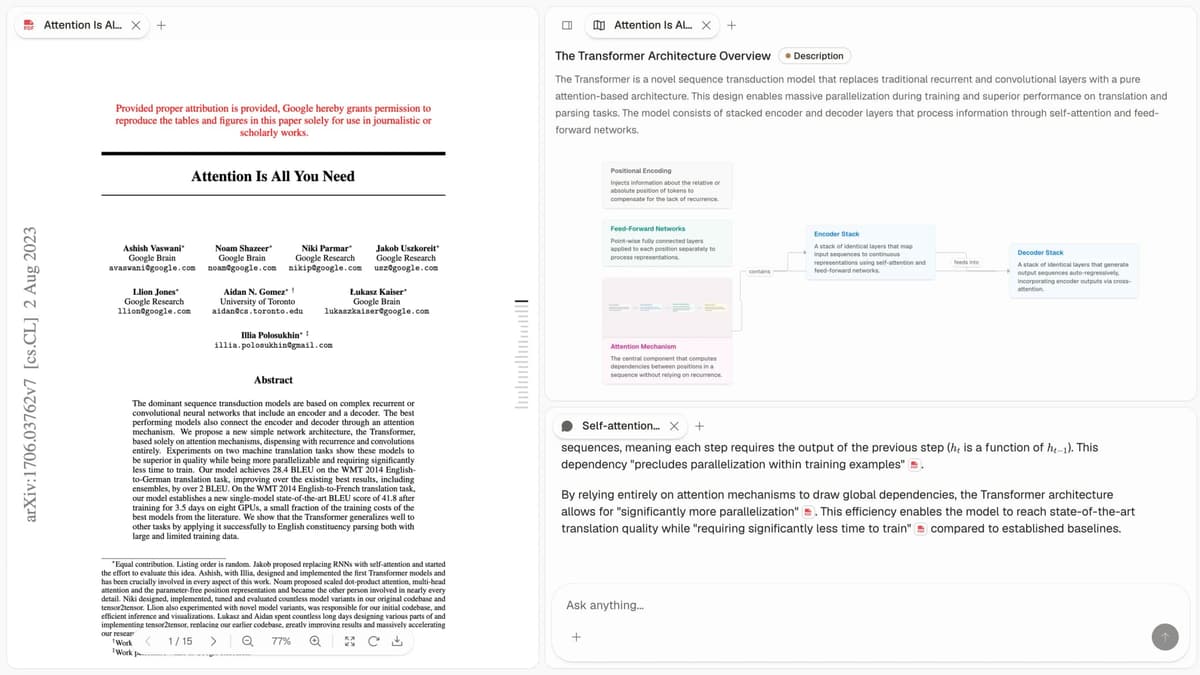
Choose Atlas when your main job is asking one question across several PDFs and checking each answer against the source text. If you only need a fast answer from one short file, ChatPDF or PDF.ai will usually be simpler. Atlas Pro costs $20 per month.
Atlas workflow: ask across multiple PDFs
- Upload two or more research PDFs into the same Atlas workspace.
- Let Atlas index the files and build the source map.
- Ask a question that needs evidence from more than one source, such as "Which papers agree that retrieval quality affects hallucination rate?"
- Open the cited answer and check the linked passages from each PDF.
- Use the mind map to inspect nearby papers, concepts, and claims before you write the final note.
The workflow matters most when the answer should combine claims from several sources and still show where each claim came from. ChatPDF is fine when one PDF is enough.
Atlas is also the wrong choice if you only need occasional free PDF chat, audio summaries, or general-purpose file analysis. In those cases, start with NotebookLM, Claude, or ChatGPT before paying for another PDF-specific workspace.
2. NotebookLM: Best Free ChatPDF Alternative
NotebookLM is Google's research notebook. Its free tier accepts up to 50 sources per notebook, with limits of 500,000 words or 200 MB per source. Those sources can include PDFs, Google Docs, web pages, audio, and YouTube transcripts. NotebookLM answers from the selected sources and lets you open its inline citations.
Use NotebookLM when you want a free, source-cited notebook for a bounded set of PDFs. Pricing: Free with Google account.
For more, see NotebookLM alternatives.
3. Claude: Best for Deep Single-PDF Reasoning
Claude can analyze long documents in a conversation. Claude Projects can hold uploaded documents in a project knowledge base, which makes related files available across that project's chats.
Use Claude for long single PDFs and hard questions about their content. Pricing: Free and paid plans; check Claude's current plan comparison before choosing one.
4. ChatGPT: Best for PDF Data Analysis
ChatGPT accepts PDF uploads (free tier supports it as of 2025). Code Interpreter extracts data from tables and charts. Custom GPTs let you build specialized PDF workflows. For the broader option set, see ChatGPT alternatives.
Use ChatGPT for general PDF Q&A and table or chart extraction. Pricing: Free and paid plans are listed on ChatGPT's pricing page.
5. Humata: Best for Teams
Humata is a direct ChatPDF competitor with stronger team and enterprise features. Multi-PDF support, citations, and SOC 2 compliance for enterprise use.
Humata fits teams that want a ChatPDF-style tool with collaboration and admin controls. Pricing: Check Humata's current plans because plan limits and prices change.
6. Anara (formerly Unriddle): Best for Academic Papers
Anara, previously called Unriddle, adds an AI layer over papers. It gives inline hover notes, links concepts to related work, and creates paper summaries. It is better for dense papers than a plain chat box.
Use Anara when you are reading papers in an unfamiliar field and need help inside the text. Pricing: Free and paid options are listed on Anara's pricing page.
7. PDF.ai: Lightweight Free Alternative
PDF.ai is a simpler, lighter ChatPDF alternative with a generous free tier and clean UI. Less feature-rich but easy to use.
Use PDF.ai when you want a simple, free ChatPDF replacement. Pricing: Compare the current upload and message limits on PDF.ai's pricing page.
8. AskYourPDF: Best Free ChatGPT Plugin
AskYourPDF is a ChatGPT plugin and standalone tool. Free for casual use, integrates directly with ChatGPT for users who already have a Plus subscription.
AskYourPDF fits ChatGPT Plus users who want PDF chat in the same interface. Pricing: AskYourPDF's current plans differ in page, file-size, document, and question limits.
Comparison Table
Use this table to narrow the shortlist before reading the pricing and privacy sections. The best pick depends on whether you need free access, multi-PDF work, or stronger source trails.
| Tool | Best For | Free Tier | Paid From | Multi-PDF | Source Citations |
|---|---|---|---|---|---|
| Atlas | Cross-PDF synthesis | No | $20/mo | Yes (mind map) | Strong |
| NotebookLM | Free multi-PDF | Yes (full) | $19.99/mo | Yes (50/notebook) | Strong |
| Claude | Long single PDFs | Yes | $20/mo | Yes (Projects) | Moderate |
| ChatGPT | General + plugins | Yes | $20/mo | Yes | Weak |
| Humata | Team ChatPDF clone | Yes | $14.99/mo | Yes | Moderate |
| Anara | Academic papers | Yes | $16/mo | Limited | Strong |
| PDF.ai | Simple free | Yes | $10/mo | Limited | Moderate |
| AskYourPDF | ChatGPT plugin | Yes | $19.99/mo | Limited | Moderate |
Table 1: ChatPDF alternatives compared by use case, free access, starting price, multi-PDF support, and citation strength.
ChatPDF Alternative by Use Case
For multi-PDF research, start with Atlas if you want a mind map or NotebookLM if a free single notebook is enough.
For long single PDFs, use Claude.
For data extraction from tables, use ChatGPT with Code Interpreter.
For inline paper explanations, use Anara.
For team or enterprise use, shortlist Humata.
For free PDF chat, start with NotebookLM or Claude's free tier.
For PDF chat inside ChatGPT, use the AskYourPDF plugin.
Costs, Limits, and Trust
Price alone does not determine whether a PDF tool is suitable. Compare the annual cost, upload limits, privacy terms, and how precisely each answer points back to the document.
Annual Cost by Use Pattern
Most AI PDF tools cost $0-$20/month. The real annual bill depends on PDF count, file length, and whether you need cross-document work. Here is the annual cost for three common patterns:
| Tool | Casual (5 PDFs/month) | Heavy single-PDF | Multi-PDF research |
|---|---|---|---|
| ChatPDF Plus | $239.88 | $239.88 | $239.88 (limited) |
| Atlas Pro | $240 | $240 | $240 |
| NotebookLM | $0 (free) | $0 | $0 |
| Claude Pro | $240 | $240 | $240 (Projects) |
| ChatGPT Plus | $240 | $240 | $240 |
| Humata Expert | $179.88 | $179.88 | $179.88 |
| Anara Pro | $192 | $192 | $192 (per-paper) |
| PDF.ai Pro | $120 | $120 | N/A |
| AskYourPDF Pro | $239.88 | $239.88 | N/A (no synthesis) |
Table 2: One-year cost comparison for casual PDF chat, heavy single-PDF work, and multi-PDF research workflows.
The cheapest useful stack in 2026 is NotebookLM for anything that fits in 50 sources, plus Claude or ChatGPT free tiers for one-off long files. Total annual cost is $0. The cheapest paid stack for serious cross-PDF research is Atlas Pro at $240/year. ChatPDF Plus is hard to justify because cheaper tools beat it on citations, synthesis, or both.
PDF page caps and upload limits are the hidden constraints. ChatPDF caps free uploads at 120 pages per PDF and 10 PDFs/day. NotebookLM allows 500K words per source, about 1,000-1,500 typical PDF pages, and 50 sources per notebook. Claude's 200K token context handles roughly 500 pages of typical text. Atlas has no per-PDF cap but indexes files in stages. If you upload textbooks, dissertations, or 1,000-page contracts, the practical shortlist is Claude, Atlas, or NotebookLM with the source split into chapters.
Privacy and Document Handling
Uploading a PDF to an AI tool means handing the full file to another processor. Read the current privacy terms before uploading confidential or regulated material:
- ChatPDF: Review the privacy and security controls on ChatPDF's PDF AI page before uploading sensitive material.
- NotebookLM: Google says NotebookLM content is not used to train its foundational models unless the user submits feedback.
- Atlas: Stores notes in user-controlled storage and runs local AI for indexes and summaries when possible.
- Claude: Review Anthropic's privacy information for the terms that apply to consumer, commercial, and API use.
- ChatGPT: OpenAI's data-controls documentation explains chat-history and model-training controls for personal accounts.
- Humata: SOC 2 Type II claimed, GDPR-aligned, US data residency. Enterprise tier offers private deployment.
- Anara: SOC 2 Type II, GDPR-aligned.
- PDF.ai: SOC 2 Type II claimed, with thinner public docs than larger enterprise tools.
- AskYourPDF: Review AskYourPDF's privacy policy for its current processing, sharing, retention, and account-control terms.
For sensitive files, such as legal contracts, medical records, financial filings, or strategy decks, the practical shortlist is narrow. Use Claude Enterprise, Microsoft Copilot for M365 with the Microsoft enterprise data agreement, Humata Enterprise, or a self-hosted RAG stack on an open model. Consumer ChatPDF, free PDF.ai, and free AskYourPDF accounts are not appropriate for confidential documents.
Citation Quality and Errors
The main failure mode for AI PDF tools is a confident wrong answer with a plausible-looking citation. Check two things before relying on an answer:
- Open the cited passage and confirm that it supports the answer rather than merely mentioning the same topic.
- Check the page, table, or section in the original PDF, especially when OCR or unusual page numbering could move the citation.
For graded academic work or any setting where citations must be verifiable, the practical shortlist narrows to NotebookLM or Atlas. For casual single-PDF chat where you'll re-read the source anyway, ChatPDF and PDF.ai are fine.
Final Take
Use NotebookLM when you want free, cited answers across a bounded source set. Use Claude for a difficult long PDF, Anara for explanations inside academic papers, and ChatPDF or PDF.ai for occasional questions about one file.
Choose Atlas when you need to compare claims across several PDFs and open the source passage behind each citation. That is the main capability gap between a research workspace and a basic upload-and-chat tool.
AtlasAsk across your research PDFs
Upload several PDFs and trace each cross-document answer to its source passages.
Frequently Asked Questions
NotebookLM (free with Google account) is the strongest free alternative, up to 50 PDFs per notebook with source-cited Q&A. Claude (free tier) handles individual PDF analysis with strong reasoning. ChatGPT (free tier) accepts PDF uploads in the free tier. Atlas ($20/mo Pro) handles cross-PDF synthesis with mind maps. The three free options match or beat ChatPDF on many common PDF-chat tasks.