

The best AI research app depends on the job. Consensus gives quick answers from research papers. Elicit finds papers and builds tables. Scite shows how later papers cite a study. Jenni helps with writing. Undermind searches for papers that a simple search may miss.
Atlas fits after you have papers, reports, notes, or web sources. It can compare what those sources say and help you find themes, gaps, and points of debate. Each answer can link back to the source text.
Treat each AI answer as a lead until you open the source. A citation helps you find the right text, but you still need to check it.

Synthesize a trusted research source set
Compare themes, gaps, and disagreements across sources with citations.
What makes an AI research app useful?
Many research apps can search, sum up text, or draft. The key difference is when you should use each one.
Use these criteria before choosing one:
- Can you open the source? Check whether a claim or table row links to the text behind it.
- Where does it search? Some apps search paper databases. Others read only the files you add.
- Can it find new papers? A search tool should help when you do not yet know which papers matter.
- Can it build a table? Some apps pull methods, findings, limits, and other fields from papers.
- Can it show citation context? Look for how later papers support, dispute, or mention a study.
- Can it help you write? Check whether drafted claims stay tied to sources.
- What must you still check? Decide how much source review remains before you use the result.
A paper search tool, citation checker, writing app, and source workspace solve different problems. Choose for the next step in your work, not the longest feature list.
AI research comparison matrix
The table shows where each app fits. It does not rank accuracy because the result depends on the sources, the question, and the reader's checks.
| App | Best fit | Source basis | Main limit |
|---|---|---|---|
| Atlas | Synthesizing a selected source set | Your uploaded or added papers, PDFs, notes, web pages, and project sources | Not a replacement for broad literature discovery or source reading |
| Consensus | Quick evidence checks from papers | Peer-reviewed scientific literature and research summaries | Still needs manual review of the underlying studies |
| Elicit | Paper search, reports, and extraction tables | Scientific papers surfaced for review workflows | Does not remove the need for screening criteria |
| Scite | Citation-context checks | Citation statements and how papers discuss other papers | Citation context is not the same as peer review |
| Jenni | Academic writing support | Sources selected inside a writing workflow | Drafted text still needs policy and citation review |
| Undermind | Broad literature discovery | Literature search aimed at finding papers others may miss | Discovery help still needs reading and screening |
| AI Academic Writing & Research | Mobile writing-heavy academic intent | App-store writing, thesis, literature review, and citation features | Use for drafting or ideation only when source checks stay separate |
Table 1: You may need more than one app. Undermind, Consensus, or Elicit can help find papers. Scite can show citation context. Jenni can help draft. Atlas can compare the source set you chose before you move findings into notes.
Atlas research comparison workflow
Atlas works best when you know which sources should shape the answer. Add those papers, reports, transcripts, notes, or web pages to a project. You can also search for a paper by DOI, arXiv ID, title, author, or topic before you compare it with the rest.
A source-set workflow looks like this:
- Add the papers or reports to one Atlas project.
- Ask a clear question, such as, “Where do these sources agree and disagree?”
- Ask for one row per source, with the claim, support, limit, and citation.
- Open the citations for key claims.
- Save only findings that the source text supports.
This process keeps the answer tied to the sources you chose. You can also make a Knowledge Map to see links among them. A person still judges the research.
The screenshot shows the source list, map, and chat in one view. Keep the sources visible, ask a clear question, and check each cited answer before you save it.
The steps are simple: choose the sources, inspect the map, ask a question, open the citation, and save the finding only when the text supports it.
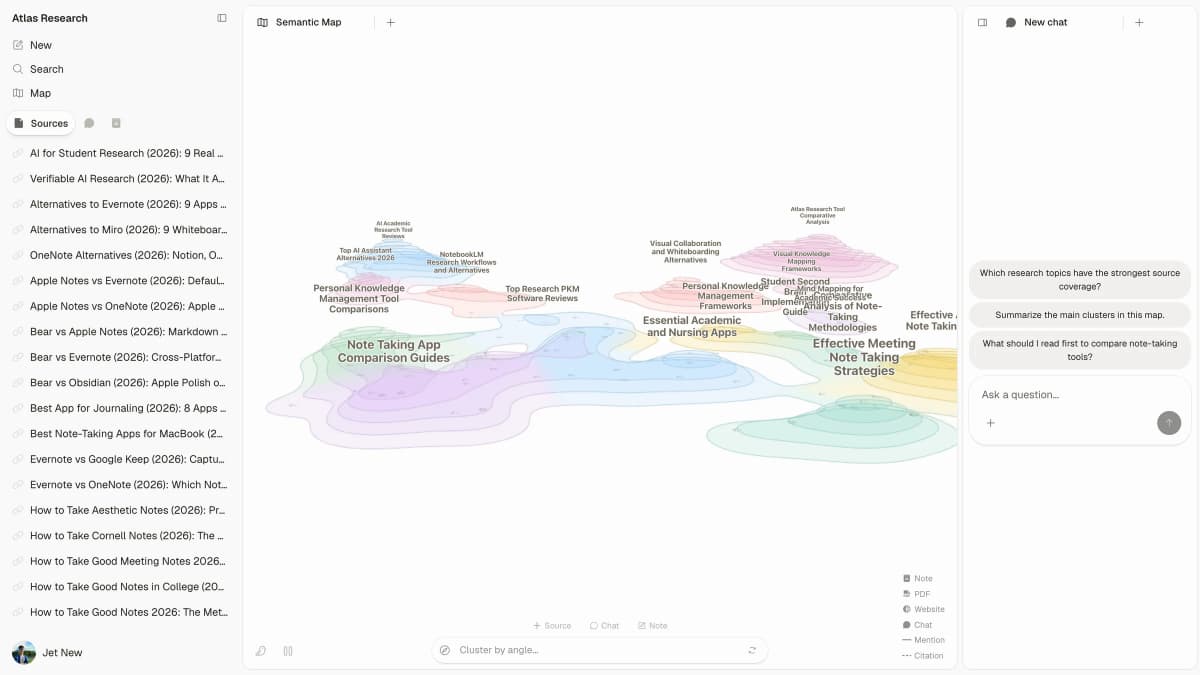
Atlas keeps the sources, map, and cited questions in one workspace. Check a finding there before you add it to your notes or draft.
Atlas answers from the source set in your project. The main value is not confident prose. It is the ability to open the source text before you trust the answer.
Best AI research apps
Atlas
Atlas is best for comparing a source set you chose. Use it to compare methods, find common limits, see where papers disagree, or turn checked findings into notes. A paper search tool is better when you still need to find the field. Use Atlas once the source set is ready and you want cited answers or a map across it.
Consensus
Consensus is a good fit for the question, “What does the research say?” It offers a quick way into research papers and points answers back to studies instead of broad web pages.
Consensus may still miss papers or make a study sound more certain than it is. Its responsible AI guide explains these limits. Open the papers before you use the answer in a review.
Elicit
Elicit can search for science papers and place fields from them in a table. Use it to move from a topic to a paper set, then compare abstracts, methods, findings, or study fields.
Keep your rules for including papers outside the tool too. A table is only as sound as the papers and fields you check.
Scite
Scite helps answer, “How have later papers discussed this study?” It shows whether later work supports, disputes, or mentions a paper.
This can guide what you read first, but it is not a quality score. You still need to inspect the methods, claims, and sources.
Jenni
Jenni helps with outlines, drafts, edits, and source-linked claims while you write. Treat its text as a draft: check your school or journal rules, verify the sources, and revise the argument in your own voice.
Undermind
Undermind helps find papers that a simpler search may miss. Use it early in the research process, then read, screen, and compare the papers before you include them.
AI Academic Writing & Research
AI Academic Writing & Research is a mobile app for writing, theses, literature reviews, and citation help.
Use this type of app for ideas or a draft. Do not trust a claim unless you can open and check its source.
What AI research apps should not replace
AI apps can speed up search, tables, comparisons, and writing. They do not replace paper databases, screening, source reading, or the researcher's judgment.
Be careful with a polished answer that has no source text you can open. Check the source, nearby context, and any conflicting result before you save the finding.
Check your school, journal, or client rules before you use AI text. The safest role for an AI app is support: it can find leads, sort findings, show patterns, and help you check claims.
Decision path for AI research apps
Choose by workflow stage:
- Use Undermind, Consensus, or Elicit when you are still finding papers.
- Use Atlas when you already have a source set and need cited synthesis across it.
- Use Elicit when you need extraction tables or structured evidence screening.
- Use Scite when citation context is the main question.
- Use Jenni when the bottleneck is academic writing with source-linked claims.
- Use AI Academic Writing & Research only for writing-heavy app-store intent, and verify sources elsewhere.
If you are starting from a blank topic, begin with discovery. If you already have a stack of PDFs, notes, and web sources, move to synthesis. The best AI research app is the one that matches the next research decision you need to make.
For a bounded source set, Atlas fits the synthesis stage. Add the papers or PDFs, ask one grounded synthesis question, inspect the citations, and keep only the finding the sources support.
For related work, see legal document organizers, AI for articles, and academic research AI tools.
Synthesize a trusted research source set
Compare themes, gaps, and disagreements across sources with citations.