

AI document comparison helps when the review is about meaning. It can surface changed duties, missing sections, clashing terms, and claims that need a source check. Exact redlines are a different job. If a reviewer needs each added word, removed word, moved clause, style change, or PDF page change, start with a diff tool. Use AI after that to explain what the changes may mean.
As of July 2026, use this guide to route the job. Pick from meaning review, redlines, many-file checks, cited follow-up, and private-file rules.
For source-heavy review, choose the review path before the vendor. A buyer usually needs one of four results. They may need exact changes, gap review, review across many files, or a cited answer that links back to the original text. The best AI document comparison tool is the one that fits that result and keeps the proof visible.

Compare documents with a cited evidence trail
Add your files, build a comparison table, and verify each cited difference.
Quick verdict
Use AI document comparison when the question is about meaning. Good questions include "What changed?", "What is missing?", "Where do these policies conflict?", and "Which source supports this difference?"
Use standard diff software when the question is literal. A redline question asks which words, pages, fields, or formatting changed between version A and version B.
The practical routing looks like this:
| Job | Best starting point | Why |
|---|---|---|
| Cited follow-up after documents are imported | Atlas | The comparison needs source separation, citation inspection, and verified notes. |
| Exact Word, PDF, PowerPoint, Excel, or text redlines | Draftable or another diff tool | You need a change list, side-by-side view, or redline export. |
| Two PDF files with visual or text differences | iLovePDF or a PDF comparison utility | The job is PDF-to-PDF review. It does not need a larger source workspace. |
| Microsoft 365 files already in SharePoint or OneDrive | Microsoft Copilot | Copilot can compare selected files inside the Microsoft workflow and continue the chat afterward. |
| Configurable agents or structured output | StackAI | The value is a repeatable flow that can produce structured results for review. |
| Enterprise AI review | H2O.ai | The fit is enterprise h2oGPTe use around similar text, legal redlines, contracts, and moved content. |
| Gap analysis across PDF, DOCX, and TXT files | DocompareAI | The fit is meaning-aware gaps, conflicts, multi-file checks, and reports. |
| Developer pattern using OCR plus GPT | Azure AI Hub | The page is a reference pattern for combining Azure Document Intelligence and GPT-4. |
Table 1: Sensitive legal, finance, HR, client, or regulated files need approved handling before upload. Check vendor security, data storage, and admin rules before using an AI tool for private files.
Use this fast rule set:
- Need each word change? Use a diff.
- Need each page change? Use a PDF tool.
- Need to know what changed in meaning? Use AI.
- Need to know what is missing? Use gap review.
- Need to compare many files? Use a tool built for more than two files.
- Need a source for each claim? Use a cited review path.
- Need to share the result with a team? Check export first.
- Need to use private files? Check policy first.
- Need a legal sign-off? Keep a human review step.
- Need a final note? Save only the rows you checked.
AI document comparison versus exact redline tools
AI comparison and redline comparison sit on different axes.
The first axis is exact-diff confidence. A high exact-diff workflow tells you which text, page, field, cell, or style changed. Draftable, Word Compare, and PDF comparison tools belong here. They are strong when a reviewer needs a change list, side-by-side review, tracked changes, or PDF export.
The second axis is meaning plus proof. A high-AI review path tells you how files differ in meaning. It can show which rules are missing, where terms clash, or which source backs a claim. Microsoft Copilot, StackAI, H2O.ai, DocompareAI, Azure AI Hub patterns, and Atlas all belong on this axis in different ways.
The mistake is treating the two axes as a single ranking. A tool can be strong at redlines and weak at meaning review. Another can be strong at AI synthesis and still be the wrong place to certify exact word-level changes. For high-stakes review, use the exact tool to find changes. Then use AI to group, explain, or check them.
AI document comparison tools compared
This matrix uses current official product and support pages as the evidence base. It separates AI review tools from redline and PDF tools because the search result page mixes both groups.
| Tool | Best fit | File or document scope | Output style | Verification trail | Main caveat |
|---|---|---|---|---|---|
| Atlas | Cited follow-up after documents are imported into a project | PDFs, websites, notes, academic papers, YouTube transcripts, and supported attachments can become project sources | Cited answers, comparison tables, notes, maps, and side-by-side review surfaces | Citation badges link back to source passages. Reviewers can open citations and save checked findings. | Atlas is strongest for cited review after source intake. Use a diff tool for exact redlines. |
| Microsoft Copilot in SharePoint and OneDrive | Microsoft 365 users comparing selected files where the documents already live | Microsoft support pages describe selecting up to five files in SharePoint or OneDrive. OneDrive notes that videos and images are not supported. | Copilot panel comparison with the option to continue chat | Review happens inside the Microsoft file context, but important claims still need source inspection | Availability, file support, and tenant controls can change, so check current Microsoft 365 guidance. |
| StackAI | Teams building a configurable document comparison agent | The template is built around uploaded documents and structured workflows | Structured report or table, with markdown currently and optional CSV or JSON output described by StackAI | Verification depends on how the agent is set up and what source text appears in the output | A template still needs testing before legal or compliance review. |
| H2O.ai | Enterprise h2oGPTe document comparison | H2O.ai describes comparison for legal documents, contracts, similarities, changes, and moved content | Side-by-side preview and enterprise AI comparison workflow | Enterprise teams need to validate the deployed h2oGPTe flow and review source passages | The page frames the feature as enterprise-facing and not clearly self-serve. Do not assume self-serve access. |
| DocompareAI | Context-aware gap analysis and consistency checks | DocompareAI lists PDF, DOCX, and TXT support. Its FAQ says gap analysis compares 2 files, and multi-file checks cover up to 5 files. | Detailed reports focused on gaps, conflicts, and differences | The review trail depends on the report and exported findings | Refresh security, storage, and policy pages before uploading private files. |
| Draftable | Exact redlines, side-by-side comparison, and change lists | Draftable lists PDF, Word, Excel, PowerPoint, and plain text comparison | Side-by-side, single-page redline, change list, and PDF export | Strong visual trail for literal changes | Use it for exact diff review before AI meaning checks. |
| iLovePDF | Quick two-PDF comparison | Two PDF files | Text and visual comparison modes with a change report | Visual and text differences are inspectable in the PDF comparison view | It is PDF-specific and should not be treated as a multi-file AI review workspace. |
| Azure AI Hub | Developer reference for OCR plus GPT document comparison | Two uploaded PDF documents in the documented pattern | Extract PDF content with Azure Document Intelligence, then ask GPT-4 for differences | Verification depends on the app pattern and exposed extracted text | Treat it as a build pattern for teams that own the app. |
Table 2: The safest pattern is often a two-step review. Use a redline tool when a literal change matters. Then use AI review to group changes by duty, risk, missing proof, or decision impact. If the final output will support a decision, require citations or source links before saving the finding.
Compare documents with citations in Atlas
Atlas fits the part of AI document comparison that happens after the documents have become sources. Use it when the reviewer needs a cited matrix and source checks. Use a diff tool when the reviewer needs a redline export.
Here is the review path I would use:
- Add the documents to the same Atlas project. For PDFs, use text-based files when possible and wait for processing to finish before asking comparison questions.
- Ask a narrow grounded question, such as
Compare the termination obligations in these three agreements. Use a table with columns for document, obligation, difference, risk, and citation. - If the answer blends sources together, ask Atlas to separate each source in the table and include one cited claim per row.
- Open the citation badges for rows that matter. Check whether the passage supports the row, whether nearby context changes the meaning, and whether another source conflicts.
- Keep checked rows. Revise weak rows. Save the final review as a note with the question and citations checked.
- Use tabs or split view when the comparison requires reading two source passages while writing the verified note.
Use this Atlas review path when the question is about importance and proof. Ask which differences matter. Ask where each one can be checked. Atlas citations are verification links. They do not make an answer complete on their own. The reviewer still has to open the passage and decide whether it supports the claim.
Best for each AI comparison workflow
Best for Microsoft 365: Microsoft Copilot
Microsoft Copilot is the natural starting point when files already live in SharePoint or OneDrive. Microsoft support describes selecting up to five files in SharePoint or OneDrive, asking Copilot to compare them, and continuing the chat afterward. That fits internal file review, quote checks, resume review, and report review inside Microsoft 365.
The boundary is control and export. If the result must leave Microsoft 365 as a table, evidence log, or audit report, check the current Copilot output and tenant settings. For exact legal redlines, pair Copilot with a diff tool.
Best for configurable agents: StackAI
StackAI is a better fit when the team wants to build a repeatable agent. Its document-comparison template uses uploaded files as inputs and returns structured output. StackAI also describes repeatable runs and optional Slack or email notices. That pattern can help teams compare recurring forms, spreadsheet versions, policies, or reports.
The risk is setup quality. A comparison agent depends on the prompt, extraction, source handling, and review step. Treat StackAI as a workflow builder. Test the agent on known file pairs before using it for important review.
Best for enterprise AI: H2O.ai
H2O.ai describes AI-powered file review as an enterprise h2oGPTe feature. The page names legal files, contracts, similar text, changes, and moved content. That makes H2O.ai relevant when the buyer needs an enterprise AI platform instead of a small web utility.
The page should not be read as proof of consumer access or higher accuracy. Enterprise teams should test deployment, access controls, review screens, and source tracing inside their own h2oGPTe setup.
Best for gap analysis: DocompareAI
DocompareAI focuses on gaps, conflicts, and reports. Its public page lists PDF, DOCX, and TXT support. Its FAQ says gap analysis compares 2 files. It says multi-file checks can compare sections across up to 5 files.
That fits regulated, quality, contract, technical-docs, or research review when the reader needs missing or clashing items. Before upload, check the current security and storage terms.
Best for exact redlines: Draftable
Draftable is the tool I would reach for when the output must show exact changes. Its public page names redline and side-by-side views, change lists, PDF export, and support for PDF, Word, Excel, PowerPoint, and text.
That is a different promise from AI review. Draftable can show each added word, removed word, and style change. If the reviewer needs an explanation of why changes matter, use AI after the redline.
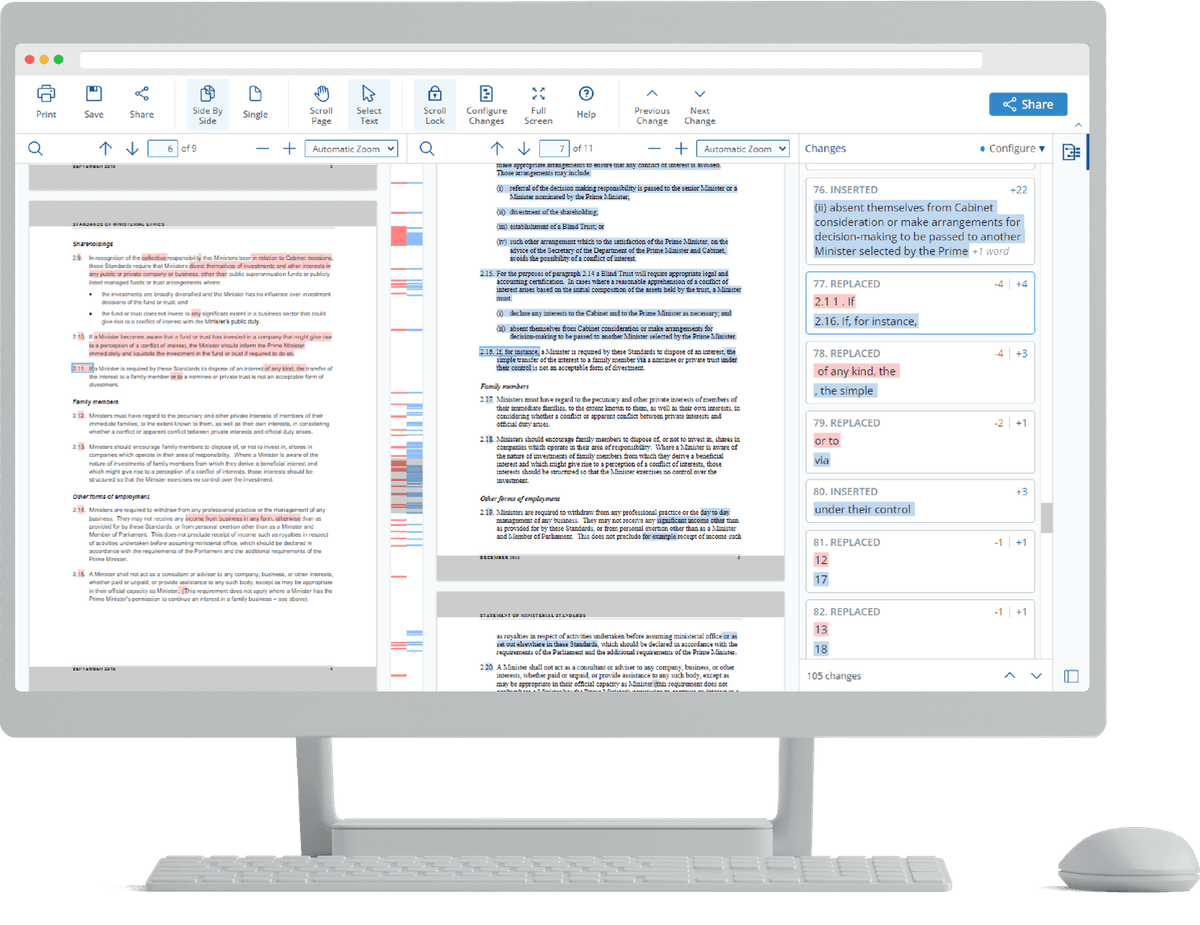
The Draftable product image shows the exact-diff review surface: two document panes, highlighted changes, synchronized side-by-side reading, and a change list for jumping between edits. That visual supports the article's redline boundary. Use it to understand the interface shape, then test accuracy on your own file pair.
Best for quick PDF review: iLovePDF
iLovePDF fits a narrow PDF job. Use it to compare two similar PDFs and inspect text or page changes. Its page exposes text and visual modes. That is enough for quick PDF review when the files are not part of a larger research project.
Do not stretch it into review across many sources. If the job involves Word files, spreadsheets, source citations, or repeat analysis, use a broader review tool.
Best developer reference: Azure AI Hub
Azure AI Hub is useful for teams building their own app. Its file review page describes uploading 2 PDFs, extracting text with Azure Document Intelligence OCR, and using GPT-4 to ask for differences.
That is a developer reference. It is relevant when the team must own file intake, extraction, prompts, review screens, and security.
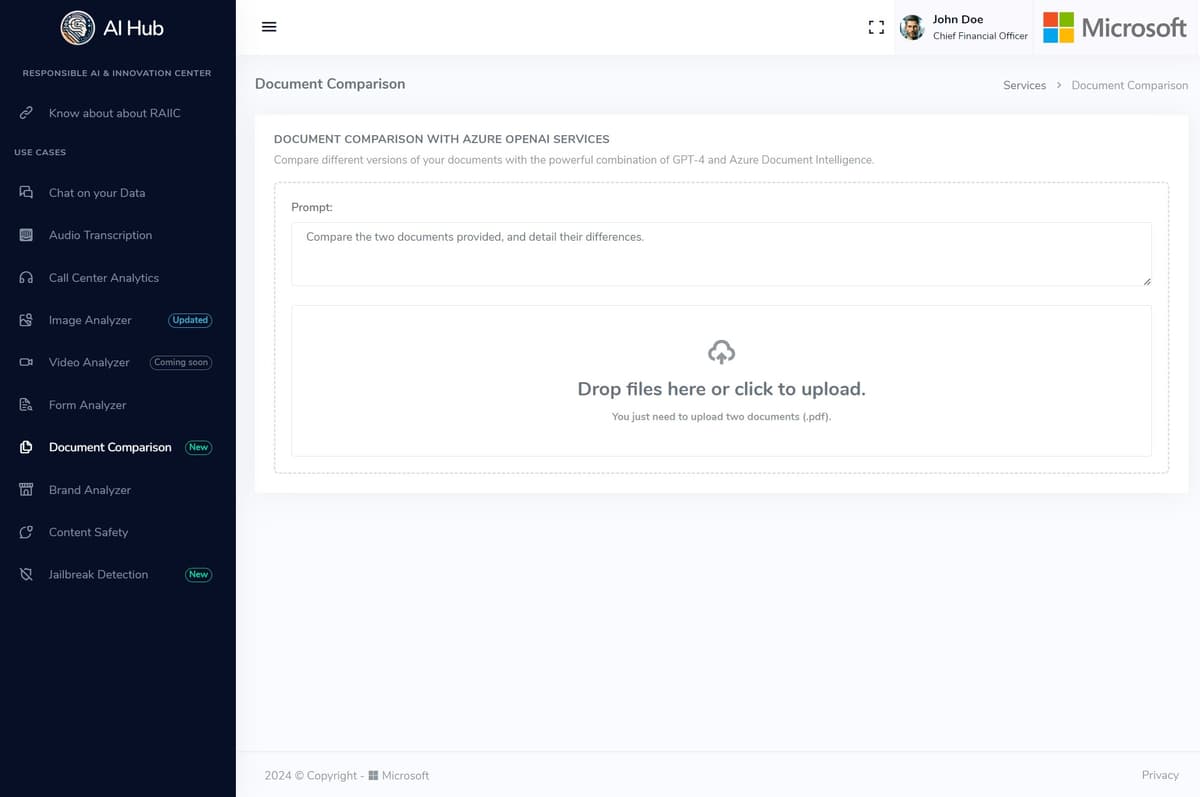
The Azure AI Hub screenshot shows the developer pattern rather than a finished SaaS comparison report. Step one is writing a prompt. Step two is uploading two PDF files. Step three is running the task as an Azure OpenAI Services workflow.
The screenshot supports these narrow workflow claims:
- The user writes a prompt before running the comparison.
- The interface asks for two PDF uploads.
- The task is framed as a developer app built around Azure OpenAI Services.
For Atlas, the proof path is source-first. Add the files as sources. Ask for a matrix with source and citation columns. Open the cited passages. Save only the rows you checked.
Accuracy, privacy, and verification risks
AI document comparison creates risk at 3 points. The file text can be weak. The AI answer can overreach. The upload may break a policy.
Extraction risk
Extraction risk appears when the source text is incomplete. Scanned PDFs, odd layouts, locked files, tables, headers, footnotes, or image-heavy files can produce weak text. If the source text is weak, the AI may miss a change or overstate a pattern.
Interpretation risk
Interpretation risk appears when a model groups changes by meaning. That grouping can help, but it can also hide exceptions. A clause may look similar while changing a term, date, court, threshold, or owner. Ask the tool to cite the passage or show the redline before you rely on the answer.
Handling risk
Handling risk appears before review begins. Client files, HR files, contracts, financial reports, and regulated records may need approved storage. Check the vendor's current retention, training, encryption, workspace, and admin controls before upload. For private files, refresh the vendor's current privacy, retention, and security pages before using the tool. If the file cannot leave a controlled space, use an approved internal process or an offline tool.
For important work, use this review checklist:
- Can the tool compare the file types and number of files you have?
- Does it show exact redlines, semantic differences, or both?
- Can you inspect source passages for every important claim?
- Can you export the output in a format your team can review?
- Does the vendor's current policy allow the documents you plan to upload?
- Does a reviewer know which findings came from exact diffing and which came from AI interpretation?
Choose an AI review workflow
Choose the review path by the cost of being wrong. If a missed insertion, deletion, style change, moved paragraph, or page-level difference would create risk, start with exact comparison. Draftable, Word Compare, or a PDF comparison utility should produce the first review surface. AI can summarize the pattern afterward, but it should not replace the redline.
If the cost is missing a requirement, inconsistency, gap, or contradiction across documents, use an AI comparison workflow. DocompareAI, StackAI, Microsoft Copilot, H2O.ai, or an Azure-based internal app may fit depending on where the documents live and how much control the team needs.
If the cost is relying on an unsupported claim, use a cited workflow. Atlas fits when files are already imported as sources. Use it when the reviewer needs a matrix with citations that can be opened, checked, revised, and saved. Atlas does not make the answer final. Its value is keeping the review tied to source passages while the reviewer decides what is safe to reuse.
For nearby jobs, pick the narrower guide:
- Use a document comparison tool when the query is broader than AI. Use an AI document summarizer for first-pass reading. Use a PDF chatbot when the source format matters, and use a PDF summarizer for a shorter read.
- Use research paper AI for scholarly file review. Use AI research assistant tools for longer source work, and use a scientific paper summarizer when the files are papers. Use legal document AI, legal document analysis AI, or contract AI when legal review controls the review path.
- Use an AI document reader when the task is source-grounded reading. Use AI citation checkers when the decision turns on whether a claim is supported. Use qualitative data analysis AI, UX research AI, AI website readers, ai transcript summarizers, or market research AI tools when the documents are research evidence in a different format.
The rule is direct. Exact changes need exact comparison. Meaning-level gaps need AI. Decision-grade findings need citations and source checks. Keep the first test small and cheap.
When in doubt, run a small test:
- Pick two short files.
- Ask the tool to find the main changes.
- Open the source text.
- Check three claims by hand.
- Save only what you can prove.
- If the tool hides proof, use it for drafts only.
- If the tool shows proof, keep the source check in the final review.
Keep the test plain by using files you know well. Ask one narrow question. Check one row at a time. Mark each row as right, wrong, or not sure. If the tool misses a fact you can verify, stop and change the prompt or the tool. If it finds useful gaps, run the same test on a longer file pair. Do not move to private work until this small test works.
Conclusion
AI document comparison is a routing decision. Microsoft Copilot is convenient inside Microsoft 365. StackAI and Azure AI Hub help teams build custom flows. H2O.ai and DocompareAI fit enterprise or gap review. Draftable and iLovePDF remain better starting points for exact redlines and PDF changes.
Atlas fits the cited follow-up step. Bring the relevant files into a project. Ask for a cited comparison matrix. Open the citation badges. Save only the rows that survive source review. This source-checking step helps turn an AI answer into a finding a reviewer can defend.
For related comparison and organization workflows, see compare Word documents for redlining a specific file pair, Word document AI for broader Word-file assistance, and document organizer for managing a larger file set.
Compare documents with a cited evidence trail
Add your files, build a comparison table, and verify each cited difference.