

The best UX research AI tool depends on the job. Use Dovetail or Great Question when the team needs a shared research hub. Use Looppanel for interview transcripts, analysis, and handoff. Use UserTesting or Maze when the team needs to run feedback or tests and sum up what happened.
Use Atlas after you have transcripts, research notes, reports, or source files. It helps when findings need source checks before they move into a roadmap, PRD, design review, or readout. Atlas does not recruit users, run tests, or record calls. Its UX research role is to turn gathered sources into cited answers that a researcher can inspect.
That matters because AI can sort and sum up research files. It does not own the research call. NN/g warns that AI-made codes and summaries still need human review. The system can miss context or invent insight. For UX research, ask which tool keeps enough user proof for the next decision.
If the research question is broader than UX methods, compare market research AI tools instead. If the project is mostly document review, start with AI document summarizers before choosing a UX research platform.

Synthesize UX research with cited evidence
Add research files and build a cited insight table you can verify.
How to choose UX research AI tools
Start with the method, then compare AI features. A shared hub helps when the team already has studies to search. A test-plan helper helps when the team is setting up a usability study. An interview tool helps when the slow part is transcripts, clips, tags, or readouts. A source-grounded workspace helps when the team needs to split supported findings from weak themes. If the research plan blends user interviews with market sizing, compare the market research AI tools lane as well.
Use these checks before picking a tool:
- Method fit: Does the tool support interviews, surveys, tests, diary studies, feedback review, or hub search?
- Source checks: Can a theme, quote, summary, or answer open back to its transcript, note, clip, survey, or report?
- Transcript and import quality: Can it keep speaker context, timestamps, tags, and study metadata from your real files?
- Hub search: Can a teammate ask a narrow question across old studies and understand which sources were used?
- Study setup: If the tool writes plans, tasks, screeners, or prompts, can a researcher edit the output before launch?
- Privacy and consent: Does the workflow match your consent language, data rules, and rules for sensitive user data?
- Team handoff: Can the final insight move into Slack, a design review, or a source-backed doc with proof intact?
UX research AI tools compared
This table compares each tool by the job it should own in a UX research workflow. It avoids pricing and plan-limit claims because those change often. Check each vendor's current pricing page before buying.
| Tool | Best fit | Research files | AI output | Source check | Watch-out |
|---|---|---|---|---|---|
| Atlas | Cited synthesis after research files exist | Interview transcripts, notes, reports, PDFs, websites, text notes, and other project sources | Grounded answers, synthesis tables, summaries, and source-backed notes | Citation badges open source passages when the files support the answer | Does not recruit participants, run usability tests, record interviews, or replace researcher judgment |
| Dovetail | Customer intelligence and shared research hub | Research, sales calls, support tickets, feedback, surveys, clips, and connected customer data | AI analysis, chat, search, dashboards, docs, and customer-intelligence outputs | Dovetail says AI-generated insights link back to source material | Broad customer-intelligence scope may be more platform than a small research team needs |
| Looppanel | UX interview analysis and handoff | Interviews, transcripts, notes, clips, tags, and research hub files | Transcription, AI analysis, hub search, reports, and clips | Useful when the team needs transcript- and clip-backed alignment | Verify tags and summaries against the session context before reporting findings |
| UserTesting | Feedback programs and human-insight testing workflows | Video, transcripts, surveys, behavior data, test plans, and user feedback | AI-assisted setup, themes, patterns, moments, and outputs linked to proof | UserTesting describes AI outputs as clear, inspectable, and linked to proof | Stronger fit for collecting feedback than for synthesizing imported research archives |
| Maze | Moderated and unmoderated testing, surveys, prototype tests, and research sharing | Interviews, usability studies, card sorts, tree tests, surveys, clips, transcripts, and highlights | AI study builder, AI moderator, reports, themes, clips, and summaries | Best checked through its reports, clips, transcripts, and highlights | Treat AI moderation and themes as assistance. Researchers still need to inspect behavior and task context |
| Great Question | Research hub, interviews, participant ops, and study synthesis | Interviews, transcripts, highlights, tags, studies, hub files, and recruiting workflows | Summaries, chapters, highlights, tags, repository Q&A, and synthesis across studies | Great Question says quotes link to original transcripts for verification | Good hub breadth, but teams should review data handling and beta AI-moderation claims before relying on them |
Table 1: The table separates test platforms, hubs, interview tools, and source-checked synthesis. Match the AI feature to the research job.
Source-check comparison workflow
This source-check method starts after the research files exist. A project might include transcripts from six interviews plus one usability-study report. It might also include tagged notes and support-call summaries. Use the method in any research tool that preserves a path back to clips, quotes, notes, reports, or source passages.
At that point, collection is already done. The reviewer needs to confirm that each generated theme points back to real user language, a source, a caveat, and a next question before it becomes a product decision.
Use this source-check method before a generated theme leaves the research tool. It also applies when a UX study turns into broader qualitative data analysis or source-heavy research assistant work:
- Gather the relevant transcripts, notes, reports, clips, or text sources in one workspace.
- Wait for import or source processing to finish.
- Ask for a table with the theme, proof, source, caveat, and next question.
- Open citations, quote links, clips, or source links before trusting a claim.
- Save only findings that the source material supports.
A useful prompt for UX synthesis is:
Compare these interview transcripts and research notes. Create a table with columns for theme, user proof, source, caveat, and next question. Tie each finding to citations. Flag places where the proof is thin or mixed.
That prompt gives the researcher an insight table to audit. It avoids a theme list that sounds finished too early. Use the same habit in Atlas, Dovetail, Looppanel, UserTesting, Maze, and Great Question. When they expose citations, clips, quotes, reports, or source links, open them before sharing.
Before a UX insight leaves the AI tool, check:
- Whether the finding appears in more than one participant source.
- Whether the quote still means the same thing in context.
- Whether behavior, transcript text, and researcher notes agree.
- Whether consent allows this material to be processed and shared.
- Whether the readout carries the caveat.
- Whether the next research question is clear enough to test.
| Insight table column | Why it matters in UX research |
|---|---|
| Theme | Gives the team a concise pattern to discuss. |
| User proof | Keeps the finding attached to real user language or research notes. |
| Source | Shows which transcript, note, report, or document supports the claim. |
| Caveat | Prevents weak, mixed, or narrow evidence from becoming a broad product truth. |
| Next question | Turns synthesis into the next research or design action. |
Table 2: For a cited synthesis pass, add the files to one project and ask a grounded question. Open source links before the claim reaches a roadmap or design review. Treat each citation or clip as a lead back to source proof. Read nearby context and check whether the answer overstates what the participant, note, or report said.
Best UX research AI tools
1. Atlas
Atlas is best for UX teams that already have research files and need source-grounded synthesis. Add interview transcripts, Markdown notes, PDFs, reports, websites, or other supported sources to a project. Then ask focused questions across those files.
Atlas can return cited answers and synthesis tables that point back to source passages. That helps a researcher inspect proof before saving or sharing a finding. The same source-check habit is useful for teams evaluating AI citation checkers and source-grounded document workflows.
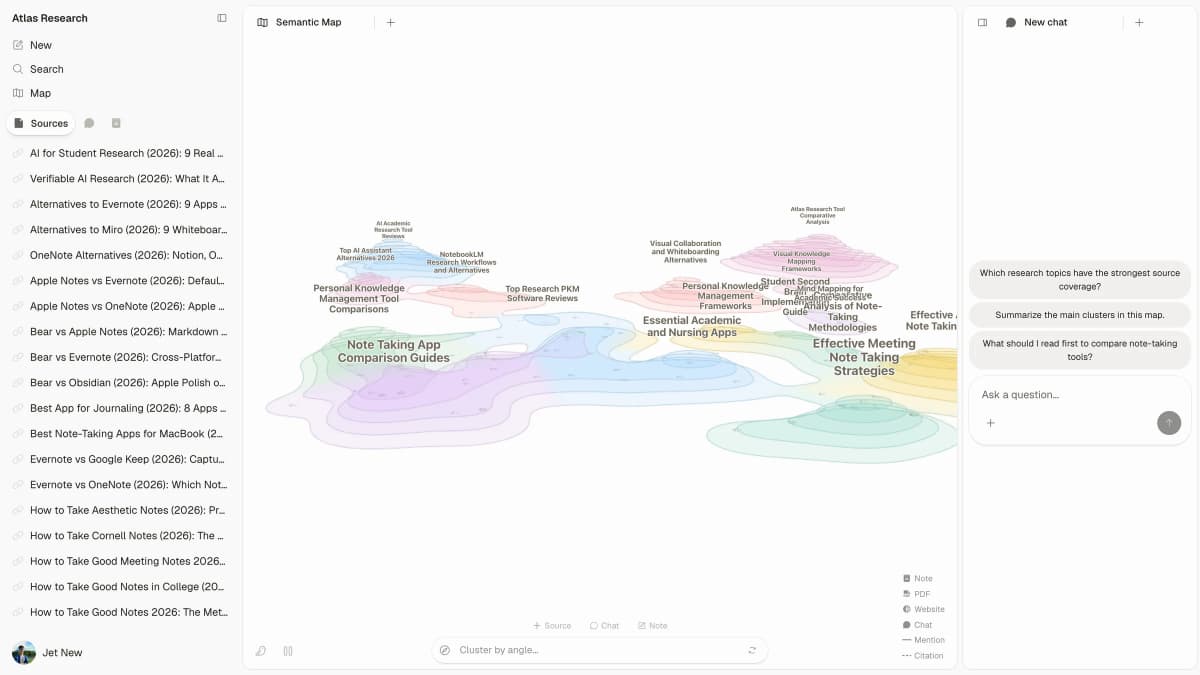
The Atlas workspace keeps sources, map context, and research questions visible while a team checks whether a finding has enough source coverage.
Use Atlas when the team has too many source files and too little source discipline. It works well for comparing findings across interviews. It can also check whether a pattern appears in more than one source. From there, the team can turn verified synthesis into notes or prep a proof-backed readout.
Atlas is not the starting point for recruiting, live calls, unmoderated tests, or video capture. Pair it with the tool that collects the data. Then use Atlas for the cited synthesis and evidence review step.
2. Dovetail
Dovetail is best for teams that want a broad customer-intelligence layer. Its current product page covers research, sales calls, support tickets, surveys, feedback, AI analysis, chat, search, and dashboards. It also describes outputs that link customer signals across teams.
That makes Dovetail a strong fit for research ops and product teams. Stakeholders can search and reuse customer proof without asking the research team for every answer. Its AI story is hub-heavy. It turns scattered customer files into structured findings, then makes them searchable and shareable.
The watch-out is scope. A smaller team that only needs a few interview transcripts may not need a full customer-intelligence platform. Before buying, check the repository model, governance needs, connected data, and cost against your UX research process.
3. Looppanel
Looppanel is best for UX interview analysis, transcripts, and qualitative handoff. Its product page describes AI that supports the researcher. Its workflows cover tagging, analysis, hub search, reports, and video clips.
Choose Looppanel when the bottleneck is turning sessions into usable research outputs. It fits teams that run interviews often and need a cleaner path from transcript to themes, clips, and team alignment.
The main check is the one any qualitative researcher should apply to AI output. Review the tags, themes, and summaries against the transcript and study context. A well-labeled pattern can still be wrong. The participant may have been primed. The sample may be narrow. The quote may have lost context.
4. UserTesting
UserTesting is best when the team needs a human-feedback platform. Its AI helps with setup, targeting, test creation, themes, and evidence review. Its AI page describes workflows that move from idea to feedback. It then surfaces themes and patterns across video, transcript, survey, and behavior data.
This is a better fit for teams that need to collect feedback and test flows. It is less useful for teams that only need to analyze imported transcripts. Study setup, user feedback, and AI synthesis live inside a broader customer-insight workflow.
The watch-out is method fit. AI can help move from feedback to direction. Researchers still need to inspect what users did and said. They also need to check the task and source support.
5. Maze
Maze is best for research and testing workflows. It supports interviews, prototype tests, surveys, card sorting, tree testing, live website tests, clips, transcripts, and reports.
Its current site describes AI study building and AI moderation. It also describes reports, themes, interview clips, transcripts, and highlights.
Choose Maze when the team needs to run studies and share findings across product and design. It fits teams that want one workflow from study setup through reporting.
The caveat is that test behavior still needs human judgment. A transcript summary can miss a pause, a misread screen, a wrong click, or a contradiction. Use Maze's AI outputs as a starting layer. Then review clips, transcripts, and task context before sharing findings.
6. Great Question
Great Question fits teams that want one tool for recruiting, study work, interviews, hub Q&A, and AI review. Its AI page lists summaries, chapters, highlights, tags, repository questions, cross-study synthesis, and quote links back to transcripts.
Use it when research ops and reuse are central to the repository workflow. The transcript-linked quote model keeps AI output close to the proof a researcher or stakeholder needs to check.
Before using it for sensitive work, review the current product and privacy docs against your consent language and data rules. Treat AI-led interview claims carefully. AI moderation may help scale some user input. It still needs study design, recruiting care, and review by a researcher who knows the product context.
Responsible AI use in UX research
Start with real research files and keep the researcher in charge of judgment. Use AI to transcribe, sort, sum up, cluster, search, draft, and prep proof for review. Do not use it to replace real users. Do not let it invent quotes, bypass consent, or present a theme as product truth before checking the source.
NN/g draws a line between text and behavior. AI works better with interview, survey, and diary text than with what a user did in a test.
If the finding depends on behavior, review the recording, task path, click data, notes, and facilitator context. Do that before treating a generated summary as proof.
dscout's practitioner framing points in the same direction: use AI with intent and stay close to the data.
Define where automation is allowed. Define where human judgment is required. Decide what proof must stay attached when insights move into product decisions. For a lightweight risk check, map each AI step to NIST's AI Risk Management Framework.
Govern how research files enter AI. Map consent, privacy, and evidence risks. Measure weak source support. Manage what changes before launch. For non-UX analysis work, use a broader market research AI tools comparison.
Consent and participant context
AI review should start with the research policy. Check whether the consent language allows transcript processing. Confirm where user data can be stored. Decide what must be redacted and who can access AI outputs. Sensitive data rules matter more when AI output is easy to share outside the original research team.
Evidence review before reporting
Use this minimum review standard:
- Check consent and data rules before uploading transcripts or user files.
- Remove or protect sensitive user data when the research policy requires it.
- Keep the transcript, note, clip, or survey response linked from the AI output.
- Check AI tags and themes against the study goal and sample.
- Mark weak evidence as weak instead of smoothing it into a confident insight.
- Separate what users said, what users did, and what the researcher infers.
- Keep caveats when moving findings into roadmaps, PRDs, and design reviews.
Which UX research AI tool fits?
Choose by workflow stage.
If you need to collect feedback, run tests, recruit users, or manage studies, start with a UX research platform. UserTesting, Maze, Great Question, or your current platform may fit. The collection step matters because user fit, consent, task setup, and study context shape every later insight.
If you need to move from interviews to themes, Looppanel is the more focused choice. If the team needs searchable old research and feedback channels, look closely at Dovetail and Great Question.
If you already have transcripts, notes, reports, or source docs and the next job is proof-backed synthesis, use Atlas. Ask a specific grounded question and request a table that keeps themes attached to sources and caveats. Open the citations behind important claims, then save the findings that survive review.
The right UX research AI stack is usually not one tool. It is a chain: collect real proof, sort it, synthesize it, check it, and only then turn it into decisions.
Synthesize UX research with cited evidence
Add research files and build a cited insight table you can verify.