

Document AI tools do not all solve the same problem. The same search page can show a cloud field tool, an AI doc maker, a PDF chat app, and a source review workspace.
The first step is to name the job. Use an extraction platform when the output should be fields. Use a document generator when the output should be a polished file. Use a source review tool when the output is an answer that someone needs to check against the source.

Compare documents with cited answers in Atlas
Compare uploaded documents, inspect citations, and save only verified findings.
Quick verdict
Choose Google Document AI when the job is repeat file processing. Use it for OCR, file labels, page parsing, doc splits, and field pulls into data tables. Google describes Document AI as a way to turn loose docs into structured data.
Choose Gamma, Piktochart, or AI Doc Maker when the job is doc creation. These tools help turn prompts into reports, proposals, white papers, case studies, ebooks, and business docs.
Choose Atlas, NotebookLM, Claude, or docAnalyzer when the job is source review. The key test is whether the answer points back to the doc, page, passage, or source set behind it.
For a ranked benchmark-style list, use the deeper best document AI tools guide. This page is a category comparison that helps you route the document job before you compare individual features.
What to compare in document AI tools
Most confusion around document AI tools comes from treating field work, doc creation, and source review as one group.
Extraction is for turning docs into data. The tool reads a file, finds fields or file types, and sends output into another system. Accuracy, field rules, review steps, and price per page matter more than writing quality.
Generation is for making a new file. The tool may turn a prompt, outline, sheet, or brand kit into a report, proposal, handout, deck-style doc, or PDF. Layout, templates, edits, export, and brand fit matter more than source checks.
Cited review is for questions about existing docs. The tool helps a person read, compare, sum up, or combine sources. Import, search, citations, passage checks, conflicts, and saved findings matter more than visual polish.
Document AI tools compared
This table is the main routing model. It does not rank every product in the market. It separates the document AI jobs that often get mixed together in search results.
| Document AI job | Best-fit tools | Proof to demand | Evidence format | Source or citation support | Privacy and governance checks | Avoid this lane when |
|---|---|---|---|---|---|---|
| Structured extraction | Google Document AI | Processor fit, extraction accuracy, schema control, review workflow, page pricing | Field output, classifications, confidence scores, processed pages | Source documents may be traceable in the processing system, but the buyer is usually checking fields rather than cited prose | Data residency, retention, processor availability, review permissions, cost at expected page volume | The reader needs a narrative answer, a comparison, or a cited synthesis |
| Visual document generation | Gamma, Piktochart | Quality of generated reports, visual editing, export, brand fit, template control | Designed documents, pages, reports, decks, PDFs | Check claims before using generated copy externally. Citation proof is usually outside the main workflow. | Team permissions, asset handling, export rights, brand controls | The output must preserve exact source evidence or extract fields into operations |
| Lightweight document creation | AI Doc Maker-style tools | Speed from prompt to PDF or Word-style output, format support, editing friction | Generated PDFs, Word documents, reports, templates | Usually weak unless the product explicitly supports citations or source references | Upload handling, retention, account requirements, commercial rights | The document will support high-stakes claims or needs source-by-source verification |
| Source-grounded document workspace | Atlas, NotebookLM, docAnalyzer | Source import, answer grounding, citations, source limits, export, follow-up workflow | Cited answers, source summaries, notebooks, downloadable artifacts | The cited passage or source is the proof surface to inspect before relying on the answer | Source types, file limits, privacy terms, retention, sharing, admin controls | You need high-volume extraction or polished visual document design |
| General PDF and multimodal reasoning | Claude | PDF text extraction, visual page handling, model behavior on charts, long-context limits | Chat answers, extracted reasoning, summaries, structured outputs | Can reference PDF contents, but verify exact app/API citation behavior for the workflow you will use | Plan/API terms, file handling, sensitive-document policy, model and context limits | You need a durable document workspace with project-level source organization |
| Collaborative knowledge documents | Bit.ai | Collaboration, document organization, wiki structure, search, sharing, analytics | Team documents, wikis, workspaces, shared assets | Do not assume citation-level verification unless official docs support it for your workflow | Workspace permissions, guest access, tracking, retention, admin controls | The main need is extraction accuracy or source-grounded claims from uploaded PDFs |
| Research and study notebooks | NotebookLM | Source type support, source limits, notebook workflow, citation behavior, study artifacts | Source notebooks, summaries, Q&A, generated study materials | Strong fit when work stays around the selected source set and citations are checked | Google account context, source limits, sharing, current privacy terms | You need enterprise document extraction or final visual document production |
Table 1: Use the matrix to route the job first, then check the proof column before trusting a vendor demo.
Source evidence for each document AI category
If the source-grounded workspace row matches your job, Atlas continues the review after source intake. Add docs, ask a grounded question, open the citation badges, and check the passage before saving the brief.
Extraction platforms
Google Document AI belongs in the extraction lane. Google's overview names OCR, field pulls, file labels, page splits, parsers, and analysis. That fits repeat file queues such as invoices, forms, claims, applications, and contracts.
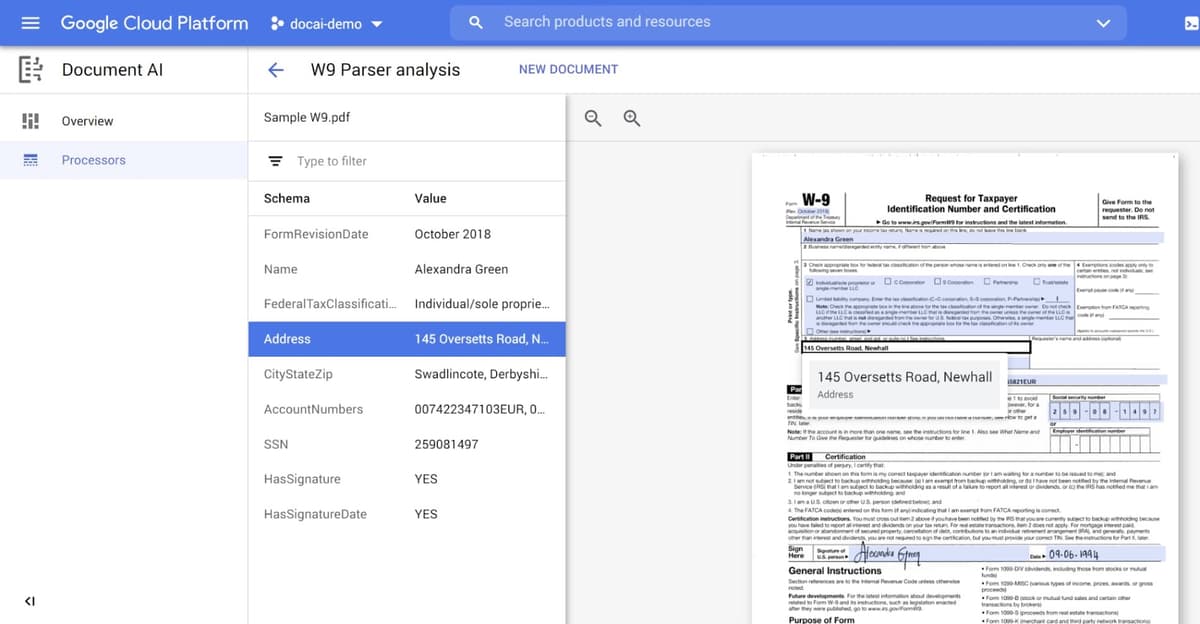
This Google Cloud Blog screenshot shows the extraction lane in practice. A user picks a processor, tests an uploaded file, and checks the fields before sending data onward.
The proof is live use. Before buying, test your real file types, fields, review steps, and page cost. A clean invoice demo says little about bad scans, odd layouts, mixed languages, or edge cases in your own queue.
Document generators
Gamma and Piktochart sit in the generation lane. Their pages describe visual docs such as reports, proposals, white papers, case studies, ebooks, training guides, and designed layouts. AI Doc Maker is closer to fast prompt-to-doc creation for PDFs, Word files, and reports.
The proof is the finished file. Check whether the tool can make a doc your team would send, revise, export, and maintain. If the text includes factual claims, review those claims separately. A polished layout does not make the source proof stronger.
Cited review workspaces
docAnalyzer, NotebookLM, Claude PDF support, and Atlas belong in the cited-review lane. Readers ask: "What do these 2 docs disagree on?" "Which source supports this claim?" "What changed across these reports?" "Can I turn these files into a checked brief?"
The proof is source access. A useful answer lets you return to the source, check the passage, and see whether the answer goes too far. If the answer cannot be traced back to the source, treat it as an unchecked draft.
Category framing
IBM's document AI overview helps with category language. It frames the field around OCR, machine learning, and language processing. Buyer decisions should still come back to the job. A definition page can explain the term. It cannot tell you whether your files need extraction, generation, or cited review.
Where Atlas fits
Atlas fits after a set of docs becomes source material. Use it when a person needs to ask a grounded question. It also helps with citation checks, source comparison, and saved answers.
A typical Atlas workflow looks like this:
- Import a PDF, website, YouTube transcript, paper, note, or other supported source into the project.
- Ask a focused question that names the document, claim, method, or comparison you want to check.
- Read the answer and open citation badges for important claims.
- Inspect the cited passage in the source or PDF viewer, including nearby context, qualifiers, tables, or contradictions.
- Save or synthesize the answer only after the cited evidence supports it.
This source-review job is different from Google Document AI extraction or Gamma-style document generation. Choose a field tool for a custom invoice processor. Choose a generation tool for a branded proposal layout or a finished PDF from a prompt.
Atlas is a better fit when review depends on proof. Use it to compare reports, review papers, check claims, or turn sources into a brief with links back to the originals.
How to choose a document AI tool
Start with the output.
If the output is fields, choose an extraction platform. Test it on your real documents, including bad scans, edge cases, and exceptions. Ask how humans review low-confidence fields and how pricing changes at your actual page volume.
If the output is a finished document, choose a generation tool. Test the editing experience, export formats, templates, brand controls, and factual review process. A generator can save drafting time, but someone still owns the accuracy of the final document.
If the output is an answer about sources, choose a cited review workspace. Test whether answers point back to the doc. Check whether citations open the right passage. Make sure the tool handles multiple sources and lets you save checked findings.
If the output is broad PDF chat, compare the narrower PDF and document-chat options before choosing. The guides to chat with documents, PDF AI tools, and PDF chat AI tools are better next reads for uploaded PDF chat.
If the output is ranked tool selection, use the best document AI tools guide. It goes deeper on individual tool picks. This article is the routing layer: it keeps you from comparing products that solve different jobs.
Before you commit, refresh four details on the vendor's current site:
- Pricing and page or usage limits.
- File types, source limits, and model behavior.
- Privacy, retention, training-data, and admin controls.
- Export, app links, and ownership of the output.
For source-based review the final test is whether a teammate can inspect the original text behind an important answer. If they cannot find the source passage, the document AI output should stay in draft review.
Choose by job, then verify proof
Document AI tools are easier to compare once you stop asking for 1 universal winner. Use extraction tools when documents need to become structured data. Use generators when the job is producing a new document. Use cited review tools when the document decision depends on answers that can be checked against source material.
Atlas belongs in that third lane. Upload the sources, ask grounded questions, inspect citations, and write the brief only after the proof holds.
Compare documents with cited answers in Atlas
Compare uploaded documents, inspect citations, and save only verified findings.