

Contract AI can mean several things. Some searchers want a vendor named ContractAI. Some want a draft tool, review app, CLM, signed-deal search, or broad AI help with contract work. Start with the job you need the tool to do.
Use a draft tool when you need a first pass at a common deal. Use review software when legal teams need playbooks, redlines, and risk flags. Use CLM or deal search when the job is storage, tasks, or signed-deal queries. Use Atlas to read uploaded contract sources, ask cited questions, compare clauses, and inspect source text.
Do not treat contract AI output as legal advice. AI can help with a first draft, review pass, extraction, or evidence check. A qualified lawyer or responsible contract owner should validate the language before anyone signs or relies on it.

Create a cited contract checklist in Atlas
Build a cited contract checklist, then inspect every supporting clause.
What to look for in contract AI
The phrase "contract AI" is ambiguous. The live results mix product names, legal guidance, draft tools, CLM explainers, deal pages, buyer guides, and signed-deal search tools.
That mix creates a practical problem for searchers. A founder asking "can AI write my NDA?" has a draft problem. An in-house team looking at CLM has a process problem. An analyst checking whether 40 vendor deals share the same renewal carveout has an evidence problem.
Here is the category map I would use before evaluating tools:
- ContractAI the vendor: evaluate it for contract analytics, extraction, review workflows, and automated negotiations based on App Orchid's first-party overview.
- Contracts.ai the product: check it for signed deals, fields, portfolio queries, and source-linked answers.
- AI contract draft tools: best for first drafts of common deal types, with later review by a qualified legal owner.
- AI contract review software: best for playbook-based review, risk flags, clause highlighting, redline assistance, and legal-team workflows.
- CLM and contract management AI: best for drafting, approvals, signing, storage, task tracking, and reports.
- Cited source checks: best when you have contract PDFs and need to check the source text before a business or legal decision.
This page owns the head term and category map. For deeper procurement criteria, use the more software-specific guide to contract AI software. Use a Contracts AI guide for plural and branded intent once that draft goes live.
Contract AI comparison matrix
This table is a lane map. It separates the contract AI jobs that appear in the SERP and names what each source can support.
| Option | Best for | Source-backed evidence | Not for | Verification needed |
|---|---|---|---|---|
| Atlas | Cited reading, clause comparison, and contract checklist synthesis over uploaded PDFs | Atlas supports PDF imports, grounded questions, multi-source synthesis, citation badges, and PDF passage inspection | Legal advice, CLM, drafting, redlining, risk scoring, or e-signature | Open each citation, read surrounding clause text, check definitions and exceptions |
| ContractAI | Contract analytics, extraction, review, and negotiation workflows | App Orchid describes extraction of terms, obligations, and milestones, plus risk flags, review workflows, and automated negotiations | Thin one-off drafting or independent legal advice | Validate current product scope, implementation needs, integrations, security, and pricing with the vendor |
| Contracts.ai | Post-signature intelligence over executed agreements | Official site emphasizes structured fields, portfolio queries, and answers linked to source contract language | First-draft generation or redline-heavy review unless current product materials prove it | Check repository fit, source-link behavior, governance, and whether answers match agreement language |
| AI Contract Generator | Quick drafts of common agreements | The site offers creation flows for agreements such as NDAs, service agreements, leases, loans, and employment contracts | Legal review, negotiation, CLM, or citation-backed analysis | Review jurisdiction, parties, defined terms, exceptions, and enforceability with counsel |
| Lumin AgreementGen | Agreement generation and editing | Lumin positions AgreementGen for prompting, editing, and downloading or sending agreements for signing | Legal review systems, source-cited analysis, or contract repository intelligence | Check beta scope, output quality, signing flow, and legal review requirements |
| LegalOn | AI contract review software for legal teams | LegalOn frames the category around playbooks, risk spotting, clause highlighting, redlines, and final lawyer judgment | Generic contract generation or broad CLM replacement without a review workflow | Validate playbook coverage, review jurisdiction, Word/workflow fit, and reviewer accountability |
| Icertis and PandaDoc category explainers | Understanding contract AI across the lifecycle | Their explainers separate drafting, review, negotiation, approval, execution, management, extraction, and insights | Proof that every vendor supports every lifecycle stage | Map each claimed capability to an official product page before buying |
| Bloomberg Law legal guidance | Legal-boundary framing | Bloomberg Law treats AI drafting and review as assistance that still needs legal-professional validation | Tool selection by itself | Use it to set review expectations. It does not endorse any tool |
Table 1: This matrix separates tools by contract job, source support, limits, and the checks a reader should run before relying on any AI output.
How to pick a contract AI lane
Choose by workflow:
- If you need a first draft of a common deal, start with a contract draft tool. Then route the draft for legal review.
- If you need playbooks, risk flags, clause notes, or redlines, check AI contract review software such as LegalOn.
- If you need approvals, authoring, deal talks, analytics, or a contract store, check CLM tools such as ContractAI.
- If you need answers from signed deals, check contract intelligence products such as Contracts.ai.
- If you need to check what contract PDFs say, use Atlas for cited reading and source checks.
The advice changes when the output will affect a signature, payment, renewal, end date, or legal call. In those cases, prefer tools that keep source text close and keep a reviewer in the loop.
If your shortlist includes Atlas, ask a narrower question. Can you add the relevant contracts, ask for a cited comparison, and check each important claim against the contract text? The next section shows that workflow.
Build a cited contract checklist in Atlas
Atlas fits the evidence-checking lane of contract AI. Ask a concrete source question instead of asking whether a contract is "good." The useful output is a cited checklist that a founder, operator, analyst, student, or legal teammate can verify.
Start with the contracts or related source documents you already have permission to use. Upload the PDFs into the relevant Atlas project, wait for processing, and confirm the document text is readable. A scanned or image-only contract may need a cleaner copy before citations and search are reliable.
Then ask a narrow grounded question. For example:
Create a cited review checklist for these vendor contracts. Separate renewal, termination, assignment, liability cap, data use, privacy, and governing-law issues by contract. Include one citation for every finding.
For a clause comparison, make the comparison explicit:
Compare the termination-for-convenience language across these contracts. Show the contract name, notice period, carveouts, and citation for each clause.
After Atlas returns the checklist, verify the contract text before saving or sharing it:
- Open the citation badge for each important finding.
- Confirm the citation opens the expected contract.
- Read the highlighted sentence and the surrounding paragraph.
- Check defined terms, carveouts, schedules, changes, and cross-references.
- Compare the clause against your intended playbook or business requirement.
- Mark uncertain legal conclusions for counsel or the responsible legal owner.
Keep the Atlas prompt small
Small prompts work better for contract checks. Ask one job at a time. Start with a clause, date, duty, party, or risk area. Then ask for the source text that backs each point.
Good first prompts sound like this:
- Which contracts mention auto-renewal?
- Which contracts have a 30-day notice period?
- Which contracts let either party end the deal for cause?
- Which contracts cap liability?
- Which contracts mention data use?
- Which contracts name a state law?
- Which contracts need written consent before assignment?
- Which contracts have an exhibit that changes the main terms?
After that, ask Atlas to turn the answer into a table. Keep the columns short: contract, clause, source text, citation, and next check. Then open the citations one by one.
Do not ask Atlas to decide whether the contract is safe. Ask it to show the text that a person should review. That keeps each finding tied to the source and makes the next legal review faster.
Atlas belongs after the source documents are in the project and before AI output becomes a decision.
Best Contract AI tools and sources
1. Atlas
Atlas is the best fit in this list when the job is evidence checking over source documents. Import contract PDFs. Ask grounded questions. Compare clauses across sources. Open citation badges to inspect the passage behind a finding.
The strongest Atlas use case is a cited review checklist. That checklist might cover termination terms, renewal notice, indemnity carveouts, assignment consent, or duties from several uploaded deals. The guardrail is important. Atlas is not a law firm, draft tool, CLM, redlining tool, or risk-scoring product. It helps you read, synthesize, and verify source evidence.
For adjacent workflows, compare this lane with AI that cites sources and source-checking patterns for AI tools that do not hallucinate. Use AI contract reader and AI PDF analyzer drafts once those pages go live.
2. ContractAI
App Orchid's ContractAI overview puts the product around advanced contract analytics, data extraction, review workflows, and automated negotiations.
Evaluate ContractAI when the job is closer to contract analytics and managed review than a one-off draft. Ask about setup scope, repository moves, extraction coverage, workflow fit, integrations, data rules, and pricing. Do not infer legal accuracy, setup speed, or business results from a vendor overview.
3. Contracts.ai
Contracts.ai is a different product from ContractAI. Its official site positions it as a post-signature intelligence layer for signed agreements. The public page focuses on contract fields, portfolio queries, source-linked answers, and enterprise governance.
Evaluate Contracts.ai when the job starts after signature. That includes pulling terms from a contract store and answering portfolio questions. It also includes keeping source language next to fields and sharing contract data with business teams. Do not treat it as a generic draft tool unless current product materials show that scope.
4. AI Contract Generator
AI Contract Generator is the lightweight generator example in the SERP. The public page lists common agreement types. Examples include work contracts, NDAs, service deals, leases, loans, partner deals, build contracts, shareholder deals, and real estate purchase deals.
Use this category for a first draft. The output still needs review for party names, jurisdiction, deal terms, defined terms, missing exceptions, business context, and enforceability.
5. Icertis
Icertis is useful here as an enterprise contract AI source. Its explainer covers drafts, review, deal talks, approval, signing, management, and post-signature reports.
Use Icertis-style CLM framing when the problem is a lifecycle system. Ask about the source store, approvals, deal flow, duties, reports, tool links, data rules, and how AI fits inside the contract process.
6. Lumin AgreementGen
Lumin AgreementGen helps users draft and edit deals. Lumin describes a prompt-to-deal flow, AI-assisted edits, and downloading or sending a deal for signing. The same page says AgreementGen is in beta, so check scope and reliability before using it for important work.
Evaluate it when the job is document creation or editing, especially if the surrounding workflow uses PDFs or signing. Do not treat it as a legal review platform or cited source-check system unless Lumin's current product materials support those claims.
7. LegalOn
LegalOn is the strongest fit in this SERP for purpose-built AI contract review software. Its buyer guide frames the lane around legal docs, risk flags, clause notes, suggested changes, playbooks, redlines, and lawyer final judgment.
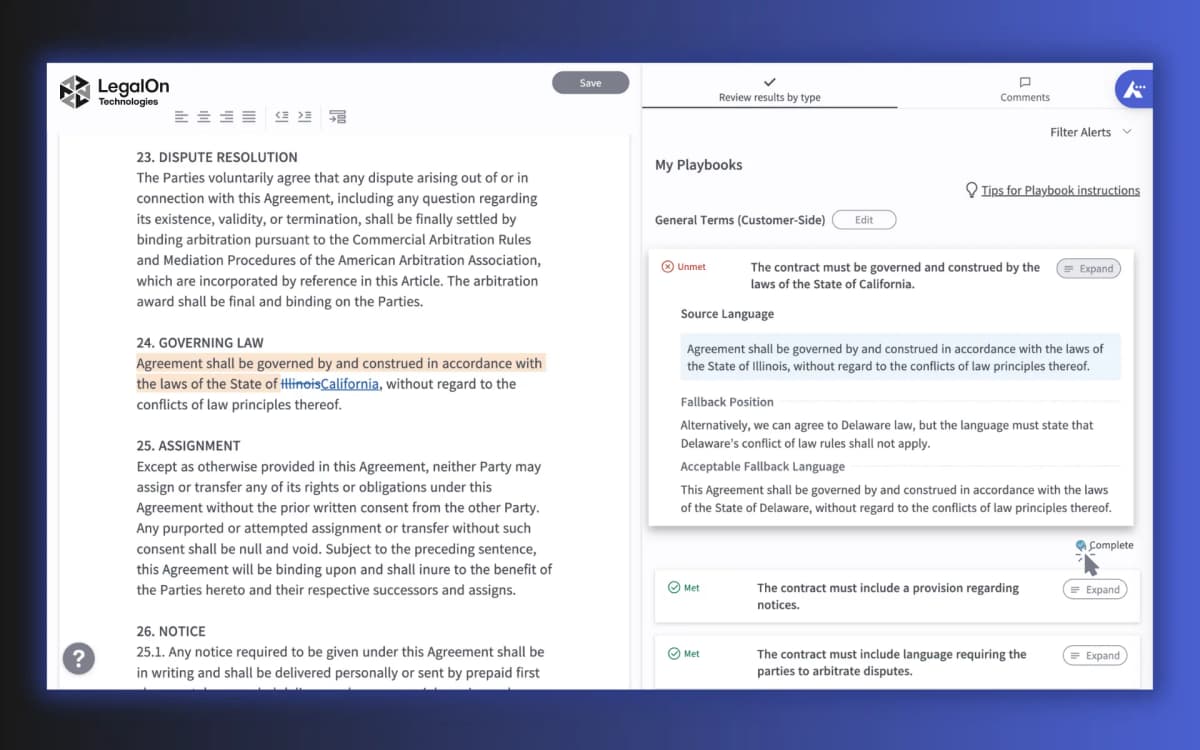
The screenshot shows a real LegalOn My Playbooks review surface. It includes contract text, review alerts, playbook guidance, and places where a reviewer can accept, dismiss, or act on a clause note. That is the review-software lane: the tool helps a legal team apply its own rules to a contract under review.
Evaluate this lane when the user is a legal team or legal-adjacent team that needs consistent review against playbooks. Ask about playbook fit, law fit, reviewer ownership, Word support, workflow fit, and final legal judgment.
For a broader document-review workflow, compare this lane with the guide to document AI tools. If the source is a PDF rather than a live review workspace, AI document reader and document AI drafts cover adjacent checks once they go live.
8. PandaDoc
PandaDoc is useful as a guide to AI contract management. Its guide separates drafting, review, deal talks, signing, tracking, risk flags, extraction, and insights.
Use this framing to sort the job. It might belong in a draft tool, review tool, CLM, contract store, or evidence-checking workspace. Category guides help with terms. Check each vendor claim against its own product page.
Legal boundaries for contract AI
Contract AI can reduce a first draft or first review pass, but contracts carry legal, money, and operating risk. A plausible AI answer can still miss a term, carveout, change, schedule, law issue, or business fact that changes the result.
Document checks
Before acting on contract AI output, check:
- Contract type: An NDA, lease, service deal, work contract, data addendum, and loan deal raise different review questions.
- Governing law: Generic contract language may not match the right law or industry rules.
- Defined terms: A clause may look acceptable until a defined term narrows or expands its effect.
- Carveouts: Liability caps, indemnities, privacy duties, and end rights often depend on carveouts elsewhere in the contract.
- Cross-references: The key language may sit in another section, schedule, exhibit, order form, or change note.
- Business context: A clause that works for one vendor, client, data type, or deal size may fail for another.
- Human review: Legal calls should go to a qualified lawyer or responsible legal owner before signature or enforcement.
Tool-boundary checks
For source-heavy work, separate drafting help from evidence checks. A generator can help create a draft. Review software can compare language to playbooks. Atlas can help verify what uploaded contracts say with citations. None of those steps removes the need for accountable legal review when the decision matters.
Use source traceability as the cutoff. If a contract AI tool produces an answer that changes a decision, inspect the exact contract language behind the answer. If the claim does not trace back to the agreement, treat the output as a draft note.
A low-risk review pass
Use this pass before you send AI output to a lawyer, client, vendor, boss, or team lead:
- Name the deal.
- Name the parties.
- Name the clause.
- Open the source.
- Read the clause out loud.
- Read the paragraph before it.
- Read the paragraph after it.
- Check each defined term.
- Check each carveout.
- Check each date.
- Check each notice period.
- Check each dollar cap.
- Check each duty.
- Check each right to end the deal.
- Check each schedule.
- Check each exhibit.
- Check each amendment.
- Check each order form.
- Ask who must act.
- Ask when they must act.
- Ask what happens if they do not act.
- Ask whether the AI answer skipped a key fact.
- Ask whether the source text says less than the AI answer says.
- Ask whether another contract says the same thing.
- Save only the finding that the source can support.
- Send legal calls to the right reviewer.
This pass is slow on purpose. It keeps the tool in the role it can fill: finding, sorting, and checking source text. It keeps the legal call with the person who owns the risk.
The goal is a clean handoff. The note should say what the source says, where it says it, and what still needs a human call. Keep the claim short. Keep the link close. Keep the risk owner clear.
For a narrower buying guide, continue to contract AI software. For citation-heavy checks, continue to AI that cites sources. For broader source review, compare document AI tools before moving into draft-only document chat pages.
For related contract workflows, see contract comparison tool for redlining two versions, AI contract reader for reading a single agreement, contracts AI for a category overview, legal documents AI for broader legal-document handling, and contract organizer for managing a contract library.
Create a cited contract checklist in Atlas
Build a cited contract checklist, then inspect every supporting clause.