

Contract comparison tools do two main jobs. A redline tool shows which words changed between two drafts. An AI tool can also flag missing clauses, changes in meaning, and risky terms.
Atlas fits after either step when you need to ask about a change. Each answer can link to the contract text, so you can check it before you act.
None of these tools give legal advice. Ask a lawyer to review any change that could create legal or business risk.

Compare contracts with citations in Atlas
Compare contract changes, then open citations to verify each clause in context.
Quick verdict
Match the tool to the work:
-
Use Draftable or Litera Compare to mark each word that changed in a Word file, PDF, or email.
-
Use DocJuris, CompareX, or the Ademero demo to find clause changes and missing terms.
-
Use Atlas to make a cited table and inspect the source behind each key change.
-
Use DocHub for a lightweight browser edit or a quick visual check. Save legal-grade review for a dedicated redline or AI clause tool. A tool can show what changed. A person who knows the deal must decide whether the change matters.
How to compare contract comparison tools
A contract comparison tool usually solves one of four jobs.
Exact redline
An exact redline marks each word that was added, removed, or moved. Draftable and Litera Compare show both drafts side by side. They also make change lists that fit a Word or legal review process.
Semantic clause comparison
This check looks for changes in both wording and meaning. You might compare a vendor draft with your standard contract. DocJuris, CompareX, and the Ademero demo can flag risks and missing clauses.
Lightweight PDF or form editing
DocHub can open, mark up, or edit a contract PDF in a web browser. Use a redline or AI clause tool when the result will guide a real deal choice.
Cited evidence review
After a tool finds a change, you still need to read it in the full contract. Add the files to Atlas and ask about the clause. Open the cited passage before you accept the answer.
A Reddit thread raises three useful buying questions. How much does the tool cost? Is Word Compare enough for the last check? Can the tool handle a PDF from the other side?
Any tool you pick should handle the format the contract comes in. Do not assume every contract will start as an editable Word file.
Contract comparison tools compared
This table shows the main job for each tool. Check the vendor's current price, plan limits, and links to other software before you choose.
| Tool | Best fit | Workflow surface | Output / proof | Legal boundary | Claims to verify |
|---|---|---|---|---|---|
| Atlas | Cited follow-up after contracts are imported, when a difference needs source-passage verification | PDF import, multi-source synthesis, grounded chat | Cited comparison matrix with source passage links | Not a redline engine, CLM, or legal-advice provider | Confirm sources have finished processing before asking a comparison question |
| Draftable | Exact redlines and side-by-side review across common document formats | Online, desktop, enterprise, and API routes | Redline and side-by-side output, change lists, export | Shows the exact text change. Confirm legal significance separately. | Current file-format support, security posture, and plan details |
| DocJuris | Legal and procurement teams comparing contracts inside a negotiation workflow | Office 365-integrated comparison and reporting | Customized reports, negotiation heatmaps, one-click markups | AI-enhanced redlining still needs reviewer sign-off | Screening accuracy claims and current plan limits |
| Litera Compare | Legal teams needing high-confidence document and email comparison | Word, Outlook, web, desktop, and firm workflows | Detailed redlines plus AI-assisted risk summaries | Built for legal teams. Output still needs independent legal judgment. | Am Law or market-share language, integration scope |
| CompareX | AI comparison of changed drafts against a baseline | Upload two drafts or a draft plus baseline | Deviation highlights, missing-clause flags, contract Q&A | Ships its own no-legal-counsel disclaimer | Posted page limits, plan pricing, and deviation coverage |
| Ademero | AI contract comparison demo focused on semantic risk detection | Upload two contracts for side-by-side AI analysis | Difference highlighting, risk detection, impact summary | Presented as a demo for early evaluation before a production trial | Whether the demo's claims hold on your own contract set |
| DocHub | Lightweight browser-based contract form editing and quick visual checks | Browser upload and edit | Edited or annotated PDF | Not built for legal-grade redline or AI clause analysis | Retention, security, and upload terms before sensitive files |
| Docusign | Provides category and evaluation-criteria context rather than a ranked comparison row | Buyer-guide framing for legal contract analysis tools | Evaluation criteria covering clause extraction, risk flagging, and workflow fit | States that AI supports legal judgment rather than replacing it | Treat it as criteria reference material rather than a ranked comparison row |
Table 1: Use a redline or AI tool to find the change. Use Atlas when you need to link a follow-up answer to the source text.
Verify contract differences with source citations
Atlas fits after a redline or AI tool has flagged a change. Use it to check that change against the rest of the contract.
- Add both contracts to the same Atlas project. Wait until both files are ready.
- If the project holds other files, use @mentions to name the exact two contracts you want compared.
- Ask about a clear clause or change instead of asking, "What changed?"
- Ask for one row per key change and a source link for each row.
- Open each source link. Read the full clause and nearby terms or limits.
- Save only the changes that the source supports. Send legal calls to a lawyer.
Use a prompt like this after a redline or an AI clause tool has flagged candidate changes:
Compare @Original MSA and @Revised MSA.
List each material change in a table with columns for changed clause, source passage, business effect, and whether it needs legal review.
A well-formed response looks something like this:
| Changed clause | Original MSA passage [¹] | Revised MSA passage [²] | Business effect | Needs legal review? |
|---|---|---|---|---|
| Payment terms | "Net 30 from invoice date" | "Net 45 from acceptance" | Extends cash cycle by up to 15 days | Yes. Confirm "acceptance" is defined. |
| Liability cap | "Limited to fees paid in prior 12 months" | "Limited to $50,000" | Cap is now fixed regardless of contract size | Yes. Check against deal value. |
| Termination notice | "30 days written notice" | "60 days written notice" | Harder to exit, longer lock-in window | Maybe. Review alongside renewal clause. |
Table 2: Open each source link and read the full clause before you save a finding. Atlas does not make tracked changes or give legal advice. It helps you find the text that needs a close read.
Best fit by contract comparison workflow
Atlas
Atlas is best when your contracts are in one project and you need a cited answer. Ask for a table of changes, open each source link, and read the clause before you accept the finding.
Atlas does not replace a redline tool, a CLM system, or a lawyer.
Draftable
Draftable shows exact changes side by side in Word files, PDFs, and other common files. Its compare page lists web, desktop, company, and API plans. This range helps teams that receive more than one file type.
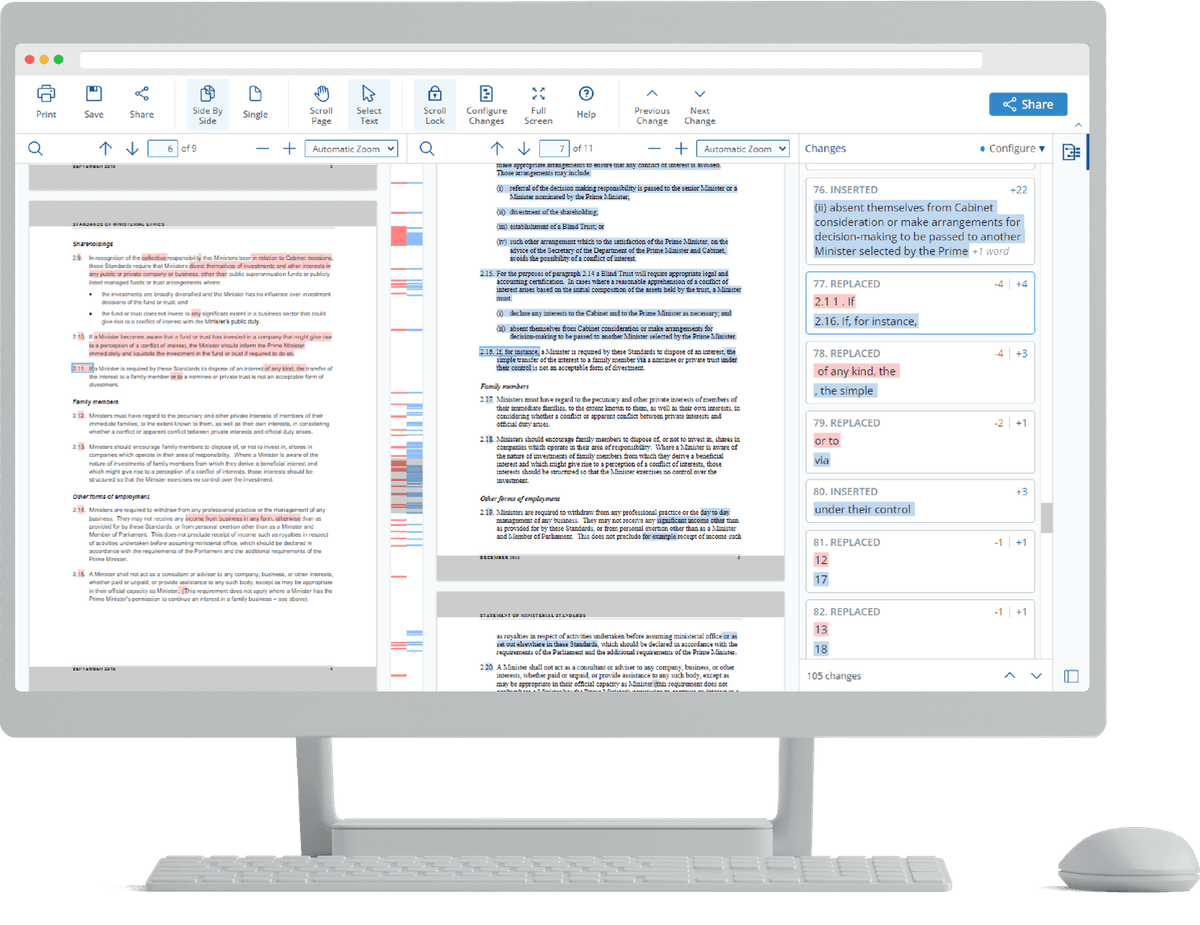
The Draftable screen shows two contracts side by side. New text is green, removed text is red, and moved text has its own mark. A change list appears on the right. This view helps a person scan the changes before choosing which clauses need legal review.
DocJuris
DocJuris fits legal and buying teams that compare drafts during a deal. Its comparison guide shows how to read new markups and compare Word files with PDFs.
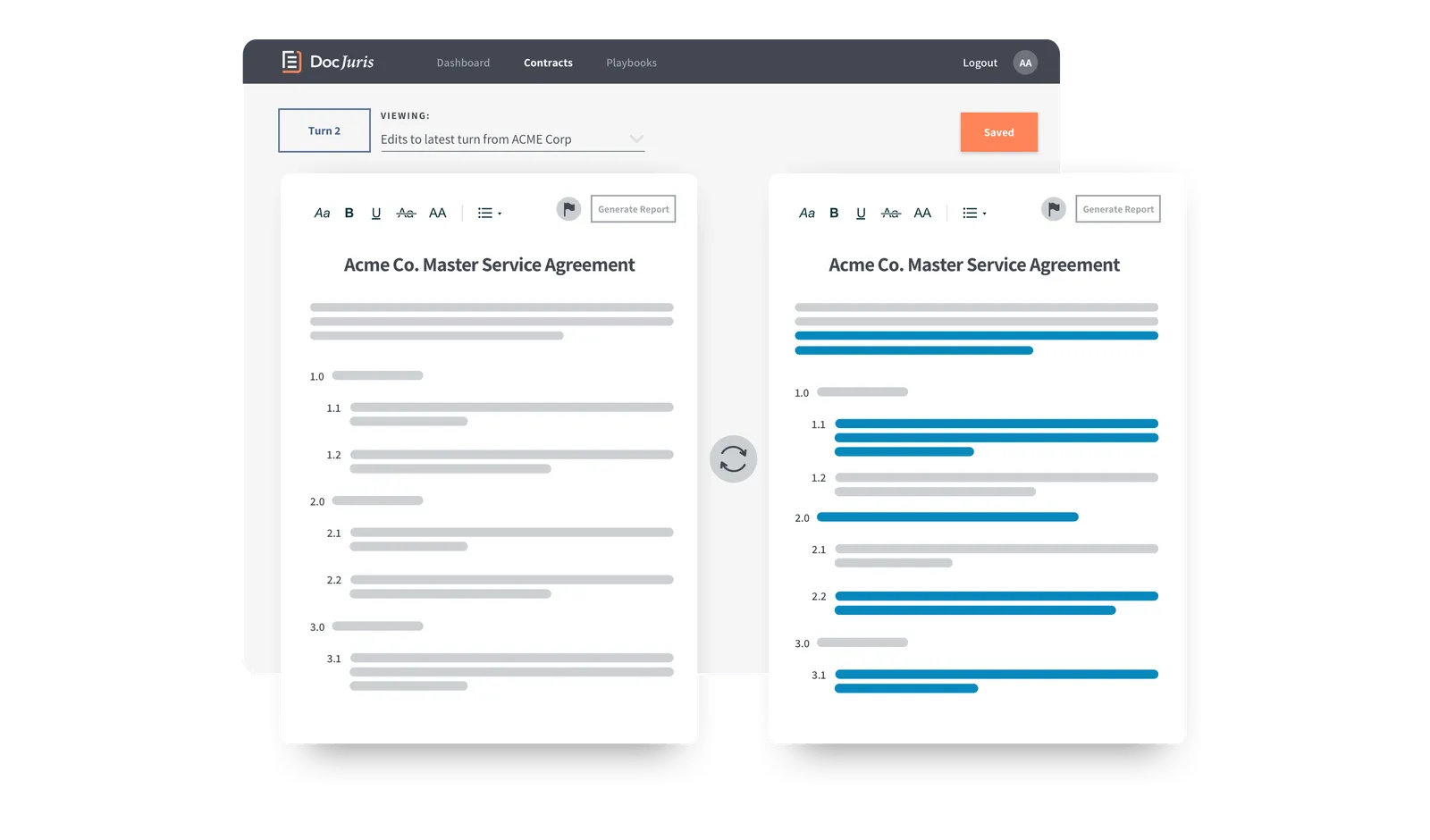
The screen shows two drafts side by side. It marks each changed clause so the user can scan the changes before opening the full redline.
Litera Compare
Litera Compare fits legal teams that compare files and email in Word, Outlook, a web browser, or a desktop app. Its product page lists AI risk notes on top of exact redlines.
CompareX
CompareX checks a new draft against a standard contract. It marks changed terms, missing clauses, and answers to contract questions. Check its current plans and page limits before you buy.
Ademero
Ademero's demo shows how AI can find changes in meaning and flag risk. Test its claims on your own contracts before you judge how well it works.
DocHub
DocHub is useful for a quick edit or visual check on a PDF. Use a full redline or AI clause tool for high-risk work.
Docusign
Docusign's buyer guide lists points to check, such as clause finding, risk flags, and fit with your work. Use it to shape your buying questions.
Legal, privacy, and accuracy boundaries
Contracts often hold private data. Check how a tool handles files and how well it finds changes. For other tasks, see legal document analysis AI and AI document summarizer.
Use these checks before you upload a contract or trust the result:
- Approval: Ask Legal or IT whether files with private prices, personal data, or restricted terms can leave your current system.
- File support: Test the files you use in real work. A scan or image-only PDF may give worse results than a file with text you can select.
- Team fit: Lawyers in an r/biglaw thread ask about cost, PDF support, links to file systems, and use in a final check.
- Plan limits: Check the vendor page and an outside source such as this free tools guide.
- Missed changes: A redline may mark a format change. AI may miss a term that gets its meaning from another clause. Read the full clause as well as the marked line.
- Vendor claims: Test claims about speed and accuracy on your own contracts. Use the output to support a human review.
- Legal review: Ask a lawyer to review changes to price, risk, term, ending rights, or legal duties.
Which contract comparison tool should you choose?
Start with the file type and the risk of the deal.
- Exact word changes: start with Draftable or Litera Compare. Both show drafts side by side and can export the result.
- Changed or missing clauses: test DocJuris, CompareX, or the Ademero demo on your own contracts. Check the current price and plan limits.
- Quick visual check or light edit: DocHub is enough. Save the dedicated redline or AI tool for anything that will inform a real decision.
- Checking a flagged change: add the contracts to Atlas and ask for a cited table. Read the source behind each key change before you save it.
For other file types, see document comparison tools or AI document comparison. For more contract tools, see contract AI, contract AI software, and legal document AI. The AI that cites sources guide explains source links in Atlas.
First, find the change with a redline or AI tool. Next, make sure the file stayed in an approved system. Last, read the source behind each change that matters and send legal calls to counsel.
Compare contracts with citations in Atlas
Compare contract changes, then open citations to verify each clause in context.