

An AI contract reader helps you understand what a contract says before you decide what needs a lawyer. Some tools are built for a quick self-serve read. Others are built for legal teams doing redlines, playbook review, or portfolio extraction. As of July 2026, use this guide to route the job first, then pick the tool.

Check contract answers against cited passages
Add contracts, ask about a clause, then inspect the cited source text.
Quick answer
An AI contract reader is software that summarizes contract language, answers questions about clauses, flags risks worth a second look, or compares terms across agreements. It should not be treated as a substitute for licensed legal advice.
The fast routing looks like this:
- Need a quick, free read of one contract before signing? Start with Justee or goHeather.
- Need lawyer-grade redlines and drafting inside Word? Use Spellbook or Docusign AI-Assisted Review.
- Need attorney-built playbooks for an in-house legal team? Use LegalOn.
- Need precedent-backed clause comparison for negotiation? Use Lexis+ Agreement Analysis.
- Need metadata extraction and red-flag reports across many contracts? Use Legly.
- Need enterprise legal-workflow guidance at scale? Use Harvey.
- Need a cited answer you can check against the original text after the contract is already a source? Use Atlas.
AI can help you understand language, spot issues worth investigating, and prepare questions for counsel. For high-value, unusual, regulated, or jurisdiction-specific contracts, have a qualified lawyer review the output before you rely on it.
How to choose an AI contract reader
The AI contract reader category covers at least 6 different jobs, and most of the confusion in this space comes from comparing tools that were never built to solve the same one.
| Job | What you need | Tools that fit |
|---|---|---|
| Ask a cited question over your own contracts | An answer you can trace back to the exact passage | Atlas |
| Understand one contract in plain language | A fast, readable summary of obligations and terms | Atlas, Justee, goHeather |
| Flag risk before signing | Issue-spotting against common clauses and red flags | Justee, goHeather, Legly |
| Get lawyer-grade redlines | Tracked changes, drafting help, clause libraries | Spellbook, Docusign AI-Assisted Review |
| Review against a playbook | Standardized rules an in-house team has already approved | LegalOn, Docusign AI-Assisted Review |
| Compare clauses against precedent | Matching negotiated language to alternate or standard clauses | Lexis+ Agreement Analysis |
| Extract metadata across a portfolio | Organizing many contracts, obligations, and renewal dates | Legly |
Table 1: Before picking a tool, answer 3 questions: What is the contract worth if a clause is misread? Does the review need to stand up to a legal team's own standards, or just help you understand the document?
Do you need the tool to write changes, or just help you read and check what is already there?
If the answer to the first question is "a lot," add a human legal review step regardless of which tool you use. AI contract readers change how much reading you do yourself. They do not remove the need for a lawyer on contracts that matter.
Contracts are one document type in a broader category of source-heavy reading jobs.
If your job is tool selection rather than reader workflow, compare contract analyzer software by clause extraction, source traceability, portfolio scale, and legal-review boundary.
If your job spans more than contracts, see AI that cites sources for the general source-grounded reading pattern this category builds on.
AI contract readers compared
This table separates self-serve reading tools from legal-team platforms, because the search results for "AI contract reader" mix both groups.
| Tool | Best fit | Contract input | Review output | Citation or passage check | Redline or playbook support | Legal-review caveat |
|---|---|---|---|---|---|---|
| Atlas | Cited reading and evidence checks after a contract is already a source | PDF or text-based contracts added to a project | Cited answers to narrow questions, comparison notes, and synthesis across contracts | Citation badges open the exact passage in the source viewer | None. Atlas focuses on reading and citation checks rather than drafting or playbook rules. | Atlas does not give legal advice. Route legal conclusions to counsel. |
| Justee | Fast, free self-serve contract upload and risk read | PDF, DOCX, or text uploads | Plain-English risk findings and compliance-style checks | Findings are tied to the uploaded document itself | No redlining or playbooks | Justee's own page states the output is not legal advice. |
| goHeather | Instant lawyer-trained review with suggested edits | PDF or Word uploads | Issue-spotting, playbook and common-law checks, plain-English risk explanations | Findings reference the uploaded document | Suggested edits, without full redlining | goHeather frames the output as preparation for a lawyer's review. |
| Docusign AI-Assisted Review | Teams reviewing and redlining inside Word and Docusign workflows | Agreements inside Microsoft Word or Docusign CLM/Agreement Desk | Redlines, drafting suggestions, Q&A, and playbook checks | Review happens inside the document workflow itself | Full redlining, drafting, and clause-library support | Built for teams already working inside Word and Docusign as a workflow tool. |
| Spellbook | Transactional lawyers drafting and reviewing in Word | Contracts drafted or reviewed inside Microsoft Word | Review and drafting suggestions using current LLMs | Review stays inside the Word document | Drafting and review support built for lawyers | Positioned for legal teams, with published privacy and security posture. |
| LegalOn | In-house legal teams needing standardized playbook review | Contracts scanned against firm-approved playbooks | Risk identification, non-standard language flags, suggested changes | Findings reference playbook rules rather than open citations | Attorney-built playbooks | Built to standardize review across a legal team. Attorney sign-off is still required. |
| Lexis+ Agreement Analysis | Lawyers comparing negotiated clauses against precedent | Negotiated agreements inside the Lexis+ research product | Clause matching against alternate or standard language | Comparison runs against a precedent database inside the product | Clause comparison support, without drafting | Built into a legal research workflow aimed at practicing lawyers. |
| Legly | Metadata extraction and red-flag reports across many contracts | Contract sets uploaded for organization and analysis | Metadata extraction, red-flag reports, task assignment | Findings reference the contract set as a whole | No redlining | Best for organizing a portfolio. Final legal sign-off still needs a reviewer. |
| Harvey | Legal teams evaluating enterprise-grade contract review guidance | Agreements reviewed inside enterprise legal workflows | Parsing, risk flagging, missing-provision checks, playbook and precedent comparison | Enterprise workflow-dependent | Redline summaries and precedent comparison | Buyer guidance aimed at legal teams evaluating vendors. |
Table 2: Refresh pricing, plan availability, and security claims from each vendor's current page before you rely on them. Legal AI features change quickly.
Where Atlas fits: cited contract reading
Atlas fits the step after a contract already exists as a document you need to read carefully. Its job is to help you ask a specific question about a clause or obligation and check the answer against the original text.
Drafting, redlining, and legal advice stay with the tools built for that work.
Here is the contract-reading sequence I would use:
- Add the contract as a source. Use a clean, text-based PDF when possible and wait for processing to finish before asking questions.
- Ask a narrow question, such as
What does section 8 say about termination notice, and what happens if either party misses that deadline? - Read the answer and check whether the claim about the obligation includes a citation badge.
- Open the citation to see the exact passage. Check the defined terms nearby, since a term like "Business Day" or "Material Breach" may be defined elsewhere in the contract and change what the clause requires.
- If you are comparing two agreements, ask Atlas to separate the sources in the answer rather than blend them, so you know which contract each obligation came from.
- Save the verified answer as a note once you have checked the passage, and flag anything unclear for a human reviewer.
This sequence works because contract questions are usually narrow: what does this clause require, when does this obligation trigger, does this term conflict with another section. Atlas answers that kind of question with a source trail you can check. Whether a clause is enforceable or how to negotiate it are separate questions for a lawyer.
Best AI contract reader tools
Atlas: best for cited contract reading
Atlas fits when you have one or more contracts and need an answer tied to the source text. Add each contract, ask about a clause, and open the source badge to check the passage. Use it to compare terms or find a buried duty before a call with counsel. Drafting, deals, and legal sign-off still belong with a lawyer or legal tool. The AI that cites sources guide shows how the same source check works with other files.
Justee: best for fast self-serve risk flags
Justee gives you a quick first read of one PDF, DOCX, or text contract. It returns plain-language risk notes and checks. This can help a consumer, freelancer, or small firm decide what to ask a lawyer. Justee says its output is not legal advice. For more self-serve choices, see best document AI tools.
goHeather: best for instant lawyer-trained review
goHeather accepts PDF or Word files and returns risk notes, rule checks, and draft edits. It fits when you want suggested wording as well as a summary. Review each edit and check the law that applies to your contract. A broad tool may miss local rules. The legal document AI guide compares this type of tool with plain file readers.
Docusign AI-Assisted Review: best for Word workflows
Docusign's AI-Assisted Review works inside Word and Docusign's contract tools. It can review terms, mark changes, answer questions, and check team rules. It best fits teams that already send contracts through Word or Docusign. For version checks in Word, see compare Word document and Word document AI.
Spellbook: best for lawyers drafting in Word
Spellbook helps deal lawyers review and draft contracts in Word. It is built for legal teams that handle private agreements. Choose it when the job includes writing new terms as well as reading old ones. For a wider view of this tool class, see contracts AI and legal documents AI.
LegalOn: best for standardized playbook review
LegalOn checks contracts against rules approved by the legal team. It flags terms that break those rules and can suggest edits.
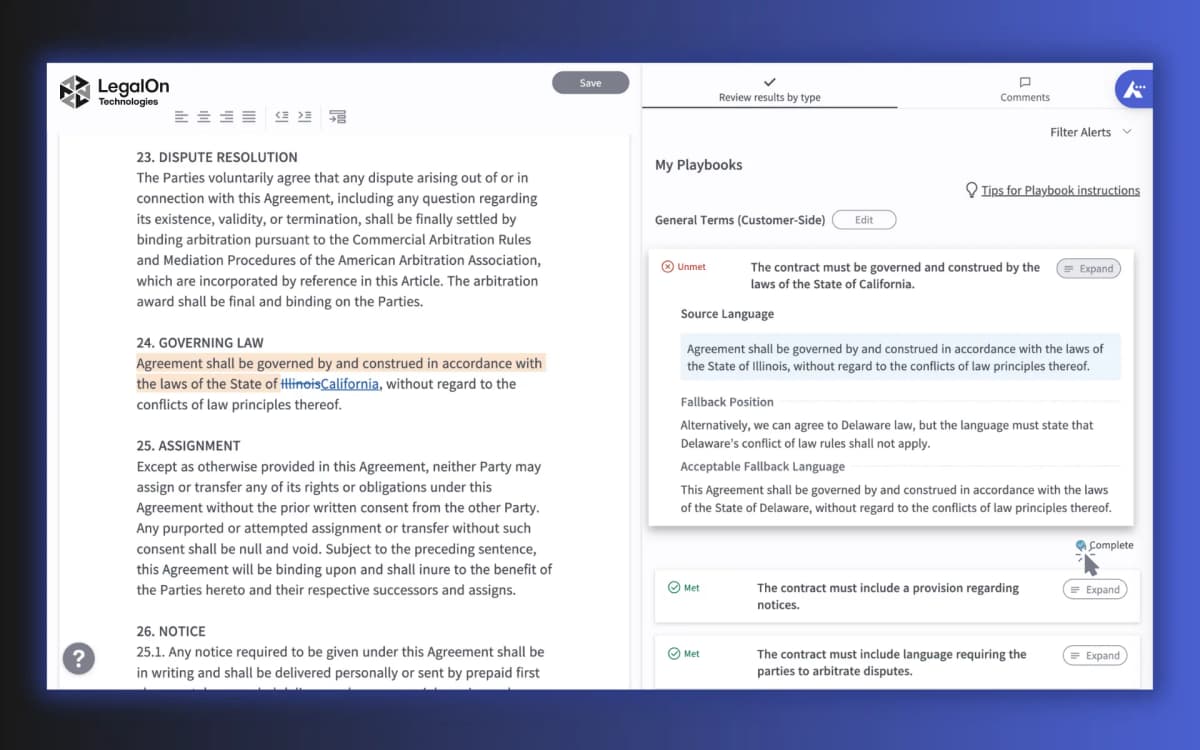
The view above shows a contract checked against set clause rules. Each edit links to the team's playbook. This suits an in-house team that reviews the same contract type each month. The legal document organizer guide covers ways to store and track that work.
Lexis+ Agreement Analysis: best for clause precedent
Lexis+ Agreement Analysis compares a clause with other deal terms in its legal research product. It fits lawyers who already use Lexis+ and need to check past wording. For a simple way to compare two files, see contract comparison tool.
Legly: best for portfolio metadata extraction
Legly helps teams manage many contracts. It pulls key fields, makes risk reports, and assigns tasks across the set. Use it for due diligence, vendor checks, or renewal dates. For other ways to sort files, see contract organizer and document organizer.
Harvey: best for enterprise legal-team evaluation
Harvey frames contract AI around text review, risk flags, missing terms, team rules, and change notes. Its guide is aimed at large legal teams that compare vendors. Use it as a buyer checklist beside AI legal document analyzer and legal document analysis AI.
What AI contract readers cannot replace
AI contract output is a first pass. A wrong answer can carry real legal or money risk.
Where AI contract review breaks down
- Wrong legal meaning. A model can misread a clause. Local law or a defined term may change what the plain words mean.
- Missing local law. Contract rules vary by state and country. The governing-law clause can change the result.
- Weak source links. A summary may hide the exact text behind a claim. You cannot check a claim without that trail.
- Old rules. Model data and team playbooks can lag behind new cases or laws.
- Missed terms. A neat risk report can still miss a key clause in an exhibit or a linked file.
A verification checklist before you act
Before acting on any AI contract review output, verify:
- Open the clause in the signed contract and read the text around it.
- Check whether the contract defines key terms elsewhere.
- Note the state or country law that applies.
- Make sure you checked the signed copy instead of an old draft.
- Send any high-stakes legal, money, or rule question to a lawyer. The PDF analyzer guide applies the same source check to other files.
Every tool in this guide, including Atlas, still needs that last step for a contract that matters. For other PDF files, PDF AI assistant explains the same check.
Which AI contract reader should you choose?
Choose based on the contract's stakes and the work you need to do. Search rank does not show which tool fits that job.
For a quick, low-stakes read, start with Justee or goHeather. Both explain terms and flag issues to check. Their output is not legal advice.
For legal teams, choose Spellbook to draft in Word, Docusign for a full contract flow, or LegalOn for checks against team rules.
Use Lexis+ to compare a clause with past deal terms. Use Legly to pull facts from many contracts. Use Harvey's guide when a large legal team must compare vendors.
Use Atlas to check one duty, compare terms across contracts, or prepare questions for counsel. Add the contracts, ask a narrow question, and open the source link before you act.
See contract AI for a wider tool list. Legal document AI covers quick first reads, and AI document reader covers other file types. For a source-linked summary of one deal, compare contract summarizer tools.
Read the clause and the terms around it yourself. Send any high-stakes question to a lawyer before you rely on the answer.
Check contract answers against cited passages
Add contracts, ask about a clause, then inspect the cited source text.